***Session Swap: Exploiting Client-Side Role Cookies in Access Control***
The portal decided a user's role from a cookie the browser sends, so the server trusted whatever role value the client supplied. An ordinary staff account could change that cookie value to an administrative role and reach the admin console without any other step.

Bug Bounty
The full write-up lives on its author's site
It belongs to its author, so we link to it rather than copy it. The other two tabs are our own rewrites, checked against it.
Context
Session Swap is a lab hosted on WebverseLabs, at webverselabs-pro.com, that demonstrates a role-based access control system enforced entirely through a client-editable cookie. The scenario is built around a fictional company, Ridgeline Hotels, which has rolled out an internal portal for three categories of staff: front-desk agents, housekeeping leads, and assistant managers. Each logged-in user is expected to see only the tools relevant to their role, and regular staff should never be able to reach the administrative console. The lab asks one question: does the server actually enforce that boundary, or does it just trust the client to behave?
Setup
The only account used in the walkthrough is a standard user account, described as an ordinary staff account and, later, as a front-desk account. No other credentials, versions or special preconditions are given. The tools named are the browser's developer tools, Burp Suite for intercepting requests, and a cookie-editing browser extension. The portal is reached at webverselabs-pro.com.
Finding it
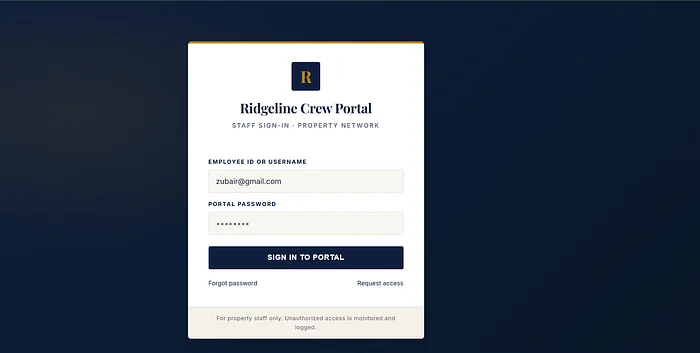
After authenticating with the standard user account, the dashboard loads normally. In the right-hand pane an Admin Console option is visible, even though the account logged in is an ordinary staff account. The author treats this as a small signal on its own: the front end is not hiding privileged navigation from unprivileged users.
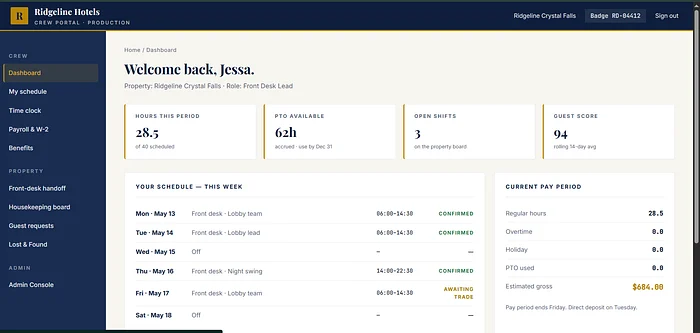
Clicking the Admin Console link redirects the browser to /admin, and the server responds with an Access Denied message. At this point it looks, superficially, as though the access control is doing its job.
Exploitation
Step 1: Logging in
Authenticate to the portal with the standard user account. The dashboard loads and shows the Admin Console link in the right-hand pane.
Step 2: Attempting to reach the admin panel
Clicking the Admin Console link sends the browser to:
/admin
The server answers with an Access Denied message.
Step 3: Inspecting the cookie
Open the browser's developer tools, or intercept the request in Burp Suite, and review the cookies sent with each request. One of them is:
role=user
This is the detail that matters. The server is not deriving the user's role from a session lookup against a database; it is trusting a value the browser itself supplied, and the browser will happily supply whatever value it is told to.
Step 4: Modifying the cookie
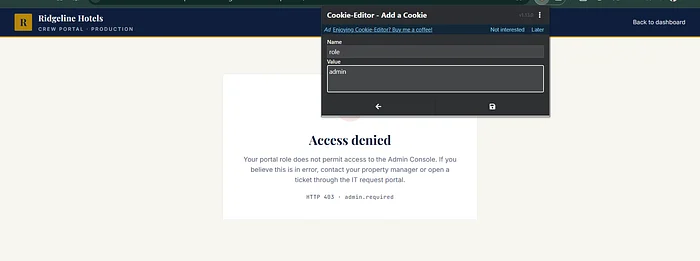
Using a cookie-editing browser extension, or editing the value directly in DevTools, change the cookie from role=user to role=admin, then reload the page.
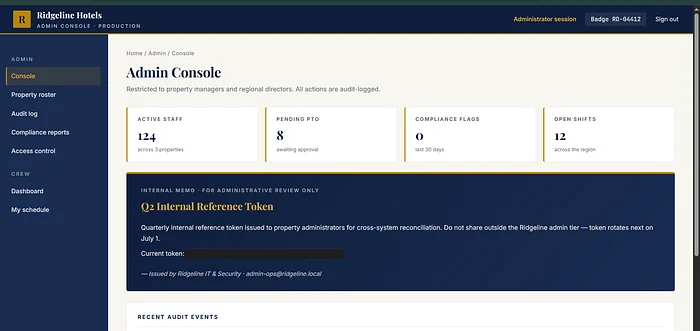
Step 5: Admin access granted
The server accepts the self-declared role without question and grants full administrative access, along with the flag confirming successful exploitation. No credentials were escalated, no session token was stolen, and no exploit chain was needed. A single cookie edit was sufficient to move from a front-desk account to full administrative control.
Root cause
The vulnerability falls under Broken Access Control, which the author notes has consistently ranked among the top entries in the OWASP Top 10. Two failures combine here.
- The role claim is stored client-side. A cookie is just data sitting in the browser's storage. The browser does not sign it, encrypt it meaningfully, or protect it from the user who controls that browser. Anything in a cookie that is not cryptographically protected, such as a properly signed session token validated server-side, should be treated as attacker-controlled input.
- There is no server-side authorization check. Even if the role cookie existed only for convenience, the
/adminroute should independently verify the authenticated session's actual permissions against a trusted source, such as a database record tied to the session ID. Instead, the server reads the cookie, trusts it, and renders the page accordingly.
The broader lesson is that authentication (who are you?) and authorization (what are you allowed to do?) must both be enforced on the server, using data the client cannot tamper with. A cookie, a hidden input, a query parameter, or even a JWT claim that is not properly verified can all fall into the same trap.
Impact
In the lab, the result is full administrative access to the portal from an ordinary front-desk account, plus the flag confirming successful exploitation. The author stresses that no credentials were escalated, no session token was stolen, and no exploit chain was needed: a single cookie edit was enough. The write-up presents this as a minimal illustration of a bug class that shows up constantly in real bug bounty programs and penetration tests, often hidden behind more complex implementations such as JWTs with unverified claims, hidden form fields, or request headers set by a trusted proxy that turns out not to be so trusted. The report does not describe the specific administrative functions exposed behind /admin or any data those functions could reach.
Fix
The report does not say what was changed in the lab. The fix it argues for is server-side: every privileged action deserves a check against a source of truth the client cannot edit. Concretely, the /admin route should verify the authenticated session's actual permissions against a trusted source, such as a database record tied to the session ID, rather than reading a role value from the cookie.
Variants to test
The author's key takeaway is never to trust the client to tell you what permissions the client has: a role, a user ID, or a permission flag sent from the browser is input, not fact. On other targets, look for the same pattern in each place a privilege decision could be made client-side.
- Role or permission cookies. Look for a value such as
role=userin the cookie jar. A positive result is that changing the value and reloading grants access that the original value denied. - Hidden form fields. Inspect forms for fields carrying role, user ID or permission flags. The report names hidden form fields as a place the same pattern can appear.
- Query parameters. Try adding or changing parameters that name a role or user on privileged routes. The report names query parameters as a place the same pattern can appear.
- JWT claims. Decode tokens and look for role or permission claims. The report names JWTs with unverified claims as a place the same pattern can appear.
- Headers set by a trusted proxy. Check whether the application trusts headers that a proxy is supposed to set. The report names request headers set by a trusted proxy as a place the same pattern can appear.
- Visible privileged navigation. As in this lab, an Admin Console link shown to an unprivileged account is a signal worth following, even when the link itself returns Access Denied. As in this lab, an Admin Console link shown to an unprivileged account is a signal worth following, even when the link itself returns Access Denied.
Spotting role=user in a cookie jar is a small thing. Knowing to try editing it is what turns a small thing into a finding.
What happened, in plain words
A training lab called Session Swap, hosted on WebverseLabs at webverselabs-pro.com, shows a very common mistake in how websites decide who is allowed to do what. The lab is built around a made-up hotel company, Ridgeline Hotels, which has an internal staff portal for three kinds of employee: front-desk agents, housekeeping leads, and assistant managers. Each person is supposed to see only the tools for their own job, and ordinary staff should never reach the administrative console.
The mistake is this: the website asks the browser which role the user has, and then believes the answer. The role is stored in a cookie, which is a small piece of text the browser keeps and sends back to the site with every request. Because the cookie lives in the browser, the person using the browser can edit it. In the lab, changing one cookie from role=user to role=admin and reloading the page was enough to go from a front-desk account to full administrative control. No password was cracked, no login was stolen, and no complicated chain of tricks was needed.
This write-up walks through the lab step by step, explains why the trick works, and then lists the places where the same pattern shows up on real websites.
Background you need first
A few everyday ideas make the rest easy to follow.
- A server is the computer somewhere else that runs the website. Your browser asks it for pages, and it decides what to send back.
- A client is your side of the conversation: the browser on your machine. Anything stored in the browser is under your control, not the server's.
- A cookie is a small label the server hands to your browser, which the browser then shows again on every later request, like a cloakroom ticket. It is how a website remembers that you already logged in. The important part: the ticket sits in your pocket, so you can read it and write a new one.
- A session is the server's memory of your logged-in visit. Normally the server keeps the real facts (who you are, what role you have) on its own side and uses the cookie only as a reference number to look them up.
- Authentication means proving who you are, usually by logging in. Authorization means deciding what you are allowed to do once you are known. They are two separate questions, and this lab is about the second one.
- Access control is the general name for the rules that answer the authorization question.
- The developer tools (DevTools) are the built-in panel in every browser, opened with a keyboard shortcut or the browser menu, where you can inspect cookies, network requests and page code.
- Burp Suite is a separate program that sits between your browser and the website so you can watch and change requests before they are sent.
The lab: Ridgeline Hotels portal
The portal was shipped at the end of a sprint, and like many features pushed out under deadline pressure, its authorization logic did not receive the scrutiny it needed. That framing matters: the bug is not exotic, it is the kind of shortcut teams take when time is short.
The question the lab poses is simple: does the server actually enforce the boundary between ordinary staff and administrators, or does it just trust the client to behave?
Setup
The only account used in the walkthrough is a standard user account, described as an ordinary staff account and, later, as a front-desk account. No other credentials, versions or special preconditions are given. The tools named are the browser's developer tools, Burp Suite for intercepting requests, and a cookie-editing browser extension. The portal is reached at webverselabs-pro.com.
Finding it
Step 1: Logging in
Authenticate to the portal with the standard user account. The dashboard loads normally. In the right-hand pane, however, an Admin Console option is visible, even though the account logged in is an ordinary staff account.
Why this is worth noticing: the front end is not hiding privileged navigation from unprivileged users, which the author treats as a small signal. Showing the link is not a vulnerability by itself, but it is a hint. It tells you the front end is not hiding privileged navigation from unprivileged users, so the real decision, if there is one, must be happening somewhere else, probably on the server.
Step 2: Attempting to reach the admin panel
Clicking the Admin Console link sends the browser to:
/admin
This is a path: the part of the address after the site name that names the page you want. The server answers with an Access Denied message.
Why this step matters: the denial is real, but it only tells you that the request as sent was rejected. It does not tell you where the decision was made. The server answers with an Access Denied message, and at this point it looks, superficially, as though the access control is doing its job. The next step is to find out which.
At this point it looks, superficially, as though the access control is doing its job.
Step 3: Inspecting the cookie
Open the browser's developer tools, or intercept the request in Burp Suite, and review the cookies sent with each request. One of them is:
role=user
Line by line, in plain words:
roleis the name of the cookie. It is a label the site chose, and it literally means the user's role.=separates the name from the value.useris the value. It says, in effect, "this person is an ordinary user".
This is the detail that matters. The server is not deriving the user's role from a session lookup against a database; it is trusting a value the browser itself supplied, and the browser will happily supply whatever value it is told to. Compare it to a nightclub where the bouncer does not check a list at the door but simply asks each guest to write their own name on a wristband and then believes it.
Step 4: Modifying the cookie
Using a cookie-editing browser extension, or editing the value directly in DevTools, change the cookie from role=user to role=admin, then reload the page.
Why this step: if the server is making its decision from this cookie, then changing the cookie changes the decision. The reload simply asks the server for the page again, this time with the edited value attached. The page is reloaded with the edited cookie value.
Step 5: Admin access granted
The server accepts the self-declared role without question and grants full administrative access, along with the flag confirming successful exploitation. A flag is a unique string a training lab places behind the protected feature, so you can prove you actually reached it.
No credentials were escalated, no session token was stolen, and no exploit chain was needed. A single cookie edit was sufficient to move from a front-desk account to full administrative control.
Why this works
The vulnerability falls under Broken Access Control, which the author notes has consistently ranked among the top entries in the OWASP Top 10. The OWASP Top 10 is a widely used list of the most common categories of web security weakness. Two failures combine here.
- The role claim is stored client-side. A cookie is just data sitting in the browser's storage. The browser does not sign it, encrypt it meaningfully, or protect it from the user who controls that browser. Anything in a cookie that is not cryptographically protected, such as a properly signed session token validated server-side, should be treated as attacker-controlled input. "Cryptographically protected" means the server attaches a mathematical signature that only the server can produce, so any change to the value is detectable.
- There is no server-side authorization check. Even if the role cookie existed only for convenience, the
/adminroute should independently verify the authenticated session's actual permissions against a trusted source, such as a database record tied to the session ID. Instead, the server reads the cookie, trusts it, and renders the page accordingly.
The broader lesson is that authentication (who are you?) and authorization (what are you allowed to do?) must both be enforced on the server, using data the client cannot tamper with. A cookie, a hidden input, a query parameter, or even a JWT claim that is not properly verified can all fall into the same trap. A JWT (JSON Web Token) is a compact token format often used to carry identity and role information; a claim is one statement inside it, such as "this user is an admin".
Impact
In the lab, the result is full administrative access to the portal from an ordinary front-desk account, plus the flag confirming successful exploitation. The author stresses that no credentials were escalated, no session token was stolen, and no exploit chain was needed: a single cookie edit was enough.
The write-up presents this as a minimal illustration of a bug class that shows up constantly in real bug bounty programs and penetration tests, often hidden behind more complex implementations such as JWTs with unverified claims, hidden form fields, or request headers set by a trusted proxy that turns out not to be so trusted. The report does not describe the specific administrative functions exposed behind /admin or any data those functions could reach.
Fix
The report does not say what was changed in the lab. The fix it argues for is server-side: every privileged action deserves a check against a source of truth the client cannot edit. Concretely, the /admin route should verify the authenticated session's actual permissions against a trusted source, such as a database record tied to the session ID, rather than reading a role value from the cookie.
Variants to test
The author's key takeaway is never to trust the client to tell you what permissions the client has: a role, a user ID, or a permission flag sent from the browser is input, not fact. On other targets, look for the same pattern in each place a privilege decision could be made client-side.
- Role or permission cookies. Look for a value such as
role=userin the cookie jar. A positive result is that changing the value and reloading grants access that the original value denied. - Hidden form fields. Inspect forms for fields carrying role, user ID or permission flags. The report names hidden form fields as a place the same pattern can appear.
- Query parameters. Try adding or changing parameters that name a role or user on privileged routes. The report names query parameters as a place the same pattern can appear.
- JWT claims. Decode tokens and look for role or permission claims. The report names JWTs with unverified claims as a place the same pattern can appear.
- Headers set by a trusted proxy. Check whether the application trusts headers that a proxy is supposed to set. The report names request headers set by a trusted proxy as a place the same pattern can appear.
- Visible privileged navigation. As in this lab, an Admin Console link shown to an unprivileged account is a signal worth following, even when the link itself returns Access Denied. As in this lab, an Admin Console link shown to an unprivileged account is a signal worth following, even when the link itself returns Access Denied.
Spotting role=user in a cookie jar is a small thing. Knowing to try editing it is what turns a small thing into a finding.
Glossary
- Access control: the rules that decide what a logged-in user is allowed to do.
- Admin Console: the privileged part of the portal intended for administrators only.
- Authentication: proving who you are, usually by logging in.
- Authorization: deciding what you are allowed to do once you are known.
- Broken Access Control: a weakness where those rules are missing or can be bypassed.
- Burp Suite: a tool that sits between browser and server so you can watch and change requests.
- Claim: one statement inside a token, such as a role or user ID.
- Client: your side of the connection, normally the browser.
- Client-side: happening or stored in the browser, and therefore editable by the user.
- Cookie: a small piece of text the browser stores and sends back to a site with each request.
- Cookie-editing extension: a browser add-on that lets you change cookie values by hand.
- Cryptographic signature: a mathematical check only the server can produce, so tampering with a value is detectable.
- Developer tools (DevTools): the built-in browser panel for inspecting cookies, requests and page code.
- Flag: a unique string a training lab places behind a protected feature to prove you reached it.
- Header: extra information sent alongside a request or response, such as a cookie or a content type.
- Hidden form field: a form input the page does not display but still submits.
- JWT (JSON Web Token): a compact token format often used to carry identity and role information.
- OWASP Top 10: a widely used list of the most common categories of web security weakness.
- Path: the part of a web address after the site name that names the page, such as
/admin. - Penetration test: an authorised assessment where someone tries to break into a system to find weaknesses.
- Proxy: an intermediary that forwards requests, and can therefore inspect or alter them.
- Query parameter: a name and value added to the end of a web address, after a question mark.
- Role: the category a user belongs to, which determines their permissions.
- Server: the remote computer that runs the website and answers requests.
- Server-side: happening on the server, where the user cannot edit the data.
- Session: the server's memory of a logged-in visit.
- Session token: a value that identifies a session, ideally signed and validated by the server.
- Source of truth: the trusted record the server should check permissions against, such as a database.
- Sprint: a short, fixed period in which a development team builds a set of features.

