How re-signing up for an account lead to account takeover
The signup page, when given an email that already had an account, returned a user identifier in its response and also exposed an API endpoint that would log a visitor in as that user without a password. An attacker who knew a victim's email address could therefore take over the account.

This is a quick write-up about an interesting bug I found on a bounty program which lead to unauthorised access to any account you knew the email of (no password needed!). I believe some other researchers may of overlooked the functionality of the site and some of the requests that were made.
The full write-up lives on its author's site
It belongs to its author, so we link to it rather than copy it. The other two tabs are our own rewrites, checked against it.
Context
This is a short write-up about a logic flaw found on a bounty program that allowed unauthorised access to any account whose email address you knew, with no password required. The researcher notes that other researchers may have overlooked the functionality of the site and some of the requests that were made.
The target is a site with a signup flow; the author signed up and went through all the steps to verify the account. The feature at the centre of the bug is the signup page itself: after an account already exists, re-submitting the signup form with that email triggers a "you already have an account" email containing a reset-password link. That link, rather than leading to a password reset form, ended up authenticating the visitor.
A tip from the author frames the whole approach: sites behave differently depending on user agent, device, language and session state (logged in or logged out). Testing from as many angles as possible is how you notice differences and discover new endpoints, because responses can display different links, ads and sections of the site.
Setup
The report does not name the program, the site or any tooling. The only precondition described is a verified account on the target, created by signing up and going through all the steps to verify it. The testing was done with ordinary browser sessions: an existing logged-in session, a brand new session, and repeated visits to the link from the email.
Finding it
After signing up and verifying the account, the author re-visited the signup page. This is a habit: sometimes the page still renders, and entering another user's email or changing some details can lead to unexpected results.
On this site, re-visiting the signup page only asked for an email address. Submitting the form produced an email saying an account already existed with that address, plus an option to reset the password if it had been forgotten. Clicking the link in that email redirected to the homepage with the following:

The button said "Reset password", yet the author was automatically logged into the account and redirected to the profile. That mismatch between the label and the effect is what made the flow worth investigating. Going back to inspect the requests that had been made, one stood out:
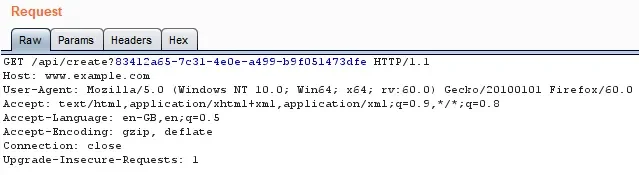
Exploitation
Step 1: Re-visit the emailed link
The first thought was what happens on a second visit to the same link. It returned a 404 error. The author tried it on the old session, still a 404, and assumed the token had expired.
Step 2: Request a fresh link and use a new session
After submitting the signup form again, a fresh link was visited, this time from a brand new session. The result was being logged into the account without entering a password.
Step 3: Work out what the value in the link is
The next question was whether the value in the link was simply the user id. The form has to be submitted for the link to work, but if the value is the user id, the problem becomes finding another user's id. Profiles, image URLs and everything else checked turned up nothing.
Step 4: Retrace and find where the parameter is set
Retracing the steps, the author looked for where the parameter may be set: only in the email, or anywhere else. The answer was in the response, in front of them the whole time:

Step 5: Reproduce against another account
The reproduction steps are:
- Submit the email of the user you wish to take over.
- Grab the id from the response.
- Visit the
/api/createURL and you are in.
The author's closing point is that basic things are extremely easy to overlook when there are so many bug types to look for: take your time, understand the target and what you are trying to achieve, and stick to one thing at a time.
Root cause
The signup endpoint, when given an email that already belongs to an account, returns a response that discloses the account's id. The signup response discloses the account's id, and visiting the /api/create URL with that id logs you in without a password. The id is handed back to anyone who submits the victim's email to the signup form, and it is enough to log in.
The author assumed the token had expired after the 404, and a fresh link could be requested by submitting the form again. The label on the button ("Reset password") suggests the flow was intended to lead to a password reset, not to a login.
Impact
An attacker who knows a victim's email address can obtain unauthorised access to that account without a password. The report does not describe any further actions taken once inside an account, nor any limits based on account role or state.
Fix
A fix would need the signup response not to disclose the account id for an existing email.
Variants to test
- Re-visit the signup page after registering and submit your own email. A positive result is a response that reveals an internal identifier (id, uuid, numeric key) for the account.
- Submit the same form with a different email you control. If the response discloses that account's identifier, the disclosure is not limited to your own session.
- Take the value from the reset email and try it in other endpoints that create sessions or reset credentials. A positive result is a session issued without a password.
- Replay the link from a fresh session, a logged-out session and a different browser. A positive result is authentication in each case.
- Request a new link and compare the value with the previous one. If it is unchanged and matches the account id, the token is predictable.
- Test the same flow with different user agents, devices and languages, as the author recommends, to see whether other responses expose different links or endpoints.
What happened, in plain words
A security researcher found a way to log into any account on a website as long as they knew the email address that account was registered with. No password was needed. The site had a signup form, and when you submitted an email address that already belonged to an account, the site sent an email saying "you already have an account" with a link to reset your password. That link did not take you to a password reset page. It logged you straight in. The site handed the account's id back to anyone who submitted the victim's email to the signup form, and that id was enough to log in. So the researcher could ask the site for a victim's id, visit the /api/create URL with it, and be logged in.
The researcher's point is that this was not a complicated technical trick. It was a logic flaw: the site's own features, combined in an unintended order, did the work. Many people testing the site may have skipped over the signup page after registering, and so never saw it.
Before we go further, a few words on the pieces involved.
- Signup form: the page where you type your email address to create an account. On this site, after you had already registered, visiting that page again still showed a form, and it only asked for an email address.
- Verification email: an email the site sends to prove the address belongs to you. The researcher signed up and completed all the steps to verify the account before testing.
- Password reset link: a link a site emails you when you have forgotten your password, so you can set a new one. Normally it should only let you change your password, and only for a short time, and only once.
- Session: the state of being logged in. When you log in, the site gives your browser a small piece of data (often a cookie) that it checks on every later request, so it knows who you are without asking for your password again. A "brand new session" means a fresh browser state with no such data, as if you had never visited the site.
- API: a set of URLs a site uses behind the scenes to do things, like create an account or fetch data, usually returning data rather than a web page. When you fill in a form, your browser often sends the data to an API address.
- Endpoint: one specific URL in that API, for example
/api/create. - Token: a value that stands in for proof of identity, like a cloakroom ticket. If the ticket is hard to guess and only works once, it is a good token. If it is just your account number, anyone who learns your account number can use it.
- User id: the internal number or string a site uses to tell accounts apart. It is not usually secret, but it should not be usable as a password.
- Account takeover: exactly what it sounds like, someone else gaining control of your account.
- Logic flaw: a bug where each individual piece of the site works as programmed, but the pieces fit together in a way that lets someone do something they should not be able to do. Nothing crashes; the site simply trusts the wrong thing.
A useful everyday comparison: imagine a hotel where the receptionist, when you ask about a room that is already booked, reads out the guest's room number, and the room's door lock opens for anyone who says that number. Each part seems reasonable on its own. Together, they mean anyone who knows your name can walk into your room.
The tip that framed the whole approach
The researcher starts with advice that shaped how the bug was found. Sites behave differently depending on:
- the user agent (the text your browser sends to identify itself, such as which browser and operating system you use),
- the device (phone, tablet, desktop),
- the language setting,
- and the session state, meaning whether you are logged in or logged out.
Because of this, the advice is to test from as many angles as possible. Responses can show different links, adverts or sections of the site depending on those factors, and those differences are how you discover new endpoints and new behaviour. In plain terms: do not only test the site the way you normally browse it. Log out, log in, switch browsers, change language, and look at what changes.
Setting up
The report does not name the bounty program, the website or any tools. The only preparation described is having a verified account on the target: the researcher signed up and went through all the steps to verify it. Testing was done with ordinary browser sessions: the existing logged-in session, a brand new session, and repeated visits to the link from the email.
Finding the flaw
After signing up and verifying the account, the researcher went back to the signup page. This is a deliberate habit, not an accident. Sometimes the signup page still loads after you already have an account, and entering another person's email address, or changing some details, can produce unexpected results. The researcher mentions this could be a topic for another post.
On this site, revisiting the signup page showed a form that only asked for an email address. Submitting that form produced an email saying an account already existed with that address, and offering an option to reset the password if it had been forgotten. Clicking the link in that email redirected to the homepage, showing this:
The screenshot shows the result of following the emailed link. The button in the email said "Reset password", but the researcher was automatically logged into the account and redirected to the profile page. That mismatch, a button that promises one thing and a site that does another, is the signal that made the flow worth investigating. If a link labelled "reset password" logs you in, the site is treating that link as proof of who you are.
Going back to look at the requests the browser had made, one stood out:
This is the moment to slow down and read what the browser actually sent, rather than what the page looked like.
Exploitation, step by step
Step 1: Revisit the emailed link
The first question was simple: what happens if I open the same link a second time? The answer was a 404 error, which is the standard "page not found" response. The researcher tried it again in the old session and still got a 404, and assumed the token had expired. Expiry is a normal safety measure for reset links: they should stop working after a short time or after one use.
Step 2: Request a fresh link and use a new session
After submitting the signup form again, the researcher got a fresh link and opened it, this time from a brand new session. The result was being logged into the account without entering a password. This is the key observation: the link works from a session that has never logged in, so the link itself is the credential.
Step 3: Work out what the value in the link is
The next question was whether the value in the link was simply the user id. The form has to be submitted for the link to work, but if the value is the user id, then the problem becomes: how do you find another user's id? The researcher checked profiles, image URLs and everything else they could think of, and found nothing. This is a common dead end in testing: you know what you need, but not where the site exposes it.
Step 4: Retrace and find where the parameter is set
Rather than keep guessing, the researcher retraced their steps and asked where the parameter might be set: only in the email, or somewhere else too? The answer was in the response, in front of them the whole time:
The screenshot shows the response containing the value. The lesson is that the data you need is often returned by the site itself, in a response you already received, and you only have to look.
Step 5: Reproduce against another account
The reproduction steps are:
- Submit the email of the user you wish to take over.
- Grab the id from the response.
- Visit the
/api/createURL and you are in.
In plain words: you type the victim's email into the signup form. The site's response includes the victim's account id. You then open the /api/create address with that id, and the site treats you as logged in as the victim. No password, no email access, no guessing.
Why it worked
The signup endpoint, when given an email that already belongs to an account, returns a response that reveals that account's id. The signup response reveals the account's id, and the /api/create endpoint accepts it as enough proof of identity, issuing a logged-in session without any password check. So the id returned by the signup form acts as an authentication token, and it is predictable because it is just the user id. And its value is handed back to anyone who submits the victim's email to the signup form.
The author assumed the token had expired after the 404, and a fresh link could be requested by submitting the form again. The button label, "Reset password", suggests the flow was meant to lead to a password reset, not to a login.
What an attacker could do
Anyone who knows a victim's email address can get unauthorised access to that account without a password. The report does not describe what was done once inside an account, and it does not describe any limits based on account role or state.
How to fix it
A fix would need the signup response not to reveal the account id for an existing email.
Things to try on your own targets
These are variations on the same idea, useful when you are learning:
- Revisit the signup page after registering and submit your own email. A positive result is a response that reveals an internal identifier (id, uuid, numeric key) for the account.
- Submit the same form with a different email you control. If the response reveals that account's identifier, the disclosure is not limited to your own session.
- Take the value from the reset email and try it in other endpoints that create sessions or reset credentials. A positive result is a session issued without a password.
- Replay the link from a fresh session, a logged-out session and a different browser. A positive result is authentication in each case.
- Request a new link and compare the value with the previous one. If it is unchanged and matches the account id, the token is predictable.
- Test the same flow with different user agents, devices and languages, as the researcher recommends, to see whether other responses expose different links or endpoints.
Glossary
- Account takeover: gaining control of someone else's account without their permission.
- API: a set of URLs a site uses behind the scenes to perform actions and return data, usually instead of a web page.
- Authentication: proving who you are, normally with a password or another credential.
- Cookie: a small piece of data a site stores in your browser, often used to remember that you are logged in.
- Endpoint: one specific URL in an API, such as
/api/create. - Expiry: the point after which a link or token stops working.
- Logic flaw: a bug where each part of the site works as programmed, but the parts combine to allow something unintended.
- Parameter: a named value sent with a request, for example an id in a URL or form.
- Password reset link: a link emailed to you so you can set a new password when you have forgotten yours.
- Session: the state of being logged in, tracked by the site through data stored in your browser.
- Signup form: the page where you enter an email address to create an account.
- Token: a value that stands in for proof of identity; it should be hard to guess, single-use and short-lived.
- User agent: the text your browser sends to identify itself, such as browser and operating system.
- Verification email: an email sent to confirm that an address belongs to you.
- 404: the standard response meaning the requested page or resource was not found.




