How We hacked (bypassed) Admin Panel just by JS file
A JavaScript file on an admin login portal contained a hardcoded token and the endpoint for adding an admin. An attacker could send a POST request with that token to create a new admin account and gain full control of the panel.
 Published on medium.com
Before starting the topic, I would like to introduce myself and my friend (@moSec),We are Whitehat hackers and Bug Bounty Hunters from Kurdistanwho enjoying finding security flaws in web applications and mobile applications.
The full write-up lives on its author's site
It belongs to its author, so we link to it rather than copy it. The other two tabs are our own rewrites, checked against it.
Context
A Kurdish company that builds websites for businesses, individuals, companies and government asked the two authors, Zhenwar Hawlery (@zhenwarx) and moSec (@moe1n1), to scan one of its projects. The manager described the site as professional work by an expert team and said it was somehow impossible to find even a single bug, because the team believed the programming language it used was very secure. The engagement was a private project scan, not a public bug bounty programme.
The target was a website that served as the back end of a Flutter mobile application. The main domain was a single page for downloading the application. The sensitive part was an administrative subdomain, referred to in the write-up as admin.project.com, with project.com standing in for the real domain. The subdomain presented a login portal for administrators, who sign in with a mobile number and a password.
Setup
The authors were given the mobile application and the website domain. They worked on the project on 21 December 2021. At that time, they say, capturing requests from Flutter applications was hard, so they left the mobile app alone and concentrated on the website, which was the back end for the app.
Their tooling was ordinary: subdomain brute forcing, which surfaced the admin subdomain, and Amass for subdomain enumeration. No versions are given.
Finding it
Because the main domain only offered the application download, the authors went looking for the admin panel. Subdomain brute forcing produced admin.project.com, and they visited it first because it looked sensitive.
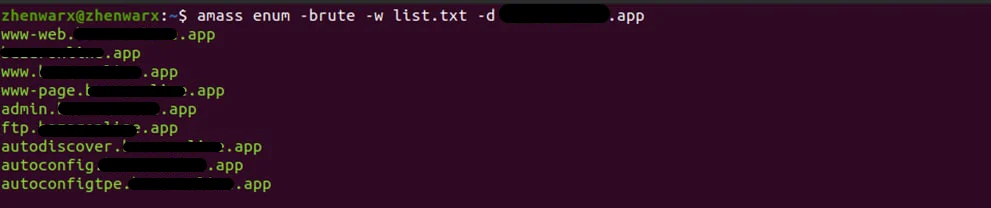
The screenshot shows the subdomain enumeration with Amass.
The subdomain returned a login portal with two fields: a mobile number, so the administrator can log in with a phone number, and a password.
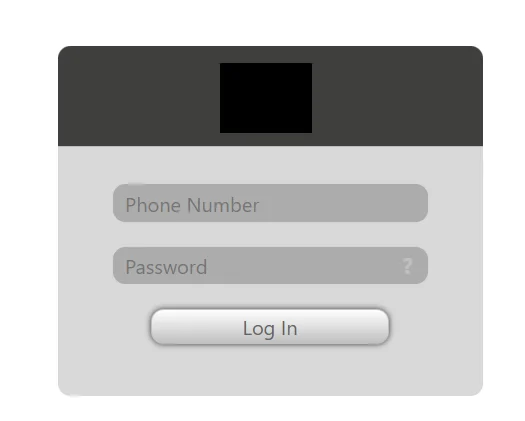
The portal looked well built, and the usual approaches did not get anywhere:
- Password brute forcing was blocked with
301 Too Many request. - Directory fuzzing produced no results.
- There was no sign-up form to try bypass techniques against.
- The website was new, so there were no related URLs or information about it.
So they turned to the source code of the login page. One line stood out: a reference to a JavaScript file.
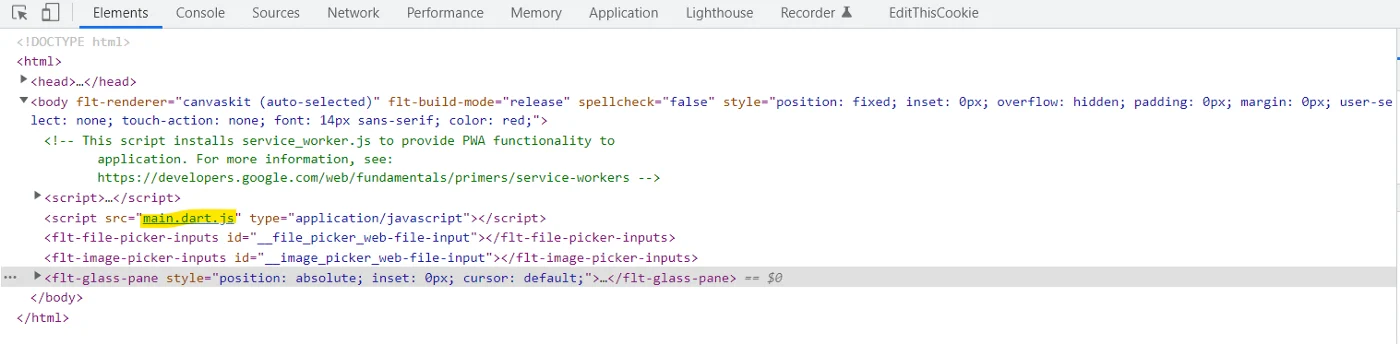
The screenshot shows the login portal source with the JavaScript file reference.
They opened the file and read it line by line to understand how the site works, searching for sensitive words such as admin, config, password, token, email and .conf. Searching for token turned up this fragment:
(["TOKEN","[redacted]","fullname",a,"phone",b,"city",c,"superadmin",d,"permisions",e,"password",f],t.N,p))
s=3
return A.U(A.ck(null).cc("https://project.app/RedactedAppBackend/dashboard/addAdmin.php",c,n),$async$uH)
The fragment contains a hard-coded token value and a list of body parameter names, and it points at an endpoint under RedactedAppBackend/dashboard/. The authors identified the call as a POST request with these body parameters:
[redacted]
fullname
phone
superadmin
permissions
password
The endpoint name, addAdmin.php, told them what the request would do: create another administrator account.
RedactedAppBackend/dashboard/addAdmin.php
Exploitation
Step 1: Send the POST request built from the JS file
They sent a POST request to the endpoint with the data taken from the JavaScript file.
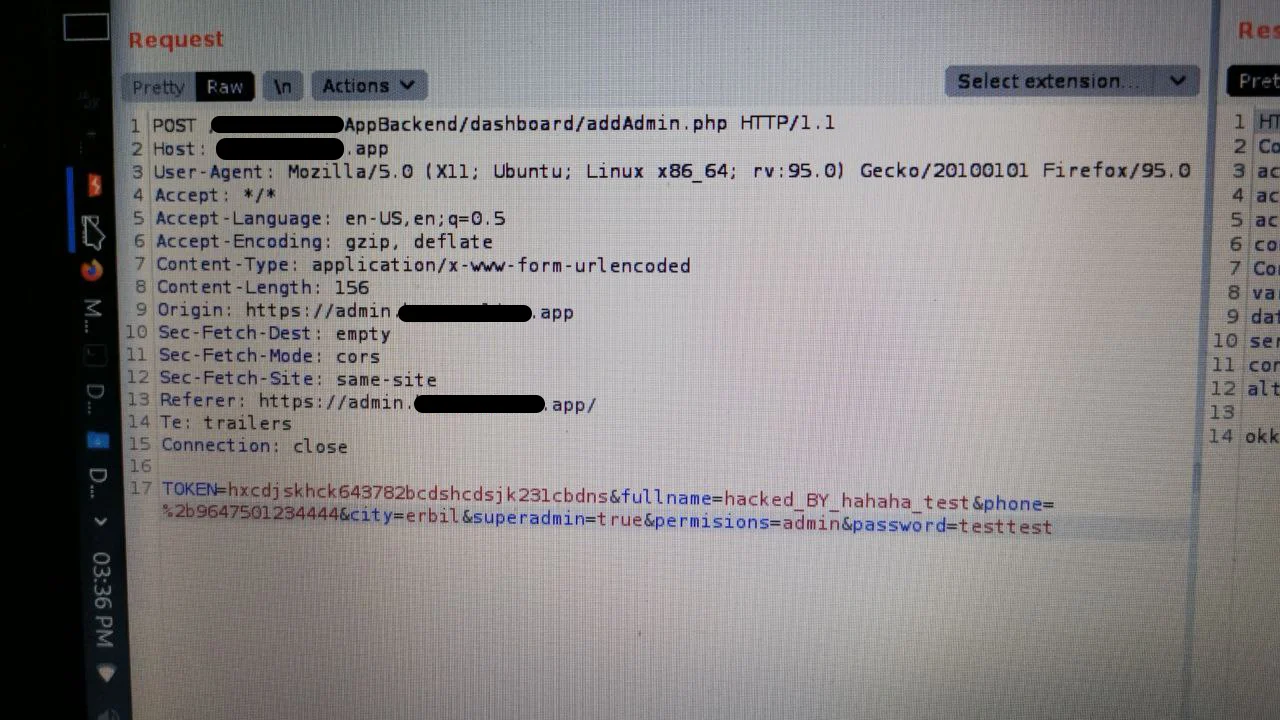
The screenshot shows the POST request.
The response came back as OK, which in their reading meant another admin account had been created.
Step 2: Log in with the new account
They used the phone number and password from the request on the login portal.
The screenshot shows the admin panel after login.
They had full control of the panel. The authors say they received a reward for the finding.
Root cause
The endpoint path and a static token were exposed in client-side code. The JavaScript file shipped to any visitor of the login page contained the full path of the addAdmin.php endpoint, the names of the parameters it expects, and a static TOKEN value that the server accepted. Because the token was embedded in client-side code, anyone who read the file could replay it, and the request succeeded using only the values taken from the file. The report does not describe the server-side check on the token, so whether it was compared against a fixed value or simply required to be present is not stated.
The defences that did exist did not cover this path. Rate limiting stopped password brute forcing, directory fuzzing found nothing, and there was no sign-up form, but none of that matters when the account-creation endpoint and its credential are handed to the browser.
Impact
In this engagement, reading the login page source gave the token and the endpoint, which allowed creating an administrator account and logging in with full control of the panel. In this engagement that is exactly what happened. The impact is limited to deployments where the same JavaScript file is served and the static token is still valid; the report gives no information about how long the token lived or whether it was rotated after the disclosure.
Fix
The report does not say what the company changed. The authors' advice to developers is not to put sensitive data such as tokens in client-side source code. In practice that means not putting sensitive data such as tokens in client-side source code.
Variants to test
- Grep every JavaScript bundle served by a login or admin page for words such as
token,admin,password,configand.conf, and for endpoint paths ending in.php. A positive result is a hard-coded credential or an administrative endpoint path in the bundle. - Look for account-creation or privilege-change endpoints named in client code, such as
addAdmin,createUserorsetRole. A positive result is a request that succeeds without a valid session. - Replay any static token found in client code against the endpoint it accompanies. A positive result is a success response and a working login with the account you created.
- Check whether the same token is accepted from a different client or after logout. A positive result is the token still working when it should have been invalidated.
- On new sites with no public footprint, enumerate subdomains and treat administrative hosts as high value, then read their source before attempting brute force. A positive result is a sensitive host whose defences are only rate limiting and obscurity.
What happened, in plain words
A company that builds websites for businesses, individuals, companies and government asked two security testers, Zhenwar Hawlery (@zhenwarx) and moSec (@moe1n1), to scan one of its projects. The manager described the site as professional work by an expert team and said it was somehow impossible to find even a single bug, because the team believed the programming language it used was very secure. This was a private project scan, not a public bug bounty programme.
The target was a website that acted as the back end of a mobile application built with Flutter. The main domain was just a single page for downloading the application. The interesting part was an administrative subdomain, written in the write-up as admin.project.com, where project.com stands in for the real domain. That subdomain showed a login portal for administrators, who sign in with a mobile number and a password.
The testers could not get in through the front door: password guessing was blocked, directory guessing found nothing, there was no sign-up form, and the site was too new to have any public information about it. So they read the source code of the login page, found a reference to a JavaScript file, opened that file, and found a hard-coded token and the address of an endpoint that creates administrator accounts. They sent a request to that endpoint using the values from the file, the server answered OK, and they logged in to the admin panel with the account they had just created. They had full control of the panel and say they received a reward for the finding.
Before the details, a few words on the ideas involved, because everything below depends on them.
- A subdomain is a name that sits in front of a domain, like
admininadmin.project.com. Companies often put different services on different subdomains, and administrative services are a favourite target because they are powerful. - Source code here means the HTML and JavaScript that your browser downloads to display a page. You can see it in any browser with View Source or the developer tools. It is public: anyone who can load the page can read it.
- A JavaScript file is a separate file of code that a page loads to make things happen in the browser, such as checking a form or sending data to the server. Because the browser must download it, its contents are visible to every visitor.
- An endpoint is a specific address on a server that accepts a particular kind of request, for example an address that creates a user account. Think of a building: the domain is the building, an endpoint is a particular service window inside it.
- An API is the set of endpoints a program offers so that other programs (or a page in your browser) can ask it to do things. It is like a restaurant menu: each dish has a name, and you order by name.
- A token is a short secret string that a server uses to recognise a client, a bit like a cloakroom ticket: whoever holds the ticket can collect the coat. If the ticket is printed on the wall where everyone can read it, the cloakroom is not protected.
- A POST request is one of the ways a browser or tool talks to a server. It carries data in its body, for example the fields of a form. A GET request asks for something; a POST request usually asks the server to create or change something.
- Body parameters are the named values carried inside a POST request, like the fields on a paper form: name, phone, password.
- Brute forcing means trying many possibilities automatically, for example many passwords, until one works.
- Directory fuzzing means asking the server for many guessed folder and file names to see which ones exist.
- Rate limiting is a server defence that refuses to answer after too many requests in a short time.
- Information disclosure is the weakness class here: the server gives away information (a secret and an internal address) that it should have kept private.
Setup
The testers were given the mobile application and the website domain. They worked on the project on 21 December 2021. At that time, they say, capturing the requests made by Flutter applications was hard, so they left the mobile app alone and concentrated on the website, which was the back end for the app.
Their tooling was ordinary: subdomain brute forcing, which surfaced the admin subdomain, and Amass for subdomain enumeration. No versions are given.
Finding it
Because the main domain only offered the application download, the testers went looking for the admin panel. Subdomain brute forcing produced admin.project.com, and they visited it first because it looked sensitive.
The screenshot shows the subdomain enumeration with Amass.
The subdomain returned a login portal with two fields: a mobile number, so the administrator can log in with a phone number, and a password.
The portal looked well built, and the usual approaches did not get anywhere:
- Password brute forcing was blocked with
301 Too Many request. - Directory fuzzing produced no results.
- There was no sign-up form to try bypass techniques against.
- The website was new, so there were no related URLs or information about it.
So they turned to the source code of the login page. One line stood out: a reference to a JavaScript file.
The screenshot shows the login portal source with the JavaScript file reference.
They opened the file and read it line by line to understand how the site works, searching for sensitive words such as admin, config, password, token, email and .conf. Searching for token turned up this fragment:
(["TOKEN","[redacted]","fullname",a,"phone",b,"city",c,"superadmin",d,"permisions",e,"password",f],t.N,p))
s=3
return A.U(A.ck(null).cc("https://project.app/RedactedAppBackend/dashboard/addAdmin.php",c,n),$async$uH)
Line by line, in plain words:
- The first line is a list of names and values.
"TOKEN"is a field name, and"[redacted]"is the value that goes with it. The rest of the list gives the other field names the request will carry:fullname,phone,city,superadmin,permisions(spelled that way in the code) andpassword. The single lettersa,b,c,d,e,fare placeholders for the values that will be filled in at runtime. - The second line,
s=3, is an ordinary assignment in the code and does not matter for our purpose. - The third line is the important one. It builds a call to the address
https://project.app/RedactedAppBackend/dashboard/addAdmin.php. Thereturnand theA.U(...)wrapper are the code's way of sending that call asynchronously, meaning the page does not freeze while waiting for the answer. The address itself is the endpoint.
The fragment contains a hard-coded token value and a list of body parameter names, and it points at an endpoint under RedactedAppBackend/dashboard/. The testers read the call as a POST request with these body parameters:
[redacted]
fullname
phone
superadmin
permissions
password
Line by line:
[redacted] is the secret value from the file, sent as a field namedTOKEN`.fullname,phone,superadmin,permissionsandpasswordare the names of the other fields the request expects. The code spells one of thempermisions, while the list above writespermissions.
The endpoint name, addAdmin.php, told them what the request would do: create another administrator account.
RedactedAppBackend/dashboard/addAdmin.php
Line by line: RedactedAppBackend is the folder of the back-end application, dashboard is a subfolder, and addAdmin.php is the file that handles the request. The name says it plainly: add an admin.
Exploitation
Step 1: Send the POST request built from the JS file
They sent a POST request to the endpoint with the data taken from the JavaScript file.
The screenshot shows the POST request.
The response came back as OK, which in their reading meant another admin account had been created.
Why this step was taken: the file had handed them both the address and the credential. If the server accepted the token from anyone, then anyone could ask it to create an administrator. Sending the request is the cheapest way to find out.
Step 2: Log in with the new account
They used the phone number and password from the request on the login portal.
The screenshot shows the admin panel after login.
They had full control of the panel. The testers say they received a reward for the finding.
Why this step was taken: a success response only proves the server accepted the request. Logging in with the account proves the account really exists and works, which is the difference between a suspicious answer and a confirmed problem.
Root cause
The endpoint path and a static token were exposed in client-side code. The JavaScript file shipped to any visitor of the login page contained the full path of the addAdmin.php endpoint, the names of the parameters it expects, and a static TOKEN value that the server accepted. Because the token was embedded in client-side code, anyone who read the file could replay it, and the request succeeded using only the values taken from the file. The report does not describe the server-side check on the token, so whether it was compared against a fixed value or simply required to be present is not stated.
The defences that did exist did not cover this path. Rate limiting stopped password brute forcing, directory fuzzing found nothing, and there was no sign-up form, but none of that matters when the account-creation endpoint and its credential are handed to the browser.
Impact
In this engagement, reading the login page source gave the token and the endpoint, which allowed creating an administrator account and logging in with full control of the panel. In this engagement that is exactly what happened. The impact is limited to deployments where the same JavaScript file is served and the static token is still valid; the report gives no information about how long the token lived or whether it was rotated after the disclosure.
Fix
The report does not say what the company changed. The testers' advice to developers is not to put sensitive data such as tokens in client-side source code. In practice that means not putting sensitive data such as tokens in client-side source code.
Variants to test
- Grep every JavaScript bundle served by a login or admin page for words such as
token,admin,password,configand.conf, and for endpoint paths ending in.php. A positive result is a hard-coded credential or an administrative endpoint path in the bundle. - Look for account-creation or privilege-change endpoints named in client code, such as
addAdmin,createUserorsetRole. A positive result is a request that succeeds without a valid session. - Replay any static token found in client code against the endpoint it accompanies. A positive result is a success response and a working login with the account you created.
- Check whether the same token is accepted from a different client or after logout. A positive result is the token still working when it should have been invalidated.
- On new sites with no public footprint, enumerate subdomains and treat administrative hosts as high value, then read their source before attempting brute force. A positive result is a sensitive host whose defences are only rate limiting and obscurity.
Glossary
- Subdomain: a name placed in front of a domain, such as
admininadmin.project.com, often pointing to a separate service. - Source code (of a page): the HTML and JavaScript your browser downloads to display a page; anyone can read it.
- JavaScript file: a separate file of code a page loads to make things happen in the browser; it is downloaded by every visitor and therefore public.
- Endpoint: a specific address on a server that accepts a particular kind of request, such as one that creates an account.
- API: the set of endpoints a program offers so other programs can ask it to do things.
- Token: a short secret string a server uses to recognise a client; whoever holds it is treated as authorised.
- POST request: a request that carries data in its body and usually asks the server to create or change something.
- GET request: a request that asks the server for something, without a body of data.
- Body parameters: the named values carried inside a POST request, like fields on a form.
- Brute forcing: trying many possibilities automatically until one works.
- Directory fuzzing: asking the server for many guessed folder and file names to see which exist.
- Rate limiting: a server defence that refuses to answer after too many requests in a short time.
- Information disclosure: a weakness where the server gives away information it should have kept private.
- Client side: everything that runs in the visitor's browser, as opposed to the server side, which runs on the company's machine.
- Static value: a value written directly into the code, the same for every visitor, instead of being generated per user.
- Replay: sending a captured value or request again to see whether the server still accepts it.
- Unauthenticated: not logged in, with no valid session.
- Session: the state of being logged in, which the server tracks so it knows who you are.
- Amass: a tool for enumerating subdomains.
- Flutter: a framework for building mobile applications, used for the app in this project.

