Hunting Android Application Bugs Using Android Studio.
The Android apps relied on a client-side permission check that could be bypassed by changing a hardcoded permission name in a debugger, letting a low-privileged user access admin-only customer data and add records. Separately, the owner passcode was written to Android logs, allowing an attacker with log access to obtain owner-level access to the merchant.
 Published on co0nan.gitbook.io
Before go for technical details i want to explain how the target work so you can understand the vulnerability well. also this target is private so some may be i will not be able to provide screenshot for each step :(
The full write-up lives on its author's site
It belongs to its author, so we link to it rather than copy it. The other two tabs are our own rewrites, checked against it.
Context
The target was a private HackerOne program, not managed by HackerOne itself, that ships hardware products running Android OS together with a set of first-party applications. Clients use those applications to manage restaurants, hotels and similar businesses. The same merchant can log in through a web dashboard, which has tabs for employees, customers, orders, settings and other areas, and through the mobile applications. On mobile the functionality is split into one application per category (customer app, employees app, order app and so on), all tied together by a main app called com.company.engine.
The researcher had previously reported a High severity issue to the same program in 2017: the APIs performed no authorisation check at all, so a low privileged user could call admin APIs and do whatever they wanted. The team acknowledged that they had not enforced back-end validation and triaged the report quickly. When the mobile applications were later added to scope, the question was whether the same class of bug survived in them, on the assumption that web and mobile clients usually talk to the same back-end APIs.
Two separate issues are described: a client-side authorisation bypass in the customer app, and an information disclosure of the merchant owner's passcode through Android logs in the engine app.
Setup
The researcher used the vendor's documentation page to learn how to install the applications in an emulator for testing. The vendor provided sandbox domains for developers, not for hunters, and the target is private, so some steps could not be illustrated with screenshots.
Tools and preconditions:
- An Android emulator with all the vendor applications installed.
- A low privileged user account on the merchant, plus a role named
TestRolecreated for that user. - Admin access to the merchant web dashboard, used to inspect the permissions API.
- MobSf to decompile the applications.
- Android Studio, used to attach the decompiled Java source to the running APK and to debug it.
adbto pull the APK from the device.
The relevant packages are com.company.engine (the main app), com.company.customer (the customer app) and, for the second issue, com.company.engine again. The vulnerable class in the first issue is PermissionChecker.class, located in the common2 folder.
Finding it
Logged in as a low privileged user in the main app com.company.engine, the researcher tried to open the customer app, which requires an admin privilege. The app refused with a message saying the user did not have permission.

That kind of client-side refusal is interesting precisely because it means the decision is being made somewhere in the app, and therefore can be inspected and possibly changed. The next step was to decompile the customer app com.company.customer with MobSf, download the Java source and open it in a text editor.
Two methods were considered for locating the function behind the message:
- Search the source with the text editor for the displayed message, for example a word like "Permission".
- Use Android Studio's logcat to identify which function is called when the app is opened.
The first method did not lead anywhere, so the second was used. The APK was pulled from the device:
adb pull /data/app/com.company.customer/base.apk
Android Studio was opened with the debug APK option and the Java source obtained from MobSf was attached to the application. After a short time a class called PermissionChecker.class was found in the common2 folder, which looked like the right place before even reading the code.
Identifying the vulnerability
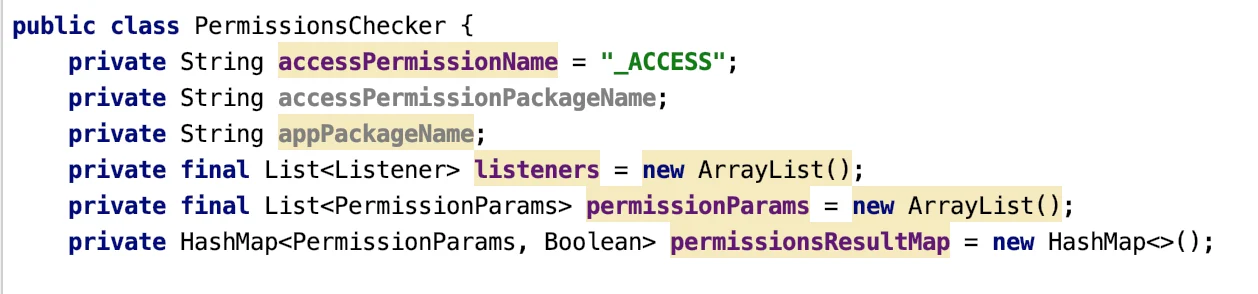
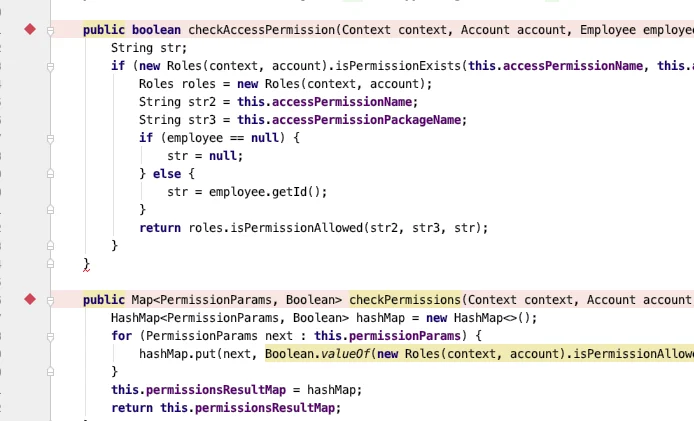
The class source code is shown in the following screenshots.
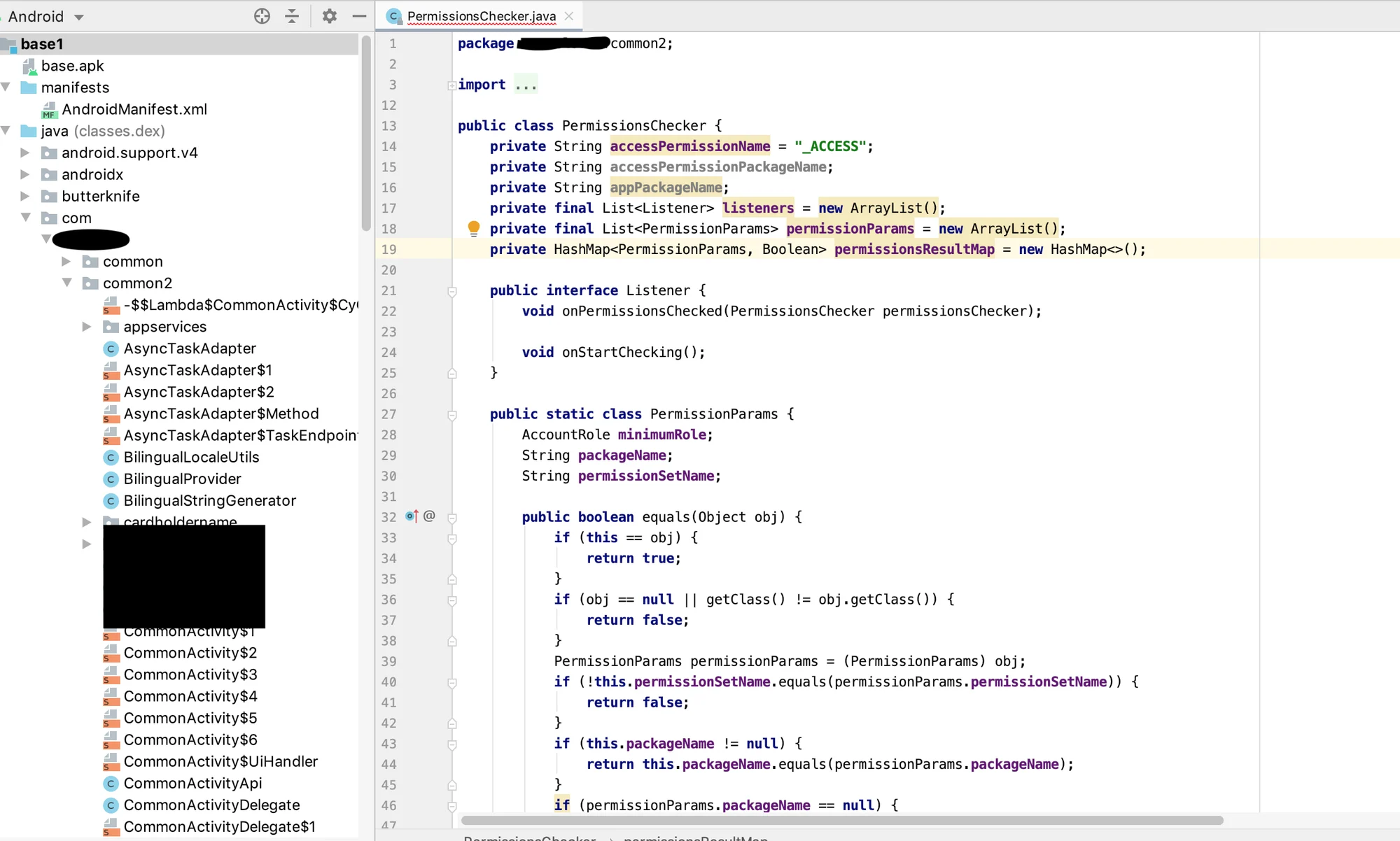
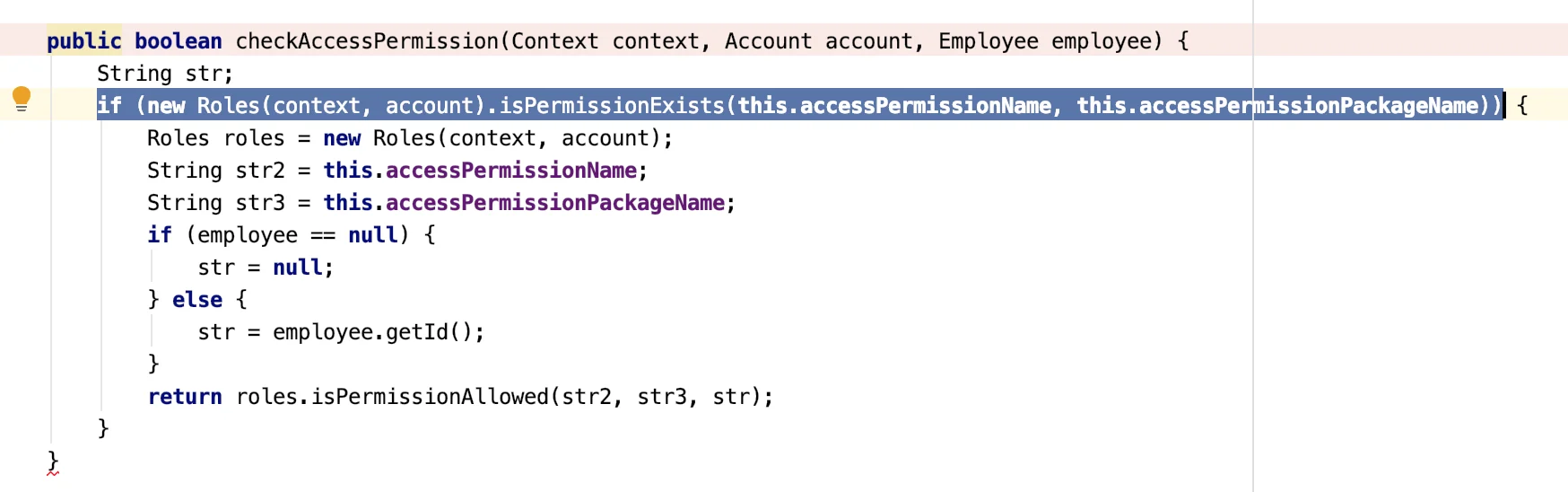
The code contains a function called checkAccessPermission, which checks whether the current user has the accessPermissionName among his permissions. accessPermissionName is a recognised variable hardcoded at the top of the class.
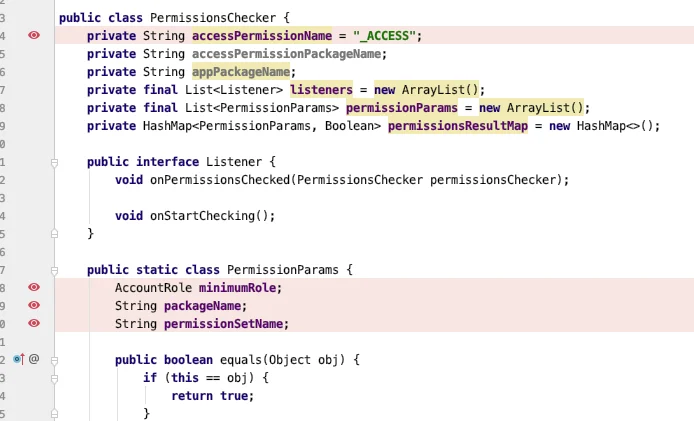
To analyse the workflow, breakpoints were set in the code as follows.
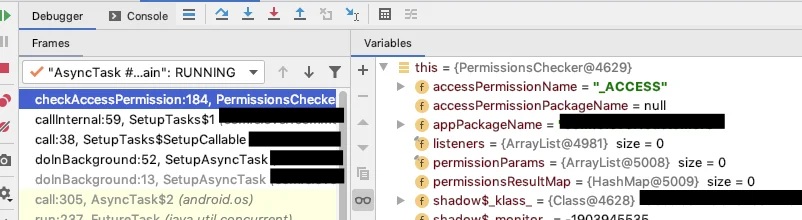
The debug button was then used to launch the application in debugging mode. Once the application opened, the debugger stopped. The researcher kept inspecting what happened at runtime and which variables were assigned, until the debugger stopped at checkAccessPermission. Looking at the variables there, accessPermissionName was set to _ACCESS. This confirmed the assumption: the function checks whether the current user has this permission assigned to him or not.
Exploitation
The debugger was stopped and the researcher went to the web dashboard to see which permissions the low user had. The reasoning is simple: replace the _ACCESS value with a permission the low user already holds, so that when the function checks for that permission the app opens.
Step 1: enumerate the permissions of the low role
Logged in to the merchant dashboard as Admin, the researcher requested the permissions API under:
/v3/merchant/{ID}/permissions
The response shows a permission called MANUAL_ENTRY_ALLOWED, which is assigned to the low role already created and given to the low user TestRole.

Step 2: change the checked permission in the debugger
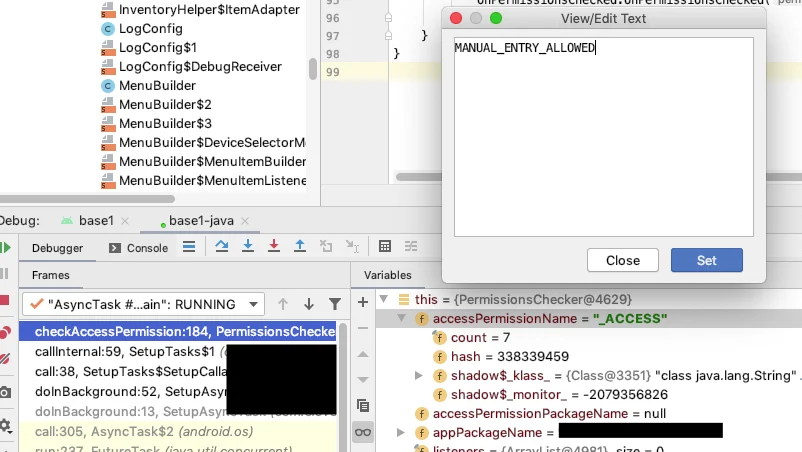
The value MANUAL_ENTRY_ALLOWED was copied and the debugger was run again. Once execution reached checkAccessPermission, the value of accessPermissionName was changed from _ACCESS to MANUAL_ENTRY_ALLOWED.
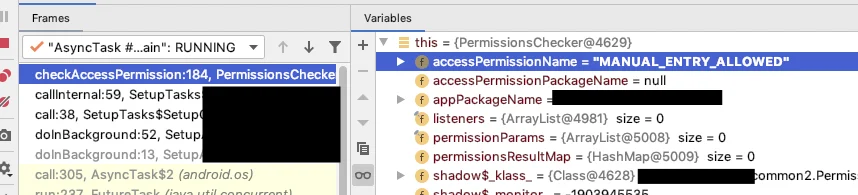
The debugger was then continued until it finished.
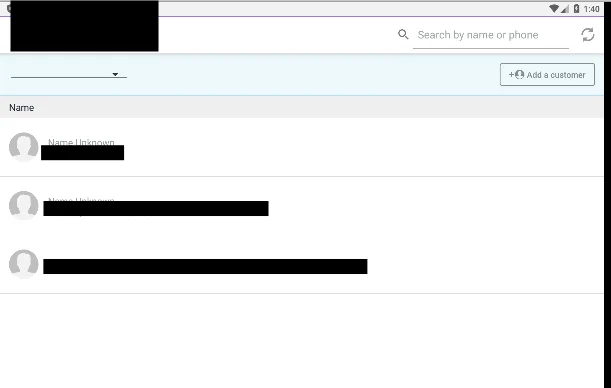
The application opened successfully and the customer information became visible. Viewing alone was not the limit, so the next step was to try modifying or adding data.
Step 3: repeat for the write action
The "Add Customer" button was clicked, and the debugger stopped again: the function runs on each step to make sure the user is allowed to perform it. The same change was repeated, from _ACCESS to MANUAL_ENTRY_ALLOWED.
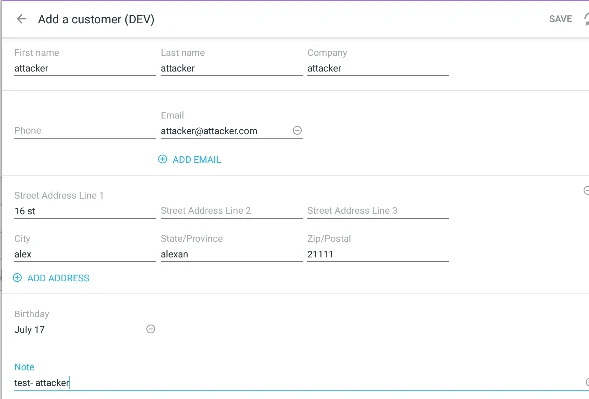
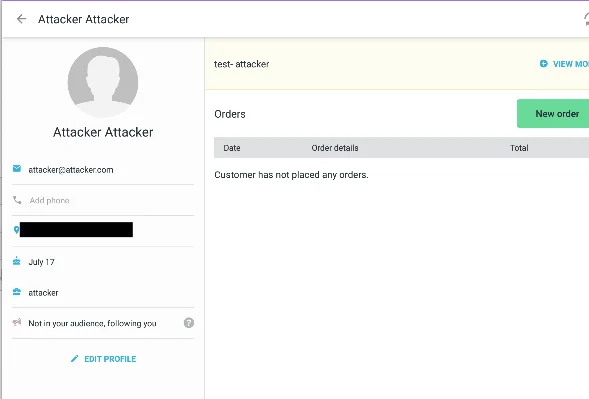
The add page opened, the required data was inserted and Save was clicked. The debugger checked the permission once more, and the change was repeated again. The user was added successfully.
Reporting
The first issue was reported on 17 July 2020, around 10pm. The team replied asking whether it could be reproduced without a debugger. At first they thought the issue was not exploitable in their production app, but the researcher explained that it is possible because a low user can log in to his account from an emulator even in the production environment.
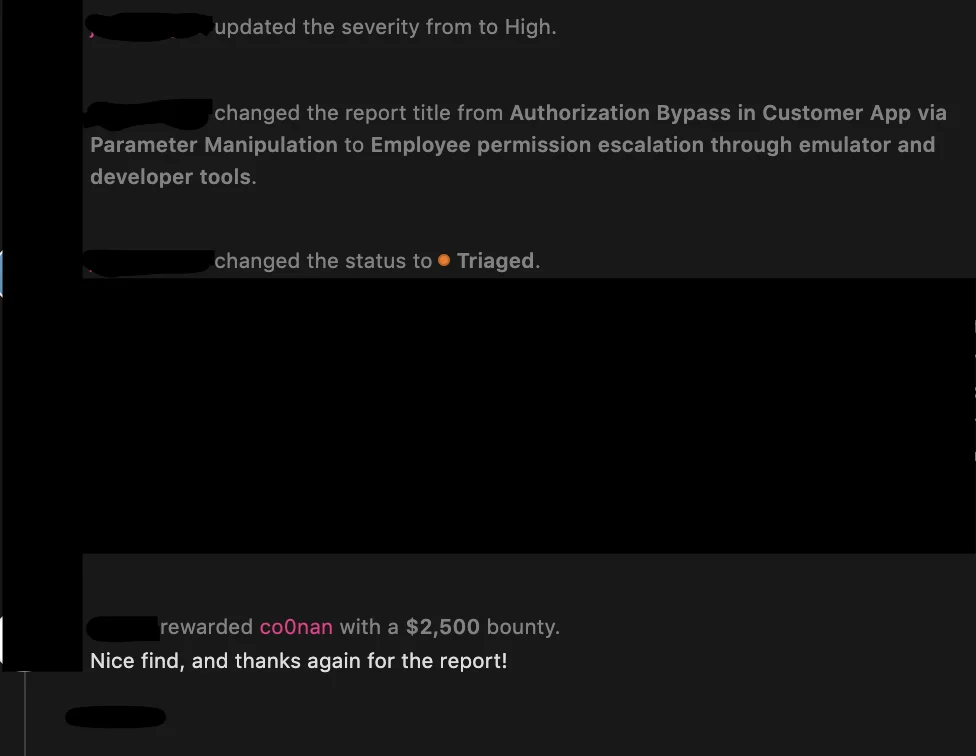
Four days later the team confirmed the bug and stated that it exists in all their applications that use the same PermissionChecker class. The severity was updated to High and the researcher was rewarded 2500 USD.
Leaking the passcode through logs
The second issue has few technical details. Android logs are a good place to look for sensitive data exposure, so the engine app com.company.engine was opened in Android Studio and the logcat tab was used. Each application was opened one by one, and then logcat was searched for strings.
Searching for the user's email address returned a result. Looking through the data, the class MerchantService.class was found with a function called doNotifyLocalProperites. This function gets the user information, including the passcode, and logs it to the Android logs.

The owner passcode was therefore visible. The passcode is meant to be used as a login authentication on the mobile device, set by the owner through the web dashboard. The researcher logged out of his account, and clicking on any application asked for the passcode.
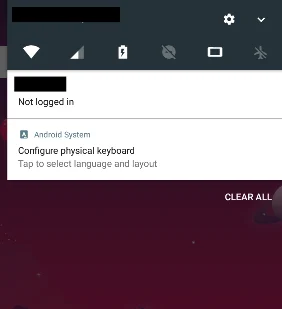
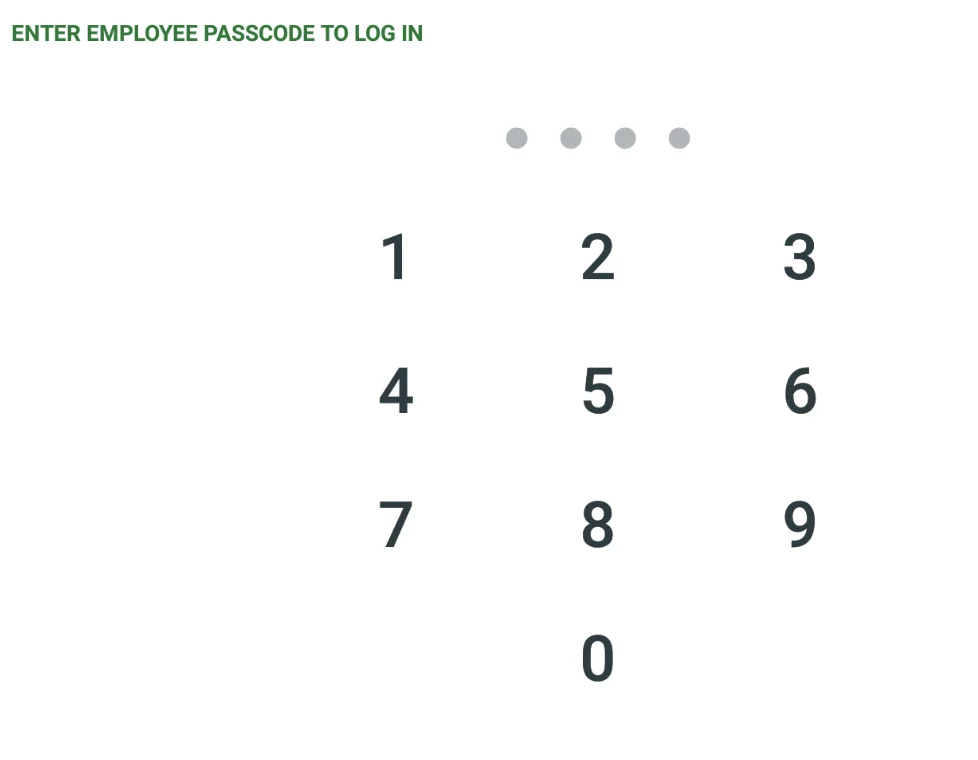
The owner passcode obtained from the logs was entered, which gave owner access over the merchant, meaning a takeover. As an example, the setup app was opened.
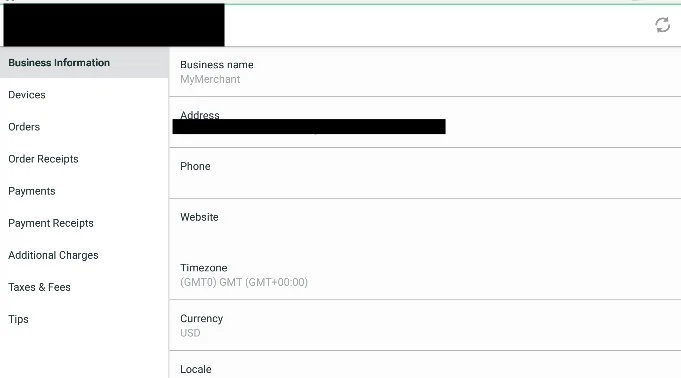
This issue was reported on 21 July 2020. The team replied after 30 minutes saying they might not consider it an issue since it relies on device logs, which normally cannot be accessed on production devices. The researcher explained that the issue does not exist because of Android Studio but is an issue in the code itself, and updated the report with a screenshot showing the vulnerable function and the line of code that logs the data.
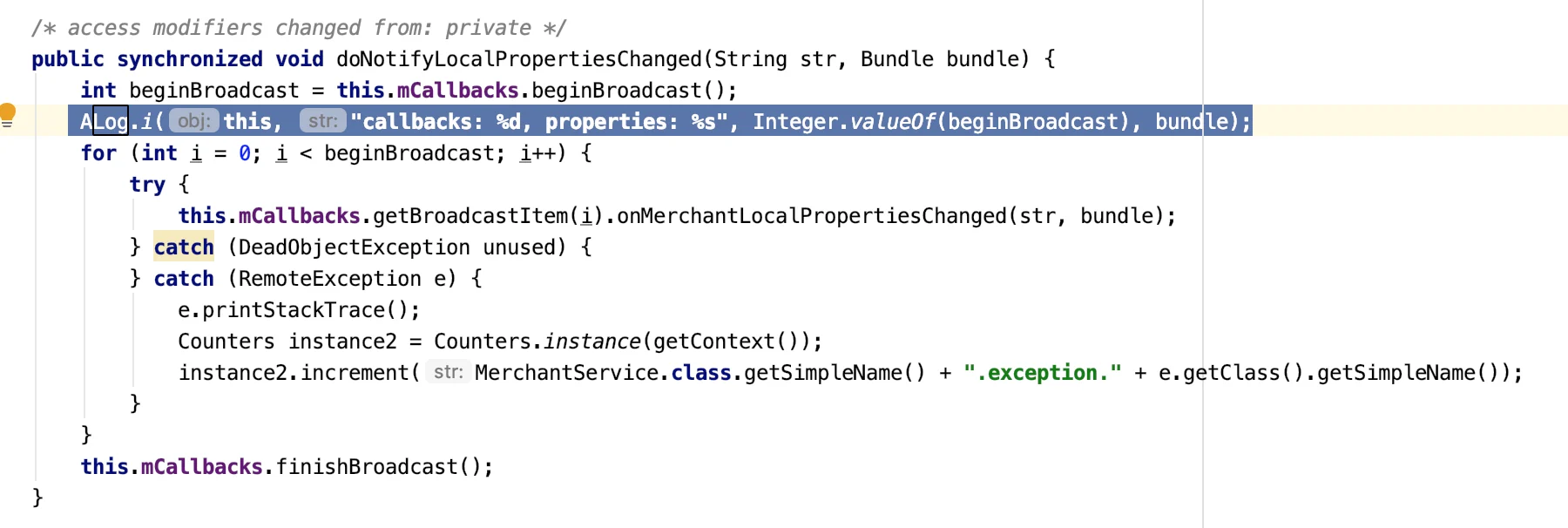
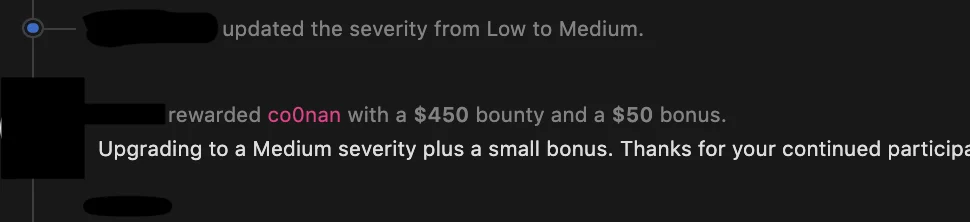
The team marked it as Low and rewarded 300 USD. The researcher replied that he was not comfortable with the bounty discussion, because the mitigation planned for the first vulnerability would not mitigate this one. In less than 5 hours the team discussed the impact again, upgraded it to Medium and awarded another 450 USD plus a 50 USD bonus.
Root cause
The customer app enforces authorisation on the client. PermissionChecker.checkAccessPermission compares the current user's permissions against a hardcoded accessPermissionName value, initially _ACCESS, and the app decides whether to open a screen or perform an action based on that local result. The decision is made locally in the app, which is consistent with the 2017 finding that the APIs had no authorisation check. Because the decision lives in the app, an attacker who controls the runtime can change the value being checked to any permission the account already holds, and the app will then allow the action. The check runs on every step, including opening a screen, opening the add page and saving, but since each of those checks is local, repeating the change defeats each of them.
The log leak is a plain information disclosure: MerchantService.doNotifyLocalProperites writes user information, including the passcode, to the Android log. The team's initial position was that production devices do not expose logs to an attacker, but the researcher's point was that the logging itself is the defect, independent of the tool used to read it.
Impact
With the client-side bypass, a low privileged user can open applications that require an admin privilege and can view customer information and add new records, by changing the checked permission to one his role already has. The team confirmed the bug exists in all their applications that use the same PermissionChecker class.
With the log leak, anyone able to read the device logs can obtain the merchant owner's passcode and use it to authenticate as the owner on the mobile device, taking over the merchant. The team's caveat was that device logs are not normally accessible on production devices; the researcher's counter was that the flaw is in the code, not in Android Studio.
Fix
The report does not describe the remediation the vendor applied. What it does say is that the team planned a mitigation for the first vulnerability, and that the researcher argued this mitigation would not address the log leak, which is why the second issue was discussed separately and its severity raised.
Variants to test
- Decompile every app in a suite and search for permission-check classes shared across packages, such as
PermissionCheckerin a common folder. A positive result is a class whose decision is made locally and whose checked permission name is a constant you can change at runtime. - Set breakpoints on the check function and inspect the variable holding the permission name. A positive result is a hardcoded value such as
_ACCESSthat differs from permissions your low role actually holds. - Enumerate your role's permissions through the dashboard API, for example under
/v3/merchant/{ID}/permissions, and substitute one of them for the hardcoded value in the debugger. A positive result is a restricted screen opening. - Repeat the substitution for write actions (add, edit, save), since the check may run per step. A positive result is a record being created or modified by a low privileged account.
- Search logcat for your own identifiers, such as your email address, after opening each app in the suite. A positive result is a log entry containing credentials or personal data.
- If a passcode is found in logs, log out and use it at the device passcode prompt. A positive result is access to the owner's context over the merchant.
- Test whether the same back-end APIs are used by web and mobile clients, since a web-side authorisation fix may not cover the mobile path.
What happened, in plain words
A security researcher spent time testing the mobile apps of a company that sells Android-based hardware to restaurants, hotels and similar businesses. The company's clients use these apps to run their business: one app for customers, one for employees, one for orders, and so on, all tied together by a main app called com.company.engine.
The researcher found two problems. The first was that one of the apps decided on the phone itself whether you were allowed to use it, instead of asking the company's servers. By running the app in a special tool that lets you pause it and change values while it runs, the researcher could make the app believe a low-privileged user was allowed to open admin-only screens, view customer data and even add new customers. The company paid 2500 USD for that one.
The second problem was that the main app wrote sensitive information, including the merchant owner's passcode, into the phone's log. Anyone who could read that log could take the passcode and log in as the owner, taking over the merchant. The company first paid 300 USD, then awarded another 450 USD plus a 50 USD bonus after further discussion.
This article walks through both findings step by step, explaining every tool and concept along the way, so that someone who has never done security testing can follow what happened and why.
Background: what the product is and why it matters
Before the technical details, it helps to understand what the target actually is. The company sells hardware products that run Android OS, and those devices come with a set of applications written by the company. Their clients are businesses: restaurants, hotels and similar. The same merchant can log in through a web dashboard (a website you open in a browser) and through the mobile applications.
The web dashboard has many tabs in its menu bar: employees, customers, orders, settings and other things. On mobile, the functionality is split into one application per category. There is a customer app, an employees app, an order app, and so on. All of these apps are connected to each other by a main app called com.company.engine.
This target was a private program on HackerOne, a well-known platform where companies invite security researchers to test their systems and pay for confirmed problems. "Private" means the program is not open to everyone; only invited researchers can take part. This particular program was not managed by HackerOne itself, meaning the company handled reports directly. The researcher notes that the team was very professional and respectful of researchers' work, which is why he kept hunting on them even though their scope was hard to find bugs in.
The 2017 finding that set up the story
In 2017, the same researcher had submitted a High severity issue to this program. He had found that the company's APIs made no authorisation check at all. A low-privileged user could call admin APIs and do whatever he wanted. The team acknowledged that they had not enforced back-end validation and triaged the report quickly.
Two terms need explaining here:
- API (Application Programming Interface): the set of URLs a program uses to talk to a server. When you tap a button in an app, the app usually sends a request to an API on the company's server, and the server sends back data. Think of it as a waiter: you (the app) tell the waiter what you want, the waiter goes to the kitchen (the server) and brings back your food (the data).
- Authorisation check: the server asking "is this user allowed to do this?" before doing it. Without it, the server does whatever anyone asks, like a waiter who brings food to anyone who walks into the kitchen.
When the mobile applications were later added to the program's scope (the list of things researchers are allowed to test), the researcher wondered whether the same class of bug had survived in them. His reasoning: web and mobile clients usually talk to the same back-end APIs, so if the web side had the problem, the mobile side probably did too.
Setting up the test environment
The researcher used the vendor's documentation page to learn how to install the applications in an emulator for testing. An emulator is a program that pretends to be a phone on your computer, so you can run Android apps without owning the physical device.
The vendor provided sandbox domains for developers, not for hunters. A sandbox is a test copy of a system, separate from the real one, so that experiments do not affect real customers. The target being private, some steps could not be illustrated with screenshots.
Tools and preconditions used:
- An Android emulator with all the vendor applications installed.
- A low-privileged user account on the merchant, plus a role named
TestRolecreated for that user. A role is a named bundle of permissions; giving a user a role gives them everything in it. - Admin access to the merchant web dashboard, used to inspect the permissions API.
- MobSf to decompile the applications. Decompiling means turning a finished app back into readable source code, the way you might un-bake a cake to see the recipe. Apps are normally shipped in a compiled form that a phone can run but a human cannot easily read.
- Android Studio, used to attach the decompiled Java source to the running APK and to debug it. Android Studio is Google's official tool for building and inspecting Android apps. Debugging means running a program while pausing it at chosen points to look at what it is doing.
adbto pull the APK from the device. adb (Android Debug Bridge) is a command-line tool that lets a computer talk to an Android device or emulator. An APK is the file format of an Android app, like a.exeon Windows.
The relevant packages are com.company.engine (the main app), com.company.customer (the customer app) and, for the second issue, com.company.engine again. A package is the unique name of an app on Android, similar to a website's domain name. The vulnerable class in the first issue is PermissionChecker.class, located in the common2 folder. A class is a named block of code in a program; a folder here is a folder inside the decompiled source tree.
Finding the first issue: a message that says "no"
Logged in as a low-privileged user in the main app com.company.engine, the researcher tried to open the customer app, which requires an admin privilege. The app refused with a message saying the user did not have permission.
That kind of client-side refusal is interesting precisely because it means the decision is being made somewhere in the app, and therefore can be inspected and possibly changed. Think of a nightclub bouncer who checks your name against a list he keeps in his pocket. If you can get hold of the list, you can see exactly what name he is looking for, and maybe change it. If the bouncer phoned head office to check, you could not do that.
The next step was to decompile the customer app com.company.customer with MobSf, download the Java source and open it in a text editor. Java is the programming language Android apps are traditionally written in. Source code is the human-readable form of a program.
Two methods were considered for locating the function behind the message:
- Search the source with the text editor for the displayed message, for example a word like "Permission".
- Use Android Studio's logcat to identify which function is called when the app is opened. Logcat is Android's built-in log viewer: a stream of messages that apps write while they run, useful for seeing what is happening inside.
The first method did not lead anywhere, so the second was used. The APK was pulled from the device:
adb pull /data/app/com.company.customer/base.apk
Line by line:
adbis the Android Debug Bridge tool, run from a terminal on the computer.pullmeans "copy this file from the phone to my computer"./data/app/com.company.customer/base.apkis the path on the phone where the customer app's APK lives.com.company.customeris the app's package name, andbase.apkis the app file itself.
Android Studio was opened with the debug APK option and the Java source obtained from MobSf was attached to the application. Attaching source means telling the debugger "when you stop at a line of code, show me the matching line from this file". After a short time a class called PermissionChecker.class was found in the common2 folder, which looked like the right place before even reading the code. The name alone is a strong hint: something that checks permissions.
Identifying the vulnerability
The class source code is shown in the following screenshots.
The code contains a function called checkAccessPermission, which checks whether the current user has the accessPermissionName among his permissions. A function is a named piece of code that does one job; you can call it by name whenever you need that job done. accessPermissionName is a recognised variable hardcoded at the top of the class. A variable is a named box that holds a value while the program runs. Hardcoded means the value is written directly into the program's code, so it is the same every time the app runs, rather than being fetched from a server.
To analyse the workflow, breakpoints were set in the code as follows. A breakpoint is a marker you place on a line of code; when the running program reaches that line, it pauses so you can look around. It is like putting a bookmark in a recipe and stopping cooking at that page to check your ingredients.
The debug button was then used to launch the application in debugging mode. Once the application opened, the debugger stopped. The researcher kept inspecting what happened at runtime and which variables were assigned, until the debugger stopped at checkAccessPermission. Looking at the variables there, accessPermissionName was set to _ACCESS. This confirmed the assumption: the function checks whether the current user has this permission assigned to him or not.
In plain words: the app was asking itself "does this user have _ACCESS?" and deciding based on the answer. The server was not being asked. That is the client-side authorisation problem: the decision is made on the client (the phone) instead of on the server (the company's computer). A client is anything the user controls, so a decision made there can be changed by the user.
Exploiting the vulnerability
The debugger was stopped and the researcher went to the web dashboard to see which permissions the low user had. The reasoning is simple: replace the _ACCESS value with a permission the low user already holds, so that when the function checks for that permission the app opens. If the bouncer is looking for the name "Alice" and your name is "Bob", you change the list so it says "Bob" instead.
Step 1: enumerate the permissions of the low role
Logged in to the merchant dashboard as Admin, the researcher requested the permissions API under:
/v3/merchant/{ID}/permissions
Line by line:
/v3/merchant/{ID}/permissionsis a URL path on the company's server.v3is a version number in the path.merchantmeans the request is about a merchant account.{ID}is a placeholder for the merchant's numeric or text identifier; in a real request you would put the actual value there.permissionsmeans the request is asking for the list of permissions.- The
httplabel above the block just marks it as an HTTP request line, the format browsers and apps use to talk to servers.
The response shows a permission called MANUAL_ENTRY_ALLOWED, which is assigned to the low role already created and given to the low user TestRole.
So the low user's role includes a permission called MANUAL_ENTRY_ALLOWED. That is a permission the low user genuinely has. If the app can be made to check for that permission instead of _ACCESS, the check will pass.
Step 2: change the checked permission in the debugger
The value MANUAL_ENTRY_ALLOWED was copied and the debugger was run again. Once execution reached checkAccessPermission, the value of accessPermissionName was changed from _ACCESS to MANUAL_ENTRY_ALLOWED.
The debugger was then continued until it finished.
The application opened successfully and the customer information became visible. Viewing alone was not the limit, so the next step was to try modifying or adding data. This matters because reading data is one level of harm, but changing data is another: a low user who can add customers can pollute the merchant's records or plant fake entries.
Step 3: repeat for the write action
The "Add Customer" button was clicked, and the debugger stopped again: the function runs on each step to make sure the user is allowed to perform it. The same change was repeated, from _ACCESS to MANUAL_ENTRY_ALLOWED.
The add page opened, the required data was inserted and Save was clicked. The debugger checked the permission once more, and the change was repeated again. The user was added successfully.
The fact that the check runs at every step (opening the screen, opening the add page, saving) sounds like good design, but it does not help if every one of those checks is local. Each check can be defeated the same way, by changing the value again. A lock that is checked by the same person who wants to open it is not a lock.
Reporting the first issue
The first issue was reported on 17 July 2020, around 10pm. The team replied asking whether it could be reproduced without a debugger. At first they thought the issue was not exploitable in their production app, but the researcher explained that it is possible because a low user can log in to his account from an emulator even in the production environment. Production means the real, live system that customers use, as opposed to a test copy.
Four days later the team confirmed the bug and stated that it exists in all their applications that use the same PermissionChecker class. The severity was updated to High and the researcher was rewarded 2500 USD.
Severity is a label for how serious a bug is, usually Low, Medium, High or Critical. It affects how much a company pays and how quickly they fix it.
Leaking the passcode through logs
The second issue has few technical details. Android logs are a good place to look for sensitive data exposure, so the engine app com.company.engine was opened in Android Studio and the logcat tab was used. Each application was opened one by one, and then logcat was searched for strings. A string here just means a piece of text.
Searching for the user's email address returned a result. Looking through the data, the class MerchantService.class was found with a function called doNotifyLocalProperites. This function gets the user information, including the passcode, and logs it to the Android logs.
A passcode in this product is a code the merchant owner sets through the web dashboard, and it is used as a login authentication on the mobile device. In other words, it is a second password for the phone apps, separate from the normal account login.
The owner passcode was therefore visible in the log. The researcher logged out of his account, and clicking on any application asked for the passcode.
The owner passcode obtained from the logs was entered, which gave owner access over the merchant, meaning a takeover. As an example, the setup app was opened.
A takeover means gaining control of an account you should not control. Here, a low-privileged user became the owner of the merchant, with all the power that implies.
Reporting the second issue
This issue was reported on 21 July 2020. The team replied after 30 minutes saying they might not consider it an issue since it relies on device logs, which normally cannot be accessed on production devices. The researcher explained that the issue does not exist because of Android Studio but is an issue in the code itself, and updated the report with a screenshot showing the vulnerable function and the line of code that logs the data.
The team marked it as Low and rewarded 300 USD. The researcher replied that he was not comfortable with the bounty discussion, because the mitigation planned for the first vulnerability would not mitigate this one. A mitigation is a change made to reduce the risk of a bug being exploited. His point: fixing the permission check in the customer app does nothing about the passcode being written to the log.
In less than 5 hours the team discussed the impact again, upgraded it to Medium and awarded another 450 USD plus a 50 USD bonus.
Why these bugs happen
The customer app enforces authorisation on the client. PermissionChecker.checkAccessPermission compares the current user's permissions against a hardcoded accessPermissionName value, initially _ACCESS, and the app decides whether to open a screen or perform an action based on that local result. The decision is made locally in the app, which is consistent with the 2017 finding that the APIs had no authorisation check. Because the decision lives in the app, an attacker who controls the runtime can change the value being checked to any permission the account already holds, and the app will then allow the action. The check runs on every step, including opening a screen, opening the add page and saving, but since each of those checks is local, repeating the change defeats each of them.
The log leak is a plain information disclosure: MerchantService.doNotifyLocalProperites writes user information, including the passcode, to the Android log. Information disclosure means sensitive data is exposed to someone who should not see it. The team's initial position was that production devices do not expose logs to an attacker, but the researcher's point was that the logging itself is the defect, independent of the tool used to read it.
What the impact was
With the client-side bypass, a low-privileged user can open applications that require an admin privilege and can view customer information and add new records, by changing the checked permission to one his role already has. The team confirmed the bug exists in all their applications that use the same PermissionChecker class.
With the log leak, anyone able to read the device logs can obtain the merchant owner's passcode and use it to authenticate as the owner on the mobile device, taking over the merchant. The team's caveat was that device logs are not normally accessible on production devices; the researcher's counter was that the flaw is in the code, not in Android Studio.
How it should be fixed
The report does not describe the remediation the vendor applied. What it does say is that the team planned a mitigation for the first vulnerability, and that the researcher argued this mitigation would not address the log leak, which is why the second issue was discussed separately and its severity raised.
Things worth trying on other apps
- Decompile every app in a suite and search for permission-check classes shared across packages, such as
PermissionCheckerin a common folder. A positive result is a class whose decision is made locally and whose checked permission name is a constant you can change at runtime. - Set breakpoints on the check function and inspect the variable holding the permission name. A positive result is a hardcoded value such as
_ACCESSthat differs from permissions your low role actually holds. - Enumerate your role's permissions through the dashboard API, for example under
/v3/merchant/{ID}/permissions, and substitute one of them for the hardcoded value in the debugger. A positive result is a restricted screen opening. - Repeat the substitution for write actions (add, edit, save), since the check may run per step. A positive result is a record being created or modified by a low-privileged account.
- Search logcat for your own identifiers, such as your email address, after opening each app in the suite. A positive result is a log entry containing credentials or personal data.
- If a passcode is found in logs, log out and use it at the device passcode prompt. A positive result is access to the owner's context over the merchant.
- Test whether the same back-end APIs are used by web and mobile clients, since a web-side authorisation fix may not cover the mobile path.
Glossary
- API (Application Programming Interface): the set of URLs a program uses to talk to a server; the waiter between the app and the kitchen.
- APK: the file format of an Android app, like a
.exeon Windows. - adb (Android Debug Bridge): a command-line tool that lets a computer talk to an Android device or emulator.
- Android Studio: Google's official tool for building and inspecting Android apps, including a debugger and logcat viewer.
- Breakpoint: a marker on a line of code that pauses the running program so you can inspect it.
- Class: a named block of code in a program.
- Client: the program on the user's side (phone, browser) that talks to a server.
- Client-side authorisation: a permission decision made on the user's device instead of on the server, so the user can change it.
- Decompile: turn a finished app back into readable source code.
- Debugging: running a program while pausing it at chosen points to look at what it is doing.
- Emulator: a program that pretends to be a phone on your computer.
- Function: a named piece of code that does one job.
- Hardcoded: a value written directly into the program's code, the same every time, rather than fetched from a server.
- HTTP: the format browsers and apps use to talk to servers.
- Information disclosure: sensitive data exposed to someone who should not see it.
- Java: the programming language Android apps are traditionally written in.
- Logcat: Android's built-in log viewer, a stream of messages apps write while they run.
- Mitigation: a change made to reduce the risk of a bug being exploited.
- Package: the unique name of an app on Android, similar to a domain name.
- Passcode: in this product, a short code the merchant owner sets through the web dashboard and uses as a login authentication on the mobile device.
- Production: the real, live system that customers use, as opposed to a test copy.
- Role: a named bundle of permissions; giving a user a role gives them everything in it.
- Sandbox: a test copy of a system, separate from the real one.
- Severity: a label for how serious a bug is, usually Low, Medium, High or Critical.
- Source code: the human-readable form of a program.
- String: a piece of text.
- Takeover: gaining control of an account you should not control.
- Variable: a named box that holds a value while the program runs.

