Hunting for Nginx Alias Traversals in the wild
Nginx configurations where a location directive lacks a trailing slash but its alias directive ends with one allow path traversal, letting an attacker read files outside the intended directory. The authors found this in Bitwarden's self-hosted setup and Google's HPC Toolkit, exposing databases, logs, certificates and cloud credentials.
Hakai Offensive Security Follow
 Published on labs.hakaioffsec.com
Nginx, a versatile web server pivotal to numerous internet infrastructures, has held a dominant market share since its inception in 2004, with widespread adoption across websites and Docker containers. This article delves into the intricacies of Nginx, focusing on the location and alias directives that are central to…
The full write-up lives on its author's site
It belongs to its author, so we link to it rather than copy it. The other two tabs are our own rewrites, checked against it.
Nginx has held a dominant share of the web server market since its release in 2004, and it is the most deployed technology in Docker containers. That popularity makes its configuration quirks worth understanding. This article looks at one of them: the interaction between the location and alias directives, which can turn a harmless-looking static file mapping into a path traversal. The technique builds on research Orange Tsai presented at BlackHat 2018, where he demonstrated a method originally found in a 2016 HCTF challenge created by @iaklis. I then went looking for the misconfiguration in popular open-source repositories with GitHub Code Search, found it in Bitwarden and in Google's Cloud HPC Toolkit, and wrote a black-box detection tool called NavGix.
Context
Nginx is a web server that also works as a reverse proxy, load balancer, mail proxy and HTTP cache. The location directive is a block directive that can contain other directives and defines how Nginx handles requests for specific URLs. It is often used together with alias to map a URL to a file location on the server. Both can live in nginx.conf or in a separate configuration file.
The syntax for location is:
location [modifier] /path/to/URL {
    # other directives
}
The optional modifier can be one of:
=: exact match~: case-sensitive regular expression match~*: case-insensitive regular expression match^~: prefix match (stop searching if this matches)
A typical use maps a URL prefix to a directory:
location /assets/ { # defines a location block for requests matching /assets

    alias /opt/production/assets/; # maps the request to the assets folder

}
That is the feature as intended: requests under /assets/ are served from /opt/production/assets/. The vulnerability appears when the two directives are written slightly differently.
Setup
No accounts or special roles are needed. The work is a mix of source review and black-box testing:
- GitHub Code Search, to find candidate Nginx configurations in public repositories.
- A local instance of the target project, so the aliased directories can be listed with a local shell and the impact assessed.
- Requests against the running instance, and later against live hosts, to confirm what is reachable.
- NavGix, the tool written for black-box enumeration of aliased directories.
Finding it
For the technique to be applicable, two conditions must be met:
- The
locationdirective should not have a trailing slash in its path. - An
aliasdirective must be present within the location context, and it must end with a slash.

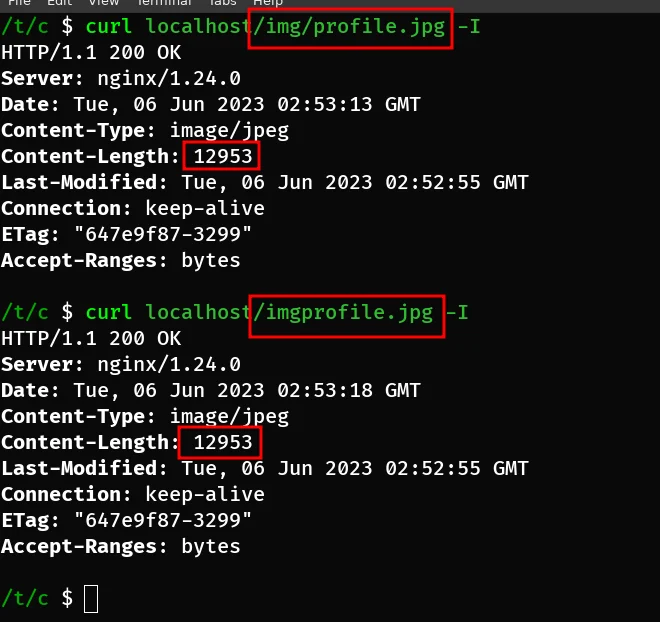
When those conditions hold, Nginx matches any URL that starts with /img and serves whatever follows that prefix with the alias path /var/images/ prepended. A request for /img/profile.jpg and a request for /imgprofile.jpg therefore return the same file, because the alias already ends in a slash and no additional slash is needed after the matched location.
Because any URL starting with /img reaches the target folder, the ever-present .. can be appended. A request to /img.. reaches the parent directory of the target directory. If Nginx answers with a redirection, that means it has located the directory and is trying to redirect to /img../, as it commonly does when a directory is accessed.
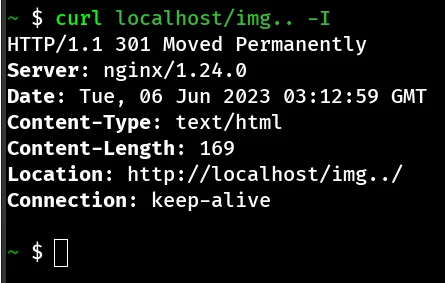
And we do!
Any file or child directory inside the parent of the target folder then becomes reachable and is served by Nginx. In the lab example, where the configured target is /var/images/, that means everything in /var/ can be read. A simple GET such as /img../log/nginx/access.log downloads /var/log/nginx/access.log.
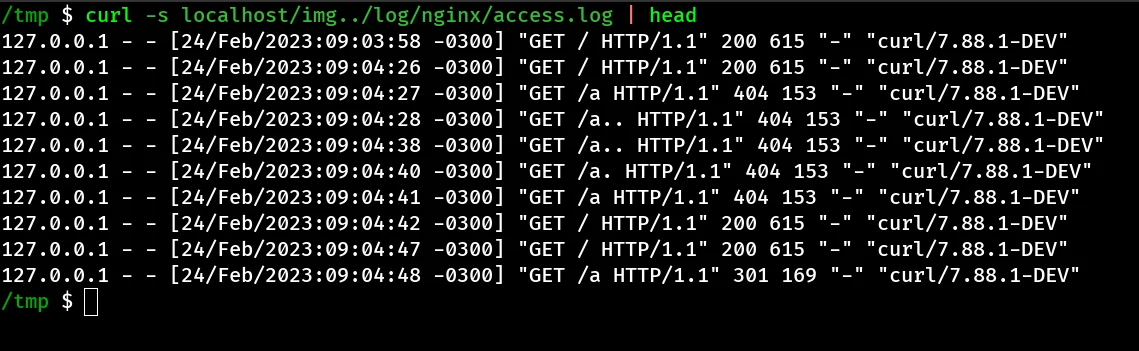
We can even see our previous tests!
The severity varies a lot between projects, from negligible to critical. It depends mainly on whether the exposed directory holds sensitive data that enables further attacks or discloses private information.
Without a trailing slash on alias

Same vulnerability, but without a trailing slash on alias.
The obvious question is whether the bug survives when the alias directive has no trailing slash. It does, but with a limit: traversal sequences can no longer escape the directory. Everything after the matched location is appended to the alias, so appending .. to a path without a trailing slash only produces a non-existent folder name, for example /var/images../.
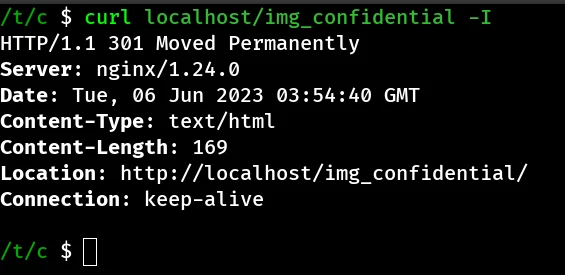
The misbehaviour can still be abused to reach other directories whose names start with the target directory name. You cannot reach /var/images/../log/, but you can reach a directory /var/images_confidential by requesting /img_confidential. Nginx appends _confidential to the /var/images target path, serving from the combined path /var/images_confidential.
Exploitation
Step 1: search public repositories
With source code available, finding the bug is much easier for two reasons. Detection is a matter of running a regular expression over configuration files, and exploitation is helped by knowing the exact aliased directory, which lets you spin up a local instance, inspect it with a shell and see which files the traversal exposes.
GitHub Code Search searches code across all public repositories and supports string matches, regular expressions and path filters. The expression used to hunt for the alias traversal was:
/location \/[_.a-zA-Z0-9-\/]*[^\/][\s]\{[\s\n]*alias \/[_.a-zA-Z0-9-\/]*\/;/
It matches a location whose path does not end in a slash, followed by an alias that does end in one. The results showed that a significant number of repositories contain this specific vulnerability.

Regular expressions are not ideal for matching code syntax. This one, for instance, will not match vulnerable files that contain comments between the directives. It is a starting point, not a complete detector.
Step 2: Bitwarden, the unified Docker setup
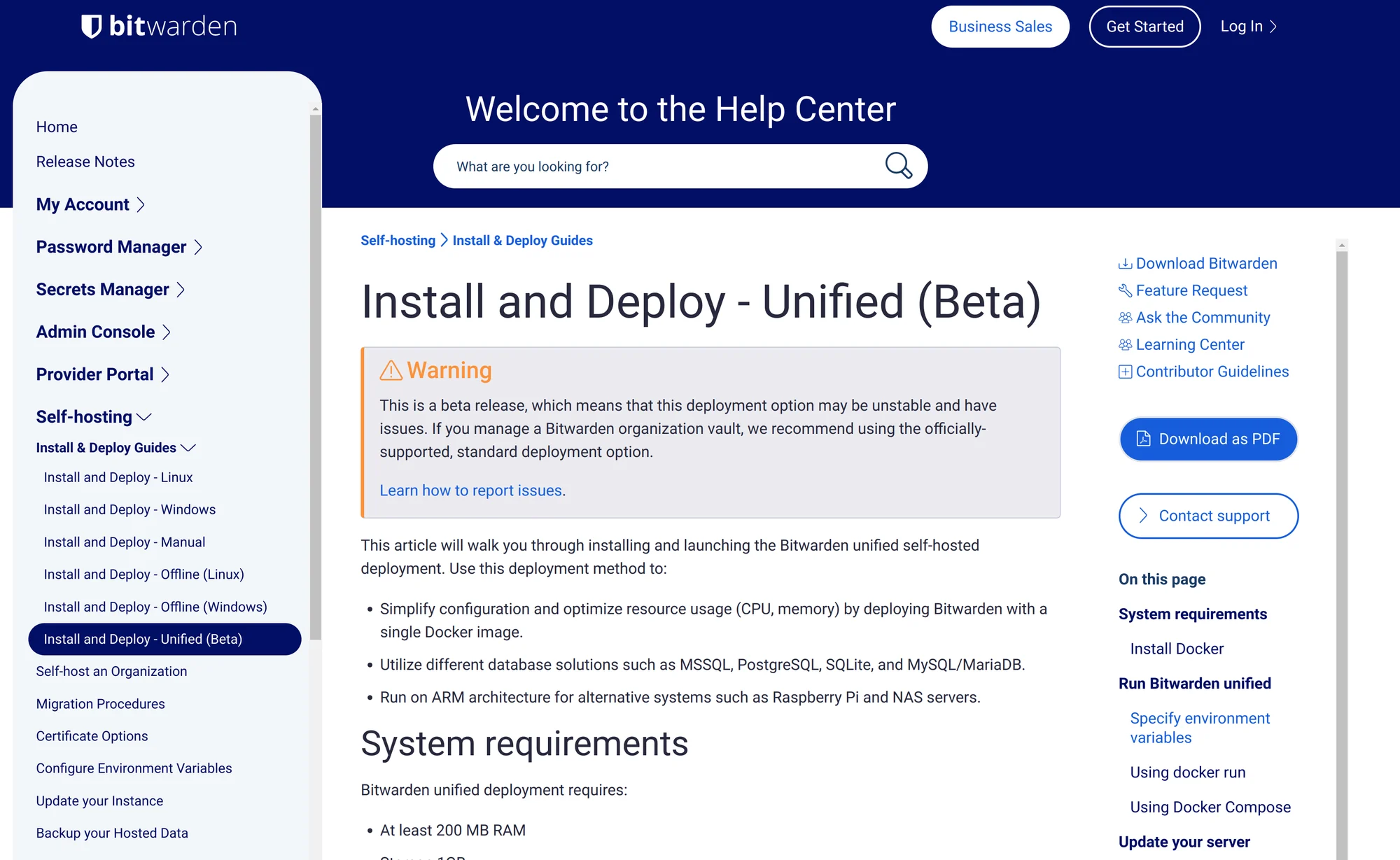
Bitwarden is an open-source password manager for storing and managing passwords, credentials and other sensitive information, with password generation, autofill and synchronisation across Windows, macOS, Linux, Android, iOS and browser extensions. It also offers a self-hosted option, and one of the documented ways to deploy it is the Unified docker method, a setup made to simplify deployment.

100K+ downloads!
The regular expression matched Bitwarden's repository, so I went through the code base looking for Nginx configurations and found one inside the folder for the unified docker setup.
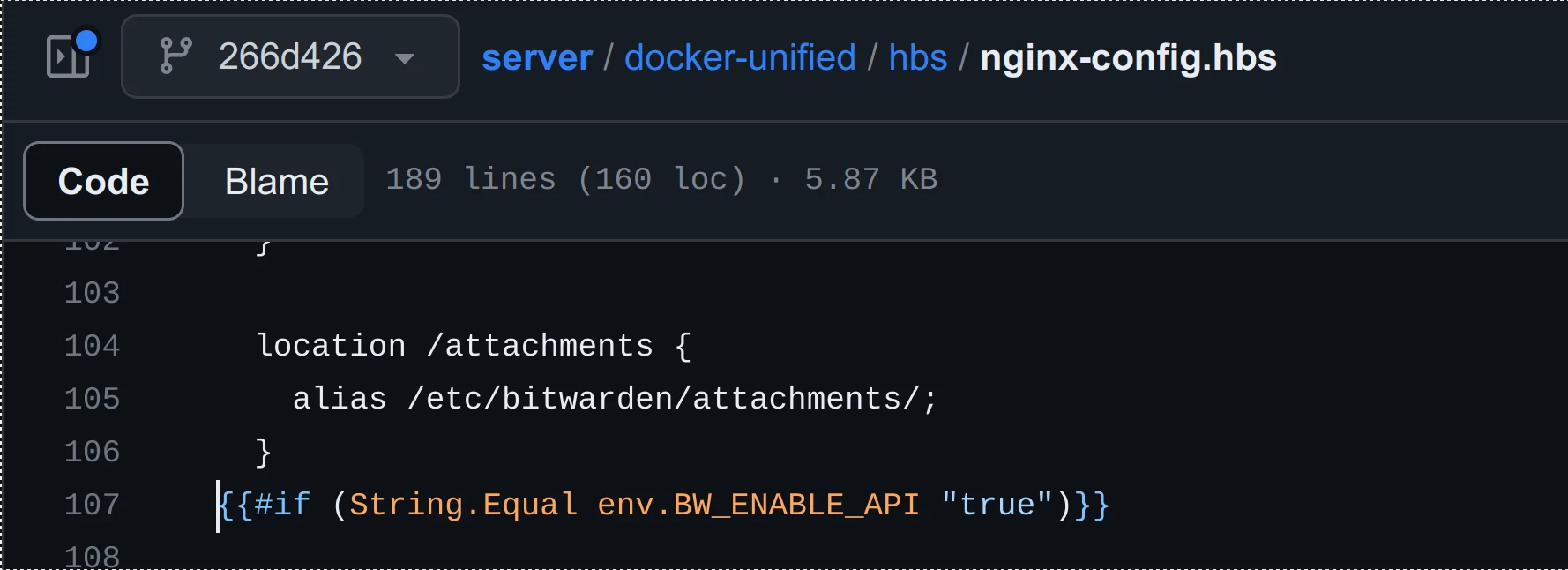
With that configuration, every file under /etc/bitwarden/attachments/ is reachable at the URL /attachments. Given the exploit details above, it also means any file present in /etc/bitwarden/ can be downloaded.
To assess the impact, the next step is either reading the code base or starting a local instance and listing the directory from a shell. The Dockerfile for the image gives more detail about that directory and what it can contain:
Dockerfile
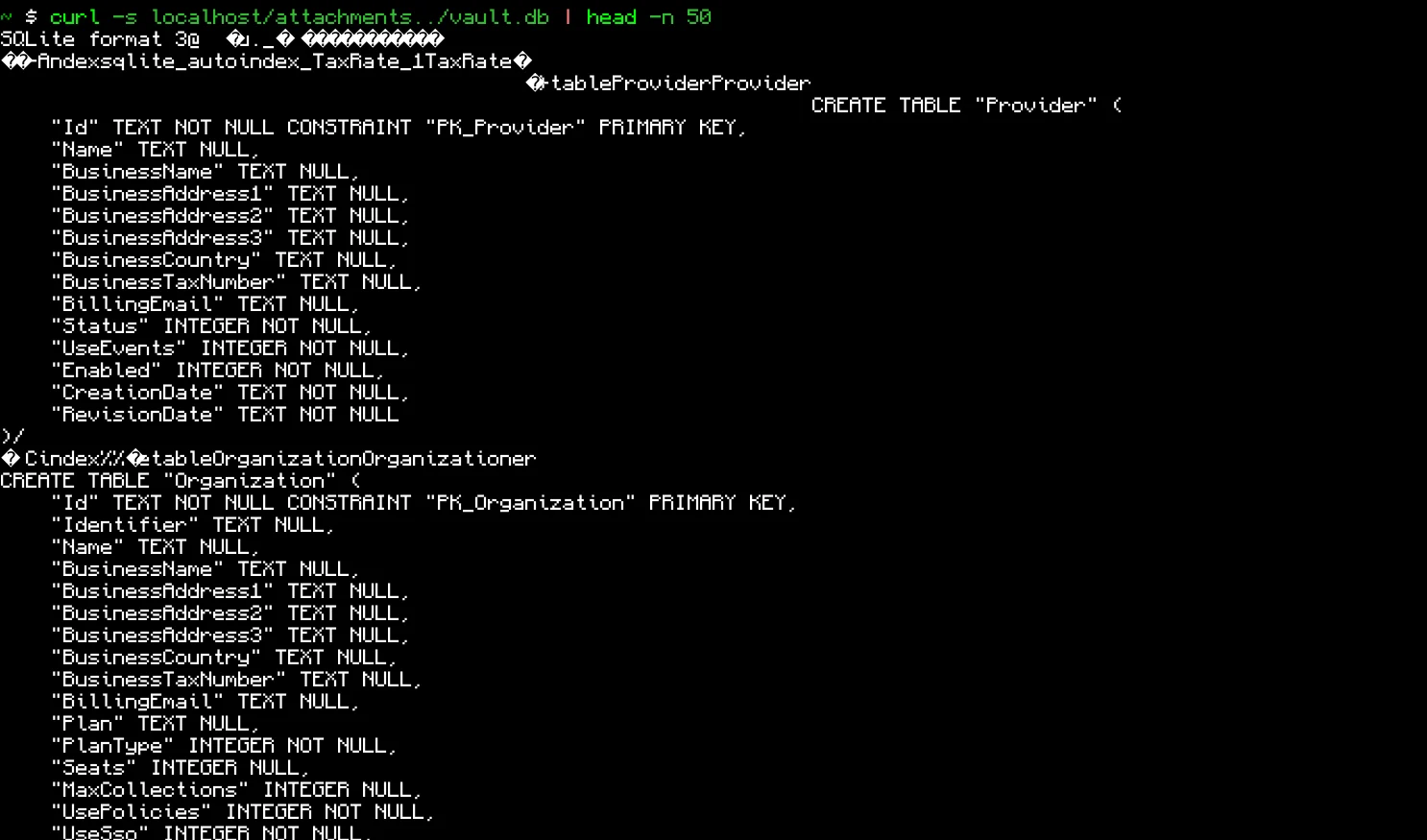
An environment variable sets where the vault database is saved, and vault.db sits in /etc/bitwarden. Bitwarden only stores the database there when the user chooses SQLite as the database provider. An unauthenticated request to the following path downloads the entire Bitwarden SQLite3 database:
http://<instance>/attachments../vault.db
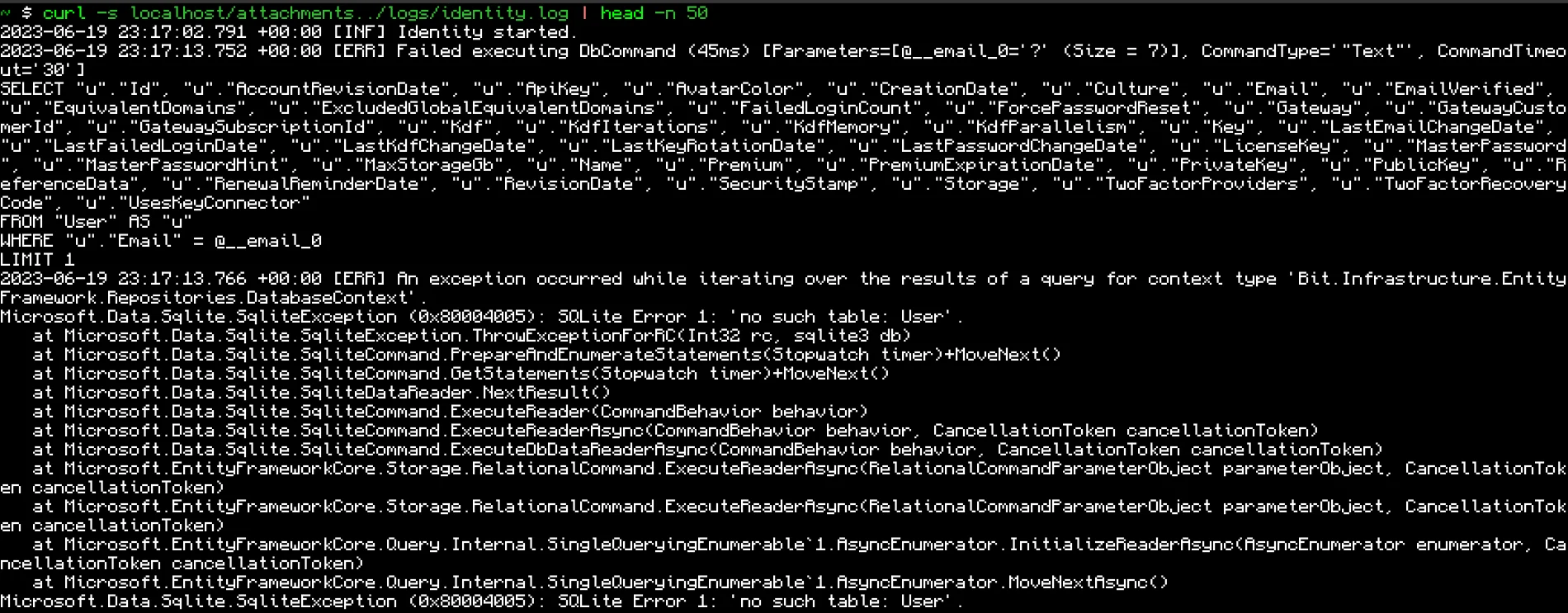
Log files have predictable names and can all be downloaded through these paths:
- /attachments../logs/api.log
- /attachments../logs/admin.log
- /attachments../logs/identity.log
- /attachments../logs/notifications.log
The certificate file was exposed in the same folder. A request to /attachments../identity.pfx retrieves it.
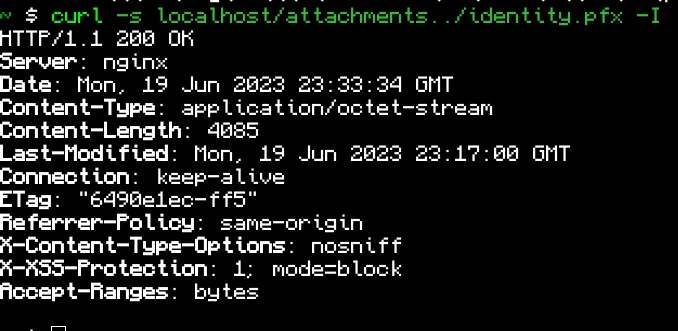
The data protection keys were also accessible, but their filenames are not predictable, so leaking them this way was not possible.
The issue was disclosed to Bitwarden and has since been fixed. Bitwarden issued a US$6000 bounty, the highest it has issued on its HackerOne program.
Step 3: Google Cloud HPC Toolkit
While browsing GitHub I came across the Cloud HPC Toolkit, a Google software solution introduced in 2022 as a framework for deploying high-performance computing environments on Google Cloud. It has a Django-based web front end that lets users manage their HPC environments through a web interface.
In the configuration section matched by the regular expression, a vulnerable path had indeed been defined. It was aliased to ../hpc-toolkit/community/front-end/website/static/, so a request to /static../ gives access to the website folder.
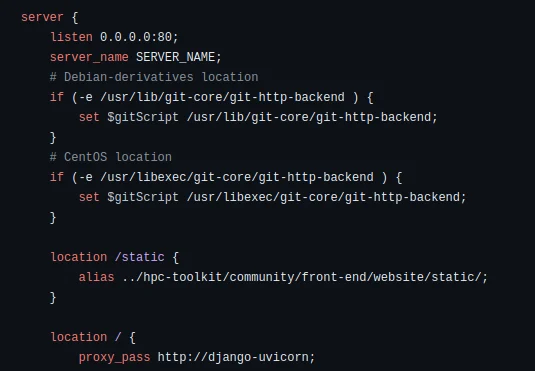
The SQLite database was also exposed in that folder and could be fetched with:
curl http://<frontend URL>/static../db.sqlite3 -O
The Django secret key was reachable at the following location:
curl http://[redacted]/static../.secret_key
Access to the database matters a great deal here, because the main function of the HPC Toolkit appears to be orchestrating large-scale Google Cloud resources. An attacker who compromises it could gain control over a victim's GCP account credentials, which are stored in the SQLite database:
sqlite> select * from [redacted];
1|production key|{
  "type": "service_account",
  "project_id": "andunduaindadaww",
  "private_key_id": "3acb9f[... redacted from report ...]7c69",
  "private_key": "-----BEGIN PRIVATE KEY-----\nMIIEv[... redacted from report ...] 5Kdkvg=\n-----END PRIVATE KEY-----\n",
  "client_email": "adwaw[...].com",
  "client_id": "105114036295455180401",
  "auth_uri": "https://accounts.google.com/o/oauth2/auth",
  "token_uri": "https://oauth2.googleapis.com/token",
  "auth_provider_x509_cert_url": "https://www.googleapis.com/oauth2/v1/certs",
  "client_x509_cert_url": "https://www.googleapis.com/robot/v1/metadata/x509/adwaw1f13f1f13-tkfe-sa%40andunduaindadaww.iam.gserviceaccount.com"
}|1
sqlite>
I considered debating the amount and decided against it.
Root cause
The mistake is in how the two directives are written together. When the location path has no trailing slash and the alias target does, Nginx treats the remainder of the request URI as a relative path appended to the alias. Nothing normalises away .. in that remainder, so the appended segment can walk out of the aliased directory. The same append behaviour, without a trailing slash on the alias, still lets a request reach sibling directories whose names begin with the target directory name.
Nothing in the configuration as written stops this. The bug is a configuration pattern rather than a flaw in a single request handler, and it survives because the configuration looks reasonable: a prefix location and an alias with a trailing slash are both common and idiomatic. The regular expression used for hunting is itself limited, since it will not match configurations with comments between the directives, so some vulnerable files will not be found by that search alone.
Impact
The impact ranges from negligible to critical depending on the project. It is determined primarily by whether the exposed directory holds sensitive data that enables further attacks or discloses private information.
In Bitwarden's unified Docker setup, an unauthenticated attacker could download the SQLite vault database when SQLite is the chosen database provider, the API, admin, identity and notifications logs, and the identity.pfx certificate. Data protection keys were present but could not be targeted because their filenames are not predictable.
In the HPC Toolkit, an attacker could read the website folder, the SQLite database and the Django secret key. Because the toolkit orchestrates Google Cloud resources, control of the stored GCP service account credentials could extend to the victim's cloud account.
Fix
The Bitwarden issue was disclosed and has since been fixed. The report does not describe the change that was made. For the pattern in general, the two conditions that make the technique work point at the fix: avoid the combination of a location without a trailing slash and an alias that ends with one, and review any aliased directory for files that should not be reachable from the web.
Variants to test
- Prefix location plus aliased directory. Look for a
locationpath without a trailing slash whose block contains analiasending in a slash. Request the location followed by..and check for a redirect to the same path with a trailing slash; that indicates the parent directory was located. - Read a known file in the parent. With the lab pattern, request
/img../log/nginx/access.logand check whether the log contents come back. - Alias without a trailing slash. Request the location followed by a sibling directory suffix, for example
/img_confidential, and check whether content from/var/images_confidentialis served. - Common alias names by brute force. When no links can be extracted from the HTML, try the dictionary that gave promising results during testing:
	var dictionary = []string{
		"static",
		"js",
		"images",
		"img",
		"css",
		"assets",
		"media",
		"lib",
	}
- Automate the enumeration. NavGix was written to enumerate and test aliased directories for traversal vulnerabilities in a black-box manner, and is available on its GitHub page.
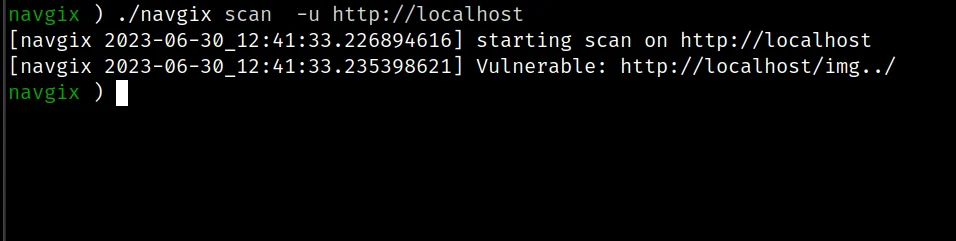
Sample usage of navgix
Once NavGix identifies a directory susceptible to traversal, other tools can fuzz for further accessible folders or files inside it. The objective at that point is to find files that increase impact, such as a configuration file containing secrets, log files or source code.
Nginx remains a robust and versatile server that carries a large part of the internet, but it is susceptible to these inconsistencies. They come from misconfigurations, and they put the burden on developers to avoid hazardous setups.
What happened, in plain words
A web server is the program that sits on a computer somewhere and hands out web pages and files when your browser asks for them. Nginx is one of the most popular web servers in the world. It was released in 2004 and, according to the figures cited in this research, it held the largest share of the web server market as of June 2022, with 33.6% of websites using it. It is also, according to Docker, the most deployed technology inside Docker containers. Docker is a way of packaging a program together with everything it needs so it can run the same way on any machine.
Because so much of the internet runs on Nginx, a small mistake in how it is set up can affect a lot of sites. This article is about one such mistake. It is a configuration pattern that lets anyone read files on the server that they were never meant to see, without logging in and without any special access. The pattern is called an Nginx alias traversal, and it belongs to a family of bugs called path traversal: the attacker makes the server walk out of the folder it was supposed to serve and into a neighbouring folder.
The technique builds on research that Orange Tsai presented at the BlackHat 2018 security conference. BlackHat is a large annual gathering where security researchers present their findings. He demonstrated a method that had originally been found in a 2016 CTF challenge. A CTF, or capture the flag, is a practice competition where people try to solve security puzzles. The challenge was created by @iaklis.
The author then went looking for this same mistake in popular open-source projects. Open source means the code is public and anyone can read it. The search used GitHub Code Search, a feature of GitHub, the website where open-source code is hosted. The mistake turned up in Bitwarden, a password manager, and in Google's Cloud HPC Toolkit, a tool for running large computing jobs on Google Cloud. Finally, the author wrote a small program called NavGix that looks for the mistake from the outside, without needing to read the server's configuration at all.
The two settings involved
To understand the bug you need to know two instructions that appear in an Nginx configuration file. A configuration file is a plain text file that tells a program how to behave. For Nginx it is usually called nginx.conf, though the settings can also live in a separate file that is pulled in.
The first instruction is location. It is a block, meaning it wraps other instructions inside curly braces, and it tells Nginx how to handle requests for particular web addresses. The second is alias, which maps a web address to a folder on the server's disk. Used together, they are how a site says: when someone asks for this part of my web address, give them files from this folder.
The general shape of a location block is:
location [modifier] /path/to/URL {
    # other directives
}
Line by line: location starts the block. [modifier] is an optional word that changes how the address is matched, and it is explained below. /path/to/URL is the part of the web address this block applies to. The curly brace opens the block, the line starting with # is a comment that Nginx ignores, and the closing brace ends the block.
The optional modifier can be one of four things:
=: exact match. The address must be exactly this and nothing else.~: case-sensitive regular expression match. A regular expression is a pattern for matching text, and case-sensitive means capital and small letters are treated as different.~*: case-insensitive regular expression match. Same idea, but capital and small letters are treated the same.^~: prefix match, and stop searching if this matches. A prefix is the beginning of an address, so this matches any address that starts with the given text.
A typical, correct use looks like this:
location /assets/ { # defines a location block for requests matching /assets

    alias /opt/production/assets/; # maps the request to the assets folder

}
Line by line: the first line opens a block for any request whose address starts with /assets/. The comment after it explains that. The alias line says that those requests should be served from the folder /opt/production/assets/ on the server's disk, and the comment says the same. The final brace closes the block. This is the feature working as intended: a visitor asking for something under /assets/ gets a file from that folder.
The trouble starts when the two lines are written slightly differently from each other.
The two conditions that create the bug
For the technique to work, two conditions must both be true:
- The
locationdirective should not have a trailing slash in its path. A trailing slash is a/at the very end. - An
aliasdirective must be present inside that location block, and it must end with a slash.
In plain terms: the web address pattern stops without a slash, but the folder on disk is written with one. That mismatch is the whole bug.
What happens when the conditions are met
When those two conditions hold, Nginx matches any web address that starts with /img and serves whatever comes after that prefix, with the folder path /var/images/ stuck on the front. So a request for /img/profile.jpg and a request for /imgprofile.jpg both return the same file. The reason is that the alias already ends in a slash, so Nginx does not need another slash after the matched part of the address.
Think of it like a receptionist who is told: any visitor whose name starts with "Jo" should be sent to room 12. That works for "Jo", but it also works for "Josephine" and for "Joanything". The receptionist only checks the beginning of the name.
Walking out of the folder
Because any address starting with /img reaches the target folder, the attacker can add .. to the address. In file paths, .. means "the folder above this one". A request to /img.. therefore reaches the parent folder of the target folder.
If Nginx answers with a redirection, that tells the attacker it has found the folder and is trying to send the browser to /img../, which is what Nginx commonly does when someone asks for a folder rather than a file.
And we do!
Once that works, any file or subfolder inside the parent of the target folder can be read, and Nginx will happily serve it. In the lab example, where the configured target is /var/images/, this means everything in /var/ can be read. A simple request such as /img../log/nginx/access.log downloads /var/log/nginx/access.log, which is the server's own log of visits.
We can even see our previous tests!
That last detail is a neat way to prove the bug is real: the log file contains the earlier test requests, so the attacker can see their own attempts recorded inside the file they just downloaded.
How serious this is varies enormously from project to project, from negligible to critical. It depends mainly on whether the exposed folder holds sensitive data that helps an attacker go further, or private information that should never be public.
The same bug without a trailing slash on the alias
Same vulnerability, but without a trailing slash on alias.
The obvious question is whether the bug still works if the alias line has no trailing slash. The answer is yes, but with a limit: the attacker can no longer use .. to escape the folder. Everything after the matched part of the address is glued onto the alias, so adding .. to a path that has no trailing slash just produces a folder name that does not exist, for example /var/images../.
But the same behaviour can still be abused to reach other folders whose names begin with the target folder's name. The attacker cannot reach /var/images/../log/, but they can reach a folder called /var/images_confidential by requesting /img_confidential. Nginx glues _confidential onto the /var/images target, and the combined path becomes /var/images_confidential.
Going back to the receptionist: if the rule is "anyone whose name starts with Jo goes to room 12", then a visitor called "Jo-confidential" also gets sent there, even though they were never meant to.
How the search was done
Step 1: searching public code
When the source code of a project is public, finding this bug is much easier, for two reasons. First, detection is just a matter of running a text pattern over the configuration files. Second, exploitation is helped by knowing the exact folder that is aliased, because the researcher can start a copy of the project locally, look at that folder with a shell, and see which files the traversal exposes. A shell is a text-based way of giving commands to a computer.
GitHub Code Search lets anyone search the code of all public repositories on GitHub. It supports plain text matches, regular expressions and filters on file paths. The expression used to hunt for the alias traversal was:
/location \/[_.a-zA-Z0-9-\/]*[^\/][\s]\{[\s\n]*alias \/[_.a-zA-Z0-9-\/]*\/;/
Line by line, in plain words: the pattern looks for the word location, then a slash, then any run of characters that are allowed in a path (letters, digits, underscore, dot, dash and slash). Then it requires one character that is not a slash, which is how it enforces "no trailing slash on the location". Then a space, then an opening curly brace, then any amount of spaces or line breaks, then the word alias, then a slash, then another run of path characters, and finally a slash followed by a semicolon. That last slash is how it enforces "the alias does end with a slash". The results showed that a significant number of repositories contain this specific vulnerability.
Regular expressions are not ideal for matching code syntax. This one, for instance, will not match vulnerable files that contain comments between the two directives. It is a starting point, not a complete detector.
Step 2: Bitwarden and its unified Docker setup
Bitwarden is an open-source password manager. A password manager is a program that stores all your passwords in one place, locked behind one master password, so you do not have to remember each one. Bitwarden can generate passwords, fill them in for you automatically, and keep them in sync across Windows, macOS, Linux, Android, iOS and browser extensions. It also offers a self-hosted option, meaning you can run the server yourself instead of using Bitwarden's. One of the documented ways to deploy it is the Unified docker method, a setup made to simplify deployment.
100K+ downloads!
The regular expression matched Bitwarden's repository, so the author went through the code base looking for Nginx configurations and found one inside the folder for the unified docker setup.
With that configuration, every file under /etc/bitwarden/attachments/ is reachable at the web address /attachments. Given what we now know about the bug, it also means any file present in /etc/bitwarden/ can be downloaded.
To work out how bad this is, the next step is either reading the code or starting a local copy and listing the folder from a shell. The Dockerfile for the image gives more detail about that folder and what it can contain. A Dockerfile is the recipe that tells Docker how to build the program's container.
Dockerfile
An environment variable sets where the vault database is saved, and vault.db sits in /etc/bitwarden. An environment variable is a named setting that a program reads when it starts. Bitwarden only stores the database there when the user chooses SQLite as the database provider. SQLite is a simple database that lives in a single file, and a database is an organised store of information.
An unauthenticated request, meaning one made without logging in, to the following address downloads the entire Bitwarden SQLite3 database:
http://<instance>/attachments../vault.db
Line by line: http:// is the protocol, the language browsers use to talk to web servers. <instance> is a placeholder for the address of the Bitwarden server. /attachments is the part that matches the vulnerable location. .. walks up one folder, out of attachments and into /etc/bitwarden/. /vault.db is the database file. The whole thing is one web address a browser could open.
Log files have predictable names and can all be downloaded through these paths:
- /attachments../logs/api.log
- /attachments../logs/admin.log
- /attachments../logs/identity.log
- /attachments../logs/notifications.log
Each of these follows the same trick: /attachments matches the vulnerable location, .. steps up into /etc/bitwarden/, and then logs/ plus a known file name picks a specific log. A log is a running record of what a program did, and these four are the records of Bitwarden's different internal services.
The certificate file was exposed in the same folder. A request to /attachments../identity.pfx retrieves it. A certificate is a digital identity document that a server uses to prove who it is, and a .pfx file is a common container for one.
The data protection keys were also accessible, but their filenames are not predictable, so leaking them this way was not possible. Data protection keys are secret values a program uses to encrypt and decrypt stored data.
The issue was disclosed to Bitwarden and has since been fixed. Bitwarden issued a US$6000 bounty, the highest it has issued on its HackerOne program. A bounty is a reward a company pays to someone who reports a security problem responsibly. HackerOne is a platform where such reports are managed.
Step 3: Google Cloud HPC Toolkit
While browsing GitHub the author came across the Cloud HPC Toolkit, a Google software solution introduced in 2022 as a framework for deploying high-performance computing environments on Google Cloud. High-performance computing means running very large, heavy computing jobs. The toolkit has a Django-based web front end that lets users manage their environments through a web interface. Django is a popular framework for building websites in the Python programming language, and a front end is the part users see and interact with.
In the configuration section matched by the regular expression, a vulnerable path had indeed been defined. It was aliased to ../hpc-toolkit/community/front-end/website/static/, so a request to /static../ gives access to the website folder.
The SQLite database was also exposed in that folder and could be fetched with:
curl http://<frontend URL>/static../db.sqlite3 -O
Line by line: curl is a command-line tool for fetching web addresses. http:// is the protocol. <frontend URL> is a placeholder for the address of the toolkit's web front end. /static matches the vulnerable location, .. steps up into the website folder, and /db.sqlite3 is the database file. The -O at the end tells curl to save the downloaded file under its own name.
The Django secret key was reachable at the following location:
curl http://[redacted]/static../.secret_key
This is the same trick against a specific server address, fetching a file called .secret_key. A secret key is a long random value a web framework uses to protect things like login sessions, so it must never be public.
Access to the database matters a great deal here, because the main job of the HPC Toolkit appears to be orchestrating large-scale Google Cloud resources. An attacker who compromises it could gain control over a victim's Google Cloud account credentials, which are stored in the SQLite database. Credentials are the username-and-key equivalent that proves to a service who you are.
sqlite> select * from [redacted];
1|production key|{
  "type": "service_account",
  "project_id": "andunduaindadaww",
  "private_key_id": "3acb9f[... redacted from report ...]7c69",
  "private_key": "-----BEGIN PRIVATE KEY-----\nMIIEv[... redacted from report ...] 5Kdkvg=\n-----END PRIVATE KEY-----\n",
  "client_email": "adwaw[...].com",
  "client_id": "105114036295455180401",
  "auth_uri": "https://accounts.google.com/o/oauth2/auth",
  "token_uri": "https://oauth2.googleapis.com/token",
  "auth_provider_x509_cert_url": "https://www.googleapis.com/oauth2/v1/certs",
  "client_x509_cert_url": "https://www.googleapis.com/robot/v1/metadata/x509/adwaw1f13f1f13-tkfe-sa%40andunduaindadaww.iam.gserviceaccount.com"
}|1
sqlite>
Line by line: sqlite> is the prompt of the SQLite database program, waiting for a command. select * from [redacted]; asks the database to show every row of the table that stores credentials. The next line is one such row: a number, the label production key, and then a block of JSON. JSON is a common text format for structured data. Inside it, type says this is a service account, which is an account meant for a program rather than a person. project_id names the Google Cloud project. private_key_id and private_key are the identifiers and the secret key itself, partly redacted in the report. client_email and client_id identify the account, and the remaining fields are the web addresses Google uses to check the key. The final |1 closes the row, and the last line is the prompt again.
VRP stands for Vulnerability Reward Program, Google's bounty scheme. The author considered debating the amount and decided against it.
Why the bug happens
The mistake is in how the two lines are written together. When the location path has no trailing slash and the alias target does, Nginx treats the rest of the requested address as a relative path to glue onto the alias. Nothing cleans up .. in that rest, so the glued-on part can walk out of the aliased folder. The same gluing behaviour, without a trailing slash on the alias, still lets a request reach neighbouring folders whose names begin with the target folder's name.
Nothing in the configuration as written stops this. The bug is a pattern in the configuration rather than a flaw in a single piece of Nginx code, and it survives because the configuration looks reasonable: a prefix location and an alias with a trailing slash are both common and normal. The regular expression used for hunting is itself limited, since it will not match configurations with comments between the directives, so some vulnerable files will not be found by that search alone.
What an attacker could get
The impact ranges from negligible to critical depending on the project. It is determined mainly by whether the exposed folder holds sensitive data that enables further attacks or discloses private information.
In Bitwarden's unified Docker setup, an unauthenticated attacker could download the SQLite vault database when SQLite is the chosen database provider, the API, admin, identity and notifications logs, and the identity.pfx certificate. Data protection keys were present but could not be targeted because their filenames are not predictable.
In the HPC Toolkit, an attacker could read the website folder, the SQLite database and the Django secret key. Because the toolkit orchestrates Google Cloud resources, control of the stored Google Cloud service account credentials could extend to the victim's cloud account.
How it was fixed
The Bitwarden issue was disclosed and has since been fixed. The report does not describe the change that was made. For the pattern in general, the two conditions that make the technique work point at the fix: avoid the combination of a location without a trailing slash and an alias that ends with one, and review any aliased folder for files that should not be reachable from the web.
Things to try if you are testing your own setup
- Prefix location plus aliased folder. Look for a
locationpath without a trailing slash whose block contains analiasending in a slash. Request the location followed by..and check for a redirect to the same path with a trailing slash; that indicates the parent folder was located. - Read a known file in the parent. With the lab pattern, request
/img../log/nginx/access.logand check whether the log contents come back. - Alias without a trailing slash. Request the location followed by a sibling folder suffix, for example
/img_confidential, and check whether content from/var/images_confidentialis served. - Common alias names by brute force. When no links can be extracted from the HTML, try the dictionary that gave promising results during testing:
	var dictionary = []string{
		"static",
		"js",
		"images",
		"img",
		"css",
		"assets",
		"media",
		"lib",
	}
Line by line: this is a small list of words in the Go programming language. var dictionary = []string{ declares a variable called dictionary that holds a list of text strings. Each line inside the braces is one candidate folder name, such as static, js, images and so on. The closing brace ends the list. The idea is to try each of these as a possible aliased folder name when there are no links on the page to guide you.
- Automate the enumeration. NavGix was written to enumerate and test aliased folders for traversal vulnerabilities from the outside, and is available on its GitHub page. Enumerate here means to go through a list of possibilities one by one.
Sample usage of navgix
Once NavGix identifies a folder that is susceptible to traversal, other tools can fuzz for further accessible folders or files inside it. Fuzzing means trying many variations quickly to see what the server accepts. The objective at that point is to find files that increase the impact, such as a configuration file containing secrets, log files or source code.
Wrapping up
Nginx remains a robust and versatile server that carries a large part of the internet, but it is susceptible to these inconsistencies. They come from misconfigurations, and they put the burden on developers to avoid hazardous setups. The lesson for anyone running a website is simple: check how your location and alias lines are written, and remember that a small missing or extra slash can decide whether a folder stays private.
Glossary
- Nginx: A popular web server program that hands out web pages and files to browsers.
- Web server: The program on a computer that answers requests from browsers.
- Reverse proxy: A server that sits in front of other servers and forwards requests to them.
- Load balancer: A program that spreads incoming traffic across several servers.
- HTTP cache: A store of previously fetched responses that can be reused to answer faster.
- Docker: A way of packaging a program with everything it needs so it runs the same everywhere.
- Docker container: A running instance of such a package.
- Dockerfile: The recipe that tells Docker how to build a container.
- Configuration file: A plain text file of settings that a program reads when it starts.
nginx.conf: The usual name of Nginx's main configuration file.- Directive: A single instruction in an Nginx configuration file.
- Block directive: A directive that wraps other directives inside curly braces.
location: The Nginx directive that says how to handle requests for a particular web address.alias: The Nginx directive that maps a web address to a folder on the server's disk.- Trailing slash: A
/at the very end of a path. - Prefix: The beginning of a web address or path.
- Modifier: An optional word after
locationthat changes how the address is matched. - Regular expression: A pattern for matching text.
- Case-sensitive: Treating capital and small letters as different.
- Case-insensitive: Treating capital and small letters as the same.
- Path traversal: A bug where an attacker makes a server walk out of the folder it was meant to serve and into another one.
..: In a file path, the notation for the folder above the current one.- Parent directory: The folder that contains the current folder.
- Sibling directory: A folder that sits next to the current one, inside the same parent.
- Redirection: A response that tells the browser to go to a different address.
- GET request: The basic kind of request a browser makes to fetch a page or file.
- Payload: The crafted part of a request that carries out an attack.
- Black-box testing: Testing a system from the outside, without seeing its code or configuration.
- Open source: Software whose code is public and anyone can read it.
- Repository: A project's store of code, usually hosted on a site like GitHub.
- GitHub: A website where open-source code is hosted and shared.
- GitHub Code Search: A GitHub feature for searching the code of public repositories.
- Shell: A text-based way of giving commands to a computer.
- Environment variable: A named setting a program reads when it starts.
- Database: An organised store of information.
- SQLite: A simple database that lives in a single file.
- Log: A running record of what a program did.
- Certificate: A digital identity document a server uses to prove who it is.
.pfxfile: A common container file for a certificate.- Data protection keys: Secret values a program uses to encrypt and decrypt stored data.
- Secret key: A long random value a web framework uses to protect things like login sessions.
- Credentials: The values that prove to a service who you are.
- Service account: An account meant for a program rather than a person.
- JSON: A common text format for structured data.
- Django: A popular framework for building websites in the Python programming language.
- Front end: The part of a program users see and interact with.
- High-performance computing: Running very large, heavy computing jobs.
- Google Cloud: Google's platform of rented computers and services.
- GCP: Google Cloud Platform, the same thing.
curl: A command-line tool for fetching web addresses.-O: A curl option that saves the downloaded file under its own name.- Unauthenticated request: A request made without logging in.
- Bounty: A reward a company pays to someone who reports a security problem responsibly.
- HackerOne: A platform where security reports and bounties are managed.
- VRP: Vulnerability Reward Program, Google's bounty scheme.
- CTF (capture the flag): A practice competition where people solve security puzzles.
- BlackHat: A large annual security conference where researchers present findings.
- Fuzzing: Trying many variations quickly to see what a server accepts.
- Enumerate: To go through a list of possibilities one by one.
- Brute force: Trying many candidates in turn until one works.
- Go: A programming language, used here for the small word list.
- Severity: How serious a security problem is.
- Critical: The most serious level of severity.



