I Didn’t Even Open Burp Suite — One URL Change Exposed Hidden WordPress Content
A WordPress print endpoint passed user-supplied query parameters into WordPress's content retrieval function without checking authorisation, so an unauthenticated visitor could request private posts, drafts and pending-review content. The author reports that the program triaged it as High severity but marked it a duplicate.
 Published on bugbountywizard.app
Cybersecurity
The full write-up lives on its author's site
It belongs to its author, so we link to it rather than copy it. The other two tabs are our own rewrites, checked against it.
Context
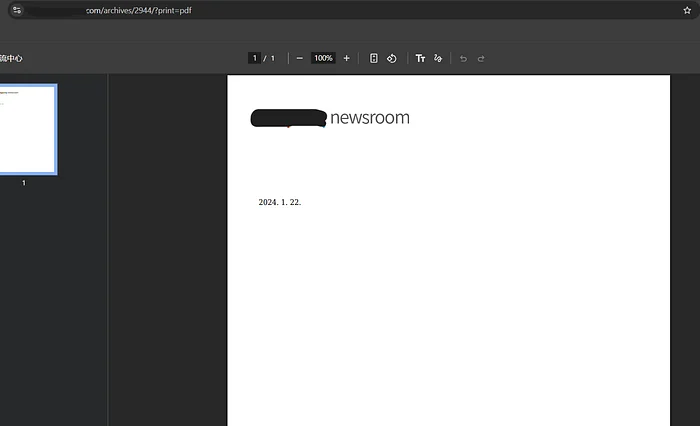
The target was a website running WordPress, and the feature under examination was its print endpoint. The site exposed a URL of the following shape, which normally generates a printable version of an article:
/archives/[POST_ID]/?print=pdf
On the surface this is a presentation feature: it takes a post identifier and a print parameter and renders the post in a printable form. The researcher's interest was in the fact that WordPress uses query parameters to decide which content is retrieved, so an endpoint that accepts parameters from the URL may accept more than the ones the feature intends.
Setup
No accounts, roles, proxy tooling or specific versions are described. The testing was done entirely in a browser: the researcher states that Burp Suite was not opened for this test. The site was identified as WordPress during reconnaissance and a print URL was found.
Finding it
The print URL looked harmless, but its structure suggested that the print parameter was not the only thing the endpoint might read. Because WordPress query parameters control which content is retrieved, the researcher wondered whether additional parameters would influence the result. Rather than starting with a complex payload, the first move was to edit the URL directly in the browser.
Exploitation
Step 1: request private posts
The first test was to see whether the endpoint would return private posts. The URL was modified to include these parameters:
?print=print-custom&post_status=private&posts_per_page=10
print=print-custom changes the print parameter to a custom mode. post_status=private asks WordPress for posts with the private status, and posts_per_page=10 sets how many records are returned. Loaded in the browser, the response appeared to contain private posts without requiring authentication.
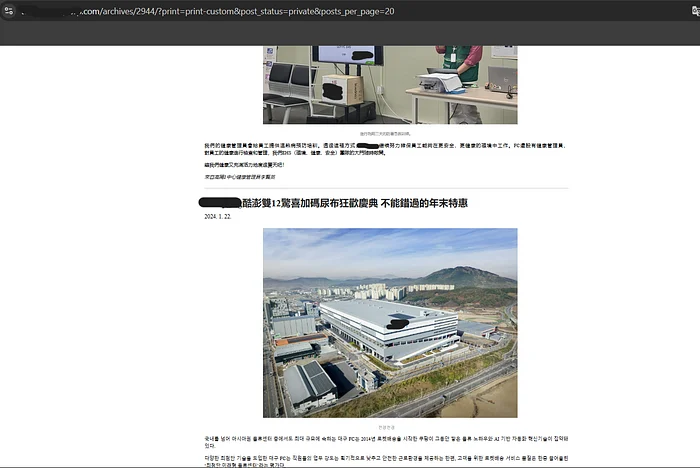
Changing the URL parameters appeared to expose content that was not publicly accessible. The feature was doing more than changing the output format: it was potentially letting a visitor influence which content WordPress retrieved.
Step 2: request drafts
A single result was not enough to establish scope, so the requested post status was changed from private to draft:
?print=print-custom&post_status=draft&posts_per_page=10
Again, the response appeared to return non-public content.
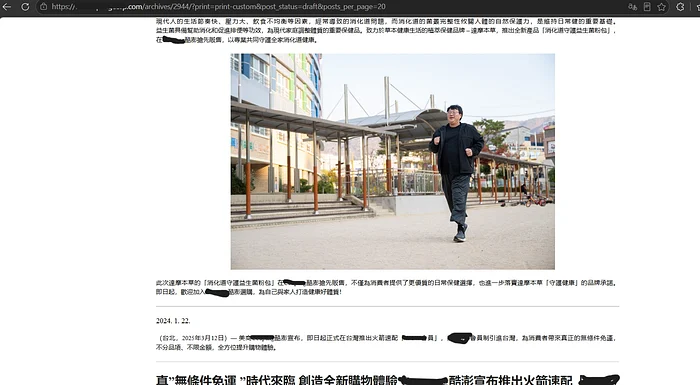
Further testing suggested that draft content could also be retrieved through the same feature.
Step 3: other content states
The researcher then tested other content states, including pending-review posts and private pages. The observations suggested the behaviour was not limited to one specific post or status. The custom print functionality also appeared to support PDF output.
The concern was now clear: if an unauthenticated visitor could retrieve these records, the endpoint could expose content that WordPress was supposed to keep restricted.
Step 4: reading the implementation
The browser test demonstrated the behaviour, but the cause required looking at the relevant code. The pattern the researcher investigated parses the query string from the request and passes the result into WordPress's content retrieval function:
parse_str($url_data['query'], $args);unset($args['print']);
if (!empty($args)) { $posts = query_posts($args);}
The important detail is that request parameters appear to be passed into query_posts() after removing only the print parameter. WordPress query arguments can influence which content is retrieved, including its post status and type. If the endpoint does not separately enforce authorisation, an unauthenticated user may be able to request content they should not see.
The fuller excerpt shows how the custom mode is reached:
$doc_type = explode( '-', $print );if ( isset( $doc_type[1] ) ) { switch ( $doc_type[1] ) { case 'custom': $url_data = isset( $_SERVER['REQUEST_URI'] ) ? wp_parse_url( sanitize_text_field( wp_unslash( urldecode( $_SERVER['REQUEST_URI'] ) ) ) ) : array(); parse_str( $url_data['query'], $args ); unset( $args['print'] ); if ( ! empty( $args ) ) { $posts = query_posts( $args ); } break; ...
The print value is split on the hyphen, and the second part selects the branch. In the custom branch, the request URI is sanitised and URL-decoded, parsed into an array, and everything except print is handed to query_posts(). The relevant code pattern suggests that user-controlled query parameters can influence content retrieval.
To be precise, query_posts() is not inherently a vulnerability. The security issue would be the absence of adequate authorisation and input restrictions in the endpoint's actual implementation.
Root cause
The endpoint takes the query string supplied by the visitor, strips only the print parameter, and passes the remainder to query_posts(). That function accepts arguments that select content by status and type, so a visitor can ask for private posts, drafts, pending-review posts and private pages. The shown code pattern does not include an authorisation check before the query runs. The sanitisation cleans the request URI string but does not restrict which query arguments are accepted.
Impact
An unauthenticated visitor could potentially retrieve:
- Private posts and pages that should require appropriate access.
- Unpublished drafts that may contain internal or unfinished material.
- Pending-review content that has not been approved for publication.
- Other content discoverable through supported query parameters.
The practical impact depends on what the exposed records contain. A harmless test draft has a different impact from a private page holding confidential information, which is why the finding should be assessed on the actual data exposed rather than on the number of records returned. The tests described used read-only requests and did not intentionally modify content.
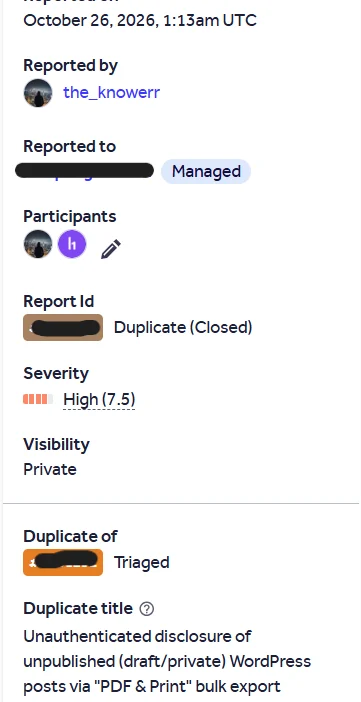
The issue was reported to the program and triaged as High severity, but it was marked as a duplicate of a previously reported issue.
Fix
The report does not describe a fix being applied.
Variants to test
- Look for other WordPress endpoints that accept a query string and forward it into
query_posts()orWP_Query. A positive result is a response containing posts whose status is not public. - A positive result is non-public content appearing in the generated document.
- A positive result is any record that the site does not show to anonymous visitors.
- A positive result is a larger set of non-public records than the default response.
- A positive result is a response whose contents change according to parameters the feature was not designed to accept.
What happened, in plain words
A security researcher was looking at a website built with WordPress, a very popular system for running blogs and content sites. WordPress stores articles, pages and other content in a database, and each item has a status: published (visible to everyone), private (visible only to certain logged-in people), draft (still being written), or pending (waiting for review before publication).
The site had a feature that produces a printable version of an article. You reach it through a web address (a URL) that looks like this:
/archives/[POST_ID]/?print=pdf
On the surface this is a presentation feature: it takes a post identifier and a print parameter and renders the post in a printable form. The researcher's interest was in the fact that WordPress uses query parameters to decide which content is retrieved, so an endpoint that accepts parameters from the URL may accept more than the ones the feature intends.
By editing that address in the browser's address bar, without any special tools, the researcher found that the page appeared to hand back content that was not supposed to be public: private posts, drafts and pending-review items. The site was reported to its bug bounty program, which rated the issue High severity, but it turned out someone had already reported the same problem, so it was closed as a duplicate.
This article walks through the same steps in the same order, explaining each idea from scratch as it comes up.
Background ideas you need first
Before the steps, a handful of everyday concepts. None of them require any software beyond a browser.
- WordPress: a system that runs a large share of the world's websites. You write an article in an admin area, it is saved in a database, and the public site shows it. Each saved item is called a post (an article) or a page (something like an About page).
- Post status: every post has one. Published means anyone can see it. Private means only chosen logged-in users can. Draft means the author is still working on it. Pending means it is waiting for an editor to approve it. Only published content is meant to be visible to a visitor who is not logged in.
- URL: the address in your browser bar, for example
example.com/archives/123/?print=pdf. The part after the?is called the query string. It is a list of name and value pairs joined by&, like?colour=red&size=large. Websites read these pairs to decide what to show. Think of the query string as the options you tick on an order form: the kitchen reads them and prepares your meal accordingly. - Parameter: one name and value pair in that query string. In
?print=pdf, the parameter name isprintand its value ispdf. - Endpoint: a specific address on a server that does a specific job, like a service counter in a building. The print endpoint is the counter that produces printable documents.
- Authentication: proving who you are, usually by logging in. Authorisation: what you are allowed to do once you are known. A visitor who has not logged in is called unauthenticated. The whole question here is whether the print counter checks who you are before handing over documents.
- Access control: the rules that decide who may see or change what. When those rules are missing or can be bypassed, the weakness is called an access-control vulnerability (sometimes broken access control). The everyday comparison: a hotel reception that gives out room keys to anyone who asks, without checking whether the person is a guest.
- Reconnaissance: the early, quiet phase of looking at a site to learn what it is built with and what features it has. Here it simply meant noticing the site runs WordPress and that a print address existed.
- Burp Suite: a well-known program that sits between your browser and a website so you can inspect and alter requests in detail. It is the usual tool for this kind of work. The researcher did not use it at all for this test, which is the point of the title.
- Payload: the crafted input an attacker sends to try to trigger a problem. Here the payload is just a modified URL.
- Read-only request: a request that only asks to view something and does not change or delete anything on the server. All the tests described were read-only.
1. A harmless-looking print feature
The site exposed a print URL similar to:
/archives/[POST_ID]/?print=pdf
Line by line, in plain words:
/archives/is the section of the site that holds articles.[POST_ID]is a placeholder for the number that identifies one particular article, for example123.?starts the query string, the list of options being sent to the server.print=pdfis one option: the name isprint, the value ispdf, meaning "give me this article as a PDF document".
At first, it looked like a normal feature designed to generate a printable version of an article. But URLs often reveal more than their intended purpose. WordPress uses query parameters to control how content is retrieved, so the researcher wondered whether this endpoint accepted additional parameters that could influence the results. In other words: if the kitchen reads the order form, what happens if you write extra items on it that the menu never offered?
Rather than starting with a complex payload, the researcher began by modifying the URL directly in the browser. This is the key beginner lesson: you do not need special tools to ask a website a slightly different question. You can type a new address and press Enter.
2. One parameter changed everything
The first test was to see whether the endpoint would return private posts. The URL was modified to include these parameters:
?print=print-custom&post_status=private&posts_per_page=10
Line by line:
print=print-customchanges the print parameter to a custom mode.&separates one parameter from the next, like a new line on the order form.post_status=privateasks WordPress for posts whose status is private, that is, the ones meant only for chosen logged-in users.posts_per_page=10is an additional parameter sent with the request.
Then the researcher loaded the URL in the browser. The response appeared to contain private posts without requiring authentication. No login, no password, no account: just a typed address.
That was the moment the test became interesting. A feature intended to generate a printable document appeared to be doing more than changing the output format: it was potentially allowing a visitor to influence which content WordPress retrieved. The print counter was not just formatting a document; it was choosing which documents to fetch, based on instructions written by the visitor.
Changing the URL parameters appeared to expose content that was not publicly accessible.
3. Were drafts exposed too?
A single result was not enough to understand the scope, so the researcher continued testing. Scope here means: how far does this go? One leaked private post could be a fluke or a misconfiguration; several different kinds of hidden content would show a pattern.
Next, the requested post status was changed from private to draft:
?print=print-custom&post_status=draft&posts_per_page=10
Line by line:
print=print-customis the same custom mode as before.post_status=draftnow asks for drafts, the articles their authors are still writing and have not published.posts_per_page=10is the same additional parameter as before.
Again, the response appeared to return non-public content.
Further testing suggested that draft content could also be retrieved through the same feature.
The researcher then tested other content states, including pending-review posts and private pages. The researcher's observations suggested that the behaviour was not limited to one specific post or status. The custom print functionality also appeared to support PDF output.
The key concern was now clear: if an unauthenticated visitor could retrieve these records, the endpoint could expose content that WordPress was supposed to keep restricted. The comparison: a library that lets anyone read the books on the open shelves is fine, but if the same request form also fetches boxes from the locked back room, the problem is not the form, it is the missing check at the door.
4. Looking beyond the browser
The browser test helped demonstrate the behaviour, but understanding the underlying cause required examining the relevant implementation. Implementation means the actual code the site runs. Seeing the result in a browser tells you something is wrong; reading the code tells you why, and why matters when you write a report or suggest a fix.
The code pattern the researcher investigated parses query parameters from the request and passes them into WordPress's content retrieval function:
parse_str($url_data['query'], $args);unset($args['print']);
Line by line:
parse_str($url_data['query'], $args);takes the raw query string from the request (the part after the?) and breaks it into a list of name and value pairs, stored in a variable called$args. It is the equivalent of reading the order form and writing each item on a separate line.unset($args['print']);removes the single entry namedprintfrom that list. Everything else stays.
So after these two lines, $args holds every parameter the visitor sent, except print.
if (!empty($args)) { $posts = query_posts($args);}
Line by line:
if (!empty($args))checks whether the list still has anything in it afterprintwas removed.$posts = query_posts($args);hands that whole list toquery_posts(), WordPress's function for fetching content from the database, and stores the result in$posts.
The important detail is that request parameters appear to be passed into query_posts() after removing only the print parameter. WordPress query arguments can influence which content is retrieved, including its post status and type. If the endpoint does not separately enforce authorisation, an unauthenticated user may be able to request content they should not see.
To be precise, query_posts() is not inherently a vulnerability. It is a normal tool that does exactly what it is told. The security issue would be the absence of adequate authorisation and input restrictions in the endpoint's actual implementation. The comparison: a key-cutting machine is not dangerous; handing it the master key pattern to anyone who walks in is.
The fuller excerpt shows how the custom mode is reached:
$doc_type = explode( '-', $print );if ( isset( $doc_type[1] ) ) { switch ( $doc_type[1] ) { case 'custom': $url_data = isset( $_SERVER['REQUEST_URI'] ) ? wp_parse_url( sanitize_text_field( wp_unslash( urldecode( $_SERVER['REQUEST_URI'] ) ) ) ) : array(); parse_str( $url_data['query'], $args ); unset( $args['print'] ); if ( ! empty( $args ) ) { $posts = query_posts( $args ); } break; ...
Line by line, in plain words:
$doc_type = explode( '-', $print );splits the value of theprintparameter at the hyphen character. Soprint-custombecomes two pieces:printandcustom.explodeis the name of the splitting function.if ( isset( $doc_type[1] ) ) {checks that a second piece exists, that is, that there was a hyphen and something after it.switch ( $doc_type[1] ) {looks at that second piece and picks a branch depending on its value.case 'custom':is the branch taken when the second piece is exactlycustom, which is whatprint=print-customproduces.$url_data = isset( $_SERVER['REQUEST_URI'] ) ? ... : array();reads the full request address from the server's record of it, if it is present, and otherwise uses an empty list.$_SERVER['REQUEST_URI']is simply the address the browser asked for.wp_parse_urlbreaks the address into its parts, such as the path and the query string.parse_str( $url_data['query'], $args );then splits the query string into name and value pairs, as before.unset( $args['print'] );removes only theprintentry.if ( ! empty( $args ) ) { $posts = query_posts( $args ); }passes everything else toquery_posts().break;ends this branch.
The print value is split on the hyphen, and the second part selects the branch. In the custom branch, the request URI is sanitised and URL-decoded, parsed into an array, and everything except print is handed to query_posts(). The relevant code pattern suggests that user-controlled query parameters can influence content retrieval.
One subtle point worth understanding: the cleaning steps (decoding, stripping characters) make the string tidy, but they do not decide which parameters are acceptable. Cleaning a form does not stop you writing an item the kitchen never offered. That is why the sanitisation here does not act as an access control.
5. What could an attacker access?
An unauthenticated visitor could potentially retrieve:
- Private posts and pages that should require appropriate access.
- Unpublished drafts that may contain internal or unfinished material.
- Pending-review content that has not been approved for publication.
- Other content discoverable through supported query parameters.
The practical impact depends on what the exposed records contain. A harmless test draft has a different impact from a private page containing confidential information. This is why the finding should be assessed based on the actual data exposed, not simply on the number of records returned. Ten empty drafts matter less than one private page with customer details.
The tests described here used read-only requests and did not intentionally modify content. Nothing was edited, deleted or published; the researcher only asked to view things.
Finally
This vulnerability was reported to the program and triaged as High severity, but it was marked as a duplicate of a previously reported issue. Triaged means the program's team reviewed it and assigned a severity rating. Duplicate means someone else had already reported the same problem.
Even though it was a duplicate, the research was a valuable learning experience.
Why this matters for a beginner
The lesson is not about a clever tool. It is about reading a URL and asking "what else might this accept?". The researcher noticed a parameter called print, guessed that the server might read other parameters too, and tried it in the address bar. That is a complete, valid test.
A few habits to take away:
- When you see a URL with a
?in it, treat the part after it as input you can change. Try changing values, adding parameters, removing them. - Ask what the feature is for, then ask what the server might do with input it was not designed for. A print button should format a document; it should not choose which documents exist.
- Test one change at a time so you know what caused what. The researcher changed the status from
privatetodraftand kept everything else the same. - Stay read-only unless you have permission to do more. Viewing is enough to demonstrate this kind of problem.
- When you find something, look at the code if you can, so you can explain the cause and not just the symptom.
Glossary
- Access control: the rules that decide who may see or change what on a site.
- Access-control vulnerability: a weakness where those rules are missing or can be bypassed, so someone sees or does something they should not.
- Burp Suite: a tool that sits between your browser and a website so you can inspect and alter requests; not used in this test.
- Database: the organised store where a site keeps its content.
- Draft: a post its author is still writing and has not published.
- Duplicate: a report of a problem that has already been reported before.
- Endpoint: a specific address on a server that performs a specific job.
- Implementation: the actual code a site runs.
- Parameter: one name and value pair in a query string, such as
print=pdf. - Payload: the crafted input sent to try to trigger a problem; here, a modified URL.
- Pending: a post waiting for review before publication.
- Post: a single piece of content in WordPress, such as an article.
- Post status: the state of a post: published, private, draft or pending.
- Private: a post status meaning only chosen logged-in users may see it.
- Published: a post status meaning anyone may see it.
- Query string: the part of a URL after the
?, made of name and value pairs joined by&. - Read-only request: a request that only views something and does not change or delete it.
- Reconnaissance: the early phase of learning what a site is built with and what features it has.
- Sanitisation: cleaning input by removing or encoding unwanted characters; it does not by itself decide what input is allowed.
- Scope: how far a problem extends, for example how many kinds of content are affected.
- Severity: a rating of how serious a problem is, such as High.
- Triaged: reviewed by the program's team and given a rating or decision.
- Unauthenticated: not logged in, so not identified to the site.
- URL: the address of a page or resource, as shown in the browser bar.
- WordPress: a widely used system for running blogs and content websites.

