I found 2 Zero-Days in popular Linux distros that includes Mint, Kali, Parrot
Two vulnerabilities in Linux document viewers Atril and Xreader allowed attackers to write arbitrary files via path traversal in EPUB files and to inject arguments into tar commands via CBT files, both leading to remote code execution. An attacker could achieve code execution by sending a crafted document or link to a victim.
 Published on febinj.medium.com
This is the story on how I found 2 Zero-Day Vulnerabilities (4 CVEs). The flaws affected a list popular Linux Desktop distros that inlcudes:
The full write-up lives on its author's site
It belongs to its author, so we link to it rather than copy it. The other two tabs are our own rewrites, checked against it.
Context
This is the story of two zero-day vulnerabilities, four CVEs in total, found in the default document viewers shipped by a long list of popular Linux desktop distributions:
- Linux Mint
- Kali Linux
- Parrot OS
- Ubuntu-Mate
- Xubuntu
- Fedora Cinnamon
- Fedora Mate
- Manjaro Mate
- Manjaro Cinnamon
- Ubuntu Kylin
- Kylin OS V10
The CVEs are:
| CVE | Component | Class |
|---|---|---|
| CVE-2023-44451 | Xreader | EPUB file parsing directory traversal RCE |
| CVE-2023-52076 | Atril | EPUB file parsing directory traversal RCE |
| CVE-2023-44452 | Xreader | CBT file parsing argument injection RCE |
| CVE-2023-51698 | Atril | CBT file parsing argument injection RCE |
The affected software is Atril and Xreader. Atril is the default document viewer of the MATE desktop environment and is the default reader on Kali Linux, Ubuntu-Mate, Parrot Security OS and Xubuntu. Xreader is the default document viewer of Linux Mint. Both are forks of Evince, the GNOME document reader, and both handle not only PDF but also EPUB and comic book archives (.cbr, .cbz, .cbt, .cb7).
Setup
The research was done on Kali Linux, logged in as root, with a sample .epub file downloaded from the internet. The tools used were the standard zip and unzip command line utilities. Reproduction was then done on the latest Kali ISO built as a VM, on a Parrot OS VM, on Ubuntu-MATE, and on Linux Mint. The CBT exploit script depends on poppler-utils, installed with:
apt install poppler-utils
Finding it
The starting point was archive formats: Zip, Tar, Rar and the software that handles them. The idea was to look at the EPUB format, because an .epub file is really a Zip archive with XML, HTML and other files packed inside, even though the format has its own standards.
The approach was deliberately simple: "What is the dumbest thing that could possibly work". Path traversal is one of the most common bugs in archives and archive-handling software. Zip Slip, disclosed on 5 June 2018 by the Snyk Security team, is one example that leads to arbitrary file overwrite and code execution, and path traversal in zip archives existed in the wild long before that. CVE-2018-20250 in WinRAR is another case where a path traversal could be exploited for RCE. Archives were designed in a period when security was not a priority, and that is where the problems start.
Exploitation
Step 1: add a file to an EPUB with zip -u
A sample .epub was downloaded and a file was added to it with the update flag of zip:
$ zip -u sample1.epub hello.txt
Listing the archive with unzip -l showed hello.txt inside the EPUB.
Step 2: prepend traversal gadgets to the filename
A bunch of ../../ gadgets were prepended to the filename hello.txt, and the crafted EPUB was opened graphically by clicking on it. The document opened and nothing visible happened, but hello.txt had been written under the Kali Linux root directory (/). Overwriting existing files did not work.
Step 3: confirm with a path under /tmp
Changing the filename to a deeper traversal such as ../../../../tmp/test.txt also worked: a file named test.txt was created under /tmp when the EPUB was opened.
At first this looked like a Kali Linux bug, so the latest Kali ISO was downloaded and a fresh VM built. It worked there too. The software opening EPUB files on Kali is Atril, which turned out to be the default document reader of the MATE desktop environment. The same reproduction worked on Parrot OS, on Ubuntu-MATE, and on Linux Mint, which uses Xreader. The MATE desktop environment itself is vulnerable.
Step 4: turn arbitrary file write into RCE
The bug can only create new files, not overwrite existing ones, but that is enough for command execution. The ways the author used:
- Write a malicious
.desktopentry under$HOME/.config/autostart/. Theautostart/directory behaves like the Windows startup folder and executes every.desktopentry inside it at login. An unlimited number of.desktopfiles with random names can be dropped there, so no overwrite is needed. After logging out and back in, the entry triggered and gave remote command execution. - Write an
authorized_keysfile under the.ssh/directory in the user's home. If SSH is enabled on the target, this gives immediate command execution over SSH. - Write files such as
.bash_profile,.bash_login,.zshrc,.cshrc,.vimrcor.xsessionunder the user's home directory. Many of these may be missing depending on the OS; on Ubuntu-Mate and Linux Mint,.bash_profileand.bash_loginare not present, so placing them with malicious commands results in RCE when the user logs in without GUI mode, for example over SSH. - Write files into locations such as
~/.local/bin,~/.local/lib/python3.9/site-packages/,~/.local/lib/python3.10/site-packages/,~/.local/lib/python3.11/site-packages/,~/.local/share/applications/,/var/www/html/,/var/www/and so on.
If a directory in the target path does not exist, it is created automatically.
Step 5: disguise the EPUB as a PDF
Renaming the crafted .epub to something .pdf still works: Atril and Xreader are responsible for both EPUB and PDF and read the renamed file as an EPUB. The crafted document can therefore be sent as a PDF.
Step 6: avoid needing the username with /proc/self/cwd
Writing to /home/<user>/.config/autostart/ requires knowing the target username. To avoid guessing, the traversal can go through /proc/self/cwd, which points at the directory the document was opened from. If the victim downloads the document and opens it somewhere inside the home directory, such as ~/Downloads/ or ~/Documents/, the following gadget reaches the home directory without knowing the username:
../../../../../proc/self/cwd/../.config/autostart/exploit.desktop
A fully working exploit for this vulnerability (exploit_rce.sh) and a script to write and include custom files for path traversal (exploit_file_write.sh) were published. The demo on Linux Mint opens the Calculator app as a proof of concept.
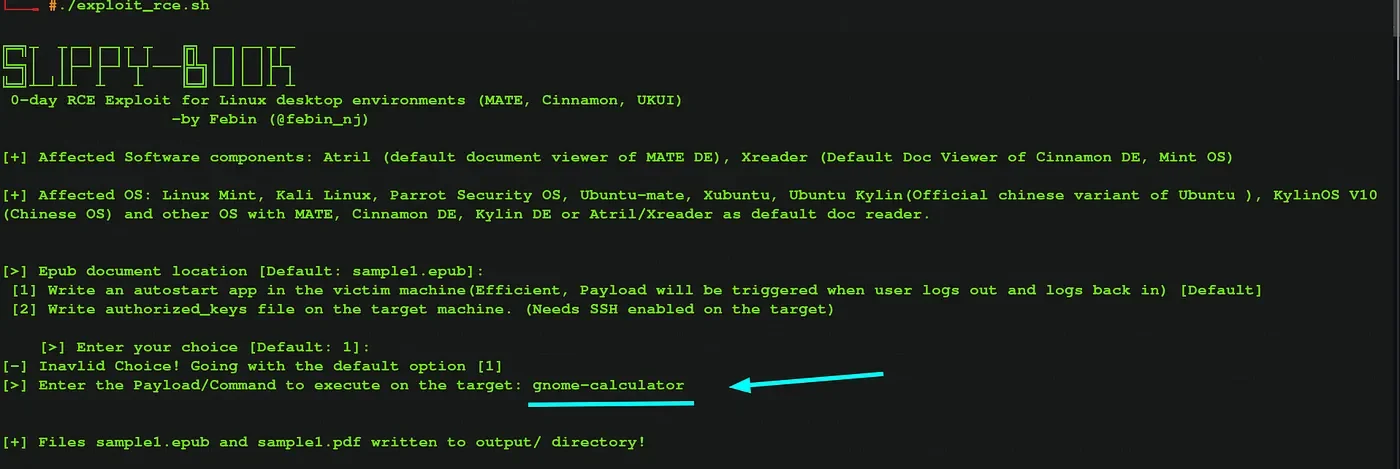
Exploit repository: https://github.com/febinrev/slippy-book-exploit.git
Zero Day Initiative advisory: https://www.zerodayinitiative.com/advisories/ZDI-23-1835/
Root cause
The EPUB bug is a path traversal combined with an arbitrary file write in the EPUB parsing of Atril and Xreader. An entry can be written anywhere the user opening the document has access, and the only limitation is that existing files cannot be overwritten. The only limitation is that existing files cannot be overwritten.
Impact
The EPUB bug gives remote command execution and system compromise, rated critical. It is particularly relevant against security researchers, who mostly use Kali and Parrot OS, and against desktop users on Linux Mint. Exploitation requires the victim to open the crafted document, and the document can be presented as a PDF.
2. CBT File Parsing Argument Injection
This bug is more dangerous: a URL or link is the only thing needed to trigger RCE. If a victim visits the link, the RCE triggers immediately and the attacker gets a shell. It is a critical one-click RCE/command injection affecting popular Linux operating systems with MATE, Cinnamon and some Xfce desktop environments. These are the author's 9th and 11th CVEs.
Vulnerability summary
The flaw allows remote attackers to execute arbitrary code on affected installations of Linux Mint Xreader. User interaction is required: the target must visit a malicious page or open a malicious file. The flaw exists within the parsing of CBT files and results from the lack of proper validation of a user-supplied string before it is used to execute a system call. An attacker can execute code in the context of the current user.
The cause is a bad code segment in Atril and Xreader that handles comic book documents (.cbr, .cbz, .cbt, .cb7). These are archives containing images. The bug is exploited with a maliciously crafted CBT document, which is a TAR archive.
Root cause: comics-document.c
The vulnerable code segment in both viewers:
static const ComicBookDecompressCommand command_usage_def[] = {
/* RARLABS unrar */
{"%s p -c- -ierr --", "%s vb -c- -- %s", NULL , FALSE, NO_OFFSET},
/* GNA! unrar */
{NULL , "%s t %s" , "%s -xf %s %s" , FALSE, NO_OFFSET},
/* unzip */
{"%s -p -C --" , "%s %s" , NULL , TRUE , OFFSET_ZIP},
/* 7zip */
{NULL , "%s l -- %s" , "%s x -y %s -o%s", FALSE, OFFSET_7Z},
/* tar */
{"%s -xOf" , "%s -tf %s" , NULL , FALSE, NO_OFFSET},
/* UNARCHIVER */
{"unar -o -" , "%s %s" , NULL , FALSE, NO_OFFSET}
};
The table contains shell commands used for decompression. The /* tar */ entry calls tar -xOf and tar -tf to view and load each image inside the CBT document. This can be exploited with the tar option --checkpoint-action to execute arbitrary commands, by naming one of the images inside the CBT document like this:
--checkpoint-action=EXEC=bash -c "whoami>/tmp/who.txt";.jpg
Why the old fix does not hold
The same vulnerability was found in Evince, the default document reader of GNOME, back in 2017. Atril and Xreader are forks of Evince, so both carried it. Atril's team fixed it at the time by adding code that quits the Atril process when a CBT file has --checkpoint-action= in its name. The patch in comics-document.c (line 983):
extract_argv (EvDocument *document, gint page)
{
ComicsDocument *comics_document = COMICS_DOCUMENT (document);
char **argv;
char *command_line, *quoted_archive, *quoted_filename;
GError *err = NULL;

if (g_strrstr (comics_document->page_names->pdata[page], "--checkpoint-action="))
{
g_warning ("File unsupported\n");
gtk_main_quit ();
}
The check prints "File unsupported" to the console and quits when it sees --checkpoint-action= in a page or filename. The author noticed that this only works with an empty file or a really small image file. With a larger file containing more bytes, the gtk_main_quit (); call fails, the process keeps running, and the injected command is executed.
Triggering it
In the MATE desktop environment, and in many Xfce and lightweight desktop environments (including Kali, Parrot, Xubuntu, Ubuntu Mate, Kylin, Fedora Mate and Manjaro Mate), the bug can be exploited by sending a link or URL. These systems have Atril, and Atril has an additional component called atril-previewer that triggers the exploit without the document being opened or clicked. An attacker can craft a webpage that instantly downloads the crafted CBT file when the victim visits it, and the latest Firefox browser downloads automatically by default without user confirmation. When the user navigates to the Downloads directory, the payload executes and gives the attacker a shell.
On Linux Mint (Cinnamon desktop environment), the user must open the document to trigger the payload, because Linux Mint uses Xreader and Xreader has no previewer.
Demo scenario
- Attacker machine: Kali Linux
- Victim machine: Kali Linux latest edition (2023.3)
- The victim visits the malicious URL or link generated by the exploit script
Exploit repository: https://github.com/febinrev/atril_cbt-inject-exploit.git
Exploit dependency: poppler-utils, installed with apt install poppler-utils before running the exploit script on Linux (Kali preferred).
GitHub advisory on MATE Atril: https://github.com/mate-desktop/atril/security/advisories/GHSA-34rr-j8v9-v4p2
Zero Day Initiative advisory on Mint Xreader: https://www.zerodayinitiative.com/advisories/ZDI-23-1836/
Impact
The CBT bug executes code in the context of the current user. On MATE and the listed Xfce and lightweight environments, visiting a link downloads the crafted CBT automatically in Firefox, and the payload executes when the user opens the Downloads directory. On Linux Mint with Xreader, opening the document is required. The EPUB bug writes arbitrary files as the user who opens the document, which leads to command execution through autostart entries, authorized_keys, shell startup files or other writable locations, and can be delivered disguised as a PDF.
Fix
Atril had previously added the --checkpoint-action= check in comics-document.c, and the author showed that the check is bypassed by a sufficiently large image file because gtk_main_quit (); fails. The report's closing advice is to update the document viewers to the latest version on the distributions. The advisories referenced are ZDI-23-1835 and ZDI-23-1836, and the MATE Atril GitHub advisory GHSA-34rr-j8v9-v4p2.
Variants to test
- Other archive-backed document formats opened by the same viewers. Add an entry with
../../gadgets usingzip -uand open the document; a positive result is a new file appearing outside the document's directory, for example under/tmp. - Renamed documents. Rename a crafted
.epubto.pdfand open it in Atril or Xreader; a positive result is the same file write, because the viewer reads it as an EPUB. - Username-independent traversal. Use a gadget through
/proc/self/cwd/../from a document opened in~/Downloads/; a positive result is a file created in the home directory without knowing the username. - Autostart persistence. Write a
.desktopentry under$HOME/.config/autostart/, log out and back in; a positive result is execution of the entry. - SSH key injection. Write an
authorized_keysunder.ssh/; a positive result is SSH command execution if SSH is enabled. - Shell startup files. Write
.bash_profile,.bash_login,.zshrc,.cshrc,.vimrcor.xsessionin the home directory and log in without GUI mode; a positive result is execution of the commands inside. - Argument injection in CBT. Name an image inside a TAR-based CBT file with a tar option such as
--checkpoint-action=EXEC=...; a positive result is execution of the command when the document is previewed or opened. Try both a tiny or empty image, where the existing check quits, and a larger image, where the check fails. - Previewer-triggered download. Serve the crafted CBT from a webpage and visit it in Firefox on a MATE system; a positive result is the payload executing when the Downloads directory is opened, without clicking the document.
What happened, in plain words
A security researcher found two serious bugs in the programs that many Linux computers use to open documents. These programs are called document viewers. When you double-click a PDF or an ebook on a Linux desktop, a document viewer is the program that appears on screen and shows you the pages.
The two bugs were found in two viewers called Atril and Xreader. Atril is the default viewer on the MATE desktop environment, and it ships as the default reader on Kali Linux, Ubuntu-Mate, Parrot Security OS and Xubuntu. Xreader is the default viewer on Linux Mint. Both programs are based on an older program called Evince, which is the default reader on the GNOME desktop. Because they share the same family tree, a bug in one often exists in the others.
The bugs were given four official tracking numbers, called CVEs. A CVE is like a reference number in a public catalogue of known security problems, so that everyone can talk about the same bug unambiguously.
| CVE | Program | Kind of bug |
|---|---|---|
| CVE-2023-44451 | Xreader | EPUB file parsing directory traversal RCE |
| CVE-2023-52076 | Atril | EPUB file parsing directory traversal RCE |
| CVE-2023-44452 | Xreader | CBT file parsing argument injection RCE |
| CVE-2023-51698 | Atril | CBT file parsing argument injection RCE |
The first bug lets a crafted ebook file drop new files anywhere the person opening it is allowed to write. The second bug lets a crafted comic book file run commands on the computer, and in some setups simply visiting a web link is enough. Both bugs were found in the default software of a long list of popular Linux distributions:
- Linux Mint
- Kali Linux
- Parrot OS
- Ubuntu-Mate
- Xubuntu
- Fedora Cinnamon
- Fedora Mate
- Manjaro Mate
- Manjaro Cinnamon
- Ubuntu Kylin
- Kylin OS V10
Kali Linux and Parrot OS are popular with security professionals and researchers. Linux Mint is popular with ordinary desktop users. Kali Linux and Parrot OS are popular with security professionals and researchers, and Linux Mint is popular with ordinary desktop users.
The two programs, and the file types they open
Atril and Xreader do not only open PDF files. They also open EPUB files, which is the common ebook format, and comic book archives with the extensions .cbr, .cbz, .cbt and .cb7. Atril and Xreader also open EPUB files and comic book archives with the extensions .cbr, .cbz, .cbt and .cb7.
To follow the rest of this article you only need to know three everyday ideas:
- An archive is a single file that contains other files inside it, like a cardboard box holding many smaller items. A Zip file is the most familiar example.
- A path is the address of a file on a computer, such as
Downloads/report.pdf. The two dots..mean "go up one folder". So../means "the folder above the current one". - A command is an instruction you type to make the computer do something, such as
whoami, which prints the name of the user you are logged in as.
Setting up the research
The research was done on Kali Linux, logged in as root. Root is the administrator account on Linux, the one with permission to do anything. A sample .epub file was downloaded from the internet to use as a starting point. The tools used were zip and unzip, two standard command line programs for packing and unpacking Zip archives.
After the first results, the bug was reproduced on a fresh Kali Linux virtual machine built from the latest ISO, on a Parrot OS virtual machine, on Ubuntu-MATE, and on Linux Mint. A virtual machine, or VM, is a whole computer simulated inside a window on your normal computer, which is handy for testing without risking your real system.
The second exploit script needs a helper package called poppler-utils, installed with:
apt install poppler-utils
Line by line:
aptis the package manager on Debian-based Linux systems such as Kali. It is the program that installs and removes software.installtellsaptwhat to do: install a package.poppler-utilsis the name of the package being installed, which the exploit script depends on.
Finding the first bug
The starting point was archive formats: Zip, Tar, Rar, and the software that handles them. The idea was to look at EPUB, because an .epub file is really a Zip archive with XML, HTML and other files packed inside, even though the format has its own rules and standards.
The approach was deliberately simple: "What is the dumbest thing that could possibly work". That is a useful mindset for a beginner, because it avoids complicated techniques and focuses on the simplest possible test.
One of the most common bugs in archive software is called path traversal. It happens when a program takes a file name from inside an archive and uses it as a path on the real disk without checking it. If the name starts with ../, the file lands outside the folder where it should have gone. A famous example is Zip Slip, disclosed on 5 June 2018 by the Snyk Security team, which led to arbitrary file overwrite and code execution in many products. Path traversal in Zip archives existed in the wild long before that. Another example is CVE-2018-20250 in WinRAR, where a path traversal could be exploited for RCE.
RCE stands for Remote Code Execution: an attacker somewhere else manages to make the victim's computer run commands of the attacker's choosing. That is the worst outcome in this kind of bug, because from there the attacker can do almost anything the logged-in user can do.
Archives were designed in a period when security was not a priority, and that is where the problems start.
Exploitation, step by step
Step 1: add a file to an EPUB with zip -u
A sample .epub was downloaded and a file was added to it with the update flag of zip:
$ zip -u sample1.epub hello.txt
Line by line:
$is the shell prompt. It is not typed; it just shows that a command follows.zipis the program that creates or updates Zip archives.-umeans update: add the named file to the archive, or replace it if it is already there.sample1.epubis the archive being modified. Even though the extension is.epub, the program treats it as a normal Zip file, which is exactly the point.hello.txtis the file being added.
Listing the archive with unzip -l showed hello.txt inside the EPUB. The -l flag means list: it prints the contents of the archive without extracting anything. This step was a sanity check: if a plain text file can be added to an EPUB, then the researcher controls what goes inside the archive, and can control the file names too.
Step 2: prepend traversal gadgets to the filename
A bunch of ../../ gadgets were prepended to the filename hello.txt, and the crafted EPUB was opened graphically by clicking on it. The document opened and nothing visible happened, but hello.txt had been written under the Kali Linux root directory (/). Overwriting existing files did not work.
A gadget here just means a small piece of text used as a building block, in this case the ../ sequences. The root directory / is the top of the whole filesystem, the equivalent of the very top of a filing cabinet. Writing a file there means the viewer followed the ../ instructions all the way up and then wrote the file at the top, which it should never have allowed.
Step 3: confirm with a path under /tmp
Changing the filename to a deeper traversal such as ../../../../tmp/test.txt also worked: a file named test.txt was created under /tmp when the EPUB was opened. /tmp is a scratch folder that every user can write to, so it is a safe place to prove the bug without touching anything important.
At first this looked like a Kali Linux bug, so the latest Kali ISO was downloaded and a fresh VM built. It worked there too. The software opening EPUB files on Kali is Atril, which turned out to be the default document reader of the MATE desktop environment. The same reproduction worked on Parrot OS, on Ubuntu-MATE, and on Linux Mint, which uses Xreader. The MATE desktop environment itself is vulnerable. This is why the researcher tested several distributions: a bug in a shared component affects every system that ships that component, not just the one where it was first noticed.
Step 4: turn arbitrary file write into RCE
The bug can only create new files, not overwrite existing ones, but that is enough for command execution. The ways the author used:
- Write a malicious
.desktopentry under$HOME/.config/autostart/. Theautostart/directory behaves like the Windows startup folder and executes every.desktopentry inside it at login. An unlimited number of.desktopfiles with random names can be dropped there, so no overwrite is needed. After logging out and back in, the entry triggered and gave remote command execution. - Write an
authorized_keysfile under the.ssh/directory in the user's home. If SSH is enabled on the target, this gives immediate command execution over SSH. - Write files such as
.bash_profile,.bash_login,.zshrc,.cshrc,.vimrcor.xsessionunder the user's home directory. Many of these may be missing depending on the OS; on Ubuntu-Mate and Linux Mint,.bash_profileand.bash_loginare not present, so placing them with malicious commands results in RCE when the user logs in without GUI mode, for example over SSH. - Write files into locations such as
~/.local/bin,~/.local/lib/python3.9/site-packages/,~/.local/lib/python3.10/site-packages/,~/.local/lib/python3.11/site-packages/,~/.local/share/applications/,/var/www/html/,/var/www/and so on.
Some of these need a short explanation:
$HOMEand~both mean the user's home folder, the personal space where their documents and settings live.- A
.desktopentry is a small text file that tells the desktop what program to launch. Theautostartfolder is the list of programs the desktop launches automatically when the user logs in, which is why dropping a file there is so powerful. authorized_keysis the file that lists which SSH keys are allowed to log in as that user. SSH is the standard way to log in to a Linux machine remotely over the network. Adding a key there is like adding a spare key to the front door.- Files such as
.bash_profileand.zshrcare startup scripts for the shell, the text-based command interface. When the shell starts, it reads them and runs whatever they contain. - The
site-packagesfolders are where Python stores installed libraries. Writing there can make Python load attacker code the next time a program runs. /var/www/htmland/var/wwware common folders where web servers keep the pages they serve.
If a directory in the target path does not exist, it is created automatically. That detail matters, because it means the attacker does not need to know which folders already exist on the victim's machine.
Step 5: disguise the EPUB as a PDF
Renaming the crafted .epub to something .pdf still works: Atril and Xreader are responsible for both EPUB and PDF and read the renamed file as an EPUB. The crafted document can therefore be sent as a PDF. This matters because people are used to PDFs and open them without thinking, while an unexpected ebook file might raise suspicion.
Step 6: avoid needing the username with /proc/self/cwd
Writing to /home/<user>/.config/autostart/ requires knowing the target username. To avoid guessing, the traversal can go through /proc/self/cwd, which points at the directory the document was opened from. If the victim downloads the document and opens it somewhere inside the home directory, such as ~/Downloads/ or ~/Documents/, the following gadget reaches the home directory without knowing the username:
../../../../../proc/self/cwd/../.config/autostart/exploit.desktop
Line by line:
../../../../../climbs five folders up from wherever the file is being written.proc/self/cwdis a special path on Linux.procis a virtual folder that the kernel uses to expose information about running programs.selfmeans "the program doing this right now", andcwdmeans "current working directory". The report says this path can be used to access the user's home directory if the document is downloaded and opened somewhere inside it.../goes up one more level, from that folder to the home directory itself..config/autostart/exploit.desktopis the file to create: an autostart entry namedexploit.desktop.
A fully working exploit for this vulnerability (exploit_rce.sh) and a script to write and include custom files for path traversal (exploit_file_write.sh) were published. The demo on Linux Mint opens the Calculator app as a proof of concept. Opening the Calculator is a harmless way to show that the attacker's command really ran, without doing any damage.
Exploit repository: https://github.com/febinrev/slippy-book-exploit.git
Zero Day Initiative advisory: https://www.zerodayinitiative.com/advisories/ZDI-23-1835/
Why the first bug works
The EPUB bug is a path traversal combined with an arbitrary file write in the EPUB parsing of Atril and Xreader. The archive entry name is used as a filesystem path without sanitising ../ sequences, so an entry can be written anywhere the user opening the document has access. The only limitation is that existing files cannot be overwritten.
In plain words: the viewer trusts the name written inside the archive. It should check that the name stays inside the folder where the document is being unpacked, but it does not, so the name can climb out and land anywhere.
What the first bug means for victims
The EPUB bug gives remote command execution and system compromise, rated critical. It is particularly relevant against security researchers, who mostly use Kali and Parrot OS, and against desktop users on Linux Mint. Exploitation requires the victim to open the crafted document, and the document can be presented as a PDF.
The second bug: CBT file parsing argument injection
This bug is more dangerous: a URL or link is the only thing needed to trigger RCE. If a victim visits the link, the RCE triggers immediately and the attacker gets a shell. A shell is a command prompt on the victim's machine, controlled by the attacker. It is a critical one-click RCE and command injection affecting popular Linux operating systems with MATE, Cinnamon and some Xfce desktop environments. These are the author's 9th and 11th CVEs.
What the bug is, in plain words
The flaw allows remote attackers to execute arbitrary code on affected installations of Linux Mint Xreader. User interaction is required: the target must visit a malicious page or open a malicious file. The flaw exists within the parsing of CBT files and results from the lack of proper validation of a user-supplied string before it is used to execute a system call. An attacker can execute code in the context of the current user.
A CBT file is a comic book archive built on TAR, another archive format. The viewer opens it by running the tar command on it. The bug is that the viewer passes file names from inside the archive straight to tar as if they were options. On the command line, anything starting with a dash is treated as an option rather than a file name. So a file named like an option becomes an instruction to tar itself. This is called argument injection: the attacker's data is interpreted as part of the command's arguments.
The vulnerable code
The cause is a bad code segment in Atril and Xreader that handles comic book documents (.cbr, .cbz, .cbt, .cb7). These are archives containing images. The bug is exploited with a maliciously crafted CBT document, which is a TAR archive.
The vulnerable code segment in both viewers:
static const ComicBookDecompressCommand command_usage_def[] = {
/* RARLABS unrar */
{"%s p -c- -ierr --", "%s vb -c- -- %s", NULL , FALSE, NO_OFFSET},
/* GNA! unrar */
{NULL , "%s t %s" , "%s -xf %s %s" , FALSE, NO_OFFSET},
/* unzip */
{"%s -p -C --" , "%s %s" , NULL , TRUE , OFFSET_ZIP},
/* 7zip */
{NULL , "%s l -- %s" , "%s x -y %s -o%s", FALSE, OFFSET_7Z},
/* tar */
{"%s -xOf" , "%s -tf %s" , NULL , FALSE, NO_OFFSET},
/* UNARCHIVER */
{"unar -o -" , "%s %s" , NULL , FALSE, NO_OFFSET}
};
Line by line:
static const ComicBookDecompressCommand command_usage_def[] = {starts a table of commands. Each row describes how to unpack one kind of comic book archive.static constmeans the table is fixed and shared, not changed at runtime./* RARLABS unrar */and the row below it describe the commands for the RARLABS version ofunrar, the tool that unpacks RAR files./* GNA! unrar */and its row describe the commands for another version ofunrar./* unzip */and its row describe the commands forunzip, used for Zip-based comic archives./* 7zip */and its row describe the commands for7z, used for 7-Zip-based comic archives./* tar */and its row describe the commands fortar, used for CBT archives. The two strings"%s -xOf"and"%s -tf %s"are the commands that list and extract the images. The%splaceholders are where the program name and the file name get filled in./* UNARCHIVER */and its row describe the commands forunar, another unpacking tool.};closes the table.
The table contains shell commands used for decompression. The /* tar */ entry calls tar -xOf and tar -tf to view and load each image inside the CBT document. This can be exploited with the tar option --checkpoint-action to execute arbitrary commands, by naming one of the images inside the CBT document like this:
--checkpoint-action=EXEC=bash -c "whoami>/tmp/who.txt";.jpg
Line by line:
--checkpoint-action=is a real option oftar. It tellstarto run a command at certain points while it works.EXEC=tellstarthat the action is to execute a program.bash -c "whoami>/tmp/who.txt"is the program and its argument.bashis the shell,-cmeans "run the following text as a command", and the text inside the quotes runswhoamiand saves its output into/tmp/who.txt.;.jpgis tacked on the end so the whole thing still looks like an image file name to a casual glance.
Because the viewer passes this name to tar as if it were an option, tar obeys it and runs the command. The whoami output in /tmp/who.txt is a harmless proof that the command ran.
Why the old fix does not hold
The same vulnerability was found in Evince, the default document reader of GNOME, back in 2017. Atril and Xreader are forks of Evince, so both carried it. A fork is a copy of a program that then develops separately. Atril's team fixed it at the time by adding code that quits the Atril process when a CBT file has --checkpoint-action= in its name. The patch in comics-document.c (line 983):
extract_argv (EvDocument *document, gint page)
{
ComicsDocument *comics_document = COMICS_DOCUMENT (document);
char **argv;
char *command_line, *quoted_archive, *quoted_filename;
GError *err = NULL;

if (g_strrstr (comics_document->page_names->pdata[page], "--checkpoint-action="))
{
g_warning ("File unsupported\n");
gtk_main_quit ();
}
Line by line:
extract_argv (EvDocument *document, gint page)is the function that builds the command line for one page of the comic.argvis the list of arguments that will be handed to the program.- The next lines declare local variables: the document object, the argument list, strings for the command line and the archive and file names, and an error holder.
if (g_strrstr (comics_document->page_names->pdata[page], "--checkpoint-action="))is the check.g_strrstrsearches a string for a piece of text. It looks at the name of the current page and asks whether it contains--checkpoint-action=.g_warning ("File unsupported\n");prints a warning to the console saying the file is not supported.gtk_main_quit ();asks the graphical program to shut down.
The check prints "File unsupported" to the console and quits when it sees --checkpoint-action= in a page or filename. The author noticed that this only works with an empty file or a really small image file. With a larger file containing more bytes, the gtk_main_quit (); call fails, the process keeps running, and the injected command is executed. In other words, the fix was a guard that could be knocked over by simply making the image big enough.
How the second bug is triggered
In the MATE desktop environment, and in many Xfce and lightweight desktop environments (including Kali, Parrot, Xubuntu, Ubuntu Mate, Kylin, Fedora Mate and Manjaro Mate), the bug can be exploited by sending a link or URL. These systems have Atril, and Atril has an additional component called atril-previewer that triggers the exploit without the document being opened or clicked. A previewer is a small helper that generates a thumbnail or preview of a file so the file manager can show it. Because it runs automatically, the malicious file is processed the moment it lands on disk.
An attacker can craft a webpage that instantly downloads the crafted CBT file when the victim visits it, and the latest Firefox browser downloads automatically by default without user confirmation. When the user navigates to the Downloads directory, the payload executes and gives the attacker a shell. The user does not have to click the file; the previewer does the work.
On Linux Mint (Cinnamon desktop environment), the user must open the document to trigger the payload, because Linux Mint uses Xreader and Xreader has no previewer. That makes the Mint case one click instead of zero clicks, but still dangerous.
The demo scenario
- Attacker machine: Kali Linux
- Victim machine: Kali Linux latest edition (2023.3)
- The victim visits the malicious URL or link generated by the exploit script
Exploit repository: https://github.com/febinrev/atril_cbt-inject-exploit.git
Exploit dependency: poppler-utils, installed with apt install poppler-utils before running the exploit script on Linux (Kali preferred).
GitHub advisory on MATE Atril: https://github.com/mate-desktop/atril/security/advisories/GHSA-34rr-j8v9-v4p2
Zero Day Initiative advisory on Mint Xreader: https://www.zerodayinitiative.com/advisories/ZDI-23-1836/
What the second bug means for victims
The CBT bug executes code in the context of the current user. On MATE and the listed Xfce and lightweight environments, visiting a link downloads the crafted CBT automatically in Firefox, and the payload executes when the user opens the Downloads directory. On Linux Mint with Xreader, opening the document is required. The EPUB bug writes arbitrary files as the user who opens the document, which leads to command execution through autostart entries, authorized_keys, shell startup files or other writable locations, and can be delivered disguised as a PDF.
The fix
Atril had previously added the --checkpoint-action= check in comics-document.c, and the author showed that the check is bypassed by a sufficiently large image file because gtk_main_quit (); fails. The report's closing advice is to update the document viewers to the latest version on the distributions. The advisories referenced are ZDI-23-1835 and ZDI-23-1836, and the MATE Atril GitHub advisory GHSA-34rr-j8v9-v4p2.
Things worth testing yourself
If you want to explore this area on your own machine, here are the same ideas written as experiments. Only do this on a computer you own or a virtual machine you built for the purpose.
- Other archive-backed document formats opened by the same viewers. Add an entry with
../../gadgets usingzip -uand open the document; a positive result is a new file appearing outside the document's directory, for example under/tmp. - Renamed documents. Rename a crafted
.epubto.pdfand open it in Atril or Xreader; a positive result is the same file write, because the viewer reads it as an EPUB. - Username-independent traversal. Use a gadget through
/proc/self/cwd/../from a document opened in~/Downloads/; a positive result is a file created in the home directory without knowing the username. - Autostart persistence. Write a
.desktopentry under$HOME/.config/autostart/, log out and back in; a positive result is execution of the entry. - SSH key injection. Write an
authorized_keysunder.ssh/; a positive result is SSH command execution if SSH is enabled. - Shell startup files. Write
.bash_profile,.bash_login,.zshrc,.cshrc,.vimrcor.xsessionin the home directory and log in without GUI mode; a positive result is execution of the commands inside. - Argument injection in CBT. Name an image inside a TAR-based CBT file with a tar option such as
--checkpoint-action=EXEC=...; a positive result is execution of the command when the document is previewed or opened. Try both a tiny or empty image, where the existing check quits, and a larger image, where the check fails. - Previewer-triggered download. Serve the crafted CBT from a webpage and visit it in Firefox on a MATE system; a positive result is the payload executing when the Downloads directory is opened, without clicking the document.
Glossary
- Archive: a single file that contains other files inside it, such as a Zip or Tar file.
- Argument injection: a bug where data supplied by an attacker is treated as options or arguments of a command, so the attacker can change what the command does.
- Atril: the default document viewer of the MATE desktop environment, used on Kali Linux, Ubuntu-Mate, Parrot Security OS and Xubuntu.
- Autostart: the folder
$HOME/.config/autostart/whose.desktopentries the desktop launches automatically at login. - authorized_keys: the file listing which SSH keys may log in as a user.
- CBT: a comic book archive built on the TAR format, opened by Atril and Xreader.
- Command: an instruction given to a computer, usually typed in a shell.
- Command injection: a bug where attacker-controlled text ends up being run as a command.
- CVE: a public reference number for a known security vulnerability.
- CWD (current working directory): the folder a running program was started from.
- Desktop environment: the graphical layer of a Linux system, such as MATE, Cinnamon or Xfce, that provides the windows, menus and file manager.
- Document viewer: a program that displays documents such as PDFs and ebooks.
- EPUB: a common ebook format, which is really a Zip archive containing XML, HTML and other files.
- Evince: the default document viewer of the GNOME desktop, from which Atril and Xreader are forked.
- Fork: a copy of a software project that then develops separately from the original.
- Gadget: a small piece of text used as a building block in an exploit, such as a
../sequence. - Home directory: the personal folder of a user, written
~or$HOME, where their documents and settings live. - ISO: a disk image file, often used to install or boot an operating system in a virtual machine.
- MATE: a Linux desktop environment; its default document viewer is Atril.
- Path: the address of a file or folder on a computer.
- Path traversal: a bug where
../sequences in a file name let a file be written outside the intended folder. - poppler-utils: a package of small tools for working with PDF files, needed by the CBT exploit script.
- Previewer: a helper component that generates previews or thumbnails of files automatically, without the user opening them.
- RCE (Remote Code Execution): a bug that lets an attacker make the victim's computer run commands of the attacker's choosing.
- Root: the administrator account on Linux, with permission to do anything on the system.
- Shell: the text-based interface where you type commands.
- SSH: the standard way to log in to a Linux machine remotely over a network.
- TAR: an archive format commonly used on Linux.
- Virtual machine (VM): a whole computer simulated inside a window on a real computer, useful for safe testing.
- Xreader: the default document viewer of Linux Mint.
- Zero-day: a vulnerability that is not yet publicly known or fixed when it is found.
- Zip Slip: a well-known path traversal bug in Zip archive handling, disclosed by the Snyk Security team on 5 June 2018.




