I Found a Fully Misconfigured S3 Bucket Exposing Private Images and Lead Complete Takeover
An Amazon S3 bucket was publicly accessible without authentication, allowing anyone to list, read, upload, and delete files. The author also found GPS metadata in user photos and evidence that other researchers had already uploaded test files, indicating the bucket had been open for months.
Md Tanjimul Islam Sifat Follow
 Published on medium.com
Bug Bounty
The full write-up lives on its author's site
It belongs to its author, so we link to it rather than copy it. The other two tabs are our own rewrites, checked against it.
Context
PRISM is a platform under the OYO ecosystem, described in the report as one of the world's largest hospitality technology companies. Its infrastructure handles property management, bookings, user data and content assets. The target of this research was not the web application but the cloud storage behind it: an Amazon S3 bucket named prism-uploads, used to store user-uploaded content such as photos, documents and configuration files, organised in directories that look like a backend processing pipeline.
PRISM runs a Vulnerability Disclosure Program (VDP) on HackerOne. The report quotes one clause of its policy as central to the submission:
"Accepts reports for all owned assets based on impact, even if not listed in scope."
The bucket was not in the explicit asset list, but the researcher considered it clearly part of PRISM's estate. The report quotes a reply stating the submission was marked NA because the S3 bucket was not a real PRISM officially owned bucket, while acknowledging that the bug itself is real even if the bucket is not owned by PRISM. That outcome is worth keeping in mind throughout: the technical behaviour described below was observed on a live bucket, but ownership was not accepted by the program.
Setup
The research required no account, no credentials and no tokens on the target side. The only tooling shown is the AWS CLI, used with the --no-sign-request flag, which sends requests without any authentication credentials, plus curl for HTTP checks. The precondition is simply that the bucket exists under a guessable name and that its permissions allow anonymous access.
The researcher describes cloud asset discovery as part of a recon process applied to companies with a VDP: alongside the web application, the cloud footprint is enumerated, including S3 buckets, exposed Azure blobs, Firebase databases and open GCP buckets.
Finding it
The starting point was the predictability of S3 bucket naming. Companies tend to name buckets after their brand, following patterns such as:
{company-name}-uploads{company-name}-assets{company-name}-static{company-name}-media
For PRISM, prism-uploads was an obvious candidate. A single command confirmed that the bucket existed and was accessible:
aws s3 ls s3://prism-uploads/ --no-sign-request
The --no-sign-request flag is the key part: it tells the AWS CLI to send the request without any authentication credentials. If the bucket has public permissions, it responds; if it does not, the caller gets an AccessDenied error. It responded.
Exploitation
Step 1: Unauthenticated bucket listing
The same listing command returned the bucket contents:
aws s3 ls s3://prism-uploads/ --no-sign-request
Output:
PRE api/ PRE events/ PRE incoming/ PRE lambda/ PRE pending/ PRE processed/ PRE queue/ PRE triggers/ PRE uploads/ PRE webhooks/2026-08-17 23:50:55 2446 codebuff-xss-verify-7a3f9.svg2026-05-12 15:30:02 971 xss-poc-realvivek.svg
Two aspects of this output stood out to the researcher.
First, the directory structure reads like a system map. Directories such as lambda/, triggers/, webhooks/, processed/ and queue/ do not look like static frontend assets; they look like backend pipeline directories, files passed between internal services, Lambda functions and event-driven workflows. Exposing the structure hands an attacker the system architecture.
Second, the two SVG files at the root level are test artefacts from other security researchers. xss-poc-realvivek.svg was uploaded in May 2026 and codebuff-xss-verify-7a3f9.svg in August, and the researcher reads them as proof-of-concept files hosted to verify XSS. In his interpretation, the bucket had therefore been open, discoverable and writable by external parties for at least three months and was still unpatched when he found it, which he treats as evidence of ongoing exploitation rather than theoretical risk.
Step 2: Unauthenticated object read
He then looked into the uploads/ directory to see what kind of data it held:
curl -I https://prism-uploads.s3.amazonaws.com/uploads/6784cdcef3417a3ee635240e/1758267786804-8529365.jpg
Output:
HTTP/1.1 200 OKContent-Length: 20332Last-Modified: Fri, 19 Sep 2025 07:43:07 GMTAccept-Ranges: bytesServer: AmazonS3
The path structure uploads/{24-character-hex-string}/ is recognisable to anyone who has worked with MongoDB: these are MongoDB ObjectIds, the unique identifiers assigned to each user or entity in a MongoDB database. From this the researcher concludes that the bucket organises user content by user ID, that each hex directory corresponds to a specific user's uploaded files, and that anyone who knows or enumerates a user's ObjectId can access all of that user's uploaded content. A single aws s3 ls --recursive command, in his words, could enumerate every user directory in the bucket, which he characterises as mass PII extraction, fully automated, at zero cost.
Step 3: Unauthenticated file upload
A readable bucket is bad; a writable bucket is a weapon. He created a harmless test file and uploaded it:
echo "PRISM-Security-Test-POC" > test-poc.txtaws s3 cp test-poc.txt s3://prism-uploads/test-poc.txt --no-sign-request
Output:
upload: ./test-poc.txt to s3://prism-uploads/test-poc.txt
No authentication, no error: one command wrote a file into a production S3 bucket belonging to a company serving millions of users.
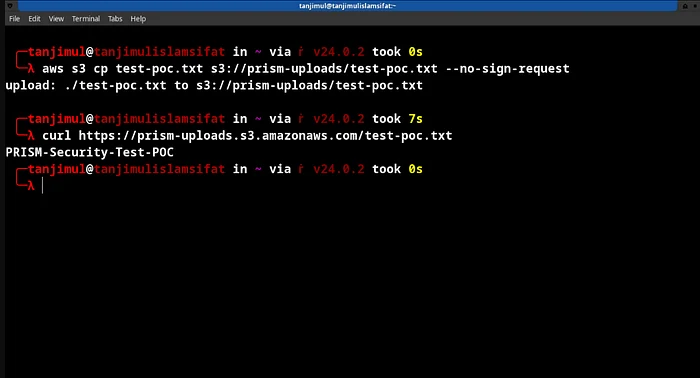
He then verified that the file was publicly served:
curl https://prism-uploads.s3.amazonaws.com/test-poc.txt
Output:
PRISM-Security-Test-POC
The file was live on the bucket and served under the amazonaws.com domain.
Step 4: Unauthenticated file deletion
After the initial report was filed, he ran one more test that escalated the severity further:
aws s3 rm s3://prism-uploads/test-upload.txt --no-sign-request
Output:
delete: s3:
This showed that s3:DeleteObject was also publicly accessible. The researcher's conclusion is that an attacker does not merely have read/write access but full CRUD: Create, Read, Update, Delete.
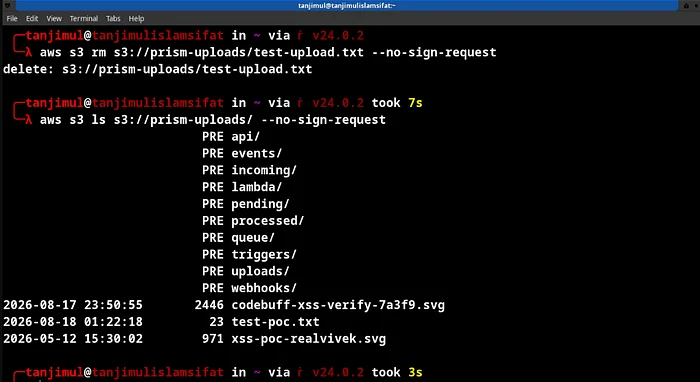
He notes that a single malicious script could recursively wipe the entire bucket:
aws s3 rm s3://prism-uploads/ --recursive --no-sign-request
According to the report this would remove 1,800+ files: user photos, backend configs and event data, gone in seconds and irreversibly.
The GPS metadata angle
While reviewing the JPEG files in the uploads/ directory, he checked the EXIF metadata embedded in user-uploaded photos. Modern smartphones embed GPS coordinates directly into photos unless the user or the application strips this data. In several JPEGs he found:
Latitude: 31.39°Longitude: 74.36°
These coordinates resolve to a real, specific location, embedded inside photos uploaded by real users, which any anonymous internet user could now download and read. He frames this as location surveillance at scale and as a GDPR/CCPA violation exposing the physical whereabouts of users who never consented to their location data being made public. In his assessment, previous researchers who found the bucket likely focused on the XSS vector of uploading a malicious SVG, and no one had flagged the GPS PII angle, which made his report a distinct finding with a higher and broader impact profile.
Root cause
The report describes the underlying mistake as a misconfigured IAM policy, a checkbox someone forgot to uncheck during setup. In practice the bucket's permissions allowed anonymous principals to list, read, write and delete objects. The report does not show the bucket policy that produced this state, so the exact configuration is not documented; the observed behaviour is consistent with a policy granting access to "Principal": "*", but the report does not state this.
Existing defences did not stop it. The web application may have had rate limiting, WAFs and solid authentication, but none of that covers the storage layer behind it. The researcher also states that the bucket had been known to the security research community since at least May 2026, three months before his report, and that prior researchers tested it and moved on; in his view the vulnerability sat unpatched and fully exploitable the whole time. The presence of their test files was not a sign of prior remediation but, in his words, a receipt proving sustained, ongoing exposure.
Impact
The researcher rated the finding CVSS 9.3, Critical. The report sets out five impact areas.
- Mass PII exfiltration. The
uploads/{userId}/path structure combined with public ListBucket access means an attacker can enumerate and download every user's uploaded content without authentication: user photos, property documents, profile images. Given the association with a hospitality platform, the report says this could include passport scans, ID documents and property records submitted during booking. - Malware and phishing hosting. The
amazonaws.comdomain is trusted by virtually every corporate firewall, email filter and endpoint detection system. Hosting phishing pages or malicious binaries atprism-uploads.s3.amazonaws.com/phishing-page.htmlwould, in the researcher's assessment, bypass most security controls a victim company has in place, and the brand legitimacy of the domain makes such attacks substantially more effective. - Financial denial of service. S3 charges per GB stored and per GB transferred. An attacker with anonymous write access can upload unlimited data, terabytes or petabytes, into the bucket, and the storage and egress fees are charged to the account owner with no cap, producing potentially catastrophic unplanned infrastructure costs.
- Complete data destruction. With
s3:DeleteObjectconfirmed publicly accessible, an attacker could delete the entire bucket's contents in a single recursive command. If the bucket lacks versioning or cross-region backup, the data is permanently and irreversibly lost. The researcher calls this the cloud equivalent of a ransomware attack, except that there is no decryption key to negotiate over. - Complete bucket takeover. A full takeover would allow an attacker to delete the entire bucket and its contents, resulting in total loss of availability and potentially permanent data destruction.
All of this applies to anyone on the internet, with no credentials, under the single condition that the bucket remains publicly accessible. The quoted reply states the program did not accept the bucket as PRISM-owned, so the attribution of the exposed data to PRISM users is the researcher's assessment rather than a confirmed fact.
Fix
The report gives remediation as recommendations; it does not describe any change made by the owner.
Immediate actions:
- Block all public access at the bucket level:
aws s3api put-public-access-block \ --bucket prism-uploads \ --public-access-block-configuration \ BlockPublicAcls=true,\ IgnorePublicAcls=true,\ BlockPublicPolicy=true,\ RestrictPublicBuckets=true
- Audit the bucket policy and remove any statement with
"Principal": "*". Every legitimate use case for serving user-uploaded content can be replaced with CloudFront signed URLs or S3 pre-signed URLs that expire after a defined window.
Architecture-level fixes:
- Adopt a signed URL pattern for serving user content:
User uploads file → Backend generates pre-signed URL → URL expires in 15 min → No public bucket needed
- Enable S3 Versioning, so that files accidentally or maliciously deleted or overwritten can be restored.
- Enable S3 Server Access Logging, so there is an audit trail of who accessed what and when, which the report calls critical for forensic analysis of what may already have been downloaded by unauthorised parties.
- Strip EXIF metadata server-side: process uploaded photos through an image normalisation pipeline (for example ImageMagick or Sharp) that removes all embedded metadata before storing to S3, so users never expose GPS coordinates through a platform that does not make this a deliberate, informed choice.
- Rotate any exposed credentials: audit the bucket for
.env,.jsonand config files that internal teams may have uploaded, and rotate any AWS keys, API tokens or database credentials found there.
Variants to test
The report closes with takeaways aimed at other hunters, which translate into concrete checks:
- Extend recon to cloud assets. Enumerate S3 buckets, Azure blobs, Firebase databases and GCP buckets for any target with a VDP. A positive result is an anonymous listing that returns objects rather than
AccessDenied. - Use
--no-sign-requeston every AWS CLI call. Every AWS CLI command supports it, and it tells you immediately whether a bucket has public permissions. A positive result is any successful response toaws s3 ls s3://<bucket>/ --no-sign-request. - Probe naming conventions. Test
{company}-uploads,{company}-assets,{company}-static,{company}-cdnand{company}-media. Because S3 bucket names are globally unique, they can be probed directly without prior knowledge of the company's infrastructure. A positive result is a bucket that exists and answers anonymously. - Do not treat existing test files as proof of a fix. Files left by other researchers show the bucket was known, not that it was closed. If the bug is still exploitable today, it is a valid finding today; re-verify listing, read, write and delete rather than assuming.
- Look for a differentiating impact dimension. When a bucket may already have been reported, dig for GPS metadata in user photos,
.envfiles in a config directory or credentials in JSON files. A positive result is a unique data class that elevates an already-reported finding into a distinct, higher-impact submission. - Read the scope policy line by line. PRISM's VDP policy states it accepts reports on all owned assets based on impact, even unlisted ones, and the researcher cites that clause as validating his submission. Check whether the target program has similar language before dismissing an unlisted asset.
- Document everything before touching anything. Screenshots, command outputs, HTTP responses and timestamps. The cleaner and more detailed the evidence, the faster and smoother triage.
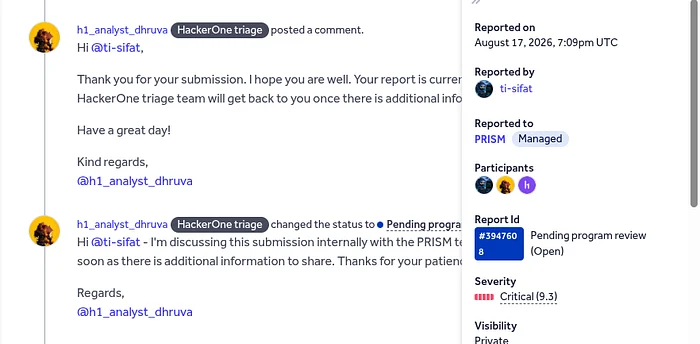
The 1st Response (Pending Program Review)
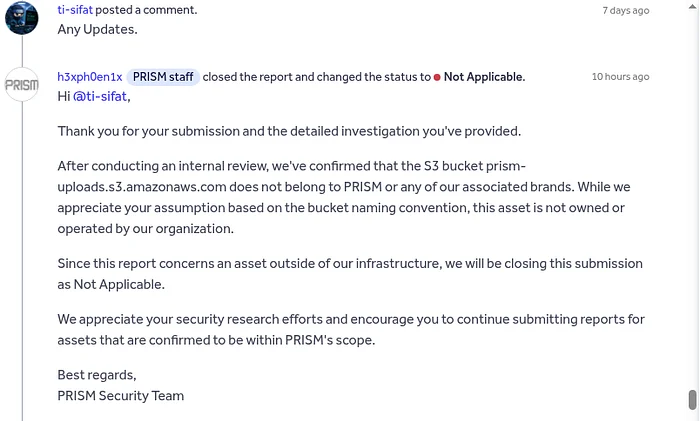
It's NA Because S3 Bucket not real PRISM Official owned Bucket. But Bug's Is Real in Even it's not owned into PRISM.
What happened, in plain words
A security researcher found a storage folder on the internet that belonged to a company, and that folder was left open to absolutely everyone. No password, no login, no special trick. Anyone with a browser or a free command-line tool could walk in, look at the files, download them, add new files, and delete existing ones.
The folder was an Amazon S3 bucket. Think of S3 as a giant online filing cabinet that companies rent from Amazon. Each cabinet is called a bucket, and inside it you put files, called objects, arranged in folders. Normally a company locks its cabinet so only its own programs can open it. This one had no lock at all.
The researcher could list the bucket, read a user-uploaded photo, upload his own test file, and delete a file. He also found that some of the photos still contained the GPS coordinates of where they were taken, which means anyone could learn where the people in those photos were standing.
One important detail: when he reported it, the bug bounty program replied that the bucket was not actually owned by the company he thought, so the report was marked NA (not applicable). The program still agreed the bug itself was real. Keep that in mind as you read: the technical behaviour was real and observed, but the ownership was not confirmed.
This article walks through the same steps the researcher took, in the same order, explaining every term from scratch. You only need to be comfortable using a computer and a browser.
Background: what is PRISM, and what is a VDP?
PRISM is described in the report as a platform under the OYO ecosystem, a large hospitality technology company. Hospitality here means hotels and similar businesses. Its systems handle property management (keeping track of buildings and rooms), bookings, user data and content assets (images and other files shown to users).
The researcher did not attack the website you would see in a browser. He went after the storage sitting behind it: an S3 bucket named prism-uploads, used to hold files that users upload, such as photos, documents and configuration files. Configuration files are small text files that tell a program how to behave, and they sometimes contain secrets such as passwords.
PRISM runs a Vulnerability Disclosure Program, or VDP, on a platform called HackerOne. A VDP is a formal promise from a company: if you find a security problem in our systems and tell us privately, we will not sue you or get you into trouble, and we will look at your report. HackerOne is a website where companies publish these programs and researchers submit findings.
The report quotes one line of PRISM's policy as important to his submission:
"Accepts reports for all owned assets based on impact, even if not listed in scope."
In plain words: we accept reports about anything we own, judged by how serious the problem is, even if that particular thing is not on our official list of targets. That official list is called the scope. The bucket was not on the list, but the researcher believed it clearly belonged to PRISM. As noted above, the program later disagreed about ownership.
Setting up: what tools you need
No account, no password and no token were needed on the target side. A token, in this context, is a short piece of text that proves who you are, a bit like a wristband at an event: show it and you are let in. The whole point here is that no wristband was required.
The only tools shown in the report are:
- The AWS CLI. CLI stands for command line interface, a program you type commands into instead of clicking buttons. AWS is Amazon Web Services, Amazon's cloud platform, and its CLI lets you talk to S3 from a terminal window.
curl, a small tool that fetches a web address and shows you what comes back, useful for checking what a server replies.- The
--no-sign-requestflag. A flag is an extra word you add to a command to change its behaviour. This one tells the AWS CLI: send the request without proving who I am. No username, no key, nothing.
The only precondition is that the bucket exists under a name someone could guess, and that its permissions allow anonymous access. Permissions are the rules saying who may do what. Anonymous means anyone at all, with no identity.
The researcher also explains his general method. When he looks at a company with a VDP, he does not only test the website. He also maps out the company's cloud footprint: its S3 buckets, exposed Azure blobs (Azure is Microsoft's cloud, and a blob is a file in its storage), Firebase databases (a Google service often used by mobile apps) and open GCP buckets (Google Cloud Platform storage). Recon, short for reconnaissance, means gathering information about a target before attacking anything.
How he found it
The starting point was how predictable bucket names are. Companies tend to name their storage after their brand, following patterns such as:
{company-name}-uploads{company-name}-assets{company-name}-static{company-name}-media
Line by line, in plain words: this is not a command, it is a template. The curly braces are placeholders. {company-name} gets replaced by the company's name, and the word after the dash says what the bucket is for. -uploads holds files users upload, -assets holds images and scripts the site needs, -static holds files that never change, and -media holds photos and videos. So for a company called Example, you would try example-uploads, example-assets and so on.
Why does this matter? Because S3 bucket names are globally unique across all of Amazon's customers. There can only ever be one bucket called prism-uploads in the entire world. That means you can simply try a name and see whether it exists, without knowing anything about the company's internal systems.
For PRISM, prism-uploads was an obvious candidate. One command confirmed it existed and was reachable:
aws s3 ls s3://prism-uploads/ --no-sign-request
Line by line:
awsruns the AWS command-line program.s3says which AWS service you want to talk to, here the storage service.lsmeans list, the same idea as thelscommand on Linux or macOS that shows the contents of a folder.s3://prism-uploads/is the address of the bucket. Thes3://part says this is an S3 address, andprism-uploadsis the bucket name.--no-sign-requestsays: do not sign this request, meaning do not attach any proof of identity.
Why run it this way? Because the answer tells you everything. If the bucket is locked down, Amazon replies with an error called AccessDenied, which means you are not allowed in. If the bucket is open, it replies with a list of files. It replied with a list.
Step 1: listing the bucket without logging in
The same command returned the contents:
aws s3 ls s3://prism-uploads/ --no-sign-request
Output:
PRE api/ PRE events/ PRE incoming/ PRE lambda/ PRE pending/ PRE processed/ PRE queue/ PRE triggers/ PRE uploads/ PRE webhooks/2026-08-17 23:50:55 2446 codebuff-xss-verify-7a3f9.svg2026-05-12 15:30:02 971 xss-poc-realvivek.svg
How to read this output. Each entry starting with PRE is a prefix, which here means a folder. So the bucket contains folders called api, events, incoming, lambda, pending, processed, queue, triggers, uploads and webhooks. The last two lines are actual files, each with a date and time, a size in bytes, and a name ending in .svg. SVG is an image format that is written in text and can contain code, which becomes important later.
Two things in this output stood out to the researcher.
First, the folder names read like a map of the company's internal system. Folders called lambda, triggers, webhooks, processed and queue do not look like ordinary website images. They look like the plumbing of a backend: files being passed between internal services, small programs called Lambda functions (Amazon's service for running code on demand), and event-driven workflows (systems that react automatically when something happens, such as a new upload arriving). Showing this structure to the world is like handing a stranger the floor plan of your building, including where the wiring runs.
Second, the two SVG files at the top level are test files left by other security researchers. xss-poc-realvivek.svg was uploaded in May 2026 and codebuff-xss-verify-7a3f9.svg in August. XSS stands for cross-site scripting, a class of bug where an attacker gets their own code to run inside someone else's website. A proof of concept, or PoC, is a small harmless demonstration that a bug is real. The researcher reads these files as proof that other people had already found the bucket and used it to host their XSS demonstrations.
His conclusion: the bucket had been open, findable and writable by outsiders for at least three months, and was still not fixed when he arrived. That is not a theoretical risk, in his view, but evidence that the problem was already being used.
Step 2: reading files without logging in
Next he looked inside the uploads folder to see what kind of data it held:
curl -I https://prism-uploads.s3.amazonaws.com/uploads/6784cdcef3417a3ee635240e/1758267786804-8529365.jpg
Line by line:
curlis the tool that fetches a web address.-Imeans: do not download the file, just ask the server for the headers. Headers are the short summary lines a server sends before the content, like the label on a parcel.- The address is the public web address of the file.
prism-uploads.s3.amazonaws.comis how Amazon exposes a bucket over the web, and the rest is the path inside the bucket: a folder named with a long string of letters and numbers, then a file ending in.jpg, which is a photo format.
Output:
HTTP/1.1 200 OKContent-Length: 20332Last-Modified: Fri, 19 Sep 2025 07:43:07 GMTAccept-Ranges: bytesServer: AmazonS3
Line by line:
HTTP/1.1 200 OKis the status line. HTTP is the language browsers and servers use to talk. 200 is the code for success, meaning the server handed over the file without asking who you are.Content-Length: 20332says the file is 20,332 bytes long.Last-Modified: Fri, 19 Sep 2025 07:43:07 GMTsays when the file was last changed. GMT is Greenwich Mean Time, a standard time zone.Accept-Ranges: bytesmeans the server can send the file in pieces if asked.Server: AmazonS3says which software answered, here Amazon's storage service.
The important part is the folder name: uploads/{24-character-hex-string}/. Hex means hexadecimal, a way of writing numbers using the characters 0 to 9 and a to f. Anyone who has worked with MongoDB, a popular database, recognises a 24-character hex string as a MongoDB ObjectId: the unique identifier the database gives to each record, such as each user.
From this the researcher concludes that the bucket stores each user's files in a folder named after that user's ID. So each hex folder belongs to one specific user, and anyone who knows or can guess a user's ID can reach all of that user's uploads. He adds that a single recursive listing command could walk through every folder in the bucket. Recursive means: go into every folder, and every folder inside those, all the way down. He describes the result as mass extraction of PII, fully automated and free. PII stands for personally identifiable information, meaning data that can be tied to a real person, such as a photo of their face or a copy of their passport.
Step 3: uploading a file without logging in
A bucket you can read is bad. A bucket you can write to is worse, because you can put your own content there. To prove write access without causing harm, he created a harmless test file and uploaded it:
echo "PRISM-Security-Test-POC" > test-poc.txtaws s3 cp test-poc.txt s3://prism-uploads/test-poc.txt --no-sign-request
Line by line:
echo "PRISM-Security-Test-POC"prints that text.>redirects the printed text into a file instead of the screen, so a file calledtest-poc.txtis created containing that one line.aws s3 cpcopies a file to or from S3.test-poc.txtis the local file being sent.s3://prism-uploads/test-poc.txtis where it should land: the bucketprism-uploads, at the top level, under the nametest-poc.txt.--no-sign-requestagain means: send this without proving who I am.
Output:
upload: ./test-poc.txt to s3://prism-uploads/test-poc.txt
That line is the tool confirming the upload succeeded. No login was asked for and no error came back. One command put a file into a production bucket, meaning storage used by the live service rather than a test copy.
He then checked that the file could be fetched by anyone:
curl https://prism-uploads.s3.amazonaws.com/test-poc.txt
Line by line: curl fetches the address, and the address is the public web location of the file he just uploaded. No -I this time, so it downloads and prints the content.
Output:
PRISM-Security-Test-POC
The text he wrote came back. His file was now live on the bucket and served from the amazonaws.com domain, the web address family that belongs to Amazon.
Step 4: deleting a file without logging in
After filing the initial report, he ran one more test to see how far the access went:
aws s3 rm s3://prism-uploads/test-upload.txt --no-sign-request
Line by line:
aws s3 rmremoves a file from S3.rmis short for remove.s3://prism-uploads/test-upload.txtis the file to remove.--no-sign-requestagain means no identity is provided.
Output:
delete: s3:
That is the tool reporting the deletion. The result shows that s3:DeleteObject was also open to the public. s3:DeleteObject is the name of the specific permission that allows deleting a file in S3. Permissions in AWS are written in this service:Action style, so s3:DeleteObject literally means the delete action on S3 objects.
The researcher's conclusion: an attacker does not merely have read and write access, but full CRUD. CRUD stands for Create, Read, Update, Delete, the four basic things you can do with stored data. Create is uploading, Read is downloading, Update is overwriting, Delete is removing.
He notes that one malicious script could wipe the whole bucket:
aws s3 rm s3://prism-uploads/ --recursive --no-sign-request
Line by line:
aws s3 rmremoves files.s3://prism-uploads/points at the bucket itself rather than one file.--recursivemeans: apply this to everything inside, including every folder and subfolder.--no-sign-requestmeans no identity.
According to the report this would remove more than 1,800 files: user photos, backend configuration files and event data, gone in seconds and impossible to undo. The number 1,800+ is the researcher's figure for the bucket's contents.
The hidden angle: GPS coordinates inside photos
This is the finding inside the finding, and the part the researcher says makes his report different from earlier discoveries of the same bucket.
While going through the JPEG photos in the uploads folder, he looked at their EXIF metadata. EXIF is extra information that cameras and phones save inside a photo file alongside the picture: the device model, the date and time, and often the location. Modern smartphones write GPS coordinates into photos unless the user or the app removes them. GPS is the satellite system phones use to know where they are.
In several JPEGs he found:
Latitude: 31.39°Longitude: 74.36°
Line by line: latitude is how far north or south a point is, and longitude is how far east or west. The degree symbol means degrees. Together, the two numbers pin down one specific spot on Earth, the way a street address does. These coordinates resolve to a real, specific location, and they were sitting inside photos uploaded by real users, which any anonymous visitor could now download and read.
He frames this as location surveillance at scale: not one person's whereabouts, but potentially many, readable by anyone. He also calls it a violation of GDPR and CCPA. GDPR is the European data protection law, and CCPA is a California privacy law; both put strict rules on handling personal data such as location. His point is that users never agreed to have their location made public.
In his assessment, the earlier researchers who found the bucket probably focused on the XSS angle, uploading a malicious SVG. Nobody had flagged the GPS and PII angle, which made his report a distinct finding with a higher and broader impact. Impact, in bug bounty language, means how much harm the bug could cause.
How serious is it? The impact assessment
The researcher rated the finding CVSS 9.3, Critical. CVSS is a standard scoring system for security bugs, running from 0 to 10, where higher means more serious; 9.0 and above is usually labelled Critical. The report sets out five areas of impact.
- Mass PII exfiltration. Exfiltration means stealing data out. Because each user's files sit in a folder named after their ID, and because anyone can list the bucket, an attacker can find and download every user's uploads without logging in: photos, property documents, profile pictures. Given the link to a hospitality platform, the report says this could include passport scans, ID documents and property records submitted during booking.
- Hosting malware and phishing pages. Malware is harmful software, and phishing is a fake page that tricks people into typing their passwords. The
amazonaws.comdomain is trusted by almost every corporate firewall, email filter and endpoint protection system. A firewall is a filter on network traffic, and endpoint protection is security software on a laptop or phone. Because that domain is trusted, hosting a phishing page or a harmful file at an address likeprism-uploads.s3.amazonaws.com/phishing-page.htmlwould, in his assessment, slip past most of those defences, and the trusted name makes the trick more convincing. - Financial denial of service. S3 charges money for each gigabyte stored and each gigabyte transferred out. An attacker with anonymous write access could upload unlimited data, terabytes or petabytes, into the bucket. A terabyte is about a thousand gigabytes and a petabyte about a thousand terabytes. The storage and transfer bills land on the account owner with no cap, which could mean huge unexpected costs. Denial of service here means harming a company by exhausting its money rather than by breaking its software.
- Complete data destruction. Because
s3:DeleteObjectwas confirmed open, an attacker could delete everything in the bucket with one recursive command. If the bucket has no versioning and no backup in another region, the data is gone for good. Versioning is an S3 feature that keeps old copies of files when they are changed or deleted, and a region is a geographic area where Amazon runs data centres. The report calls this the cloud equivalent of a ransomware attack, except there is no decryption key to negotiate over: the data is simply gone. - Complete bucket takeover. A full takeover would let an attacker delete the entire bucket and its contents, causing total loss of availability and possibly permanent data loss.
All of this applies to anyone on the internet, with no credentials, as long as the bucket stays public. The quoted reply states the program did not accept the bucket as PRISM-owned, so the link between the exposed data and PRISM's users is the researcher's assessment, not a confirmed fact.
Why it happened
The report describes the underlying mistake as a misconfigured IAM policy. IAM stands for Identity and Access Management, the part of AWS where you write rules about who may do what. A policy is such a rule, written as text. In his words, it was a checkbox someone forgot to uncheck during setup. The permissions simply allowed anonymous visitors to list, read, write and delete files.
The report does not show the exact policy that produced this state, so the precise configuration is not documented. The observed behaviour fits a policy that grants access to "Principal": "*", where Principal means who the rule applies to and * means everyone, but the report does not state this.
Existing defences did not help. The website may well have had rate limiting (a cap on how many requests one visitor can make), a WAF (web application firewall, a filter for malicious web traffic) and solid login checks, but none of that covers the storage sitting behind the site. The report also notes that the bucket had been known to the security community since at least May 2026, three months before his report, and that earlier researchers tested it and moved on. The vulnerability stayed unpatched and fully usable the whole time. In his words, their test files were not a sign of a fix but a receipt proving the exposure continued.
How to fix it
The report gives these as recommendations.
Immediate actions:
- Block all public access at the bucket level:
aws s3api put-public-access-block \ --bucket prism-uploads \ --public-access-block-configuration \ BlockPublicAcls=true,\ IgnorePublicAcls=true,\ BlockPublicPolicy=true,\ RestrictPublicBuckets=true
Line by line:
-
aws s3apiis the lower-level AWS tool for S3, which exposes settings the simpleraws s3commands do not. -
put-public-access-blockmeans: apply the public access block, a master switch that stops a bucket from being made public. -
The backslash
\at the end of a line means the command continues on the next line, so it is easier to read. -
--bucket prism-uploadssays which bucket to change. -
--public-access-block-configurationintroduces the four settings that follow. -
BlockPublicAcls=truestops anyone from adding a public access rule to the bucket. -
IgnorePublicAcls=truemakes Amazon ignore any public access rule that already exists. -
BlockPublicPolicy=truestops a bucket policy from granting public access. -
RestrictPublicBuckets=truelimits access to buckets that are, or were, public. -
Audit the bucket policy and remove any statement containing
"Principal": "*". Auditing means reading through the rules carefully. Any legitimate need to serve user files can be met with CloudFront signed URLs or S3 pre-signed URLs that expire after a set time. CloudFront is Amazon's content delivery network, a service that caches and serves files close to users. A signed URL is a web address with a built-in, time-limited permission attached, like a ticket that only works for one event and expires.
Architecture-level fixes:
- Use a signed URL pattern for serving user content:
User uploads file → Backend generates pre-signed URL → URL expires in 15 min → No public bucket needed
Line by line: a user uploads a file. The company's backend, meaning its server-side software, creates a pre-signed URL, a link that carries temporary permission. That link stops working after 15 minutes. Because access is granted per link, the bucket itself never needs to be public.
- Enable S3 Versioning, so files that are deleted or overwritten by accident or on purpose can be brought back.
- Enable S3 Server Access Logging, so there is a record of who accessed what and when. The report calls this critical for forensic analysis, meaning investigating after the fact what unauthorised parties may already have downloaded.
- Strip EXIF metadata on the server. When a user uploads a photo, run it through an image processing pipeline, for example ImageMagick or Sharp, that removes all embedded metadata before the file is stored in S3. That way users never leak their GPS coordinates through a platform that did not make it a deliberate, informed choice.
- Rotate any exposed credentials. Rotating means replacing a secret with a new one, so the old one stops working. Audit the bucket for
.env,.jsonand configuration files that internal teams may have uploaded, and rotate any AWS keys, API tokens or database passwords found there. An API is the way one program talks to another, and an API token is the secret that proves a program is allowed to do so.
What other hunters can take from it
The report closes with lessons for other researchers, which translate into concrete checks:
- Look at cloud assets, not just websites. Enumerate S3 buckets, Azure blobs, Firebase databases and GCP buckets for any target with a VDP. A positive result is an anonymous listing that returns files instead of
AccessDenied. - Use
--no-sign-requeston every AWS CLI call. Every AWS CLI command supports it, and it tells you straight away whether a bucket is public. A positive result is any successful answer toaws s3 ls s3://<bucket>/ --no-sign-request. - Try the usual names. Test
{company}-uploads,{company}-assets,{company}-static,{company}-cdnand{company}-media. Because bucket names are globally unique, you can probe them directly without knowing anything about the company's systems. A positive result is a bucket that exists and answers without a login. - Do not treat leftover test files as proof of a fix. Files left by other researchers show the bucket was known, not that it was closed. If the bug still works today, it is a valid finding today. Re-check listing, reading, writing and deleting rather than assuming.
- Find an angle that makes your report different. When a bucket may already have been reported, dig for GPS metadata in photos,
.envfiles in a configuration folder or passwords in JSON files. A positive result is a kind of data nobody else flagged, which turns an already-reported issue into a distinct, higher-impact submission. - Read the scope policy line by line. PRISM's VDP policy states it accepts reports on all owned assets based on impact, even unlisted ones, and the researcher cites that line as validating his submission. Check whether a program has similar wording before dismissing an asset that is not on the list.
- Document everything before you touch anything. Screenshots, command output, server responses and timestamps. The clearer and more detailed your evidence, the faster and smoother the triage, which is the process of a program reviewing and sorting reports.
The 1st Response (Pending Program Review)
It's NA Because S3 Bucket not real PRISM Official owned Bucket. But Bug's Is Real in Even it's not owned into PRISM.
That reply is the outcome: the submission was marked NA, meaning not applicable, because the bucket was judged not to be an official PRISM-owned bucket, while the program still agreed the bug itself was real.
Glossary
- Access control list (ACL): an older S3 mechanism for granting permissions on a bucket or file.
- Anonymous: without any identity, login or token.
- API: the way one program talks to another; a defined set of requests and responses.
- API token: a secret string that proves a program is allowed to call an API.
- AWS: Amazon Web Services, Amazon's cloud platform.
- AWS CLI: the command-line program used to send commands to AWS.
- Azure blob: a file stored in Microsoft's cloud storage service.
- Backend: the server-side software of a service, which users do not see directly.
- Bucket: a container for files in S3; its name is unique across all of AWS.
- CCPA: a California privacy law governing personal data.
- CloudFront: Amazon's content delivery network, which caches and serves files close to users.
- Configuration file: a text file that tells a program how to behave, sometimes containing secrets.
- CRUD: Create, Read, Update, Delete, the four basic operations on stored data.
- curl: a command-line tool that fetches a web address and shows the response.
- CVSS: a standard 0 to 10 score for how serious a security bug is; 9.0 and above is usually Critical.
- Denial of service: harming a service by exhausting a resource, such as money, rather than by breaking its code.
- Endpoint protection: security software running on a laptop or phone.
- EXIF: extra information stored inside a photo file, such as device, time and GPS location.
- Exfiltration: stealing data out of a system.
- Firewall: a filter on network traffic that allows or blocks connections.
- Flag: an extra word added to a command to change its behaviour, such as
--no-sign-request. - Forensic analysis: investigating after an incident what happened and what was taken.
- GDPR: the European data protection law governing personal data.
- GPS: the satellite system phones use to determine location.
- HackerOne: a website where companies publish bug bounty and disclosure programs and receive reports.
- Headers: the summary lines a server sends before the content, such as status and file size.
- Hex / hexadecimal: a way of writing numbers using 0 to 9 and a to f.
- HTTP: the language browsers and servers use to exchange requests and responses.
- IAM: Identity and Access Management, the AWS system for rules about who may do what.
- Impact: how much harm a bug could cause.
- Injection: a bug class where malicious input is slipped into a program and interpreted as instructions.
- Lambda: Amazon's service for running small pieces of code on demand.
- Latitude / longitude: the two numbers that pin down a point on Earth, north or south and east or west.
- Malware: harmful software.
- MongoDB: a popular database; each record gets a unique 24-character hex ID called an ObjectId.
- NA: not applicable, a status meaning a report does not qualify under the program's rules.
- Object: a file stored in an S3 bucket.
- ObjectId: the unique 24-character hex identifier MongoDB gives each record.
- Permission: a rule saying who may perform which action.
- Phishing: a fake page or message that tricks people into giving away credentials.
- PII: personally identifiable information, data that can be tied to a real person.
- Policy (bucket policy): a text rule in AWS saying who may do what with a bucket.
- PoC (proof of concept): a small, harmless demonstration that a bug is real.
- Pre-signed URL: a web address carrying temporary permission to access one file.
- Principal: in an AWS policy, the who the rule applies to;
*means everyone. - Production: the live system real users use, as opposed to a test copy.
- Rate limiting: a cap on how many requests one visitor may make in a period.
- Recon (reconnaissance): gathering information about a target before testing it.
- Recursive: applying an action to everything inside a folder, including subfolders.
- Region: a geographic area where a cloud provider runs data centres.
- Rotate (credentials): replace a secret with a new one so the old one stops working.
- S3: Amazon's cloud storage service.
- Scope: the official list of targets a program allows researchers to test.
- Signed URL: see pre-signed URL.
- SVG: an image format written in text that can contain code.
- Token: a short piece of text that proves an identity or grants access.
- Triage: the process of a program reviewing, sorting and responding to reports.
- VDP: Vulnerability Disclosure Program, a company's formal channel for receiving security reports safely.
- Versioning: an S3 feature that keeps older copies of files when they are changed or deleted.
- WAF: web application firewall, a filter for malicious web traffic.
- XSS (cross-site scripting): a bug class where an attacker gets their own code to run inside someone else's website.



