I Found a Hidden Signup Page… and Chained 3 Bugs to Become a Su
A hidden signup endpoint allowed unauthenticated account creation, and the password reset flow let users activate accounts without the required invitation code. The signup API also trusted a client-supplied role parameter, so an attacker could create accounts with admin and then super-admin roles, reaching the Auth0/Okta identity environment.

Bug Bounty
The full write-up lives on its author's site
It belongs to its author, so we link to it rather than copy it. The other two tabs are our own rewrites, checked against it.
Context
The target was a web application that does not offer a public signup option. Only a login option is exposed, and new users are expected to be invited by a privileged user via email. The application sits on top of Auth0 by Okta as its identity and authentication infrastructure, which handles authentication, user management, roles, permissions and access to applications.
The application defines three roles: Super Admin, Admin and Curator. The Super Admin role is associated with the underlying identity-management environment rather than being an ordinary application-level role. The researcher cannot name the site because the issue was responsibly reported and fixed, so the scenario was recreated in a controlled local environment and the hosts below are demonstration names.
What looked like a single Broken Access Control issue turned into a chain of three vulnerabilities that ended in a Super Admin account with access to the Auth0/Okta environment. The chained issue was rated Critical, CVSS v3.1 score 10.0.
Setup
The researcher worked manually against the application, and the modified requests are shown in Burp Suite Repeater. No accounts were provided up front: the starting point was an unauthenticated visitor with only the login page available. The roles encountered along the way were Curator (the lowest-privileged role), Admin and Super Admin. The application's JavaScript files were a key source of information, and the API was hosted on a separate host from the front end.
Finding it
During reconnaissance the researcher manually accessed the /signup endpoint:
https://demo-vulnerable-app.com/signup
The signup page was accessible even though there was no link to it from the application's UI. The form required First Name, Last Name, Email Address and Phone Number, and notably had no password field.
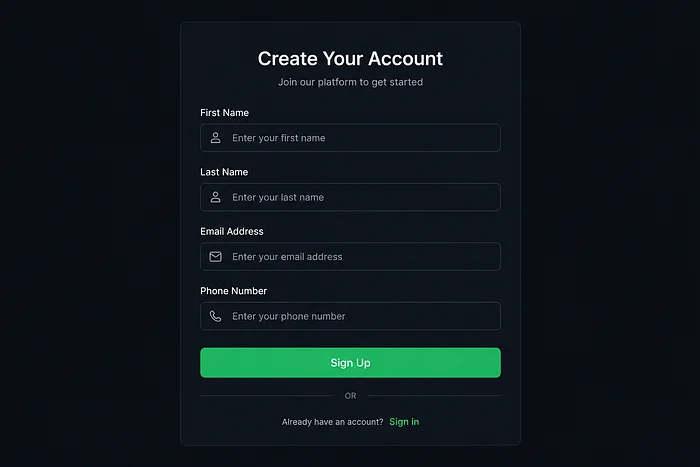
After submitting the form the researcher received an email with a link to set a password, but a second control stood in the way: the password setup process required a code provided by a privileged user before the account could be fully activated.
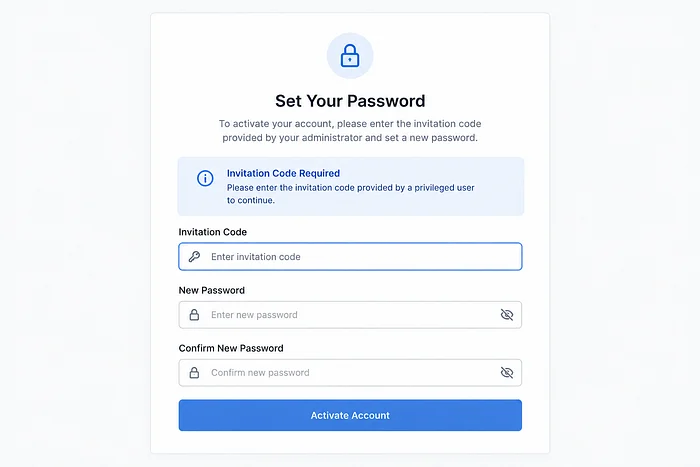
At that point the account creation process appeared to be designed so that registration could not be completed without the administrator-supplied code. The researcher then asked what would happen if the Forgot Password functionality were used instead, even though the account might not become fully active until the password setup with the administrator code was completed.
Exploitation
Step 1: Bypass the activation control with password reset
The same email address was entered into the Forgot Password functionality and a password reset was requested.
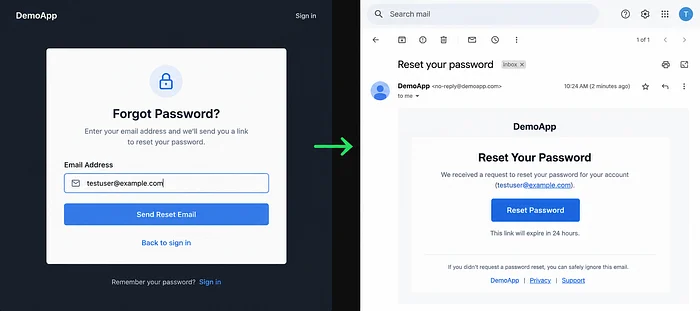
A password reset email arrived. Following the link allowed the researcher to reset the password and log in to the application without ever providing the code that was supposed to come from the privileged user. The intended invitation and activation flow could be bypassed simply by abusing password reset, producing an activated account without an administrator completing the intended authorization step.
Step 2: Read the JavaScript and find the role model
After logging in as a Curator, the researcher performed further reconnaissance to understand the authorization model and identified the three roles: Super Admin, Admin and Curator. The application's JavaScript files were one of the most useful sources: they can expose API endpoints, hidden functionality, role names, feature flags and internal routes that are not visible in the UI. In those files the researcher noticed references to multiple roles, including admin, and asked whether it was possible to become an Admin.
Step 3: Add a role parameter to the signup request
Returning to the signup functionality, the researcher analysed the network requests made during account creation. Signup made a request to an endpoint similar to:
/api/signup
The API was hosted on:
api-demo-vulnerable-app.com
The API response contained a role parameter, for example:
{ "role": "curator"}
Because the role appeared to be determined from a client-controlled parameter, the researcher wanted to see whether the server enforced the allowed role values. A new user was created and the request was modified by adding or changing the role parameter to:
"role": "admin"
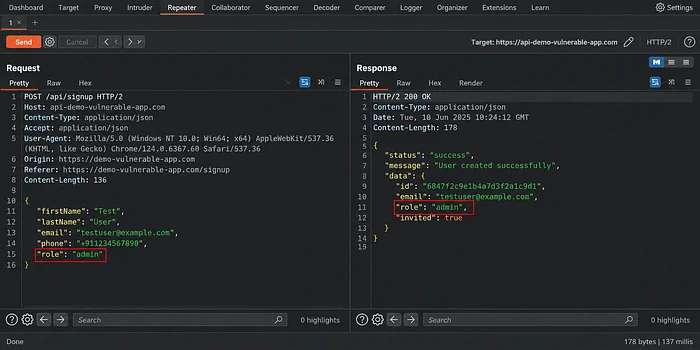
The modified request was sent and it worked: the newly created account was assigned the Admin role. There was no server-side restriction preventing a low-privileged user from specifying a higher-privileged role during account creation. The chain so far was unauthenticated signup, password-reset bypass, then Admin account creation. One role remained of interest: Super Admin.
Step 4: From Admin to Super Admin through the Okta-integrated API
Logged in as an Admin, the researcher continued reconnaissance and found a Create User section available to Admin users. From the UI, an Admin could create users with either of two roles:
- Admin
- Curator
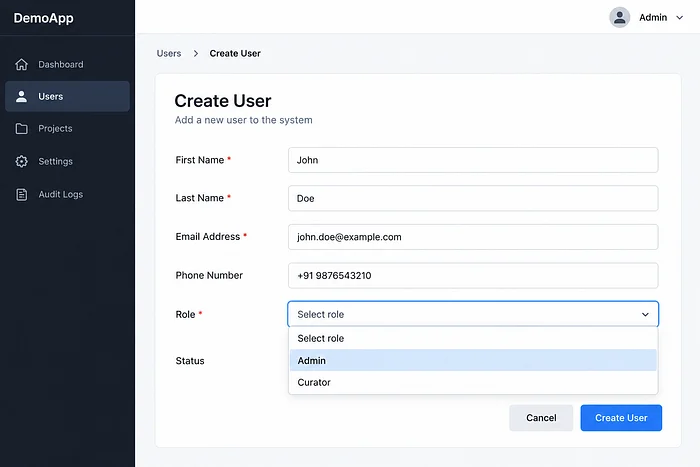
This did not add up, because the earlier JavaScript reconnaissance had already shown references to a Super Admin role. Digging into how the Admin user creation functionality worked, the researcher noticed that the application made another request to an endpoint with the same path, /api/signup, but this time to a different host:
api-okta-vulnerable-app.com
This was the Okta-integrated API. After analysing the behaviour and researching how the integration worked, the researcher understood that Super Admin was tied to the underlying identity-management environment rather than being an ordinary application role. That raised the question of whether the application, which trusted a user-controlled role parameter when creating users, would also trust super-admin.
The user-creation functionality was tested. This time the role parameter was already exposed through the UI, which made the request structure more interesting. The request was intercepted and the role value changed to:
"role": "super-admin"
The modified request was sent and the server accepted it. An invitation email arrived for the newly created account, this time with the Super Admin role.
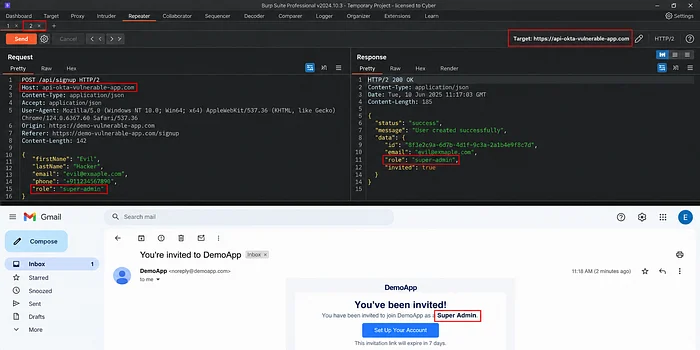
After completing the invitation process, the researcher could access the application as a Super Admin and, more importantly, access the associated Auth0/Okta administration environment. What had started as an application-level access control flaw now reached the identity provider itself.
The complete attack chain:
Broken Signup Access ↓Password Reset Bypass ↓Unauthorized Account Creation ↓Curator → Admin ↓Admin → Super Admin ↓Access to Auth0/Okta Environment
Root cause
The /signup endpoint was reachable even though the UI never linked to it, so the absence of a public signup option was only a UI-level restriction. The activation control that required an administrator-provided code was not enforced by the password reset flow: an account that had not completed the administrator-assisted activation could still request and complete a password reset, which made the account usable. The role assigned at account creation was taken from a client-controlled role parameter, and the server did not enforce the allowed role values, so a caller could ask for admin. On the Okta-integrated user-creation API the role parameter was exposed through the UI, and the server accepted super-admin.
Impact
The chain allowed unauthorised account creation without admin approval, a password reset flow that bypasses the intended activation control, escalation from a low-privileged user to Admin, escalation from Admin to Super Admin, and unauthorised access to the Auth0/Okta administration environment. That potentially exposes users, roles, permissions and applications managed by the identity provider, and potentially other applications relying on the same identity infrastructure. The final chained issue reached Critical severity (CVSS 10.0) because of the chained privilege escalation. The impact beyond the tested application depends on whether the same identity provider manages authentication or authorization for other applications, tenants, users or resources.
Fix
The report lists the following recommendations, which describe what should be done rather than a change that was confirmed:
- Disable or restrict access to the
/signupendpoint. - Enforce server-side authorization for user registration.
- Require valid administrator invitations for account creation.
- Do not allow password reset for unverified or incomplete accounts.
- Enforce role assignment exclusively on the server side.
- Never trust client-controlled
roleparameters. - Implement strict role allowlisting for each user-creation workflow.
- Prevent Admin users from assigning privileged roles.
- Restrict creation of Super Admin accounts to authorised identity administrators only.
- Enforce authorization checks on every API endpoint.
- Review and restrict Auth0/Okta administrative permissions.
- Implement least-privilege access for application and identity-management accounts.
- Audit existing users and roles for unauthorised privilege escalation.
Variants to test
- Request the signup path directly on applications that only show a login page. A positive result is a rendered signup form with no link from the UI.
- Submit signup, then use Forgot Password on the same address before completing any activation step. A positive result is a reset email and a working login without the activation code.
- Add or change a
rolefield in the signup request body. A positive result is a response or subsequent session showing the requested higher role. - Compare the host used by self-service signup with the host used by privileged user creation. A second host on the same path suggests a separate, possibly less strict, API.
- Change the role value in the privileged user-creation request to a role the UI does not offer, such as
super-admin. A positive result is an invitation email for an account with that role. - Read client-side JavaScript for role names, feature flags and internal routes before testing. A positive result is a role name that never appears in the UI but is accepted by an API.
What happened, in plain words
A security researcher was looking at a website that, on the surface, only let people log in. There was no "Sign up" button anywhere. New accounts were supposed to be created only when an existing privileged user invited someone by email. That is a common design for business software: the company controls who gets in.
Despite that, the researcher found a signup page that was still reachable if you typed its address by hand. From there, three separate weaknesses lined up like dominoes. First, the signup page could be reached at all. Second, the step that was supposed to stop an account from becoming usable until an administrator approved it could be skipped by using the "Forgot Password" feature. Third, the part of the request that says which role (permission level) the new account should get was trusted from the person sending the request, so the researcher could simply ask for a more powerful role.
By chaining those three, the researcher went from being a complete outsider to holding the highest role in the application, called Super Admin. That role was tied to the identity system underneath the application, Auth0 by Okta, which is the service that actually stores users, passwords, roles and permissions. Reaching that layer is much more serious than reaching an ordinary application account, because the same identity system may serve other applications too.
The researcher could not name the real website, because the issue was reported responsibly and fixed. To show the problem safely, the scenario was rebuilt in a controlled local environment, and the addresses used below are demonstration names. The final chained issue was rated Critical, with a CVSS v3.1 score of 10.0. CVSS is a standard scoring system for how severe a security flaw is; 10.0 is the maximum.
A few words you will meet constantly, explained once here:
- Endpoint: a specific address on a server that does one job, like a counter in a shop.
/signupis the counter for creating accounts;/api/signupis the counter the program uses behind the scenes. - API: the set of these counters that a program (rather than a person clicking) talks to. Think of a restaurant: the menu and dining room are the website you see, the kitchen door where orders are passed is the API.
- Request: one message your browser (or a tool) sends to a server, for example "please create this account".
- Response: the server's reply to that request.
- Parameter: a named piece of information inside a request, like a field on a paper form.
roleis a parameter whose value might becuratororadmin. - Role: a label that decides what an account is allowed to do. Here there are three: Curator (least powerful), Admin (middle) and Super Admin (most powerful).
- Broken Access Control: the general name for flaws where the server lets someone do something they should not be allowed to do, because it does not properly check who is asking. It is like a staff-only door that is unlocked: nothing is broken in the lock itself, the check is simply missing.
- Privilege escalation: climbing from a low-permission account to a higher one.
- Burp Suite: a tool that sits between your browser and the website, letting you see each request and change it before it is sent. Think of it as an interception desk for letters: you can read a letter, rewrite a line, and post it on.
The starting point
The application offered only a login page. New users were expected to be invited by a privileged user via email. Underneath, the application used Auth0 by Okta as its identity and authentication infrastructure, which handles authentication (proving who you are), user management, roles, permissions and access to applications.
The application defines three roles: Super Admin, Admin and Curator. The Super Admin role belongs to the underlying identity-management environment rather than being an ordinary application-level role. That distinction matters later: an application admin runs the app, while the identity environment can control who logs in and what they may do across everything that relies on it.
The researcher worked manually, and the modified requests are shown in Burp Suite Repeater. No accounts were provided at the start: the beginning was an unauthenticated visitor, meaning someone not logged in at all, with only the login page available. The application's JavaScript files turned out to be a key source of information, and the API lived on a separate host (a separate server name) from the front end.
Finding it
During reconnaissance (the exploratory phase where you look around before attacking anything), the researcher manually accessed the /signup endpoint:
https://demo-vulnerable-app.com/signup
Line by line: https is the encrypted version of the web protocol, so the traffic is protected in transit. demo-vulnerable-app.com is the demonstration host name. /signup is the path, the specific page on that host. Typing this address directly is different from clicking a link: the browser does not need a button to exist in order to open a page, it only needs the address. That is exactly why hiding a page by not linking to it is not a security control.
The signup page was accessible even though there was no link to it from the application's UI. UI means user interface, the visible screens and buttons. The form required First Name, Last Name, Email Address and Phone Number, and notably had no password field.
After submitting the form the researcher received an email with a link to set a password, but a second control stood in the way: the password setup process required a code provided by a privileged user before the account could be fully activated.
At that point the account creation process appeared to be designed so that registration could not be completed without the administrator-supplied code. In other words, the account existed but was not yet usable, waiting for a human with authority to hand over a code. The researcher then asked a simple question: what would happen if the Forgot Password functionality were used instead, even though the account might not become fully active until the password setup with the administrator code was completed?
Exploitation
Step 1: Bypass the activation control with password reset
The same email address was entered into the Forgot Password functionality and a password reset was requested.
A password reset email arrived. Following the link allowed the researcher to reset the password and log in to the application without ever providing the code that was supposed to come from the privileged user. The intended invitation and activation flow could be bypassed simply by abusing password reset, producing an activated account without an administrator completing the intended authorization step.
Why this works, in everyday terms: the application had two doors into the same account, the "activate with an administrator code" door and the "reset my password" door. The first door was locked properly. The second door was not checked against the same rule, so it opened for an account that had never been approved. A missing check in one place undoes a check in another.
Step 2: Read the JavaScript and find the role model
After logging in as a Curator, the researcher performed further reconnaissance to understand the authorization model and identified the three roles: Super Admin, Admin and Curator. Authorization means deciding what a logged-in user is allowed to do, as opposed to authentication, which is proving who they are.
The application's JavaScript files were one of the most useful sources. JavaScript is the code your browser downloads and runs to make a page interactive. Because it runs on your computer, you can read it. It can expose API endpoints, hidden functionality, role names, feature flags (switches that turn features on or off) and internal routes that are not visible in the UI. Think of it as the shop's internal instruction sheet left on the counter: even if customers never see the storeroom, the sheet may mention it.
In those files the researcher noticed references to multiple roles, including admin, and asked whether it was possible to become an Admin. That question is the whole point of this step: knowing the name of a more powerful role gives you something concrete to try.
Step 3: Add a role parameter to the signup request
Returning to the signup functionality, the researcher analysed the network requests made during account creation. Signup made a request to an endpoint similar to:
/api/signup
Line by line: this is a path, not a full address. /api signals that this is the program-facing part of the site, and /signup is the action. The word "similar" matters: the report gives a representative path rather than the exact production one.
The API was hosted on:
api-demo-vulnerable-app.com
Line by line: this is a host name, a separate server from the website you see. Splitting the front end from the API is normal architecture, and it is worth noting because later a second API host appears.
The API response contained a role parameter, for example:
{ "role": "curator"}
Line by line: the outer braces { } mark a JSON object, a common text format for structured data, like a filled-in form returned as text. "role" is the field name, in double quotes. "curator" is its value, also in double quotes. The colon separates name from value. So the server was telling the client: this account has the curator role. JSON is just a way of writing labelled values that both programs and people can read.
Because the role appeared to be determined from a client-controlled parameter, the researcher wanted to see whether the server enforced the allowed role values. Client-controlled means the value comes from the person or program making the request, so the sender can change it. A server that simply believes whatever the client says is like a hotel clerk who writes down whatever room number a guest claims.
A new user was created and the request was modified by adding or changing the role parameter to:
"role": "admin"
Line by line: this is a single field, not a whole object. The name stays role; the value is now admin instead of curator. The researcher did not invent a new field, only changed the value the server was already reading. That is the smallest possible change and the clearest test of whether the server checks anything.
The modified request was sent and it worked: the newly created account was assigned the Admin role. There was no server-side restriction preventing a low-privileged user from specifying a higher-privileged role during account creation. Server-side means the check happens on the server, where the user cannot reach it; a check that only happens in the browser can always be bypassed, because the browser belongs to the user.
The chain so far was unauthenticated signup, password-reset bypass, then Admin account creation. One role remained of interest: Super Admin.
Step 4: From Admin to Super Admin through the Okta-integrated API
Logged in as an Admin, the researcher continued reconnaissance and found a Create User section available to Admin users. From the UI, an Admin could create users with either of two roles:
- Admin
- Curator
This did not add up, because the earlier JavaScript reconnaissance had already shown references to a Super Admin role. If the application knows about a Super Admin role but the screen only offers two choices, the screen is not the whole story. The UI offered only two roles, yet the JavaScript had already shown references to a Super Admin role.
Digging into how the Admin user creation functionality worked, the researcher noticed that the application made another request to an endpoint with the same path, /api/signup, but this time to a different host:
api-okta-vulnerable-app.com
Line by line: the path is identical to the earlier one, but the host name differs, and the name includes okta. Same path, different server: the application was quietly sending privileged user creation to a second API, the one integrated with the identity provider. A second host on the same path is a strong hint that a separate, possibly less strict, piece of software handles that request.
This was the Okta-integrated API. After analysing the behaviour and researching how the integration worked, the researcher understood that Super Admin was tied to the underlying identity-management environment rather than being an ordinary application role. That raised the question of whether the application, which trusted a user-controlled role parameter when creating users, would also trust super-admin.
The user-creation functionality was tested. This time the role parameter was already exposed through the UI, which made the request structure more interesting. Exposed through the UI means the screen itself sends a role value, so the request visibly contains a field you can edit. The request was intercepted and the role value changed to:
"role": "super-admin"
Line by line: again one field, one value. super-admin is a role name the researcher had seen in the JavaScript but which the UI never offered as a choice. The test is whether the server accepts a value the interface would never send.
The modified request was sent and the server accepted it. An invitation email arrived for the newly created account, this time with the Super Admin role.
After completing the invitation process, the researcher could access the application as a Super Admin and, more importantly, access the associated Auth0/Okta administration environment. What had started as an application-level access control flaw now reached the identity provider itself. The identity provider is the service that holds the accounts and permissions for everything built on it, so access there can extend beyond the one application.
The complete attack chain:
Broken Signup Access ↓Password Reset Bypass ↓Unauthorized Account Creation ↓Curator → Admin ↓Admin → Super Admin ↓Access to Auth0/Okta Environment
Line by line: each line is one step, and the downward arrows show the order. First the signup page was reachable when it should not have been. Then the password reset skipped the activation check. That produced an account nobody had approved. That account was then pushed from Curator to Admin, and from Admin to Super Admin. The last line is the consequence: access to the identity environment, which is the part that matters most.
Root cause
Root cause means the underlying reason the problem exists, as opposed to the symptom you happen to see.
The /signup endpoint was reachable even though the UI never linked to it, so the absence of a public signup option was only a UI-level restriction. Hiding a door is not locking it.
The activation control that required an administrator-provided code was not enforced by the password reset flow: an account that had not completed the administrator-assisted activation could still request and complete a password reset, which made the account usable. Two paths into the same account were guarded by different rules.
The role assigned at account creation was taken from a client-controlled role parameter, and the server did not enforce the allowed role values, so a caller could ask for admin. On the Okta-integrated user-creation API the role parameter was exposed through the UI, and the server accepted super-admin. An allowlist is a fixed list of permitted values; anything not on the list is refused.
In plain terms: the application asked the user what role they wanted and never checked the answer, and the identity system behind it did the same.
Impact
Impact means what an attacker could actually do with the flaw.
The chain allowed unauthorised account creation without admin approval, a password reset flow that bypasses the intended activation control, escalation from a low-privileged user to Admin, escalation from Admin to Super Admin, and unauthorised access to the Auth0/Okta administration environment. That potentially exposes users, roles, permissions and applications managed by the identity provider, and potentially other applications relying on the same identity infrastructure.
The final chained issue reached Critical severity (CVSS 10.0) because of the chained privilege escalation. The impact beyond the tested application depends on whether the same identity provider manages authentication or authorization for other applications, tenants, users or resources. A tenant here means a separate customer space inside the same service.
Fix
The report lists the following recommendations, which describe what should be done rather than a change that was confirmed:
- Disable or restrict access to the
/signupendpoint. - Enforce server-side authorization for user registration.
- Require valid administrator invitations for account creation.
- Do not allow password reset for unverified or incomplete accounts.
- Enforce role assignment exclusively on the server side.
- Never trust client-controlled
roleparameters. - Implement strict role allowlisting for each user-creation workflow.
- Prevent Admin users from assigning privileged roles.
- Restrict creation of Super Admin accounts to authorised identity administrators only.
- Enforce authorization checks on every API endpoint.
- Review and restrict Auth0/Okta administrative permissions.
- Implement least-privilege access for application and identity-management accounts. Least privilege means each account gets only the permissions it needs for its job, nothing more.
- Audit existing users and roles for unauthorised privilege escalation. An audit is a systematic review of records to find things that should not be there.
Variants to test
These are patterns you can try on other applications, each with a clear sign that something is wrong:
- Request the signup path directly on applications that only show a login page. A positive result is a rendered signup form with no link from the UI.
- Submit signup, then use Forgot Password on the same address before completing any activation step. A positive result is a reset email and a working login without the activation code.
- Add or change a
rolefield in the signup request body. A positive result is a response or subsequent session showing the requested higher role. - Compare the host used by self-service signup with the host used by privileged user creation. A second host on the same path suggests a separate, possibly less strict, API.
- Change the role value in the privileged user-creation request to a role the UI does not offer, such as
super-admin. A positive result is an invitation email for an account with that role. - Read client-side JavaScript for role names, feature flags and internal routes before testing. A positive result is a role name that never appears in the UI but is accepted by an API.
Glossary
- API: the set of addresses a program talks to behind the scenes, separate from the pages a person clicks.
- Authentication: proving who you are, usually by logging in.
- Authorization: deciding what a logged-in user is allowed to do.
- Auth0 by Okta: an identity platform that stores users, roles and permissions and handles login for applications built on it.
- Broken Access Control: a flaw where the server fails to check whether the requester is allowed to perform an action.
- Burp Suite: a tool that intercepts, displays and lets you modify requests between your browser and a website.
- Client-controlled: a value that comes from the person or program making the request, and can therefore be changed by them.
- CVSS: a standard scoring system for the severity of a security flaw; 10.0 is the maximum.
- Endpoint: a specific address on a server that performs one function, such as
/signup. - Feature flag: a switch in the software that turns a feature on or off.
- Host: the server name part of an address, such as
api-demo-vulnerable-app.com. - Identity provider: the service that holds accounts and permissions for one or more applications.
- JavaScript: code your browser downloads and runs to make a page interactive; it can be read by anyone.
- JSON: a text format for structured data made of names and values in braces.
- Least privilege: giving each account only the permissions it needs for its job.
- Parameter: a named piece of information inside a request, like a field on a form.
- Path: the part of an address after the host, such as
/api/signup. - Privilege escalation: moving from a lower-permission account to a higher-permission one.
- Reconnaissance: the exploratory phase of looking around a system before testing it.
- Request: a message sent from a browser or tool to a server asking it to do something.
- Response: the server's reply to a request.
- Role: a label that determines what an account may do, such as Curator, Admin or Super Admin.
- Root cause: the underlying reason a flaw exists, rather than the visible symptom.
- Server-side: a check or action performed on the server, where the user cannot alter it.
- Tenant: a separate customer space inside one shared service.
- UI (user interface): the visible screens, buttons and forms of an application.
- Unauthenticated: not logged in at all.
- Allowlist: a fixed list of permitted values; anything not on the list is refused.

