**I Found an Open Admin Panel on the UP Ground Water Department Portal**
An administrative page on a government portal was reachable without any login, exposing applicant documents such as identity cards and land records and presenting controls to approve or reject applications. An unauthenticated visitor could view sensitive personal data and privileged functions.

Cybersecurity
The full write-up lives on its author's site
It belongs to its author, so we link to it rather than copy it. The other two tabs are our own rewrites, checked against it.
Context
The target was the UP Ground Water Department portal at upgwdonline.in. The feature at the centre of the report is the department's application-processing workflow: a public-facing portal where people submit applications and supporting documents, and an administrative interface that departmental staff use to review those applications, raise queries and approve or reject them.
The administrative interface is the part that should never be reachable by an ordinary visitor. It is tied to applicant records and to the documents applicants upload, and it presents privileged actions on those records.
Setup
The report describes no special setup. There were no accounts, no credentials, no tooling and no versions listed. The researcher was simply browsing the public website as an unauthenticated visitor, with a browser, and reading robots.txt first, which is one of the obvious places he checks on any site.
Finding it
While looking through the portal, the researcher noticed an entry in robots.txt that pointed towards administrative functionality. robots.txt is public: it tells search engines which parts of a site the owner does not want indexed, and anyone with a browser can read it. Finding an admin path listed there is not, by itself, a vulnerability, and the report says as much: plenty of sites have such entries.
The question is what happens when somebody opens the URL. In this case the admin interface loaded directly, without asking for a login. Instead of a page meant only for departmental staff being protected by an authentication check, it was reachable by an unauthenticated visitor.
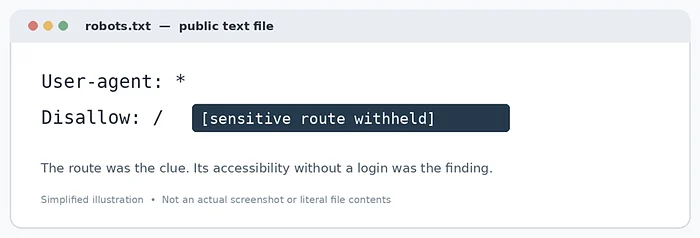
The image is a simplified view of the clue in robots.txt. The actual admin route is withheld from the write-up.
Exploitation
Step 1: Read robots.txt and note the admin path
The researcher read robots.txt on upgwdonline.in and found an entry pointing towards administrative functionality. The exact route is deliberately not published; the report states that the exact administrative URL is left out and belongs in the disclosure sent to the response team rather than in a public walkthrough. No request or response text is reproduced in the report.
Step 2: Open the admin URL without authenticating
He opened the URL as an unauthenticated visitor. The page loaded without a login prompt. This was not a hidden API or a complicated exploit: it was a page used for administrative work, reachable directly.
Step 3: Observe what the page exposed
The interface was not a blank dashboard. It was tied to the department's application-processing workflow, and the disclosure described access to applicant information and supporting documents. The material included:
- Aadhaar cards
- Authorization letters
- Land-related details
- MSME certificates
- Uploaded affidavits
These are documents people submit because a government process asks them to, not things they expect an unknown visitor to see.
Step 4: Observe the privileged functions
The administrative interface also presented functions for raising queries and for approving or rejecting applications. The researcher is precise about this point: he reported those controls as exposed. He does not claim that he approved, rejected or changed anyone's application. The visibility of sensitive records and privileged functions was already a serious problem on its own.
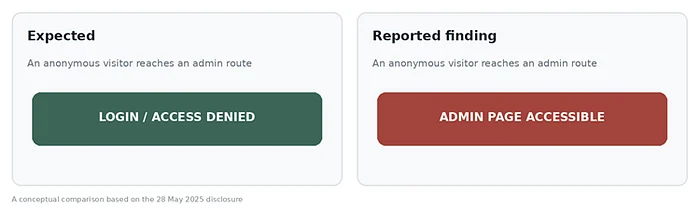
The image contrasts the expected access to the administration page with the access that was actually reported.
Root cause
The mistake was not the line in robots.txt. robots.txt is a set of instructions for search crawlers. It is not a login system and it does not stop anybody from visiting a URL. Removing the entry would hide the address from crawlers but would not fix anything, because an administrative page must verify who is making the request whether or not its address is easy to find.
What was reported is a failure of access control: the administrative page and the functions behind it did not check the identity of the requester, so an unauthenticated visitor reached them. The report does not describe the server-side implementation, so the precise reason the check was missing is not stated; The report does not describe the server-side implementation, so the precise reason the check was missing is not stated.
Impact
The exposed material is sensitive by nature. Aadhaar cards and land papers can be useful for impersonation and fraud, and an affidavit or application might contain contact details, addresses and other information someone would rather keep private.
The risk is not limited to viewing. A page that exposes application approval controls raises the question of whether an unauthorised person could interfere with the department's workflow.
The report is careful to frame these as potential consequences, not as observed exploitation. The researcher did not establish how many records were accessible, whether anyone else had used the weakness, or whether any application was changed. His position is that evidence of damage should not be a precondition for protecting an administrative page.
Fix
No confirmed remediation or closure notice is cited, so the report does not state that the problem is fixed. What it does set out is what should be done, in order:
- Start with one simple test: can an unauthenticated request reach any admin page, document or privileged operation? If yes, that is where the work begins.
- Every sensitive request needs server-side authentication and role-based authorisation.
- Uploaded documents should have access checks of their own.
- Administrative actions should be logged.
- The team should review whether the same pattern exists elsewhere in the portal.
Cleaning sensitive routes out of robots.txt is fine, but only after the access-control issue itself is fixed.
Disclosure
The issue was reported to CERT-In on 28 May 2025, with the affected website, the nature of the access-control problem, the document categories at risk and a proof-of-concept video. CERT-In replied the same day: the incident was registered as CERTIn-05939725, and the response said appropriate action was being taken with the concerned authority. That is the status the researcher can support from the email correspondence.
Variants to test
The pattern here generalises to any portal with a public application workflow and a separate staff interface. Concrete things to try elsewhere:
- Harvest admin paths from
robots.txtand open them unauthenticated. A positive result is an administrative page that renders without a login prompt. - Request document and record endpoints directly, without going through the UI. A positive result is applicant data or uploaded files returned to an unauthenticated request.
- Try privileged operations such as raising a query or changing an application status from an unauthenticated session. A positive result is the operation being accepted rather than rejected with an authentication or authorisation error.
- Check whether uploaded documents have access checks of their own, separate from the page that links to them. A positive result is a document retrievable by URL without a session.
- Repeat the same test across other public-service portals. The researcher notes he has seen access-control problems in other public-service portals, where a page looks internal and is therefore assumed to be private while the application itself does not check.
Keep testing limited, protect any personal information encountered, and disclose responsibly.
What happened, in plain words
A security researcher was browsing the website of the UP Ground Water Department, a government portal where people submit applications and upload documents. While looking around, he read a public file called robots.txt and noticed a line that pointed to an administrative page, the kind of page that staff use to review applications. He opened that page in his browser. It loaded without asking him to log in. That meant an ordinary visitor, with no account and no password, could see a page meant only for departmental staff. The page showed applicant information and uploaded documents, and it also offered buttons for raising queries and approving or rejecting applications. He did not approve, reject or change anyone's application; he only reported that the controls were exposed. He wrote up the issue and sent it to CERT-In, India's national computer emergency response team, on 28 May 2025. CERT-In replied the same day with a registration number and said action was being taken. The report does not say the problem was fixed.
This article walks through the same story for someone who has never done security testing. It explains each idea from scratch, using everyday comparisons, and it keeps the same order as the original write-up.
The website and the feature involved
The target is upgwdonline.in, the portal of the UP Ground Water Department. The feature at the centre of the report is the department's application-processing workflow. In plain terms, this is a two-sided system:
- On the public side, people fill in applications and upload supporting documents, such as identity papers and land records.
- On the staff side, an administrative interface lets departmental employees look at those applications, ask applicants for more information (raise queries), and approve or reject the application.
The administrative interface is the part that should never be reachable by an ordinary visitor. It is tied to applicant records and to the documents applicants upload, and it offers privileged actions on those records. "Privileged" simply means actions that only certain trusted people are supposed to be able to take.
Setup: what was needed
The report describes no special setup. There were no accounts, no credentials, no tools and no software versions listed. The researcher was simply browsing the public website as an unauthenticated visitor, meaning someone who has not logged in. He used a browser, the same kind of program you are probably using now, and he read robots.txt first, which is one of the obvious places he checks on any site.
Finding it
While looking through the portal, the researcher noticed an entry in robots.txt that pointed towards administrative functionality. To understand why that matters, you need to know what robots.txt is.
robots.txt is a plain text file that websites put at the top of their domain, for example https://example.com/robots.txt. It tells search engines, such as Google, which parts of the site the owner does not want them to crawl or index. "Crawl" means automatically visiting pages, and "index" means adding them to search results. The file is public: anyone with a browser can open it. It is like a sign on a door saying "staff only, please do not enter", but the sign is readable by everyone who walks past.
Finding an admin path listed in robots.txt is not, by itself, a vulnerability. Plenty of websites have such entries. The real question is what happens when somebody opens the URL. A URL is simply a web address, the text you type in the address bar.
In this case the admin interface loaded directly, without asking for a login. Instead of a page meant only for departmental staff being protected by an authentication check, it was reachable by an unauthenticated visitor. "Authentication" is the process of proving who you are, usually by entering a username and password. A page that skips that check is like a staff room whose door has a "staff only" sign but no lock.
The image is a simplified view of the clue in robots.txt. The actual admin route is withheld from the write-up, so you cannot see the exact address.
Exploitation
Step 1: Read robots.txt and note the admin path
The researcher read robots.txt on upgwdonline.in and found an entry pointing towards administrative functionality. The exact route is deliberately not published. The report states that the exact administrative URL is left out and belongs in the disclosure sent to the response team rather than in a public walkthrough. No request or response text is reproduced in the report.
Why take this step? Because robots.txt is a public list of places the site owner considers private or non-indexable. It is a common starting point for anyone checking a website, and it costs nothing to read. It is like checking the noticeboard at the entrance of a building to see which rooms are marked "staff only".
Step 2: Open the admin URL without authenticating
He opened the URL as an unauthenticated visitor. The page loaded without a login prompt. This was not a hidden API or a complicated exploit: it was a page used for administrative work, reachable directly.
An API, short for Application Programming Interface, is a way for one piece of software to talk to another, often returning data rather than a web page. Here there was no API trickery; the researcher simply typed or pasted the address into the browser and the page appeared. The important observation is the absence of a login prompt. A login prompt is the box where you type your username and password. Its absence means the server did not ask who he was before showing the page.
Step 3: Observe what the page exposed
The interface was not a blank dashboard. It was tied to the department's application-processing workflow, and the disclosure described access to applicant information and supporting documents. The material included:
- Aadhaar cards
- Authorization letters
- Land-related details
- MSME certificates
- Uploaded affidavits
These are documents people submit because a government process asks them to, not things they expect an unknown visitor to see. An Aadhaar card is India's national identity document. An affidavit is a written statement confirmed by oath. An MSME certificate relates to registration as a micro, small or medium enterprise. Land-related details are records about property. All of these can contain personal information.
Why does this matter? Because seeing such documents is not like seeing a public brochure. It is like finding a filing cabinet in a public corridor with the drawer open.
Step 4: Observe the privileged functions
The administrative interface also presented functions for raising queries and for approving or rejecting applications. The researcher is precise about this point: he reported those controls as exposed. He does not claim that he approved, rejected or changed anyone's application. The visibility of sensitive records and privileged functions was already a serious problem on its own.
A "control" here means a button or link on the page that performs an action. Seeing the button is one issue; being able to use it would be another. The report only claims the former. This distinction matters because it keeps the report accurate: it describes what was visible, not what was done.
The image contrasts the expected access to the administration page with the access that was actually reported.
Root cause
The mistake was not the line in robots.txt. robots.txt is a set of instructions for search crawlers. It is not a login system and it does not stop anybody from visiting a URL. Removing the entry would hide the address from crawlers but would not fix anything, because an administrative page must verify who is making the request whether or not its address is easy to find.
Think of it this way: a "do not enter" sign does not lock a door. If the door is unlocked, anyone who ignores the sign can walk in. The real fix is the lock, which in web terms is an authentication and authorisation check.
What was reported is a failure of access control: the administrative page and the functions behind it did not check the identity of the requester, so an unauthenticated visitor reached them. "Access control" is the set of rules that decides who is allowed to see or do what. "Authorisation" is the part of that process that checks whether an identified user has permission for a particular action. The report does not describe the server-side implementation, so the precise reason the check was missing is not stated; The report does not describe the server-side implementation, so the precise reason the check was missing is not stated. "Obscure" means hard to guess, like hiding a key under a doormat.
Impact
The exposed material is sensitive by nature. Aadhaar cards and land papers can be useful for impersonation and fraud, and an affidavit or application might contain contact details, addresses and other information someone would rather keep private. "Impersonation" means pretending to be someone else, for example using their identity details to open accounts or claim benefits.
The risk is not limited to viewing. A page that exposes application approval controls raises the question of whether an unauthorised person could interfere with the department's workflow. "Unauthorised" means without permission.
The report is careful to frame these as potential consequences, not as observed exploitation. The researcher did not establish how many records were accessible, whether anyone else had used the weakness, or whether any application was changed. His position is that evidence of damage should not be a precondition for protecting an administrative page. In other words, you do not wait for a burglary before locking the door.
Fix
"Remediation" means the fix. What it does set out is what should be done, in order:
- Start with one simple test: can an unauthenticated request reach any admin page, document or privileged operation? If yes, that is where the work begins. A "request" here means the message your browser sends to the server when you open a page or click a button.
- Every sensitive request needs server-side authentication and role-based authorisation. "Server-side" means the check happens on the server, not just in the browser, because checks in the browser can be bypassed. "Role-based authorisation" means permissions are tied to a role, such as staff member or administrator, rather than to a guess.
- Uploaded documents should have access checks of their own. A document should not be downloadable just because someone knows its address.
- Administrative actions should be logged. A "log" is a record of what happened, who did it and when, which helps detect and investigate misuse.
- The team should review whether the same pattern exists elsewhere in the portal. If one page forgot its lock, others might have too.
Cleaning sensitive routes out of robots.txt is fine, but only after the access-control issue itself is fixed. Removing the sign does not install the lock.
Disclosure
The issue was reported to CERT-In on 28 May 2025, with the affected website, the nature of the access-control problem, the document categories at risk and a proof-of-concept video. CERT-In is India's national computer emergency response team; it coordinates the handling of cybersecurity incidents. A "proof-of-concept" is a small demonstration that shows the issue is real, in this case a video. CERT-In replied the same day: the incident was registered as CERTIn-05939725, and the response said appropriate action was being taken with the concerned authority. That is the status the researcher can support from the email correspondence.
Variants to test
The pattern here generalises to any portal with a public application workflow and a separate staff interface. Concrete things to try elsewhere:
- Harvest admin paths from
robots.txtand open them unauthenticated. A positive result is an administrative page that renders without a login prompt. "Harvest" means collecting a list of addresses from a public source. - Request document and record endpoints directly, without going through the UI. A positive result is applicant data or uploaded files returned to an unauthenticated request. An "endpoint" is a specific address on a server that responds to requests. "UI" means user interface, the visible pages and buttons.
- Try privileged operations such as raising a query or changing an application status from an unauthenticated session. A positive result is the operation being accepted rather than rejected with an authentication or authorisation error. A "session" is the period during which your browser is recognised by the server, usually via a cookie. A "cookie" is a small piece of data the server asks your browser to store and send back with later requests, so the server can remember who you are.
- Check whether uploaded documents have access checks of their own, separate from the page that links to them. A positive result is a document retrievable by URL without a session.
- Repeat the same test across other public-service portals. The researcher notes he has seen access-control problems in other public-service portals, where a page looks internal and is therefore assumed to be private while the application itself does not check.
Keep testing limited, protect any personal information encountered, and disclose responsibly. "Disclose responsibly" means telling the organisation or the authorities in private first, giving them a chance to fix the issue, and not publishing details that could help someone misuse it.
Glossary
- Access control: the rules that decide who is allowed to see or do what on a system.
- Aadhaar card: India's national identity document, containing a unique identity number and personal details.
- Admin interface: a page or set of pages used by staff to manage records and perform privileged actions.
- Affidavit: a written statement confirmed by oath, often used as supporting evidence.
- API (Application Programming Interface): a way for software to talk to other software, often returning data rather than a web page.
- Authentication: the process of proving who you are, usually with a username and password.
- Authorisation: the process of checking whether an identified user has permission for a particular action.
- CERT-In: India's national computer emergency response team, which coordinates the handling of cybersecurity incidents.
- Cookie: a small piece of data a server asks a browser to store and send back with later requests, used to remember who you are.
- Crawl: automatically visiting web pages, usually done by search engines.
- Endpoint: a specific address on a server that responds to requests.
- Harvest: to collect a list of items, such as web addresses, from a public source.
- Impersonation: pretending to be someone else, often using their personal details.
- Index: adding a page to a search engine's list of results.
- Log: a record of events, such as who did what and when.
- MSME certificate: a document relating to registration as a micro, small or medium enterprise.
- Obscure: hard to guess or find.
- Privileged action: an action that only certain trusted people are supposed to be able to take.
- Proof-of-concept: a small demonstration that shows an issue is real.
- Remediation: the fix for a security issue.
- Request: the message a browser sends to a server when you open a page or click a button.
- robots.txt: a public text file that tells search engines which parts of a site not to crawl or index.
- Role-based authorisation: permissions tied to a role, such as staff member or administrator.
- Server-side: happening on the server, rather than in the browser.
- Session: the period during which a browser is recognised by a server, usually via a cookie.
- UI (user interface): the visible pages and buttons a person interacts with.
- Unauthenticated: not logged in, with no proven identity.
- Unauthorised: without permission.
- URL: a web address, the text you type in the address bar.
- Vulnerability: a weakness in a system that could be used to cause harm or gain unauthorised access.

