I Found My First Real Bug. Here’s Exactly How I Did It — And Everything That Went Wrong First.
The application checked authorisation on the GET request for viewing a profile but not on the PUT request for updating it. An authenticated attacker could change any other user's profile data by altering the ID in the update request.

Cybersecurity
The full write-up lives on its author's site
It belongs to its author, so we link to it rather than copy it. The other two tabs are our own rewrites, checked against it.
Context
The target was a public bug bounty program that the author describes as having a wide scope and a reputation for responding to reports. The feature involved was a user profile page that takes an ID parameter, with separate requests for viewing a profile and for updating one. The report does not name the program, the application, or the endpoint path.
The author stresses that no scanner or automated tooling was used: the work was done by hand with Burp Suite Community Edition on a laptop, after about a week of recon (subdomain enumeration, checking what was live, and looking at the technologies in use).
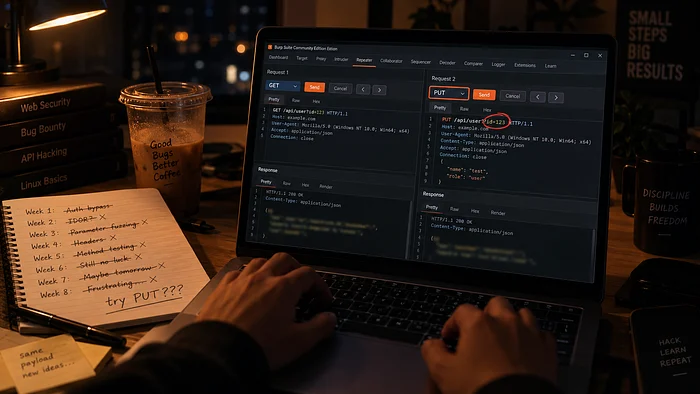
Setup
The setup was deliberately minimal:
- Two accounts on the target, referred to as User A and User B.
- A browser session logged in as User A.
- Burp Suite Community Edition to capture and replay requests.
- Notes to record requests and responses.
The precondition for the bug is simply that the attacker holds any authenticated account. No special role, header or token is described beyond the normal session of User A.
Finding it
The endpoint looked like classic IDOR territory: a profile page with an ID parameter. The author says this is exactly why it was almost skipped, since everyone tests it.
For roughly two weeks the testing stayed on the GET request that views a profile. The method was: log in as User A, capture the request to view User A's profile, change the ID to User B's ID, and send it. The result was access denied. Different parameters, different endpoints, different HTTP methods, encoding tricks and extra parameters all produced nothing. The author concluded the program had probably already fixed this vulnerability class.
The break came by accident. While copying a request from Burp into notes late at night, the wrong request was copied: instead of the request to view User A's profile, the request to update User A's profile was copied. It was the same endpoint with a different HTTP method. The ID in that request was changed to User B's ID and sent.
Exploitation
Step 1: Confirm the GET request is protected
As User A, capture the request that views a profile and change the ID to User B's ID. The response is access denied. This establishes that the read path enforces an authorization check.
Step 2: Capture the update request instead
Copy the request that updates User A's profile. It targets the same endpoint and the same ID parameter, but uses a different HTTP method (the author describes it as a PUT request). The report does not include the raw request text.
Step 3: Swap the ID and send
Change the ID in the update request to User B's ID and send it as User A. The response said:
Profile updated successfully.
Step 4: Verify as the victim
Log in as User B and check the profile. The changes made from User A's session were present. The author had modified another user's profile without authorization.
Root cause
The application enforced an authorization check on the GET request that views a profile, so changing the ID on the read path was blocked. The update request on the same endpoint, with the same ID parameter, had no authorization check at all. One method was protected and the other was not.
The author frames this as classic broken access control: developers secure the endpoint they expect attackers to use and forget the other methods on it. The report does not show the server-side code, so the exact implementation of the missing check is not stated; The report does not show the server-side code, so the exact implementation of the missing check is not stated.
Impact
Any authenticated user could modify any other user's profile data by changing the ID in the update request. The fields the author names are name, bio and contact information, qualified as anything the update form allowed.
The author notes that a malicious actor could have changed someone's email address to their own and triggered a password reset, but states that this was not tested. No attempt was made to escalate the bug, test account takeover, access admin profiles or modify anything sensitive; testing stopped once the modification was confirmed.
Fix
The response from the program was:
Thank you for your submission. We have confirmed the vulnerability and are working on a fix. We will process your bounty payment shortly.
The author's own recommendation is to test every HTTP method on every interesting endpoint (GET, POST, PUT, PATCH, DELETE, OPTIONS) and not to assume that because one part of an application is secure, the rest is too.
Variants to test
- Other methods on a protected endpoint. Take any endpoint where GET is properly authorized and replay the same ID with PUT, PATCH and DELETE. A positive result is a success response or a visible change on the victim account.
- Method override. Where a framework honours override headers or parameters, try reaching the update handler through a method the front end does not expect. A positive result is the update taking effect despite the method being blocked at the edge.
- Secondary identifiers. If the update request carries an object ID alongside a user ID, swap each one independently. A positive result is a change applied to an object belonging to another account.
- Mass assignment on the update path. Add fields the form does not show, such as an email or role field, to the update body. A positive result is the extra field being persisted and reflected back.
- Read versus write asymmetry in the other direction. Check whether a write path is protected while the corresponding read path is not, for example a profile or document that can be fetched by ID without a check. A positive result is another user's data returned in the response.
What happened, in plain words
Someone found a real security bug in a website that pays people for finding bugs. It was not a dramatic break-in. It was a small mistake in how the website checked who is allowed to do what.
The website had a page where you can look at your own profile, and a way to change your own profile. The people who built it remembered to check that you are allowed to look at a profile. They forgot to check that you are allowed to change one. So anyone with a normal account could change anyone else's profile details, just by putting a different number in the request.
The person who found it spent about two weeks looking in the wrong place. They only found the bug because they copied the wrong request by accident late at night. They reported it, the company confirmed it, and said a payment would follow.
This article walks through the whole story slowly, explaining every term as it comes up, so that someone who has never done security work can follow it.
The tools and the words you need first
Before the story, a few ideas. None of them require any special software to understand.
A request. When you type an address into your browser and press Enter, your browser sends a message to a computer somewhere asking for a page. That message is a request. The computer answers with a response. Everything on the web is this back and forth.
An HTTP method. Every request carries a label saying what kind of action it wants. The common ones:
- GET: give me something to look at. Loading a page is a GET.
- POST: here is some new information, save it. Submitting a sign-up form is usually a POST.
- PUT: here is a replacement for something that already exists, overwrite it. Saving an edited profile is often a PUT.
- PATCH: change part of something that already exists.
- DELETE: remove something.
- OPTIONS: tell me what actions this address supports.
A useful everyday comparison: a restaurant menu. GET is asking to see the menu. POST is placing a new order. PUT is sending back a dish to be replaced with a corrected one. DELETE is cancelling. The same waiter, the same table, but different actions.
An endpoint. An endpoint is a specific address on a server that does a specific job, for example the address behind a profile page. Think of it as one particular counter in a large building: the building has one street address, but each counter handles a different task.
An API. An API is the set of endpoints a website's own pages talk to behind the scenes. When you click Save on a profile page, the page does not reload from scratch; it quietly sends a request to an API endpoint, and the server replies with a short answer like "saved". Think of the visible page as the shop front and the API as the back office the staff walk into.
A parameter. A parameter is a named piece of information attached to a request, such as an ID number saying which profile you mean. In a web address it often looks like ?id=123. It is like the line on a form where you write which account you are asking about.
An ID. A number or code that identifies one particular record, such as one user's profile. Every user has their own.
A session and a cookie. When you log in, the server needs to remember who you are on the next request, because each request arrives separately. It gives your browser a small piece of text called a session cookie, and your browser sends it back with every request. It works like a wristband at an event: you show your ticket once at the door, get the wristband, and after that the staff just glance at your wrist. If someone else gets your wristband, they can walk around as you.
Authentication versus authorization. These two sound alike and mean different things. Authentication is proving who you are, like showing your passport at the door. Authorization is what you are allowed to do once inside, like a staff badge that opens some doors but not others. Most serious web bugs are authorization bugs: the site knows exactly who you are, and still lets you do something you should not be allowed to do.
IDOR. Short for Insecure Direct Object Reference. It means the site uses a simple identifier, such as a user ID, to decide which record to act on, and does not check that the person asking is allowed to touch that record. If you can change the number in the request and get someone else's data, that is an IDOR. The everyday version: a hotel gives you key card number 204, and the lock on room 305 also opens because nobody checked that your card belongs to that room.
Broken access control. The umbrella term for authorization checks that are missing or wrong. IDOR is one kind of broken access control.
Burp Suite Community Edition. A free tool that sits between your browser and the website and lets you see every request your browser sends, pause it, edit it, and send it again. Think of it as a transparent envelope you can open, rewrite the letter inside, and post again. The Community Edition is the free version.
Recon. Short for reconnaissance: the early, quiet work of finding out what a target has, before trying anything. Subdomain enumeration means finding out which sub-addresses exist under a main domain, for example whether there is a separate address for support or for testing.
A bug bounty program. A scheme run by a company that invites outside people to test its systems and pays for genuine problems reported responsibly. Each program publishes a scope: the list of systems that are fair game. A wide scope means many systems are included.
A duplicate, informative, out of scope. Three ways a report can fail. A duplicate is a bug someone already reported. Informative means the company read it but decided it is not a real security problem. Out of scope means the thing you tested was not on the list of systems you were allowed to test.
RCE and zero-day. RCE stands for remote code execution: an attacker can make the server run their own commands. It is about as bad as it gets. A zero-day is a flaw nobody knew about before, so there is no fix ready. The author is clear that their bug was neither.
The target and the setup
The target was a public bug bounty program that the author describes as having a wide scope and a reputation for responding to reports. The feature involved was a user profile page that takes an ID parameter, with separate requests for viewing a profile and for updating one. The report does not name the program, the application, or the endpoint path.
The author stresses that no scanner or automated tooling was used. The work was done by hand with Burp Suite Community Edition on a laptop, after about a week of recon: subdomain enumeration, checking what was live, and looking at the technologies in use.
The setup was deliberately minimal:
- Two accounts on the target, referred to as User A and User B.
- A browser session logged in as User A.
- Burp Suite Community Edition to capture and replay requests.
- Notes to record requests and responses.
Why two accounts? Because to test whether you can reach someone else's data, you need a second, innocent account to be the someone else. User A is you, the tester. User B is the stand-in victim. You act as A and try to touch B's things. If it works, the bug is real.
The only precondition for the bug is that the attacker holds any authenticated account. No special role, header or token is described beyond the normal session of User A. In plain words: you do not need to be an administrator or an insider. A free sign-up is enough.
Finding it
The endpoint looked like classic IDOR territory: a profile page with an ID parameter. The author says this is exactly why it was almost skipped, since everyone tests it. That is a common trap for beginners: the most obvious thing to test is also the thing everyone else has already tested, so it feels like a waste of time.
For roughly two weeks the testing stayed on the GET request that views a profile. The method was: log in as User A, capture the request to view User A's profile, change the ID to User B's ID, and send it. The result was access denied.
Why do it this way? Because the request your browser sends when you open your own profile contains your own ID. If you can edit that ID before the request reaches the server, you are effectively asking the server for someone else's profile. If the server answers with the other person's data, the check is missing. If it refuses, the check is there.
Different parameters, different endpoints, different HTTP methods, encoding tricks and extra parameters all produced nothing. Encoding tricks means writing the same value in a disguised form, for example with special characters, in the hope that the check reads one thing and the database reads another. The author concluded the program had probably already fixed this vulnerability class.
The break came by accident. While copying a request from Burp into notes late at night, the wrong request was copied: instead of the request to view User A's profile, the request to update User A's profile was copied. It was the same endpoint with a different HTTP method. The ID in that request was changed to User B's ID and sent.
This is the heart of the story. The author had been testing the door marked "look" for two weeks. The door marked "change" was right next to it, on the same wall, and nobody had checked it.
Exploitation
Step 1: Confirm the GET request is protected
As User A, capture the request that views a profile and change the ID to User B's ID. The response is access denied. This establishes that the read path enforces an authorization check.
Why this step matters: it proves the site is not simply broken everywhere. The read side works correctly. That makes the later finding sharper, because it shows the developers thought about security and applied it in one place but not the other.
Step 2: Capture the update request instead
Copy the request that updates User A's profile. It targets the same endpoint and the same ID parameter, but uses a different HTTP method, which the author describes as a PUT request. The report does not include the raw request text.
Why capture rather than guess? Because the update request contains the exact shape the server expects: which fields, in what order, in what format. Reusing the real request means the only thing you change is the ID, so if something happens, you know the ID was the cause.
Step 3: Swap the ID and send
Change the ID in the update request to User B's ID and send it as User A. The response said:
Profile updated successfully.
Line by line, in plain words: this is the server's reply. It is not a page, just a short confirmation message. It says the change was accepted. The important part is not the wording but the fact that the server did not refuse. When you are logged in as A and the server says "updated successfully" about B's profile, the check that should have stopped you was not there.
Step 4: Verify as the victim
Log in as User B and check the profile. The changes made from User A's session were present. The author had modified another user's profile without authorization.
Why verify from the other side? Because a success message can lie. Some applications say "saved" and then quietly discard the change. Logging in as B and seeing the edit with your own eyes is proof that the change reached the database and belongs to B's record. This is the difference between a suspicion and a confirmed bug.
Root cause
The application enforced an authorization check on the GET request that views a profile, so changing the ID on the read path was blocked. The update request on the same endpoint, with the same ID parameter, had no authorization check at all. One method was protected and the other was not.
The author frames this as classic broken access control: developers secure the endpoint they expect attackers to use and forget the other methods on it. The report does not show the server-side code, so the exact implementation of the missing check is not stated.
In everyday terms: the building has one reception desk for two counters. The guard was told to check badges at the "look" counter and was never told about the "change" counter next to it. The guard did the job they were given. The job was incomplete.
Impact
Any authenticated user could modify any other user's profile data by changing the ID in the update request. The fields the author names are name, bio and contact information, qualified as anything the update form allowed.
The author notes that a malicious actor could have changed someone's email address to their own and triggered a password reset, but states that this was not tested. No attempt was made to escalate the bug, test account takeover, access admin profiles or modify anything sensitive. Testing stopped once the modification was confirmed.
Why stop there? Because the goal of a bug bounty report is to demonstrate the problem clearly and then hand it over, not to cause damage. Changing someone's email and taking over their account would have crossed from testing into harm. The author drew that line deliberately.
Fix
The response from the program was:
Thank you for your submission. We have confirmed the vulnerability and are working on a fix. We will process your bounty payment shortly.
Line by line: the first sentence thanks the reporter. The second says the company has reproduced the bug and accepts it as real, and that a fix is in progress. The third says payment will follow. For a beginner, the key words are "confirmed the vulnerability": the report was not a duplicate, not informative, and not out of scope.
The author's own recommendation is to test every HTTP method on every interesting endpoint (GET, POST, PUT, PATCH, DELETE, OPTIONS) and not to assume that because one part of an application is secure, the rest is too.
Variants to test
These are the same ideas generalised, so a beginner can try them on other targets.
- Other methods on a protected endpoint. Take any endpoint where GET is properly authorized and replay the same ID with PUT, PATCH and DELETE. A positive result is a success response or a visible change on the victim account. This is exactly the pattern that produced the bug in this story.
- Method override. Where a framework honours override headers or parameters, try reaching the update handler through a method the front end does not expect. A positive result is the update taking effect despite the method being blocked at the edge. In plain words: some frameworks let a request say "treat me as a PUT" even though it arrived as a POST, and a check that only looks at the outer label can be fooled.
- Secondary identifiers. If the update request carries an object ID alongside a user ID, swap each one independently. A positive result is a change applied to an object belonging to another account. In plain words: a request may contain more than one number, and each one is a separate door to try.
- Mass assignment on the update path. Add fields the form does not show, such as an email or role field, to the update body. A positive result is the extra field being persisted and reflected back. In plain words: the form shows you five boxes, but the server may accept a sixth you typed in yourself, such as a role field that says "admin".
- Read versus write asymmetry in the other direction. Check whether a write path is protected while the corresponding read path is not, for example a profile or document that can be fetched by ID without a check. A positive result is another user's data returned in the response. In plain words: this story had a protected read and an open write. The reverse also happens, and it leaks data rather than changing it.
Glossary
- API: the set of addresses a website's pages talk to behind the scenes to fetch and save data.
- Authentication: proving who you are, for example by logging in.
- Authorization: what you are allowed to do once the site knows who you are.
- Broken access control: a missing or incorrect authorization check, letting someone do more than they should.
- Bug bounty program: a scheme where a company invites outside testers and pays for genuine security problems reported responsibly.
- Burp Suite Community Edition: a free tool that lets you see, pause, edit and resend the requests your browser makes.
- Cookie (session cookie): a small piece of text your browser stores after login and sends with each request so the server remembers who you are.
- DELETE: an HTTP method asking the server to remove something.
- Duplicate: a report for a bug that someone else already reported.
- Endpoint: one specific address on a server that performs one specific job.
- GET: an HTTP method asking the server to return something to look at.
- HTTP method: the label on a request saying what kind of action it wants, such as GET, POST, PUT, PATCH, DELETE or OPTIONS.
- ID: a number or code identifying one particular record, such as one user's profile.
- IDOR (Insecure Direct Object Reference): a bug where changing an identifier in a request gives access to someone else's record because the site does not check ownership.
- Informative: a report the company read but judged not to be a real security problem.
- Mass assignment: a bug where a server accepts extra fields you were not meant to be able to set, such as a role field.
- Method override: a feature in some frameworks that lets a request be treated as a different HTTP method than the one it arrived with.
- OPTIONS: an HTTP method asking the server which actions an address supports.
- Out of scope: a system that was not on the list of things you were allowed to test.
- Parameter: a named piece of information attached to a request, such as an ID number.
- PATCH: an HTTP method asking the server to change part of an existing record.
- POST: an HTTP method sending new information to the server to save.
- PUT: an HTTP method sending a replacement for an existing record.
- RCE (remote code execution): a flaw that lets an attacker make the server run their own commands.
- Recon (reconnaissance): the early work of finding out what a target has, before trying anything.
- Request: the message your browser sends to a server asking for something.
- Response: the message the server sends back.
- Scope: the list of systems a bug bounty program allows you to test.
- Session: the server's memory of who you are across many separate requests, usually tied to a cookie.
- Subdomain enumeration: finding out which sub-addresses exist under a main domain.
- Zero-day: a flaw nobody knew about before, so no fix exists yet.

