I Got Invited to a Private Bug Bounty. The Bug Was Sitting in a JavaScript File.
The AWS Cognito identity pool allowed unauthenticated guest access, and the guest role had broad permissions to list the entire customer document bucket. An attacker could obtain temporary AWS credentials without logging in and list the names of customer invoices, signed contracts and ID documents.
 Published on anubhavdhakal.medium.com
Cybersecurity
The full write-up lives on its author's site
It belongs to its author, so we link to it rather than copy it. The other two tabs are our own rewrites, checked against it.
Context
The target was a web application plus a mobile app for a business that handled documents for customers. The product let people sign up, upload files and share them with their accountant. Nothing exotic: a document handling service with a customer facing front end and a mobile client.
The feature that matters here is the public landing page. Before signing in, a visitor could see product images and use a "preview a sample document" feature. For that to work from the browser, something had to fetch files without a logged in user. That is the feature that normally does a small, harmless job: show sample content to strangers.
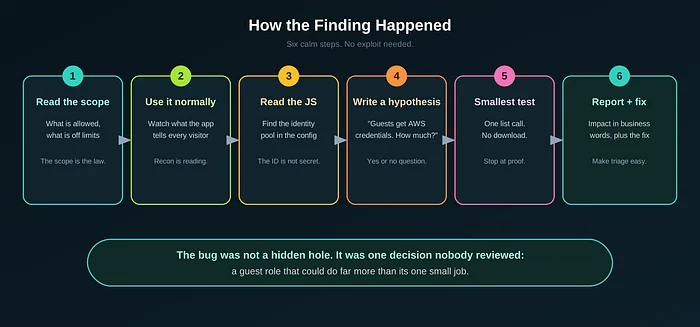
The researcher had been invited to a private bug bounty program for this target. A private program means a company invites a small number of researchers, gives them a defined scope, and asks them to look at it properly. The report stresses that the scope document was read twice before any tool was opened: which domains, which actions are allowed, what counts as out of bounds, and what to do if real customer data is accidentally seen.
Setup
No special accounts or tooling were needed to start. The researcher used the app like a normal customer, with browser developer tools open and the network tab running, and modified nothing. Recon here means reading what the application already sends to every visitor: the pages it loads, the scripts it sends to the browser, and the services it talks to. Everything in a website's front end is, by definition, public.
The only precondition for the later steps was the configuration found in the JavaScript bundle: an AWS region, a Cognito user pool ID, a client ID and an identity pool ID. The identity pool ID is not confidential; AWS's own documentation says it is meant to be in the front end. The report also gives read only AWS CLI commands that defenders can run.
Finding it
The researcher searched the JavaScript bundle for words that are always worth searching for: region, bucket, pool, endpoint, key. Near the top of the bundle was a block of configuration containing an AWS region, a user pool ID, a client ID and an identity pool ID.

The important distinction is between the two halves of Amazon Cognito. A user pool handles who you are: sign up, login, passwords. An identity pool hands out temporary AWS credentials so the app can talk to AWS services directly. The identity pool ID is not a secret, so finding it is not a bug, and reporting it as a leaked secret would get the report closed as informative. What it does tell you is that the app gives out AWS credentials to its users, which raises the real question: what can those credentials do?
Before touching anything, the researcher wrote a one line hypothesis:
"If this identity pool allows guest access, then anyone on the internet gets AWS credentials. So the only thing standing between a stranger and the company's cloud is the permission policy on the guest role."
The reasoning for guest access being on was the public landing page with product images and the sample document preview. Something had to fetch files without a logged in user, and a developer under deadline pressure tends to solve that by turning on guest access, attaching a role and moving on. AWS's guidance is explicit that if guest access is enabled, the permissions given to those sessions are available to everyone, because anyone who knows the pool ID can request them.
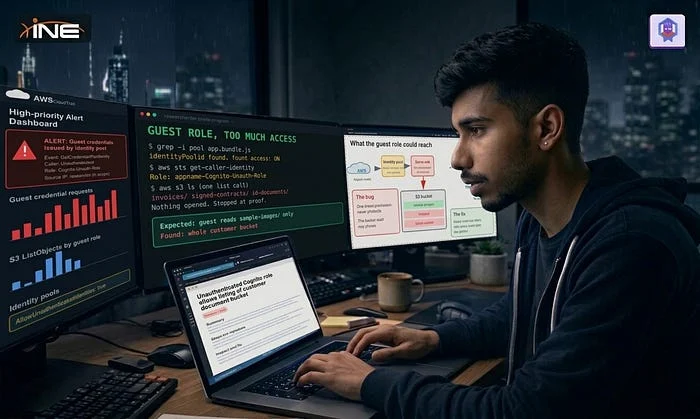
No passwords were guessed and no scanner was run. The hypothesis was a question that could be answered yes or no.
Exploitation
Step 1: Request guest credentials the way the app does
The app already asks for guest credentials every time a stranger opens the landing page, so the researcher asked for them the same way, in two calls to the public Cognito API. The first hands out an identity, the second hands out temporary credentials for that identity. It worked with no login: short lived credentials for an AWS role belonging to the company.
Step 2: Identify the role
The first command after obtaining credentials is always the same:
aws sts get-caller-identity
This tells you which role you are. The name came back as something like appname-Cognito-Unauth-Role, a guest role, exactly as hoped.
Step 3: Test the smallest thing that proves the point
Rather than trying everything the credentials allowed, the researcher asked what the role was supposed to do. Based on the app, the answer was simple: show sample images on the landing page. The honest test is whether the role stays inside that small job.
One thing was tried, and only one: could this guest role list the contents of the bucket that stores the company's files? Not download, not delete, just list. It could.
The listing was not a bucket of sample images. The folder names told the story: prefixes that looked like customer IDs, and inside them names like invoices, signed-contracts and id-documents. The researcher stopped right there. No file was opened, nothing was downloaded, and no write or delete was attempted. One screenshot of a listing, with the names redacted in the notes, was enough. Seeing a list of object names is already more than was wanted, and the rule applied was to prove the problem with the least access that proves it.
Root cause
The bucket itself was private. No public access, locked down in all the ways a security scanner checks. The problem was one level up, in identity: the guest role had a policy that effectively said this role may do everything with objects in this bucket, not "read the sample images folder". The whole bucket.
The policy itself is not visible from the outside, so the report presents the origin as an informed guess, clearly labelled as a guess. The pattern is familiar: during early development someone copied a sample policy so the demo would work, broad permissions made everything work, so it shipped, and nobody went back because nothing was broken.
Nothing was misconfigured in the way scanners look for. Everything was working exactly as written. The mistake was a decision, made once and never reviewed: a governance problem rather than a hacking problem. The security lead's reply after triage sums it up: they scanned for public buckets every day, but never thought about who the guest role is. They had checked the door, not the key.
Impact
Under the conditions found, any person on the internet could obtain temporary AWS credentials for the company's guest role without authenticating, and use them to list the contents of the bucket holding customer documents. The listing exposed folder names that looked like customer IDs and object names such as invoices, signed-contracts and id-documents.
The report's impact statement goes further, with a hedge: any person on the internet can see the names of customers' invoices and ID documents, and if the write permissions are equally broad, could tamper with them. That conditional matters. The researcher did not test write or delete, and the report does not claim to have confirmed them. The stated business consequence is that regulated customer data is put at risk.
Fix
The team triaged the report within a day, and their engineer reproduced it in minutes. They narrowed the role the same week, moved the sample images somewhere harmless, and rewarded the finding through the program.
The report also lists the fix it recommended:
- Turn guest access off if the landing page does not truly need it, or serve the sample images from a public CDN instead.
- If guest access has to stay, give the guest role access to one folder only, using a narrow resource path, and nothing else.
- Use separate roles for guests and for signed in users, and scope each one down.
- Alert whenever guest credentials are issued, so a change in behaviour gets noticed.
For defenders, the same questions work in reverse and take about ten minutes. These are read only commands from the AWS CLI:
aws cognito-identity list-identity-pools aws cognito-identity describe-identity-pool aws cognito-identity get-identity-pool-roles
The second command shows whether AllowUnauthenticatedIdentities is true. The third tells you which roles guests and signed in users receive. Then read those roles' policies. If the guest role can do more than the smallest job you can describe in one sentence, you have found your own version of this bug.
On the monitoring side, guest credentials show up in CloudTrail as GetId and GetCredentialsForIdentity calls from an unauthenticated caller. Elastic publishes a detection rule for exactly this, which alerts the first time a pool issues guest credentials. Cognito data events need to be turned on in CloudTrail for it to work.
Variants to test
The same shape of mistake lives in every identity system. The report names three stacks, each with an "everyone" door hiding the same question.
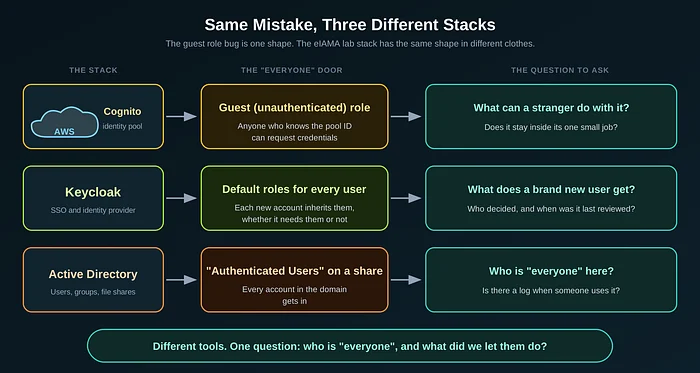
- AWS Cognito identity pools. Look for an identity pool ID in the front end JavaScript, request guest credentials the way the app does, run
aws sts get-caller-identityand then try the single smallest action the role should not need. A positive result is a guest role that can list beyond the sample content it exists to serve. - Keycloak. Ask what roles every brand new user receives by default. A positive result is a default role that grants access to more than a new user should ever see.
- Active Directory. Ask which shares are open to "Authenticated Users", which really means every account in the domain. A positive result is a share reachable by any domain account that has no business reading it.
The habit behind all three is the same five question list the researcher carries into every engagement:
- What does this app tell every visitor for free?
- Which of those things hand out identity or credentials?
- What is each one supposed to be allowed to do?
- Does it stay inside that job?
- What is the smallest proof I can show?
Sources
- AWS documentation, "Security best practices for Amazon Cognito identity pools"
- Elastic, "AWS Cognito Unauthenticated Identity Pool Credentials Issued"
What happened, in plain words
A security researcher was invited to a private bug bounty programme. That means a company picks a small number of people, gives them a written list of what they are allowed to look at, and asks them to find mistakes in its systems. The researcher found a real problem that week, but not by doing anything clever or dramatic. The problem came from asking one simple question about identity: who does this system think I am, and what has it decided I am allowed to do?
The target was a web app and a mobile app for a business that handled documents for customers. People could sign up, upload files and share them with their accountant. The researcher opened the app like any normal customer, looked at the files the app sends to every visitor's browser, found a piece of configuration in a JavaScript file, and used it to get temporary access to the company's cloud storage without logging in. That access let them see the names of folders that looked like customer documents. They stopped there, wrote a clear report, and the company fixed it within the week.
This article walks through the same steps the researcher took, in the same order, explaining every idea from scratch. You only need to be comfortable using a browser.
Before anything: the scope is the law
The researcher read the scope document twice before opening a single tool. The scope is the written agreement between the company and the researcher. It says which domains are in bounds, which actions are allowed, what counts as out of bounds, and what to do if you accidentally see real customer data.
This matters because bug bounty work is not the same as breaking in. If you go outside the scope, you are not a researcher any more, you are just someone breaking in. The report says this louder than anything else in the post, so it is worth repeating: read the scope first, and follow it.
Step one: ask what the system believes about you
When the researcher looks at a new target, they do not start with "how do I break this". They start with "who does this system think I am, and what has it decided I am allowed to do?"
That one question covers most of cloud security. Every request to a cloud app is really an identity question in disguise. Who is calling? How does the system know? What did someone decide they can touch?
The target was a web app plus a mobile app for a business that handled documents for customers. Sign up, upload files, share them with your accountant. Nothing exotic.
Before logging in, the researcher used the app like a normal customer and watched. That is allowed. Browser developer tools open, network tab running, nothing modified.
What is recon, and why is it not hacking?
Recon is short for reconnaissance, which just means looking around and reading. It is not hacking. You look at what the application already tells every visitor: the pages it loads, the scripts it sends to your browser, and the services it talks to. Everything in a website's front end is, by definition, public. The skill is knowing which parts of that public information are interesting.
A useful comparison: walking into a shop and reading the signs on the wall is not shoplifting. The signs are there for everyone. Recon is reading the signs.
What are browser developer tools?
Every modern browser has a built in set of tools for looking at what a website is doing. You open them with a keyboard shortcut or a menu item. The network tab is one panel inside those tools. It lists every file the browser downloaded to show you the page: images, stylesheets, scripts, and requests the page made to other services. Watching the network tab is like watching the delivery van bring boxes to a shop: you see what arrived and from where.
Step two: read the boring files
Most people look at the pretty pages. The researcher looks at the JavaScript bundle, the big file that makes the app work. Developers put configuration in there, because the front end has to know where to send requests.
What is JavaScript, and what is a bundle?
JavaScript is the programming language that runs inside your browser and makes a web page interactive. When you click a button and something happens without the page reloading, that is JavaScript. A bundle is many JavaScript files squashed together into one big file so the browser can download it in one go. It is not secret. Your browser has to download it to run the app, so anyone can read it.
The researcher searched the bundle for a few words that are always worth searching for: region, bucket, pool, endpoint, key. These are words developers use when they write down where their cloud services live and how to reach them.
Near the top of the bundle was a block of configuration. Among it were an AWS region, a user pool ID, a client ID, and something called an identity pool ID.
What is AWS?
AWS stands for Amazon Web Services. It is Amazon's collection of rented computer services: storage, databases, login systems, and much more. Companies use it instead of buying their own servers. Think of it as a huge warehouse park where a business rents a few shelves and a few machines.
What is Amazon Cognito?
Amazon Cognito is AWS's sign in service for apps. It has two parts that people mix up:
- A user pool handles who you are: sign up, login, passwords.
- An identity pool hands out temporary AWS credentials so the app can talk to AWS services directly.
A useful comparison: a user pool is the front desk that checks your name and gives you a badge. An identity pool is the key cupboard that hands out temporary keys to rooms, based on the badge you showed.
Why the identity pool ID is not a secret
A rookie might shout "leaked secret!" and rush to write a report. That would be wrong, and it is a mistake that gets reports closed as "informative", which means the company read it and decided there was nothing to fix.
Here is the key fact, from AWS's own documentation: the identity pool ID is not confidential. It is meant to be in your front end. It is like the street address of the key cupboard. Knowing the address does not mean you can open it.
So the ID is not the bug. Finding it only told the researcher something useful: this app gives out AWS credentials to its users. And that raised the real question.
Step three: form a hypothesis
This is the part the researcher loves, and the part beginners skip. Before touching anything, they wrote a one line hypothesis in their notes:
"If this identity pool allows guest access, then anyone on the internet gets AWS credentials. So the only thing standing between a stranger and the company's cloud is the permission policy on the guest role."
What is a hypothesis?
A hypothesis is a single sentence that could be proven true or false by a test. It is not a guess about what might be broken in general. It is a specific claim you can check. Writing it down before you test keeps you honest: you are testing the claim, not wandering around trying random things.
What is guest access?
Guest access means the app lets people who have not logged in get temporary credentials anyway. It exists because some features have to work before you sign in, like showing sample images on a public landing page.
What is a role, and what is a permission policy?
A role in cloud computing is a set of permissions with a name. It is not a person. It is a job description: "this is what you are allowed to do". When the app hands out temporary credentials, those credentials belong to a role.
A permission policy is the written list attached to a role saying what it can and cannot do. Think of a role as a staff badge, and the policy as the list of doors that badge opens.
Why did the researcher think guest access might be on?
The app showed a public landing page with product images and a "preview a sample document" feature before you signed in. For that to work from the browser, something had to be fetching files without a logged in user. In the researcher's experience, a developer under deadline pressure solves that by turning on guest access, attaching a role, and moving on.
AWS is very clear about this in its guidance. If you enable guest access, the permissions you give those sessions are available to everyone, because anyone who knows the pool ID can request them. The pool ID is public, so "everyone" really means everyone on the internet.
Notice what the researcher did not do. They did not guess passwords. They did not run a scanner. They read the situation and wrote down a question that could be answered with a yes or no.
Step four: test it the smallest way possible
Now the researcher needed to check the hypothesis, and wanted to do it in the quietest, least invasive way.
The app itself already asks for guest credentials every time a stranger opens the landing page. So the researcher asked for them the same way the app does, in two calls to the public Cognito API. First it hands out an identity, then it hands out temporary credentials for that identity.
What is an API?
An API is a way for one piece of software to ask another piece of software to do something. It is like a service counter: you hand over a request in a specific format, and you get back a specific answer. You do not need to know what happens behind the counter. The Cognito API is the counter where the app asks AWS for credentials.
What are credentials?
Credentials are the proof that you are allowed to do something. A password is one kind. A temporary credential is a short lived key that expires after a while, so even if it leaks, the damage is limited in time. Think of a hotel key card that stops working at checkout.
It worked. No login. The researcher had short lived credentials for an AWS role that belonged to the company.
Step 4a: find out which role you are
The first command after getting credentials is always the same:
aws sts get-caller-identity
Line by line:
awsis the AWS command line tool. It is a program you run in a terminal to talk to AWS.stsis the AWS service that answers the question "who am I right now?". STS stands for Security Token Service.get-caller-identityis the specific request: tell me the identity behind the credentials I am currently using.
It tells you which role you are. The name came back as something like appname-Cognito-Unauth-Role. A guest role, exactly as hoped. The word Unauth in the name is short for unauthenticated, meaning not logged in.
Step 4b: test the smallest thing that proves the point
Here is the moment that separates a good report from a great one. The researcher did not immediately try everything the credentials allowed. They asked: what is this role supposed to do? Based on the app, the answer was simple. Show sample images on the landing page. That is a very small job.
So the honest test is this: does the role stay inside that small job?
The researcher tried one thing, and only one: could this guest role list the contents of the bucket that stores the company's files? Not download. Not delete. Just list.
What is a bucket?
A bucket is a container for files in cloud storage. AWS's storage service is called S3, and every bucket has a name. Think of a bucket as a filing cabinet. Listing a bucket means reading the labels on the folders and files inside, without opening any of them.
It could.
And the listing was not a bucket of sample images. The folder names told the story. There were prefixes that looked like customer IDs, and inside them names like invoices, signed-contracts and id-documents.
The researcher stopped right there.
Why stop there?
Seeing a list of object names is already more than the researcher wanted. They did not open a single file, did not download anything, and did not try to write or delete. Good programmes spell this out, and responsible researchers follow the rule that you prove the problem with the least access that proves it. One screenshot of a listing, with the names redacted in the notes, was enough.
Redacted means covered up or removed. If you ever find yourself reading real customer data "just to be sure", stop. You are past the point of proof and into the point of harm.
Step five: find the root cause, not just the symptom
A weaker report would say: "Your bucket is exposed." But that is not quite true. The bucket was private. No public access. It was locked down in all the ways a security scanner checks.
What is a security scanner?
A security scanner is an automated tool that checks for common mistakes, like a bucket that anyone can read. It is like a checklist inspector walking around a building looking for open windows. It is useful, but it only finds the mistakes on its list.
The real problem was one level up, in identity. The guest role had a policy that effectively said this role may do everything with objects in this bucket. Not "read the sample images folder". The whole bucket.
The researcher cannot see the policy from the outside, but could reason about how it got there, and in the report wrote that as an informed guess, clearly labelled as a guess. The pattern is familiar. During early development, someone copied a sample policy so the demo would work. Broad permissions made everything work, so it shipped. Nobody ever went back, because nothing was broken.
That is the big lesson of the whole story, so let me say it plainly:
Nothing was misconfigured in the way scanners look for. Everything was working exactly as written. The mistake was a decision, made once and never reviewed.
That is not a hacking problem. That is a governance problem. Governance just means who decides things, who checks them, and when. It is the same family as the forgotten test account story from Part 4, just in a different costume.
Step six: write the report like a professional
Great findings get ignored because the report was messy. So the researcher takes as much care writing as testing. The report had these parts:
- Title: One plain sentence. "Unauthenticated Cognito role allows listing of customer document bucket."
- Summary: Three sentences a busy manager can read in ten seconds.
- Steps to reproduce: Numbered, exact, so their engineer could repeat it in five minutes.
- Impact in business words: Not "s3 list permission". Instead: "Any person on the internet can see the names of customers' invoices and ID documents, and if the write permissions are equally broad, could tamper with them. This puts regulated customer data at risk."
- Evidence: One redacted screenshot.
- Fix: Specific and short.
The fix is the part people forget, and it is the part that makes triage teams trust you. Triage is the first read a report gets: someone decides whether it is real and how serious it is.
- Turn guest access off if the landing page does not truly need it, or serve the sample images from a public CDN instead.
- If guest access has to stay, give the guest role access to one folder only, using a narrow resource path, and nothing else.
- Use separate roles for guests and for signed in users, and scope each one down.
- Alert whenever guest credentials are issued, so a change in behaviour gets noticed.
What is a CDN?
A CDN is a content delivery network: a service that serves files to the public from many locations around the world. It is designed for public files, so putting sample images there means they are meant to be seen by anyone, and no cloud credentials are involved.
What happened next
The team triaged it within a day. Their engineer reproduced it in minutes, which is exactly what a good report is for. They narrowed the role the same week, moved the sample images somewhere harmless, and rewarded the finding through the programme.
The thing the researcher remembers most was their security lead's reply. She wrote: We scan for public buckets every day. We never thought about who the guest role is.
That sentence is the whole story. They had checked the door. They had not checked the key.
How to check your own cloud this week
If you are a defender, the same questions work in reverse, and you can ask them in about ten minutes. These are read only commands from the AWS CLI:
aws cognito-identity list-identity-pools aws cognito-identity describe-identity-pool aws cognito-identity get-identity-pool-roles
Line by line:
awsis the AWS command line tool.cognito-identityis the part of AWS that deals with identity pools, the key cupboard described earlier.list-identity-poolsasks AWS to show every identity pool in the account. It is a read only request: it changes nothing.describe-identity-poolasks for the details of one pool, including whether guest access is switched on.get-identity-pool-rolesasks which roles guests and signed in users receive.
The second command shows whether AllowUnauthenticatedIdentities is true. That setting is the guest access switch: if it is true, people who are not logged in can get credentials. The third tells you which roles guests and signed in users receive. Then read those roles' policies. If the guest role can do more than the smallest job you can describe in one sentence, you have found your own version of this bug.
What is CloudTrail?
CloudTrail is AWS's logbook. It records who did what and when. Guest credentials show up in CloudTrail as GetId and GetCredentialsForIdentity calls from an unauthenticated caller. Those are the two API calls the app makes to get an identity and then credentials, the same two calls the researcher made.
Elastic publishes a detection rule for exactly this, which alerts the first time a pool issues guest credentials. A detection rule is an automatic alarm: it watches the logbook and shouts when a specific pattern appears. You need Cognito data events turned on in CloudTrail for it to work. Data events are the detailed log entries for individual requests, as opposed to a summary. Detection is the safety net for the day the policy drifts again.
The same mistake in other systems
This bug is not really an AWS bug. It is an identity and access management bug that happened to show up in AWS. The exact same shape of mistake lives in every identity system. You do not need AWS to practise spotting it. Look at the three stacks below. Each one has an "everyone" door, and each one hides the same question.
Same mistake, three different stacks: AWS Cognito, Keycloak and Active Directory
- AWS Cognito identity pools. Look for an identity pool ID in the front end JavaScript, request guest credentials the way the app does, run
aws sts get-caller-identityand then try the single smallest action the role should not need. A positive result is a guest role that can list beyond the sample content it exists to serve. - Keycloak. Ask what roles every brand new user receives by default. A positive result is a default role that grants access to more than a new user should ever see.
- Active Directory. Ask which shares are open to "Authenticated Users", which really means every account in the domain. A positive result is a share reachable by any domain account that has no business reading it.
What are Keycloak and Active Directory?
Keycloak is a free, open source sign in system that companies can run themselves. Active Directory is Microsoft's directory service, used by most large offices to manage staff accounts and shared folders. Both are identity systems, just like Cognito, and both have a default setting that decides what a new or anonymous user can reach.
The habit behind all three is the same five question list the researcher carries into every engagement:
- What does this app tell every visitor for free?
- Which of those things hand out identity or credentials?
- What is each one supposed to be allowed to do?
- Does it stay inside that job?
- What is the smallest proof I can show?
What I want you to take away
If you are a student or just starting out: you do not need exploit skills to find real bugs. Learn to ask "who does this system think I am, and what did someone decide I can do?" That question alone is worth more than a hundred tools.
If you are a researcher: write the hypothesis before you test it, prove the problem with the least access, and always explain the fix. Triage teams remember the researchers who make their job easier.
If you build or lead teams: scan the doors, but review the keys too. Every role your app assumes should be able to answer, in one sentence, what its job is.
Sources
- AWS documentation, "Security best practices for Amazon Cognito identity pools"
- Elastic, "AWS Cognito Unauthenticated Identity Pool Credentials Issued"
Glossary
- API: a way for one piece of software to ask another to do something, like a service counter with a fixed request and answer format.
- AWS: Amazon Web Services, Amazon's collection of rented computer services such as storage, databases and login systems.
- AWS CLI: the command line tool for talking to AWS from a terminal.
- Bucket: a container for files in cloud storage, like a filing cabinet.
- Bundle: many JavaScript files combined into one large file so the browser can download it in one go.
- CDN: content delivery network, a service that serves public files from many locations around the world.
- CloudTrail: AWS's logbook that records who did what and when.
- Cognito: AWS's sign in service for apps, made of user pools and identity pools.
- Credentials: proof that you are allowed to do something, such as a password or a temporary key.
- Data events: detailed CloudTrail log entries for individual requests, as opposed to a summary.
- Detection rule: an automatic alarm that watches logs and alerts when a specific pattern appears.
- Developer tools: the built in panel in a browser for inspecting what a website is doing, including the network tab.
- Governance: who decides things, who checks them, and when.
- Guest access: letting people who have not logged in obtain temporary credentials anyway.
- Hypothesis: a single sentence that could be proven true or false by a test.
- Identity pool: the Cognito part that hands out temporary AWS credentials so an app can talk to AWS services directly.
- Identity pool ID: the public identifier of an identity pool, meant to be in the front end and not a secret.
- Impact: the real world consequence of a bug, described in business terms.
- Informative: a report status meaning the company read it and decided there was nothing to fix.
- JavaScript: the programming language that runs inside a browser and makes a page interactive.
- Keycloak: a free, open source sign in system that companies can run themselves.
- Least privilege: giving a role only the smallest set of permissions it needs to do its job.
- Network tab: the browser developer tools panel that lists every file and request the page made.
- Permission policy: the written list attached to a role saying what it can and cannot do.
- Private bug bounty programme: a programme where a company invites a small number of researchers and gives them a defined scope.
- Recon: reconnaissance, reading what an application already tells every visitor.
- Redacted: covered up or removed, usually to hide personal or sensitive data.
- Role: a named set of permissions in cloud computing, like a job description rather than a person.
- Root cause: the underlying reason a problem exists, as opposed to the visible symptom.
- S3: AWS's cloud storage service, where buckets live.
- Scope: the written agreement saying which domains and actions are in bounds for a researcher.
- Security scanner: an automated tool that checks for common mistakes on a fixed list.
- STS: the AWS service that answers "who am I right now?" for the credentials in use.
- Triage: the first read a report gets, where someone decides whether it is real and how serious it is.
- User pool: the Cognito part that handles sign up, login and passwords.
- Active Directory: Microsoft's directory service, used by most large offices to manage staff accounts and shared folders.

