I Hacked into my University’s Vending Machine And it was soo BA
The vending machine app contained hardcoded database credentials in the frontend and an authentication endpoint without rate limiting. An attacker could use the exposed username and brute-force the password to gain access to the backend database.

Hacker
The full write-up lives on its author's site
It belongs to its author, so we link to it rather than copy it. The other two tabs are our own rewrites, checked against it.
Context
J Vend is the vending machine application used at MIT-BLR (the author's university). The flow the author describes is a mobile app backed by a PHP backend and Razorpay for payments. A user signs in with a Google account, gets a user ID under which orders and history are stored, adds an item to a cart, receives an order ID, and presses pay. The server looks up the item price in the database and sends it to the app, the app opens Razorpay for that amount, and once the payment succeeds and the backend verifies it, the server fires GET myorder.php and the motor vends the item.
The author states that the app is worse than a vibe coded app, and that the auth key, username and password were hardcoded in the front end in production. and that the findings were reported privately to the company and its founders with no reply before publication. The APK, the credentials and the exact exploit chain are deliberately not published.
Setup
The report does not name tools or versions. The preconditions it does describe are:
- Access to the J Vend Android application and the ability to inspect its contents (the author refers to strings sitting inside the APK).
- A Google account to log in and obtain a user ID.
- A reachable
/phpmyadmininstance on the backend. - Knowledge of the payment flow, which the author maps out before testing.
The author says the work took a few weeks and that earlier attempts by other people failed.
Finding it
The author starts from the architecture rather than the vending logic. The flow is drawn out as:
from the TOP you log in via google mail
 ↓
You get assigned a user ID where all the orders and history is stored
 ↓
you place an item to cart and order ID is assigned and you press pay
 ↓
the server send the item price from the DB to the app aka hard( Im not shitting devs that’s how bad the design is )
 ↓
and the app fires Razorpay with that money
 ↓
you pay and when its sucessful and the back-end verifies the you click vend and the item vends.
The verification step is described as follows: the server fetches the DB price with the order ID and the amount paid, and if the Razorpay amount associated with the order ID equals the product price in the DB, the server fires GET myorder.php?…, which drives the motor in the vending machine and dispenses the item; otherwise it does not.
Because the price is fetched by the server and handed to the app, the author was able to change the cart value to Rs. 1 regardless of the real cart value, and Razorpay then asked for Rs. 1.
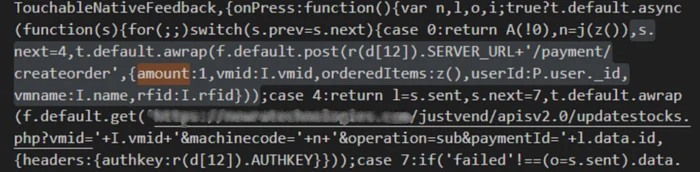
The screenshot shows the cart value changed to Rs. 1 and Razorpay asking for Rs. 1.
The author explicitly lists the approaches that did not interest them, framed as what a regular person would try:
- Skip payment.
- Change the amount before it reaches Razorpay.
- Reuse the payment ID or order ID to vend multiple times.
- Force trigger the motor to vend.
- Force a refund.
- Forge the Razorpay signature to pay less and show more (the author warns this could end you in jail).
The real finding, in the author's view, is the architecture around the application: the frontend trusted things it should not have, sensitive information sat where a client could inspect it, backend endpoints exposed functionality that needed stronger authentication and authorisation, and some controls that should have existed simply did not.
Exploitation
Step 1: Hardcoded credentials in the front end
Inspecting the app revealed a hardcoded username and password in the front end, in production.
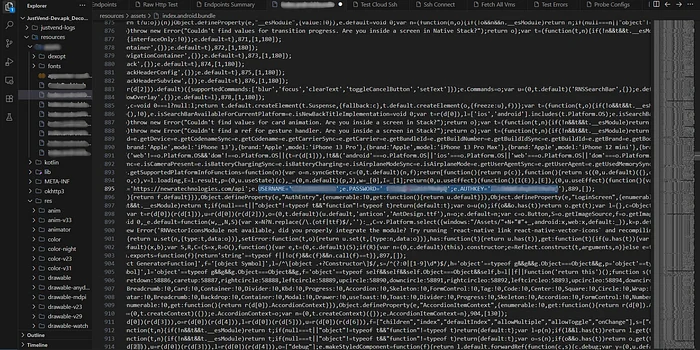
The screenshot is the evidence of the hardcoded username and password; the author notes it may be hard to see.
Step 2: Locating where the credentials fit
The credentials point at /phpmyadmin.
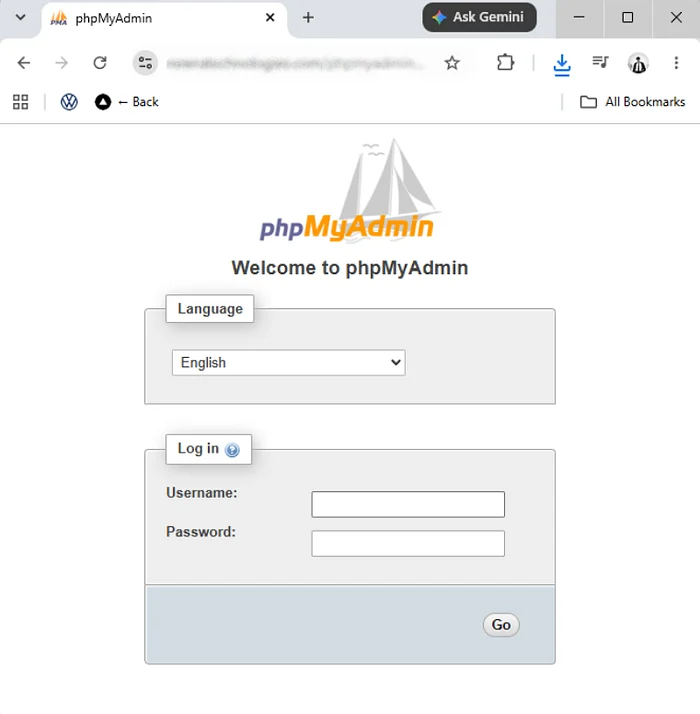
The author notes that although this sounds easy, it is not: the password for that user had been changed, so the hardcoded password no longer worked. What remained useful was the username, provided the account actually existed.
Step 3: Confirming the user exists with SQL injection
The author used SQL injection to determine whether the hardcoded username exists in the database. The report names CVE-2017-1000017 in this context and states that access was denied for the hardcoded username with the password, which the author interprets as confirmation that the user exists in the database. The exact request, payload and response are not published.
Step 4: Attacking the authentication endpoint
With a valid username and no working password, the next problem was the password. The admin had left rate limiting off on the authentication endpoint. The author does not give the exact commands or the exact attack chain, stating that they are not trying to hand someone a ready made way into somebody else's server. The point made is that an authentication endpoint with sensitive access behind it and no proper rate limiting is asking to be abused, and that this is enough to get in.
Root cause
The report attributes the issues to design and configuration rather than to a single bug:
- Secrets shipped in the client. The authentication key, username and password were hardcoded in the front end in production, so anyone with the APK could read them. As the author puts it, if your app contains your secrets, they are not secrets.
- Price handling. The server sends the item price from the DB to the app, and the app passes that amount to Razorpay, so the client controls the amount that is charged. The backend check compares the Razorpay amount for the order ID with the DB price.
- Exposed backend surface.
/phpmyadminwas reachable, and backend endpoints exposed functionality that needed much stronger authentication and authorisation. - Missing rate limiting. The authentication endpoint had no meaningful protection against repeated attempts, which makes password guessing practical once a valid username is known.
- Information exposure. The application exposed information to the client that should not have been exposed, which is what allowed the username to be confirmed.
The author's summary is that the payment system being secure does not save the application when everything around it is not.
Impact
The author's stated position is that they did not exploit the issues themselves because it goes against their principles, and they did not publish the APK, the credentials or the exploit chain. The demonstrated effect is that the cart value can be changed to Rs. 1 irrespective of the real cart value, and Razorpay then asks for Rs. 1. Beyond that, the hardcoded credentials pointed at an actual backend account, the username was confirmed to exist, and the authentication endpoint had no rate limiting, which together put sensitive backend access within reach. The report does not quantify how many machines, accounts or users were affected.
Fix
The report does not say what was changed. Based on the findings, the fixes it implies are: remove secrets from the client and rotate anything that shipped in the APK; derive the charge amount from the server side only and never accept an amount chosen by the client; restrict /phpmyadmin and other backend endpoints to properly authenticated and authorised access; enable rate limiting on authentication endpoints; and stop exposing backend information to the client.
Variants to test
- Inspect the APK for hardcoded keys, usernames and passwords, then check whether the same strings appear in other builds or environments. A positive result is a credential that authenticates to a live backend service.
- Intercept the price sent to the payment gateway and change it. A positive result is a gateway prompt for the modified amount that the backend still accepts as matching the order.
- Probe
/phpmyadminand similar administrative paths for reachability and default or leaked accounts. A positive result is a login page reachable from the internet that accepts a username found in the client. - Test authentication endpoints for rate limiting by repeating attempts. A positive result is a large number of attempts without lockout, delay or captcha.
- Test input fields for SQL injection to confirm whether a username exists. A positive result is a response that differs between existing and non-existing users.
- Attempt to reuse a payment ID or order ID to vend more than once. A positive result is a second vend from a single payment.
- Attempt to trigger the vend endpoint directly without a payment. A positive result is the motor firing without a verified payment.
What happened, in plain words
A student at MIT-BLR (a university) found serious security problems in the vending machine app used on campus, called J Vend. The app lets you log in with your Google account, put an item in a cart, pay through a payment service called Razorpay, and then press a button to make the machine drop the item.
The student spent a few weeks looking at how the app was built. They found that the app had a username and password written directly into the app itself, that a database administration page was reachable from the internet, and that the login page had no protection against someone trying passwords over and over. They also showed that the price the app asks you to pay can be changed to Rs. 1 no matter what is in the cart.
The student says they did not exploit the issues themselves, because it goes against their principles. They also say they contacted the company and its founders privately and got no reply, which is why they wrote about it publicly. They deliberately do not publish the app file, the credentials or the exact steps to exploit the issues.
This article walks through what they found, in the order they found it, and explains every technical idea from scratch along the way.
The app and how it is supposed to work
Before looking at the problems, it helps to understand what the app does normally. The author drew the flow like this:
from the TOP you log in via google mail
 ↓
You get assigned a user ID where all the orders and history is stored
 ↓
you place an item to cart and order ID is assigned and you press pay
 ↓
the server send the item price from the DB to the app aka hard( Im not shitting devs that’s how bad the design is )
 ↓
and the app fires Razorpay with that money
 ↓
you pay and when its sucessful and the back-end verifies the you click vend and the item vends.
Line by line, in plain words:
- You log in via google mail. You sign in with your Google account. The app uses Google to confirm who you are, instead of asking you to create a new password.
- You get assigned a user ID where all the orders and history is stored. The app gives you an identifier, a kind of account number. Everything you order is filed under that number.
- You place an item to cart and order ID is assigned and you press pay. You pick something, the app creates an order and gives it its own number (the order ID), and you tap pay.
- The server send the item price from the DB to the app. The server looks up the price in its database (DB, a structured store of data) and sends that price to the app. The author is annoyed here because the price travels to the phone, where the phone can change it.
- And the app fires Razorpay with that money. The app takes that price and opens Razorpay, the payment service, asking you to pay that amount.
- You pay and when its sucessful and the back-end verifies the you click vend and the item vends. You pay. The server (the back-end, the computer that runs the app's logic) checks the payment, and then you press vend and the machine releases the item.
The check the server does is described like this: the server fetches the database price using the order ID and the amount paid, and if the Razorpay amount associated with the order ID equals the product price in the database, the server fires GET myorder.php?…, which drives the motor in the vending machine and dispenses the item. If the amounts do not match, nothing comes out.
A few terms worth knowing before going further:
- Front end / client: the part of the app that runs on your phone. Anything in it can be read by anyone who has the app.
- Back end / server: the part that runs on the company's computers. You cannot see it directly; you only talk to it through requests.
- Database: where the server keeps its data, such as prices, users and orders.
- API: a way for one program to ask another program to do something. Think of it as a waiter: you tell the waiter what you want, the waiter goes to the kitchen (the server) and brings back the result. The app is the customer, the server is the kitchen, and the API is the menu of requests the app is allowed to make.
- Endpoint: one specific address on the server that does one specific job, like a particular counter in a shop.
myorder.phpis an endpoint. - Request: a message your app sends to the server, such as "give me the price for order 123".
The Rs. 1 trick
Because the server sends the price to the app and the app then tells Razorpay how much to charge, the author was able to change the cart value to Rs. 1 regardless of the real cart value. Razorpay then asked for Rs. 1.
The screenshot shows the cart value changed to Rs. 1 and Razorpay asking for Rs. 1.
Why does this work? The server's check compares the amount Razorpay says was paid for that order ID with the price in the database. But the amount that was sent to Razorpay came from the app, and the app had been changed to say Rs. 1. So the amount sent to Razorpay is the one the app chose. The author's point is that the payment service itself may be secure, but the design around it is not: the client is trusted to state the price.
What a regular person would try first
The author lists the ideas that most people have when they first look at a vending machine app, and says these are not where the real problem is:
- Skip payment.
- Change the amount before it reaches Razorpay.
- Reuse the payment ID or order ID to vend multiple times.
- Force trigger the motor to vend.
- Force a refund.
- Forge the Razorpay signature to pay less and show more (the author warns this could end you in jail).
Some quick definitions for those ideas:
- Payment ID / order ID: unique codes the payment service and the app use to refer to one specific payment and one specific order. Reusing them would mean paying once and vending twice.
- Signature: a cryptographic stamp that proves a message really came from Razorpay and was not altered. Forging one means faking that stamp, which is a serious crime, not just a security test.
- Force trigger: sending the request that starts the motor directly, without going through the normal payment step.
The author's view is that the interesting part is not the vending logic but the architecture around the app: the front end trusted things it should not have, sensitive information sat where a client could inspect it, backend endpoints exposed functionality that needed much stronger authentication and authorisation, and some controls that should have existed simply did not.
Two more terms:
- Authentication: proving who you are, like showing your ID at the door.
- Authorisation: what you are allowed to do once you are inside, like which rooms your ID card opens.
Step 1: A username and password written into the app
When the author inspected the app, they found a username and password written directly into the front end, in production (the live version real users have).
The screenshot is the evidence of the hardcoded username and password; the author notes it may be hard to see.
Hardcoded means the value is typed into the program's code as fixed text, rather than being stored safely on the server. Anyone who downloads the app can read those strings. The author's reaction is blunt: who puts their auth key, username and password hardcoded into the front end, in production? An auth key is a secret string that a program uses to prove to another service that it is allowed to talk to it, a bit like a spare key kept under the doormat.
Step 2: Where do those credentials fit?
The credentials point at /phpmyadmin.
phpMyAdmin is a well-known web page for managing a database. If you can reach it and log in, you can read and change the database directly. The author notes that although this sounds easy, it is not: the password for that user had been changed, so the hardcoded password no longer worked. What remained useful was the username, provided the account actually existed.
So the next question was: does this username really exist on the server?
Step 3: Confirming the user exists with SQL injection
The author used SQL injection to determine whether the hardcoded username exists in the database.
SQL is the language used to talk to many databases. A typical question looks like "find the user whose name is X". SQL injection happens when a program builds that question by gluing together text you typed, so that your text can change the meaning of the question. A simple comparison: imagine a form that asks for your name and then looks for a file called name.txt. If you type ../secrets, the program might look somewhere it never intended. SQL injection is the database version of that.
The report names CVE-2017-1000017 in this context. A CVE is a public catalogue number for a known vulnerability, so people can refer to the same issue unambiguously. The author states that access was denied for the hardcoded username with the password, and interprets that as confirmation that the user exists in the database. The exact request, payload and response are not published.
Step 4: Attacking the login page
With a valid username and no working password, the next problem was the password. The admin had left rate limiting off on the authentication endpoint.
Rate limiting is a cap on how many times someone can try something in a given period. Think of a cash machine that swallows your card after three wrong PINs. Without a cap, someone can try thousands of passwords quickly. With a cap, guessing becomes impractical.
The author does not give the exact commands or the exact attack chain, stating that they are not trying to hand someone a ready made way into somebody else's server. The point made is that an authentication endpoint with sensitive access behind it and no proper rate limiting is asking to be abused, and that this is enough to get in.
Why it all went wrong
The report attributes the issues to design and configuration rather than to a single bug:
- Secrets shipped in the client. The authentication key, username and password were hardcoded in the front end in production, so anyone with the app file could read them. As the author puts it, if your app contains your secrets, they are not secrets.
- Price handling. The server sends the item price from the database to the app, and the app passes that amount to Razorpay, so the client controls the amount that is charged. The backend check compares the Razorpay amount for the order ID with the database price.
- Exposed backend surface.
/phpmyadminwas reachable, and backend endpoints exposed functionality that needed much stronger authentication and authorisation. - Missing rate limiting. The authentication endpoint had no meaningful protection against repeated attempts, which makes password guessing practical once a valid username is known.
- Information exposure. The application exposed information to the client that should not have been exposed, which is what allowed the username to be confirmed.
The author's summary is that the payment system being secure does not save the application when everything around it is not.
What the impact was
The author's stated position is that they did not exploit the issues themselves because it goes against their principles, and they did not publish the app file, the credentials or the exploit chain. The demonstrated effect is that the cart value can be changed to Rs. 1 irrespective of the real cart value, and Razorpay then asks for Rs. 1. Beyond that, the hardcoded credentials pointed at an actual backend account, the username was confirmed to exist, and the authentication endpoint had no rate limiting, which together put sensitive backend access within reach. The report does not quantify how many machines, accounts or users were affected.
What should be fixed
The report does not say what was changed. Based on the findings, the fixes it implies are:
- Remove secrets from the client and rotate anything that shipped in the app file. Rotating a secret means replacing it with a new one, so the old leaked value stops working.
- Derive the charge amount from the server side only and never accept an amount chosen by the client.
- Restrict
/phpmyadminand other backend endpoints to properly authenticated and authorised access. - Enable rate limiting on authentication endpoints.
- Stop exposing backend information to the client.
Things to test on similar apps
If you are learning and want to practise on apps you are allowed to test, these are the checks the findings suggest:
- Inspect the app file for hardcoded keys, usernames and passwords, then check whether the same strings appear in other builds or environments. A positive result is a credential that authenticates to a live backend service.
- Intercept the price sent to the payment gateway and change it. A positive result is a gateway prompt for the modified amount that the backend still accepts as matching the order.
- Probe
/phpmyadminand similar administrative paths for reachability and default or leaked accounts. A positive result is a login page reachable from the internet that accepts a username found in the client. - Test authentication endpoints for rate limiting by repeating attempts. A positive result is a large number of attempts without lockout, delay or captcha.
- Test input fields for SQL injection to confirm whether a username exists. A positive result is a response that differs between existing and non-existing users.
- Attempt to reuse a payment ID or order ID to vend more than once. A positive result is a second vend from a single payment.
- Attempt to trigger the vend endpoint directly without a payment. A positive result is the motor firing without a verified payment.
Responsible disclosure
The author says they tried the boring responsible thing first: they contacted the company, contacted the founders, explained that they had found security issues, and waited. They got no reply. That is why they documented what happened publicly. They are clear that they are not publishing everything required for someone else to abuse the system, because there is a difference between saying "I found a vulnerability" and handing out a ready-made break-in.
Glossary
- API: a way for one program to ask another program to do something, like a waiter taking your order to the kitchen.
- APK: the file format of an Android app. Anyone who has it can inspect what is inside.
- Auth key: a secret string a program uses to prove to another service that it is allowed to talk to it.
- Back end / server: the part of the system that runs on the company's computers and that the app talks to.
- Client / front end: the part of the app that runs on your phone or in your browser.
- CVE: a public catalogue number for a known vulnerability, so people can refer to the same issue unambiguously.
- Database (DB): an organised store of data, such as prices, users and orders.
- Endpoint: one specific address on the server that does one specific job.
- Hardcoded: a value typed into the program's code as fixed text, readable by anyone who has the program.
- Order ID: a unique code the app gives to one order.
- Payment ID: a unique code the payment service gives to one payment.
- phpMyAdmin: a well-known web page for managing a database.
- Production: the live version of a system that real users use.
- Rate limiting: a cap on how many times someone can try something in a given period, like a cash machine swallowing your card after three wrong PINs.
- Rotate (a secret): replace a leaked secret with a new one so the old value stops working.
- Signature: a cryptographic stamp proving a message really came from a particular service and was not altered.
- SQL: the language used to talk to many databases.
- SQL injection: a flaw where text you type changes the meaning of a database question the program builds from it.
- User ID: an identifier the app gives you, under which your orders and history are stored.
- Vulnerability: a weakness in a system that someone could use to make it behave in a way its owners did not intend.

