I Own Your Customers !!!

medium.com
Published on medium.com
AWS
The full write-up lives on its author's site
It belongs to its author, so we link to it rather than copy it. The other two tabs are our own rewrites, checked against it.
Context
This write-up covers two separate findings, both of which ended with the author holding access to users' KYC documents stored in Amazon S3 buckets. The author does not name either organisation. The first target is described as a blockchain project backed by reputable names in the crypto community; the second is a crypto exchange with good trading volume, referred to throughout as vuln.com.
In both cases the exposed material was identity-verification documentation that users had submitted to the service, plus, in the second case, support ticket documents. Neither target is identified beyond that, and no endpoint, parameter or version is given for the applications themselves.
Setup
The author describes no special accounts or roles on either target. The work was done with a subdomain enumeration workflow and Burp Suite, which was used to review the spidered site structure. The only artefacts quoted from the targets are a JavaScript bundle path on the first target and a snippet of source on the second. No tool versions are stated.
Finding it
Target 1: the blockchain project
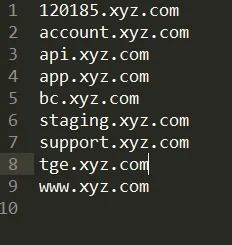
The author's stated first step on any website is reconnaissance, so subdomain enumeration scripts were run against the blockchain project. The output included a host of the form 120185.xyz.com, which turned out to be the site's admin panel.
Roughly an hour was spent trying to bypass the admin panel with various tricks, without success. The author notes that no screenshot of the panel is available because it has since been taken down. The approach then changed: Burp was used to look at the spidered structure of the site, and the JavaScript files reachable from the panel were read. One of them was:
https://120185.xyz.com/js/app-1eda861a990702514571.bundle.js
Reading that bundle surfaced something worth following up.

A search of the file for the keyword bucket then produced hardcoded AWS access keys.

Target 2: the crypto exchange
The second finding was not the result of a hunt. The author visited the exchange to check the exchange rate of a token they had invested in, and opened the page source out of curiosity.

That source contained a reference to an S3 bucket. Opening the bucket showed it was readable.
Exploitation
Step 1: use the leaked keys against the first bucket
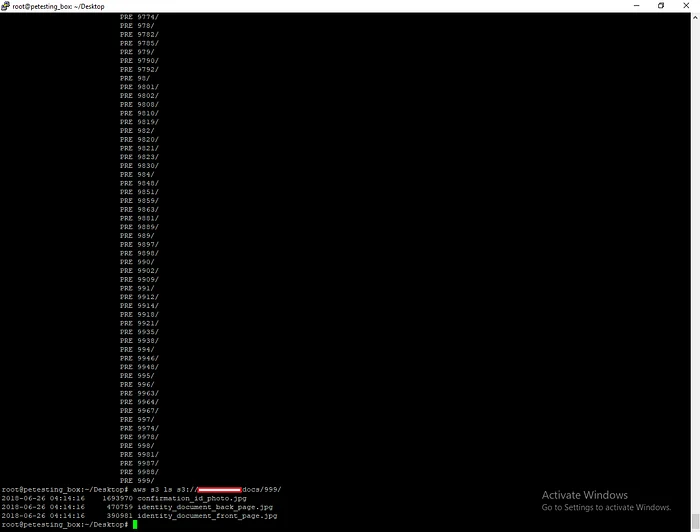
The AWS access keys found in the admin panel's JavaScript bundle were used directly to access the S3 bucket. The bucket held user KYC documents, and the author states there was access to thousands of them.
The author states that no document was downloaded, on ethical grounds, and that the issue was reported to the organisation immediately. The organisation implemented a fix quickly.
Step 2: read the second bucket directly
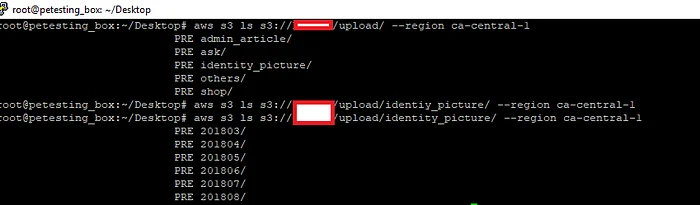
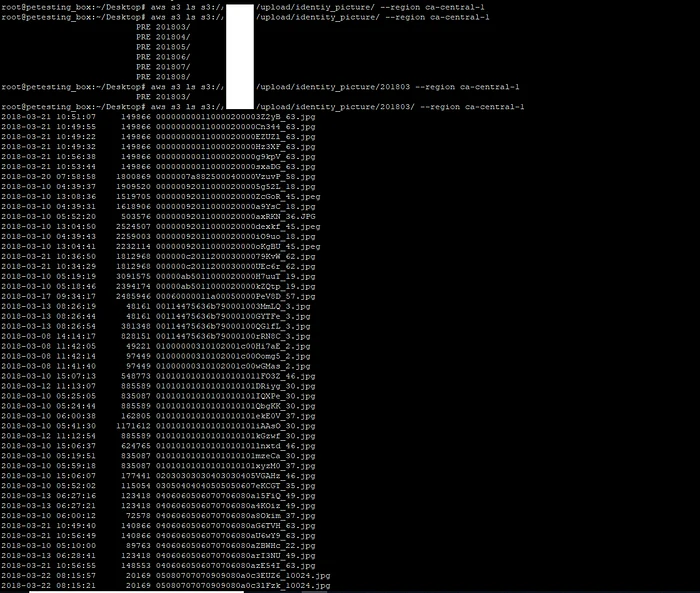
For the exchange, no credentials were needed. The bucket referenced in the page source was readable, and opening it revealed the full set of KYC documents along with support ticket documents.
The report gives no bucket name, no URL and no listing response for either target, so the exact request that produced these listings is not shown.
Root cause
Two distinct mistakes are described.
-
Secrets shipped to the browser. On the blockchain project, AWS access keys were embedded in a client-side JavaScript bundle served from the admin panel host. The keys were embedded in a JavaScript bundle served from the admin panel host. The author moved from trying to bypass the admin panel to reading the JavaScript files accessible on the panel.
-
Publicly readable bucket. On the exchange, the bucket referenced in the page source was readable without any credentials at all. The report does not say whether this was an ACL, a bucket policy or a misconfigured static hosting setting; it only states that the bucket was readable.
In both cases the sensitive material was stored in S3; in the first the keys to it were in client-side code, in the second the bucket was readable.
Impact
In both cases the exposed data was identity documentation submitted by users, which the author describes as KYC documents, and on the exchange also support ticket documents. The author characterises the first bucket as containing thousands of KYC documents and the second as containing the whole set of KYC documents plus support tickets. The report does not quantify the second bucket.
The author does not describe downloading or exfiltrating any of it, and states explicitly that nothing was downloaded from the first bucket. The impact described is therefore potential: anyone who found the same keys or the same readable bucket could have accessed the same documents. The report gives no information about retention, notification or regulatory consequences.
Fix
For the blockchain project, the organisation fixed the issue the same day it was reported. The report does not say what the fix was; removing the keys from the bundle and rotating them would be the obvious minimum, but the report does not state that this is what happened.
For the exchange, the bug was fixed the same day it was reported.
Variants to test
- JavaScript bundles on admin and internal hosts. Spider the application with Burp, then read every reachable bundle, including ones loaded by login pages. A positive result is a string such as an access key, a bucket name or an internal endpoint that should not be client-side.
- Keyword search across fetched scripts. Search downloaded scripts for terms like
bucket,s3,awsandaccessKey. A positive result is a hardcoded credential or a bucket reference in a file served without authentication. - Page source on any site you visit. View source on the main application and look for storage hostnames. A positive result is a bucket URL that resolves and lists or serves objects.
- Direct bucket access without credentials. Request the bucket root and a known object path. A positive result is a listing or a downloadable object returned to an unauthenticated client.
Takeaways
The author's own conclusions are to always read JavaScript files, because you might get lucky, and to always check the buckets you come across, because of the information they may hold. The second finding came from opening the page source and then the bucket.
Timeline
| Time | Event |
|---|---|
| August 29, 2018 12:57 PM | Report sent (blockchain project) |
| August 29, 2018 7:30 PM | Checked and bug fixed |
| August 30, 2018 1:12 PM | Report sent (exchange) |
| August 30, 2018 4:00 PM | Bug fixed |
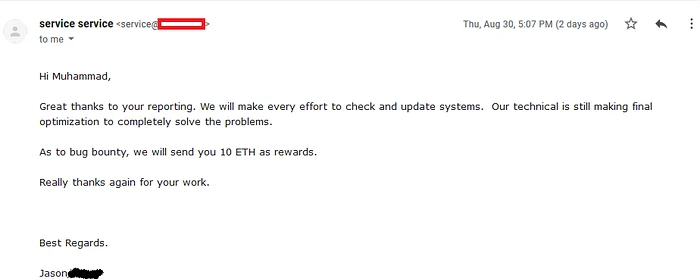
| August 30, 2018 5:07 PM | Bounty rewarded (10 ETH) |
What happened, in plain words
A security researcher found that two cryptocurrency services had left their users' identity documents sitting in a place on the internet that anyone could open. The documents were KYC files: the passport photos, ID cards and proof-of-address papers that a service asks you to upload before it will let you trade. In the second case there were also support ticket documents, the files customers attach when they ask for help.
The documents were stored in Amazon S3. S3 is Amazon's online storage service: think of it as a set of very large, very cheap filing cabinets on the internet, called buckets, that a company can put files into and serve to its users. Normally a bucket is locked so that only the company's own systems can read it. In the first case the keys were in a client-side file; in the second the bucket was readable.
The first service was a blockchain project backed by well-known names in the crypto community. Its admin panel served a JavaScript file that contained hardcoded AWS access keys. The researcher read that file and used the keys.
The second service was a crypto exchange with good trading volume, which the author calls vuln.com to avoid naming it. The researcher was not even hunting for bugs there. They opened the page source, the raw text a browser receives before it draws the page, and saw a reference to a storage bucket. The bucket turned out to be readable by anyone, with no key at all.
Neither organisation is named. The author reports the first issue and it was fixed the same day. The second was fixed the same day too, and paid a bounty of 10 ETH, a reward paid in the cryptocurrency Ether.
Background
The author says they were not doing much bug hunting at the time. They were learning DPDK, Intel's Data Plane Development Kit, a set of tools for processing network packets very quickly. Documentation for it is thin, so they were reading Intel's own docs, which they describe as good but long. Tired of reading, they decided to relax by earning some bounties.
A bounty is a reward a company pays to someone who reports a security problem to it privately instead of exploiting it or selling it. This write-up is the author's second about crypto exchanges; the first involved a different flaw in a password reset function.
Finding it
Target 1: the blockchain project
The author's first step on any website is reconnaissance, usually shortened to recon. Recon means gathering information about a target before touching it: which machines it runs on, which names point at it, what software it uses. It is the equivalent of walking around a building and noting the doors and windows before trying any of them.
One standard recon step is subdomain enumeration. A company's main site might be example.com, but it very often has other hosts such as shop.example.com, admin.example.com or dev.example.com. Each of those is a subdomain, and each is a separate door that may be less carefully guarded than the front one. Enumeration means finding as many of these names as possible, usually by querying public records of domain names and by trying common words.
The author ran their subdomain recon scripts and got a list of hosts.
The image shows the enumerated subdomains, the list of hostnames the recon produced. One of them was 120185.xyz.com, and it turned out to be the admin panel of the site. An admin panel is the private web interface where staff manage users, content and settings. It is the back office, not the shop front.
The author spent about an hour trying to get past the admin panel's login with various tricks. This is called bypassing authentication: finding a way in without valid credentials, for example by guessing, by tampering with what the browser sends, or by exploiting a flaw in the login code. None of it worked. The author notes there is no screenshot of the panel because it has since been taken down.
So the approach changed. Instead of attacking the login, the author used Burp Suite to look at the site's spidered structure. Burp Suite is a tool that sits between your browser and the website and records every request and response, so you can see exactly what the site loads. Spidering means letting the tool crawl the site automatically and build a map of its pages and files. The point of this step is that even a login page loads files, and those files are often reachable without logging in.
Among the files reachable from the panel were JavaScript files. JavaScript is the programming language that runs in your browser and makes pages interactive. Modern sites bundle their JavaScript into large files with names like app-<long hash>.js, where the hash is a fingerprint that changes whenever the code changes. One of them was:
https://120185.xyz.com/js/app-1eda861a990702514571.bundle.js
Line by line, this is just a web address. https:// is the secure version of the protocol browsers use to fetch pages. 120185.xyz.com is the host, the specific machine the file lives on. /js/ is the folder. app-1eda861a990702514571.bundle.js is the file name: app is a common name for a site's main script, the long string is the fingerprint, and .bundle.js says it is a bundle, a single file containing many scripts joined together. The reason this matters is that a browser must be able to download this file to run the site, so the server usually hands it out to anyone who asks, logged in or not.
Reading that bundle surfaced something worth following up.
The image shows the part of the file that caught the author's eye. A search of the file for the keyword bucket then produced hardcoded AWS access keys.
Hardcoded means written directly into the code as fixed text, rather than being looked up from a safe place at run time. AWS access keys are the username-and-password pair that programs use to talk to Amazon Web Services. They come as an access key ID, which is a bit like a username, and a secret access key, which is like a password. Anyone holding both can act as that program: read its files, and depending on the permissions attached, change or delete them. Because the keys were inside a file the browser downloads, anyone who opened that file could read them.
Target 2: the crypto exchange
The second finding was not the result of a hunt. The author visited the exchange to check the exchange rate of a token they had invested in, and opened the page source out of curiosity. Page source is what you see with the browser's View Source command: the raw HTML, the language pages are written in, plus the scripts and links the page pulls in. It is not hidden; it is simply something most people never look at.
The image shows the part of the source that mentioned storage. That source contained a reference to an S3 bucket. Opening the bucket showed it was readable.
Exploitation
Step 1: use the leaked keys against the first bucket
The AWS access keys found in the admin panel's JavaScript bundle were used directly to access the S3 bucket. In plain terms, the researcher took the username and password that the site had handed to every visitor and used them as if they were the company's own program. The bucket held user KYC documents, and the author states there was access to thousands of them.
The image shows the bucket contents that the keys opened up. KYC stands for Know Your Customer: the checks financial services are legally required to run on their users, which is why they collect identity documents in the first place. A leaked KYC document is serious because it usually contains a name, a date of birth, a photograph and an ID number, which is exactly the material needed for identity theft.
The author states that no document was downloaded, on ethical grounds, and that the issue was reported to the organisation immediately. The organisation implemented a fix quickly.
Step 2: read the second bucket directly
For the exchange, no credentials were needed. The bucket referenced in the page source was readable, and opening it revealed the full set of KYC documents along with support ticket documents.
The first of these images shows the bucket listing, the list of files the bucket returns when you open it. The others show the KYC documents themselves. A readable bucket is one whose permissions allow anyone on the internet to list and fetch its contents. There is no login step and no key: the storage service simply answers.
The report gives no bucket name, no URL and no listing response for either target, so the exact request that produced these listings is not shown.
Root cause
Two distinct mistakes are described.
-
Secrets shipped to the browser. On the blockchain project, AWS access keys were embedded in a client-side JavaScript bundle served from the admin panel host. Client-side means the code runs in the visitor's browser, so it is delivered to the visitor. The keys were embedded in a JavaScript bundle served from the admin panel host. The author moved from trying to bypass the admin panel to reading the JavaScript files accessible on the panel. This is the everyday equivalent of locking the front door but taping the spare key to the outside of the letterbox.
-
Publicly readable bucket. On the exchange, the bucket referenced in the page source was readable without any credentials at all. The report does not say whether this was an ACL, a bucket policy or a misconfigured static hosting setting; it only states that the bucket was readable. An ACL is an access control list, a per-file or per-bucket list of who may do what. A bucket policy is a set of rules attached to the whole bucket. Static hosting is the S3 feature that serves files as a website. All three are ways of saying who can read what, and any of them can be set too loosely.
In both cases the sensitive material was stored in S3; in the first the keys to it were in client-side code, in the second the bucket was readable. The application layer is the website's own code, the part that checks who you are when you log in. The storage layer is the filing cabinet behind it. If the cabinet is open, it does not matter how good the website's login is.
Impact
In both cases the exposed data was identity documentation submitted by users, which the author describes as KYC documents, and on the exchange also support ticket documents. The author characterises the first bucket as containing thousands of KYC documents and the second as containing the whole set of KYC documents plus support tickets. The report does not quantify the second bucket.
The author does not describe downloading or exfiltrating any of it, and states explicitly that nothing was downloaded from the first bucket. Exfiltrating means copying data out. The impact described is therefore potential: anyone who found the same keys or the same readable bucket could have accessed the same documents. The report gives no information about retention, notification or regulatory consequences.
Fix
For the blockchain project, the organisation fixed the issue the same day it was reported. The report does not say what the fix was; removing the keys from the bundle and rotating them would be the obvious minimum, but the report does not state that this is what happened. Rotating keys means issuing new ones and cancelling the old ones, so that the leaked pair stops working.
For the exchange, the bug was fixed the same day it was reported.
Variants to test
These are the same checks, written so that someone with only a browser can follow them.
- JavaScript bundles on admin and internal hosts. Use Burp to record what the site loads, then read every reachable bundle, including ones loaded by login pages. A positive result is a string such as an access key, a bucket name or an internal endpoint that should not be client-side. An endpoint is a specific address a program sends requests to, like a counter in a shop.
- Keyword search across fetched scripts. Search downloaded scripts for terms like
bucket,s3,awsandaccessKey. A positive result is a hardcoded credential or a bucket reference in a file served without authentication. - Page source on any site you visit. View source on the main application and look for storage hostnames. A positive result is a bucket URL that resolves and lists or serves objects. An object is simply a file stored in a bucket.
- Direct bucket access without credentials. Request the bucket root and a known object path. A positive result is a listing or a downloadable object returned to an unauthenticated client. Unauthenticated means the request carried no login or key.
Takeaways
The author's own conclusions are to always read JavaScript files, because you might get lucky, and to always check the buckets you come across, because of the information they may hold. The second finding came from opening the page source and then the bucket.
Timeline
| Time | Event |
|---|---|
| August 29, 2018 12:57 PM | Report sent (blockchain project) |
| August 29, 2018 7:30 PM | Checked and bug fixed |
| August 30, 2018 1:12 PM | Report sent (exchange) |
| August 30, 2018 4:00 PM | Bug fixed |
| August 30, 2018 5:07 PM | Bounty rewarded (10 ETH) |
Glossary
- Admin panel: the private web interface where a company's staff manage users, content and settings.
- Amazon S3: Amazon's online file storage service, organised into containers called buckets.
- Application layer: the website's own code, including its login and permission checks.
- AWS access keys: the access key ID and secret access key pair that programs use to authenticate to Amazon Web Services.
- Bounty: a reward a company pays for a privately reported security problem.
- Bucket: a container in Amazon S3 that holds files, called objects.
- Bucket policy: a set of access rules attached to a whole S3 bucket.
- Bundle: a single JavaScript file containing many scripts joined together, usually with a hash in its name.
- Burp Suite: a tool that sits between browser and website and records every request and response.
- Bypass: getting past a control such as a login without satisfying it legitimately.
- Client-side: code that runs in the visitor's browser and is therefore delivered to the visitor.
- Credentials: the proof of identity a system accepts, such as a username and password or a key pair.
- Endpoint: a specific address a program sends requests to.
- Enumeration: systematically listing things, such as all the subdomains of a domain.
- Exfiltration: copying data out of a system without permission.
- Hardcoded: written into the code as fixed text rather than looked up from a safe store at run time.
- HTML: the language web pages are written in.
- JavaScript: the programming language that runs in browsers and makes pages interactive.
- KYC: Know Your Customer, the identity checks financial services must run, which is why they hold identity documents.
- Object: a file stored in a bucket.
- Page source: the raw HTML and linked files a browser receives, visible with View Source.
- Recon: gathering information about a target before attacking it.
- Rotating keys: issuing new credentials and cancelling the old ones so leaked ones stop working.
- Spidering: letting a tool crawl a site automatically to map its pages and files.
- Storage layer: the file storage behind a website, as opposed to the website's own code.
- Subdomain: a named host under a main domain, such as
admin.example.comunderexample.com. - Subdomain enumeration: finding as many of a domain's subdomains as possible.
- Unauthenticated: a request that carries no login or key.
- ACL: access control list, a per-file or per-bucket list of who may do what.



