I scanned every package on PyPi and found 57 live AWS keys
The author scanned every package on PyPI and found 57 live AWS access keys embedded in published packages. An attacker with access to these keys could use them to access AWS resources, though the text does not detail specific exploitation beyond validating the keys.
 Published on tomforb.es
6 Jan 2023 projectssecurity
The full write-up lives on its author's site
It belongs to its author, so we link to it rather than copy it. The other two tabs are our own rewrites, checked against it.
Context
PyPi is the Python package index: the place where authors publish releases of Python libraries, and where anyone can download them. Each release can be published as several files (sdist, wheels, platform-specific eggs), and those files are public and permanent. The target of this work is not a single web application but the whole index: every release ever published, scanned for AWS access key pairs that are still live.
The starting point was an earlier, accidental find: InfoSys had leaked an AWS key on PyPi. That raised the obvious question of how common this is across the index. The answer, after scanning every release, was 57 valid access keys belonging to organisations including Amazon, Intel, Stanford, Portland and Louisiana universities, the Australian Government, the General Atomics fusion department, Terradata, Delta Lake and Top Glove.
Setup
The tooling is deliberately small:
ripgrepfor searching package contents, including inside compressed archives.- The
awsCLI to test whether a discovered key pair is valid. - A static dump of PyPi metadata, pypi-data, to enumerate every release file URL.
fd,jqand GNUparallelto drive the pipeline across many files at once.- A Rust tool, aws-creds-scanner, for continuous scanning of new releases.
- GitHub Actions to run that tool periodically, and GitHub Secret Scanning as the notification channel to AWS.
No account on the target is needed: everything scanned is public package data.
Finding it
An AWS key pair has two parts: the key ID and the key secret. The key ID has a recognisable prefix and shape, so it can be matched with a regular expression:
((?:ASIA|AKIA|AROA|AIDA)([A-Z0-7]{16}))
The secret is far less distinctive, so it is matched with a much more general pattern:
[a-zA-Z0-9+/]{40}
The trick is to tie the two together: find a key ID and a secret that sit close to each other, surrounded by quotes. That is expressed as one large regular expression (also published on regex101):
re.match(r"""
    (('|\")((?:ASIA|AKIA|AROA|AIDA)([A-Z0-7]{16}))('|\").*?(\n^.*?){0,4}(('|\")[a-zA-Z0-9+/]{40}('|\"))+|('|\")[a-zA-Z0-9+/]{40}('|\").*?
    (\n^.*?){0,3}
    ('|\")((?:ASIA|AKIA|AROA|AIDA)([A-Z0-7]{16}))('|\"))+
""")
The two alternatives handle both orders: key ID first with the secret up to four lines below, or secret first with the key ID up to three lines below. The line-count bounds keep the match local, so unrelated strings in the same file are not paired up.
Exploitation
Step 1: search a package for the pattern
With the pattern in a shell variable, ripgrep can search a downloaded archive directly. The --text flag treats binary content as text, -z searches inside compressed files, and --multiline allows the pattern to span lines:
$ wget "https://files.pythonhosted.org/.../amazon_pay-2.5.1.tar.gz"
$ rg --text -z --multiline $chonky_regex amazon_pay-2.5.1.tar.gz
2195:#        mws_access_key='[redacted]',
2196:#        mws_secret_key='aC/[redacted]',
The output shows a commented-out integration test inside Amazon's own amazon_pay SDK, with the key ID and secret on consecutive lines. The match is exactly what the regex was built to find: two quoted strings, one matching the key ID shape and one matching the 40-character secret shape, close together.
Step 2: test whether the key pair is live
The aws CLI's sts get-caller-identity call is the cheapest way to check whether a key pair is valid, because it returns the identity behind the credentials without touching any other service:
$ AWS_SECRET_KEY=X AWS_ACCESS_KEY_ID=Y aws sts get-caller-identity
{
  "UserId":"985141293874",
  "Account":"985141293874",
  "Arn":"arn:marketplacewebservice:iam::985141293874:root"
}
A successful response means the pair is live. The Arn also tells you what kind of principal the key belongs to, which is what the later analysis uses to categorise keys.
Step 3: scale the search to the whole index
The simple rg invocation has limits. The -z flag does not support searching zip files, so a custom shell script is needed to handle those, and extracting the matches cleanly requires using ripgrep's JSON output. Once those are handled, the static PyPi data dump provides the list of every release file URL, and the pipeline runs in parallel:
# Illustrative example, reduced in complexity quite a bit
$ git clone https://github.com/orf/pypi-data.git
$ fd -t f --min-depth=2 . 'release_data/' | parallel --xargs jq 'to_entries[] | .value.urls[].url' > all_urls.txt
$ cat all_urls.txt | parallel -I@ "wget @ -O downloads/@ && rg --json -z --multiline $chonky_regex downloads/@" > matches.txt
fd lists the per-release metadata files, jq pulls out every file URL from them, and parallel downloads each file and runs the regex over it, writing JSON matches to matches.txt. The full run took about 27 hours on the author's MacBook over a home internet connection.
Step 4: continuous scanning of new releases
The batch scan was converted into a Rust tool, aws-creds-scanner, which runs periodically via GitHub Actions and scans new releases from PyPi, HexPM and RubyGems. When it finds keys, it generates a report and commits it to the repository, for example this report for a PyPi package. Each report contains the keys found, a public link to them, and metadata about the release.
Because the keys are committed to a public GitHub repository, GitHub's Secret Scanning service detects them and notifies AWS. AWS then opens a support ticket with the key's owner to notify them of the leak, and applies a quarantine policy to the key that blocks high-risk actions such as starting EC2 instances or adjusting permissions.
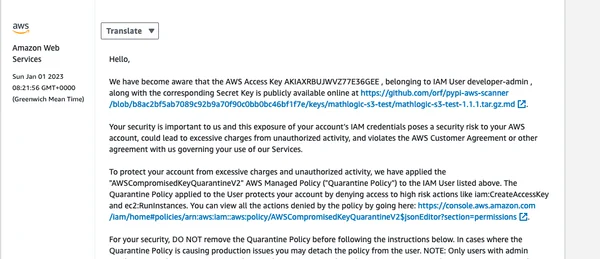
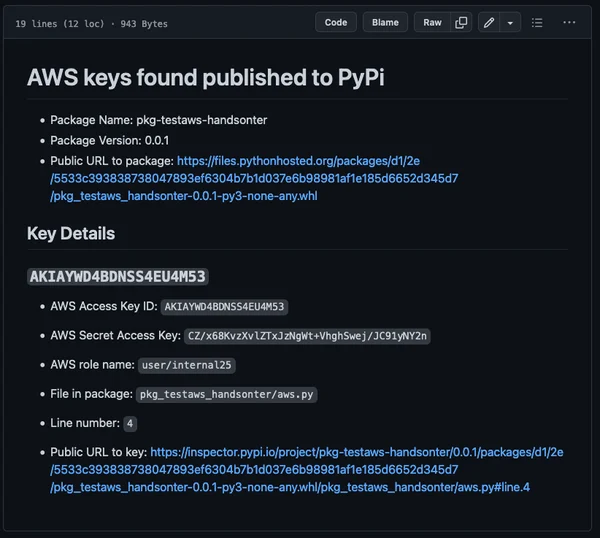
The two images show the resulting AWS support ticket and the generated report that triggered it.
To avoid reprocessing packages, the workflow does not use a database. Instead, GitHub Actions commits a JSON file that acts as a cursor to the last package processed, and each subsequent run fetches the next set of packages after that cursor. The author notes this pattern is not perfect and does not handle individual package failures well, but works well for periodic tasks like this. Running a Rust tool every half an hour via GitHub Actions is not a web-scale solution, but it is an effective post-proof-of-concept that costs nothing.
Analysis of the leaked keys
The oldest still-active key was uploaded nearly 10 years earlier, in 2013, and the newest was published on the 20th of December.
Key types
By looking at the name of the principal the key belongs to, the author categorised the keys:
| Type | Example principal | Count |
|---|---|---|
| Root | arn:aws:iam:..:root |
11 |
| User | arn:aws:iam:..:user/ivan.vasquez |
18 |
| Service | arn:aws:iam:..:user/S3TempUploader |
22 |
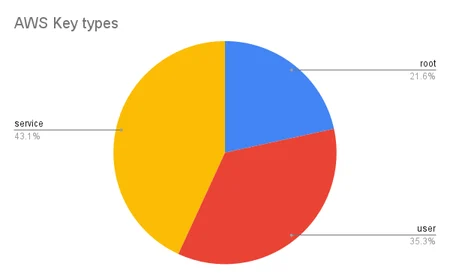
The image shows the breakdown of key types.
Types of leaks
Leaks fall into three categories: accidentally committed files or changes, test data and test files, and "legitimate" usage.
Accidentally published files
Authors can publish different platform-specific files for each version of a release. Tensorflow, for example, has 16 different versions for different Windows, Linux and MacOS versions. Usually these contain exactly the same code, but differences are possible.
One example is a package version published by Terradata. The file containing the key, presto-local/debug, does not exist in the source version of the release and only exists in the platform-specific .egg releases. It seems some files were accidentally bundled before publishing, which implies the release was not fully automated.
Amazon fell victim to the same thing: amazon_pay SDK version 2.5.1 contains an accidental integration test the developer was working on, and that file is not present in previous or future releases. There are other examples of mistakenly added integration tests, one from RedisScheduler and one from the third-party python-amazon-mws SDK.
Test files
12 of the 57 keys appear to be included as part of a test suite, usually in the form of integration test credentials. DeltaLake added keys to their tests but later refactored them to use LocalStack. Other tests are a mix of accidentally published files and ad-hoc integration tests, such as a file-level test in django_framework.
Most test keys are used with S3, but one test from BigJob2 appears to launch an EC2 instance.
"Legitimate" usage
Some packages use long-lived IAM keys for what the author calls "legitimate" usage, in quotes because there are much better ways to allow public access to specific AWS resources without shared IAM keys. Most of these involve uploading temporary files to S3.
One example is Sym, an access management company, which includes write-only IAM credentials and apparently uses them because their API is unable to generate temporary signed URLs yet. Another example in the same vein is motoo.
QuantPanda is a particularly telling case. In versions 0.0.22 to 0.0.25 the AWS key was hardcoded. After AWS flagged their key, they switched from hardcoding it to fetching it from a Gist:
aws_cred_df = pd.read_csv(r'https://gist.githubusercontent.com/ashishongari/[redacted]/raw/[redacted]/aws_cred_df.csv')
aws_access_key_id, aws_secret_access_key = aws_cred_df['aws_access_key_id'].iloc[0], aws_cred_df['aws_secret_access_key'].iloc[0]
$ curl https://gist.githubusercontent.com/ashishongari/[redacted]/raw/[redacted]/aws_cred_df.csv
aws_access_key_id,aws_secret_access_key
[redacted],[redacted]
The key is fetched from a public Gist that anyone can open.
Root cause
There is no single vulnerability in a single codebase here. The root cause is a combination of factors that make it easy to publish live credentials to a public, permanent index:
- Testing against AWS is hard. It is often simpler to test against AWS itself than to set up moto or localstack, so real credentials end up in test code.
- It is easy to accidentally commit files when publishing releases. Python tooling could add an "are you sure" prompt if anything being published has not been fully committed to git.
- Python allows multiple individual downloads for a given release. Combined with point 2, this makes it easy to publish a correct release, make some changes, and publish a sneakily incorrect one without realising.
- Python is used heavily for data science and ML. Many of the packages found were in this domain, and best practices around AWS key management may not be clear to those practitioners.
The keys are long-lived IAM keys that remain valid until someone notices and revokes them.
Impact
The impact depends on what the key can do. The categorisation shows 11 root keys, 18 user keys and 22 service keys, and the examples include keys used for S3 uploads and one test that appears to launch an EC2 instance. A live key pair gives whoever finds it the permissions attached to that principal, for as long as the key remains valid; the oldest still-active key had been exposed for nearly 10 years. The affected parties are the organisations that published the packages, and by extension anyone relying on the resources those keys protect.
The author's own notification path shows the practical limit: once AWS is told, it opens a support ticket and applies a quarantine policy that blocks high-risk actions such as starting EC2 instances or adjusting permissions. That mitigates the worst outcomes but does not remove the exposure on its own.
Fix
For package authors, the fix is to stop publishing long-lived IAM keys at all: use short-lived credentials, or grant public access to specific resources in ways that do not involve shared IAM keys. The QuantPanda case shows that moving a key to a Gist does not hide it. The author also suggests that Python tooling could add an "are you sure" prompt when publishing files that have not been fully committed to git, which would catch the accidental-file cases.
For the ecosystem, the aws-creds-scanner project provides continuous detection of new leaks, and committing findings to a public repository lets GitHub Secret Scanning notify AWS.
Variants to test
- Scan other package registries. The same tool already covers HexPM and RubyGems; a positive result is a report containing a key pair that
aws sts get-caller-identityaccepts. - Scan platform-specific artefacts separately from the source distribution. Terradata's key existed only in the
.eggfiles, so a positive result is a key found in a wheel or egg but absent from the sdist of the same version. - Check historical versions, not just the latest. Amazon's key appeared in one release only, so a positive result is a key present in an old version and absent from the current one.
- Look for keys fetched at runtime from external URLs, as QuantPanda does. A positive result is a package that downloads credentials from a Gist or similar public location instead of embedding them.
- Test whether discovered keys are still live rather than assuming. A positive result is a successful
sts get-caller-identityresponse; a key that fails the call is stale and out of scope.
What happened, in plain words
A developer named Tom Forbes went looking through PyPi, the place where Python programmers publish and download reusable pieces of software, and found 57 sets of live Amazon Web Services (AWS) login credentials sitting in public files. AWS is Amazon's cloud computing service: companies rent computers, storage and other services from Amazon instead of running their own machines. To use those rented services, a program needs a key pair, which works much like a username and password combined. If someone else gets your key pair, they can use your rented computers and storage, and often your money pays for it.
The keys belonged to organisations including Amazon itself, Intel, Stanford, Portland and Louisiana universities, the Australian Government, the General Atomics fusion department, Terradata, Delta Lake and Top Glove, the world's largest glove manufacturer. The oldest key that still worked had been sitting there since 2013, nearly ten years. The newest had been published on the 20th of December.
This started by accident. Tom had earlier found that a company called InfoSys had leaked an AWS key on PyPi. That made him ask a simple question: how often does this happen across the whole index? To answer it he scanned every release ever published there.
Some background before we start
A few ideas come up again and again, so here they are from zero.
PyPi is the Python Package Index. Think of it as a giant public library of software components. Anyone can upload a component (called a package), and anyone can download it. Uploads are public and permanent: once a version is published, it stays downloadable.
A release is one published version of a package. A single release can be published as several files. The main one is the sdist (source distribution), which is the original code. Others are wheels and eggs, which are pre-packaged versions built for particular operating systems or Python versions, so users do not have to build anything themselves. All of these files are public.
AWS access keys come in pairs: a key ID, which is a short identifier a bit like a username, and a key secret, which is the long password-like part. Both are needed together. The key ID has a recognisable shape, starting with letters such as AKIA, ASIA, AROA or AIDA. The secret is a 40-character string of letters, digits, + and /.
An API is the way one program talks to another over the internet. Instead of a human clicking buttons on a website, a program sends a request to a specific address and gets data back. AWS is essentially a huge collection of APIs.
The AWS CLI is a command-line tool: a program you run in a terminal by typing commands, which sends those API requests for you.
An IAM principal is the identity a key belongs to inside AWS. It can be a root account (the all-powerful owner identity), a user (a named person or program), or a service (an identity set up for a particular job, such as uploading files).
A regular expression (regex) is a pattern for describing text. For example, "three digits followed by a dash" is a pattern. Programs can search a file for anything matching the pattern. This is the core technique of the whole investigation.
A token or credential is any secret string that proves who you are. An AWS key pair is one kind. A session cookie is another: a small piece of data your browser stores so a website remembers you are logged in. The principle is the same: whoever holds the secret is treated as you.
Information disclosure is the security term for a secret becoming visible to people who should not see it. Nothing is broken or hacked here; the secret was simply published where anyone could read it.
A quarantine policy is a restriction AWS can place on a key so that, even though it still exists, it cannot do dangerous things such as starting servers or changing permissions.
GitHub is a website where programmers store and share code. GitHub Actions is a feature that runs a program automatically on a schedule. GitHub Secret Scanning is a service that watches repositories for things that look like credentials and alerts the companies they belong to.
The setup
The tools used were deliberately small and mostly free:
ripgrep, a very fast text search tool, used to search inside package files, including compressed ones.- The
awscommand-line tool, used to test whether a discovered key pair actually works. - A static dump of PyPi metadata called pypi-data, which lists every release file and its download address.
fd,jqand GNUparallel, small utilities that list files, extract data from structured text, and run many jobs at once.- A Rust program called aws-creds-scanner, written to keep scanning new releases automatically.
- GitHub Actions to run that program on a schedule, and GitHub Secret Scanning as the way to tell AWS about leaks.
No account on PyPi was needed. Everything scanned is public package data that anyone can download.
Finding the keys
An AWS key pair has two parts, as described above. The key ID has a recognisable prefix and shape, so it can be described as a pattern:
((?:ASIA|AKIA|AROA|AIDA)([A-Z0-7]{16}))
In plain words: look for one of the four prefixes, followed by exactly 16 characters that are capital letters A to Z or digits 0 to 7. That is the key ID.
The secret is far less distinctive. It is just 40 characters from a small set, so it is matched with a much more general pattern:
[a-zA-Z0-9+/]{40}
In plain words: any 40 characters in a row that are letters (upper or lower case), digits, + or /. On its own this would match all sorts of harmless text, which is why it cannot be used alone.
The trick is to tie the two together: find a key ID and a secret that sit close to each other, each surrounded by quotes. That is expressed as one large regular expression, also published on regex101:
re.match(r"""
    (('|\")((?:ASIA|AKIA|AROA|AIDA)([A-Z0-7]{16}))('|\").*?(\n^.*?){0,4}(('|\")[a-zA-Z0-9+/]{40}('|\"))+|('|\")[a-zA-Z0-9+/]{40}('|\").*?
    (\n^.*?){0,3}
    ('|\")((?:ASIA|AKIA|AROA|AIDA)([A-Z0-7]{16}))('|\"))+
""")
This looks intimidating, so break it down:
- The
|in the middle means "or". The pattern has two halves, one for each order the two parts might appear in. - The first half looks for a quoted key ID, then allows up to four lines of anything, then looks for a quoted 40-character secret. So: key ID first, secret up to four lines below.
- The second half does the reverse: a quoted secret first, then up to three lines, then a quoted key ID.
- The line limits (four and three) keep the match local. Without them, a key ID near the top of a file could be paired with an unrelated 40-character string far below, producing false alarms.
- The
('|\")parts mean "a single quote or a double quote", because code usually puts credentials inside quotes.
Testing whether a key works
Step 1: search a package for the pattern
With the pattern stored in a shell variable, ripgrep can search a downloaded archive directly. The --text flag treats binary content as text, -z searches inside compressed files, and --multiline allows the pattern to span several lines:
$ wget "https://files.pythonhosted.org/.../amazon_pay-2.5.1.tar.gz"
$ rg --text -z --multiline $chonky_regex amazon_pay-2.5.1.tar.gz
2195:#        mws_access_key='[redacted]',
2196:#        mws_secret_key='aC/[redacted]',
Line by line:
wgetdownloads a file from a web address. Here it fetches one specific release of Amazon's ownamazon_paypackage. The...in the address stands for the parts of the path that were shortened for the article.rgis ripgrep. The flags tell it to treat the archive as text, look inside the compressed file, and allow matches across lines.$chonky_regexis the big pattern from above, stored in a variable.- The two output lines are the match. They show a commented-out integration test (code that talks to a real AWS account to check things work) inside Amazon's own software development kit. The
#at the start of each line means the code is commented out, but the credentials are still there in plain text. - The key ID and secret are on consecutive lines, each in quotes, exactly what the pattern was built to find.
Step 2: test whether the key pair is live
The aws tool has a command called sts get-caller-identity. It simply asks AWS "who am I?" and returns the identity behind the credentials. It is the cheapest possible check because it does not touch any other service and does not change anything:
$ AWS_SECRET_KEY=X AWS_ACCESS_KEY_ID=Y aws sts get-caller-identity
{
  "UserId":"985141293874",
  "Account":"985141293874",
  "Arn":"arn:marketplacewebservice:iam::985141293874:root"
}
Line by line:
AWS_SECRET_KEY=X AWS_ACCESS_KEY_ID=Ysets the two values the tool needs.XandYare placeholders standing in for the real key pair found in the file.aws sts get-caller-identitysends the "who am I?" request.- The response is a small block of structured data.
UserIdandAccountidentify the AWS account.Arnis the full name of the identity, and here it ends inroot, meaning this key belongs to the account's all-powerful owner identity.
A successful response means the pair is live: the secret is still valid and usable. A failure would mean the key had been revoked or was never real. The Arn also tells you what kind of identity the key belongs to, which is what the later analysis uses to sort keys into categories.
Step 3: scale the search to the whole index
The simple rg command has limits. The -z flag does not support searching zip files, so a custom shell script is needed for those, and pulling the matches out cleanly requires ripgrep's JSON output. Once those problems are solved, the static PyPi data dump provides the list of every release file address, and the pipeline runs many downloads in parallel:
# Illustrative example, reduced in complexity quite a bit
$ git clone https://github.com/orf/pypi-data.git
$ fd -t f --min-depth=2 . 'release_data/' | parallel --xargs jq 'to_entries[] | .value.urls[].url' > all_urls.txt
$ cat all_urls.txt | parallel -I@ "wget @ -O downloads/@ && rg --json -z --multiline $chonky_regex downloads/@" > matches.txt
Line by line:
git clonecopies a public code repository to your own machine. Here it fetches the PyPi metadata dump, which describes every release and where its files live.fdlists files inside therelease_data/folder. The|symbol means "pass the output to the next command".jqreads the structured metadata and pulls out every file address. All those addresses are saved toall_urls.txt.- The last line reads that list and, for each address, downloads the file and runs the pattern over it.
parallelruns many of these at once instead of one at a time. The results go intomatches.txt.
The full run took about 27 hours on the author's MacBook over a home internet connection. That is the price of scanning everything: a lot of downloading and searching, but no special access.
Step 4: continuous scanning of new releases
The one-off scan was turned into a Rust program, aws-creds-scanner. It runs on a schedule via GitHub Actions and scans new releases from PyPi, HexPM and RubyGems (the equivalent package libraries for other programming languages). When it finds keys, it writes a report and saves it to the repository, for example this report for a PyPi package. Each report contains the keys found, a public link to them, and details about the release.
Here is the clever part. Because the keys are saved into a public GitHub repository, GitHub's Secret Scanning service notices them and tells AWS. AWS then opens a support ticket with the key's owner to warn them, and applies a quarantine policy to the key. Quarantine blocks high-risk actions such as starting servers (EC2 instances) or changing permissions, while the owner sorts things out.
The two images show the AWS support ticket that resulted, and the generated report that triggered it.
To avoid scanning the same packages twice, the workflow does not use a database. Instead, GitHub Actions saves a small JSON file that acts as a bookmark to the last package processed, and each later run picks up from there. The author is honest about the limits: this pattern is not perfect and does not handle individual package failures well, but it works nicely for periodic tasks. Running a Rust program every half an hour via GitHub Actions is not a web-scale solution, but it is an effective proof of concept that costs nothing.
What the keys turned out to be
The oldest still-active key had been uploaded nearly ten years earlier, in 2013. The newest was published on the 20th of December.
Key types
By looking at the name of the identity each key belongs to, the author sorted them into three groups:
| Type | Example identity | Count |
|---|---|---|
| Root | arn:aws:iam:..:root |
11 |
| User | arn:aws:iam:..:user/ivan.vasquez |
18 |
| Service | arn:aws:iam:..:user/S3TempUploader |
22 |
Root keys belong to the account's root identity. User keys belong to a named person or program. Service keys are set up for a specific job, such as uploading files to S3 (Amazon's file storage service).
The image shows the breakdown of key types.
Types of leaks
The leaks fall into three categories: files or changes committed by accident, test data and test files, and what the author calls "legitimate" usage (in quotes, for reasons explained below).
Accidentally published files
Authors can publish different files for each version of a release, built for different platforms. Tensorflow, for example, has 16 different versions for different Windows, Linux and MacOS systems. Usually these contain exactly the same code, but differences are possible.
One example is a package version published by Terradata. The file containing the key, presto-local/debug, does not exist in the source version of the release and only exists in the platform-specific .egg files. It looks as though some files were accidentally bundled before publishing, which suggests the release was not fully automated.
Amazon fell victim to the same thing: amazon_pay version 2.5.1 contains an accidental integration test the developer was working on, and that file is not present in earlier or later releases. There are other examples of mistakenly added integration tests, one from RedisScheduler and one from the third-party python-amazon-mws SDK.
Test files
12 of the 57 keys appear to be part of a test suite, usually as integration test credentials. DeltaLake added keys to their tests but later changed them to use LocalStack, a fake local imitation of AWS that needs no real credentials. Other tests are a mix of accidentally published files and ad-hoc integration tests, such as a file-level test in django_framework.
Most test keys are used with S3, but one test from BigJob2 appears to launch an EC2 instance, meaning a real rented server.
"Legitimate" usage
Some packages use long-lived IAM keys for what the author calls "legitimate" usage. The quotes are there because there are much better ways to let the public reach specific AWS resources without sharing IAM keys at all. Most of these cases involve uploading temporary files to S3.
One example is Sym, an access management company, which includes write-only IAM credentials (keys that can upload but not read) and apparently uses them because their API cannot yet generate temporary signed links. Another example in the same vein is motoo.
QuantPanda is a particularly telling case. In versions 0.0.22 to 0.0.25 the AWS key was hardcoded, meaning typed directly into the source code. After AWS flagged their key, they switched from hardcoding it to fetching it from a Gist, a small public snippet page on GitHub:
aws_cred_df = pd.read_csv(r'https://gist.githubusercontent.com/ashishongari/[redacted]/raw/[redacted]/aws_cred_df.csv')
aws_access_key_id, aws_secret_access_key = aws_cred_df['aws_access_key_id'].iloc[0], aws_cred_df['aws_secret_access_key'].iloc[0]
Line by line:
- The first line downloads a CSV file (a simple table of comma-separated values) from a public Gist address and reads it into a table.
- The second line takes the first row of that table and pulls out the key ID and the secret into two variables.
So the key is no longer written in the package itself, but it is still fetched from a public web address that anyone can open. The following command shows that the Gist really does serve the credentials:
$ curl https://gist.githubusercontent.com/ashishongari/[redacted]/raw/[redacted]/aws_cred_df.csv
aws_access_key_id,aws_secret_access_key
[redacted],[redacted]
Line by line:
curlfetches a web address and prints the response. Here it fetches the same Gist.- The output is a two-line CSV: a header row naming the two columns, then a row containing the key ID and the secret in plain text.
The key is fetched from a public Gist that anyone can open.
Why this happens
There is no single bug in a single program here. The cause is a combination of factors that make it easy to publish live credentials to a public, permanent index:
- Testing against AWS is hard. It is often simpler to test against the real AWS than to set up moto or localstack, two tools that imitate AWS locally, so real credentials end up in test code.
- It is easy to accidentally include files when publishing a release. Python tooling could add an "are you sure?" prompt if anything being published has not been fully saved to version control.
- Python allows several separate files for one release. Combined with point 2, this makes it easy to publish a correct release, make some changes, and publish a sneakily incorrect one without noticing.
- Python is used heavily for data science and machine learning. Many of the packages found were in this area, and good habits around AWS key management may not be clear to those practitioners.
These are long-lived keys that stay valid until someone notices and revokes them.
What the impact is
The impact depends on what each key can do. The breakdown shows 11 root keys, 18 user keys and 22 service keys. The examples include keys used for S3 uploads and one test that appears to launch an EC2 instance. A live key pair gives whoever finds it whatever permissions that identity has, for as long as the key stays valid. The oldest still-active key had been exposed for nearly ten years. The affected parties are the organisations that published the packages, and by extension anyone relying on the resources those keys protect.
The author's own notification path shows the practical limit: once AWS is told, it opens a support ticket and applies a quarantine policy that blocks high-risk actions such as starting servers or changing permissions. That reduces the worst outcomes but does not remove the exposure by itself.
How to fix it
For package authors, the fix is to stop publishing long-lived IAM keys at all. Use short-lived credentials, or grant public access to specific resources in ways that do not involve shared IAM keys. The QuantPanda case shows that moving a key to a Gist does not hide it. The author also suggests that Python tooling could add an "are you sure?" prompt when publishing files that have not been fully saved to version control, which would catch the accidental-file cases.
For the wider ecosystem, the aws-creds-scanner project provides continuous detection of new leaks, and committing findings to a public repository lets GitHub Secret Scanning notify AWS.
Other places to look
- Scan other package libraries. The same tool already covers HexPM and RubyGems; a positive result is a report containing a key pair that
aws sts get-caller-identityaccepts. - Scan platform-specific files separately from the source distribution. Terradata's key existed only in the
.eggfiles, so a positive result is a key found in a wheel or egg but absent from the source version of the same release. - Check old versions, not just the latest. Amazon's key appeared in one release only, so a positive result is a key present in an old version and absent from the current one.
- Look for keys fetched at runtime from external addresses, as QuantPanda does. A positive result is a package that downloads credentials from a Gist or similar public place instead of embedding them.
- Test whether discovered keys are still live rather than assuming. A positive result is a successful
sts get-caller-identityresponse; a key that fails the call is stale and out of scope.
Glossary
- API: the way one program talks to another over the internet, sending requests and receiving data back.
- AWS (Amazon Web Services): Amazon's cloud computing service, where companies rent computers, storage and other services.
- AWS CLI: a command-line program for sending requests to AWS by typing commands.
- Access key pair: the two-part credential for AWS, made of a key ID and a key secret.
- Key ID: the short, recognisable first part of an AWS key pair, starting with prefixes such as
AKIA. - Key secret: the long, password-like second part of an AWS key pair.
- Root identity: the all-powerful owner identity of an AWS account.
- IAM principal: the identity a key belongs to inside AWS, such as a root account, a user or a service.
- ARN: the full name of an AWS identity or resource, such as
arn:aws:iam:..:root. - EC2 instance: a rented virtual server in AWS.
- S3: Amazon's file storage service.
- Quarantine policy: a restriction AWS places on a key so it cannot perform high-risk actions.
- PyPi: the Python Package Index, the public library where Python packages are published and downloaded.
- Package: a reusable piece of software that others can download and use.
- Release: one published version of a package.
- sdist: the source distribution, the original code of a release.
- Wheel / egg: pre-packaged versions of a release built for particular systems.
- Regular expression (regex): a pattern that describes text, used to search for matching strings.
- ripgrep (
rg): a fast command-line text search tool. wget/curl: command-line tools for downloading files and web addresses.jq: a command-line tool for extracting data from structured text such as JSON.fd: a command-line tool for listing files.parallel: a command-line tool that runs many jobs at once.- JSON: a common structured text format for data, made of keys and values.
- CSV: a simple table format where values are separated by commas.
- GitHub: a website where programmers store and share code.
- GitHub Actions: a GitHub feature that runs programs automatically on a schedule.
- GitHub Secret Scanning: a GitHub service that detects credentials in repositories and alerts the companies they belong to.
- Gist: a small public snippet page on GitHub.
- Integration test: a test that talks to a real external service rather than a fake local one.
- LocalStack / moto: tools that imitate AWS locally so tests need no real credentials.
- Information disclosure: a security problem where a secret becomes visible to people who should not see it.
- Credential / token: any secret string that proves who you are.
- Session cookie: a small piece of data a browser stores so a website remembers you are logged in.
- Revoke: to cancel a key so it no longer works.
- Long-lived key: a credential that stays valid until someone cancels it, as opposed to a short-lived one that expires quickly.
- Hardcoded: written directly into the source code of a program.




