$$ I Tried a Simple Registration Endpoint… and Accidentally Found a Critical Admin Account…
The public registration API accepted a client-supplied role field and created an account with administrator privileges. An unauthenticated attacker could register an admin account and access sensitive administrative functionality and business data.
 Published on alfazhossain0.medium.com
Cybersecurity
The full write-up lives on its author's site
It belongs to its author, so we link to it rather than copy it. The other two tabs are our own rewrites, checked against it.
Context
While testing a development environment, the researcher came across an API endpoint responsible for user registration. At first glance it looked completely normal: a registration endpoint, nothing exciting. The application creates an account from a JSON body and the user gets a normal account.
The write-up does not name the product, the organisation or the bug bounty programme. It describes the target only as an application with a public registration API and a separate administrative area covering user management, company management, teams, payroll, billing, projects, production, fleet management, analytics, reports, employee management, material orders and system configuration.
Setup
The report does not describe any tooling, versions or special accounts. The precondition was simply the ability to send requests to the registration API of a development environment and then authenticate with the account that was created. No existing account, invitation or approval was needed to obtain the privileged account.
Finding it
When hunting APIs, the researcher pays attention to what the server actually trusts from the client. A registration request might look something like:
POST /api/auth/registerContent-Type: application/json
{ "username": "testuser", "email": "[redacted]", "password": "********"}
That is pretty standard: the server creates the account and the user gets a normal account. But while looking at the request body, the researcher noticed a parameter related to the user's role, something like:
{ "username": "testuser", "email": "[redacted]", "password": "********", "role": "USER"}
That raised the first question: why is the client allowed to tell the server what role the new account should have? For a normal registration flow, the server should decide that. The client should not be able to say "Hey server, please make me an administrator."

Exploitation
Step 1: change the role value
The obvious case was tested first. Instead of the normal low-privileged role, the value was changed to a privileged role:
{ "username": "testadmin", "email": "[redacted]", "password": "********", "role": "ADMIN"}
The researcher was not expecting much. Maybe the API would return:
{ "error": "Unauthorized"}
Or:
{ "error": "Invalid role"}
Or simply ignore the parameter. Instead, the server accepted the request:
{ "message": "User created successfully", "userId": "REDACTED"}
Step 2: verify the resulting privileges
An application accepting an ADMIN value does not necessarily mean the account actually has administrator privileges, so the researcher did not call it a vulnerability yet. The next step was to authenticate with the newly created account and inspect the authentication response and token claims. The resulting authorization data indicated that the account had privileged permissions, conceptually similar to:
{ "role": "ADMIN", "roles": [ "SUPER_ADMIN" ]}
This is where the finding became much more serious: the application was not simply accepting an unusual registration parameter, it was granting privileged authorization based on attacker-controlled input.
Step 3: open the administrative area
The important part came next: could the account actually access administrative functionality? The researcher opened the application's administrative area using the newly created account, and it worked. There was no existing administrator account, no invitation, no approval and no special authorization flow. The chain was simply:
Registration ↓role = ADMIN ↓Account Created ↓Privileged Authentication ↓Administrative Dashboard

At that point the researcher stopped testing randomly and started documenting everything carefully.
Step 4: map the accessible functionality
Getting an administrator account is already a critical issue, but the next question was what this administrator could actually do. Going through the available administrative functionality, the account could access multiple sensitive areas of the application, including functionality related to:
- User management
- Company management
- Teams
- Payroll
- Billing
- Projects
- Production
- Fleet management
- Analytics
- Reports
- Employee management
- Material orders
- System configuration
The exact accessible functionality depends on the affected environment, but the important point was clear: the attacker-controlled registration flow could lead directly to privileged application access.
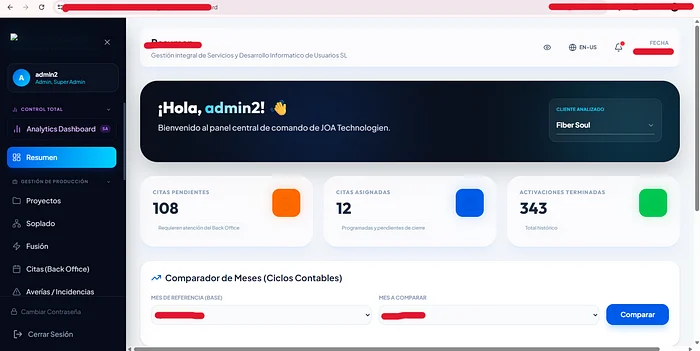
Step 5: verify impact with minimum necessary access
Once a potentially critical vulnerability is found, the goal is to verify impact with the minimum necessary access and data rather than clicking everything just because you can. During controlled verification, the researcher confirmed that the privileged account could access sensitive business functionality and records, including areas containing information such as:
- Employee information
- Compensation/payroll-related data
- Client records
- Pricing information
- Billing information
- Company information
- Production metrics
- Internal operational data
The researcher also confirmed that certain administrative exports could be generated. Sensitive records and personal or business information are redacted from the article.
Step 6: verbose errors as a secondary finding
While testing some administrative functionality, the researcher encountered verbose error responses. The errors exposed information about the application's internal database implementation; in particular, debug output revealed details related to the application's Prisma database schema. This was not the primary vulnerability, but it was a useful reminder: a critical authorization bug can turn seemingly harmless debug information into a much more valuable source of intelligence, because an attacker who already has administrative access has a very different threat model from an unauthenticated user.
Root cause
The core issue is simple: the application trusted a security-sensitive value supplied by the client. Conceptually, the vulnerable logic looked like:
Client | | role = ADMIN vRegistration API | | "Sure, sounds good." vCreate privileged account
The correct architecture should be:
Client | | registration data vRegistration API | | Server decides role vCreate LOW-PRIVILEGE account
The client should never be the authority for authorization. Hiding a field from the frontend is not security either: if the backend accepts it, it can potentially be manipulated.
Impact
The attack begins with an unauthenticated attacker. There is no requirement for an existing account, no requirement for an existing administrator, and no approval step. The vulnerable flow effectively allows:
Unauthenticated Attacker ↓Public Registration ↓Attacker-Controlled Role ↓ADMIN Account ↓Privileged JWT ↓Administrative Dashboard ↓Sensitive Business Data
This can impact all three major security properties:
- Confidentiality: an attacker may access sensitive employee, client, financial and operational information.
- Integrity: an attacker with sufficient privileges may modify users, configuration, business records or other application data.
- Availability: the report lists availability as one of the three affected properties but does not describe a specific availability scenario.
The exact accessible functionality depends on the affected environment. The researcher verified access to sensitive business functionality and records and the ability to generate certain administrative exports, with the underlying data redacted.
Fix
- Never accept privileged roles from public registration. The server should assign a safe default role:
New Registration ↓USER
Not:
New Registration ↓Whatever role the client requested
-
Create a separate privileged account-management flow. Administrator creation should require authentication, authorization, server-side validation, appropriate administrative permissions and, ideally, additional controls such as approval or auditing for highly privileged accounts.
-
Ignore client-controlled authorization fields. Even if the frontend does not expose
"role": "ADMIN", the backend should still reject or ignore it if supplied manually. -
Audit existing accounts. After fixing the vulnerability, the organisation should review accounts created through the vulnerable endpoint and investigate, remove or downgrade any unexpectedly privileged accounts.
-
Review authorization across the entire API. Finding one instance of client-controlled privilege assignment should trigger a broader review, looking for the same pattern in paths such as:
/register/users/invite/team/company/roles/permissions/admin
One broken authorization check can sometimes indicate a broader design problem.
Variants to test
When a registration or account-management endpoint is in scope, the researcher asks a few questions of it. Each of these is a concrete thing to try elsewhere:
- Enumerate the accepted fields. Look for security-sensitive parameters such as:
rolerolespermissionsisAdminisStaffaccountTypeorganizationIdtenantIdstatusverified
Look for security-sensitive parameters such as these in the request body.
-
Test whether the server actually validates them. Do not assume frontend validation is enough; intercept the request and test what the backend accepts. Intercept the request and test what the backend accepts.
-
Look past
200 OK. Check what permissions the newly created account actually receives. Check what permissions the newly created account actually receives. -
Try privileged endpoints with the new account. A successful registration is not necessarily a vulnerability; the important part is the resulting authorization state. A successful registration is not necessarily a vulnerability; the important part is the resulting authorization state.
-
Follow the whole chain. Think in terms of input, account creation, authentication, authorization and sensitive functionality:
Input ↓Account creation ↓Authentication ↓Authorization ↓Sensitive functionality
That is often where the real impact becomes visible.
The lesson the researcher draws is that you do not always need a sophisticated exploit. When you see something like:
{ "role": "USER"}
don't immediately move on. Ask yourself: what happens if I change it?

What happened, in plain words
A security researcher was testing a website's development environment. A development environment is a copy of a website used for building and testing, kept separate from the real one that customers use. While looking around, the researcher found the part of the site that handles new user sign-ups, called a registration endpoint.
An endpoint is simply a specific address on a server that does one job. Think of a large office building: the front desk handles visitors, the post room handles parcels, the accounts office handles invoices. Each desk is an endpoint. On a website, the registration desk is the one that creates new accounts.
The researcher sent a normal sign-up request, the kind any new user would send, and the site created a normal account. Nothing unusual. But while reading the request closely, the researcher noticed that the request included a field called role. A role is a label that says what a user is allowed to do: a normal customer, a staff member, an administrator. The request was letting the person signing up choose their own role.
That is like a form at a hotel reception that asks for your name, your address, and also asks you to tick a box for which master keys you would like. The researcher changed the role from a normal user to an administrator, sent the request again, and the server said yes. The new account was created with administrator rights. The researcher then logged in with it and opened the site's administrative area, the back office where staff manage the business. It opened. No invitation, no approval, no existing administrator involved.
This kind of flaw is called a privilege escalation, or more broadly a broken access control issue: the site let someone give themselves more power than they should have. The rest of this article walks through the same steps the researcher took, explaining each idea from scratch.
The target
The write-up does not name the product, the organisation or the bug bounty programme. A bug bounty programme is a scheme where a company invites outside researchers to look for security problems and report them, often for a reward. All we know is that the target was an application with a public registration API and a separate administrative area.
The administrative area covered a lot of business functions: user management, company management, teams, payroll, billing, projects, production, fleet management, analytics, reports, employee management, material orders and system configuration. In plain terms, this was not a small hobby site. It was the kind of back office that runs a company: who works there, what they are paid, which clients exist, what things cost, and how the business is configured.
Setup
The report does not describe any tooling, versions or special accounts. The only precondition was the ability to send requests to the registration API of a development environment and then log in with the account that was created. No existing account, invitation or approval was needed to obtain the privileged account.
That last sentence matters. Many security tests assume you already have some kind of login. Here, the researcher started from nothing, the same position as any stranger on the internet.
Finding it
When hunting APIs, the researcher pays attention to what the server actually trusts from the client. An API is the set of addresses a website's own pages, mobile apps and other programs use to talk to its server. When you fill in a sign-up form in your browser, your browser sends a message to one of these addresses. The server reads the message and acts on it.
The key idea is trust. The server should treat everything coming from the client, meaning your browser or any other program on your side, as untrusted. Your browser is under your control, so anything it sends can be changed. A useful comparison: a bank teller should check your ID, not simply believe the account number you write on a slip of paper.
A registration request might look something like:
POST /api/auth/registerContent-Type: application/json
Line by line:
POSTis the type of request. It means "here is some data, please create something with it". AGETrequest, by contrast, just asks to read a page./api/auth/registeris the address on the server, the registration desk.apisuggests it belongs to the programming interface rather than a human-facing page, andauthsuggests it deals with accounts and login.Content-Type: application/jsontells the server what format the data is in. JSON is a simple text format for structured data, using curly brackets, names in quotes and colons. It is the format most modern web and mobile apps use to exchange information.
The body of the request, the actual data, looked like this:
{ "username": "testuser", "email": "[redacted]", "password": "********"}
Line by line:
- The outer curly brackets mark the start and end of one JSON object, a bundle of named values.
"username": "testuser"gives the name the new account should have. The name is in quotes because JSON text values are quoted."email": "[redacted]"gives the email address.example.comis a reserved domain used in documentation, so this is a placeholder, not a real address."password": "********"is where the password would go. The asterisks stand in for a real password that has been hidden.
That is pretty standard: the server creates the account and the user gets a normal account. But while looking at the request body, the researcher noticed a parameter related to the user's role, something like:
{ "username": "testuser", "email": "[redacted]", "password": "********", "role": "USER"}
Line by line, compared with the previous block:
- Everything is the same except one extra line.
"role": "USER"is a fourth field.roleis the name of the setting, andUSERis its value, meaning an ordinary user.
A parameter is just a named piece of data in a request, like a field on a paper form. Seeing role in a sign-up request is the moment the researcher stopped. The question raised was: why is the client allowed to tell the server what role the new account should have? For a normal registration flow, the server should decide that. The client should not be able to say "Hey server, please make me an administrator."
Think about a gym membership form. It is fine for the form to ask your name and which membership you want to buy. It is not fine for the form to include a hidden line where you write "staff" and the gym then hands you keys to the office and the safe. The form should collect your details; the gym decides what you are allowed to do.
Exploitation
Step 1: change the role value
The obvious case was tested first. Instead of the normal low-privileged role, the value was changed to a privileged role:
{ "username": "testadmin", "email": "[redacted]", "password": "********", "role": "ADMIN"}
Line by line:
"username": "testadmin"is a new name for the new account, chosen to reflect what it is meant to become."email": "[redacted]"is a placeholder email address for the same account."password": "********"is again a hidden password."role": "ADMIN"is the one meaningful change: the value is nowADMINinstead ofUSER.ADMINis short for administrator, a user with wide powers over the application.
Why take this step? Because the previous request showed that the server was willing to read a role from the client. If the server reads the value and does what it says, then changing the value is the simplest possible test. The researcher was not expecting much. Maybe the API would return:
{ "error": "Unauthorized"}
Line by line:
"error"is the name of the field, saying this response describes a problem."Unauthorized"is the message, meaning you are not allowed to do this.
Or:
{ "error": "Invalid role"}
Line by line:
- Again an error response.
"Invalid role"would mean the server checked the role value and rejected it as not permitted.
Or simply ignore the parameter. Any of those three outcomes would have been the correct, safe behaviour. Instead, the server accepted the request:
{ "message": "User created successfully", "userId": "REDACTED"}
Line by line:
"message": "User created successfully"says the account was made. The server did not complain about the role at all."userId": "REDACTED"is the identifier of the new account. The real value has been removed and replaced withREDACTEDso the article does not expose it.
So the server took the word ADMIN from the client and acted on it. At this point the researcher still did not call it a vulnerability, and that caution is worth understanding.
Step 2: verify the resulting privileges
An application accepting an ADMIN value does not necessarily mean the account actually has administrator privileges. The server might store the word and ignore it later, the way a form might accept the word "manager" in a comments box without anyone reading it. So the next step was to log in with the newly created account and inspect the authentication response and token claims.
A token, in this context, is a small piece of data the server gives you after you log in, which your browser or app sends back with every later request to prove who you are. A useful comparison is a wristband at a festival: you show your ticket once at the gate, get the wristband, and after that the staff check the wristband rather than your ticket. Claims are the pieces of information written on that wristband: your name, your role, when it expires. If the wristband says "all areas", you get into all areas.
The resulting authorization data indicated that the account had privileged permissions, conceptually similar to:
{ "role": "ADMIN", "roles": [ "SUPER_ADMIN" ]}
Line by line:
"role": "ADMIN"says the account's role is administrator."roles": [opens a list of roles. The square brackets mark a list in JSON, as opposed to the curly brackets which mark a bundle of named values."SUPER_ADMIN"is a single entry in that list, a role even higher than administrator.]closes the list.
This is where the finding became much more serious. The application was not simply accepting an unusual registration parameter. It was granting privileged authorization based on attacker-controlled input. Attacker-controlled means the value came from the person making the request and could be set to anything they liked.
Step 3: open the administrative area
The important part came next: could the account actually access administrative functionality? A token saying ADMIN is a claim; the real test is whether the doors open. The researcher opened the application's administrative area using the newly created account, and it worked. There was no existing administrator account, no invitation, no approval and no special authorization flow. The chain was simply:
Registration ↓role = ADMIN ↓Account Created ↓Privileged Authentication ↓Administrative Dashboard
Line by line, reading downwards:
Registrationis the starting point: a public sign-up request.role = ADMINis the value the researcher put in that request.Account Createdis the server making the account as asked.Privileged Authenticationis logging in and receiving a token that carries administrator rights.Administrative Dashboardis the back office, which accepted that token.
Each arrow means "led to". The whole chain is five steps, and every one of them was under the researcher's control from the outside.
At that point the researcher stopped testing randomly and started documenting everything carefully. Documenting means writing down each request, each response and each observation as it happens, so the finding can be explained clearly and reproduced later. Random clicking produces a story; careful notes produce evidence.
Step 4: map the accessible functionality
Getting an administrator account is already a critical issue, but the next question was what this administrator could actually do. Going through the available administrative functionality, the account could access multiple sensitive areas of the application, including functionality related to:
- User management
- Company management
- Teams
- Payroll
- Billing
- Projects
- Production
- Fleet management
- Analytics
- Reports
- Employee management
- Material orders
- System configuration
Mapping the accessible functionality means walking through the back office and noting which sections open. Each item in that list is a business function, not a technical one: payroll is what people are paid, billing is what customers are charged, fleet management is the company's vehicles, system configuration is the settings that control how the application behaves.
The exact accessible functionality depends on the affected environment, but the important point was clear: the attacker-controlled registration flow could lead directly to privileged application access.
Step 5: verify impact with minimum necessary access
Once a potentially critical vulnerability is found, the goal is to verify impact with the minimum necessary access and data rather than clicking everything just because you can. This is a professional habit. Opening every record in a payroll system to prove you can is both unnecessary and harmful: it exposes real people's data to no purpose. The researcher confirmed enough to show the problem was real, and no more.
During controlled verification, the researcher confirmed that the privileged account could access sensitive business functionality and records, including areas containing information such as:
- Employee information
- Compensation/payroll-related data
- Client records
- Pricing information
- Billing information
- Company information
- Production metrics
- Internal operational data
The researcher also confirmed that certain administrative exports could be generated. An export is a feature that takes data out of the system in bulk, for example as a spreadsheet or file, which makes a leak much larger and easier to carry away. Sensitive records and personal or business information are redacted from the article, meaning removed or blacked out before publication.
Step 6: verbose errors as a secondary finding
While testing some administrative functionality, the researcher encountered verbose error responses. Verbose means the error message says too much. A safe error says "something went wrong". A verbose one says which database, which table and which internal component failed, which is a gift to anyone probing the system.
The errors exposed information about the application's internal database implementation. In particular, debug output revealed details related to the application's Prisma database schema. A database is where the application stores its data. Prisma is a tool that programmers use to talk to a database from their code, and a schema is the description of how the data is organised: which tables exist, which fields they have and how they connect. Debug output is extra technical detail a program prints to help its own developers, which should never reach a normal user.
This was not the primary vulnerability, but it was a useful reminder: a critical authorization bug can turn seemingly harmless debug information into a much more valuable source of intelligence, because an attacker who already has administrative access has a very different threat model from an unauthenticated user. Threat model here simply means what an attacker is able to do and therefore how much damage each piece of information is worth. A leaked table name is mildly interesting to a stranger; to someone already inside the back office, it is a map.
Root cause
The core issue is simple: the application trusted a security-sensitive value supplied by the client. Conceptually, the vulnerable logic looked like:
Client | | role = ADMIN vRegistration API | | "Sure, sounds good." vCreate privileged account
Line by line, reading downwards:
Clientis the browser or program sending the request.role = ADMINis the value it chose to send.Registration APIis the server's sign-up desk receiving it."Sure, sounds good."stands for the server's response: it accepted the value without question.Create privileged accountis the result: an account with administrator rights.
The correct architecture should be:
Client | | registration data vRegistration API | | Server decides role vCreate LOW-PRIVILEGE account
Line by line:
Clientsends the request, as before.registration datais what it is allowed to send: name, email, password, nothing about permissions.Registration APIreceives it.Server decides roleis the crucial difference: the server itself picks the role, ignoring anything the client says about it.Create LOW-PRIVILEGE accountis the result: an ordinary account with the least power needed.
The client should never be the authority for authorization. Authorization means deciding what a logged-in user is allowed to do, as opposed to authentication, which is proving who they are. An allow-list is a list of permitted values, so an allow-list for roles might contain only USER and reject everything else.
Hiding a field from the frontend is not security either. The frontend is what you see in the browser: the page, the form, the buttons. If a field is removed from the form but the backend still accepts it, anyone can add it back by hand. The backend is the part on the server that does the real work, and it is the part that must check.
Impact
Impact means what harm the flaw allows. The attack begins with an unauthenticated attacker. Unauthenticated means not logged in at all: a stranger with a browser. There is no requirement for an existing account, no requirement for an existing administrator, and no approval step. The vulnerable flow effectively allows:
Unauthenticated Attacker ↓Public Registration ↓Attacker-Controlled Role ↓ADMIN Account ↓Privileged JWT ↓Administrative Dashboard ↓Sensitive Business Data
Line by line, reading downwards:
Unauthenticated Attackeris the starting position: no account, no login.Public Registrationis the open sign-up page anyone can use.Attacker-Controlled Roleis the role value the attacker chooses.ADMIN Accountis the account that results.Privileged JWTis the login token carrying administrator rights. JWT stands for JSON Web Token, a common format for such tokens; it is a block of JSON data that the server can check has not been tampered with.Administrative Dashboardis the back office that accepts the token.Sensitive Business Datais what sits behind it: payroll, clients, pricing and the rest.
This can impact all three major security properties. Security people often describe protection with three words:
- Confidentiality: keeping data secret from those who should not see it. An attacker may access sensitive employee, client, financial and operational information.
- Integrity: keeping data correct and unaltered. An attacker with sufficient privileges may modify users, configuration, business records or other application data.
- Availability: keeping the service working for legitimate users. The report lists availability as one of the three affected properties but does not describe a specific availability scenario.
The exact accessible functionality depends on the affected environment. The researcher verified access to sensitive business functionality and records and the ability to generate certain administrative exports, with the underlying data redacted.
Fix
Remediation means the changes that remove the flaw.
- Never accept privileged roles from public registration. The server should assign a safe default role:
New Registration ↓USER
Line by line:
New Registrationis any sign-up through the public form.USERis the only role it can ever produce. The arrow means "results in".
Not:
New Registration ↓Whatever role the client requested
Line by line:
New Registrationis the same starting point.Whatever role the client requestedis the current, broken behaviour: the client's wish becomes the result.
-
Create a separate privileged account-management flow. Administrator creation should require authentication, authorization, server-side validation, appropriate administrative permissions and, ideally, additional controls such as approval or auditing for highly privileged accounts. In everyday terms: making a new administrator should be a different process from signing up, done by someone already trusted, checked on the server, and recorded.
-
Ignore client-controlled authorization fields. Even if the frontend does not expose
"role": "ADMIN", the backend should still reject or ignore it if supplied manually. Reject means answer with an error; ignore means accept the request but drop the field. Either is safe; accepting it is not. -
Audit existing accounts. After fixing the vulnerability, the organisation should review accounts created through the vulnerable endpoint and investigate, remove or downgrade any unexpectedly privileged accounts. An audit is a systematic review of records. The point is that fixing the door does not remove anyone who already walked through it.
-
Review authorization across the entire API. Finding one instance of client-controlled privilege assignment should trigger a broader review, looking for the same pattern in paths such as:
/register/users/invite/team/company/roles/permissions/admin
Line by line:
- Each item is a path segment, a piece of a web address between slashes.
/registeris sign-up,/usersis user accounts,/inviteis invitations,/teamis teams,/companyis companies,/rolesand/permissionsare the permission settings themselves, and/adminis administration.- Written together like this, they are a checklist of places where the same mistake might hide, not one real address.
One broken authorization check can sometimes indicate a broader design problem. A design problem means the mistake is in how the system was planned, not a one-off slip in a single line of code, so other parts are likely to share it.
Variants to test
When a registration or account-management endpoint is in scope, the researcher asks a few questions of it. Each of these is a concrete thing to try elsewhere.
- Enumerate the accepted fields. Enumerate means list them one by one. Look for security-sensitive parameters such as:
rolerolespermissionsisAdminisStaffaccountTypeorganizationIdtenantIdstatusverified
Line by line, these are field names that commonly control permissions:
roleandroles: the user's role or roles.permissions: what the user may do.isAdminandisStaff: yes/no flags for administrator or staff status.accountType: the kind of account.organizationIdandtenantId: which company or customer the account belongs to. A tenant is one customer's separate space inside a shared system.status: whether the account is active, suspended and so on.verified: whether the account has been confirmed.
Look for security-sensitive parameters such as these in the request body.
-
Test whether the server actually validates them. Do not assume frontend validation is enough; intercept the request and test what the backend accepts. Intercept means capture the request on its way out, for example with your browser's developer tools, so you can edit it before it is sent. Intercept the request and test what the backend accepts.
-
Look past
200 OK. Check what permissions the newly created account actually receives. Check what permissions the newly created account actually receives. A session is the period you stay logged in, and the session data is what the server remembers about you during it. -
Try privileged endpoints with the new account. A successful registration is not necessarily a vulnerability; the important part is the resulting authorization state. A successful registration is not necessarily a vulnerability; the important part is the resulting authorization state.
-
Follow the whole chain. Think in terms of input, account creation, authentication, authorization and sensitive functionality:
Input ↓Account creation ↓Authentication ↓Authorization ↓Sensitive functionality
Line by line, reading downwards:
Inputis what the attacker sends.Account creationis the account that results.Authenticationis logging in and getting a token.Authorizationis what that token is allowed to do.Sensitive functionalityis the valuable part of the application it can reach.
That is often where the real impact becomes visible. Each link in the chain is a place to check, and the last one is where the damage is measured.
The lesson the researcher draws is that you do not always need a sophisticated exploit. When you see something like:
{ "role": "USER"}
Line by line:
- The curly brackets mark one JSON object.
"role": "USER"is a single field saying the role is an ordinary user.
don't immediately move on. Ask yourself: what happens if I change it?
Glossary
- API: the set of addresses a website's pages, apps and other programs use to talk to its server.
- Endpoint: one specific address on a server that performs one job, such as registration.
- Request: a message a browser or program sends to a server asking it to do something.
- Response: the message the server sends back.
- JSON: a simple text format for structured data, using curly brackets for named values and square brackets for lists.
- Parameter: a named piece of data in a request, like a field on a form.
- Role: a label saying what a user is allowed to do, such as user or administrator.
- Privilege: a permission to do something; higher privilege means more power.
- Privilege escalation: gaining more power on a system than you are entitled to.
- Broken access control: a flaw where the system fails to check properly what a user is allowed to do.
- Authorization: deciding what a logged-in user is permitted to do.
- Authentication: proving who a user is, usually by logging in.
- Unauthenticated: not logged in at all.
- Token: a piece of data given after login that is sent with later requests to prove who you are.
- JWT (JSON Web Token): a common token format made of JSON data that the server can check has not been tampered with.
- Claims: the pieces of information written inside a token, such as role and expiry.
- Session: the period you stay logged in, and the data the server keeps about you during it.
- Attacker-controlled: a value that comes from the person making the request and can be set to anything.
- Client: the browser or program on your side that sends requests.
- Server: the computer that receives requests and does the real work.
- Frontend: what you see and use in the browser, such as pages and forms.
- Backend: the part on the server that processes requests and stores data.
- Intercept: capture a request on its way out so you can read or edit it before it is sent.
- Development environment: a copy of a system used for building and testing, separate from the live one.
- Bug bounty programme: a scheme where a company invites outside researchers to find and report security problems, often for a reward.
- Database: where an application stores its data.
- Schema: the description of how data is organised: tables, fields and their connections.
- Prisma: a tool programmers use to talk to a database from their code.
- Debug output: extra technical detail a program prints to help its developers, which should not reach normal users.
- Verbose error: an error message that reveals too much internal detail.
- Export: a feature that takes data out of a system in bulk, for example as a spreadsheet or file.
- Redacted: removed or blacked out before publication.
- Allow-list: a list of permitted values, with everything else rejected.
- Validation: checking that data meets the rules before acting on it.
- Audit: a systematic review of records.
- Remediation: the changes made to remove a flaw.
- Impact: the harm a flaw allows.
- Threat model: what an attacker is able to do, and therefore how much each piece of information or access is worth.
- Availability: keeping a service working for legitimate users.
- Enumerate: list items one by one.
- Tenant: one customer's separate space inside a shared system.
- 200 OK: the standard success response from a web server.

