I Wasn’t Invited to the Project, But the Backend Let Me In
An organization Manager could access a project they were never added to as a member, because the backend checked only the organization role rather than project membership. The Manager could view project data and modify it, including adding themselves or others to the project.

medium.com
Published on medium.com
Bug Bounty
The full write-up lives on its author's site
It belongs to its author, so we link to it rather than copy it. The other two tabs are our own rewrites, checked against it.
Context
This write-up describes a Broken Access Control issue found while testing a project access-control logic. The application has two layers of permission:
- Organizations, which have their own roles, such as:
- Owner
- Manager
- Projects, which have their own members.
The expected behaviour, as the author states it, is simple:
A user should only be able to access a project if they are authorized to access that specific project.
In other words, project membership should be the gate for project data, regardless of what role a user holds at the organization level.
Setup
The report does not name the product, the program or the platform where the issue was reported, and it gives no versions, endpoints or request captures. The only setup information it provides is the role model used to reproduce the issue:
- An organization with two users: an Owner and a Manager.
- A project owned by the Owner, with only the Owner added as a member.
- The Manager, who is deliberately not a member of that project.
No tools are mentioned.
Finding it
The author's goal was to check whether the application enforces project-level permissions, or whether it applies access control only at the organization level. The question posed during discovery was whether the application was properly enforcing project-level permissions or applying good access control.
The authorization logic appears to treat an organization-level role as sufficient for project-level actions. That would be wrong because the two concepts are separate: being a Manager in the organization says nothing about being a member of a particular project.
Exploitation
Step 1: the Owner creates an organization
The Victim (Owner) creates an organization. This organization will contain two users:
- Owner
- Manager
Step 2: the Owner creates a project
The Owner creates a project called Free Palestine.
Step 3: the Owner adds only themselves to the project
The Owner adds only themselves as a member of the project. The Manager is not added to the project.
Step 4: the Manager logs in
The Manager logs into the application with their own account.
Step 5: the Manager accesses the project
The Manager attempts to access Free Palestine.
Result
The Manager successfully accesses the project and can view its data despite having no project membership. Beyond reading, the Manager can also make changes in the project, such as:
- update project details
- add himself to the project or add other people
The important part, as the author puts it, is that the Manager's organization role was enough to bypass the expected project-level access restriction.
Root cause
The backend does not appear to properly verify project membership or project-level authorization before returning project data.
Instead of checking:
"Is this user authorized to access this project?"
the authorization logic appears to rely on:
"Is this user a Manager in the organization?"
This creates an authorization gap where an organization-level role can bypass project-level access restrictions. The report does not show the code or the request that demonstrates this; the conclusion is drawn from the observed behaviour.
Impact
An organization Manager who was never added to a project can read that project's data and modify it: updating project details and adding themselves or other people to the project. The condition is that the attacker holds a Manager role in the organization.
Fix
Based on the described root cause, the authorization check for project data and project actions should verify project membership (or an explicit project-level authorization) rather than relying on the organization role alone.
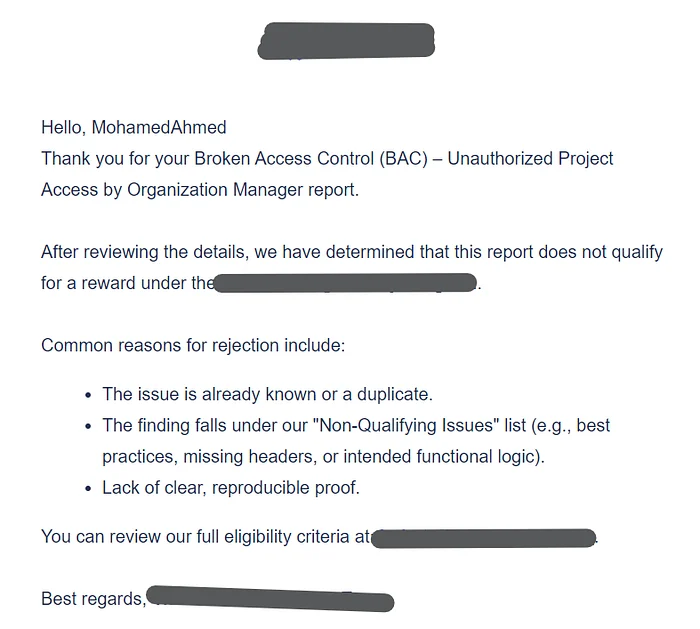
Report Status
Variants to test
- Other organization roles. Test whether roles other than Manager (for example, any custom organization role) also grant access to projects they are not members of. A positive result is any organization-level role reaching a project without membership.
- Write actions on non-member projects. Try updating project details, adding members and removing members from a project the account is not a member of. A positive result is any state change succeeding.
- Cross-organization access. Check whether a Manager in one organization can reach a project belonging to a different organization. A positive result is data from another organization's project being returned.
- Direct object references. Request project resources directly by identifier while authenticated as a non-member. A positive result is a successful response containing project data instead of an authorization error.
- Membership removal. Remove the Manager from the organization, or downgrade the role, and retry project access. A positive result is continued access after the role that granted it was taken away.
What happened, in plain words
A security researcher was testing a web application that lets companies organise their work. The application has two layers of permission: an organization (think of a company account) and projects inside that organization (think of folders or workspaces where work happens). People can hold a role in the organization, such as Owner or Manager, and separately they can be added as members of individual projects.
The rule the application is supposed to follow is simple: you should only be able to open a project if you have been given access to that specific project. Being important in the company should not automatically open every folder.
What the researcher found is that it did. A user who was a Manager in the organization, but who had never been added to a particular project, could open that project anyway. Not only could they read it: they could change its details and add themselves or other people to it. This is a class of bug called Broken Access Control: the application knows who you are, but it checks the wrong thing before letting you in.
The rest of this article walks through the same steps the researcher took, explaining each idea from scratch along the way.
The two layers: organizations and projects
Before the bug makes sense, you need a picture of how the application is built.
An organization is a shared account for a group of people. Inside it, each person has a role. The report mentions two roles:
- Owner: the person who created the organization. In most products the Owner is the most powerful account, able to manage everything in the organization.
- Manager: a trusted person who helps run the organization, but who is not the top-level account.
A project is a container for work inside the organization. Projects have their own list of members: the people allowed to see and work on that project. Membership of a project is separate from your role in the organization. You can be a Manager in the company and still not be a member of the marketing project, just as you can be a senior employee and still not have the key to a particular storage room.
This separation is the whole point. The organization role says what you can do across the company. Project membership says what you can do inside one project. A well-built application checks both, at the right moment.
The expected behaviour, as the author states it, is:
A user should only be able to access a project if they are authorized to access that specific project.
In plain terms: project membership is the gate for project data, no matter what role you hold higher up.
Setting up the test
The report does not name the product, the program, or the platform where the issue was reported. It gives no version numbers, no endpoint addresses and no captured requests. The only setup information it provides is the role model used to reproduce the issue:
- An organization with two users: an Owner and a Manager.
- A project owned by the Owner, with only the Owner added as a member.
- The Manager, who is deliberately not a member of that project.
No tools are mentioned.
Why set it up this way? Because a good access-control test needs a clean contrast. You want one account that is supposed to have access (the Owner, who is a project member) and one account that is not supposed to have access (the Manager, who is not a project member but is still senior in the organization). If the second account gets in, the difference between the two layers has collapsed, and that is the bug.
Finding it
The author's goal was to check whether the application enforces project-level permissions, or whether it applies access control only at the organization level. The question posed during discovery was whether the application was properly enforcing project-level permissions or applying good access control.
The suspicion is that an organization-level role might be treated as sufficient for project-level actions. That would be wrong because the two concepts are separate: being a Manager in the organization says nothing about being a member of a particular project.
Think of a hotel. Being a manager of the hotel does not mean your key card opens every guest room. The front desk checks the room number on your booking, not your job title. If the door opens because you are staff, the lock is checking the wrong fact.
Exploitation
Step 1: the Owner creates an organization
The Victim (Owner) creates an organization. This organization will contain two users:
- Owner
- Manager
Why this step: every test needs a starting state. Creating the organization as the Owner establishes the top-level account, and the Manager is then brought in as a second user so the two roles can be compared side by side.
Step 2: the Owner creates a project
The Owner creates a project called Free Palestine.
Why this step: the project is the object being protected. Without a project there is nothing to try to reach. Giving it a name makes it easy to recognise in the interface when the Manager later tries to open it.
Step 3: the Owner adds only themselves to the project
The Owner adds only themselves as a member of the project. The Manager is not added to the project.
Why this step: this is the heart of the setup. The project's member list now contains exactly one person. The Manager is intentionally left out, so any access the Manager gets is access they were never granted.
Step 4: the Manager logs in
The Manager logs into the application with their own account.
Why this step: the test has to be performed as the Manager, not as the Owner. If the Owner tried to open the project, success would prove nothing, because the Owner is a legitimate member. Logging in as the Manager means every action from here on is taken by an account that should be blocked.
Step 5: the Manager accesses the project
The Manager attempts to access Free Palestine.
Why this step: this is the actual experiment. The Manager navigates to the project they were never added to. The expected result is a refusal. Anything else is a finding.
Result
The Manager successfully accesses the project and can view its data despite having no project membership. Beyond reading, the Manager can also make changes in the project, such as:
- update project details
- add himself to the project or add other people
The important part, as the author puts it, is that the Manager's organization role was enough to bypass the expected project-level access restriction.
Notice how much worse the write actions are than the read. Reading a project you should not see is already a leak. Being able to add yourself as a member turns the leak into a permanent foothold: once you are on the member list, you look like a legitimate participant, and any later check that relies on membership will pass. Being able to add other people means the Manager can extend access to accounts of their choosing.
Root cause
The backend does not appear to properly verify project membership or project-level authorization before returning project data.
A quick word on the backend: it is the part of the application that runs on the server, out of sight of your browser. Your browser draws the screens and sends requests; the backend decides what data to send back. Access control lives in the backend, because that is the only place a determined user cannot edit.
Instead of checking:
"Is this user authorized to access this project?"
the authorization logic appears to rely on:
"Is this user a Manager in the organization?"
This creates an authorization gap where an organization-level role can bypass project-level access restrictions. The report does not show the code or the request that demonstrates this; the conclusion is drawn from the observed behaviour.
In everyday terms: the guard at the project door asks "do you work here?" instead of "is your name on the list for this room?" Anyone who works here gets in, and the list is never consulted.
Impact
An organization Manager who was never added to a project can read that project's data and modify it: updating project details and adding themselves or other people to the project. The condition is that the attacker holds a Manager role in the same organization that owns the project.
That condition matters. This is not a bug that lets a stranger on the internet walk in. It lets a user with an organization-level Manager role reach a project they were not added to. Insider over-reach is still a real problem: it breaks the promise the product makes about project privacy, and
Fix
Based on the described root cause, the authorization check for project data and project actions should verify project membership (or an explicit project-level authorization) rather than relying on the organization role alone.
The general principle is worth remembering: check the permission that matches the thing being protected. If the thing is a project, check project membership. An organization role can be one input to that decision, but it should not replace it.
Report Status
Variants to test
Once you have found one broken check, the natural next move is to ask where else the same mistake might live. These are the follow-up tests suggested, each with what counts as a positive result.
- Other organization roles. Test whether roles other than Manager (for example, any custom organization role) also grant access to projects they are not members of. A positive result is any organization-level role reaching a project without membership.
- Write actions on non-member projects. Try updating project details, adding members and removing members from a project the account is not a member of. A positive result is any state change succeeding.
- Cross-organization access. Check whether a Manager in one organization can reach a project belonging to a different organization. A positive result is data from another organization's project being returned.
- Direct object references. Request project resources directly by identifier while authenticated as a non-member. A positive result is a successful response containing project data instead of an authorization error.
- Membership removal. Remove the Manager from the organization, or downgrade the role, and retry project access. A positive result is continued access after the role that granted it was taken away.
A note on the fourth item, direct object references. Applications often identify things by a number or code in the address, for example a project with an identifier like 1234. Normally you reach a project by clicking a link, and the application decides what to show. A direct request means typing or sending that identifier yourself, skipping the clicking. If the backend hands back the project anyway, it is trusting the identifier instead of checking who is asking. That is the same mistake as before, just reached by a different road.
Glossary
- Access control: the rules that decide who is allowed to see or change what. When those rules are missing or check the wrong thing, the result is called Broken Access Control.
- Authorization: the act of deciding whether a specific user is allowed to perform a specific action on a specific thing. It happens after the application knows who you are.
- Authentication: proving who you are, usually by logging in. It comes before authorization: first the application learns your identity, then it decides what that identity may do.
- Backend: the server-side part of an application that stores data and makes decisions. Your browser cannot see or edit it directly.
- Bypass: getting past a restriction that was meant to stop you, without breaking the restriction itself.
- Cross-organization access: reaching data that belongs to a different organization from the one your account is part of.
- Direct object reference: requesting a specific item by its identifier (a number or code) rather than through the normal screens, to see whether the server checks your permission for that item.
- Endpoint: a specific address on a server that accepts requests, for example the address that returns a project's data.
- Identifier: a value that uniquely names an item, such as a project number, so the application can tell one project from another.
- Manager: in this report, an organization-level role for a trusted user who helps run the organization but is not the top-level account.
- Member (project membership): a person on a specific project's list of allowed users. Membership is separate from the role a person holds in the organization.
- Multi-tenant: a design where one application serves many separate organizations, keeping each one's data apart from the others.
- Organization: a shared account for a group of people, containing roles and projects.
- Owner: in this report, the organization-level role of the account that created the organization, the most powerful role mentioned.
- Permission: a single allowance, such as the ability to view a project or to add a member to it.
- Project: a container for work inside an organization, with its own list of members.
- Request: a message your browser sends to a server asking for something, such as a page or a piece of data.
- Response: the server's reply to a request, containing the data or an error.
- Role: a named set of permissions attached to a user within an organization, such as Owner or Manager.
- Root cause: the underlying reason a bug exists, as opposed to its visible symptom.
- State change: any action that alters stored data, such as updating details or adding a member, as opposed to simply reading.
- UI (user interface): the screens and controls you see and click in the application.
- Victim: in a security test, the account or asset that the attacker is trying to reach without permission.
- Vulnerability: a weakness in an application that allows someone to do something the designers did not intend.
- Write action: an action that changes data, as opposed to a read action that only displays it.

