IDOR in Munshi: Changing a Purchase Inquiry ID Exposed Another User’s Thread
An authenticated user could change the thread identifier in the purchase inquiry URL and receive a different user's inquiry thread. This exposed supplier communication and quotation details belonging to another account.
 Published on medium.com
Cybersecurity
The full write-up lives on its author's site
It belongs to its author, so we link to it rather than copy it. The other two tabs are our own rewrites, checked against it.
Context
Munshi is a procurement product, and its Purchase Inquiry module is where a buyer and a supplier hold a conversation about a purchase. Each conversation is a thread, and the application loads a thread from a route that carries the thread identifier in the URL:
GET /purchase-inquiry/thread/{thread-id}
The expected behaviour is simple: before returning a thread, the backend must confirm that the signed-in user owns the inquiry or has been explicitly granted permission to view it. Threads are part of a supplier-facing procurement workflow, so they can hold supplier responses, quotations, product details, pricing discussions, availability information and negotiation context. That is the data the route is meant to protect.
Setup
The assessment was carried out against Munshi's Purchase Inquiry workflow using a valid, authenticated account. This was not an authentication bypass: every request described here was made after login, with a legitimate session. The only tooling the report mentions is a browser, used to open a thread, read the identifier from the URL, change it and reload the route. The report gives no product version, no account roles beyond the authenticated testing account, and no other preconditions.
Finding it
I opened a valid Purchase Inquiry thread and inspected the identifier in the browser URL. The identifier is user-controlled: it is part of the route, so the client can change it freely. The question worth asking at that point is whether the server treats that identifier as a lookup key only, or whether it also treats it as proof of permission.
Exploitation
Step 1: Capture a valid thread request
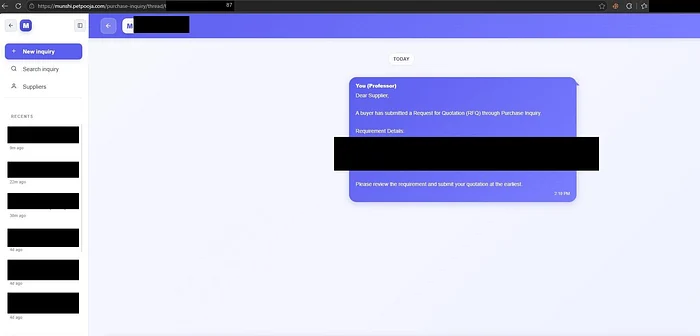
With the authenticated account, I loaded a Purchase Inquiry thread through the normal interface. The application issued a request to the route above with the thread identifier in the path, and returned a valid thread page. Figure 1 shows the capture: the Munshi host and route are visible, while the middle of the thread identifier and the private inquiry details are redacted.
Step 2: Modify the identifier and reload
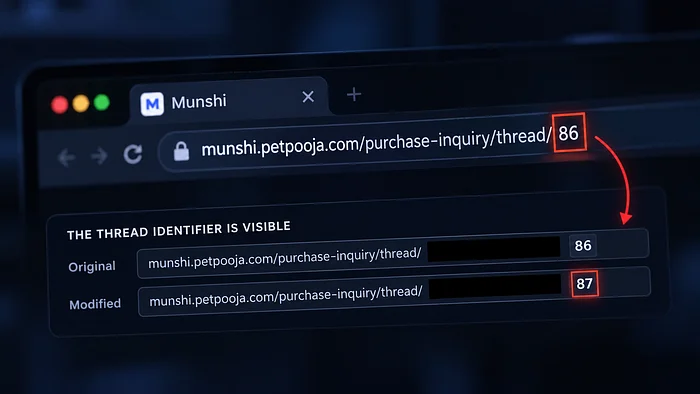
I then modified the identifier in the URL and reloaded the route. Instead of returning an authorization error, the application loaded a valid thread page. I modified the identifier and reloaded the route; the request was made with the same authenticated account.
Step 3: Confirm that a different inquiry was returned
The key validation was not simply that the modified URL loaded a page. I verified that the application returned a different purchase inquiry. The returned thread belonged to another user and had no established relationship with the testing account, and the application displayed the thread and its supplier conversation without returning a permission error.
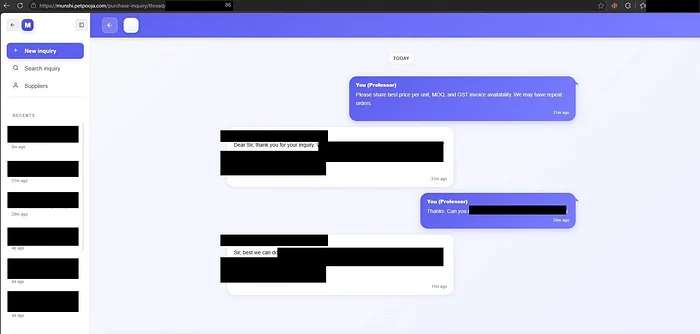
Figure 2 preserves the actual Munshi interface and message layout. The supplier identity, quotation values, product details, delivery terms and unrelated recent inquiry entries are covered; the buyer's generic request and the structure of the supplier replies remain visible so the screenshot still shows the workflow that was accessed.
This was cross-user access to a distinct business record, not a cosmetic routing issue. The application returned supplier communication and quotation-related content from an inquiry outside the testing account's intended access scope.
Root cause
The root cause was the absence of a server-side authorization decision for the requested thread before its content was returned. The application trusted the object identifier in the URL without verifying that the authenticated user owned the inquiry or had been explicitly authorized to access it.
The endpoint accepted an object identifier supplied in the URL and used it to retrieve a thread, but the authorization decision was not tied to the authenticated user's ownership or explicit permission for that exact object. An identifier locates a record; it does not prove that the requester is allowed to view it. Tenant or session context alone is insufficient unless it is combined with an ownership or permission check for the requested object.
The missing control sits at the object boundary: the identifier was trusted without an ownership or permission check. The finding maps to CWE-639: Authorization Bypass Through User-Controlled Key, which describes access to another user's record by modifying an identifier controlled by the requester.
Impact
The assessment demonstrated unauthorized read access to another user's thread and exposure of supplier communication and quotation-related content. Depending on what an individual thread contains, this type of access can reveal commercial information and business relationships that should remain restricted to authorized participants. The impact is a confidentiality failure in a business workflow.
The demonstrated result should be kept distinct from possible broader consequences. The report confirms that a modified identifier returned a different inquiry. It does not demonstrate that the testing account could edit or delete another user's inquiry, nor does it establish access to every tenant's records. Identifier probing or enumeration is a potential concern, but the supplied evidence demonstrates a cross-user retrieval case rather than a full enumeration campaign.
Fix
The fix belongs at the server-side object boundary, where the thread is resolved and returned. Every request to load a purchase inquiry thread should verify that the authenticated user owns the inquiry or has explicit permission to view it, and this check must happen before any useful thread data is returned. Unauthorized requests should receive a 403 Forbidden, 404 Not Found, or a generic access-denied response that does not disclose the requested object's contents. The application must not rely on non-guessable identifiers as a replacement for authorization.
Regression testing should cover cross-user access and tenant isolation. A user should be able to load their own permitted threads, while requests for unrelated threads must be rejected even when the supplied identifier refers to a valid record. Automated tests should also cover attempts to probe or enumerate thread identifiers.
The report date is 17 June 2026, and the CVE ID is listed as to be assigned.
Variants to test
- Other object-scoped routes in the same product. Apply the same identifier swap to any route that loads a record by an ID in the path or query string. A positive result is a valid page for a record the account did not create, with no permission error.
- Numeric and opaque identifiers. Try both sequential integers and long random-looking identifiers. A positive result with an opaque identifier shows that unpredictability was the only barrier, which is not access control.
- Nested identifiers. Where a route carries more than one identifier, for example a parent and a child, change only the child while keeping the parent one the account legitimately owns. A positive result is a child record from another owner returned under your own parent.
- Tenant boundary. With accounts in two separate tenants, request a record belonging to the other tenant. A positive result is cross-tenant data in the response rather than a
403or404. - Write methods on the same object. Repeat the swap on update and delete requests for the same identifier. A positive result is a successful state change on a record the account does not own; the report does not claim this was demonstrated here.
- Enumeration behaviour. Send a small range of identifiers and compare status codes and response sizes. A positive result is a consistent difference between existing and non-existing records that lets an attacker map valid identifiers.
What happened, in plain words
Munshi is a product used for procurement, which means the process of buying things for a business. Inside Munshi there is a feature called Purchase Inquiry. It is where a buyer and a supplier hold a conversation about a purchase: the buyer asks questions, the supplier replies, and they discuss prices and availability. Each of these conversations is called a thread.
When you open a thread in your browser, the application has to know which thread you want. It does that by putting an identifier in the web address (the URL). An identifier is just a label for a record, like a number on a filing cabinet drawer. The problem the researcher found is that the application used that label to fetch the thread but never checked whether the person asking was allowed to see that particular thread. So by changing the label in the address bar, a signed-in user could open someone else's purchase inquiry and read the supplier conversation and quotation details inside it.
This kind of mistake has a name: Broken Object Level Authorization, or BOLA, also commonly called Insecure Direct Object Reference, or IDOR. Both names describe the same failure: the application checks that you are logged in, but not that you are allowed to touch the specific record you asked for.
It is worth being clear about what this was not. It was not a way to get in without an account. The researcher was logged in the whole time with a normal, valid account. The failure happened after login, at the moment the application decided which record to hand back.
The product and the feature
Munshi is a procurement product. Procurement is the business activity of sourcing and buying goods and services, so the people using Munshi are buyers and suppliers working together on purchases.
The Purchase Inquiry module is where a buyer and a supplier hold a conversation about a purchase. Each conversation is a thread. A thread can contain supplier responses, quotations (a quotation is a supplier's formal offer of a price for goods), product details, pricing discussions, availability information and negotiation context. In other words, it holds commercial information that belongs to the two parties in that conversation and should not be visible to anyone else.
The application loads a thread from a route that carries the thread identifier in the URL:
GET /purchase-inquiry/thread/{thread-id}
Let us take that line apart, because it contains several ideas that come up again and again in security work.
GETis the method. When a browser asks a web server for a page or for data, it uses a method to say what kind of action it wants.GETmeans "give me something", as opposed to methods that change or delete things. Think of it as knocking on a door and asking to be shown a document./purchase-inquiry/thread/{thread-id}is the path. It is the part of the address that tells the server which feature and which record you mean. The{thread-id}part is a placeholder: in a real request it is replaced by an actual identifier, such as a number or a long random-looking string.- The whole line is an HTTP request, the standard way a browser and a web server talk to each other. An API (Application Programming Interface) is simply the set of these request addresses and rules that a program exposes so that other programs, or a browser, can ask it for data or ask it to do something. You can picture an API as a restaurant menu: it lists what you can order and how to order it, and the kitchen decides whether to serve you.
The expected behaviour is simple: before returning a thread, the backend must confirm that the signed-in user owns the inquiry or has been explicitly granted permission to view it. The backend is the part of the application that runs on the server, out of sight of your browser, and makes the real decisions. The browser is the front end; the backend is where the data lives and where permission checks have to happen, because anything the browser does can be changed by the person using it.
Setting up the test
The assessment was carried out against Munshi's Purchase Inquiry workflow using a valid, authenticated account. Authenticated means the researcher had logged in, so the application knew who they were. A session is the period during which the application remembers that you are logged in; technically it is usually kept alive by a cookie or a token, which is a small piece of data your browser stores and sends back with each request so the server can recognise you. Think of it as a wristband you get at an event: it proves you are inside, but it does not by itself prove which rooms you are allowed into.
This was not an authentication bypass: every request described here was made after login, with a legitimate session. That distinction matters, because it tells you where the bug lives. The application was good at answering "who are you?" and bad at answering "are you allowed to see this?"
The only tooling the report mentions is a browser, used to open a thread, read the identifier from the URL, change it and reload the route. No special software was needed. The report gives no product version, no account roles beyond the authenticated testing account, and no other preconditions.
Finding it
I opened a valid Purchase Inquiry thread and inspected the identifier in the browser URL. The identifier is user-controlled: it is part of the route, so the client can change it freely. The client here means your side of the connection, the browser and everything in it, which you fully control.
The question worth asking at that point is whether the server treats that identifier as a lookup key only, or whether it also treats it as proof of permission. A lookup key is like a coat check ticket: it tells the attendant which coat to fetch. Proof of permission is like an ID card: it tells the attendant whether you are the person entitled to that coat. If the application only checks the ticket, anyone holding a ticket number can collect the coat.
Exploitation
Exploitation means turning a suspected weakness into a demonstrated result. The steps below are the whole of it, and none of them required anything beyond a browser.
Step 1: Capture a valid thread request
With the authenticated account, I loaded a Purchase Inquiry thread through the normal interface. The application issued a request to the route above with the thread identifier in the path, and returned a valid thread page. Figure 1 shows the capture: the Munshi host and route are visible, while the middle of the thread identifier and the private inquiry details are redacted.
Why this step first? Because you need a known-good starting point. You want to see a request that works, for a record you are genuinely allowed to see, so that when you change one thing you can tell what effect that change had. It is the same logic as testing a light switch: first confirm the light is on, then flip the switch and see what happens.
Step 2: Modify the identifier and reload
I then modified the identifier in the URL and reloaded the route. Instead of returning an authorization error, the application loaded a valid thread page. I modified the identifier and reloaded the route; the request was made with the same authenticated account.
A parameter is a named value attached to a request, for example a search term or a page number. A header is extra information sent alongside a request, such as what kind of data the browser accepts. A token, in this context, is a value that proves your session, like the wristband mentioned earlier. Keeping all of those the same is what makes the test clean: the only thing that changed was the identifier, so any difference in the response must be caused by that identifier.
An authorization error is the application's way of saying "you are logged in, but you are not allowed to see this". The application returned a valid thread page instead of an authorization error.
Step 3: Confirm that a different inquiry was returned
The key validation was not simply that the modified URL loaded a page. I verified that the application returned a different purchase inquiry. The returned thread belonged to another user and had no established relationship with the testing account, and the application displayed the thread and its supplier conversation without returning a permission error.
This is the most important step, and it is worth slowing down on. A page loading is not proof of anything: many applications show a friendly "not found" page, or an empty template, and that would be harmless. What makes this a real finding is that the content was a different business record, belonging to someone else, with real supplier conversation in it. The researcher checked the content, not just the status of the page.
Figure 2 preserves the actual Munshi interface and message layout. The supplier identity, quotation values, product details, delivery terms and unrelated recent inquiry entries are covered; the buyer's generic request and the structure of the supplier replies remain visible so the screenshot still shows the workflow that was accessed.
Redaction, the covering of sensitive parts in a screenshot, is standard practice in published security reports. It lets the reader see that the evidence is genuine without exposing the real supplier, prices or personal details to the public.
This was cross-user access to a distinct business record, not a cosmetic routing issue. Cross-user means from one user's account to another user's data. A cosmetic routing issue would be something like a page showing the wrong title; here the application returned supplier communication and quotation-related content from an inquiry outside the testing account's intended access scope.
Root cause
The root cause was the absence of a server-side authorization decision for the requested thread before its content was returned. The application trusted the object identifier in the URL without verifying that the authenticated user owned the inquiry or had been explicitly authorized to access it.
The endpoint accepted an object identifier supplied in the URL and used it to retrieve a thread, but the authorization decision was not tied to the authenticated user's ownership or explicit permission for that exact object. An identifier locates a record; it does not prove that the requester is allowed to view it. Tenant or session context alone is insufficient unless it is combined with an ownership or permission check for the requested object.
A tenant, in software, is one organisation's separate space inside a shared application. Many businesses can use the same product, and each one should only ever see its own data. Tenant context means the application knows which organisation you belong to; that is useful, but it is not the same as knowing that you personally may open this particular thread.
The missing control sits at the object boundary: the identifier was trusted without an ownership or permission check. The object boundary is the point in the code where a specific record is fetched and prepared to be sent back. Serialised simply means turned into a format, such as JSON, that can travel over the network to your browser. That is exactly where the check has to sit: after the application knows who you are, and before it starts packing up the data.
The finding maps to CWE-639: Authorization Bypass Through User-Controlled Key, which describes access to another user's record by modifying an identifier controlled by the requester. CWE stands for Common Weakness Enumeration, a public catalogue that gives standard names and numbers to well-known kinds of software weakness, so that different reports can refer to the same problem in the same way.
Impact
Impact means what an attacker could actually do with the weakness, and how bad it is for the people affected.
The assessment demonstrated unauthorized read access to another user's thread and exposure of supplier communication and quotation-related content. Depending on what an individual thread contains, this type of access can reveal commercial information and business relationships that should remain restricted to authorized participants. The impact is a confidentiality failure in a business workflow. Confidentiality is one of the three classic goals of security, alongside integrity (data not being changed) and availability (data being reachable when needed); a confidentiality failure means information was seen by someone who should not have seen it.
The demonstrated result should be kept distinct from possible broader consequences. The report confirms that a modified identifier returned a different inquiry. It does not demonstrate that the testing account could edit or delete another user's inquiry, nor does it establish access to every tenant's records. Identifier probing or enumeration is a potential concern, but the supplied evidence demonstrates a cross-user retrieval case rather than a full enumeration campaign.
Enumeration means trying many identifiers in sequence to map out which records exist, the way you might dial numbers one after another to find out who answers. It is a plausible next step for an attacker, but the report is careful to say it was not shown here. Being precise about what was and was not proven is part of doing this work well: overstating a finding damages trust in the whole report.
Fix
The fix belongs at the server-side object boundary, where the thread is resolved and returned. Every request to load a purchase inquiry thread should verify that the authenticated user owns the inquiry or has explicit permission to view it, and this check must happen before any useful thread data is returned. Unauthorized requests should receive a 403 Forbidden, 404 Not Found, or a generic access-denied response that does not disclose the requested object's contents. The application must not rely on non-guessable identifiers as a replacement for authorization.
Those two status codes are standard HTTP responses. 403 Forbidden means "I know who you are, and you may not have this". 404 Not Found means "there is nothing here", and it is often used deliberately so that an attacker cannot even learn whether a record exists. A generic access-denied response is a plain refusal that reveals nothing about the record behind it.
The point about non-guessable identifiers is worth spelling out. Making identifiers long and random makes them harder to guess, which is a useful extra layer, but it is not access control. A secret that can be copied from a URL is not a permission check; it is a speed bump.
Regression testing should cover cross-user access and tenant isolation. Regression testing means re-running tests after a fix to make sure the problem is gone and nothing else broke. Tenant isolation means confirming that one organisation's data never appears in another organisation's responses. A user should be able to load their own permitted threads, while requests for unrelated threads must be rejected even when the supplied identifier refers to a valid record. Automated tests should also cover attempts to probe or enumerate thread identifiers.
The report records the remediation status as Fixed. The report date is 17 June 2026, and the CVE ID is listed as to be assigned. A CVE, or Common Vulnerabilities and Exposures, is a public identifier given to a specific known vulnerability so that people can refer to it unambiguously.
Variants to test
Once you have found one instance of this kind of bug, the natural next question is where else the same pattern might appear. These are follow-up tests in the same pattern, not tests the report describes.
- Other object-scoped routes in the same product. Apply the same identifier swap to any route that loads a record by an ID in the path or query string. A positive result is a valid page for a record the account did not create, with no permission error.
- Numeric and opaque identifiers. Try both sequential integers and long random-looking identifiers. A positive result with an opaque identifier shows that unpredictability was the only barrier, which is not access control.
- Nested identifiers. Where a route carries more than one identifier, for example a parent and a child, change only the child while keeping the parent one the account legitimately owns. A positive result is a child record from another owner returned under your own parent.
- Tenant boundary. With accounts in two separate tenants, request a record belonging to the other tenant. A positive result is cross-tenant data in the response rather than a
403or404. - Write methods on the same object. Repeat the swap on update and delete requests for the same identifier. A positive result is a successful state change on a record the account does not own; the report does not claim this was demonstrated here.
- Enumeration behaviour. Send a small range of identifiers and compare status codes and response sizes. A positive result is a consistent difference between existing and non-existing records that lets an attacker map valid identifiers.
Glossary
- API: the set of addresses and rules a program exposes so that other programs, or a browser, can ask it for data or ask it to perform an action.
- Authenticated: having logged in, so the application knows who you are.
- Authentication bypass: getting access without going through the normal login, which is not what happened here.
- Authorization: the decision about whether a known user is allowed to do or see a particular thing.
- Authorization error: a response saying you are logged in but not permitted to access the requested item.
- Backend: the part of an application that runs on the server and holds the data and the real permission decisions.
- BOLA (Broken Object Level Authorization): a flaw where the application checks that you are logged in but not that you may access the specific record you requested.
- Client: your side of the connection, the browser and everything in it, which you control.
- Confidentiality: the security goal of keeping information visible only to those allowed to see it.
- Cookie: a small piece of data a browser stores and sends back with requests, often used to keep you logged in.
- Cross-user access: reaching data that belongs to a different user's account.
- CVE (Common Vulnerabilities and Exposures): a public identifier assigned to a specific known vulnerability.
- CWE (Common Weakness Enumeration): a public catalogue giving standard names and numbers to kinds of software weakness.
- CWE-639: the catalogue entry for authorization bypass through a user-controlled key, meaning access to another user's record by changing an identifier you control.
- Endpoint: a specific address in an API that performs a particular action, such as loading a thread.
- Enumeration: trying many identifiers in sequence to discover which records exist.
- GET: an HTTP method meaning "give me something", used to retrieve data without changing it.
- Header: extra information sent alongside a request, such as the format of data the browser accepts.
- HTTP: the standard protocol browsers and web servers use to communicate.
- IDOR (Insecure Direct Object Reference): another name for the same failure as BOLA, where a record is reached by directly changing its identifier.
- Identifier: a label, such as a number or random string, that names a specific record.
- Impact: what an attacker could actually do with a weakness and how bad it is for those affected.
- JSON: a common text format for sending structured data between a server and a browser.
- Object boundary: the point in the code where a specific record is fetched and prepared to be sent back, and where the permission check belongs.
- Opaque identifier: an identifier that looks random and gives no hint about what it refers to.
- Parameter: a named value attached to a request, such as a search term or page number.
- Path: the part of a URL that identifies the feature and record being requested.
- Procurement: the business activity of sourcing and buying goods and services.
- Quotation: a supplier's formal offer of a price for goods.
- Redaction: covering or removing sensitive parts of a screenshot or document before publishing it.
- Regression testing: re-running tests after a fix to confirm the problem is gone and nothing else broke.
- Route: the pattern of a URL that an application uses to decide which code handles a request.
- Serialised: turned into a format, such as JSON, that can be sent over the network.
- Session: the period during which an application remembers that you are logged in.
- Status code: a number in an HTTP response saying how the request went, such as
403or404. - Tenant: one organisation's separate space inside a shared application.
- Tenant isolation: the guarantee that one organisation's data never appears in another organisation's responses.
- Thread: in Munshi, a single conversation between a buyer and a supplier about a purchase inquiry.
- Token: a value that proves your session or identity to the server.
- URL: the web address you see in the browser, which includes the path and any identifiers.
- User-controlled: something the person using the browser can change freely, such as an identifier in the URL.
403 Forbidden: an HTTP status meaning the server knows who you are but you may not have the requested item.404 Not Found: an HTTP status meaning there is nothing at that address, often used deliberately to hide whether a record exists.



