Stored XSS in Munshi: A Purchase Inquiry Message Could Rewrite the Page
Untrusted item descriptions and thread messages in Munshi's Purchase Inquiry workflow were rendered as executable HTML, allowing stored JavaScript to run when a thread was opened. An attacker could persistently deface the page or execute script in a victim's browser session.
 Published on medium.com
Cybersecurity
The full write-up lives on its author's site
It belongs to its author, so we link to it rather than copy it. The other two tabs are our own rewrites, checked against it.
Context
Munshi is a product by Petpooja, and the feature under review was its Purchase Inquiry module, reachable at:
https://munshi.petpooja.com/purchase-inquiry/
A purchase inquiry is a small business workflow. A user creates an inquiry, adds an item description, and then continues the discussion with the supplier through a buyer-supplier thread. The application stores those values and later displays them inside the thread view, which lives at:
https://munshi.petpooja.com/purchase-inquiry/thread/{thread-id}
Because a thread carries supplier communication, quotation details and procurement context, it is a page that other people open, not just the person who created it. That is the property that turns a rendering mistake into something more serious.
Setup
The assessment was a security review of the Purchase Inquiry workflow, carried out by Vyom Nagpal (TheWildEye). The report does not describe the accounts, roles, tooling or browser versions used, so I will not guess at them. What it does establish is the precondition that matters: an ordinary user can create a purchase inquiry, supply an item description, and post messages into an existing thread. Both of those input paths were tested.
Finding it
While reviewing how inquiry descriptions and thread messages were rendered, I found that untrusted content placed in an item description could be interpreted as HTML rather than displayed strictly as text. The same behaviour appeared in messages posted to an existing thread.
The input path was completely ordinary. Content submitted through a normal purchase inquiry form was subsequently interpreted by the browser as active markup. The payload itself is redacted in the public screenshot, but the form is the point: no special endpoint, no developer tooling, just a business field.
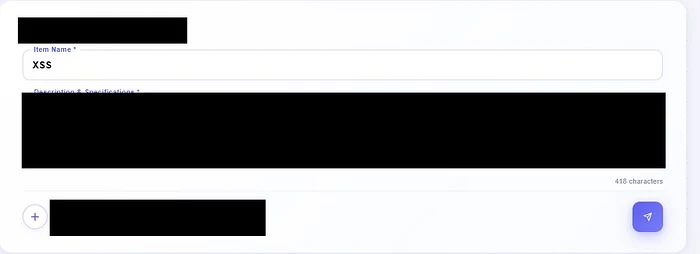
Figure 1 shows the inquiry form where the test content was submitted, with the payload and identifying details covered.
Exploitation
Step 1: Submit content through the inquiry form
A purchase inquiry was created and an item description was supplied through the normal form. The stored value was later rendered inside the thread view, where the browser treated it as markup rather than text. The report does not publish the payload, so there is no request to reproduce here; the relevant fact is that the input arrived through the standard creation flow.
Step 2: Open the thread
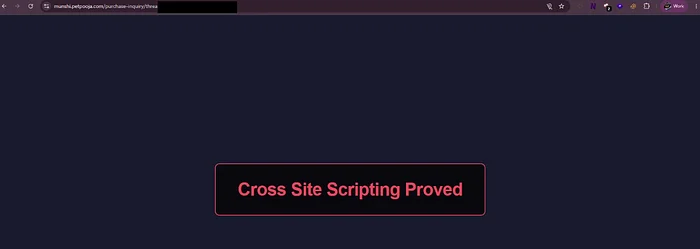
Opening the affected thread was enough. The stored content replaced the visible page with a full-screen defacement message, and the interface became unusable until the page was reloaded.
Figure 2 shows the stored content having replaced the thread page, with the thread identifier redacted.
This was not a case of pasting a script into the browser console. The code path ran as part of rendering the stored thread content: once the thread was opened, the browser processed the content and executed the injected behaviour.
Step 3: Reopen an existing thread
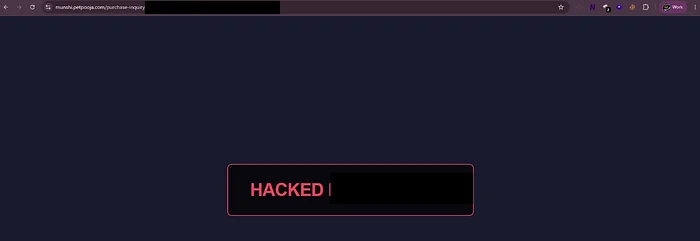
The payload remained in an existing thread and executed again when that thread was reopened. Persistence and repeatability are what separate this from a one-time client-side demonstration.
Figure 3 shows the payload executing again in an existing thread, with the thread ID and the personal defacement text redacted.
Step 4: Post a message into an existing thread
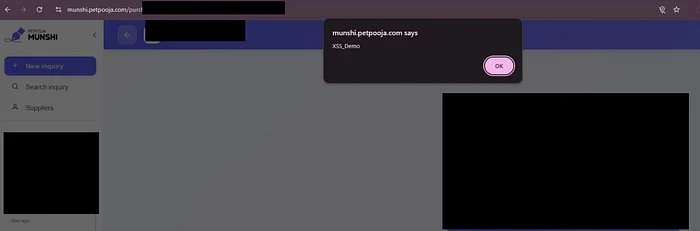
The message-posting path was tested separately. Content sent as a thread message triggered JavaScript execution when the thread was rendered. The report captured a browser alert generated from that path; supplier conversation content, participant details and thread identifiers are hidden in the public screenshot.
Figure 4 shows the alert triggered by content posted inside an existing thread.
So the issue was not confined to inquiry creation. Both the item description supplied at creation time and message content posted within a thread reached unsafe rendering logic.
What the browser actually did
The assessment demonstrated three outcomes:
- A stored payload could replace the thread page with a custom defacement message.
- The payload executed again when an existing thread containing it was reopened.
- Posting content inside an existing thread could trigger JavaScript execution, demonstrated by a browser alert.
Root cause
The root cause was unsafe handling of untrusted content during thread rendering. The report identifies a flow that temporarily parses input as HTML before the text-cleaning step is complete.
When untrusted data is assigned to innerHTML, the browser interprets it as markup. If that markup contains executable event handlers or elements that can trigger script execution, the browser processes them instead of treating the whole value as plain text. The storage layer makes the problem persistent: content is saved during inquiry creation or message posting, then rendered later for whoever opens the thread. Without safe output handling at that point, the same content executes across multiple views and sessions.
This is Stored Cross-Site Scripting (CWE-79): untrusted input is not properly neutralised before it is included in generated web content. The report does not name the specific sanitisation routine or the exact sink beyond the innerHTML pattern described above.
Impact
The broader risk comes from execution in the application's browser origin. Depending on the victim's permissions and on what data is accessible to page JavaScript, stored XSS may expose information shown in the application or enable actions in the victim's session. The report presents those as potential impacts only: it does not document a confirmed theft of application data or session tokens, and I am not presenting those outcomes as demonstrated.
What was demonstrated is full-page defacement, browser alert execution, and re-execution when an existing thread was reopened. Because purchase inquiry threads may contain supplier communication, quotation details and procurement context, a malicious message that runs when the thread is opened can affect more than the person who submitted it.
Fix
The report lists the remediation status as Fixed. It recommends removing the unsafe rendering path rather than relying only on filtering a few known payload patterns.
- If the application only needs to display message text, render it as text and avoid parsing user-controlled content as HTML. In Angular-based rendering, ordinary interpolation is preferable to directly injecting HTML for this use case.
- If rich HTML is required, sanitise it with a maintained, allowlist-based HTML sanitisation library immediately before it reaches the HTML rendering sink.
- Apply context-appropriate output encoding wherever user-controlled content is rendered.
- Treat server-side validation and sanitisation as additional protection, not as a replacement for safe rendering at the output layer.
- Review every rendering path for inquiry descriptions, thread messages, supplier replies and message previews. Fixing only the creation form would leave the existing-thread message path exposed if it uses the same unsafe handling.
- A strong Content Security Policy provides defence in depth but is not a substitute for safe rendering.
- Regression testing should confirm that HTML and JavaScript-like input is displayed inertly, that previously stored malicious content no longer executes, and that reopening an old thread cannot trigger the payload again.
Variants to test
- Every field that ends up in a thread view. Submit markup through item descriptions, thread messages, supplier replies and message previews. A positive result is the markup being interpreted rather than shown as text when the thread is rendered.
- Reopen rather than resubmit. After storing a payload, close the thread and open it again, ideally from a different session. A positive result is execution on the second view, which confirms storage rather than reflected behaviour.
- Second input path. If creation is fixed, test posting into an existing thread separately. A positive result is execution through the message path while the creation path is inert, which shows the fix was applied to only one sink.
- Sanitisation timing. Where a cleaning step exists, look for content that is parsed as HTML before cleaning completes. A positive result is execution during the temporary parse, even if the stored value is later cleaned.
- Preview and notification rendering. Check any place a stored message is summarised, such as previews or notification text. A positive result is execution in a context that was not part of the original fix.
- CSP behaviour. With a policy in place, test whether inline handlers or external script sources still run. A positive result is execution despite the policy, which shows it is not providing the assumed defence in depth.
Vulnerability reference
| Field | Value |
|---|---|
| Vulnerability | Stored Cross-Site Scripting in Purchase Inquiry Thread |
| Product | Munshi (by Petpooja) |
| Affected component | Purchase Inquiry Thread Rendering |
| Affected workflow | Item descriptions and thread messages |
| Affected route | /purchase-inquiry/thread/{thread-id} |
| Vulnerability class | Stored Cross-Site Scripting (Stored XSS) |
| Primary CWE | CWE-79, Improper Neutralization of Input During Web Page Generation |
| Report date | 13 July 2026 |
| Remediation status | Fixed |
| CVE ID | To be assigned |
| Researcher | Vyom Nagpal |
Closing thoughts
This began with a message field that should have contained ordinary business text. Instead, content saved through the Purchase Inquiry workflow was later interpreted as executable HTML by the browser. The most important detail was persistence: the content did not affect only the initial submitter, it executed when an existing thread was opened again, and the same unsafe behaviour appeared through message posting. In a business application, every user-generated field that is saved and rendered has to be treated as untrusted, and safe text rendering, correctly applied sanitisation where rich HTML is required, and regression tests across every thread-rendering path are what stop stored content from becoming executable code.
What happened, in plain words
Munshi is a product made by Petpooja. It is a business tool, and one of its features is called the Purchase Inquiry module. A purchase inquiry is a small piece of everyday business paperwork: someone wants to buy something, so they create an inquiry, write down what the item is, and then talk back and forth with the supplier about it. That back-and-forth conversation is called a thread.
A thread is a bit like an email conversation. You write a message, the other person replies, and the whole exchange stays in one place so anyone involved can open it later and read it. The important thing about a thread is that it is not private to the person who started it. Other people open it too: colleagues, suppliers, whoever is part of the buying process.
While reviewing this feature, the researcher Vyom Nagpal, who writes under the name TheWildEye, found a problem. Text that a normal user typed into an inquiry could be treated by the browser as instructions rather than as plain words. When that text was later shown inside a thread, the browser followed those instructions and ran them as code. This is called Cross-Site Scripting, or XSS for short.
The worst part was that the text was saved. It did not just affect the person who typed it. It sat in the thread and ran again every time somebody opened that thread. That is why this is called stored XSS: the bad content is stored on the server, like a letter left in a drawer, and it does its thing each time the drawer is opened.
The report lists the remediation status as Fixed. It also says a CVE ID, which is a public catalogue number for a known security flaw, is still to be assigned.
Context
Before going further, it helps to know what the pieces are.
What is a browser? You already know this one: it is the program you use to visit websites, like Chrome, Firefox or Safari. When you open a web page, the browser receives a bundle of text from the server and turns it into the page you see. Part of that text is HTML, which describes the structure of the page (headings, paragraphs, forms), and part of it is JavaScript, which is code the browser runs to make the page do things.
What is HTML? HTML is a way of marking up text with tags. For example, <b>hello</b> tells the browser to show the word hello in bold. The tags are instructions. The browser reads them and obeys them.
What is JavaScript? JavaScript is a programming language that browsers understand. It can change what is on the page, read information the page has access to, and send requests to servers. When a page includes JavaScript, the browser runs it.
What is a server? A server is a computer somewhere else that stores the website and sends pages to your browser when you ask for them. When you type an address and press Enter, your browser asks the server for that page, and the server sends it back.
What is a URL? A URL is a web address, like https://munshi.petpooja.com/purchase-inquiry/. The part after the domain, here /purchase-inquiry/, is called the path, and it tells the server which part of the site you want.
What is a route? A route is a pattern for a URL. When a site has many threads, each one needs its own address. Instead of writing a separate address for every thread, the site uses a pattern with a placeholder, like {thread-id}, which gets filled in with the actual number or code for that thread. Think of it like a form letter: "Dear {name}" becomes "Dear Alice" when it is sent.
Now, the feature itself. The Purchase Inquiry module lives at:
https://munshi.petpooja.com/purchase-inquiry/
This is the main page of the feature. It is where a user goes to start a new inquiry or look at existing ones.
Each individual thread has its own address, built from this pattern:
https://munshi.petpooja.com/purchase-inquiry/thread/{thread-id}
Here, {thread-id} is a placeholder. If a thread had the identifier 1234, the address would be https://munshi.petpooja.com/purchase-inquiry/thread/1234. The report hides the real identifiers in its screenshots, so we do not know any actual thread numbers.
The workflow is simple. A user creates an inquiry, writes an item description, and then continues the discussion with the supplier through the thread. The application saves those values and later shows them inside the thread view.
Why does this matter? Because a thread carries supplier communication, quotation details and procurement context. It is a page that other people open, not just the person who created it. That is the property that turns a rendering mistake into something more serious. If the only person who ever saw the page was the person who typed the text, the damage would be limited to themselves. Because other people open the thread, the damage can reach them too.
Setup
The assessment was a security review of the Purchase Inquiry workflow, carried out by Vyom Nagpal (TheWildEye). The report does not describe the accounts, roles, tooling or browser versions used, so I will not guess at them.
What the report does establish is the precondition that matters: an ordinary user can create a purchase inquiry, supply an item description, and post messages into an existing thread. Both of those input paths were tested. In other words, an ordinary user can create an inquiry, add an item description and post messages into an existing thread.
Finding it
While reviewing how inquiry descriptions and thread messages were rendered, the researcher found that untrusted content placed in an item description could be interpreted as HTML rather than displayed strictly as text. The same behaviour appeared in messages posted to an existing thread.
What does "untrusted content" mean? It means any text that comes from a user rather than from the developers of the site. From the site's point of view, everything a user types is untrusted, because the site cannot know in advance whether that text is harmless or malicious. A safe site treats all user input as potentially dangerous and handles it carefully.
What does "rendered" mean? Rendering is the process of turning stored data into what you see on screen. When the server sends a thread page to your browser, the browser has to take the stored text and place it into the page. That placement step is rendering. If the browser is told to treat the text as HTML, it will look for tags and obey them. If it is told to treat the text as plain text, it will just show the characters, tags and all.
The input path was completely ordinary. Content submitted through a normal purchase inquiry form was subsequently interpreted by the browser as active markup. The payload itself is redacted in the public screenshot, but the form is the point: no special endpoint, no developer tooling, just a business field.
What is a payload? In security, a payload is the piece of content that is designed to do something when it is processed. In an XSS attack, the payload is the text that, when the browser reads it, causes code to run. The report does not publish the payload, so we do not know exactly what it looked like.
What is redacted? Redacted means removed or covered up before publication. Researchers often hide details like payloads, thread identifiers and personal information so that the public report cannot be used to attack systems that are still vulnerable, and so that real people's data is not exposed.
Figure 1 shows the inquiry form where the test content was submitted, with the payload and identifying details covered.
Exploitation
Step 1: Submit content through the inquiry form
A purchase inquiry was created and an item description was supplied through the normal form. The stored value was later rendered inside the thread view, where the browser treated it as markup rather than text. The report does not publish the payload, so there is no request to reproduce here; the relevant fact is that the input arrived through the standard creation flow.
Why was this step taken? Because the researcher wanted to see what happens to ordinary user input after it is saved. If the site is safe, the text should come back as text. If the site is unsafe, the text might come back as instructions.
Step 2: Open the thread
Opening the affected thread was enough. The stored content replaced the visible page with a full-screen defacement message, and the interface became unusable until the page was reloaded.
What is defacement? Defacement means changing what a page looks like, usually to something the site owner did not intend. In this case, the stored content took over the whole page and showed a message instead of the normal thread.
Figure 2 shows the stored content having replaced the thread page, with the thread identifier redacted.
This was not a case of pasting a script into the browser console. The code path ran as part of rendering the stored thread content: once the thread was opened, the browser processed the content and executed the injected behaviour.
What is the browser console? It is a panel built into browsers, mostly used by developers, where you can type commands and see errors. Pasting a script there would only affect your own browser, and only for that moment. It would prove nothing about the site. The fact that the code ran simply by opening a normal page is what makes this a real vulnerability.
Step 3: Reopen an existing thread
The payload remained in an existing thread and executed again when that thread was reopened. Persistence and repeatability are what separate this from a one-time client-side demonstration.
What does client-side mean? It means happening in your browser, on your computer, rather than on the server. A client-side demonstration that only works once, in one browser, proves very little. A stored problem that repeats for anyone who opens the page is a different matter.
Figure 3 shows the payload executing again in an existing thread, with the thread ID and the personal defacement text redacted.
Step 4: Post a message into an existing thread
The message-posting path was tested separately. Content sent as a thread message triggered JavaScript execution when the thread was rendered. The report captured a browser alert generated from that path; supplier conversation content, participant details and thread identifiers are hidden in the public screenshot.
What is a browser alert? An alert is a small pop-up box that a page can make the browser show, usually with a short message and an OK button. It is a simple, visible way to prove that JavaScript ran, because the box only appears if code actually executed.
Figure 4 shows the alert triggered by content posted inside an existing thread.
So the issue was not confined to inquiry creation. Both the item description supplied at creation time and message content posted within a thread reached unsafe rendering logic.
Why test a second path? Because a fix applied to one form does not necessarily cover another. If the researcher had only tested the creation form, the site's owners might have fixed that one form and left the message path open. Testing both shows the problem was in the shared rendering step, not in one particular form.
What the browser actually did
The assessment demonstrated three outcomes:
- A stored payload could replace the thread page with a custom defacement message.
- The payload executed again when an existing thread containing it was reopened.
- Posting content inside an existing thread could trigger JavaScript execution, demonstrated by a browser alert.
Root cause
The root cause was unsafe handling of untrusted content during thread rendering. The report identifies a flow that temporarily parses input as HTML before the text-cleaning step is complete.
What does parsing mean? Parsing is the process of reading text and working out its structure. When a browser parses HTML, it looks for tags and decides what each one means. If it sees <b>, it decides to make text bold. If it sees a tag that carries code, it decides to run that code. Parsing is the moment where text becomes instructions.
What does the text-cleaning step mean? Many sites try to clean user input before showing it, by removing dangerous tags. This is called sanitisation. The problem here was timing: the input was parsed as HTML before the cleaning was finished. Imagine a security guard who checks bags after people have already walked into the building. The check is real, but it happens too late.
When untrusted data is assigned to innerHTML, the browser interprets it as markup. If that markup contains executable event handlers or elements that can trigger script execution, the browser processes them instead of treating the whole value as plain text.
What is innerHTML? It is a property in JavaScript that lets code put content into a page. When you set innerHTML to a piece of text, you are telling the browser: treat this text as HTML. The browser then parses it and builds whatever the tags describe. If the text contains a tag that runs code, the browser runs that code. There is a safer alternative called textContent, which tells the browser: treat this text as plain text, show the characters exactly as they are, do not interpret any tags.
What is an event handler? In HTML, some attributes tell the browser to run code when something happens, such as when the page loads or when the user clicks. These are event handlers. They are a common way to get code to run through HTML.
The storage layer makes the problem persistent: content is saved during inquiry creation or message posting, then rendered later for whoever opens the thread. Without safe output handling at that point, the same content executes across multiple views and sessions.
What is a session? A session is the period during which you are logged in to a site. When you log in, the server gives your browser a small piece of data, often called a cookie or a token, which your browser sends back with every request so the server knows who you are. A session ends when you log out or the login expires. Because the stored content runs for whoever opens the thread, it can run in their session, not just the session of the person who typed it.
This is Stored Cross-Site Scripting (CWE-79): untrusted input is not properly neutralised before it is included in generated web content. The report does not name the specific sanitisation routine or the exact sink beyond the innerHTML pattern described above.
What is CWE-79? CWE stands for Common Weakness Enumeration. It is a public list of known kinds of software weakness, each with a number. CWE-79 is the entry for Cross-Site Scripting. Giving the number helps other people look up the same class of problem and compare notes.
What is a sink? In security, a sink is a place in the code where data ends up and where it can do harm. A source is where data comes from, such as a form field. A sink is where it goes, such as a place that turns text into HTML. The problem here was that untrusted data from a source reached a dangerous sink without being made safe on the way.
Impact
The broader risk comes from execution in the application's browser origin. Depending on the victim's permissions and on what data is accessible to page JavaScript, stored XSS may expose information shown in the application or enable actions in the victim's session. The report presents those as potential impacts only: it does not document a confirmed theft of application data or session tokens, and it does not present those outcomes as demonstrated.
What is an origin? An origin is the combination of the protocol (such as https), the domain (such as munshi.petpooja.com) and the port. Browsers use origins to decide what one page is allowed to do to another. Code running in the same origin as the application can do many of the things the application itself can do. That is why running code inside the application's origin is serious.
What is a session token? A session token is the piece of data that proves you are logged in. If someone else got hold of it, they could act as you. The report mentions session tokens as a possible risk but does not claim any were stolen.
What was demonstrated is full-page defacement, browser alert execution, and re-execution when an existing thread was reopened. Because purchase inquiry threads may contain supplier communication, quotation details and procurement context, a malicious message that runs when the thread is opened can affect more than the person who submitted it.
Fix
The remediation status in the report is Fixed. The report recommends removing the unsafe rendering path rather than relying only on filtering a few known payload patterns.
Why not just filter known payloads? Because attackers can always write new ones. Blocking a list of known bad words is like locking one door while leaving the windows open. The safer approach is to change how the content is handled, so that no text is ever treated as instructions unless it has been properly checked.
- If the application only needs to display message text, render it as text and avoid parsing user-controlled content as HTML. In Angular-based rendering, ordinary interpolation is preferable to directly injecting HTML for this use case.
What is Angular? Angular is a framework, a set of tools that developers use to build web applications. It has its own ways of putting data into a page. Interpolation means placing a value into the page as text, which is the safe default. Directly injecting HTML is the risky option, and should only be used when there is a real need.
- If rich HTML is required, sanitise it with a maintained, allowlist-based HTML sanitisation library immediately before it reaches the HTML rendering sink.
What is an allowlist? An allowlist is a list of things that are permitted, with everything else refused. The opposite, a blocklist, lists things that are forbidden and allows everything else. Allowlists are safer because you only have to think about what you want to allow, not about every possible thing an attacker might try.
- Apply context-appropriate output encoding wherever user-controlled content is rendered.
What is output encoding? Encoding means changing characters so they cannot be mistaken for instructions. For example, turning < into a code that displays as < but is not treated as the start of a tag. Context-appropriate means using the right kind of encoding for the place the text goes: HTML, an attribute, a URL and JavaScript each need different treatment.
- Treat server-side validation and sanitisation as additional protection, not as a replacement for safe rendering at the output layer.
What is server-side validation? It means checking input on the server, before it is saved. It is useful, but it is not enough on its own, because the same data can be shown in many places and each place needs its own safe handling.
- Review every rendering path for inquiry descriptions, thread messages, supplier replies and message previews. Fixing only the creation form would leave the existing-thread message path exposed if it uses the same unsafe handling.
- A strong Content Security Policy provides defence in depth but is not a substitute for safe rendering.
What is a Content Security Policy? It is a set of rules a site can send to the browser, saying which sources of code are allowed to run. It is a useful extra layer, like a second lock on a door, but it does not fix the underlying problem if unsafe rendering is still happening.
- Regression testing should confirm that HTML and JavaScript-like input is displayed inertly, that previously stored malicious content no longer executes, and that reopening an old thread cannot trigger the payload again.
What is regression testing? It means testing again after a fix to make sure the problem is really gone and nothing else broke. Inertly means shown without doing anything: the text appears on screen but no code runs.
Variants to test
These are the follow-up checks a tester would run to make sure the fix is complete and to look for similar problems elsewhere.
- Every field that ends up in a thread view. Submit markup through item descriptions, thread messages, supplier replies and message previews. A positive result is the markup being interpreted rather than shown as text when the thread is rendered.
- Reopen rather than resubmit. After storing a payload, close the thread and open it again, ideally from a different session. A positive result is execution on the second view, which confirms storage rather than reflected behaviour.
What is reflected behaviour? Reflected XSS is when the bad content bounces straight back to you in the same response, without being saved. Stored XSS is when the content is saved and comes back later. Reopening the thread is how you tell the two apart.
- Second input path. If creation is fixed, test posting into an existing thread separately. A positive result is execution through the message path while the creation path is inert, which shows the fix was applied to only one sink.
- Sanitisation timing. Where a cleaning step exists, look for content that is parsed as HTML before cleaning completes. A positive result is execution during the temporary parse, even if the stored value is later cleaned.
- Preview and notification rendering. Check any place a stored message is summarised, such as previews or notification text. A positive result is execution in a context that was not part of the original fix.
- CSP behaviour. With a policy in place, test whether inline handlers or external script sources still run. A positive result is execution despite the policy, which shows it is not providing the assumed defence in depth.
Vulnerability reference
| Field | Value |
|---|---|
| Vulnerability | Stored Cross-Site Scripting in Purchase Inquiry Thread |
| Product | Munshi (by Petpooja) |
| Affected component | Purchase Inquiry Thread Rendering |
| Affected workflow | Item descriptions and thread messages |
| Affected route | /purchase-inquiry/thread/{thread-id} |
| Vulnerability class | Stored Cross-Site Scripting (Stored XSS) |
| Primary CWE | CWE-79, Improper Neutralization of Input During Web Page Generation |
| Report date | 13 July 2026 |
| Remediation status | Fixed |
| CVE ID | To be assigned |
| Researcher | Vyom Nagpal |
Closing thoughts
This began with a message field that should have contained ordinary business text. Instead, content saved through the Purchase Inquiry workflow was later interpreted as executable HTML by the browser. The most important detail was persistence: the content did not affect only the initial submitter, it executed when an existing thread was opened again, and the same unsafe behaviour appeared through message posting. In a business application, every user-generated field that is saved and rendered has to be treated as untrusted, and safe text rendering, correctly applied sanitisation where rich HTML is required, and regression tests across every thread-rendering path are what stop stored content from becoming executable code.
Glossary
- Alert: a small pop-up box a web page can make the browser show, often used to prove that JavaScript ran.
- Allowlist: a list of things that are permitted, with everything else refused.
- Angular: a framework developers use to build web applications.
- Browser: the program you use to visit websites, such as Chrome, Firefox or Safari.
- Browser console: a developer panel in the browser where you can type commands and see errors.
- Client-side: happening in your browser, on your computer, rather than on the server.
- Content Security Policy (CSP): rules a site sends to the browser saying which sources of code are allowed to run.
- Cookie: a small piece of data a site stores in your browser, often used to keep you logged in.
- CVE ID: a public catalogue number for a known security flaw.
- CWE-79: the entry in the Common Weakness Enumeration list for Cross-Site Scripting.
- Defacement: changing what a page looks like, usually to something the site owner did not intend.
- Event handler: an HTML attribute that tells the browser to run code when something happens, such as a page load or a click.
- HTML: the markup language that describes the structure of a web page using tags.
innerHTML: a JavaScript property that puts content into a page and tells the browser to treat it as HTML.- Interpolation: placing a value into a page as text, which is the safe default in frameworks like Angular.
- JavaScript: a programming language that browsers understand and run.
- Origin: the combination of protocol, domain and port that browsers use to decide what one page may do to another.
- Output encoding: changing characters so they cannot be mistaken for instructions.
- Parsing: reading text and working out its structure, such as deciding what each HTML tag means.
- Payload: the piece of content designed to do something when it is processed.
- Redacted: removed or covered up before publication.
- Reflected XSS: bad content that bounces straight back in the same response without being saved.
- Regression testing: testing again after a fix to make sure the problem is gone and nothing else broke.
- Rendering: the process of turning stored data into what you see on screen.
- Route: a pattern for a URL, with placeholders that get filled in for each item.
- Sanitisation: cleaning user input by removing dangerous parts before showing it.
- Server: a computer somewhere else that stores a website and sends pages to your browser.
- Server-side validation: checking input on the server before it is saved.
- Session: the period during which you are logged in to a site.
- Session token: the piece of data that proves you are logged in.
- Sink: a place in code where data ends up and where it can do harm.
- Source: a place in code where data comes from, such as a form field.
- Stored XSS: Cross-Site Scripting where the bad content is saved on the server and runs again each time the page is opened.
- Thread: a back-and-forth conversation between people, kept in one place.
- Untrusted content: any text that comes from a user rather than from the developers of the site.
- URL: a web address.



