Stored HTML Injection in Munshi: A Profile Name Reached the Support Email as HTML
The backend accepted and stored HTML markup in a profile name field that had no normal UI editing path, and the Contact Support workflow later inserted that stored value into an HTML email without encoding it. An attacker could place misleading banners, masked links, external media or phishing-style content into a support message that staff would read.
 Published on medium.com
Cybersecurity
The full write-up lives on its author's site
It belongs to its author, so we link to it rather than copy it. The other two tabs are our own rewrites, checked against it.
Context
Munshi is the product assessed here, and the feature at the centre of the finding is its Contact Support workflow. When a user triggers Contact Support, the application builds a support email. The profile name is expected to be display text, but the application did not expose a normal UI feature to edit it.
The issue is a stored HTML injection: a backend-accepted profile value was stored without safe handling and then rendered as HTML when the Contact Support workflow generated an email. The researcher is explicit that the evidence demonstrated HTML and media rendering in the support-email context and did not establish arbitrary JavaScript execution, so the behaviour is described as stored HTML injection.
Setup
The report does not describe specific accounts, roles, tools or versions. What it does establish as preconditions is a profile record whose name field can be reached through a modified backend request even though no UI path exists to edit it, and a Contact Support action that loads the support-mail content through JavaScript and includes the stored profile value in the generated message.
Finding it
The profile name was expected to be plain display text. There was no normal UI path to edit it, but the backend accepted a manipulated request containing a custom value in the name field. That mismatch, a field the UI treats as immutable but the API accepts, is what made the value worth following into the workflows that consume it.
Exploitation
Step 1: Submit a modified request with HTML in the name field
The researcher sent a modified request containing HTML in the name field. The report does not reproduce the request itself, so the exact endpoint, method, headers and payload are not available here. The backend accepted the request and persisted the value.
Step 2: Confirm the value survived in storage
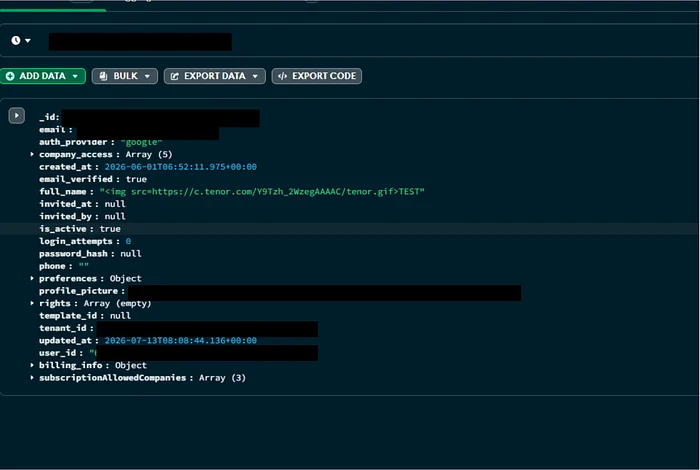
The supplied value was saved in MongoDB without meaningful sanitisation. After the modified request was submitted, the updated profile value was confirmed in the backend database: the stored full_name field contained the supplied HTML-capable value rather than a plain-text name.
Figure 1 shows the database record with the stored value. Account identifiers and contact details are redacted while the affected field remains visible.
This is the distinction between a one-time reflected issue and a stored injection. The value was not limited to the request that introduced it; it remained available to later workflows that consumed the same profile data.
Step 3: Trigger Contact Support
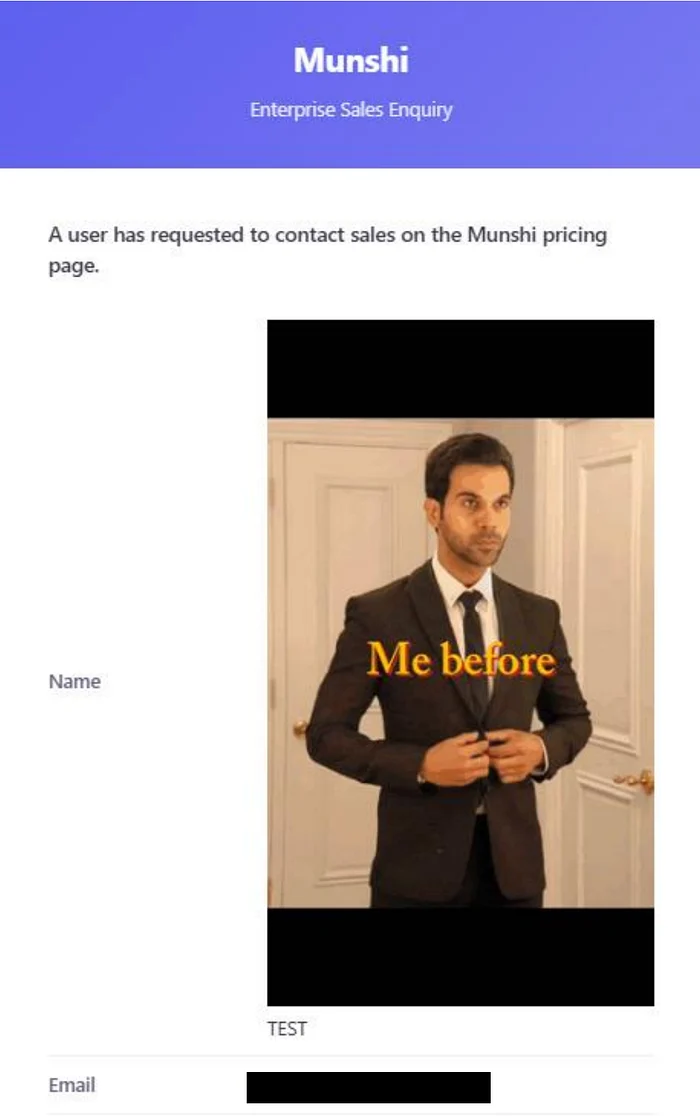
The next step was to trigger the Contact Support action. The application loaded the support-mail content through JavaScript and included the stored profile value in the generated message. The resulting support email displayed the injected media content, so the field was being interpreted as HTML in the support-mail context rather than rendered as inert text.
Figure 2 shows the Contact Support email output. The account email address is redacted; the rendered media and surrounding message remain visible.
Root cause
The root cause was unsafe handling of the user-controlled name value across the storage and rendering path. The backend accepted markup-like input and stored it, and the support-mail template later inserted that value into an HTML context without escaping it. The issue therefore crossed two parts of the application: the API accepted and persisted attacker-controlled markup, and the support-mail rendering flow inserted that stored value into an HTML context without proper output encoding.
The researcher notes that input validation alone would not be a sufficient fix: even if the API rejects unexpected markup, every output context must still encode untrusted values correctly. The finding aligns with CWE-79 (Improper Neutralization of Input During Web Page Generation) and CWE-116 (Improper Encoding or Escaping of Output), with CWE-20 (Improper Input Validation) also relevant to the API-side acceptance of unexpected input.
Impact
Support email is an operational communication channel. Content displayed there can receive more trust than an arbitrary page or user-generated comment, particularly when it appears inside an established business workflow. The report identified several ways the behaviour could be abused: misleading banners, masked hyperlinks, external media, tracking resources and phishing-style content. A malicious value could make a support message appear more legitimate while directing a recipient toward attacker-controlled content.
The demonstrated result was the rendering of injected HTML and media in the support-mail flow. The supplied evidence does not show that a recipient clicked a malicious link, disclosed credentials, or that JavaScript executed. Those are potential abuse scenarios, not confirmed outcomes of this test.
The vulnerability reference records the following:
| Field | Value |
|---|---|
| Vulnerability | Stored HTML Injection in Support Email Rendering |
| Product | Munshi |
| Affected input | Backend name field |
| Trigger | Contact Support workflow |
| Primary CWEs | CWE-79, CWE-116 |
| Severity | Medium |
| Report Date | 15 July 2026 |
| Remediation Status | Fixed |
| CVE ID | To be assigned |
The CVSS vector given is:
CVSS:4.0/AV:N/AC:L/AT:N/PR:L/UI:P/VC:N/VI:N/VA:N/SC:N/SI:L/SA:N
Fix
The fix belongs at the point where user-controlled data enters the HTML message. The support-mail template should HTML-escape the name value before inserting it into the message body. If the field is only intended to hold a person's name, the API should also reject unexpected markup and keep the value as plain text throughout the application.
Templates should use context-aware auto-escaping by default. If rich HTML is genuinely required in another workflow, it should be sanitised with a vetted allowlist-based library rather than inserting raw user input. The mail-generation path should also be reviewed to ensure every user-controlled field is handled safely. A restrictive Content Security Policy can provide additional defence in browser-based rendering contexts, but it does not replace correct output encoding. The report records the remediation status as fixed.
Variants to test
- Other profile fields consumed by email templates. Change fields such as display name, company or job title through the API and trigger every workflow that builds an email. A positive result is the stored value appearing as rendered HTML in the generated message rather than as inert text.
- Fields with no UI edit path. Enumerate API fields that the front end never lets a user edit, then try submitting them directly. A positive result is the backend accepting and persisting a value the UI treats as immutable.
- Stored values reused across multiple workflows. After storing a markup value, trigger every consumer of the same record (support mail, notifications, exports, admin views). A positive result is the value rendering as HTML in more than one context, which shows the encoding gap is in shared rendering rather than a single template.
- Client-side rendering of stored data. Where content is loaded through JavaScript before being inserted into the page or a message, check whether it is inserted as HTML. A positive result is injected markup or media rendering in the output.
- Escaping versus sanitisation. Submit benign markup such as a simple element and observe whether it is escaped, stripped or rendered. A positive result is rendering, which tells you the output context is unencoded; a stripped result tells you only input filtering is in place, which the researcher notes is not sufficient on its own.
What happened, in plain words
Munshi is a product that has a feature called Contact Support. When a user uses that feature, the application builds an email to the support team. That email includes the stored profile value, here the profile name.
A profile name is supposed to be ordinary text, like "Alex" or "Priya". The application had no normal screen where a user could edit this name. But the server behind the application, the part that actually stores data, still accepted a hand-made request that put HTML into the name field. HTML is the language web pages are written in: it is what tells a browser "this is a heading", "this is a link", "this is an image". The server saved that value in its database.
Later, when the Contact Support email was generated, the saved name was placed into the email as if it were HTML. So the HTML was not shown as text; it was acted on. The result was that the injected media content appeared inside the support email.
This is called stored HTML injection. "Stored" means the value was saved and came back later, rather than only appearing once in the same request. "HTML injection" means user-supplied HTML was placed into a page or message and interpreted instead of being shown as plain text.
The researcher is careful about one point: the evidence showed HTML and media being rendered in the support email, but it did not show that JavaScript ran. JavaScript is the programming language that makes web pages interactive, and being able to run your own JavaScript in someone else's page is a more serious problem usually called XSS (cross-site scripting). Because that was not demonstrated, the finding is described as stored HTML injection, not XSS.
The pieces involved, explained from zero
Before following the steps, here are the parts of the story in everyday terms.
- The application and the backend. What you see in your browser is the front end. The backend is the server-side program behind it: it receives requests, checks them, and saves data. Think of a restaurant: the menu and waiter are the front end, the kitchen is the backend. You can ask the kitchen for something that is not on the menu, and sometimes it will still make it.
- An API. An API is the way software talks to the backend without using the normal screens. It is a set of addresses (endpoints) that accept requests and return responses. When you fill in a form, your browser is usually calling an API for you. If you send a request to the API yourself, you can ask for things the normal screens never offer.
- A request. A request is a message your browser (or a tool) sends to a server. It has a method (such as GET to fetch something or POST to submit something), a URL, sometimes headers (extra information such as who you are), and sometimes a body (the data you are sending).
- A field. A field is one named piece of data in a request or a database record, for example
nameorfull_name. The name in the request and the name in the database are not always identical; here the request usednameand the stored record usedfull_name. - A database and MongoDB. A database is where an application keeps its data. MongoDB is one particular kind of database that stores records as documents, a bit like structured text files. The report says the value was saved in MongoDB.
- Sanitisation and escaping. These are two ways to make user input safe. Sanitisation means cleaning input, for example removing HTML tags. Escaping (also called encoding) means converting special characters so they are displayed as text rather than interpreted. If a name contains
<b>, escaping turns it into something the browser shows literally as<b>instead of making the text bold. Escaping is done at the moment the value is placed into its destination, because different destinations (a web page, an email, a database query) need different escaping. - Rendering. Rendering is the act of turning data into what a person sees. A browser renders HTML into a visible page. If a value is rendered as HTML, any tags in it take effect. If it is rendered as text, the tags are just characters on the screen.
- The Contact Support workflow. A workflow is a sequence of steps the application performs automatically. Here, when the user triggers Contact Support, the application loads the support-mail content through JavaScript and builds the message, including the stored profile value.
Setup: what had to be true before the test
The report does not describe specific accounts, roles, tools or versions. What it does establish is two preconditions:
- There is a profile record whose
namefield can be reached through a modified backend request, even though no screen in the application lets a user edit it. - There is a Contact Support action that loads the support-mail content through JavaScript and includes the stored profile value in the generated message.
Why this matters: the interesting thing is the mismatch. The front end treats the name as something you cannot change. The backend accepts a change anyway. Whenever a screen and the server disagree about what is allowed, it is worth checking what happens to the value afterwards, because other parts of the application may trust it.
Finding it
The profile name was expected to be plain display text. There was no normal UI path to edit it, but the backend accepted a manipulated request containing a custom value in the name field. That mismatch is what made the value worth following into the workflows that consume it.
In plain terms: the researcher did not find a button that says "edit name". Instead, they sent a modified request to the backend with a value of their own choosing. The backend said yes and saved it.
Exploitation
Step 1: Submit a modified request with HTML in the name field
The researcher sent a modified request containing HTML in the name field. The report does not reproduce the request itself, so the exact endpoint, method, headers and payload are not available here. The backend accepted the request and persisted the value.
Why this step was taken: to test whether the server enforces the same rules as the screen. If the screen hides a field but the server still accepts it, the server is the real boundary.
"Persisted" simply means saved. The value did not just pass through; it went into storage.
Step 2: Confirm the value survived in storage
The supplied value was saved in MongoDB without meaningful sanitisation. After the modified request was submitted, the updated profile value was confirmed in the backend database: the stored full_name field contained the supplied HTML-capable value rather than a plain-text name.
Why this step was taken: to prove the value was really stored, not just echoed back once. This is the difference between a reflected issue and a stored one. A reflected issue appears only in the response to the request that carried it, like a shop assistant repeating your words back to you. A stored issue is written down and comes back later, like a note left on a file that the next person reads.
Figure 1 shows the database record with the stored value. Account identifiers and contact details are redacted while the affected field remains visible.
The value was not limited to the request that introduced it; it remained available to later workflows that consumed the same profile data.
Step 3: Trigger Contact Support
The next step was to trigger the Contact Support action. The application loaded the support-mail content through JavaScript and included the stored profile value in the generated message. The resulting support email displayed the injected media content, so the field was being interpreted as HTML in the support-mail context rather than rendered as inert text.
Why this step was taken: storing a value is only half the story. The harm depends on where the value is used next. Contact Support is a place where the value is placed into a generated support email, which makes it a meaningful destination to test.
"Inert text" means text that is displayed exactly as written and does nothing. If the name had been handled correctly, the HTML would have appeared as visible characters, harmless. Instead it was interpreted, and media content appeared in the email.
Figure 2 shows the Contact Support email output. The account email address is redacted; the rendered media and surrounding message remain visible.
Root cause
The root cause was unsafe handling of the user-controlled name value across the storage and rendering path. The backend accepted markup-like input and stored it, and the support-mail template later inserted that value into an HTML context without escaping it.
A template is a reusable pattern for building output, with blanks filled in from data. If the template puts a value into an HTML message without escaping it, the value is treated as part of the HTML.
The issue crossed two parts of the application:
- The API accepted and saved attacker-controlled markup.
- The support-mail rendering flow inserted that stored value into an HTML context without proper output encoding.
The researcher notes that input validation alone would not be a sufficient fix. Input validation means checking data as it arrives, for example rejecting anything that looks like HTML. That helps, but it is not enough: even if the API rejects unexpected markup, every output context must still encode untrusted values correctly. The reason is that data can arrive from many places, and the only reliable moment to make it safe is when it is placed into its destination.
The finding aligns with three standard weakness categories:
- CWE-79, Improper Neutralisation of Input During Web Page Generation: user input ends up in generated output without being made safe.
- CWE-116, Improper Encoding or Escaping of Output: the output is not encoded for the context it lands in.
- CWE-20, Improper Input Validation: relevant to the API-side acceptance of unexpected input.
CWE is a public catalogue of software weakness types, used so that findings can be compared across projects.
Impact
Support email is an operational communication channel. Content displayed there can receive more trust than an arbitrary page or user-generated comment, particularly when it appears inside an established business workflow. People expect a support email to be genuine, so they read it differently from a random web page.
The report identified several ways the behaviour could be abused: misleading banners, masked hyperlinks, external media, tracking resources and phishing-style content. A malicious value could make a support message appear more legitimate while directing a recipient toward attacker-controlled content.
- Misleading banners: a fake notice inside the message that looks official.
- Masked hyperlinks: a link whose visible text says one thing while it points somewhere else.
- External media: images loaded from another server, which makes the recipient's browser contact that server.
- Tracking resources: content that reports back when the message is opened.
- Phishing-style content: text designed to persuade the reader to hand over information or click.
The demonstrated result was the rendering of injected HTML and media in the support-mail flow. The supplied evidence does not show that a recipient clicked a malicious link, disclosed credentials, or that JavaScript executed. Those are potential abuse scenarios, not confirmed outcomes of this test.
The vulnerability reference records the following:
| Field | Value |
|---|---|
| Vulnerability | Stored HTML Injection in Support Email Rendering |
| Product | Munshi |
| Affected input | Backend name field |
| Trigger | Contact Support workflow |
| Primary CWEs | CWE-79, CWE-116 |
| Severity | Medium |
| Report Date | 15 July 2026 |
| Remediation Status | Fixed |
| CVE ID | To be assigned |
The CVSS vector given is:
CVSS:4.0/AV:N/AC:L/AT:N/PR:L/UI:P/VC:N/VI:N/VA:N/SC:N/SI:L/SA:N
CVSS is a scoring system for describing how serious a vulnerability is. The vector is a compact string of measurements. In this vector, the parts that matter most for a beginner are:
AV:Nmeans the attack can be carried out over a network rather than requiring physical access.AC:Lmeans the attack complexity is low.PR:Lmeans the attacker needs low privileges, in other words a normal account.UI:Pmeans some action by a user is required.VC:N,VI:N,VA:Nmean no impact was recorded on the confidentiality, integrity or availability of the vulnerable system itself.SC:N,SI:L,SA:Nmean the impact is recorded on a subsequent system: no confidentiality impact, low integrity impact, no availability impact.
Severity is recorded as Medium, and the remediation status as Fixed.
Fix
The fix belongs at the point where user-controlled data enters the HTML message.
The support-mail template should HTML-escape the name value before inserting it into the message body. If the field is only intended to hold a person's name, the API should also reject unexpected markup and keep the value as plain text throughout the application.
Templates should use context-aware auto-escaping by default. "Context-aware" means the escaping matches the destination: HTML needs one kind of escaping, a URL another, a database query another. "Auto-escaping by default" means the safe behaviour happens unless a developer deliberately turns it off, rather than the other way round.
If rich HTML is genuinely required in another workflow, it should be sanitised with a vetted allowlist-based library rather than inserting raw user input. An allowlist is a list of things that are permitted; anything not on the list is removed. A vetted library is one that has been reviewed and is maintained by people who specialise in this problem.
The mail-generation path should also be reviewed to ensure every user-controlled field is handled safely. A restrictive Content Security Policy can provide additional defence in browser-based rendering contexts, but it does not replace correct output encoding. A Content Security Policy is a set of instructions a website gives the browser about which sources of content it may load; it is a safety net, not a substitute for handling data correctly.
The report records the remediation status as fixed.
Variants to test
These are follow-up ideas in the same spirit, useful for anyone learning how to look for similar issues.
- Other profile fields consumed by email templates. Change fields such as display name, company or job title through the API and trigger every workflow that builds an email. A positive result is the stored value appearing as rendered HTML in the generated message rather than as inert text.
- Fields with no UI edit path. Enumerate API fields that the front end never lets a user edit, then try submitting them directly. A positive result is the backend accepting and persisting a value the UI treats as immutable.
- Stored values reused across multiple workflows. After storing a markup value, trigger every consumer of the same record (support mail, notifications, exports, admin views). A positive result is the value rendering as HTML in more than one context, which shows the encoding gap is in shared rendering rather than a single template.
- Client-side rendering of stored data. Where content is loaded through JavaScript before being inserted into the page or a message, check whether it is inserted as HTML. A positive result is injected markup or media rendering in the output.
- Escaping versus sanitisation. Submit benign markup such as a simple element and observe whether it is escaped, stripped or rendered. A positive result is rendering, which tells you the output context is unencoded; a stripped result tells you only input filtering is in place, which the researcher notes is not sufficient on its own.
Glossary
- API: the set of addresses and rules a program uses to talk to a backend directly, without the normal screens.
- Backend: the server-side part of an application that receives requests, applies rules and stores data.
- Contact Support: the Munshi feature that builds and sends a support email.
- Content Security Policy (CSP): instructions a site gives the browser about which content sources it may load, used as an extra safety layer.
- Context-aware auto-escaping: escaping that automatically matches the destination (HTML, URL, database) and is on by default.
- CVSS: a scoring system and notation for describing the severity of a vulnerability.
- CWE: a public catalogue of software weakness types, such as CWE-79 for injection into generated pages.
- CWE-20: Improper Input Validation, accepting input that should have been rejected.
- CWE-79: Improper Neutralisation of Input During Web Page Generation, user input reaching generated output without being made safe.
- CWE-116: Improper Encoding or Escaping of Output, output not encoded for the context it lands in.
- Database: where an application keeps its data.
- Endpoint: a specific address on a server that accepts a particular kind of request.
- Escaping (encoding): converting special characters so they are shown as text instead of being interpreted.
- Field: one named piece of data, such as
nameorfull_name. - Front end: the part of an application you see and interact with in the browser.
- HTML: the language used to describe the structure and content of web pages and HTML emails.
- HTML injection: placing user-supplied HTML into a page or message where it is interpreted instead of shown as text.
- Inert text: text displayed exactly as written that has no effect.
- JavaScript: the programming language that makes web pages interactive and can load and insert content.
- MongoDB: a kind of database that stores records as documents.
- Persisted: saved in storage so it is available later.
- Phishing: content designed to persuade someone to hand over information or click a link.
- Reflected: appearing only in the response to the request that carried the value, not saved.
- Rendering: turning data into what a person sees.
- Request: a message sent to a server, with a method, a URL, sometimes headers and a body.
- Sanitisation: cleaning input, for example removing HTML tags.
- Stored: saved and then reused later by other parts of the application.
- Stored HTML injection: HTML supplied by a user is saved and later interpreted in another context.
- Template: a reusable pattern for building output, with blanks filled from data.
- UI (user interface): the screens and controls a person uses.
- Workflow: a sequence of steps an application performs automatically.
- XSS (cross-site scripting): running attacker-supplied JavaScript in another user's browser context; not demonstrated in this report.



