Malicious File Attachment Injection in Munshi Purchase Inquiry Through Incomplete File Validation
The Munshi Purchase Inquiry workflow only blocked a list of known dangerous file extensions and did not inspect file content, so a password-protected ZIP containing a publicly available malware sample was accepted and delivered to a supplier's inbox. An attacker could send a malicious attachment through a trusted procurement conversation, where the recipient might assume the platform had checked it.
 Published on medium.com
Cybersecurity
The full write-up lives on its author's site
It belongs to its author, so we link to it rather than copy it. The other two tabs are our own rewrites, checked against it.
Context
Munshi is a procurement product, and its Purchase Inquiry module is the part of the workflow where a buyer submits a Request for Quotation (RFQ) to a supplier together with supporting files. Those attachments are not incidental: they are part of ordinary business correspondence, so a supplier receiving an RFQ notification has a reasonable expectation that the platform has already checked whatever is attached to it.
The assessment covered the Purchase Inquiry workflow at the endpoint munshi.petpooja.com/purchase-inquiry. The question the researcher asked was simple: does the attachment validation actually establish that an uploaded file is safe before it is accepted and delivered to the other party?
Setup
The work was a security assessment of the Purchase Inquiry workflow, carried out on 17 June 2026. The researcher is Vyom Nagpal, publishing as TheWildEye.
The test used a publicly available malware sample, referenced through MalwareBazaar, packaged inside a password-protected ZIP archive. The sample's threat-intelligence listing was included in the supporting evidence.
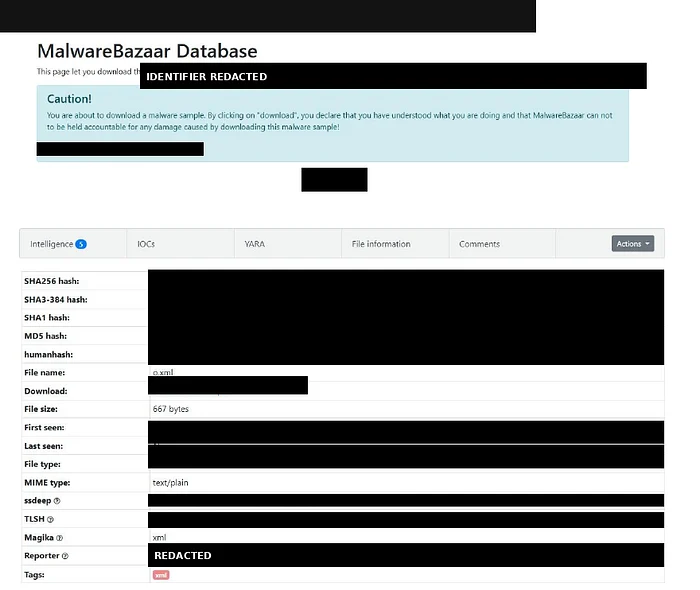
No further tooling, accounts or role configuration is described in the report.
Finding it
The application already blocked a substantial list of executable and script-based extensions, including .exe, .bat, .cmd, .js, .ps1 and many others. On the surface that looks like a deliberate control.
Two things about it looked wrong.
First, the validation appeared to be enforced only after the Submit button was clicked. That means a potentially dangerous file could reach the attachment stage before the restriction was applied at all.
Second, the control was purely extension-based. Malware delivery is not limited to traditional executable extensions: many other formats can carry active content, support embedded scripts, carry payloads or act as containers for other files. Extension-only blocking also leaves room for file format confusion, polyglot files, MIME-type mismatches and archive-based payload delivery.
While reviewing the blocked list, the researcher documented additional extensions that needed to be reviewed against the actual requirements of the Purchase Inquiry workflow:
- Active content and web formats:
.svg,.svgz,.html,.htm,.xhtml,.xml - Macro-enabled documents:
.docm,.dotm,.xlsm,.xltm,.pptm,.ppam - Archives and compressed files:
.zip,.rar,.7z,.tar,.gz,.bz2,.xz - Disk images and containers:
.iso,.img,.vhd,.vhdx,.cab - Installers and application packages:
.msix,.msixbundle,.appinstaller,.jnlp,.nupkg - Other potentially risky formats:
.chm,.search-ms,.library-ms,.mobileconfig,.xll,.xlam
The researcher's position is not that every one of these must be prohibited. If there is a legitimate business requirement for a format, it can stay, but each should be evaluated according to its actual content and behaviour rather than trusted automatically because of its extension.
Exploitation
Step 1: Package a sample inside a password-protected archive
To test whether the existing restrictions were sufficient, the researcher took a publicly available malware sample and placed it inside a password-protected ZIP archive. The objective was to determine whether a potentially malicious file could pass through the Purchase Inquiry workflow despite the extension restrictions.
The choice of a password-protected archive matters for the mechanism: when an archive is password-protected, conventional scanning mechanisms may not be able to inspect its contents.
Step 2: Submit the archive as an RFQ attachment
The archive was submitted through the Purchase Inquiry attachment functionality. The application accepted it.
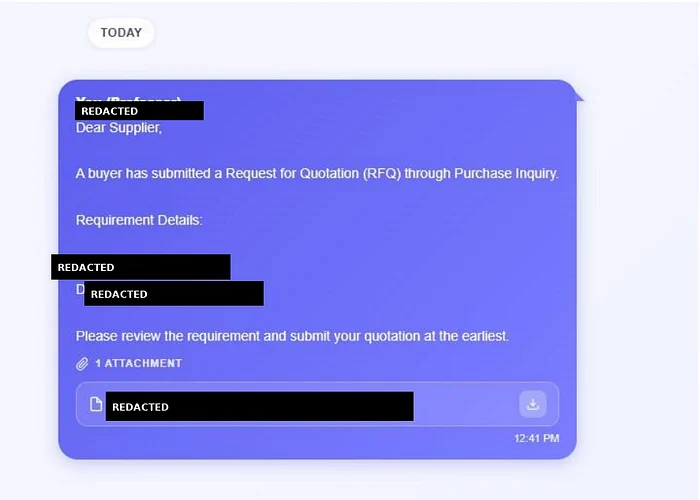
The figure shows the Purchase Inquiry notification for the submitted RFQ together with its attachment, with sensitive information and attachment identifiers partially redacted. The result demonstrated that restricting known executable extensions was not enough to keep potentially malicious content out of the workflow.
Step 3: Confirm delivery to the supplier-facing mailbox
The researcher then inspected the resulting supplier-facing notification to determine whether the attachment was actually delivered, rather than merely sitting in the application interface.
The RFQ notification was received with the ZIP archive attached. The archive passed through every filtering mechanism described during testing:
- Munshi's existing restrictions.
- Prayosha Food Services' outgoing work email blocker.
- Gmail's default attachment protection.
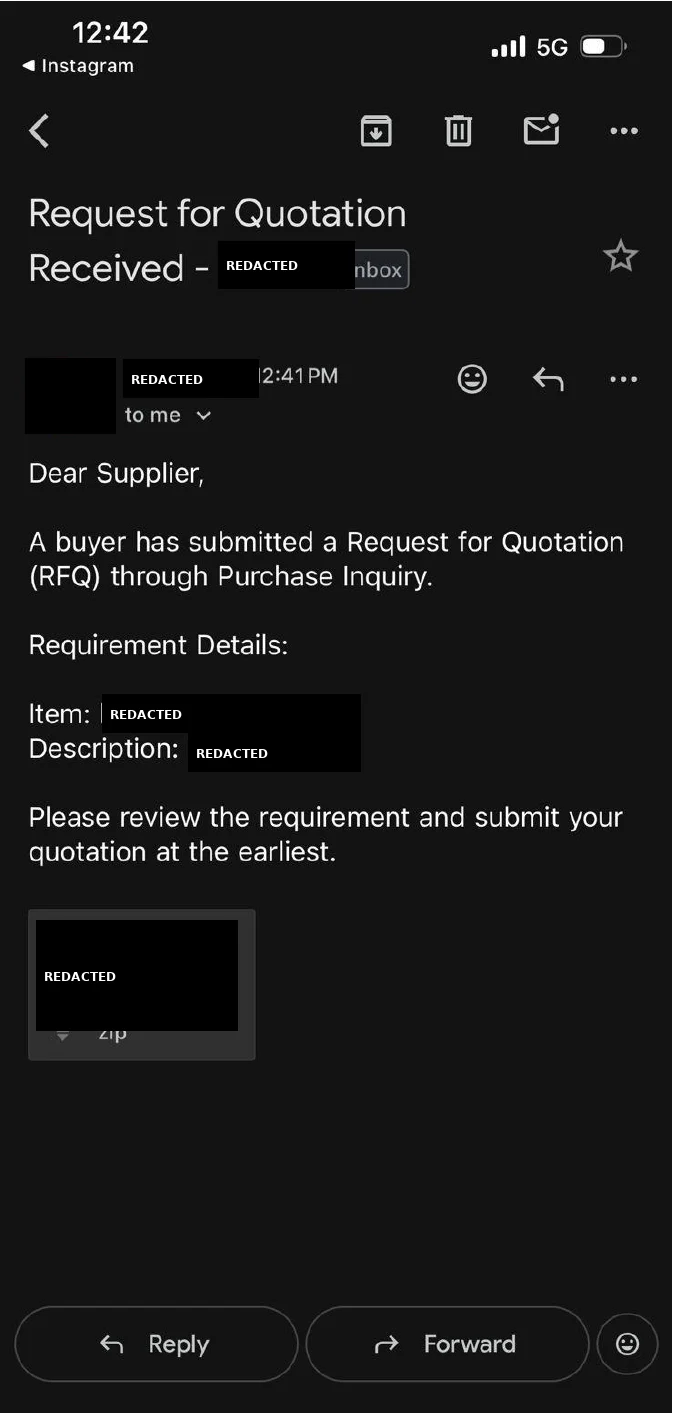
The figure shows the supplier-facing RFQ notification as received, with the ZIP attachment present and email addresses and business details partially redacted. The important point is that the file travelled through the actual procurement communication workflow and reached the supplier-facing mailbox, not just the application UI.
That is the condition that makes the issue matter: a recipient may receive the attachment as part of an otherwise legitimate business conversation and assume the platform has already verified its safety.
Root cause
The root of the problem was the absence of sufficiently comprehensive file validation before an attachment could proceed through the Purchase Inquiry workflow. Maintaining a list of restricted extensions does not establish whether an uploaded file is safe.
The report says validation appeared to run only after Submit was clicked, so the file reached the attachment stage first. Client-side restrictions can be bypassed independently of the backend, and the report's remediation section implies that the backend did not independently enforce the same checks before accepting, storing or associating the file with an inquiry.
The existing defences did not stop the payload: the extension list did not cover archives, and the archive was encrypted so conventional scanning could not look inside it. The extension list did not cover archives, the archive was encrypted so conventional scanning could not look inside it, and the downstream mail filters (the outgoing work email blocker and Gmail's default attachment protection) did not stop a password-protected ZIP either.
Impact
An attacker who can submit an RFQ can deliver a potentially malicious attachment to a supplier through a trusted procurement channel, under the conditions tested: the file is packaged in a format the extension list does not cover, and in this case encrypted so that content scanning cannot inspect it. The recipient sees a legitimate business notification from the platform and may assume the platform verified the attachment.
The report does not assign a severity or a bounty. It records the primary weakness as CWE-434 (Unrestricted Upload of File with Dangerous Type) and the secondary as CWE-20 (Improper Input Validation), with a suggested CVSS v3.1 score of 8.8 as proposed in the original assessment. The CVE ID is listed as to be assigned.
Fix
The report does not say whether anything was changed by the vendor. It sets out what the implementation should do.
- Use a strict allowlist of permitted file formats based on actual business requirements, rather than a blocklist of known dangerous extensions.
- Reject unsupported files at the attachment stage, not at RFQ submission.
- Enforce the same restrictions on the backend, independently of the browser, before storage or downstream processing.
- Check file signatures, MIME types and actual content together.
- Inspect archive contents for nested files, and reject or quarantine password-protected archives that cannot be safely inspected.
- Scan every permitted attachment for malware before it is processed or delivered, removing active content where appropriate.
- Log blocked attempts with the relevant user, timestamp and file metadata.
The objective is to stop an unsafe attachment entering the workflow at all, rather than trying to stop it after the user has submitted the inquiry.
Variants to test
- Other container formats. Try
.rar,.7z,.tar,.gz,.bz2,.xz,.iso,.img,.vhd,.vhdxand.cabin place of the ZIP. A positive result is the file being accepted at the attachment stage and arriving in the supplier-facing notification. - Active content and web formats. Try
.svg,.svgz,.html,.htm,.xhtmland.xml. A positive result is acceptance and delivery of a file that a browser or mail client may render or execute. - Macro-enabled documents. Try
.docm,.dotm,.xlsm,.xltm,.pptmand.ppam. A positive result is delivery of a document that carries macros through the RFQ notification. - Installer and package formats. Try
.msix,.msixbundle,.appinstaller,.jnlpand.nupkg. A positive result is acceptance and delivery of a package that triggers installation or code execution on the recipient's machine. - Other risky formats. Try
.chm,.search-ms,.library-ms,.mobileconfig,.xlland.xlam. A positive result is delivery of a file that can execute or alter recipient configuration. - Extension and MIME mismatch. Submit a file whose extension is permitted but whose content is not, and vary the declared MIME type. A positive result is acceptance without any check of the actual file signature or content.
- Polyglot files. Submit a file that is valid in two formats at once. A positive result is acceptance based on the benign interpretation while the other interpretation survives delivery.
- Validation timing. Intercept the request and submit a blocked extension directly to the backend, bypassing the browser-side check that runs on Submit. A positive result is the backend accepting a file the interface would have rejected.
- Unencrypted archive with a nested sample. Repeat the test without a password. A positive result is delivery, which would show that archive contents are not inspected even when inspection is technically possible.
What happened, in plain words
Munshi is a procurement product: software that businesses use to buy things from suppliers. One part of it, the Purchase Inquiry module, lets a buyer send a Request for Quotation (RFQ) to a supplier. An RFQ is simply a message saying "please quote me a price for these goods", and it usually comes with files attached, such as a spreadsheet of quantities or a specification document. Those attachments are part of normal business correspondence, so a supplier who receives an RFQ notification reasonably assumes the platform has already checked whatever is attached to it.
The researcher, Vyom Nagpal (publishing as TheWildEye), tested that assumption on 17 June 2026. The question was simple: does the attachment check actually establish that an uploaded file is safe before the platform accepts it and delivers it to the other party? The answer was no. A file containing a publicly available malware sample, wrapped inside a password-protected ZIP archive, was accepted by the Purchase Inquiry workflow and arrived in the supplier's email inbox.
This kind of weakness is called unrestricted upload of a file with a dangerous type (CWE-434), with a secondary issue of improper input validation (CWE-20). In plain terms: the site lets you upload a file it should not, and it does not properly check what the file really is. The report suggests a CVSS v3.1 score of 8.8, as proposed in the original assessment, and lists the CVE ID as to be assigned. It does not assign a severity or a bounty.
The product and the feature
Munshi's Purchase Inquiry module is the part of the workflow where a buyer submits an RFQ to a supplier together with supporting files. The assessment covered this workflow at the endpoint munshi.petpooja.com/purchase-inquiry.
An endpoint is a specific address on a website that does a particular job, like a counter in a shop: you go to that address to submit something or ask for something. Here it is the address of the Purchase Inquiry page.
Attachments in this workflow are not incidental. They are part of ordinary business correspondence, so a supplier receiving an RFQ notification has a reasonable expectation that the platform has already checked whatever is attached to it. That expectation is exactly what the test put under pressure.
Setting up the test
The work was a security assessment of the Purchase Inquiry workflow, carried out on 17 June 2026. The researcher is Vyom Nagpal, publishing as TheWildEye.
The test used a publicly available malware sample, referenced through MalwareBazaar, packaged inside a password-protected ZIP archive. MalwareBazaar is a public catalogue where security researchers share samples of malicious files so others can study and detect them. A malware sample is a real piece of malicious software kept for testing. A ZIP archive is a single file that holds other files inside it, like a cardboard box holding several items; a password-protected ZIP is the same box with a lock on it, so only someone with the password can open it and see what is inside.
The sample's threat-intelligence listing was included in the supporting evidence. Threat intelligence here means the catalogue entry describing the sample: what it is and what is known about it.
The figure shows the MalwareBazaar reference for the sample used during validation, with sensitive identifiers and other unnecessary details partially redacted.
The report does not describe any further tooling, accounts or role configuration.
Finding it
The application already blocked a substantial list of executable and script-based extensions, including .exe, .bat, .cmd, .js, .ps1 and many others. An extension is the part of a file name after the last dot, such as .exe in setup.exe; it is a label that tells the computer, and the user, what kind of file it is meant to be. An executable is a file that runs as a program when opened. A script is a small program, often written in a language like JavaScript, that a computer or browser can run. On the surface, blocking those extensions looks like a deliberate control.
Two things about it looked wrong.
First, the validation appeared to be enforced only after the Submit button was clicked. That means a potentially dangerous file could reach the attachment stage before the restriction was applied at all. Think of a nightclub with a bouncer who only checks IDs once you are already inside the dance floor: the check exists, but it happens too late to keep anyone out.
Second, the control was purely extension-based. Malware delivery is not limited to traditional executable extensions: many other formats can carry active content, support embedded scripts, carry payloads or act as containers for other files. Active content means material inside a file that a program will act on, such as a script in a web page. A payload is the harmful part of a file, the thing that actually does damage. A container is a file whose job is to hold other files, like an envelope holding a letter.
Extension-only blocking also leaves room for file format confusion (a file whose label does not match what it really is), polyglot files (a single file that is valid in two different formats at once, so two different programs each see something sensible), MIME-type mismatches (a MIME type is the official label a browser or mail system sends to say what kind of content something is, such as image/png; a mismatch is when that label disagrees with the actual file) and archive-based payload delivery (hiding the harmful file inside a ZIP or similar container).
While reviewing the blocked list, the researcher documented additional extensions that needed to be reviewed against the actual requirements of the Purchase Inquiry workflow:
- Active content and web formats:
.svg,.svgz,.html,.htm,.xhtml,.xml - Macro-enabled documents:
.docm,.dotm,.xlsm,.xltm,.pptm,.ppam - Archives and compressed files:
.zip,.rar,.7z,.tar,.gz,.bz2,.xz - Disk images and containers:
.iso,.img,.vhd,.vhdx,.cab - Installers and application packages:
.msix,.msixbundle,.appinstaller,.jnlp,.nupkg - Other potentially risky formats:
.chm,.search-ms,.library-ms,.mobileconfig,.xll,.xlam
A few of those groups deserve a word. Macro-enabled documents are office files that can carry small programs called macros, which run when the document is opened. Disk images are files that behave like a whole disk or USB stick, so opening one can expose many files at once. Installers are files whose purpose is to install software, which means running code on the recipient's machine.
The researcher's position is not that every one of these must be prohibited. If there is a legitimate business requirement for a format, it can stay, but each should be evaluated according to its actual content and behaviour rather than trusted automatically because of its extension.
Exploitation
Step 1: Package a sample inside a password-protected archive
To test whether the existing restrictions were sufficient, the researcher took a publicly available malware sample and placed it inside a password-protected ZIP archive. The objective was to determine whether a potentially malicious file could pass through the Purchase Inquiry workflow despite the extension restrictions.
The choice of a password-protected archive matters for the mechanism: when an archive is password-protected, conventional scanning mechanisms may not be able to inspect its contents. Scanning here means automatic checking of a file's contents for known bad material, the way a postal service might X-ray parcels. If the parcel is locked and the scanner cannot see inside, the scanner has nothing to judge.
Step 2: Submit the archive as an RFQ attachment
The archive was submitted through the Purchase Inquiry attachment functionality. The application accepted it.
The figure shows the Purchase Inquiry notification for the submitted RFQ together with its attachment, with sensitive information and attachment identifiers partially redacted. The result demonstrated that restricting known executable extensions was not enough to keep potentially malicious content out of the workflow.
Step 3: Confirm delivery to the supplier-facing mailbox
The researcher then inspected the resulting supplier-facing notification to determine whether the attachment was actually delivered, rather than merely sitting in the application interface. This distinction matters: a file that only appears in the website's own screens has not yet reached anyone who could be harmed by it.
The RFQ notification was received with the ZIP archive attached. The archive passed through every filtering mechanism described during testing:
- Munshi's existing restrictions.
- Prayosha Food Services' outgoing work email blocker.
- Gmail's default attachment protection.
An outgoing work email blocker is a filter on a company's email system that inspects mail leaving the organisation. Gmail's default attachment protection is the built-in filtering Google applies to attachments in Gmail. Both are examples of email filtering: automatic checks applied to messages as they travel.
The figure shows the supplier-facing RFQ notification as received, with the ZIP attachment present and email addresses and business details partially redacted. The important point is that the file travelled through the actual procurement communication workflow and reached the supplier-facing mailbox, not just the application UI. UI stands for user interface, the part of the software you see and click on.
That is the condition that makes the issue matter: a recipient may receive the attachment as part of an otherwise legitimate business conversation and assume the platform has already verified its safety.
Root cause
The root of the problem was the absence of sufficiently comprehensive file validation before an attachment could proceed through the Purchase Inquiry workflow. Maintaining a list of restricted extensions does not establish whether an uploaded file is safe.
The report says validation appeared to run only after Submit was clicked, so the file reached the attachment stage first. Client-side means the check happens in your own browser, on your own computer, rather than on the company's server. Server-side means the check happens on the company's machine, where the file is actually stored and processed. Client-side restrictions can be bypassed independently of the backend, and the report's remediation section implies that the backend did not independently enforce the same checks before accepting, storing or associating the file with an inquiry.
The existing defences did not stop the payload: the extension list did not cover archives, and the archive was encrypted so conventional scanning could not look inside it. The extension list did not cover archives, the archive was encrypted so conventional scanning could not look inside it, and the downstream mail filters (the outgoing work email blocker and Gmail's default attachment protection) did not stop a password-protected ZIP either.
Impact
An attacker who can submit an RFQ can deliver a potentially malicious attachment to a supplier through a trusted procurement channel, under the conditions tested: the file is packaged in a format the extension list does not cover, and in this case encrypted so that content scanning cannot inspect it. The recipient sees a legitimate business notification from the platform and may assume the platform verified the attachment.
The report does not assign a severity or a bounty. It records the primary weakness as CWE-434 (Unrestricted Upload of File with Dangerous Type) and the secondary as CWE-20 (Improper Input Validation), with a suggested CVSS v3.1 score of 8.8 as proposed in the original assessment. The CVE ID is listed as to be assigned. CWE is a public catalogue of weakness types, and CVE is a public register of individual vulnerabilities, each with an identifier.
Fix
The report does not say whether anything was changed by the vendor. It sets out what the implementation should do.
- Use a strict allowlist of permitted file formats based on actual business requirements, rather than a blocklist of known dangerous extensions. An allowlist names what is permitted and refuses everything else; a blocklist names what is forbidden and lets everything else through. The difference is like a guest list at a party versus a list of troublemakers: the guest list is far harder to get around.
- Reject unsupported files at the attachment stage, not at RFQ submission.
- Enforce the same restrictions on the backend, independently of the browser, before storage or downstream processing.
- Check file signatures, MIME types and actual content together. A file signature is a short pattern at the start of a file that identifies its real format, regardless of the name it was given.
- Inspect archive contents for nested files, and reject or quarantine password-protected archives that cannot be safely inspected. To quarantine a file is to hold it aside, out of the normal flow, until someone decides what to do with it.
- Scan every permitted attachment for malware before it is processed or delivered, removing active content where appropriate.
- Log blocked attempts with the relevant user, timestamp and file metadata. Metadata is descriptive information about a file, such as its name, size and type.
The objective is to stop an unsafe attachment entering the workflow at all, rather than trying to stop it after the user has submitted the inquiry.
Variants to test
- Other container formats. Try
.rar,.7z,.tar,.gz,.bz2,.xz,.iso,.img,.vhd,.vhdxand.cabin place of the ZIP. A positive result is the file being accepted at the attachment stage and arriving in the supplier-facing notification. - Active content and web formats. Try
.svg,.svgz,.html,.htm,.xhtmland.xml. A positive result is acceptance and delivery of a file that a browser or mail client may render or execute. - Macro-enabled documents. Try
.docm,.dotm,.xlsm,.xltm,.pptmand.ppam. A positive result is delivery of a document that carries macros through the RFQ notification. - Installer and package formats. Try
.msix,.msixbundle,.appinstaller,.jnlpand.nupkg. A positive result is acceptance and delivery of a package that triggers installation or code execution on the recipient's machine. - Other risky formats. Try
.chm,.search-ms,.library-ms,.mobileconfig,.xlland.xlam. A positive result is delivery of a file that can execute or alter recipient configuration. - Extension and MIME mismatch. Submit a file whose extension is permitted but whose content is not, and vary the declared MIME type. A positive result is acceptance without any check of the actual file signature or content.
- Polyglot files. Submit a file that is valid in two formats at once. A positive result is acceptance based on the benign interpretation while the other interpretation survives delivery.
- Validation timing. Intercept the request and submit a blocked extension directly to the backend, bypassing the browser-side check that runs on Submit. A positive result is the backend accepting a file the interface would have rejected.
- Unencrypted archive with a nested sample. Repeat the test without a password. A positive result is delivery, which would show that archive contents are not inspected even when inspection is technically possible.
Glossary
- Active content: material inside a file that a program will act on, such as a script in a web page.
- Allowlist: a list of what is permitted, with everything else refused.
- Archive: a single file that holds other files inside it, such as a ZIP.
- Attachment: a file sent along with a message or form submission.
- Backend: the part of a system that runs on the company's servers, where files are stored and processed.
- Blocklist: a list of what is forbidden, with everything else allowed.
- Client-side: a check that happens in your own browser, on your own computer.
- Container: a file whose purpose is to hold other files.
- CVE: a public register of individual vulnerabilities, each with an identifier.
- CVSS: a scoring system that expresses how severe a vulnerability is as a number.
- CWE: a public catalogue of weakness types.
- Endpoint: a specific address on a website that performs a particular job.
- Executable: a file that runs as a program when opened.
- Extension: the part of a file name after the last dot, indicating the intended file type.
- File format confusion: a situation where a file's label does not match what it really is.
- File signature: a short pattern at the start of a file that identifies its real format.
- Gmail's default attachment protection: the built-in filtering Google applies to attachments in Gmail.
- Installer: a file whose purpose is to install software on a machine.
- Macro: a small program carried inside an office document that runs when the document is opened.
- Macro-enabled document: an office file that can carry macros.
- Malware: software written to cause harm.
- Malware sample: a real piece of malicious software kept for testing.
- MalwareBazaar: a public catalogue where security researchers share malware samples.
- Metadata: descriptive information about a file, such as its name, size and type.
- MIME type: the official label a browser or mail system sends to say what kind of content something is.
- MIME-type mismatch: a situation where the declared MIME type disagrees with the actual file.
- Outgoing work email blocker: a filter on a company's email system that inspects mail leaving the organisation.
- Payload: the harmful part of a file, the thing that actually does damage.
- Polyglot file: a single file that is valid in two different formats at once.
- Quarantine: to hold a file aside, out of the normal flow, until someone decides what to do with it.
- Request for Quotation (RFQ): a message asking a supplier to quote a price for goods or services.
- Scanning: automatic checking of a file's contents for known bad material.
- Script: a small program that a computer or browser can run.
- Server-side: a check that happens on the company's machine, where the file is stored and processed.
- Threat intelligence: information describing a piece of malware, such as a catalogue entry.
- UI (user interface): the part of the software you see and click on.
- ZIP archive: a single file that holds other files inside it, often compressed.
- Password-protected ZIP: a ZIP archive that requires a password to open and see its contents.


