IDOR - Inside the Session Storage
The application stored a user identifier in browser session storage and used it to load the user's account without any access control check. By changing that identifier to another user's value, an attacker could view and manipulate another user's account, including available funds.
 Published on shahjerry33.medium.com
IDOR stands for Insecure Direct Object Reference which is a vulnerability that falls under the broken access control category. In brief, this vulnerability arises when an application uses user-supplied input to access an object directly.
The full write-up lives on its author's site
It belongs to its author, so we link to it rather than copy it. The other two tabs are our own rewrites, checked against it.
Context
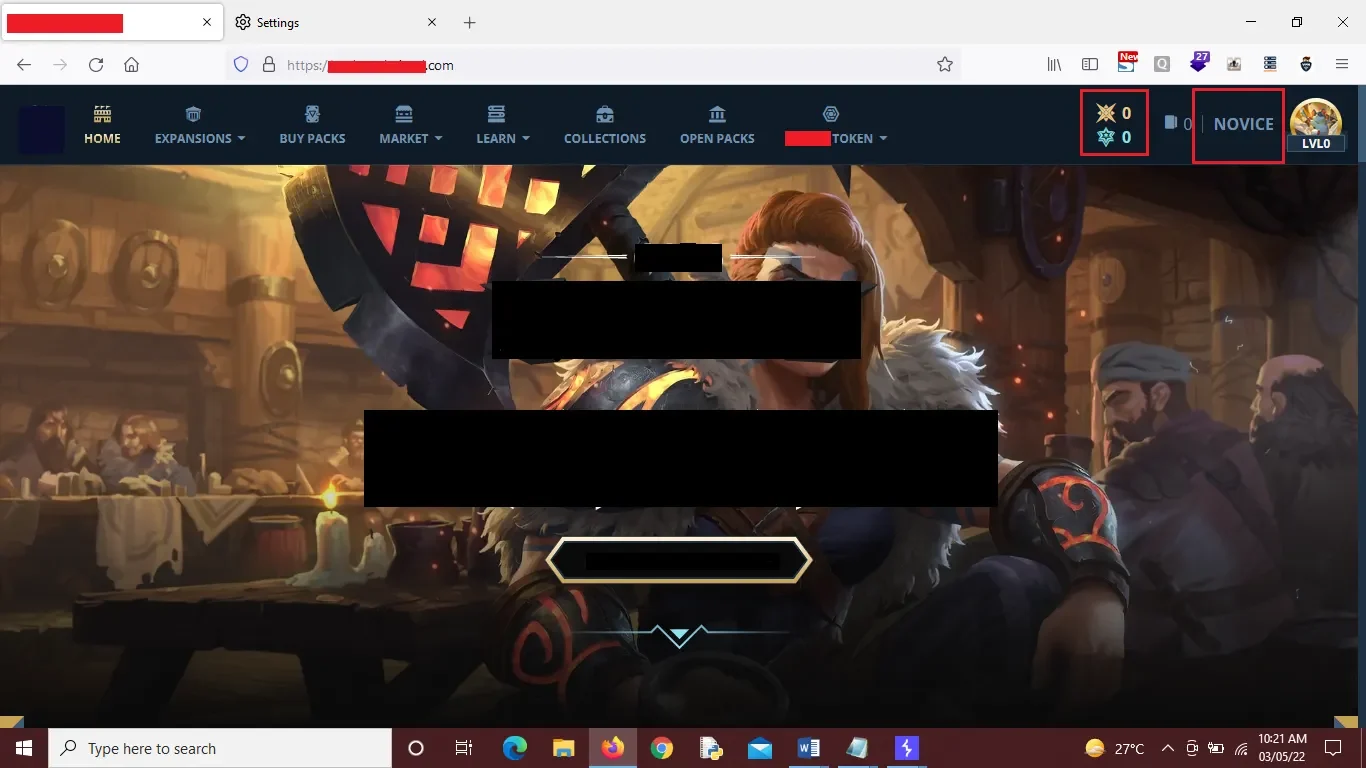
This write-up covers an insecure direct object reference (IDOR) that I found in one of the private programs I work on. The report went duplicate, so the program itself is not named here. The application stored a user_id in the browser's session storage, and that value was bound to the user's account. The feature involved is the account view that shows the user's balance on the right side of the page. Normally that page should show only the balance and details belonging to the logged-in user.
IDOR falls under broken access control. It arises when an application uses user-supplied input to access an object directly. With an IDOR it is possible to gain horizontal privilege escalation, and in some cases it can lead to vertical privilege escalation as well.
What session storage is
Session storage is a web storage API that allows data to be stored in a web browser for a single session. It is similar to local storage, with one difference: the data is cleared when the browser is closed or the particular session ends. Applications use it to store user data, such as form data, during a user's session, which improves the user experience by reducing the need to send requests to a server.
Setup
The report does not describe any special tooling, accounts or versions. The attack was carried out in the browser's developer tools. The steps shown are all performed in the browser's developer tools.
Finding it
I went to the target website, where the balance is displayed on the right side of the page.
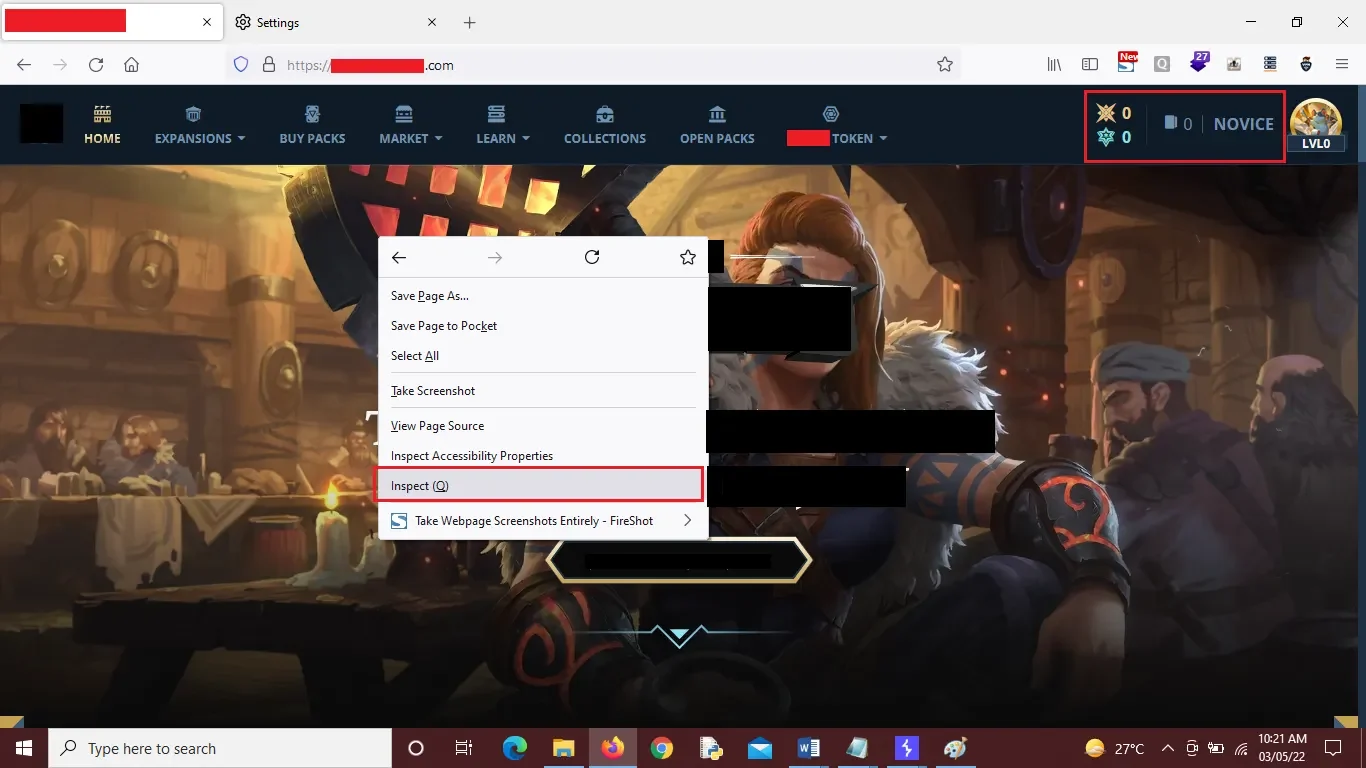
From there I opened the developer tools with a right click, then Inspect, then Storage, then Session Storage, and selected the site's origin, http://target.com.
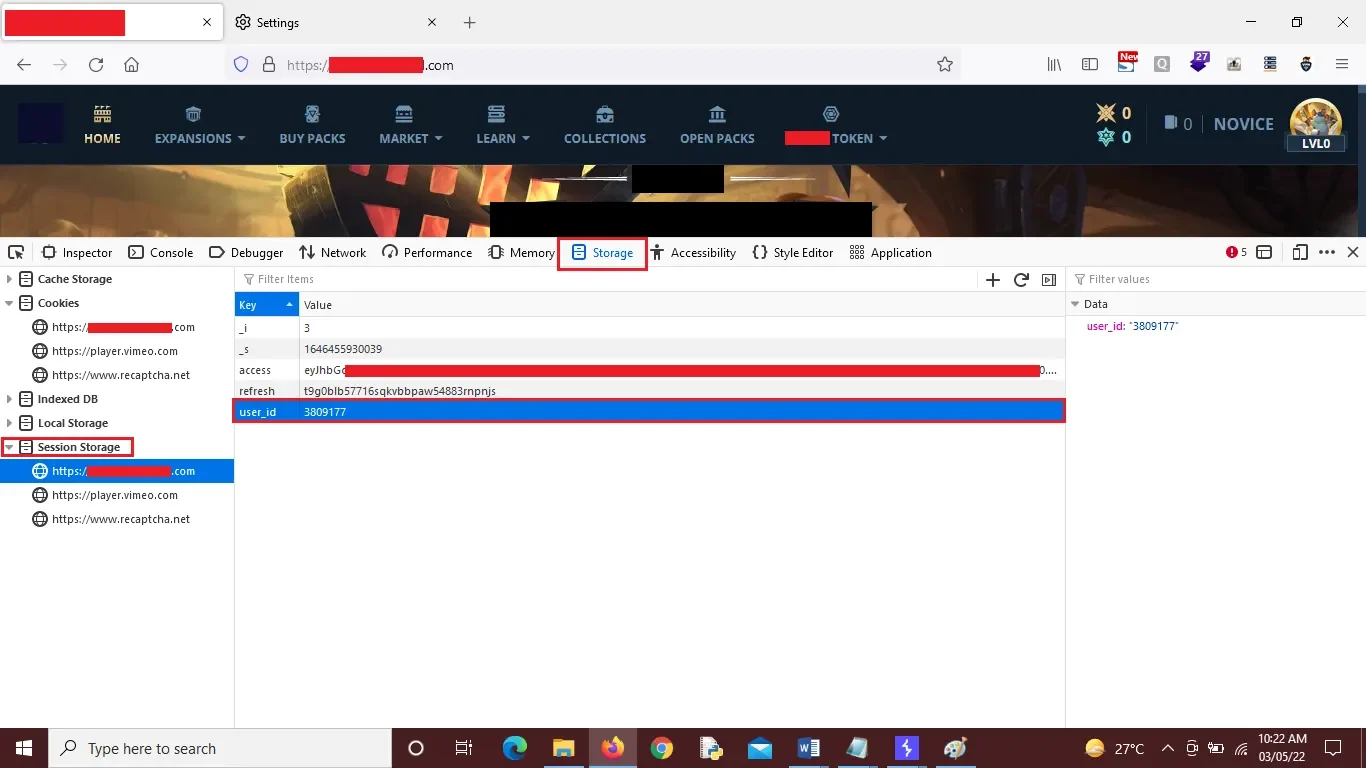
Under session storage the application kept a user_id entry. That value was bound to the user's account, and no access check was performed on it. That is what made it look wrong: a client-controlled identifier that selects an account, with no visible access control around it.
Exploitation
Step 1: Open the account page
I loaded the target website while logged in. The page shows the balance on the right side.
Step 2: Inspect session storage
I right clicked, chose Inspect, then Storage, then Session Storage, and selected http://target.com. The user_id entry was visible there.
Step 3: Change the user_id and reload
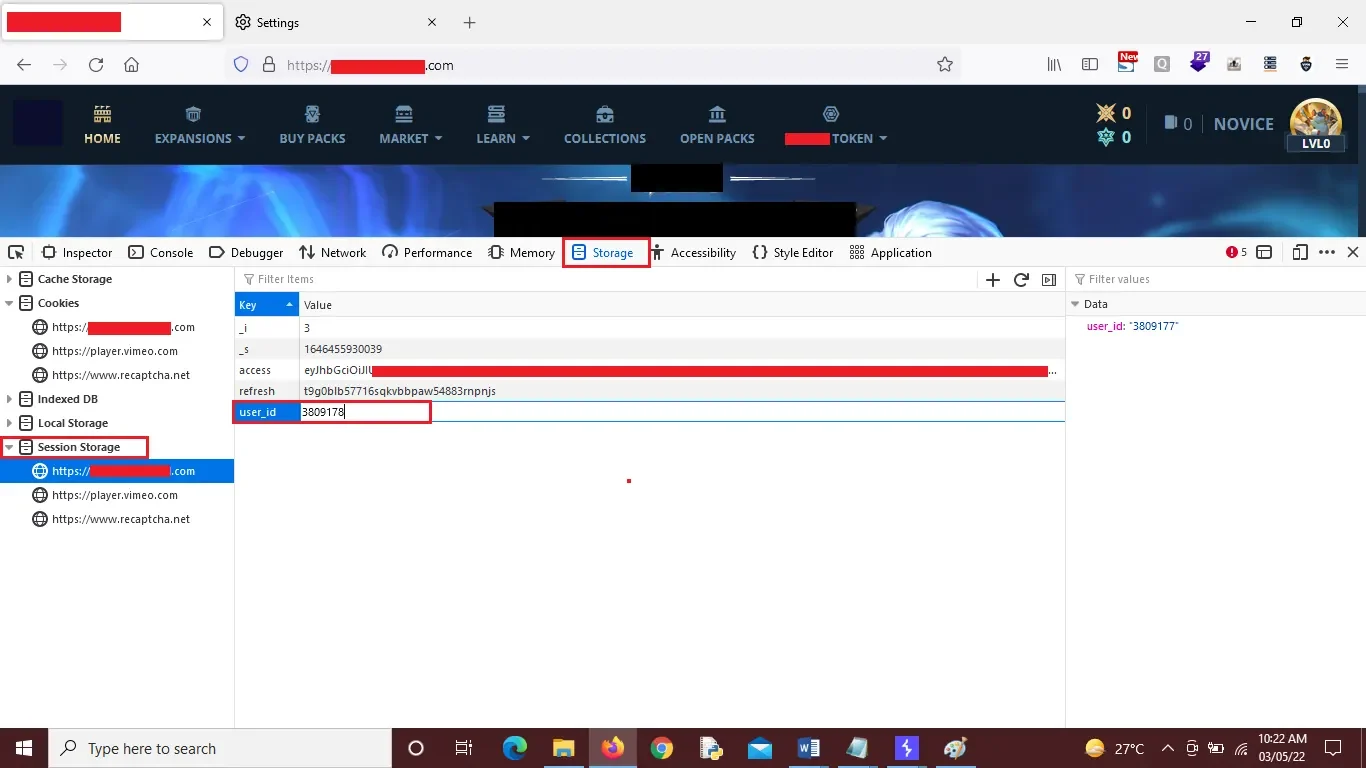
I changed the user_id to the victim's user_id and reloaded the page.
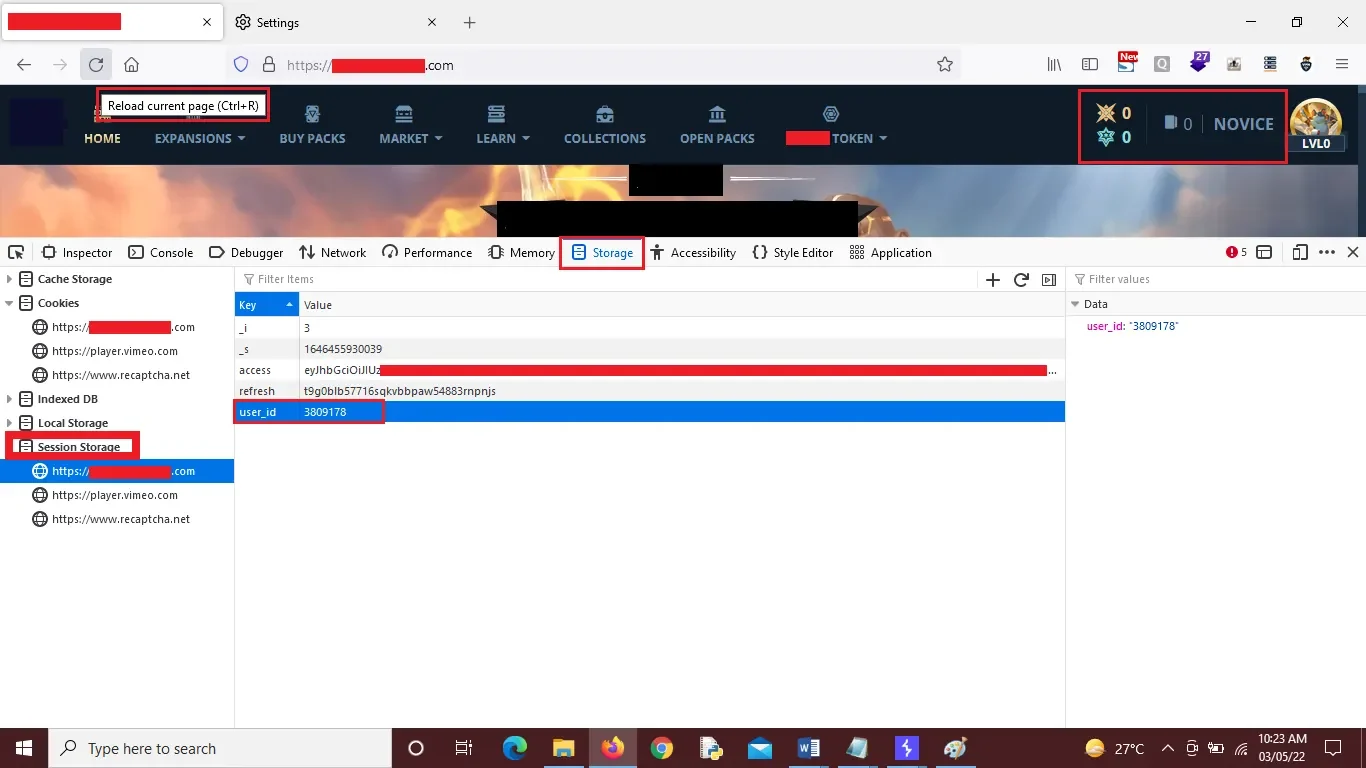
Step 4: Land in the victim's account
After the reload I was inside the victim's account.
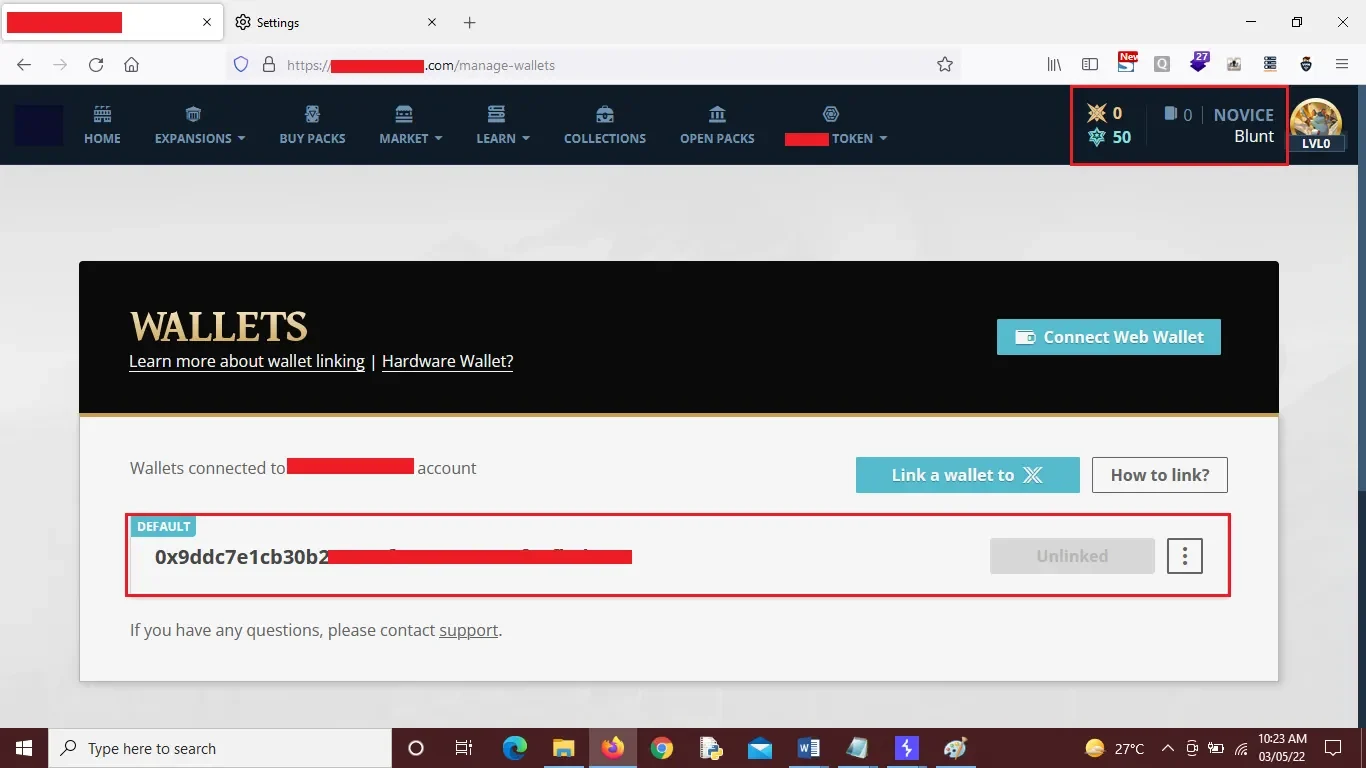
I was able to use another user's account and manipulate the available funds there.
Root cause
In my opinion, this happened because the user_id was bound to the user's account and no access check was performed on it. The user_id was bound to the user's account and no access check was performed on it.
Why session storage IDORs behave differently
Unlike normal IDORs, IDORs involving session storage are different in nature: at times they do not make permanent changes, but the severity is still the same.
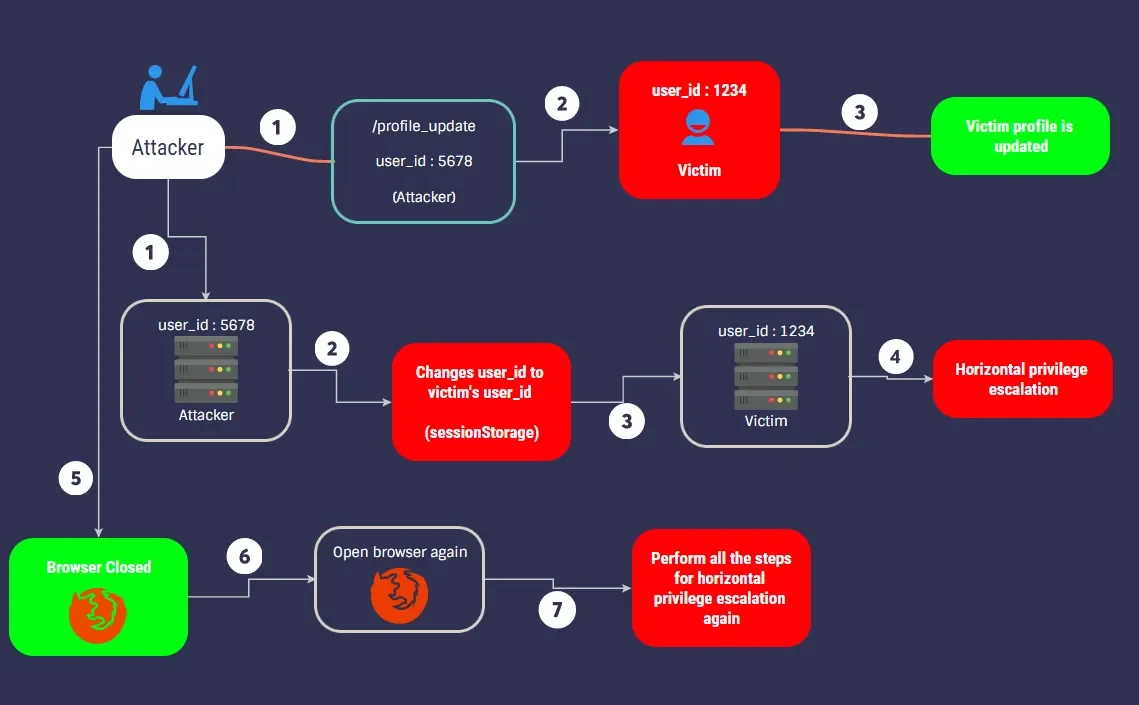
With normal IDOR behaviour you can change the victim's profile settings permanently, unless the victim visits their profile and reverts the change. With IDORs in session storage the changes are not made on a permanent basis, because the attack is performed via session storage. As soon as the browser is closed or the particular session ends, the changes you made, for example the horizontal privilege escalation, are reverted due to the nature of session storage.
Impact
Any user is able to access the accounts of other users, which can lead to horizontal privilege escalation, and in some cases it might lead to vertical privilege escalation as well. In this instance the access allowed manipulation of the available funds in the victim's account. Because the attack is performed via session storage, the changes are reverted when the session ends.
The CVSS vector I calculated for the report was:
CVSS:3.0/AV:N/AC:L/PR:N/UI:N/S:C/C:L/I:L/A:L
That gives a score of 8.3 (High).
Fix
Access checks should be performed, and verification of all the referenced objects should be done. An authentication and authorization check should also be performed. Apart from that, the ids should be made alpha-numeric in order to prevent them from being guessed.

Variants to test
- Other identifiers in session storage. Look for any other keys in session storage or local storage that name an object, such as account ids, order ids or tenant ids. A positive result is that changing the value and reloading returns another user's data.
- Identifiers in local storage. The same test applies to local storage, with the difference that the value persists after the browser is closed, so the effect is not reverted at the end of the session.
- Identifiers in cookies or hidden form fields. Change the value and resubmit. A positive result is that the response contains data belonging to the other object.
- Sequential or guessable ids. If ids are numeric and increment by one, try neighbouring values. A positive result is that a neighbouring id resolves to a valid object you do not own.
- Write operations, not just reads. After switching the id, attempt an action that changes state, such as a transfer or a profile update. A positive result is that the change is applied to the other user's object.
- Vertical escalation. Try an id belonging to a privileged role, such as an administrator. A positive result is that the privileged account's view or actions become available to you.
What happened, in plain words
A website kept a small piece of information in my browser called a user_id. That number told the site which account to show me. The site used the number to pick the account and no access check was performed on it. So I opened my browser's built-in developer tools, changed the number to someone else's, reloaded the page, and the site showed me that other person's account, including their balance. I could manipulate the available funds in their account.
This kind of mistake has a name: an insecure direct object reference, or IDOR. The "object" is the thing being looked up (here, an account). The "reference" is the number used to point at it (here, user_id). It is "insecure" because the site lets the visitor supply the reference and does not check that the visitor is allowed to reach that object.
I found this on a private bug bounty program, which is a company that pays researchers for reporting security problems. My report was marked as a duplicate, meaning someone else had already reported the same issue, so the program is not named here. The feature involved is the account page that shows your balance on the right-hand side. Normally that page should show only your own balance and details.
IDOR belongs to a wider family called broken access control. Access control is the part of a site that decides who is allowed to see or do what. When it is broken, people can reach things they should not. An IDOR can give you horizontal privilege escalation, which means getting into another account at the same level as yours (another ordinary user). In some cases it can also give you vertical privilege escalation, which means reaching an account with more power than yours, such as an administrator.
What session storage is
A browser gives websites a few small lockers to keep data in while you use them. One of these is called session storage. It is a web storage API, which just means a standard way for a web page to save and read small values inside your browser. Session storage is similar to another locker called local storage, with one difference: session storage is emptied when you close the browser or the session ends, while local storage keeps its contents.
Sites use session storage to hold things like form data during your visit. That saves them from asking the server for the same information again and again, which makes the page feel quicker. Think of it as a sticky note the site puts on your desk for the duration of your visit and throws away when you leave.
Setup
The steps shown use the browser's developer tools. The steps shown are all performed in the browser's developer tools.
Finding it
I went to the target website, where the balance is shown on the right side of the page.
From there I opened the developer tools. Developer tools are a panel built into the browser, meant for people building websites, that lets you look at the page's internals. I right clicked, chose Inspect, then Storage, then Session Storage, and selected the site's origin, http://target.com. An origin is simply the address of the site, made of its scheme (http), its host name and its port.
Under session storage the application kept a user_id entry. That value was tied to the user's account. No access check was performed on the id. That is what looked wrong: a number the visitor can edit, used to pick which account to load, with no visible check around it.
Exploitation
Step 1: Open the account page
I loaded the target website while logged in. The page shows the balance on the right side. This step is just to get a normal, working session so there is something to tamper with.
Step 2: Inspect session storage
I right clicked, chose Inspect, then Storage, then Session Storage, and selected http://target.com. The user_id entry was visible there. I looked here because session storage is one of the places a site keeps values that the browser, and therefore the visitor, can read and change. If the site later trusts one of those values, that is a place to test.
Step 3: Change the user_id and reload
I changed the user_id to the victim's user_id and reloaded the page. The victim is the other user whose account I was trying to reach. Reloading makes the page run again from scratch, so it reads the value I just edited and asks the server for the matching account.
Step 4: Land in the victim's account
After the reload I was inside the victim's account.
I was able to use another user's account and manipulate the available funds there. That last part matters: this was not only a read of someone else's data, I could also change it.
Root cause
In my opinion, this happened because the user_id was tied to the user's account and no access check was performed on it. The user_id was tied to the user's account and no access check was performed on it. A useful comparison: a hotel clerk who hands out a room key to anyone who says a room number, without checking the guest list.
Why session storage IDORs behave differently
Unlike normal IDORs, IDORs involving session storage are different in nature: at times they do not make permanent changes, but the severity is still the same.
With normal IDOR behaviour you can change the victim's profile settings permanently, unless the victim visits their profile and reverts the change. With IDORs in session storage the changes are not made on a permanent basis, because the attack is performed via session storage. As soon as the browser is closed or the particular session ends, the changes you made, for example the horizontal privilege escalation, are reverted due to the nature of session storage. In other words, the break-in lives on the sticky note, and the sticky note is thrown away when you leave.
Impact
Any user is able to access the accounts of other users, which can lead to horizontal privilege escalation, and in some cases it might lead to vertical privilege escalation as well. In this instance the access allowed manipulation of the available funds in the victim's account. Because the attack is performed via session storage, the changes are reverted when the session ends.
The CVSS vector I calculated for the report was:
CVSS:3.0/AV:N/AC:L/PR:N/UI:N/S:C/C:L/I:L/A:L
CVSS is a standard scoring system for security issues. The vector is a compact string that records how the issue was rated. Reading it left to right: AV:N means the attack can be carried out over a network rather than needing physical access; AC:L means the attack is easy to carry out; PR:N means the attacker needs no privileges on the system; UI:N means no action from another person is required; S:C means the impact can spread beyond the component that was attacked; C:L, I:L and A:L mean limited impact on confidentiality (reading data), integrity (changing data) and availability (keeping the service running). That gives a score of 8.3 (High).
Fix
Access checks should be performed, and verification of all the referenced objects should be done. An authentication and authorization check should also be performed. Apart from that, the ids should be made alpha-numeric in order to prevent them from being guessed. Authentication means confirming who you are; authorization means confirming what you are allowed to do. The first is the login, the second is the guest list.
Variants to test
- Other identifiers in session storage. Look for any other keys in session storage or local storage that name an object, such as account ids, order ids or tenant ids. A positive result is that changing the value and reloading returns another user's data.
- Identifiers in local storage. The same test applies to local storage, with the difference that the value persists after the browser is closed, so the effect is not reverted at the end of the session.
- Identifiers in cookies or hidden form fields. Change the value and resubmit. A positive result is that the response contains data belonging to the other object. A cookie is a small piece of data a site asks your browser to store and send back with each request; a hidden form field is a value in a form that you cannot see on the page but that still gets sent.
- Sequential or guessable ids. If ids are numeric and increment by one, try neighbouring values. A positive result is that a neighbouring id resolves to a valid object you do not own.
- Write operations, not just reads. After switching the id, attempt an action that changes state, such as a transfer or a profile update. A positive result is that the change is applied to the other user's object.
- Vertical escalation. Try an id belonging to a privileged role, such as an administrator. A positive result is that the privileged account's view or actions become available to you.
Glossary
- Access control: the part of a site that decides who may see or do what.
- API: a defined way for one piece of software to talk to another; here, the browser storage interface the page uses.
- Authentication: confirming who you are, usually by logging in.
- Authorization: confirming what you are allowed to do once you are known.
- Broken access control: a class of bugs where those permission checks are missing or wrong.
- Cookie: a small value a site asks your browser to store and send back with each request.
- CVSS: a standard scoring system for security issues, expressed as a vector string and a score.
- Developer tools: a panel built into the browser for inspecting and editing a page's internals.
- Duplicate: a report for an issue that has already been reported, so it earns no separate reward.
- Hidden form field: a value in a form that is not shown on the page but is still sent when the form is submitted.
- Horizontal privilege escalation: reaching another account at the same level as yours.
- IDOR (insecure direct object reference): a bug where a site lets the visitor supply a reference to an object and does not check that the visitor may reach it.
- Local storage: a browser locker like session storage, but its contents survive closing the browser.
- Object: the thing being looked up, such as an account, order or profile.
- Origin: the address of a site, made of scheme, host name and port.
- Private program: a bug bounty program that is not open to the public.
- Reference: the value used to point at an object, such as an id.
- Session: the period during which you stay logged in to a site.
- Session storage: a browser locker that holds small values for one session and is emptied when the session ends.
- User-supplied input: any value that comes from the visitor rather than the server.
- Vertical privilege escalation: reaching an account with more power than yours, such as an administrator.
- Web storage API: the standard browser interface for saving and reading small values in local or session storage.




