RCE via WebDav Power Of PUT
A WebDAV directory was protected by default credentials and allowed the PUT method, so an attacker could upload a PHP file and execute commands on the server. The author demonstrated remote code execution and a reverse shell.
 Published on shahjerry33.medium.com
Hello everyone, at first I want to thank you all for 1K family and I hope you guys are getting some knowledge from my blogs. I decided to write something interesting on 1K followers and luckily I found this material for the blog on vulnerability which I discovered in 2018.
The full write-up lives on its author's site
It belongs to its author, so we link to it rather than copy it. The other two tabs are our own rewrites, checked against it.
Context
This write-up describes a remote code execution vulnerability found through a WebDav directory on a private project in 2018. The author presents it as a general pattern rather than a single product: whenever WebDav is enabled and the PUT method is reachable, the shortest path to RCE is often simply uploading a server-side script.
WebDav stands for Web Distributed Authoring and Versioning. It is an extension of HTTP that lets clients perform remote web content authoring operations: create a file or folder, edit a file in place, copy, move or delete a file on a remote web server. It uses port 80 for unencrypted access and port 443 for secure access, and it lets users reach cloud files or files on a separate server in real time without downloading, caching, editing and uploading them manually.
If WebDav is enabled and all rights are given publicly, any user on the internet can upload, delete and modify files on the remote server, which can lead to remote code execution.
Two HTTP headers matter here. The Authorization request header carries the credentials used to authenticate a user agent with a server. When a request targets a resource you have no permission for, the server answers 401 Unauthorized, because no credentials were supplied for the restricted resource. In WebDav, developers use an authentication mechanism to protect access to resources and changes on the server. Its syntax is:
Authorization: Basic YWRtMW46cEBzJHdvcmQ=
Basic is the authorization type and YWRtMW46cEBzJHdvcmQ= is the base64 encoding of the credentials (adm1n:p@s$word in the author's example).
The WWW-Authenticate response header defines the authentication method that should be used to gain access to a resource:
WWW-Authenticate: Basic realm="webdav"
Basic is the authorization type and realm describes the protected area. If no realm is specified, developers often display a formatted hostname instead.
Setup
The work was done against a private project, with no special tooling described beyond directory brute forcing, a client able to set arbitrary HTTP verbs and headers, and later netcat. The precondition is a WebDav-enabled directory that is publicly reachable and protected by HTTP Basic authentication.
Finding it
A directory brute force revealed a /webdav directory returning 401 Unauthorized. The response carried a WWW-Authenticate header, which showed that the path needed credentials to be accessed.
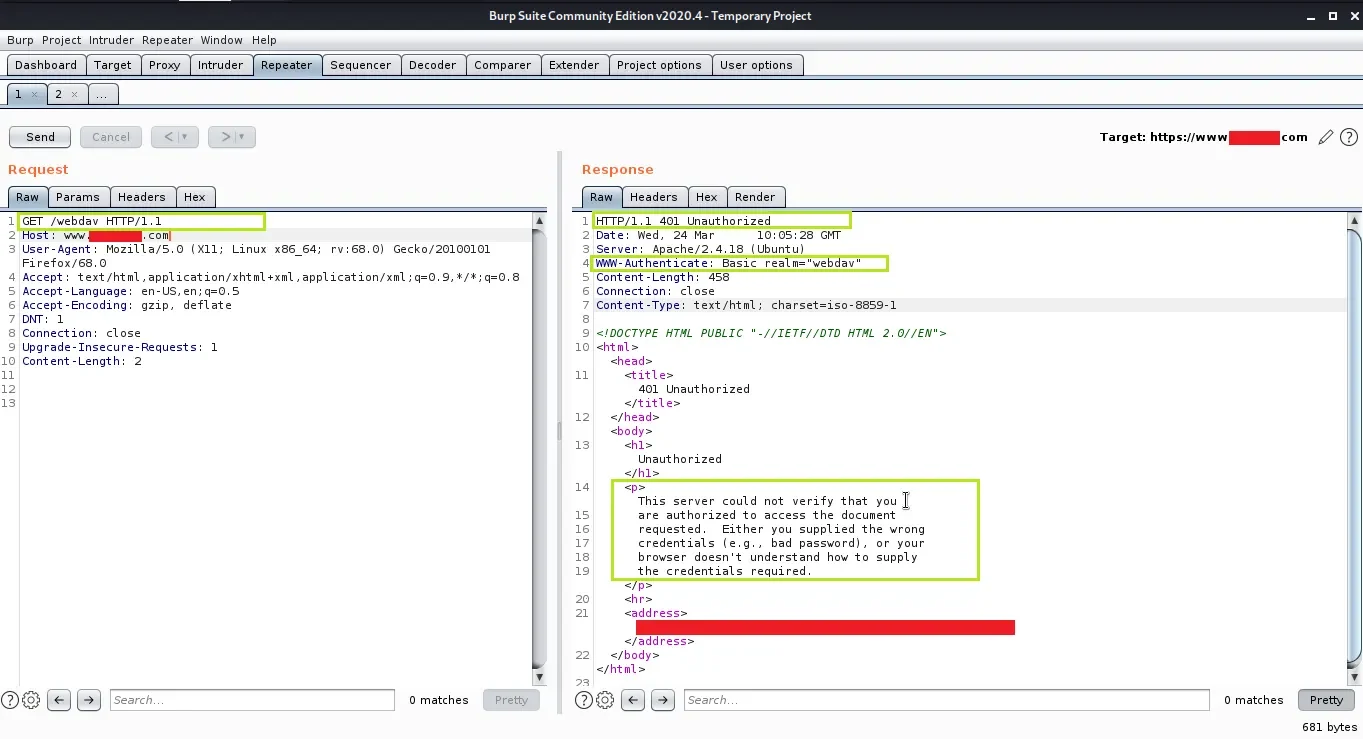
The screenshot shows the WebDav directory answering 401 Unauthorized with the WWW-Authenticate header and an error message.
Exploitation
Step 1: Default credentials, first attempt
A search for default WebDav credentials turned up jigsaw as both username and password.
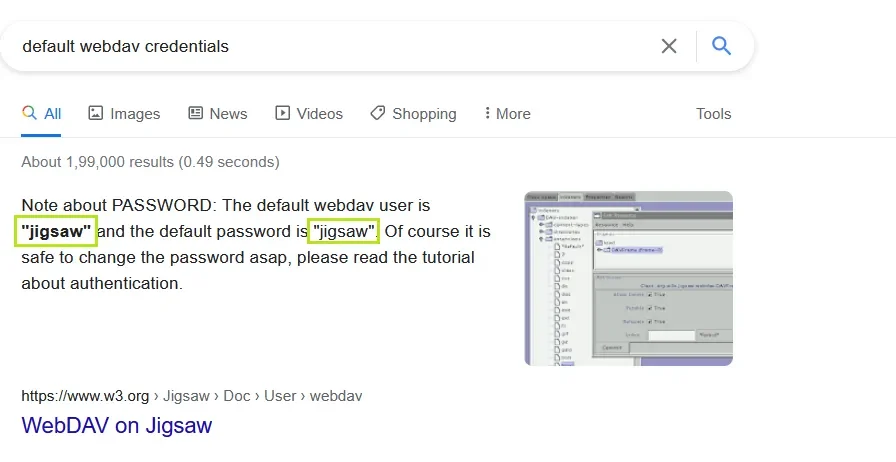
The credentials were base64 encoded and sent in the Authorization header, but the attempt failed.
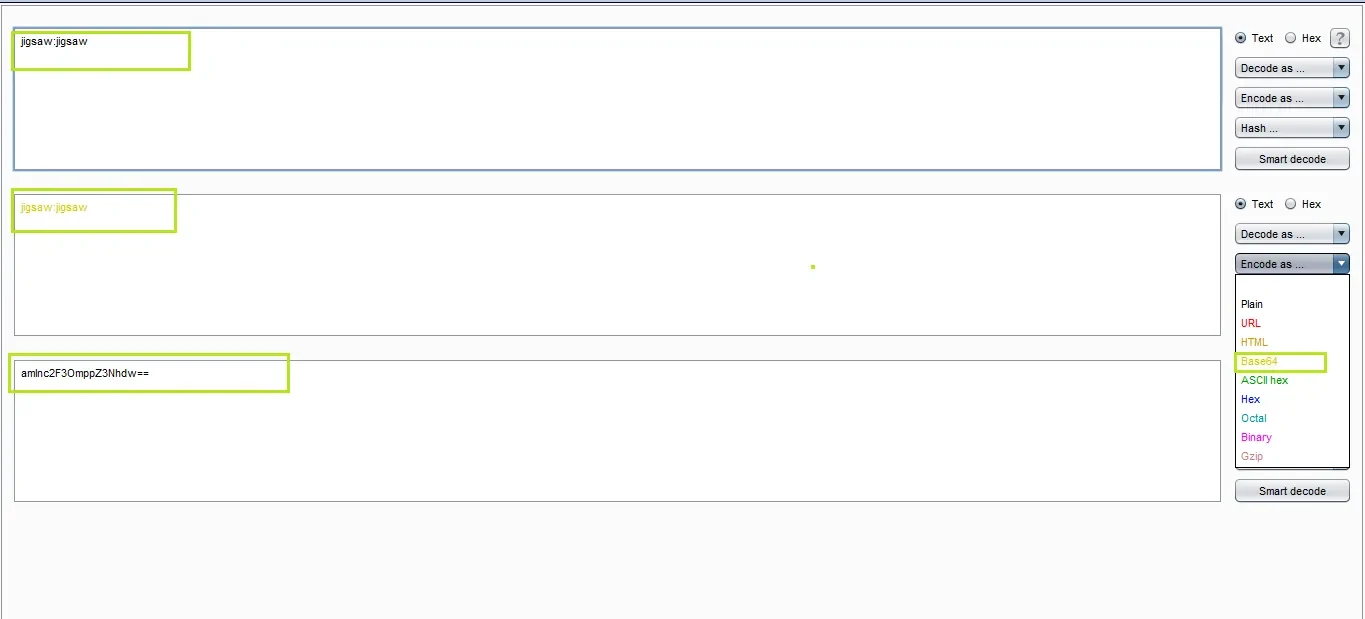
The encoded value shown is amlnc2F3OmppZ3Nhdw==, which is the base64 form of jigsaw:jigsaw.
Step 2: Default credentials, second attempt
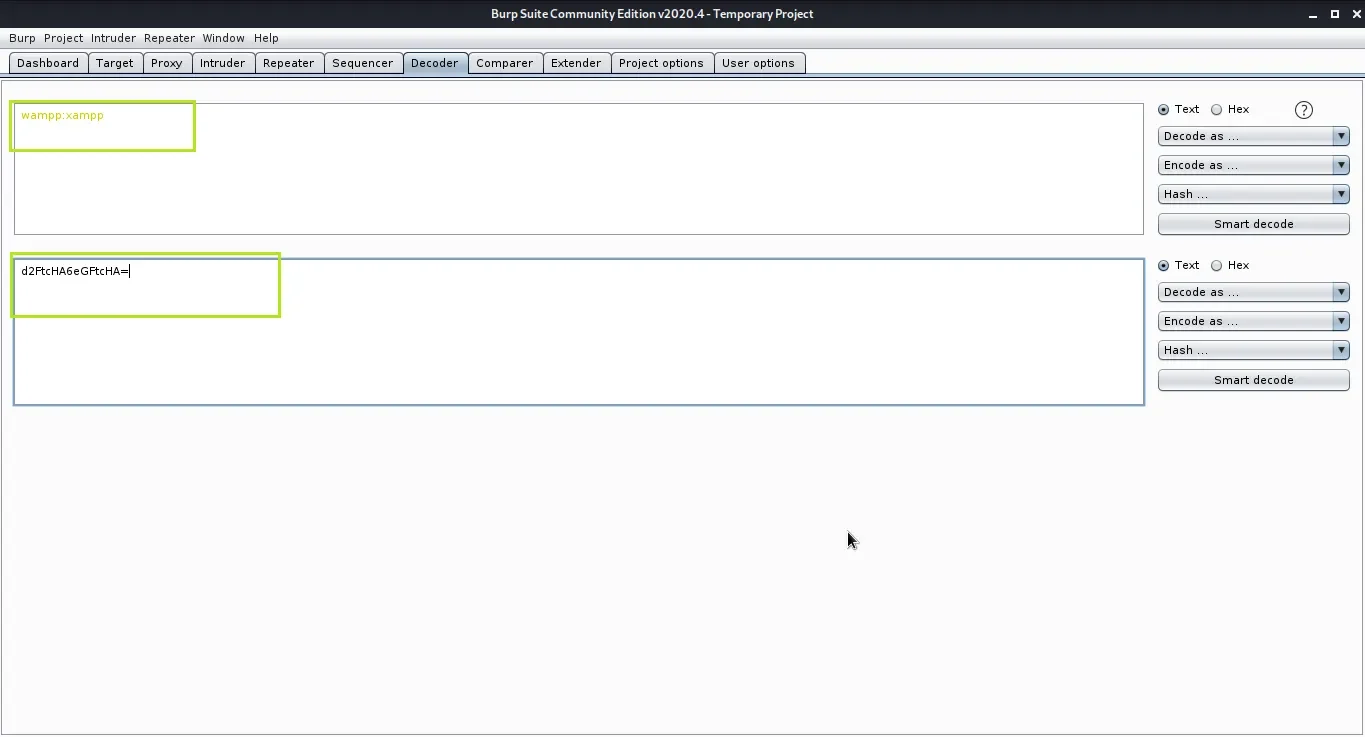
A blog post about a WebDav helper for XAMPP 1.7.3 listed another default pair: wampp as user and xampp as password.
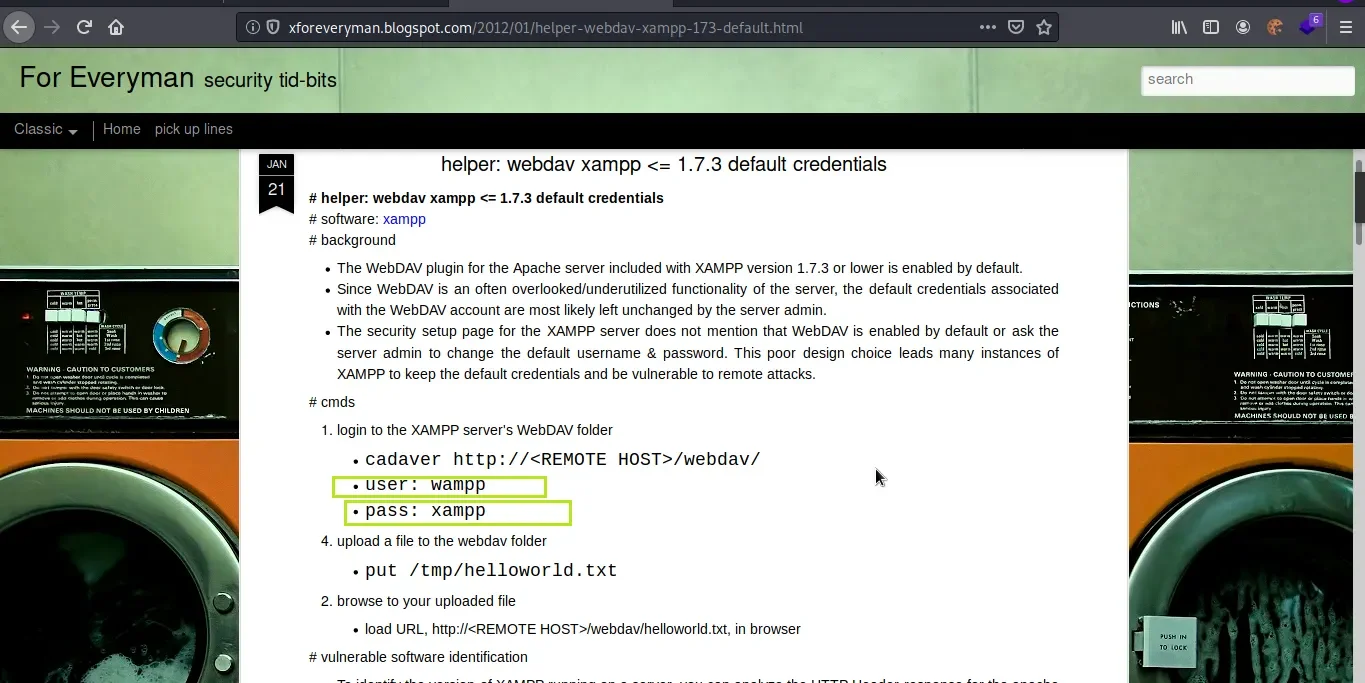
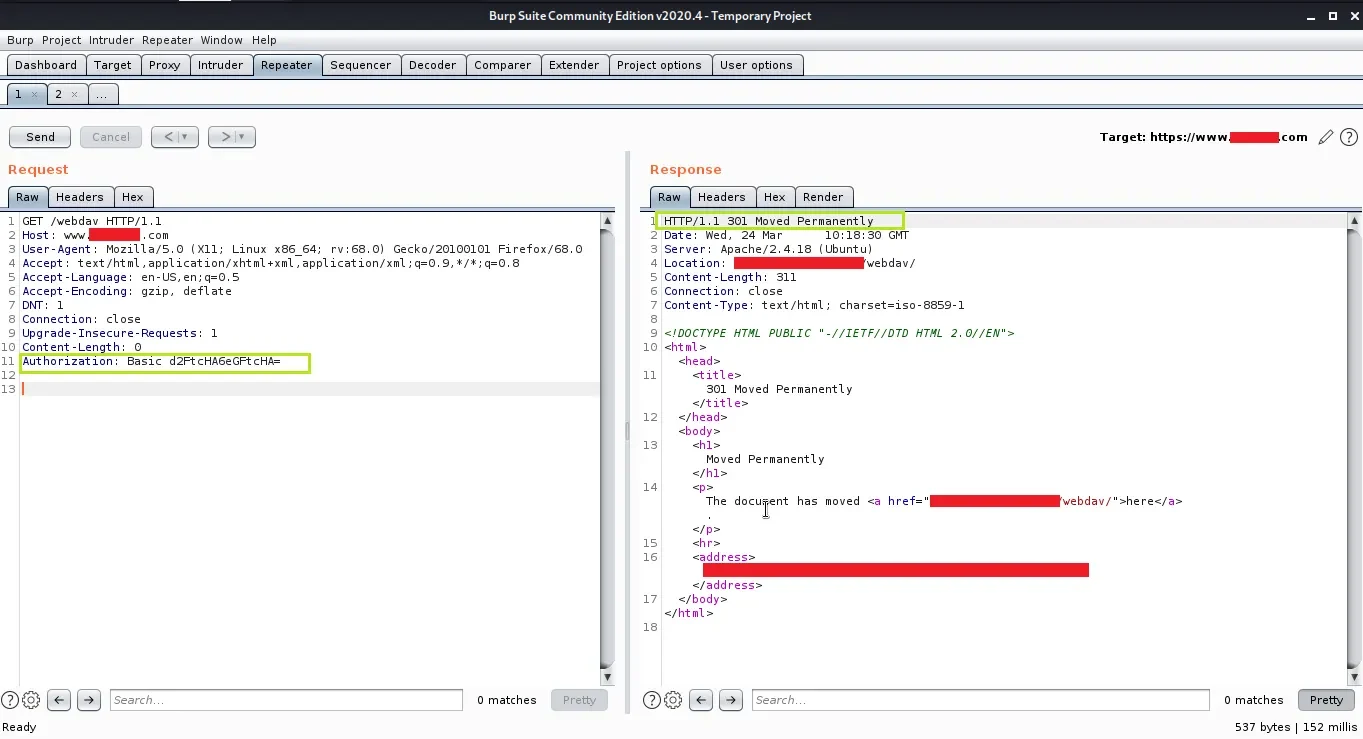
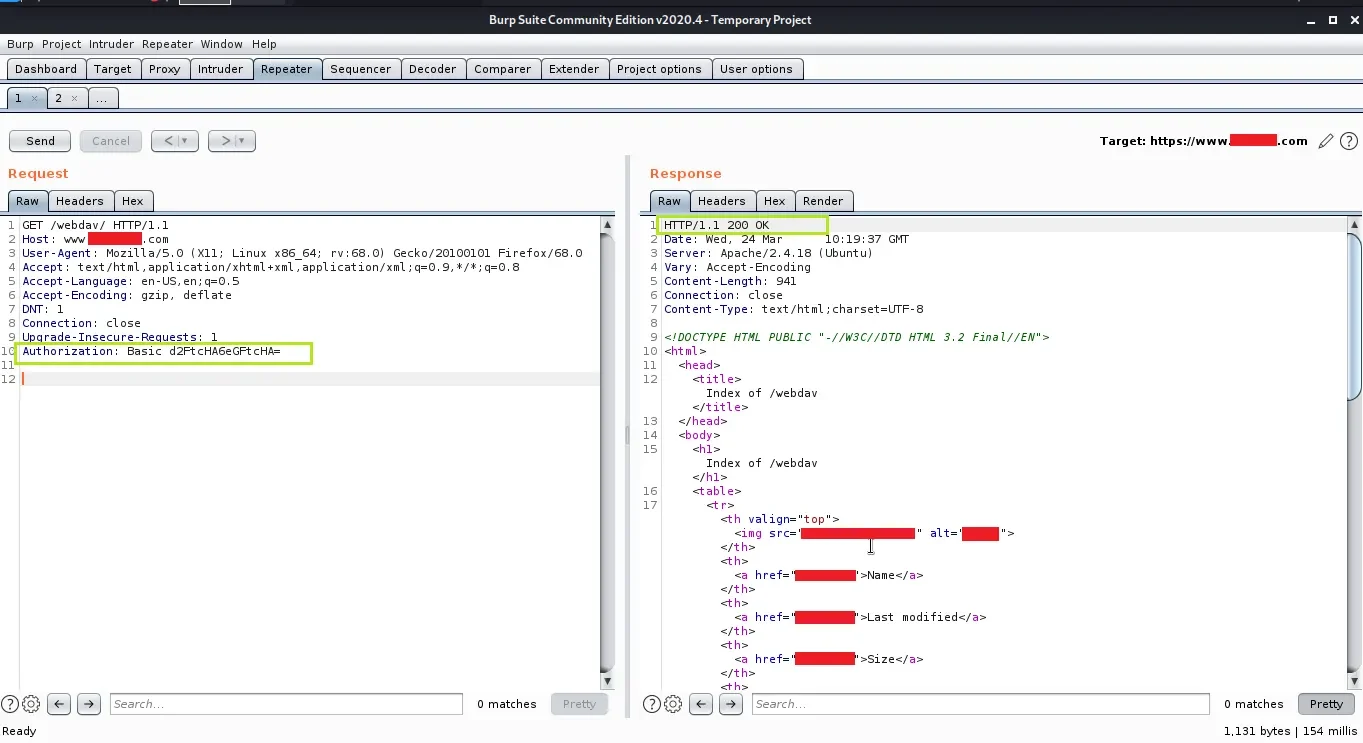
These were encoded as d2FtcHA6eGFtcHA= and sent in the Authorization header. This time the server answered 301 Moved Permanently, and following the redirect produced 200 OK.
Step 3: Enumerate allowed methods
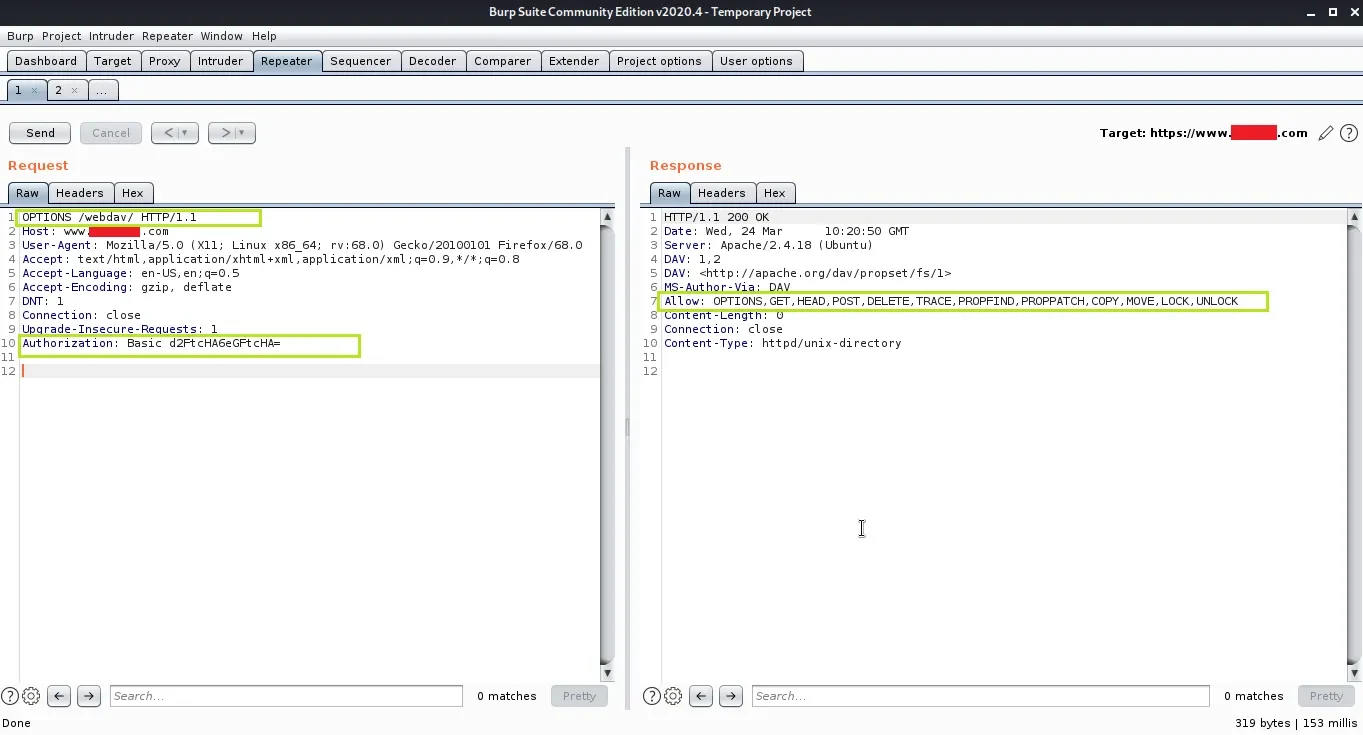
The HTTP verb was changed from GET to OPTIONS to see which methods the server allowed. Many were permitted, including PUT.
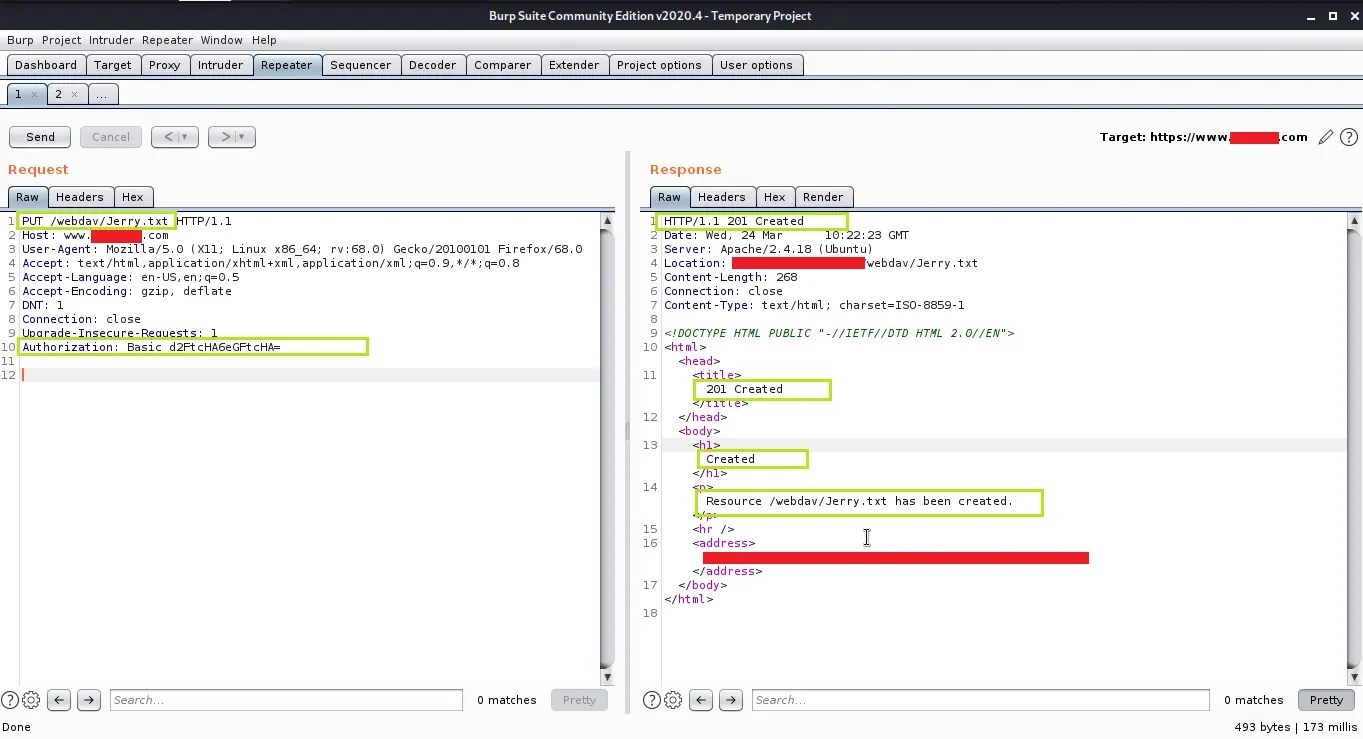
Step 4: Upload a text file
A .txt file was uploaded with the PUT verb and was created successfully on the server.
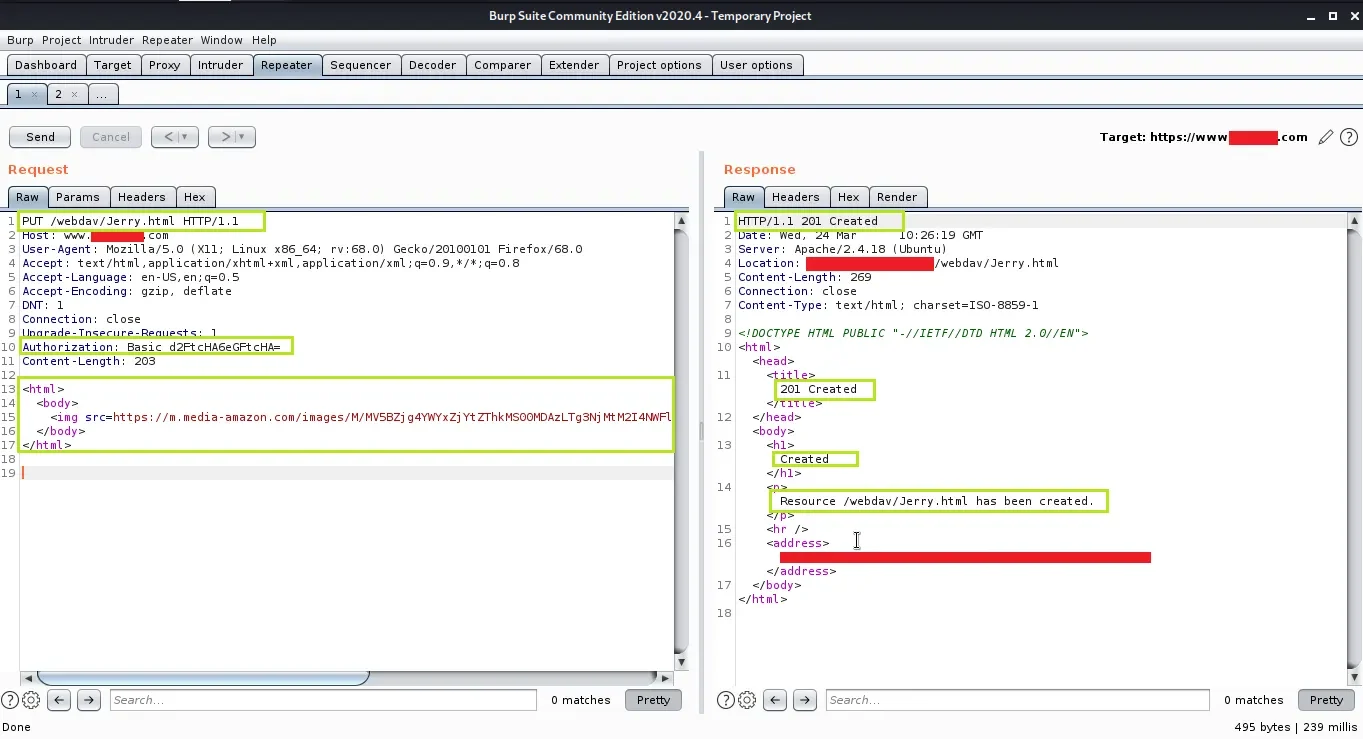
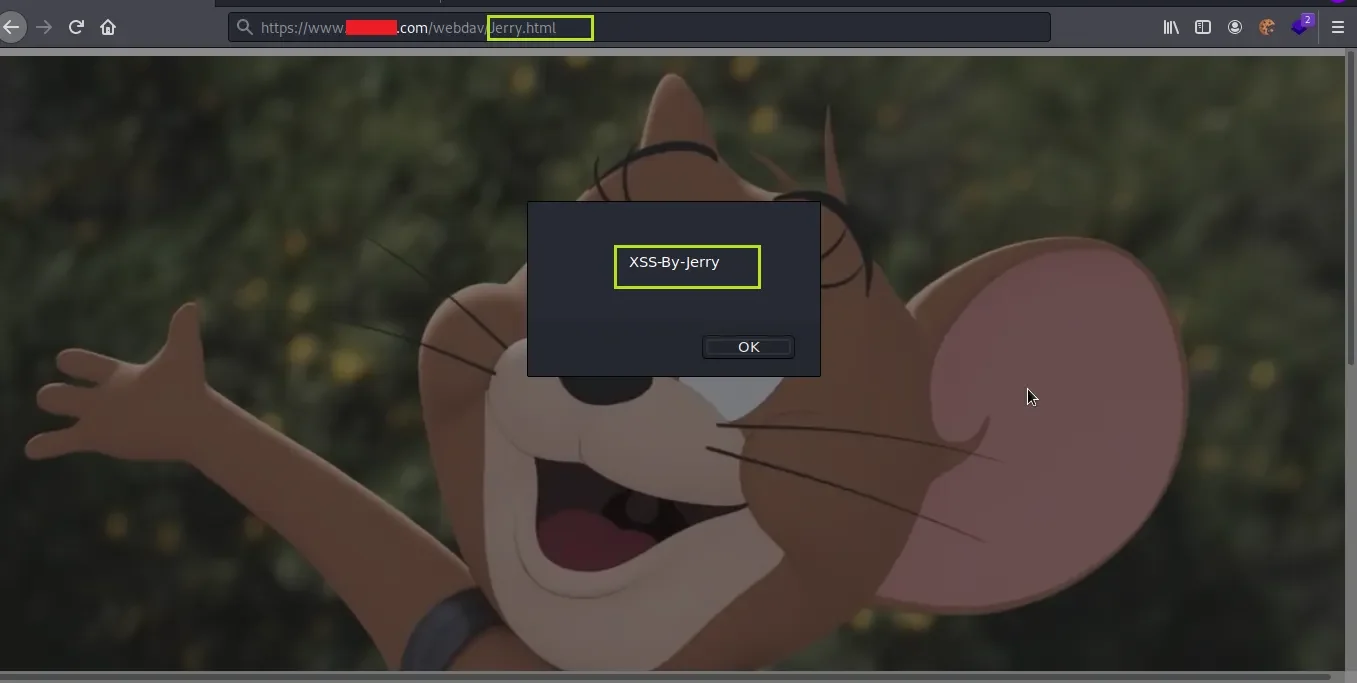
Step 5: Upload an HTML file with XSS
An .html file was uploaded with PUT, carrying an XSS payload in the request body. The payload fired when the file was served.
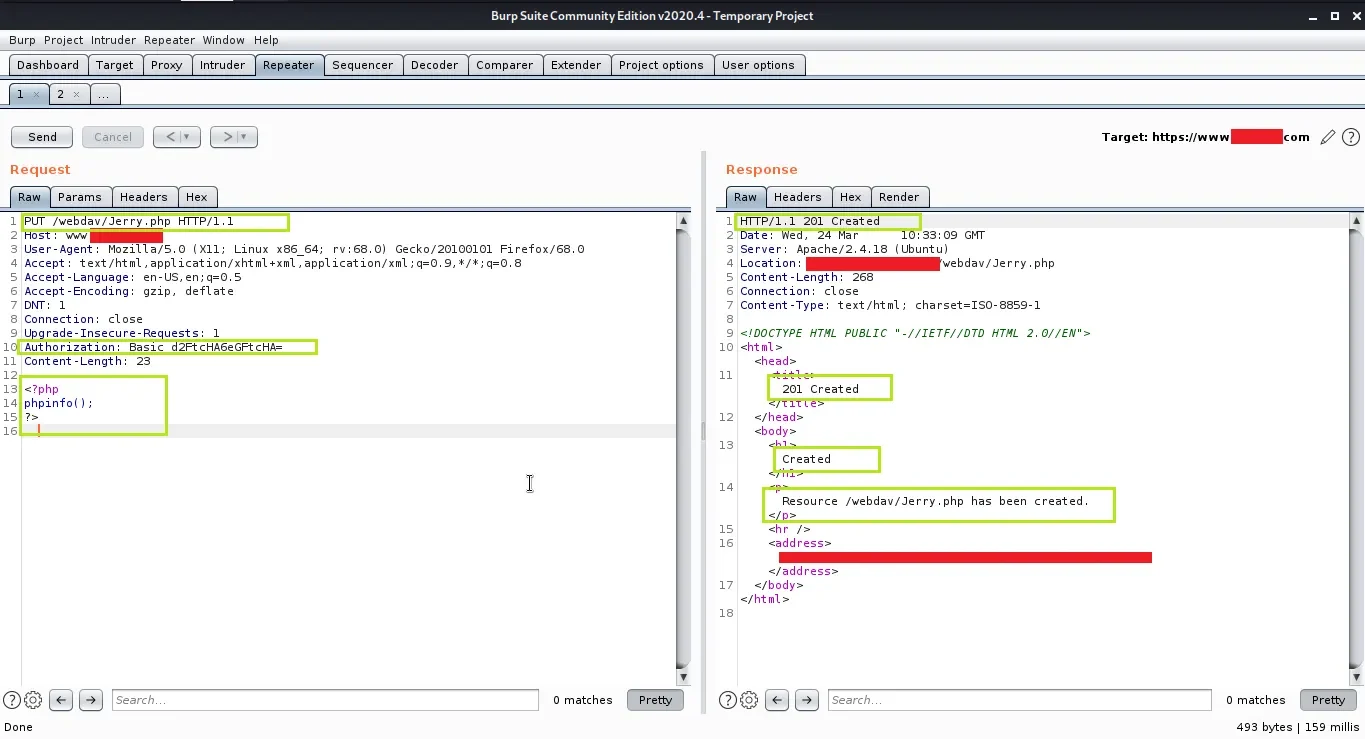
Step 6: Upload a PHP file
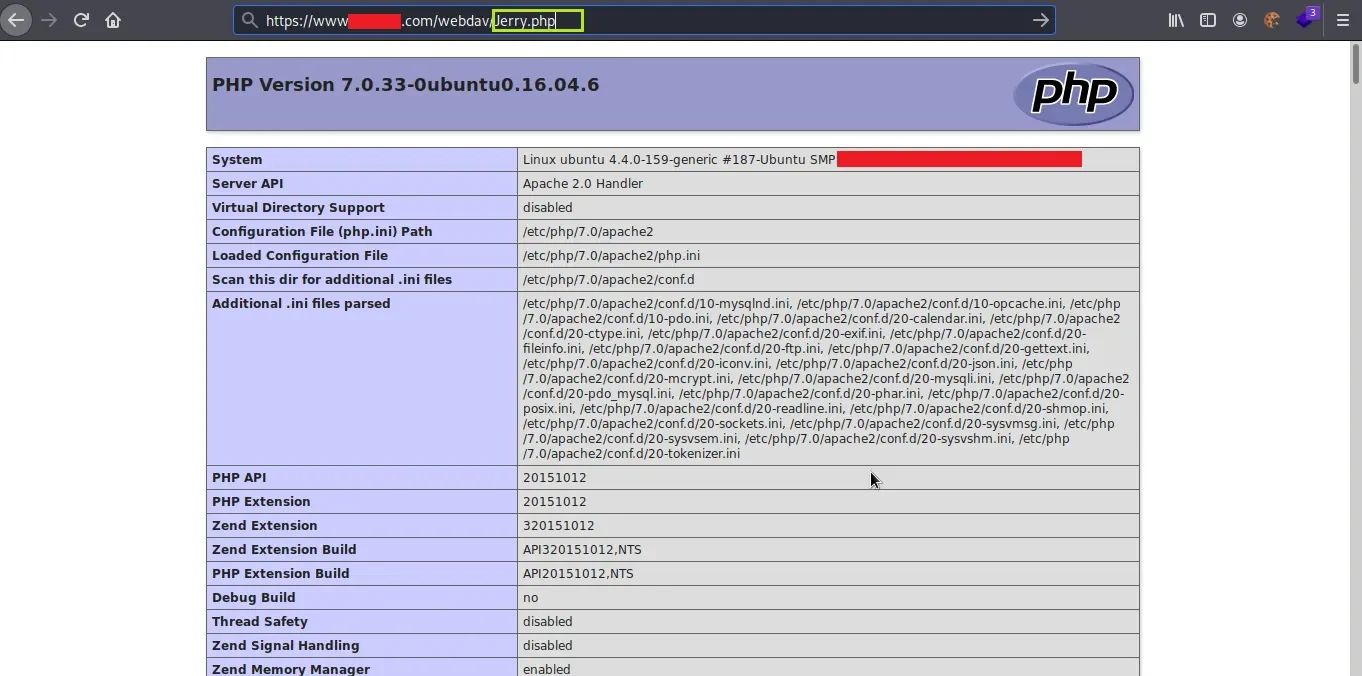
A .php file was uploaded with PUT containing a normal PHP payload, and the upload succeeded. Requesting it executed the payload, as the phpinfo() output shows.
Step 7: Upload the RCE payload
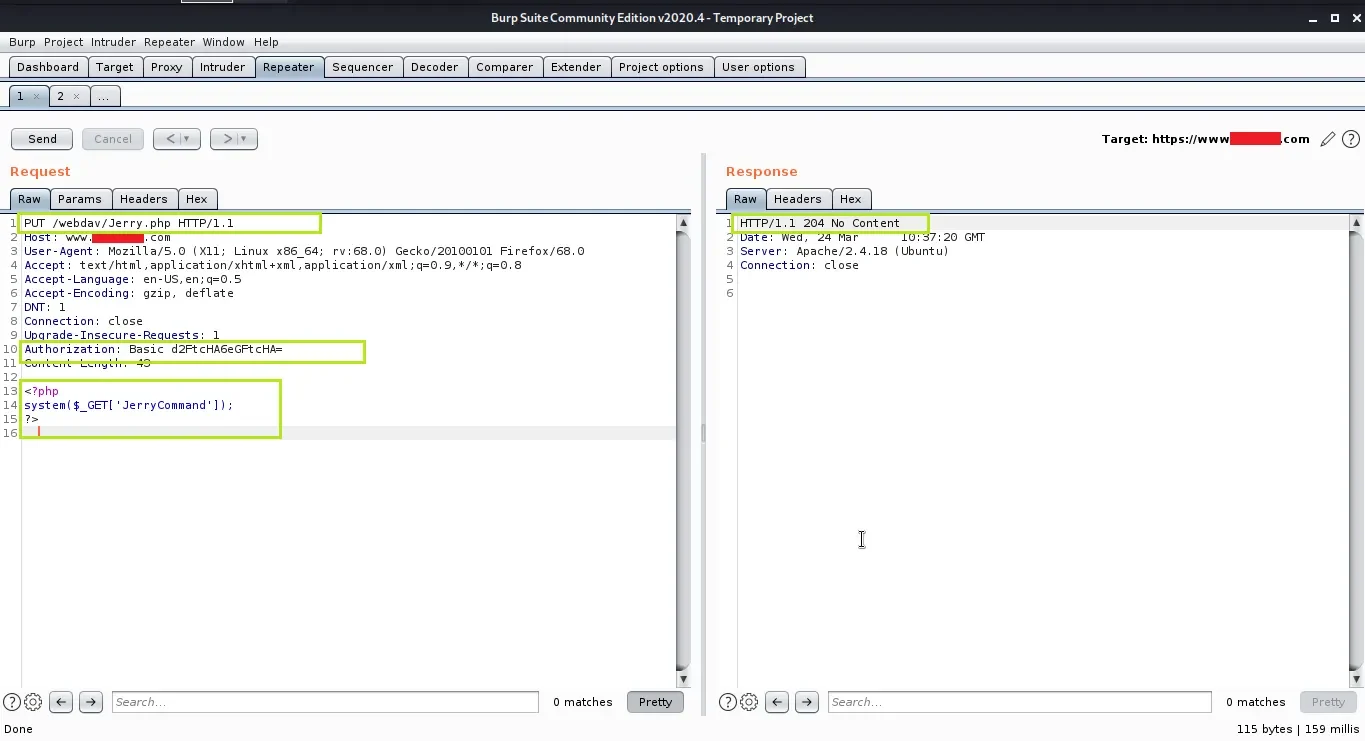
A second .php file was uploaded with PUT, this time with an RCE payload in the request body. The server answered 204 No Content.
Step 8: Trigger the command execution
The uploaded page was requested with a parameter appended:
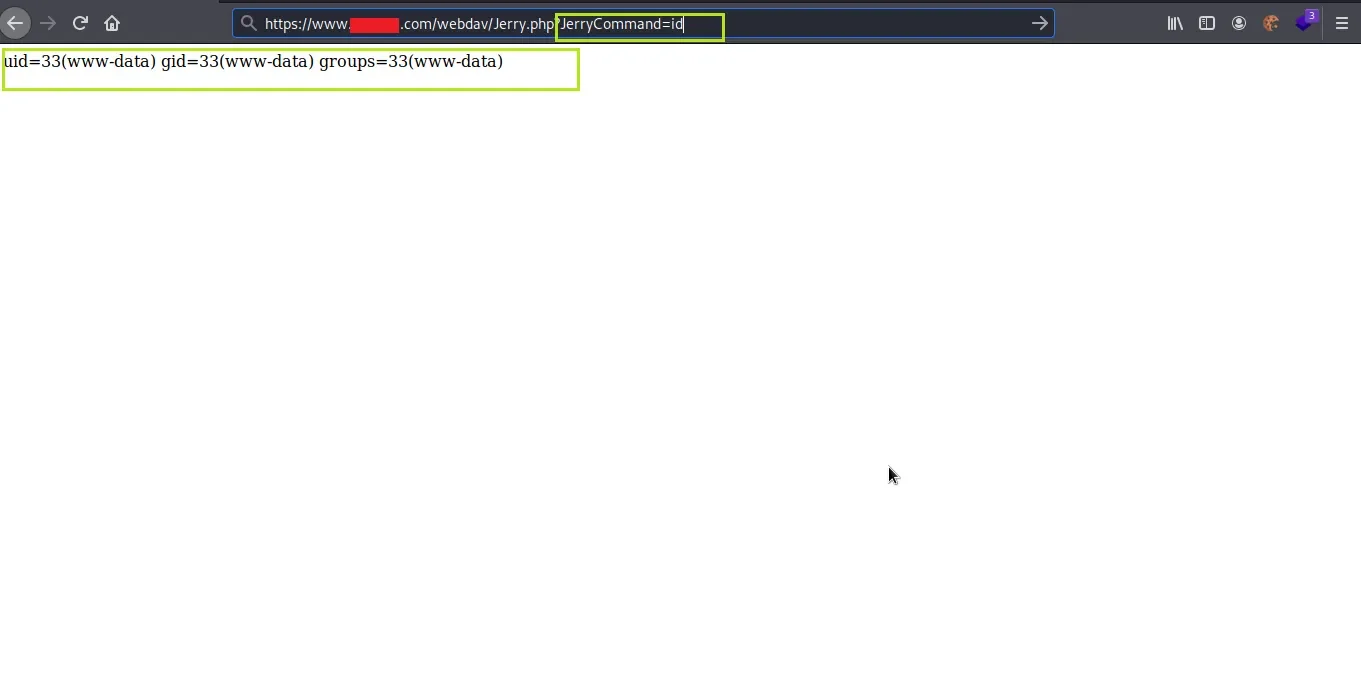
JerryCommand is the parameter the uploaded script reads, and id is the command passed to it. The command executed and returned remote code execution.
Step 9: Reverse shell
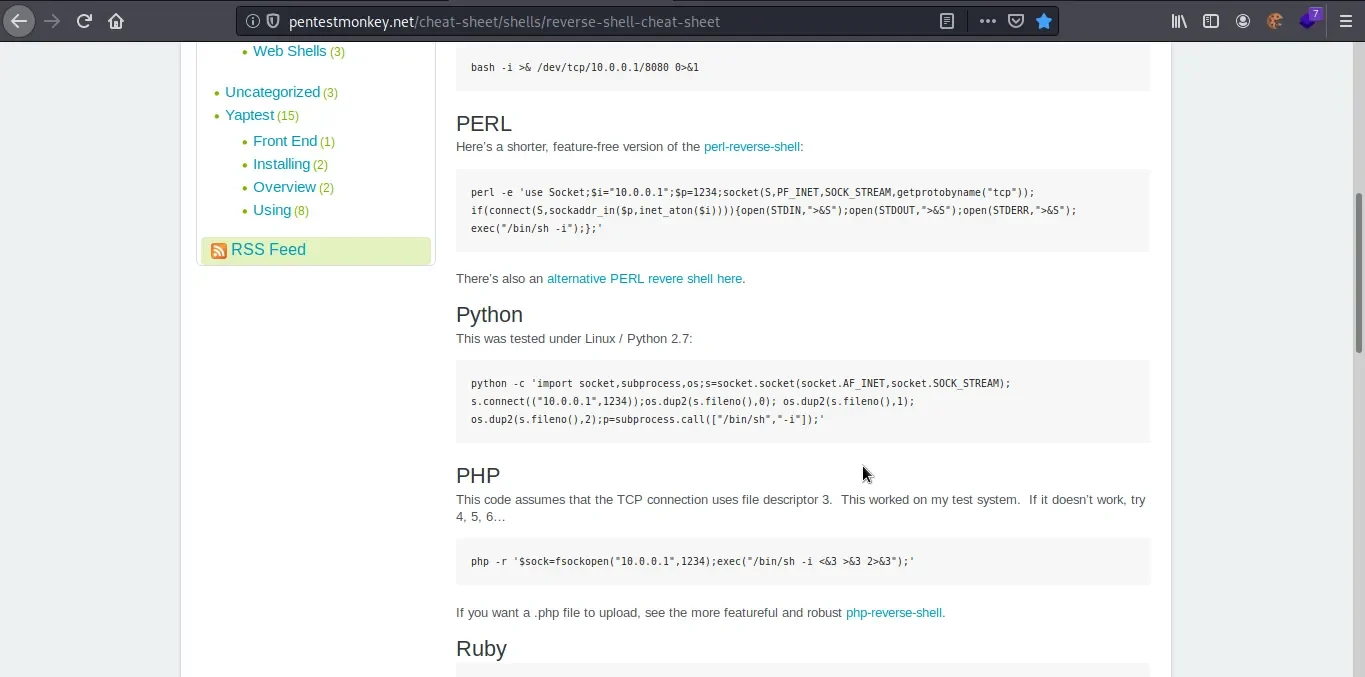
To go further, a reverse shell cheat sheet from pentestmonkey was consulted.
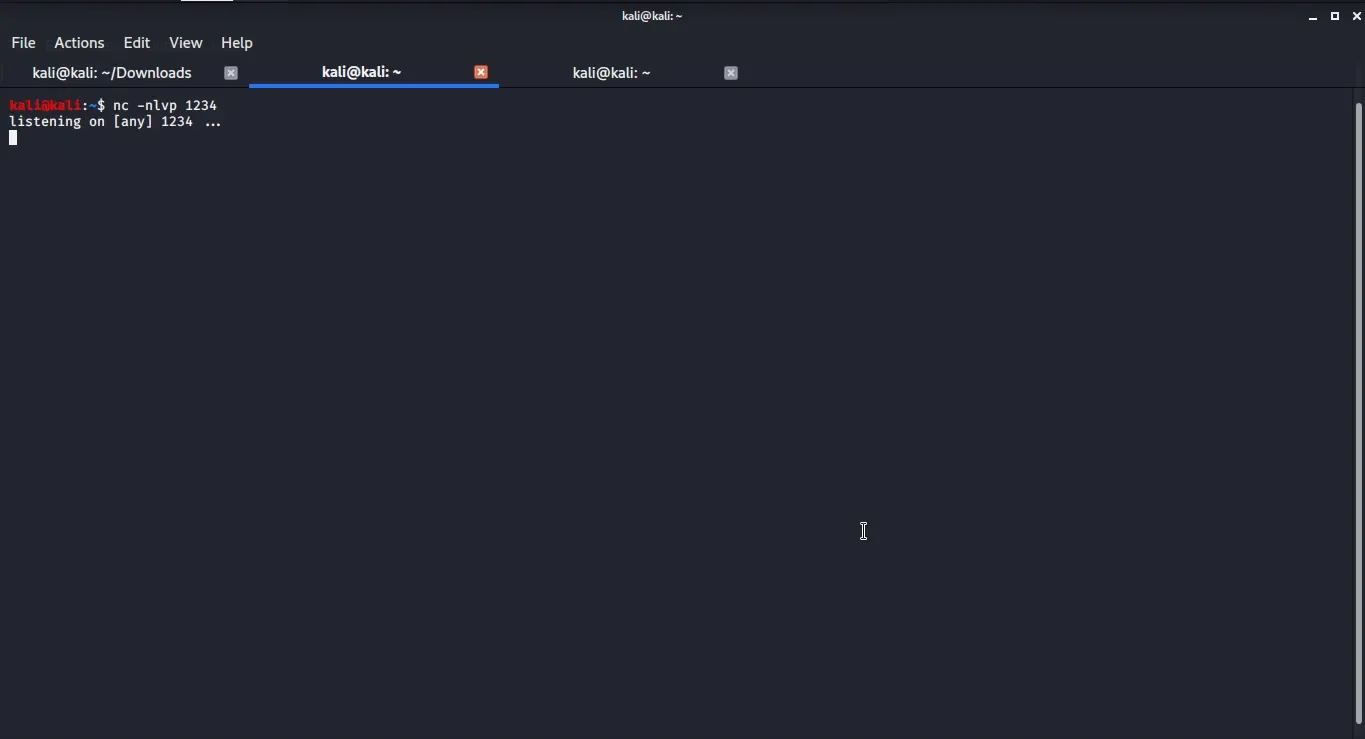
A netcat listener was started on the attacker machine.
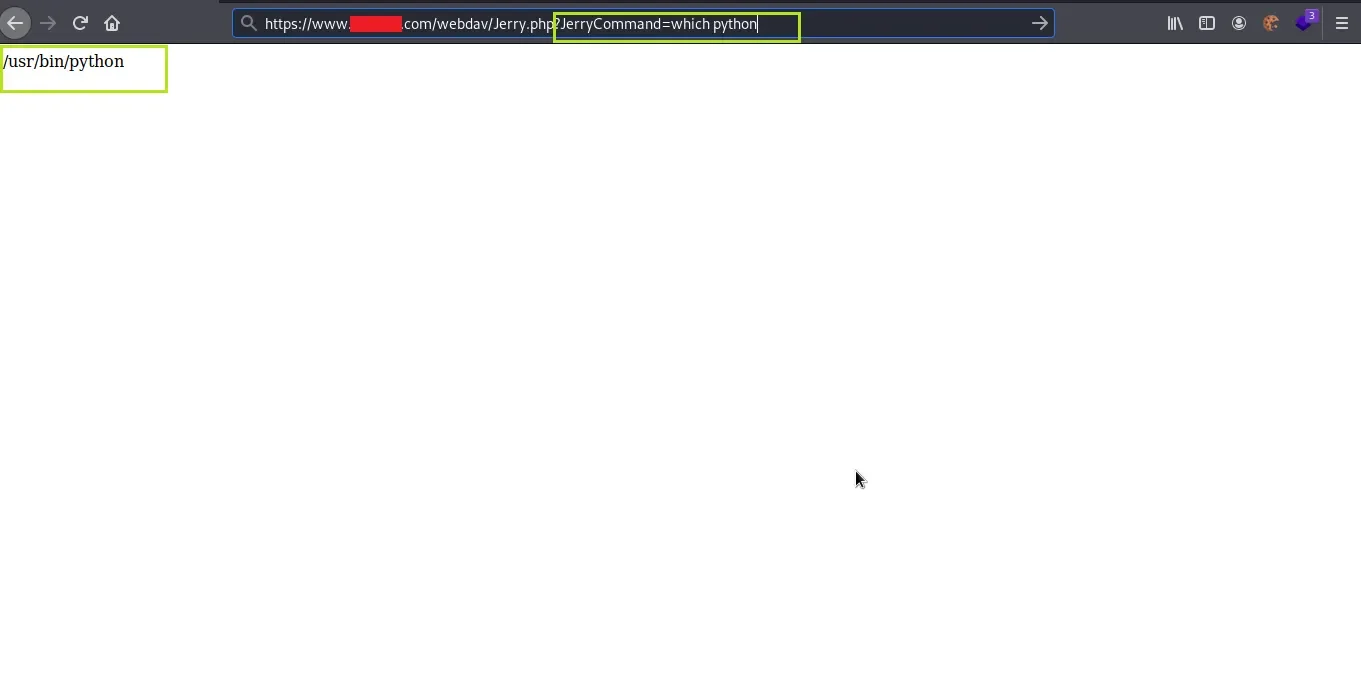
Before choosing a payload, the interpreter on the target was checked:
which python
This tells whether the system uses python3 or python2.
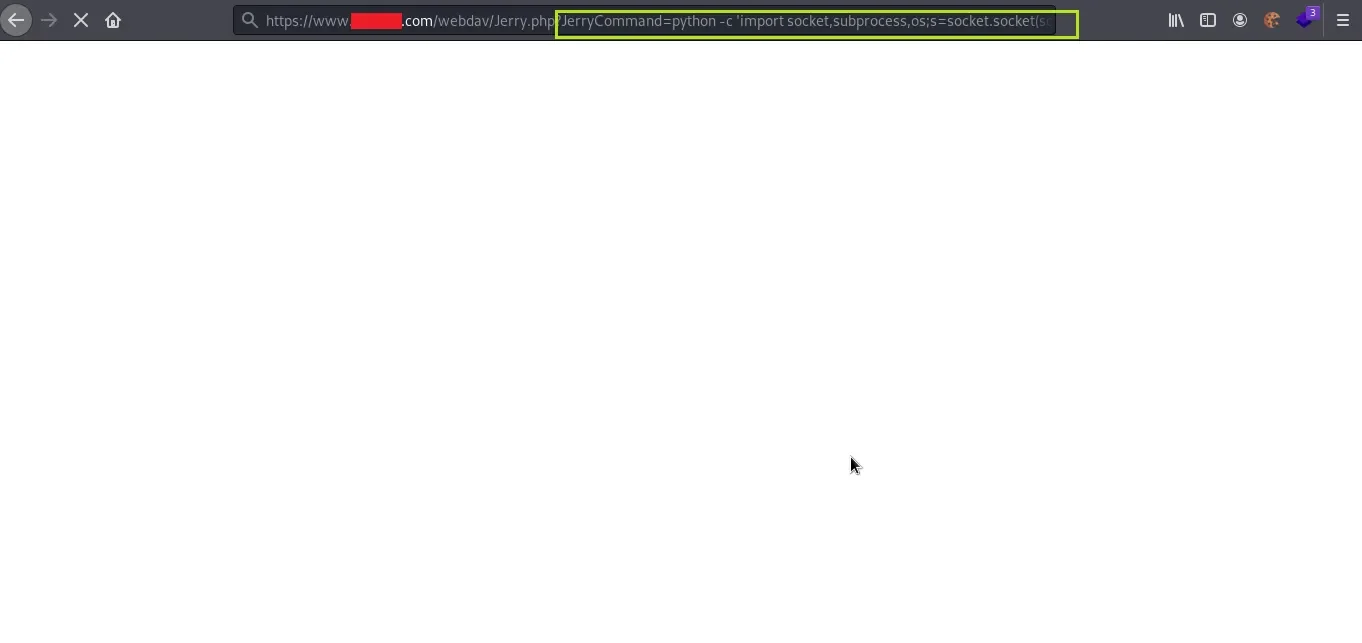
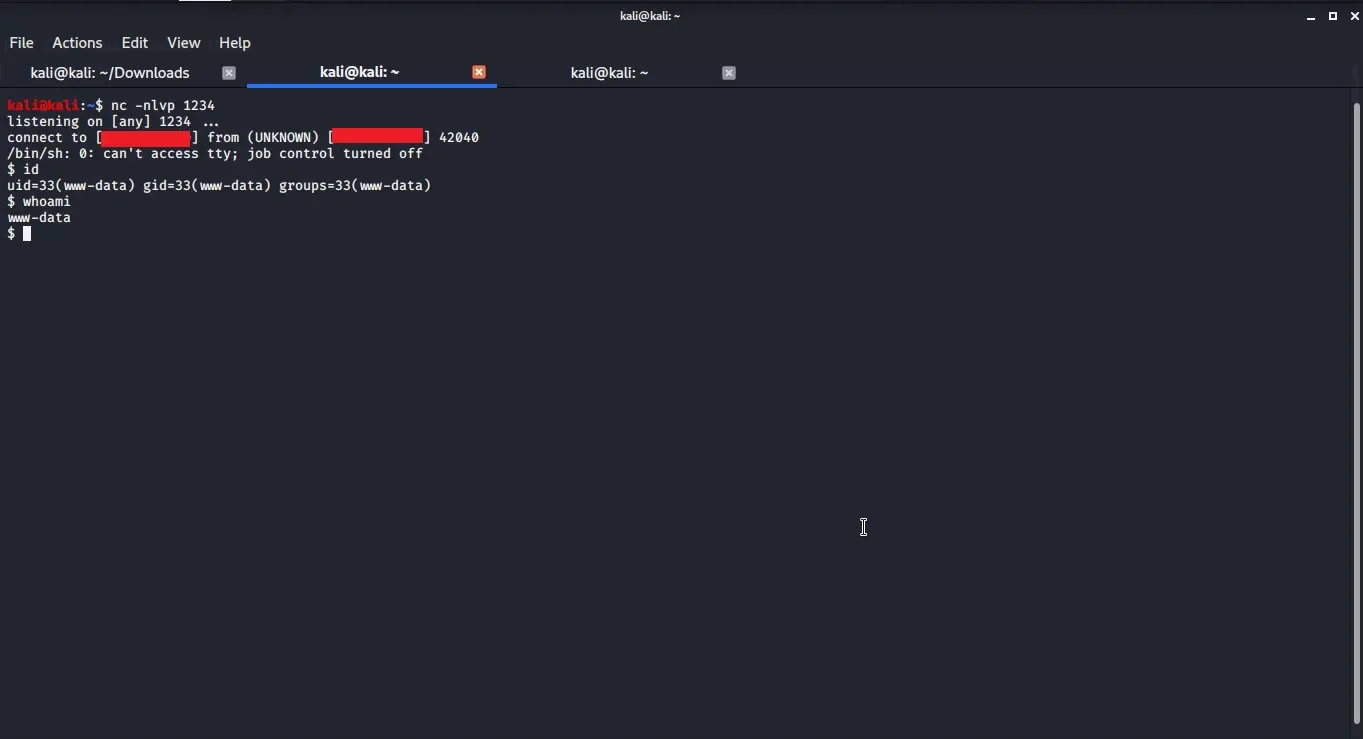
A normal python reverse shell payload from pentestmonkey was then used, and it produced a reverse shell on the netcat listener.
Root cause
The author lists three faults:
- The password set for authorization was one of the default credentials used by WebDav.
- WebDav was enabled and publicly accessible.
- WebDav allowed dangerous methods such as
PUT,DELETEandCOPY.
In other words, the only barrier between the internet and file write access was HTTP Basic authentication, and that barrier was a well-known default pair. Once authenticated, the method allow-list let the client write files into a directory the web server would later execute.
Impact
Any user can easily upload a file to the server, which can lead to remote code execution because the PUT method was allowed. In this case the result was command execution, and from there a reverse shell.
Fix
The mitigations the author recommends are: stop using default credentials, do not enable WebDav, and stop allowing dangerous methods such as PUT.
Variants to test
The technique is not limited to WebDav. Where APIs are used, capture the request and change the HTTP verb from GET to OPTIONS to see how many methods are allowed. A positive result is finding that write methods such as PUT or DELETE are allowed. The author also references HackerOne report 487656 as a related case.
What happened, in plain words
A website had a folder that was meant to be used for uploading and managing files. That folder was protected by a username and password, but the password was a well-known default one that anyone can look up online. Once the author guessed it, the site let him upload files of his choosing, including a file written in a programming language the server runs. Visiting that uploaded file made the server run commands, which is remote code execution: someone sitting at their own computer gets the server to do things on their behalf.
This article walks through the whole story from zero. You only need to know how to use a browser and a computer. Every technical word is explained the first time it appears, and there is a glossary at the end.
The idea behind it
Remote code execution, usually shortened to RCE, means that an attacker can make a remote computer run commands or programs that the attacker chose. There are many ways to reach it. The author says the easiest one is when a feature called WebDav is switched on and it accepts a particular HTTP method called PUT.
A useful comparison: think of a web server as an office building. Normally visitors can only look through the windows (read pages). Some doors, though, are meant for staff who deliver and rearrange furniture (write files). If one of those doors is left open to the street, anyone can walk in and leave a parcel on a desk. If the building then automatically opens and follows the instructions written on any parcel it finds, the visitor effectively controls part of the office.
What is WebDav?
WebDav stands for Web Distributed Authoring and Versioning. It is an extension of HTTP, the protocol your browser uses to talk to websites. HTTP is the set of rules for asking a server for something ("give me this page") and getting an answer back ("here it is", or "not allowed").
WebDav adds abilities on top of that: a client can create a file or folder, edit a file in place, copy, move or delete a file on a remote web server. It uses port 80 for unencrypted access and port 443 for secure access. Ports are numbered channels on a computer; 80 is the usual unencrypted web channel and 443 the encrypted one (the one with the padlock in your browser). WebDav lets users reach cloud files or files on a separate server in real time, without the hassle of downloading, caching, editing and uploading them by hand.
If WebDav is enabled and all rights are given publicly, any user on the internet can upload, delete and modify files on the remote server. That can lead to remote code execution, because the server may later run a file that someone else placed there.
What is the Authorization request header?
The HTTP Authorization request header contains the credentials used to authenticate a user agent with a server. A request header is a small labelled line that your browser (the user agent) attaches to its request, like the note you clip to a form saying who you are. Credentials are simply proof of identity: a username and password, or something derived from them.
When you send a request to a server to access a resource for which you do not have permission, the server responds with a 401 Unauthorized error. It happens because no credentials were provided while trying to access the restricted resource. A status code is the three-digit number a server sends back to summarise the result; 401 is the standard "who are you?" answer.
In WebDav, for security purposes, developers use an authentication mechanism for accessing a resource or for making changes on the server. The syntax is:
Authorization: Basic YWRtMW46cEBzJHdvcmQ=
Line by line:
Authorizationis the name of the header. It tells the server "this line carries my proof of identity".Basicis the type of authorization. Basic means the username and password are joined with a colon and encoded, then sent with every request.YWRtMW46cEBzJHdvcmQ=is the base64 encoding of the credentials. Base64 is not encryption; it is a way of writing any bytes using only plain letters, digits and a few symbols, so they survive being sent as text. Anyone who intercepts it can decode it back in a second. In the author's example it decodes toadm1n:p@s$word.
What is the WWW-Authenticate response header?
The HTTP WWW-Authenticate is a response header that defines the authentication method that should be used to gain access to a resource. A response header is the same idea as a request header, but travelling from the server back to you. Think of it as the receptionist saying "to enter this floor, show a badge of this particular kind".
The syntax is:
WWW-Authenticate: Basic realm="webdav"
Line by line:
WWW-Authenticateis the header name. Seeing it in a response is a strong hint that the server wants credentials.Basicis the authorization type it expects, matching theBasicscheme above.realmis a description of the protected area, a label for which set of credentials applies here. If no realm is specified, developers often display a formatted hostname instead.
How the author found it
The author found this remote code execution vulnerability via WebDav in 2018 on a private project. A private project here means a target that was not a named public company; the write-up is shared as a lesson.
At first he did directory brute forcing. Brute forcing a directory means trying a long list of common folder names against a website, one after another, to discover paths that are not linked anywhere. It is like walking down a corridor trying every door handle instead of reading a map.
That revealed a /webdav directory answering with 401 Unauthorized. When he checked the response, he found a WWW-Authenticate response header, which told him the folder needed credentials to be accessed.
The screenshot shows the WebDav directory answering 401 Unauthorized, with the WWW-Authenticate header and an error message in the response.
Step by step: how the vulnerability was exploited
Step 1: Try the first set of default credentials
He searched on Google for default credentials of WebDav and found that the default credentials were jigsaw and jigsaw, as user and password.
Default credentials are the username and password a piece of software ships with, before anyone changes them. Many products are installed with a known pair so that the first login is easy. The problem is that the pair is published in manuals and blog posts, so it is not a secret at all. It is like a hotel safe that leaves the factory with combination 0000 and nobody ever changes it.
He used the Authorization header in the request with the base64 encoded credentials jigsaw:jigsaw, but it failed.
The encoded value shown is amlnc2F3OmppZ3Nhdw==, which is the base64 form of jigsaw:jigsaw. The attempt failed, meaning the server did not accept that pair. This is a normal part of the process: a default credential list is a guess, and guesses can be wrong.
Step 2: Try a second set of default credentials
He then found a blog where the credentials were wampp as user and xampp as a password.
He again used the Authorization header in the request, this time with the base64 encoded credentials wampp:xampp, and got a 200 OK response.
The encoded value is d2FtcHA6eGFtcHA=. In the sequence of responses he describes, the server first answered 301 Moved Permanently, and following the redirection produced 200 OK.
What those codes mean:
301 Moved Permanentlymeans the address you asked for has moved to another address, and the server tells you where. Your browser follows it automatically, which is why you often never notice.200 OKmeans the request succeeded and here is the content.
So the second default pair worked. The door was open.
Step 3: Ask the server which actions it allows
He changed the HTTP verb from GET to OPTIONS to check how many methods or HTTP verbs are allowed. He found that the HTTP PUT verb is allowed, along with other verbs.
An HTTP verb (also called a method) is the word at the start of every request that says what you want to do. GET means "give me this". PUT means "store this content at this address", in other words upload or overwrite a file. OPTIONS means "tell me which verbs you accept here". It is the equivalent of asking a receptionist which services this desk offers before filling in a form.
Seeing PUT in the allowed list is the key finding. It means the server is willing to accept a file from the client and save it.
Step 4: Upload a harmless text file
At first he tried to upload a normal text file, and it was successfully created.
Why start with a text file? Because it proves the write works without any risk. If a plain .txt file lands on the server, you know the upload path is real and you know where the file ends up. It is a test delivery before sending anything that matters.
Step 5: Upload an HTML file with a script in it
Then he uploaded a file with an XSS payload and it fired the pop-up.
XSS stands for cross-site scripting. It means putting a small script into content that a website will later show to a browser, so that the browser runs the script as if the site itself had written it. A pop-up is the classic proof: if a box appears, your script ran. The payload here is a piece of HTML, the language web pages are written in, containing a script.
This step matters because it shows the uploaded file is served back and interpreted by the browser.
Step 6: Upload a PHP file
So the last thing was to upload a PHP file for remote code execution, and it worked perfectly. A .php file is a page written in PHP, a programming language that runs on the server before the page is sent to you. When you request a .php page, the server executes the code inside it and sends you the result. That is exactly the behaviour an attacker wants: code that runs on the server, not in the visitor's browser.
The phpinfo() output shows the payload executed: phpinfo() is a standard PHP function that prints a long page of details about the server's PHP installation. Seeing that page means the server ran the file rather than just handing it back as text.
Step 7: Upload the payload that runs commands
He again uploaded a .php file using PUT, this time with an RCE payload in the request body, and it gave a 204 No Content response.
204 No Content means the server accepted the request and has nothing to send back. For an upload, that is a success signal: the file was stored.
Step 8: Trigger the command execution
He visited the web page and added a parameter to the address:
Line by line:
https://www.mytarget.com/webdav/Jerry.phpis the address of the uploaded file.mytarget.comis a placeholder name used in the write-up, not a real site.?starts the query string, the part of a web address that carries extra values to the page.JerryCommand=idis one such value: the nameJerryCommandis the parameter the uploaded script reads, andidis the command passed to it.idis a standard command on Unix-like systems that prints which user the server is running as.
A parameter is simply a named value handed to a page, the way you fill in a field on a form. Here the page was written to take whatever arrives in JerryCommand and run it as a system command. The command executed, and he got remote code execution.
Step 9: Get an interactive shell
Exploiting further, he searched for a reverse shell cheat sheet on pentestmonkey. A reverse shell is a connection where the target machine calls back to the attacker's machine and hands over a command prompt. It is "reverse" because the target starts the connection outward, which often slips past firewalls that block incoming connections but allow outgoing ones. A cheat sheet is a page of ready-made one-line commands for exactly this purpose.
Then he started a netcat listener on his machine. Netcat is a small tool that can open a network connection and wait for something to connect to it. A listener is netcat sitting on a port, waiting. Think of it as holding the phone and waiting for the target to dial your number.
In the next step he searched for python, to see whether the system uses python or not:
which python
Line by line:
whichis a command that reports where a program is installed, or says nothing if it is not there.pythonis the name of the program being looked for.
Using the command which python will tell whether the system is using python3 or python2. That matters because the two versions are not fully compatible, and a reverse shell one-liner written for one may fail on the other. It is like checking whether a socket is square or round before buying a plug.
He used a normal python reverse shell payload from pentestmonkey and got a reverse shell on his netcat listener.
At that point the attacker had a reverse shell on the server.
Why it happened
In the author's opinion there were three faults:
- The password set for authorization was one of the default credentials used by WebDav.
- The WebDav feature was enabled and was publicly accessible.
- WebDav was allowing some dangerous methods such as
PUT,DELETEandCOPY.
Put together: the only barrier between the internet and file write access was HTTP Basic authentication, and that barrier was a well-known default pair. Once past it, the list of allowed methods let the client write files into a folder the web server would later execute. Each fault alone is a weakness; together they form a chain from a guessed password to running commands.
Impact
Any user can easily upload a file on the server, which can lead to remote code execution because the PUT method was allowed. In this case the result was command execution, and from there a reverse shell.
How to fix it
The mitigations the author recommends are: stop using default credentials, do not enable WebDav, and stop allowing dangerous methods such as PUT.
In everyday terms: change the factory password before the door is unlocked, do not leave the furniture door open to the street, and do not let visitors drop parcels on a desk the building will act on.
The same trick beyond WebDav
The author notes that this vulnerability is not only limited to WebDav. You can also try this where APIs are used. An API is the part of a website built for programs rather than people: instead of a page with buttons, it accepts requests and returns data. Just capture the request and change the HTTP verb from GET to OPTIONS for checking how many methods are allowed. Capturing a request means recording what your browser sends, usually with the developer tools built into every browser, so you can look at it and resend a modified copy.
A positive result is finding that write methods such as PUT or DELETE are allowed. The author also references HackerOne report 487656 as a related case. HackerOne is a platform where security researchers report bugs to companies.
Glossary
- API: the part of a website built for programs to talk to, accepting requests and returning data rather than pages with buttons.
- Authentication: proving who you are, usually with a username and password.
- Authorization: deciding what an identified user is allowed to do; also the name of the HTTP header that carries credentials.
- Base64: a way of writing any bytes using plain letters, digits and a few symbols so they survive being sent as text. It is encoding, not encryption, and anyone can decode it.
- Brute forcing (a directory): trying a long list of common names against a website to discover paths that are not linked anywhere.
- Credentials: proof of identity, such as a username and password.
- Cross-site scripting (XSS): putting a script into content a site will later show to a browser, so the browser runs it as if the site had written it.
- Default credentials: the username and password a product ships with before anyone changes them, published in manuals and blog posts.
- Directory: a folder on a web server, reached by a path such as
/webdav. - GET: the HTTP verb meaning "give me this content".
- Header: a small labelled line attached to a request or response, carrying extra information such as identity or content type.
- HTTP: the protocol browsers and servers use to exchange requests and responses.
- HTTP verb (method): the word at the start of a request saying what you want to do, such as
GET,PUTorOPTIONS. - Listener: a program waiting on a network port for something to connect to it.
- Netcat: a small tool that opens network connections and can wait for incoming ones.
- OPTIONS: the HTTP verb meaning "tell me which verbs you accept here".
- Parameter: a named value handed to a page through the query string of a web address.
- PHP: a programming language that runs on the server before a page is sent to the browser.
- phpinfo(): a standard PHP function that prints details about the server's PHP installation.
- Port: a numbered channel on a computer; 80 is the usual unencrypted web channel and 443 the encrypted one.
- PUT: the HTTP verb meaning "store this content at this address", in other words upload or overwrite a file.
- Query string: the part of a web address after
?that carries extra values to the page. - Remote code execution (RCE): making a remote computer run commands or programs that the attacker chose.
- Response header: a labelled line a server sends back with extra information about its answer.
- Reverse shell: a connection where the target machine calls back to the attacker and hands over a command prompt.
- Status code: the three-digit number a server sends back to summarise the result, such as 200, 204, 301 or 401.
- User agent: the program making a request, normally your browser.
- WebDav: Web Distributed Authoring and Versioning, an extension of HTTP that lets clients create, edit, copy, move and delete files on a remote web server.
- XAMPP: a package that lets people run a web server on their own computer.
- 200 OK: the request succeeded and here is the content.
- 204 No Content: the request succeeded and there is nothing to send back.
- 301 Moved Permanently: the address has moved; the server tells you where and your browser follows it.
- 401 Unauthorized: the server wants credentials before it will give you this resource.



