Account Takeover Inside The Tenanth
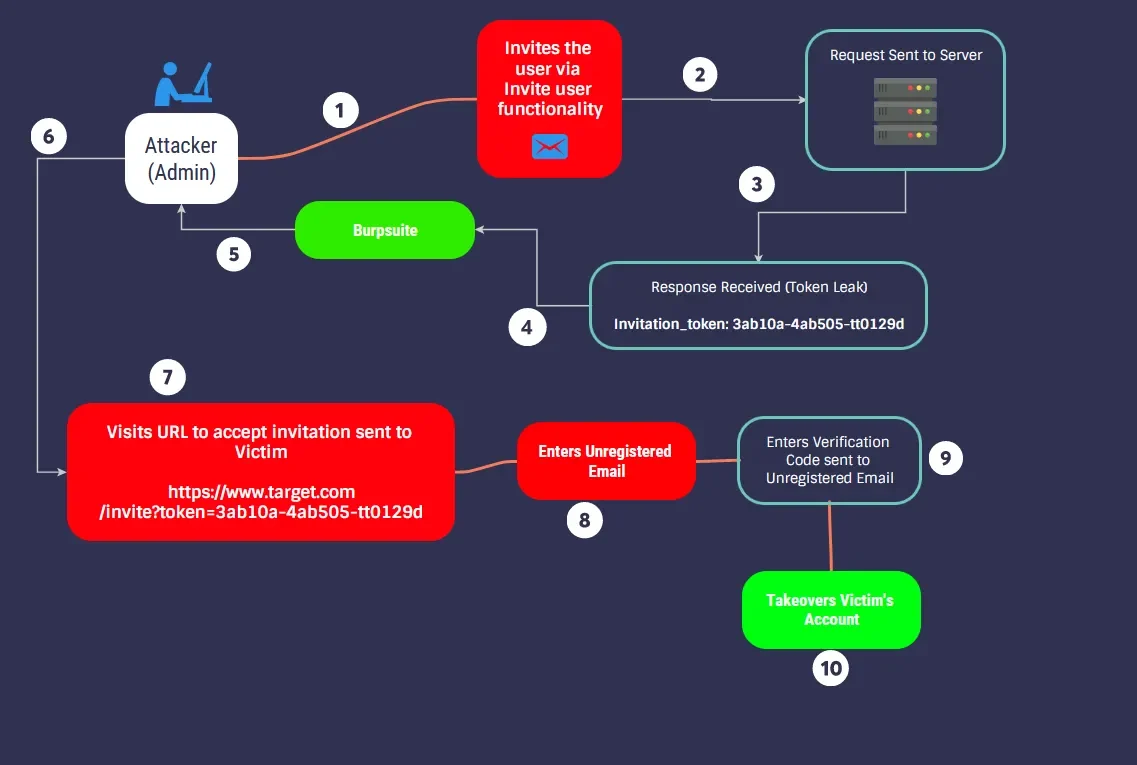
An invitation token was leaked in the server response when an admin invited a user, and the invitation acceptance flow did not check that the email entered matched the invited email. An admin could therefore accept the invitation using their own email and take over the invited user's account.
 Published on shahjerry33.medium.com
Account Takeover (ATO) is an attack using which an attacker cat take ownership of another person’s account. There are multiple ways for an account takeover attack, namely brute forcing credentials, credentials stuffing, response manipulation, password reset poisoning, social engineering and phishing, 2FA bypass…
The full write-up lives on its author's site
It belongs to its author, so we link to it rather than copy it. The other two tabs are our own rewrites, checked against it.
Context
This is a write-up of a private-program finding on a bug bounty platform, for which the researcher was awarded 150 USD. The target is a web application that organises users into tenants. In the report's own words, a tenant is a group of users from a single organisation or company, and there is an admin in the tenant who can invite other users to work for the company by which the tenant has been created. A tenant can belong to an IT department, an Accounts department, a Sales department and so on.
The feature at the centre of the finding is the invitation flow: an admin invites a user by email, and the invited person accepts to join the tenant. The researcher found that this flow leaked the invitation token in the server response and did not bind the token to the invited email address, which together allowed an account takeover.
Setup
The researcher was given admin credentials for the application by the platform, so the starting position is an authenticated tenant administrator. The only tool mentioned is Burp Suite, used to intercept the invitation request and its response. No versions are given.
The attacker in this scenario is an admin in the tenant who can invite users. The victim is a user who is invited by that admin.
Finding it
While browsing the application the researcher came across the invite functionality and noticed that it was vulnerable to invitation token leakage. The leaked token was then used to take over the victim's account through an unregistered email address controlled by the attacker.
Exploitation
Step 1: Log in as the tenant admin
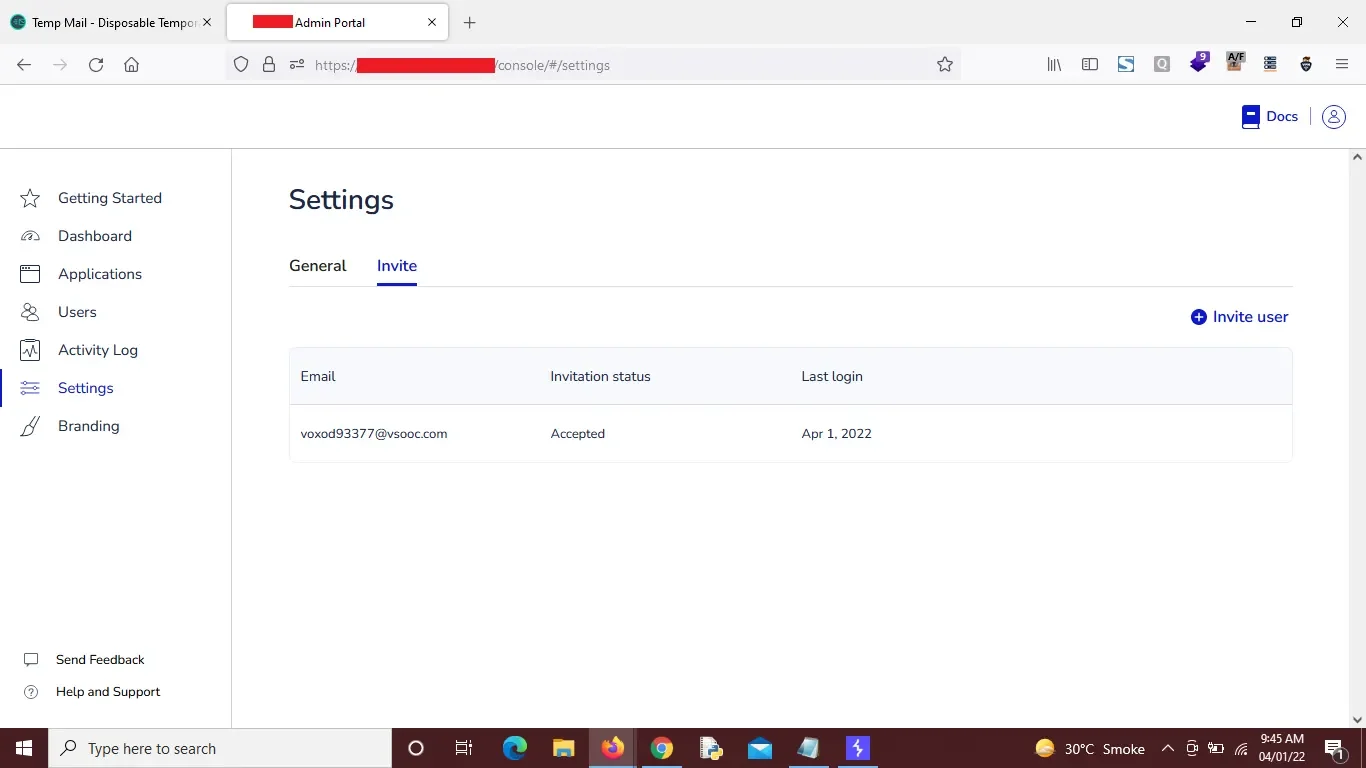
The researcher logged into the account with the admin credentials provided by the platform and clicked on the Invite user functionality.
Step 2: Invite the victim
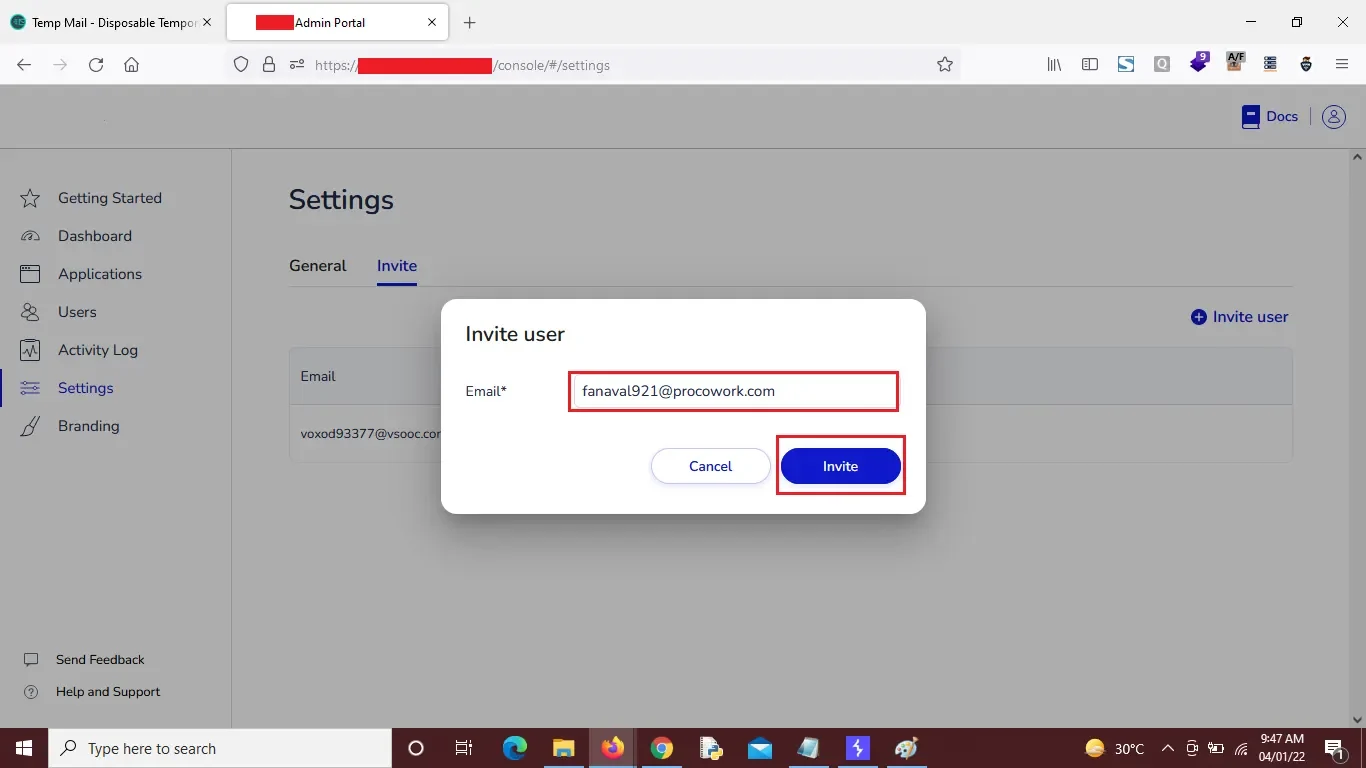
The victim's email address was entered and the Invite button was clicked.
Step 3: Intercept the request and the response
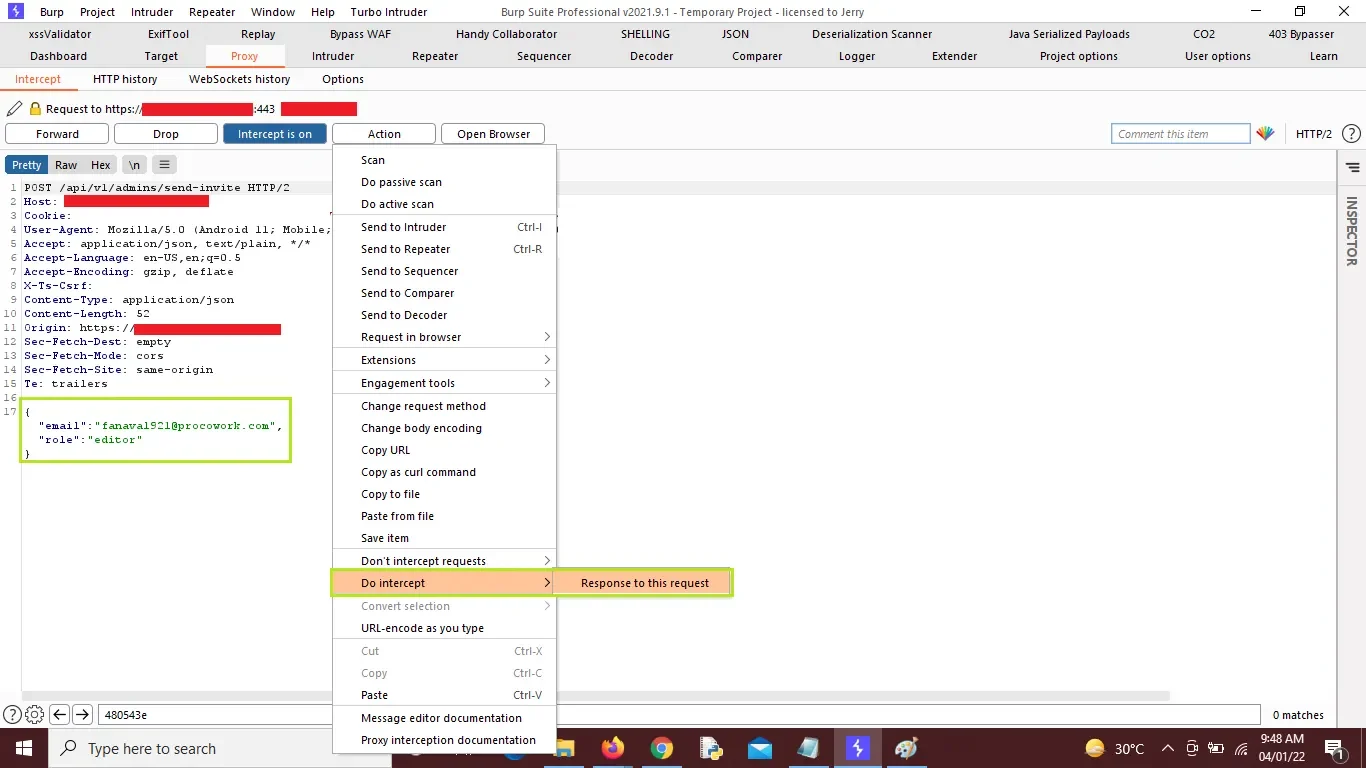
The request was intercepted with Burp Suite, then the researcher right-clicked on the request and chose Do intercept > Response to this request, so that the server's response to the invitation call could be inspected.
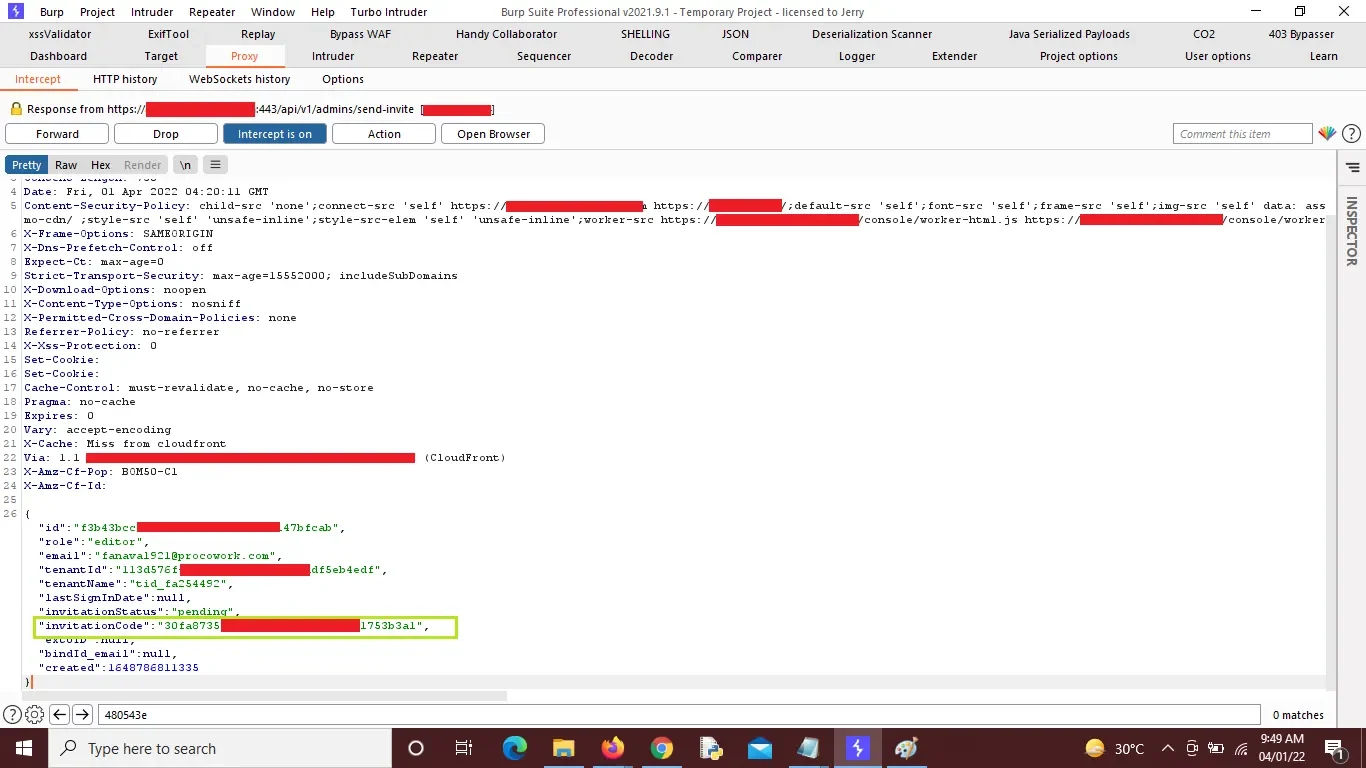
The response contained the invitation token, which is the leak at the heart of the finding. The invitation was left in a pending state.
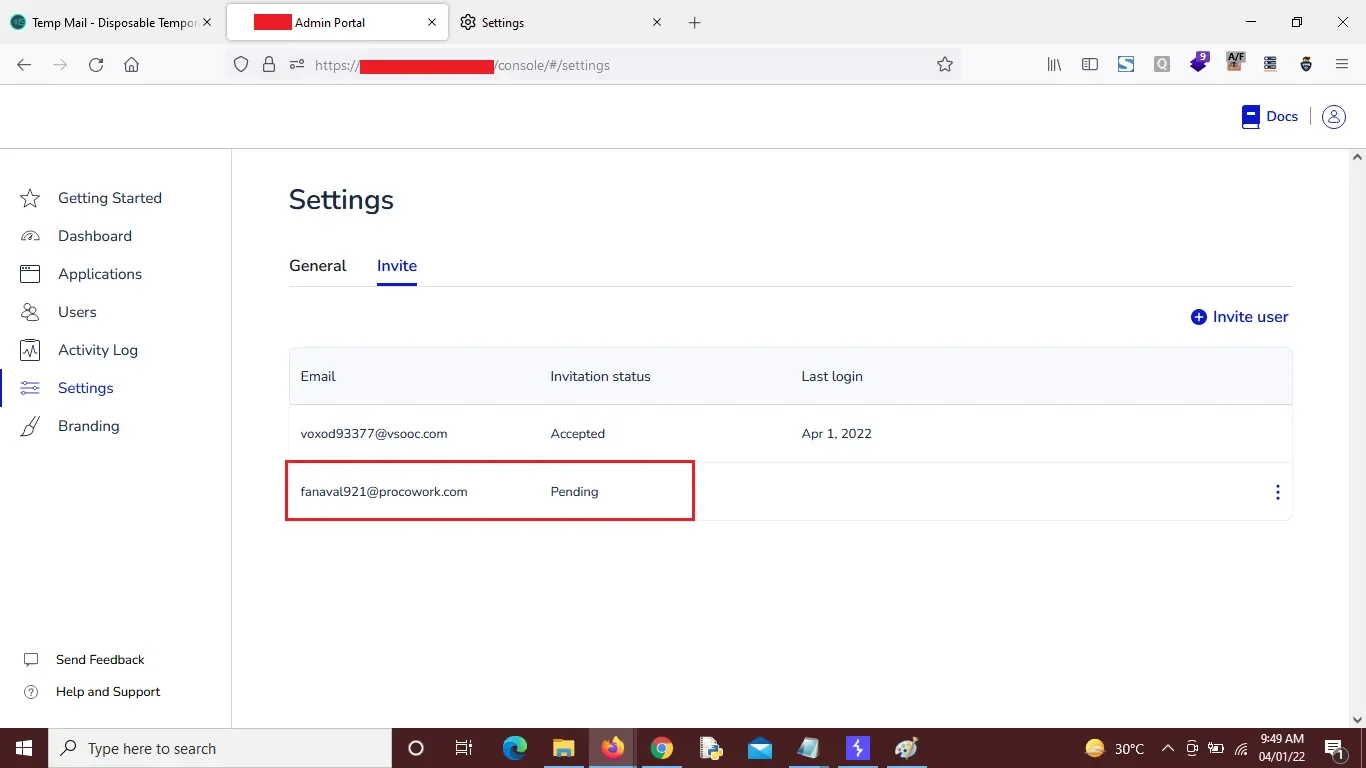
Step 4: Build the invitation URL
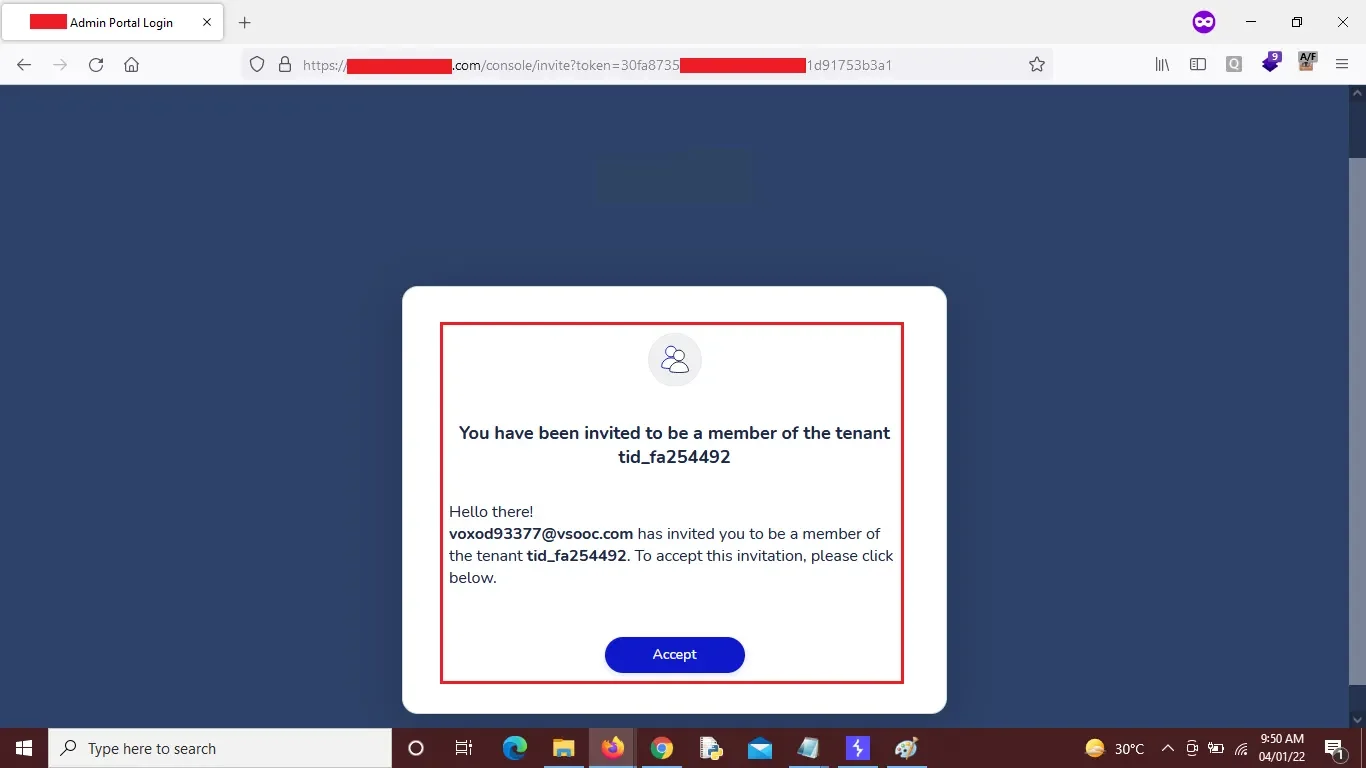
Because the token was already leaked in the response, the researcher crafted the URL for the invitation token and opened it in the browser. Clicking Accept prompted for an email address.
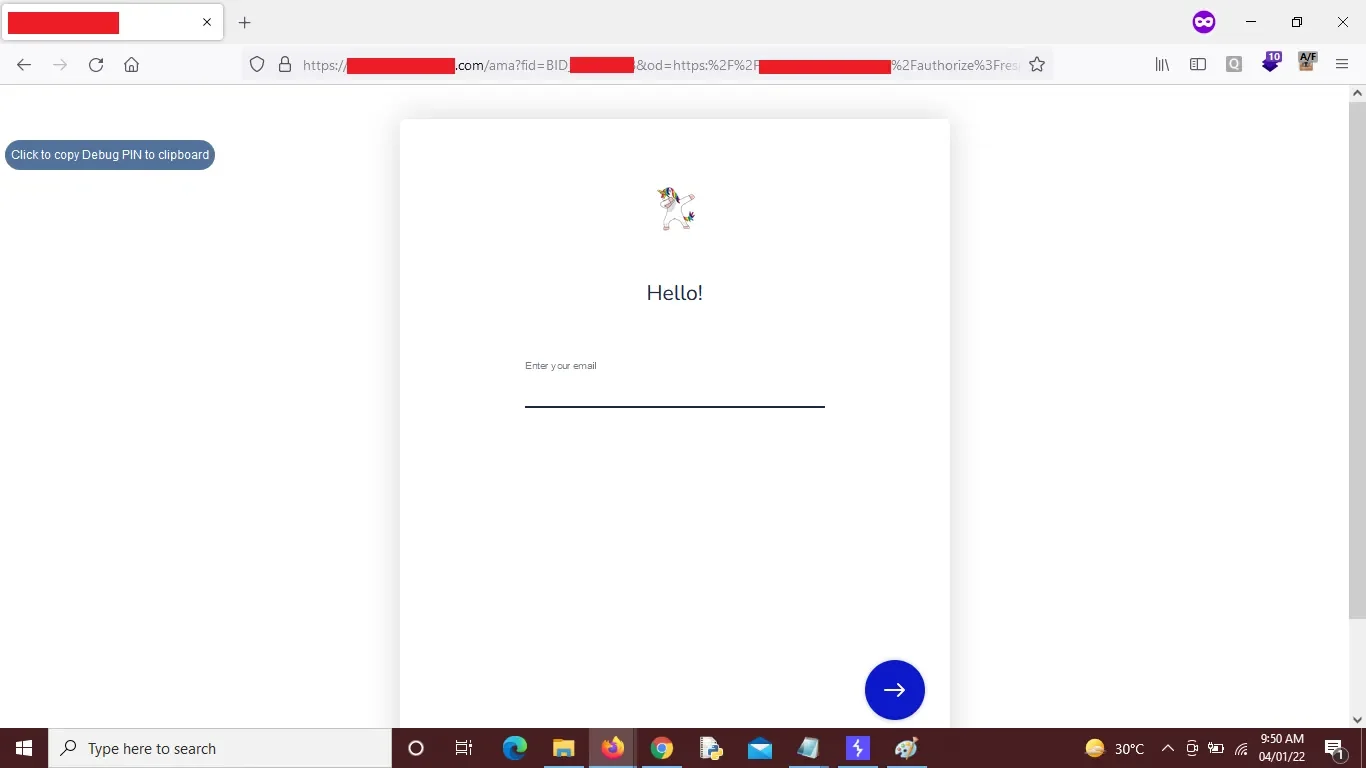
Step 5: Supply an attacker-controlled email
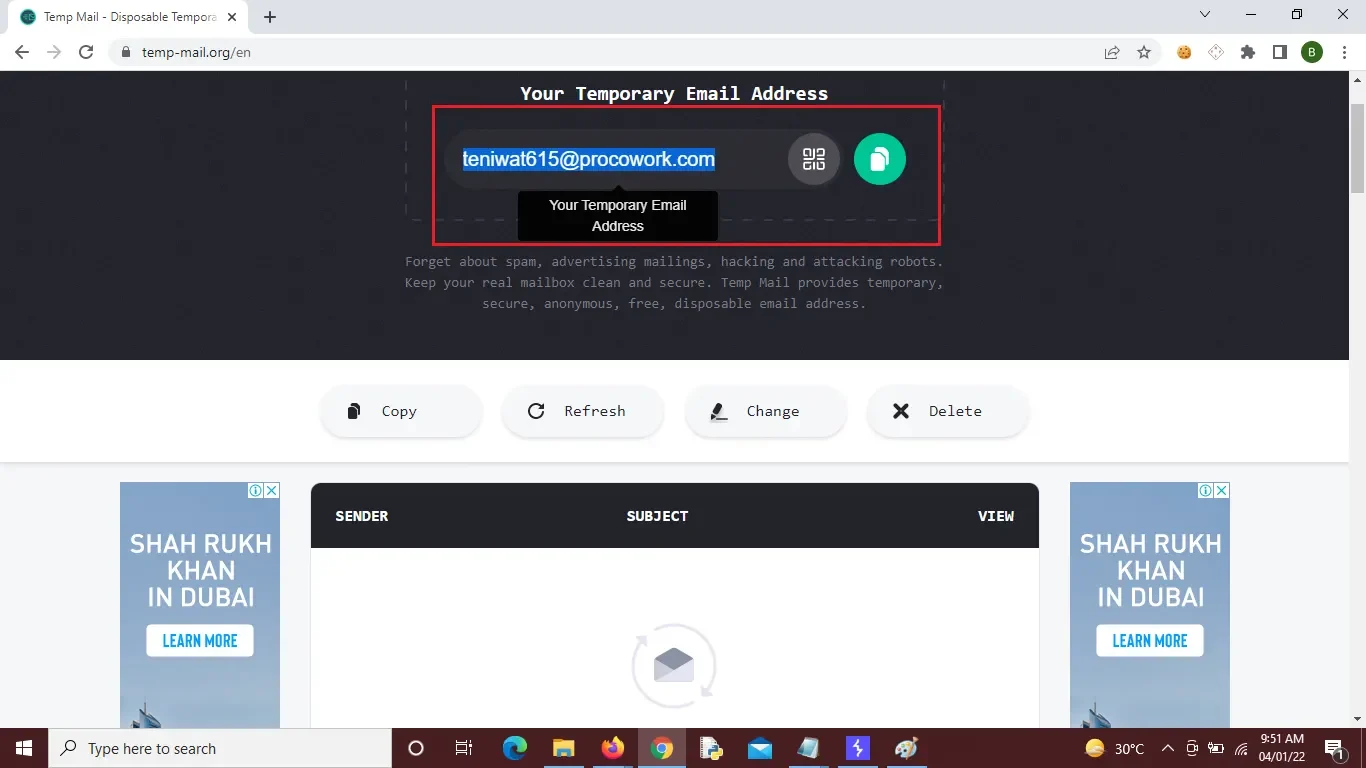
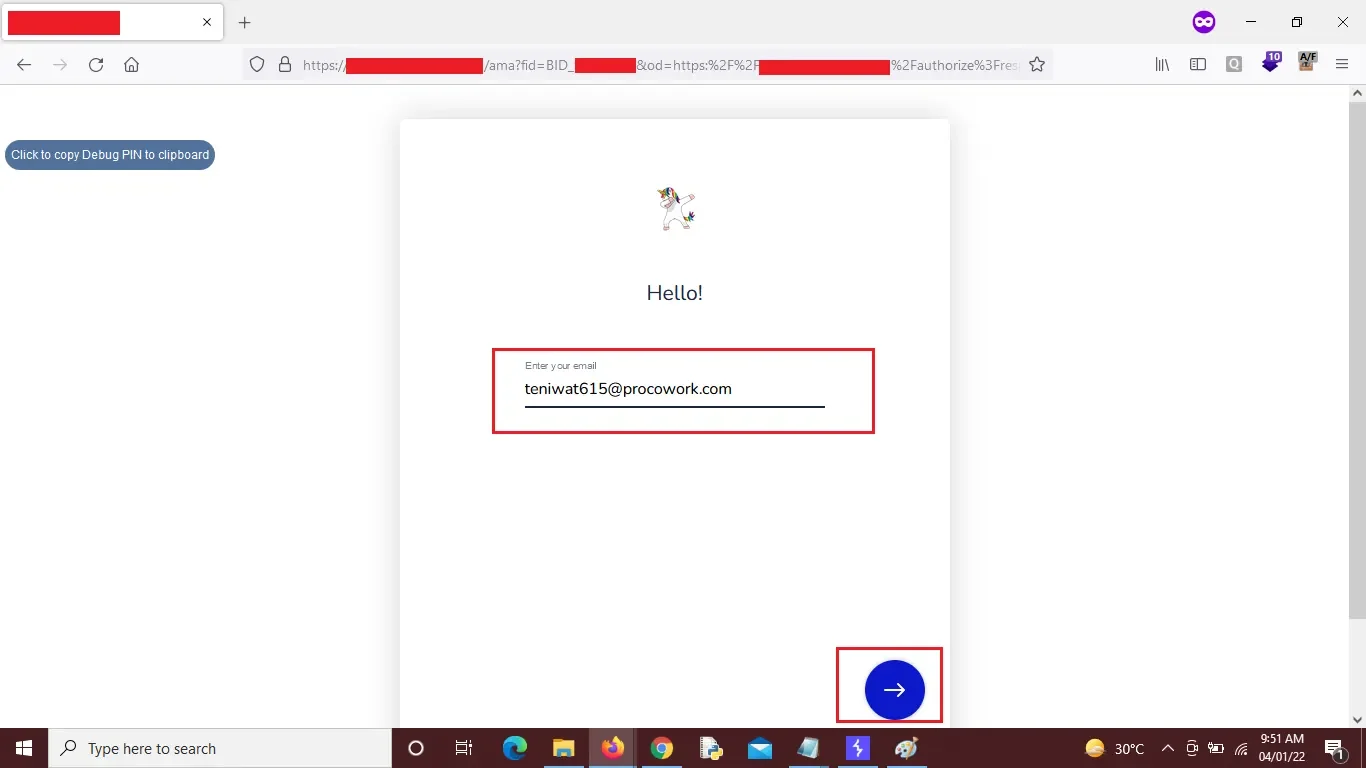
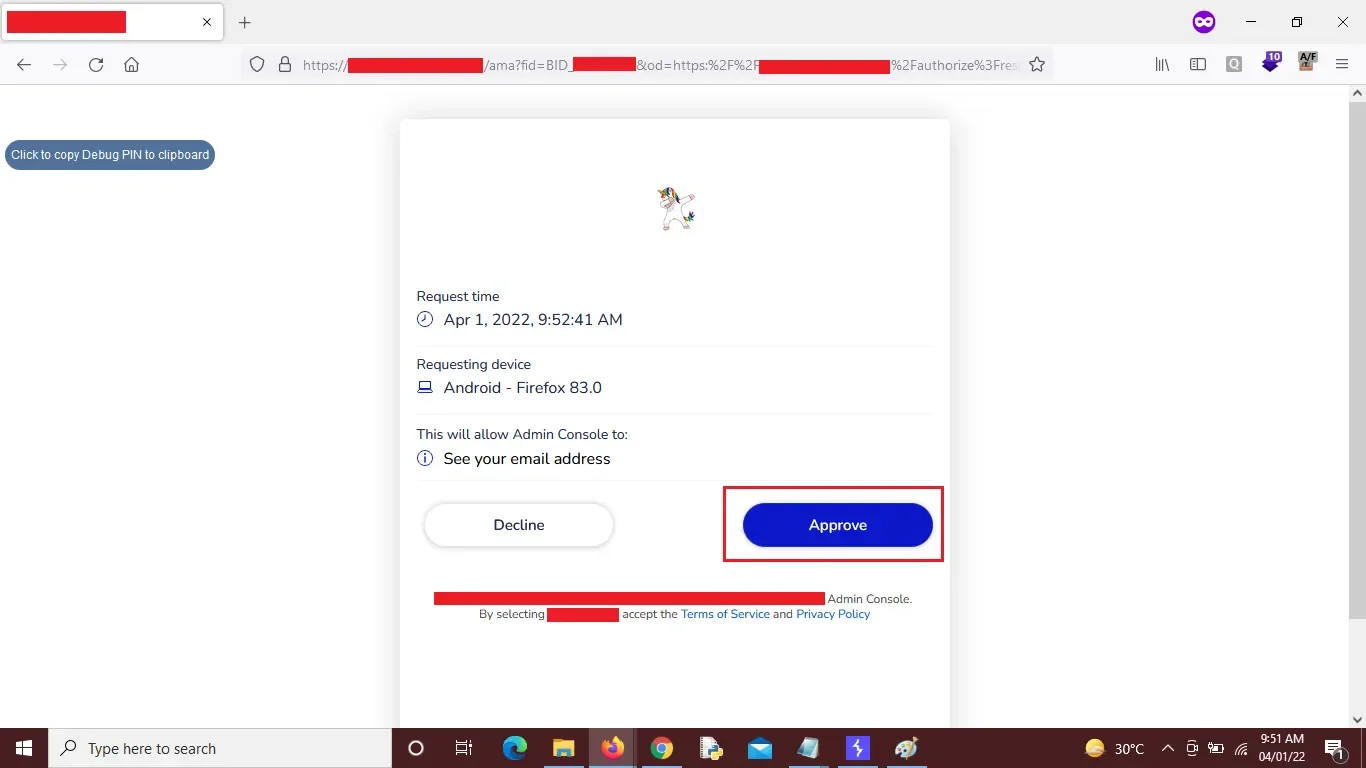
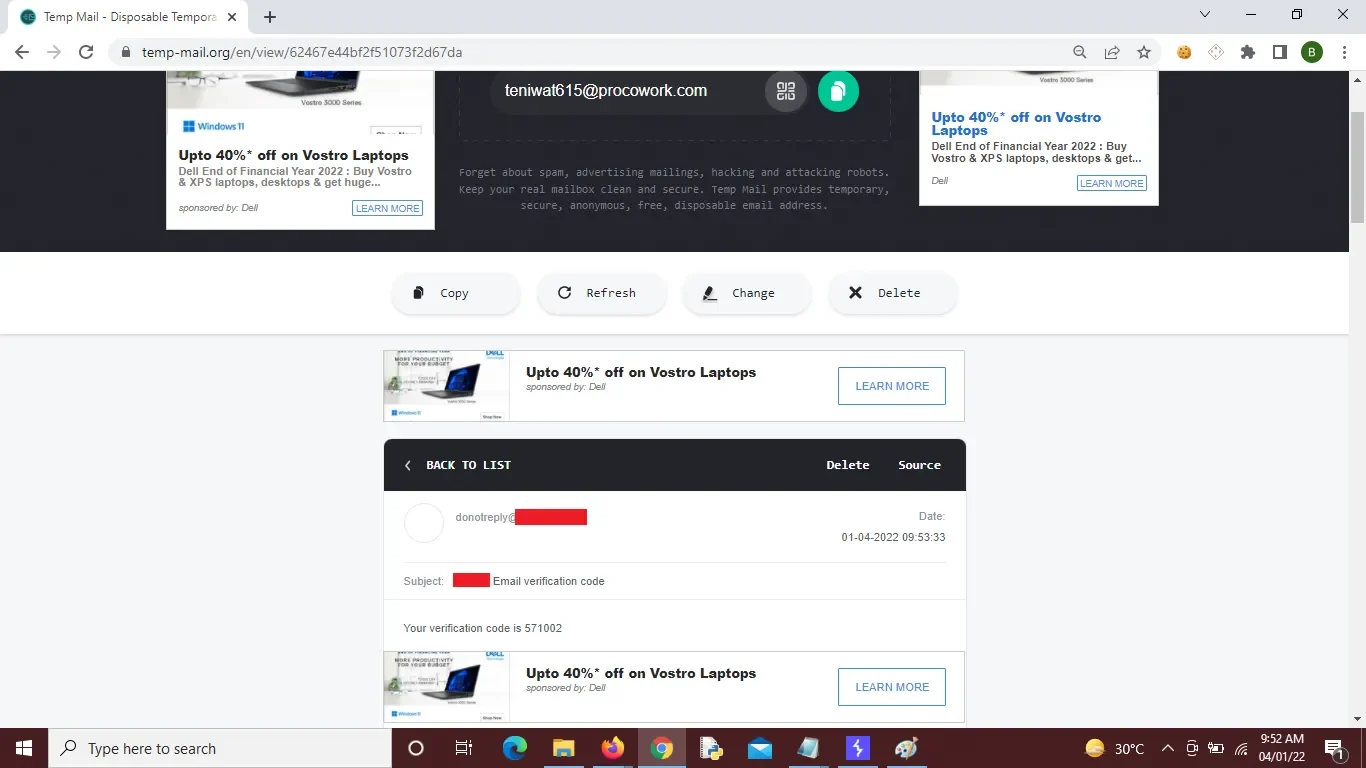
The researcher went to Temp Mail, copied the unregistered email address, pasted it into the site and clicked the button, then clicked Approve.
Step 6: Receive the verification code
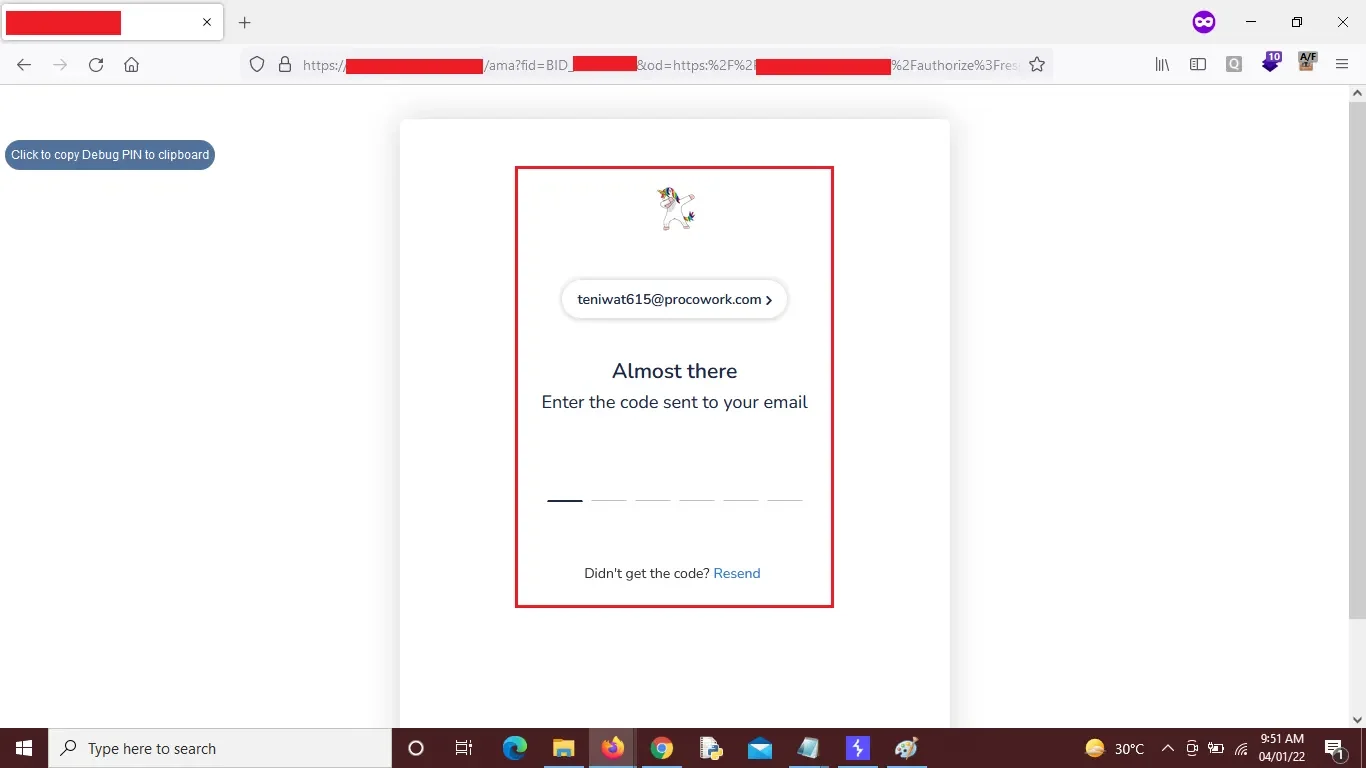
The verification code was sent to the unregistered email address, that is, the attacker's mailbox rather than the victim's.
Step 7: Accept the invitation
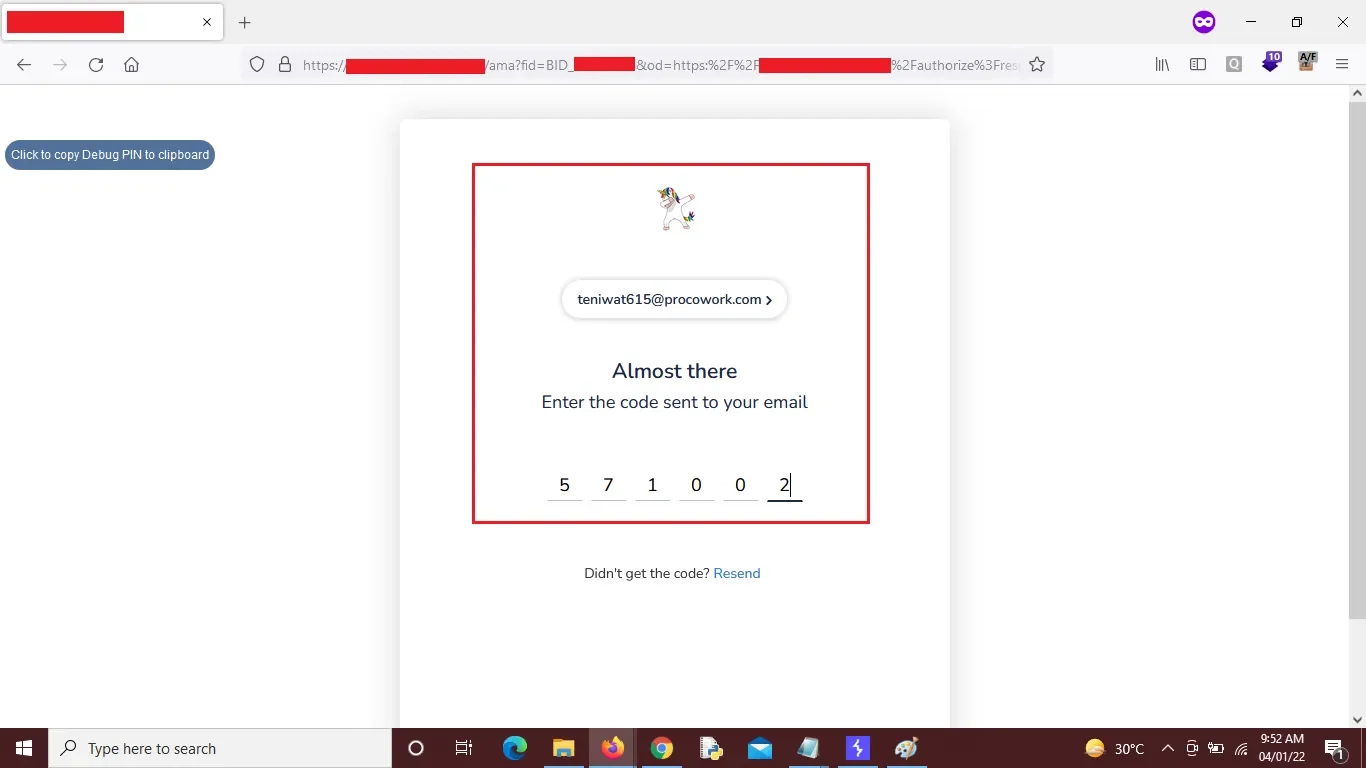
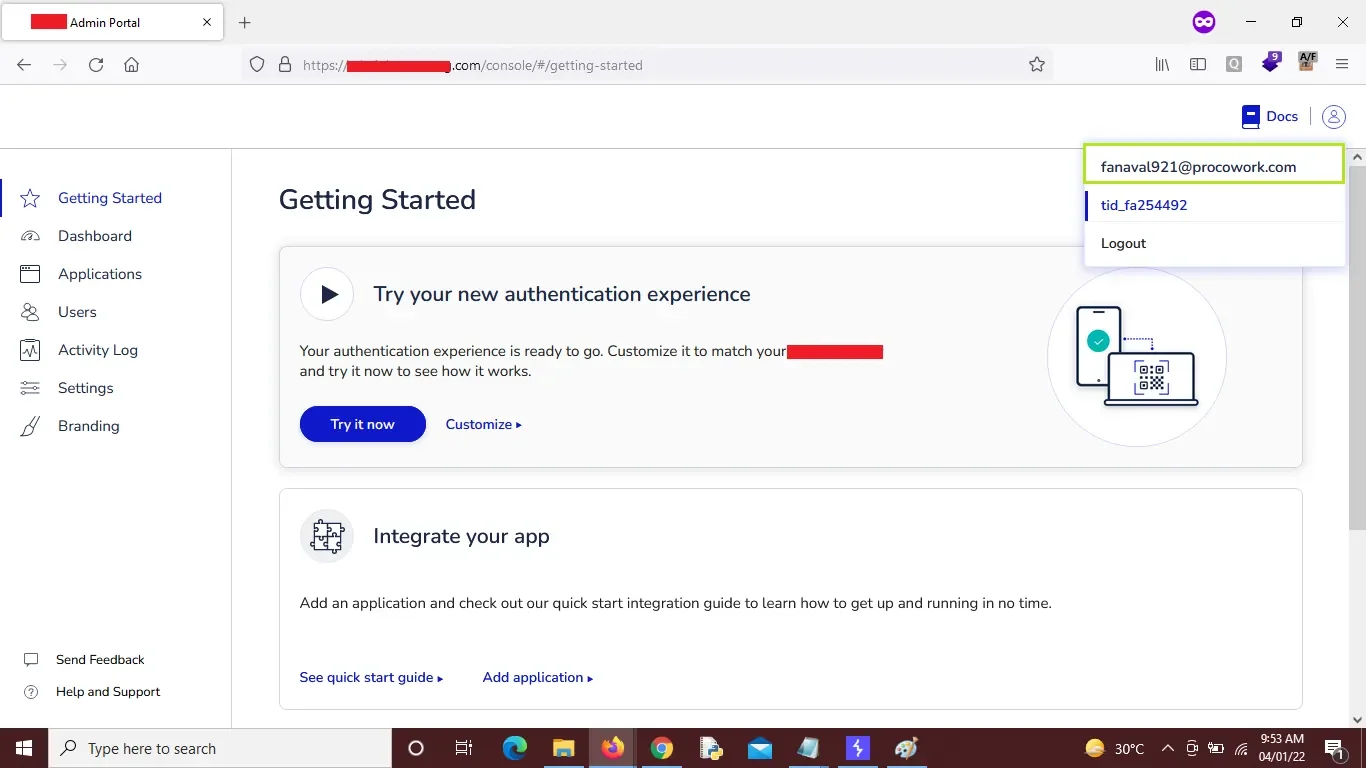
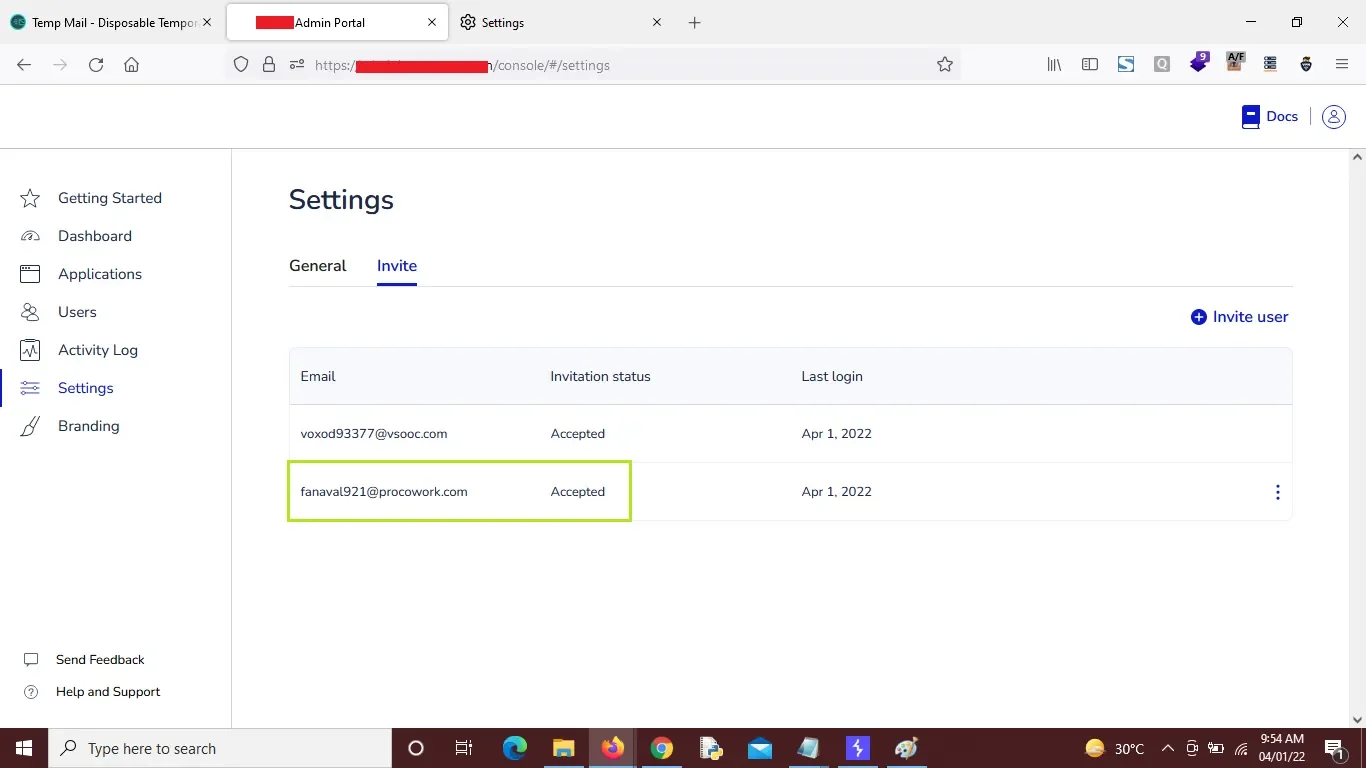
The code was used and the invitation that had been sent to the victim was accepted.
Root cause
In the researcher's opinion there were two flaws in the web application:
- The invitation token was leaked in the response while inviting the user.
- The validation of the invited user on the invitation token was not done.
In other words, the validation of the invited user against the invitation token was not performed.
Impact
Any admin can take over the account of any user who is invited by the admin to the tenant. The researcher rates the severity as low to medium, because the attack happens within the tenant. Beyond that, the only thing an admin can do here is impersonate the invited user and perform actions on that user's behalf; an admin is not able to impersonate an existing user.
The researcher calculated the following CVSS v3.0 score:
Vector String - CVSS:3.0/AV:N/AC:L/PR:L/UI:N/S:U/C:L/I:L/A:N
Score - 5.4 (Medium)
Fix
The report gives two mitigations:
- The invitation code should not be sent in the response from the server.
- A check should be performed against the invite code and the invited email address.
The report's proposed secure-code sketch compares the provided email with the invite code and only proceeds when they match; otherwise it returns an error or asks for the correct invite code.
// Check if the provided email matches the invite code
if (email == inviteCode) {
 // Email matches the invite code
 // Proceed with the rest of the authentication process
 // …
} else {
 // Email does not match the invite code
 // Return an error message or ask for the correct invite code
 // …
}

Variants to test
- Token in the invitation response. Invite a user and inspect the response. A positive result is an invitation token appearing in the response to the admin who created the invitation.
- Email not bound to the token. Open the invitation URL, accept, and enter a different address than the invited one. A positive result is a verification code delivered to the new address and the invitation being accepted.
Each of these should be tested only within the scope and rules of the target programme.
What happened, in plain words
A security researcher was given permission to test a private web application through a bug bounty platform. A bug bounty platform is a website where companies list their software and offer money to people who find security problems in it, so that the problems can be fixed before criminals find them. For this finding the researcher was paid 150 USD.
The application organises users into tenants. "Multi-tenant" means one installation of the software serves many separate organisations at once, and each organisation's data is kept apart from the others. In the report's own words, a tenant is a group of users from a single organisation or company, and there is an admin in the tenant who can invite other users to work for the company by which the tenant has been created. A tenant can belong to an IT department, an Accounts department, a Sales department and so on. Think of an office building: the building is the application, and each company renting a floor is a tenant. People on one floor should not be able to walk into another floor's offices.
The feature at the centre of the finding is the invitation flow. An admin types a colleague's email address, the application sends an invitation, and the invited person accepts it to join the tenant. This is like a company sending a new starter an email saying "click here to get your office pass".
The researcher found that this flow leaked the invitation token in the server response and did not bind the token to the invited email address. A token is a long random string that acts as a temporary key: whoever holds it is treated as allowed to do the thing it unlocks, much like a paper claim ticket at a cloakroom. "Leaked in the response" means the server handed that key back to whoever made the request, in a place it could be read. "Not bound to the email address" means the key was not tied to the person it was meant for, so anyone holding it could finish the sign-up using a different email address. Together, these two weaknesses allowed an account takeover: the researcher ended up in control of the invited person's account.
Setup
The researcher was given admin credentials for the application by the platform. Credentials are the username and password (or similar) that prove who you are when you log in. So the starting position is an authenticated tenant administrator: someone already logged in as an admin inside one tenant.
The only tool mentioned is Burp Suite, used to intercept the invitation request and its response. Burp Suite is a program that sits between your browser and the website, like a postal worker who opens every letter going both ways, lets you read it, and can hold it back before delivery. "Intercept" means to pause a message in transit so you can look at it. No versions are given.
The precondition for the attack is that the attacker holds an admin role in a tenant and can invite users. The victim is a user who is invited by that admin. In plain terms: you need to be a manager inside the building before you can abuse the invitation desk.
Finding it
While browsing the application the researcher came across the invite functionality and noticed that it was vulnerable to invitation token leakage. The leaked token was then used to take over the victim's account through an unregistered email address controlled by the attacker. An unregistered email address here means a mailbox the attacker controlled, obtained through Temp Mail.
Exploitation
Step 1: Log in as the tenant admin
The researcher logged into the account with the admin credentials provided by the platform and clicked on the Invite user functionality. This step is simply getting into the position where the invitation button is available.
Step 2: Invite the victim
The victim's email address was entered and the Invite button was clicked. The point of this step is to make the application create a real, pending invitation for the victim, because that invitation is what carries the token the researcher wants to see.
Step 3: Intercept the request and the response
The request was intercepted with Burp Suite, then the researcher right-clicked on the request and chose Do intercept > Response to this request, so that the server's response to the invitation call could be inspected. A request is the message your browser sends to the server asking it to do something; a response is the server's reply. Normally your browser handles both silently and you never see them. Burp Suite lets you pause them, which is how you find out what the server is really saying behind the page you see.
The response contained the invitation token, which is the leak at the heart of the finding. The invitation was left in a pending state, meaning it had been created but not yet accepted.
Step 4: Build the invitation URL
Because the token was already leaked in the response, the researcher crafted the URL for the invitation token and opened it in the browser. A URL is a web address. Clicking Accept prompted for an email address. Because the token was already leaked in the response, the researcher crafted the invitation URL and opened it in the browser.
Step 5: Supply an attacker-controlled email
The researcher went to Temp Mail, copied the unregistered email address, pasted it into the site and clicked the button, then clicked Approve. Temp Mail is a service that gives you a temporary, throwaway email address you can read in the browser without signing up. It is useful here because the attacker needs a mailbox they control that is not linked to them personally.
Step 6: Receive the verification code
The verification code was sent to the unregistered email address, that is, the attacker's mailbox rather than the victim's. A verification code is a short number or string sent to prove you can read a particular mailbox. The code went to the attacker because the validation of the invited user on the invitation token was not done.
Step 7: Accept the invitation
The code was used and the invitation that had been sent to the victim was accepted. The result is that the invitation sent to the victim was accepted using the attacker's email.
Root cause
In the researcher's opinion there were two flaws in the web application:
- The invitation token was leaked in the response while inviting the user.
- The validation of the invited user on the invitation token was not done.
In other words, the validation of the invited user against the invitation token was not performed. "Server-side control" means a check performed by the server itself, which a user cannot bypass by editing what their browser sends.
Impact
Any admin can take over the account of any user who is invited by the admin to the tenant. The researcher rates the severity as low to medium, because the attack happens within the tenant. Beyond that, the only thing an admin can do here is impersonate the invited user and perform actions on that user's behalf; an admin is not able to impersonate an existing user. "Impersonate" means to act while appearing to be that person.
The researcher calculated the following CVSS v3.0 score. CVSS is a standard scoring system that turns the characteristics of a vulnerability into a number, so different findings can be compared. The vector string is a compact code listing those characteristics, and the score is the resulting number.
Vector String - CVSS:3.0/AV:N/AC:L/PR:L/UI:N/S:U/C:L/I:L/A:N
Score - 5.4 (Medium)
Reading the vector in plain words: the attack can be done over the network (AV:N), it is easy to carry out (AC:L), it needs some privileges to start from (PR:L, the admin role), it needs no action from the victim (UI:N), it stays within the same security scope (S:U), and the effect on confidentiality, integrity and availability is low (C:L, I:L, A:N). The total is 5.4, which the scale labels Medium.
Fix
The report gives two mitigations. A mitigation is a change that removes or reduces the weakness.
- The invitation code should not be sent in the response from the server.
- A check should be performed against the invite code and the invited email address.
The report's proposed secure-code sketch compares the provided email with the invite code and only proceeds when they match; otherwise it returns an error or asks for the correct invite code.
// Check if the provided email matches the invite code
if (email == inviteCode) {
 // Email matches the invite code
 // Proceed with the rest of the authentication process
 // …
} else {
 // Email does not match the invite code
 // Return an error message or ask for the correct invite code
 // …
}
Line by line: the first line is a comment saying what the block does, namely check that the email supplied matches the invite code. The if (email == inviteCode) { line is the check itself: it asks whether the email and the invite code are the same. If they are, the lines inside the first pair of braces run: a comment notes that they match, another comment says to continue with the rest of the login or sign-up process, and the // … marks where that remaining code would go. The } else { line covers every other case, where the two do not match. Inside it, a comment notes the mismatch, and the remaining lines say to return an error message or ask for the correct invite code, with // … again standing in for the actual code. In short, the sketch shows the check the report proposes: continue only when the email matches the invite code.
Variants to test
These are checks in the same area as the finding, written so that someone new to testing can follow them. Each should be tested only within the scope and rules of the target programme.
- Token in the invitation response. Invite a user and inspect the response. A positive result is an invitation token appearing in the response to the admin who created the invitation.
- Email not bound to the token. Open the invitation URL, accept, and enter a different address than the invited one. A positive result is a verification code delivered to the new address and the invitation being accepted.
Glossary
- Account takeover (ATO): an attack in which one person gains control of another person's account and can act as them.
- Admin: a user with the highest level of permission inside a tenant, including the ability to invite others.
- API: a way for one piece of software to talk to another, sending requests and receiving responses; web pages use it behind the scenes.
- Authentication: the process of proving who you are, usually by logging in.
- Bug bounty platform: a website where companies list software and pay researchers who report security problems in it.
- Burp Suite: a tool that sits between your browser and a website so you can pause, read and change the requests and responses.
- Cookie: a small piece of data a website stores in your browser so it can recognise you on later requests.
- Credentials: the username and password, or similar, used to log in.
- CVSS: a standard scoring system that turns the characteristics of a vulnerability into a comparable number.
- Headers: extra lines of information sent alongside a request or response, describing things like the type of content or how to handle it.
- Impersonate: to act while appearing to be another person.
- Intercept: to pause a message in transit so you can inspect it before it continues.
- Invitation token: a long random string that acts as a temporary key allowing whoever holds it to accept an invitation.
- Mitigation: a change that removes or reduces a weakness.
- Multi-tenant: one installation of software serving many separate organisations while keeping their data apart.
- Pending invitation: an invitation that has been created but not yet accepted.
- Request: the message a browser sends to a server asking it to do something.
- Response: the server's reply to a request.
- Root cause: the underlying reason a vulnerability exists, as opposed to its visible symptom.
- Server-side control: a check performed by the server itself, which a user cannot bypass by editing what their browser sends.
- Severity: how serious a vulnerability is judged to be, often expressed as low, medium, high or critical.
- Temp Mail: a service that provides a temporary, throwaway email address readable in the browser.
- Tenant: a group of users from a single organisation or company, kept separate from other organisations in the same application.
- Token: a string of characters used as a key to prove permission or identity without sending a password each time.
- URL: a web address, such as the address of a page in a browser.
- Vector string: the compact code in CVSS that lists the characteristics of a vulnerability.
- Verification code: a short number or string sent to an email address or phone to prove the recipient can access it.
- Vulnerability: a weakness in software that someone could abuse to do something the designers did not intend.




