Server Side Request Forgery - A Forged Document
A document upload feature accepted HTML files without validating the file type, and the server later fetched a remote image referenced inside the uploaded file. An attacker could make the server send requests to internal addresses, revealing that internal hosts are reachable.
 Published on shahjerry33.medium.com
Server Side Request Forgery (SSRF) attacks are used to target internal systems that are behind firewalls and are not accessible from the external network. SSRF attacks can be exploited to access internally running services like SSH, Local-Host, FTP, Gopher etc.
The full write-up lives on its author's site
It belongs to its author, so we link to it rather than copy it. The other two tabs are our own rewrites, checked against it.
Context
This write-up covers a server side request forgery (SSRF) issue found on a private Bugcrowd program. The affected feature was a document upload: after logging in, a user was given the option to upload a document. The program accepted uploads without validating the file type, so any file, including an .html file, could be stored.
SSRF, as the report describes it, is used to target internal systems that sit behind firewalls and are not reachable from the external network. The report notes that such attacks can be used to reach internally running services such as SSH, localhost, FTP and Gopher, and that in a normal SSRF attack the attacker causes the server to make a connection to internal-only services inside the organisation's infrastructure.
Setup
No special tooling beyond a browser and Burp Suite was needed. The preconditions were:
- A registered account on the target application.
- Access to the document upload feature after logging in.
- Burp Collaborator, used to generate a unique payload URL and to observe incoming interactions.
The report does not name the application, its hostnames or any software versions.
Finding it
The upload feature had no validation on the uploaded file type and allowed all files to be uploaded. That alone is a file upload weakness, but the interesting behaviour appeared after the file was stored: the server read the content of the uploaded file and tried to fetch the image referenced inside it. Because the reference pointed at a Collaborator URL, the fetch came from the server itself, and the resulting interaction revealed an internal IP address.
Exploitation
Step 1: Create an account and reach the upload
After creating an account and logging in, the researcher had the option of uploading a document.
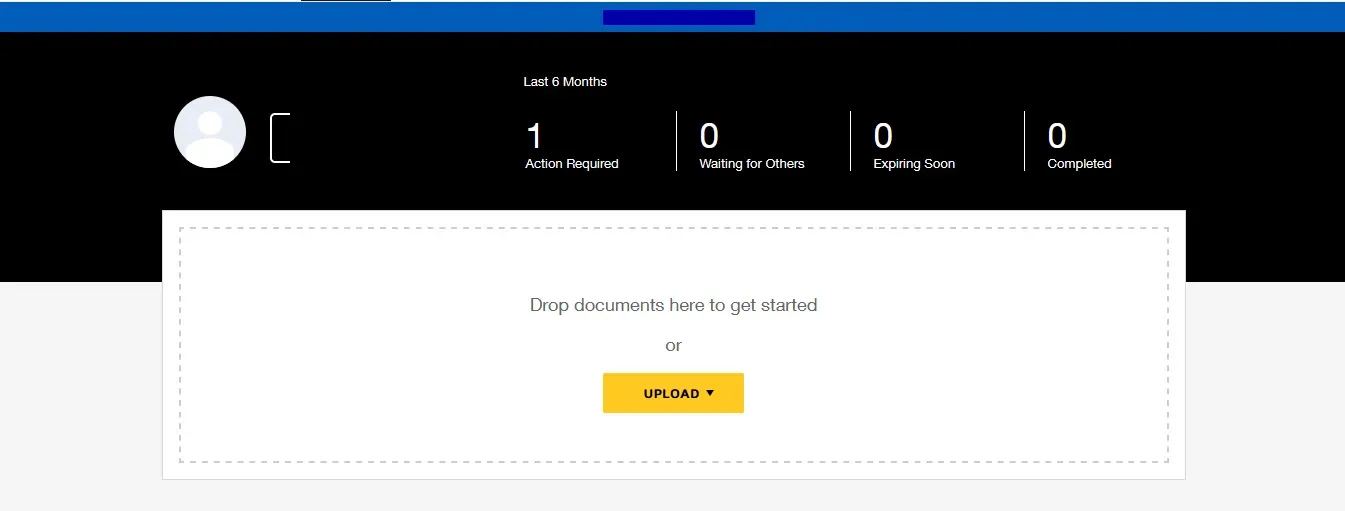
The screenshot shows the document upload option in the logged-in application.
Step 2: Generate a Collaborator payload
The Burp Collaborator client was started to generate a payload, and the payload was copied with the "Copy to clipboard" button.
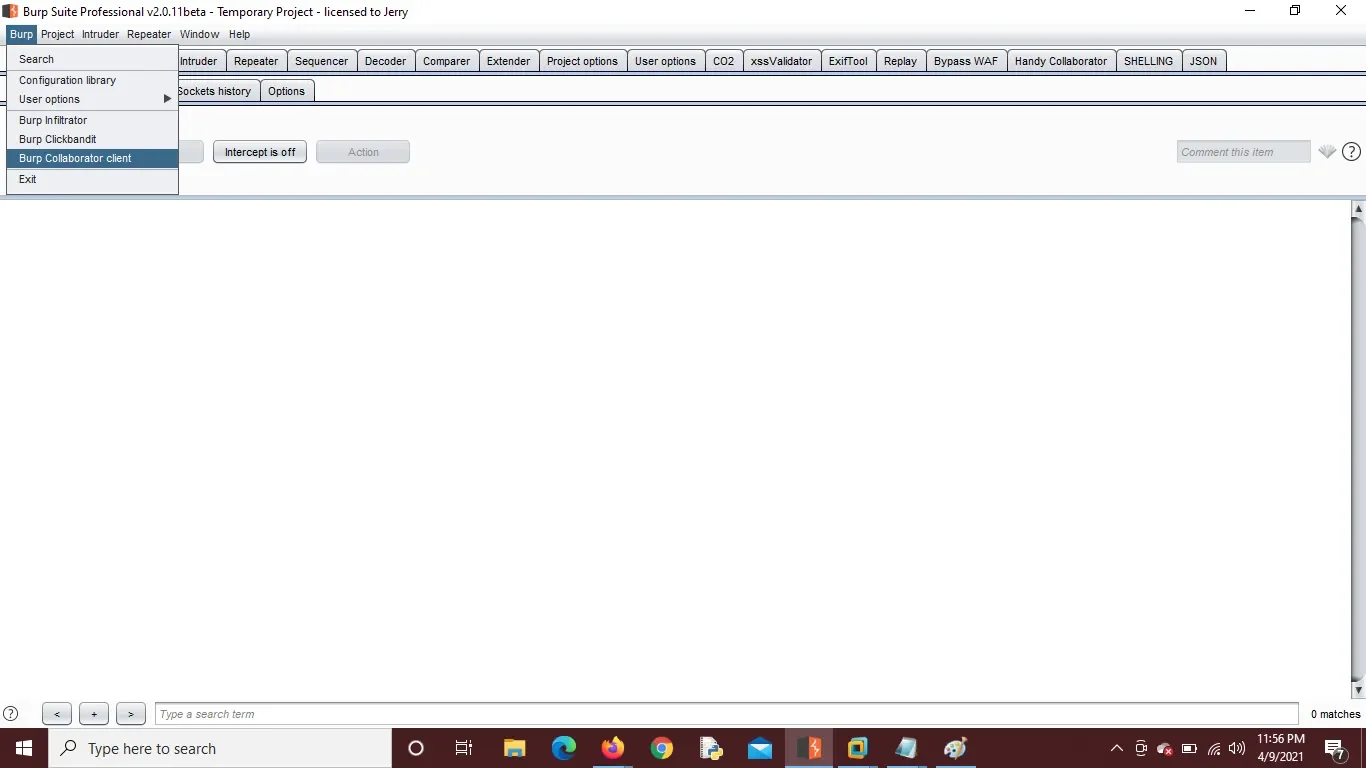
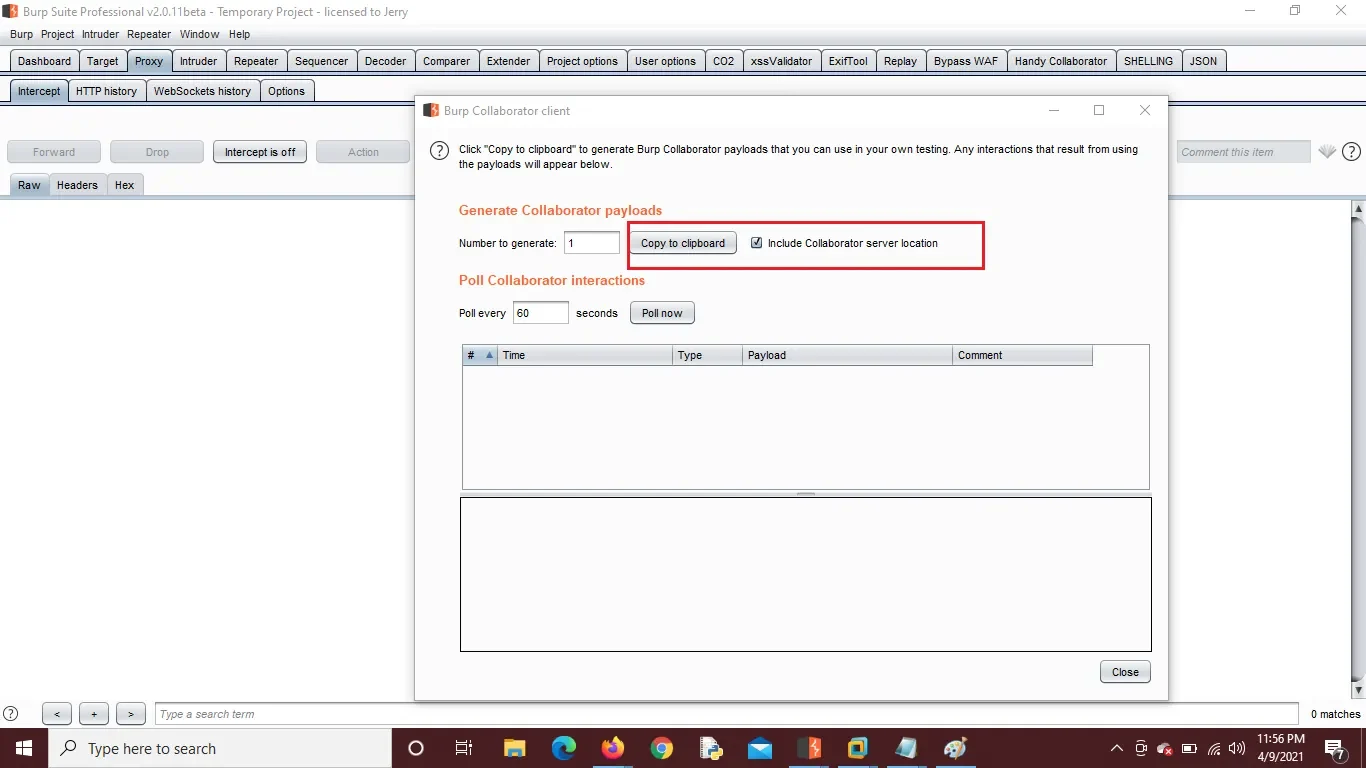
The two screenshots show the Collaborator client and the copy action that produced the URL used in the payload.
Step 3: Build the HTML file
An .html file was created containing the payload and saved. The exploit code in the report is:
<html>
<body>
<img src=http://<BurpCollaboratorURL></img>
</body>
</html>
Then save it as .html and upload it. The <img> element is the part that matters: its src points at the Collaborator URL, and the server fetched that image when it processed the file.
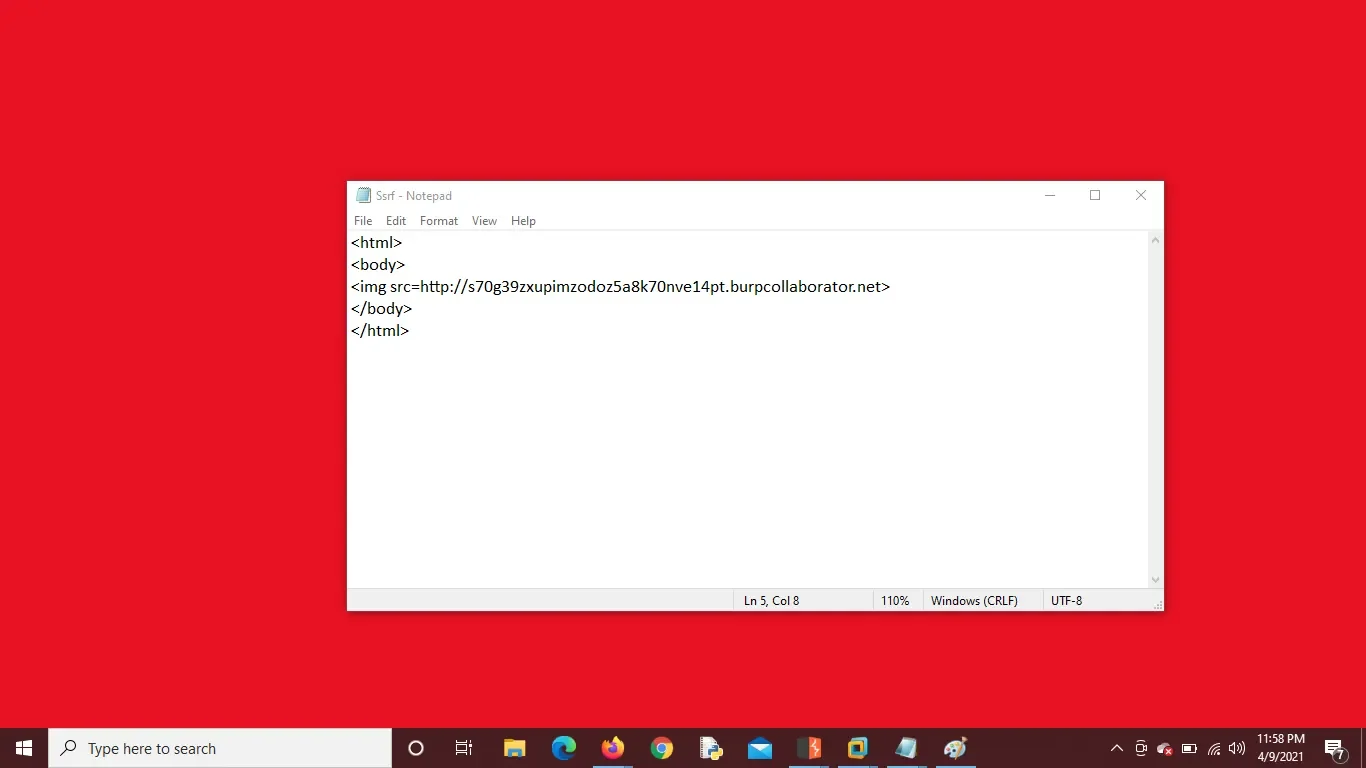
The screenshot shows the saved file with the Collaborator payload in place.
Step 4: Upload the file
The .html file was uploaded to the target website through the document upload feature.
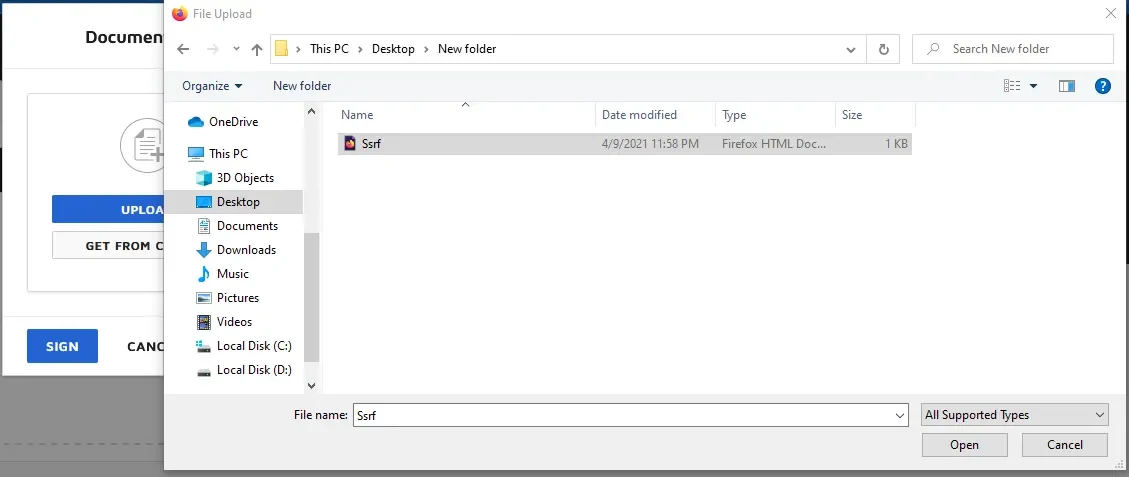
The screenshot shows the upload of the crafted file.
Step 5: Observe the pingbacks
After some time, pingbacks arrived on the Burp Collaborator client.
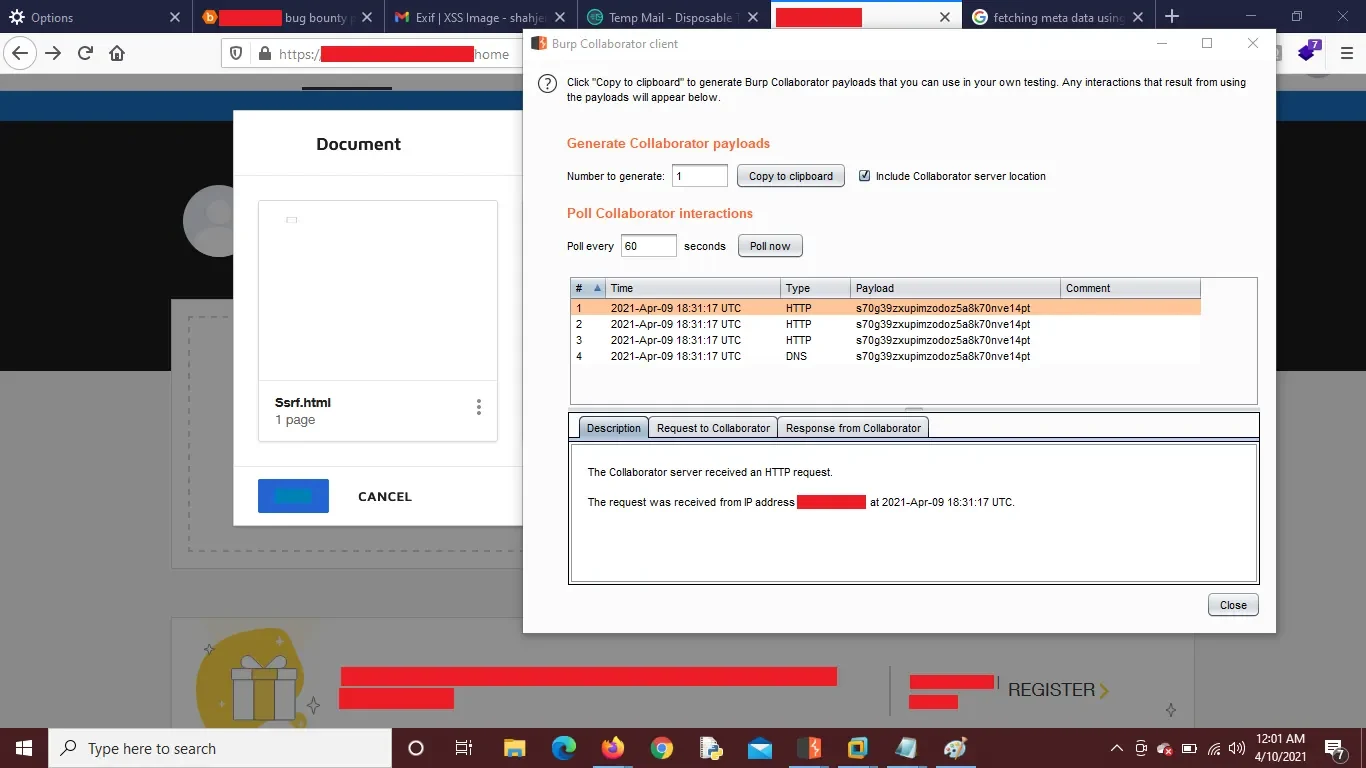
The screenshot shows the internal pingbacks received by the Collaborator client.
The researcher then checked the source IP of the interaction with the whois command. The address belonged to the company itself, but it was different from the IP of the target and was not accessible from the internet. This was a basic SSRF: the internal IP was identified, but it was not possible to exploit the issue further.
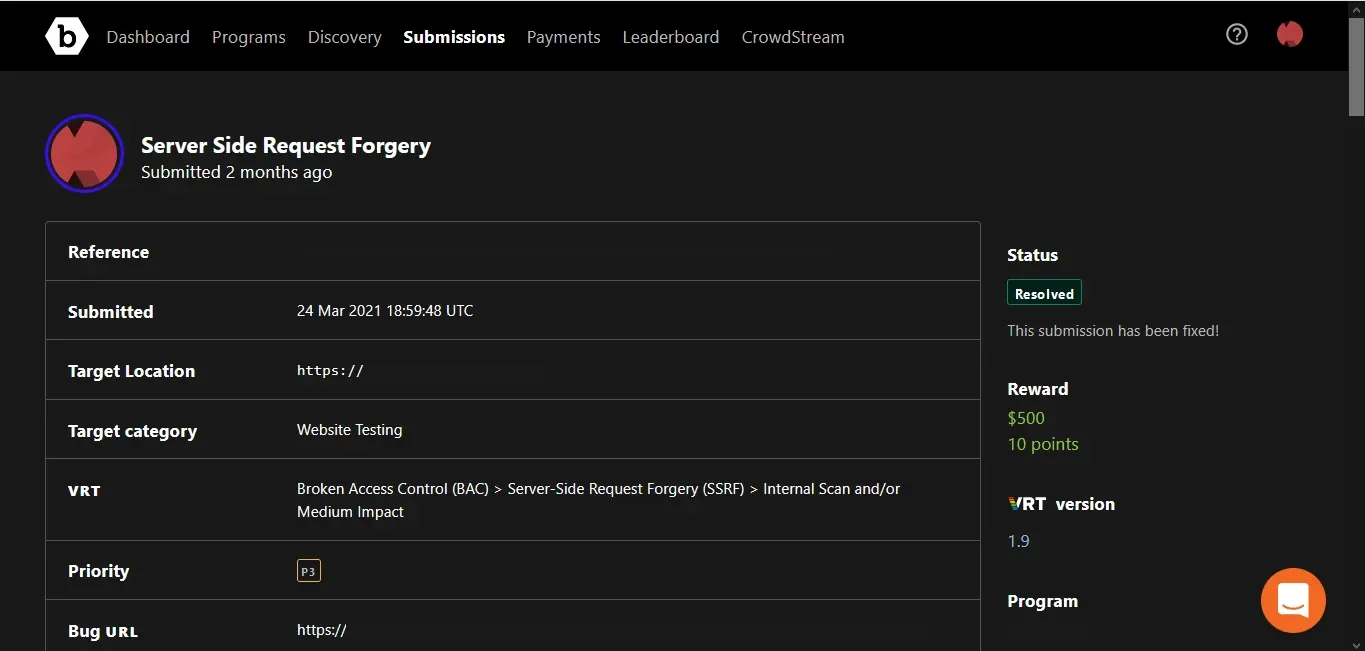
The bug was triaged as P3 with a bounty of 500 USD. The severity was later changed to P4.
Root cause
In the researcher's opinion, the chain is as follows: when the .html file was uploaded to the server, the server read the content of the file and tried to fetch the image from the Burp Collaborator client using its internal IP, which was then reflected on the Collaborator client.
In the researcher's opinion, the upload accepted any file type and the server then resolved the external image reference itself, from inside the network.
Impact
An attacker can exploit trust relationships to escalate an attack from the vulnerable application and perform unauthorised actions. In this instance the practical result was limited: the researcher could confirm that the server made a request from an internal address belonging to the company, different from the target's own IP and not reachable from the internet, but could not go further. The researcher was not able to exploit the issue further.
Fix
No fix is described in the report. The suggested mitigation is to whitelist the IP addresses or DNS names that the application needs to access. The report notes that there is no universal fix for SSRF because it depends heavily on application functionality and business requirements. For this case specifically, the recommendation is that the application should only allow image files such as pdf, png, jpeg and tiff to be uploaded.
Variants to test
- Other file types that reference external resources. Try SVG, PDF and office documents containing external image or link references. A positive result is an interaction on your Collaborator or listener originating from the target's infrastructure.
- Different HTML elements. Replace
<img>with other elements or attributes that trigger fetches, such as<link>,<script>or CSSurl(). A positive result is the same kind of pingback from an internal address. - Redirect-based bypasses. Point the payload at a URL you control that redirects to an internal address. A positive result is a request reaching the internal destination, visible in your logs or in the timing of the response.
- DNS-only confirmation. Use a Collaborator domain and check whether DNS resolution alone occurs even when the HTTP fetch is blocked. A positive result is a DNS interaction from an internal resolver.
- Source IP comparison. For every interaction, run
whoison the source address and compare it with the target's public IP. A different address owned by the organisation indicates the request came from inside.
What happened, in plain words
A security researcher found a way to make a company's own web server reach out to a Burp Collaborator address. The company ran a website where people could upload documents. The upload form did not check what kind of file was being sent, so the researcher uploaded a small web page instead of a normal document. When the company's server stored that page, it also read it and tried to load an image that the page pointed to. That image address was a Burp Collaborator payload, so the server made a request to the Collaborator. The request came from an IP address belonging to the company that was not accessible from the internet. That is the essence of a server side request forgery (SSRF) bug: you trick a server into making a request on your behalf, and because the server sits inside the network, it can reach places you cannot.
The researcher could see that the request came from an internal address belonging to the company, but could not use it to do anything more. The report was triaged as P3 and paid a bounty of 500 USD. Later the severity was changed to P4.
This article walks through the same steps the researcher took, explaining every idea from scratch. You only need a browser and a computer to follow along conceptually; the researcher also used a tool called Burp Suite, which is explained below.
Background: the ideas you need
Before the steps, here are the concepts that appear in the report, explained as if you have never heard of them.
A server and a client. When you visit a website, your browser (the client) asks a computer somewhere on the internet (the server) for a page. The server sends the page back. Most of what happens on the web is this back-and-forth.
A firewall and an internal network. Companies usually put their important computers behind a firewall. A firewall is like a reception desk at the entrance of an office building: it decides which visitors from outside are allowed in. Computers behind the firewall can talk to each other freely, but people on the public internet cannot reach them directly. This is why an internal network is interesting to an attacker: it often holds services that were never designed to be exposed to the outside world.
Internal services. Inside a company's network there are often services such as SSH (a way to log in to another computer remotely), a local web server running on the same machine (often called localhost), FTP (an old way to transfer files) and Gopher (an even older protocol for fetching documents). The report lists these as examples of what SSRF can be used to reach. None of them should normally be reachable from the internet.
SSRF (server side request forgery). Normally, when you type an address into your browser, your computer makes the request. In SSRF, you arrange for the server to make the request instead. The server is inside the firewall, so it can reach internal services that you cannot. The report describes it this way: SSRF attacks are used to target internal systems that are behind firewalls and are not accessible from the external network, and in a normal SSRF attack the attacker causes the server to make a connection to internal-only services within the organisation's infrastructure. A simple comparison: you cannot walk into a restricted office building yourself, but if you can convince a member of staff to go and fetch something for you, you can reach inside without ever passing the front desk.
File upload and file type validation. Many websites let you upload a document, for example a CV or a receipt. A well-built site checks the file type: it looks at the file and decides whether it is an allowed kind, such as a PDF or a JPEG image. If it does not check, it will accept anything, including a file that a browser would treat as a web page. That is the weakness the researcher found first.
HTML and the <img> tag. HTML is the language web pages are written in. An HTML file is just a text file with a .html ending. Inside it, an <img> tag tells the browser to display a picture, and its src attribute says where the picture lives. For example, <img src="https://example.com/cat.png"> means "show the picture at this address". The important part for this story: whoever reads that HTML will try to fetch the address in src. If the address points at a computer you control, you will see the request arrive.
Burp Suite and Burp Collaborator. Burp Suite is a tool used by security testers to look at and change the traffic between a browser and a website. Burp Collaborator is a companion feature: it gives you a unique web address that you can put into a payload, and it records any request that arrives at that address. Think of it as a private mailbox with a unique address: you hand the address to someone, and you can see whether anything ever gets delivered. The researcher used it to generate the address used in the payload and to watch for incoming requests.
A payload. In security testing, a payload is the piece of input you craft to trigger a behaviour. Here the payload is the HTML file containing the Collaborator address.
whois. whois is a command-line tool that looks up who owns an IP address (the numeric address of a computer on a network). The researcher used it to check which organisation the incoming request came from.
Severity ratings and bounties. Bug bounty programs pay researchers for reporting security bugs. Reports are given a priority rating; P3 and P4 are lower-priority levels in a common scale where P1 is the most serious. A bounty is the money paid for a valid report.
The setup
The researcher found the issue on a private Bugcrowd program. Bugcrowd is a platform where companies invite researchers to test their systems and report problems. "Private" means the program is not open to everyone; only invited researchers can take part. The report does not name the application, its hostnames or any software versions.
The affected feature was a document upload. After logging in, a user was given the option to upload a document. The program accepted uploads without validating the file type, so any file, including an .html file, could be stored.
What you need to reproduce the same line of thinking:
- A registered account on the target application.
- Access to the document upload feature after logging in.
- Burp Collaborator, used to generate a unique payload address and to observe incoming requests.
Finding it
The upload feature had no validation on the uploaded file type and allowed all files to be uploaded. On its own, that is a file upload weakness: the site stores files it should not. But the interesting behaviour appeared after the file was stored. The server read the content of the uploaded file and tried to fetch the image referenced inside it. Because the reference pointed at a Collaborator address, the fetch came from the server itself, and the resulting request revealed an internal IP address.
In other words, the site did not just store the file; it processed it, and that processing made an outbound request. That is the moment a file upload weakness turns into SSRF.
Exploitation
Step 1: Create an account and reach the upload
After creating an account and logging in, the researcher had the option of uploading a document. This is the normal, intended use of the feature: a logged-in user uploads a file. The researcher needed an account because the upload option only appears after logging in.
The screenshot shows the document upload option in the logged-in application.
Step 2: Generate a Collaborator payload
The Burp Collaborator client was started to generate a payload, and the payload was copied with the "Copy to clipboard" button. The reason for this step is to have a unique address that the researcher controls and can watch. If the server ever tries to fetch that address, the request will show up in the Collaborator client, along with information about where it came from.
The two screenshots show the Collaborator client and the copy action that produced the address used in the payload.
Step 3: Build the HTML file
An .html file was created containing the payload and saved. The exploit code in the report is:
<html>
<body>
<img src=http://<BurpCollaboratorURL></img>
</body>
</html>
Then save it as .html and upload it.
Line by line:
<html>opens the document and tells anything reading it that this is an HTML page.<body>opens the part of the page that holds visible content.<img src=http://<BurpCollaboratorURL></img>is the part that matters.<img>asks for an image to be displayed, andsrc=gives the address of that image. Here the address is the Collaborator address, so anything that reads this file and tries to load the image will send a request to the Collaborator. The closing</img>is not strictly needed in HTML, but it is harmless.</body>and</html>close the page.
The screenshot shows the saved file with the Collaborator address in place.
Step 4: Upload the file
The .html file was uploaded to the target website through the document upload feature. This is where the missing file type check matters: a site that only accepts documents would reject an .html file, but this one accepted it.
The screenshot shows the upload of the crafted file.
Step 5: Observe the requests
After some time, requests arrived on the Burp Collaborator client. Each one is a sign that some computer tried to fetch the Collaborator address. The researcher then checked the source IP of the request with the whois command. The address belonged to the company itself, but it was different from the IP of the target and was not accessible from the internet. That is the proof of SSRF: the request came from an IP belonging to the company, different from the target's IP and not accessible from the internet.
The screenshot shows the internal requests received by the Collaborator client.
This was a basic SSRF: the internal IP was identified, but it was not possible to exploit the issue further. The researcher could confirm that the server made a request from an internal address, but could not use it to read data or perform actions.
The bug was triaged as P3 with a bounty of 500 USD. The severity was later changed to P4.
Why it happened
In the researcher's opinion, the chain is as follows: when the .html file was uploaded to the server, the server read the content of the file and tried to fetch the image from the Burp Collaborator client using its internal IP, which was then reflected on the Collaborator client.
In the researcher's opinion, the upload accepted any file type and the server then resolved the external image reference itself, from inside the network.
A useful comparison: imagine a mailroom that opens every parcel and, if it finds a note saying "please fetch the item at this address", sends a staff member to that address. If anyone can post a parcel, anyone can send the mailroom's staff to any address they like, including addresses inside the building that visitors cannot reach.
Impact
An attacker can exploit trust relationships to escalate an attack from the vulnerable application and perform unauthorised actions. In this instance the practical result was limited: the researcher could confirm that the server made a request from an internal address belonging to the company, different from the target's own IP and not reachable from the internet, but could not go further. The researcher was not able to exploit the issue further.
Fix
No fix is described in the report. The suggested mitigation is to whitelist the IP addresses or DNS names that the application needs to access. A whitelist is an allow-list: only the addresses on the list are permitted, and everything else is refused. The report notes that there is no universal fix for SSRF because it depends heavily on application functionality and business requirements. For this case specifically, the recommendation is that the application should only allow image files such as pdf, png, jpeg and tiff to be uploaded.
Variants to test
If you want to look for similar issues yourself, here are directions the same idea can take. Each one is a variation on the same theme: get the server to fetch something you control, or something internal.
- Other file types that reference external resources. Try SVG, PDF and office documents containing external image or link references. A positive result is a request on your Collaborator or listener originating from the target's infrastructure.
- Different HTML elements. Replace
<img>with other elements or attributes that trigger fetches, such as<link>,<script>or CSSurl(). A positive result is the same kind of request from an internal address. - Redirect-based bypasses. Point the payload at an address you control that redirects to an internal address. A positive result is a request reaching the internal destination, visible in your logs or in the timing of the response.
- DNS-only confirmation. Use a Collaborator domain and check whether DNS resolution alone occurs even when the HTTP fetch is blocked. DNS is the system that turns a name like example.com into an IP address; a DNS lookup is often enough to prove the server tried to reach you. A positive result is a DNS request from an internal resolver.
- Source IP comparison. For every request, run
whoison the source address and compare it with the target's public IP. A different address owned by the organisation indicates the request came from inside.
Glossary
- API: a way for one piece of software to talk to another, like a menu of requests a program will accept.
- Bounty: money paid by a company to a researcher for a valid security report.
- Bug bounty program: a scheme where a company invites researchers to find and report security problems, usually for a reward.
- Burp Collaborator: a Burp Suite feature that gives you a unique address and records any request that arrives at it.
- Burp Suite: a tool used by security testers to inspect and modify traffic between a browser and a website.
- Client: the program that asks for something, usually your browser.
- DNS: the system that turns a name such as example.com into a numeric IP address.
- DNS name: a human-readable name for a computer, such as example.com.
- Firewall: a filter that decides which network traffic is allowed in or out, like a reception desk.
- FTP: an older protocol for transferring files between computers.
- Gopher: an older protocol for fetching documents from a server.
- HTML: the language web pages are written in; a plain text file with a
.htmlending. - HTTP: the protocol browsers and servers use to exchange web pages and other content.
- IP address: the numeric address of a computer on a network.
- Internal network: the private part of a company's network, behind the firewall, not reachable from the public internet.
- localhost: the name a computer uses to refer to itself.
- P3 / P4: priority levels in a common severity scale, where P1 is the most serious and higher numbers are less severe.
- Payload: the crafted input used to trigger a behaviour in a target.
- Private program: a bug bounty program open only to invited researchers.
- Redirect: a server response that tells the client to go to a different address instead.
- Server: the computer that holds a website and answers requests for it.
- SSH: a protocol for logging in to another computer remotely and securely.
- SSRF (server side request forgery): a bug where an attacker makes a server send a request on their behalf, often to internal systems the attacker cannot reach directly.
- SVG: an image format written in a text-based markup language, which can contain references to other resources.
- Triage: the process of reviewing a report and deciding whether it is valid and how severe it is.
- Unauthorised actions: actions performed without permission from the system's owner.
- Whitelist: an allow-list of things that are permitted, with everything else refused.
whois: a command-line tool that looks up who owns an IP address or domain name.





