CSRF with IDOR - A Deadly Combo
A trial account cancellation endpoint accepted a GET request with no CSRF token and only checked the Referer header, which could be set to the victim's own account URL. An attacker could craft a page that, when visited by a logged-in victim, deleted the victim's account by changing the username in the URL and Referer.
 Published on shahjerry33.medium.com
I was invited on a private program on HackerOne and there were so many domains in scope so I thought of testing some of them. In one of the domain I found this vulnerability which is Cross Site Request Forgery, when combined with Insecure Direct Object Referencewas able to delete anyone’s account.
The full write-up lives on its author's site
It belongs to its author, so we link to it rather than copy it. The other two tabs are our own rewrites, checked against it.
Context
The target was a private HackerOne program with many domains in scope. On one of those domains, users could register two kinds of account:
- Open Source Account
- Trial Account
A trial account came with a 29 day trial and an option labelled Cancel Enterprise. Clicking that option deletes the account automatically. Clicking that option deletes the account automatically, and the request behind it was a plain GET.
The researcher's goal was to delete another user's account by combining Cross Site Request Forgery with an Insecure Direct Object Reference.
Setup
- Two browsers: a normal Firefox window and a Firefox Private window, so that two separate sessions could be held at once.
- Two trial accounts, one per browser.
- Burp Suite, used to capture the cancel request and to compare the two accounts' requests with the Comparer module.
- A CSRF PoC generator, with the output saved as an
.htmlfile. - A temporary mailbox for the victim account, shown in the report as
[redacted].
In the report's own naming, pentesterworld is the attacker's account and defendingera is the victim's account.
Finding it
The researcher first tried a straight IDOR against the cancel feature, and it did not work. A straight IDOR attempt did not work; the CSRF attack succeeded once the username and referrer were changed to the victim's.
When the trial account was registered, the Cancel Enterprise option was present, and clicking it deleted the account immediately. Capturing that request showed two parameters carrying values:
googleAnalyticsId=<Value>&mktToken=<Value>
Capturing the same request from the second account in the private browser showed the same parameters with no values at all:
googleAnalyticsId=&mktToken=
That difference suggested the request might be forgeable. The remaining obstacle was that the request was a GET carrying the account's username in the path:
GET /userName1/account/cancelTrial/?&googleAnalyticsId=&mktToken=
Changing the username in the path to the other account's username gave the shape of the attack:
GET /userName2/account/cancelTrial/?&googleAnalyticsId=&mktToken=
Something was still missing. The request also carried a referrer header:
Referrer: https://example.com/userName1/account/account
Changing it to point at the second account made the forged request work:
Referer: https://example.com/userName2/account/account
The attack succeeded once both the username in the path and the referrer pointed at the victim.
Exploitation
Step 1: open two sessions
The researcher went to https://example.com from two different browsers, a normal window and a private window.
Step 2: create two trial accounts
A trial account was registered in each browser, giving an attacker session and a victim session side by side.
Step 3: verify and reach the dashboard
The verification links were followed and both sessions were taken to their dashboards.
Step 4: locate the cancel option on the victim account
From the second account (second browser), the researcher visited the account page:
https://example.com/<userName2>/account/
There the Cancel Enterprise (trial) option was available.
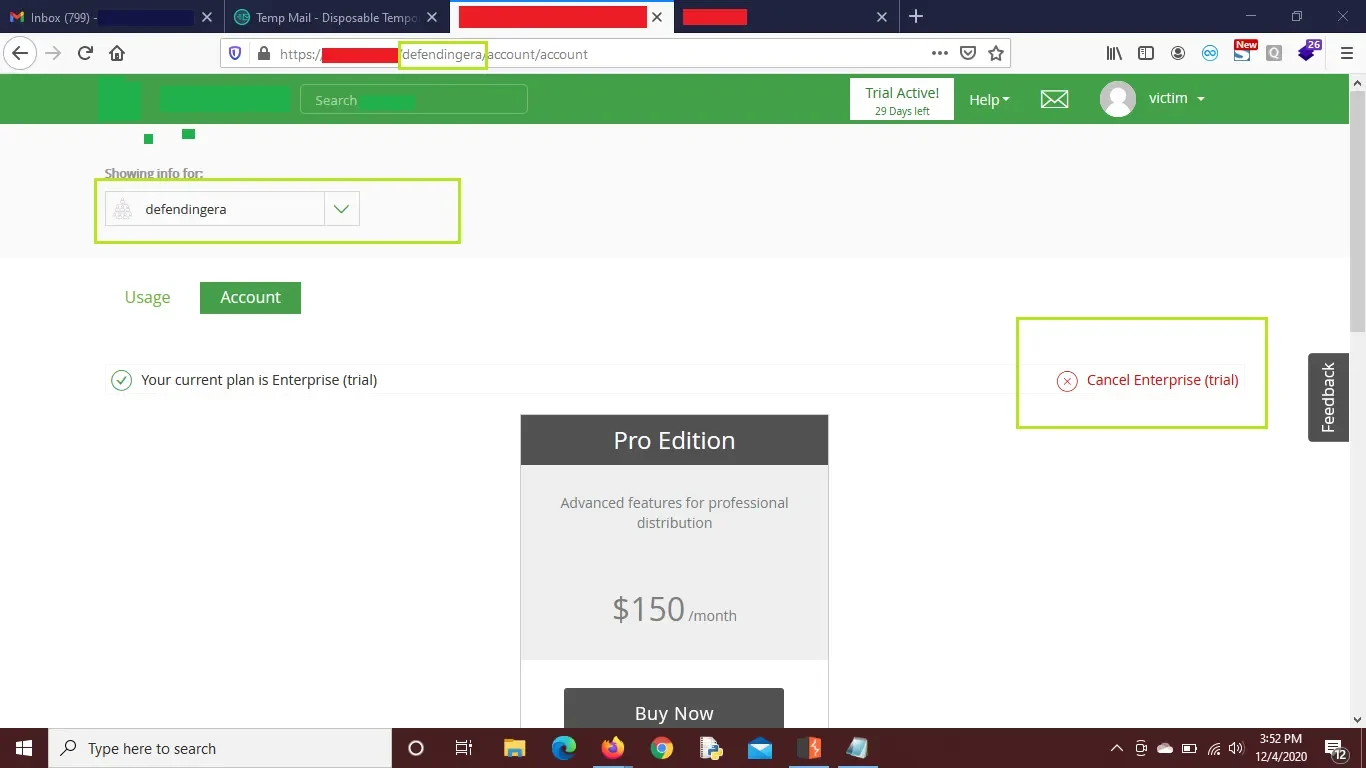
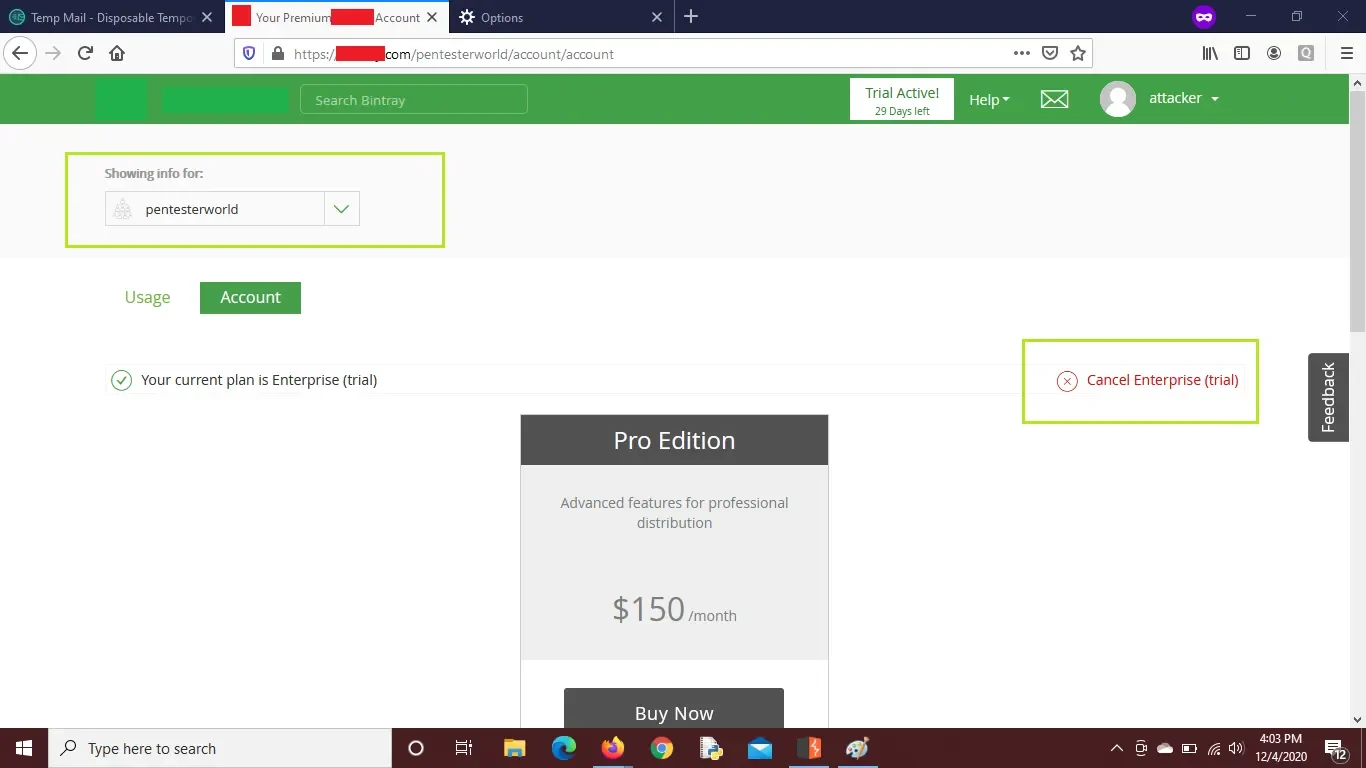
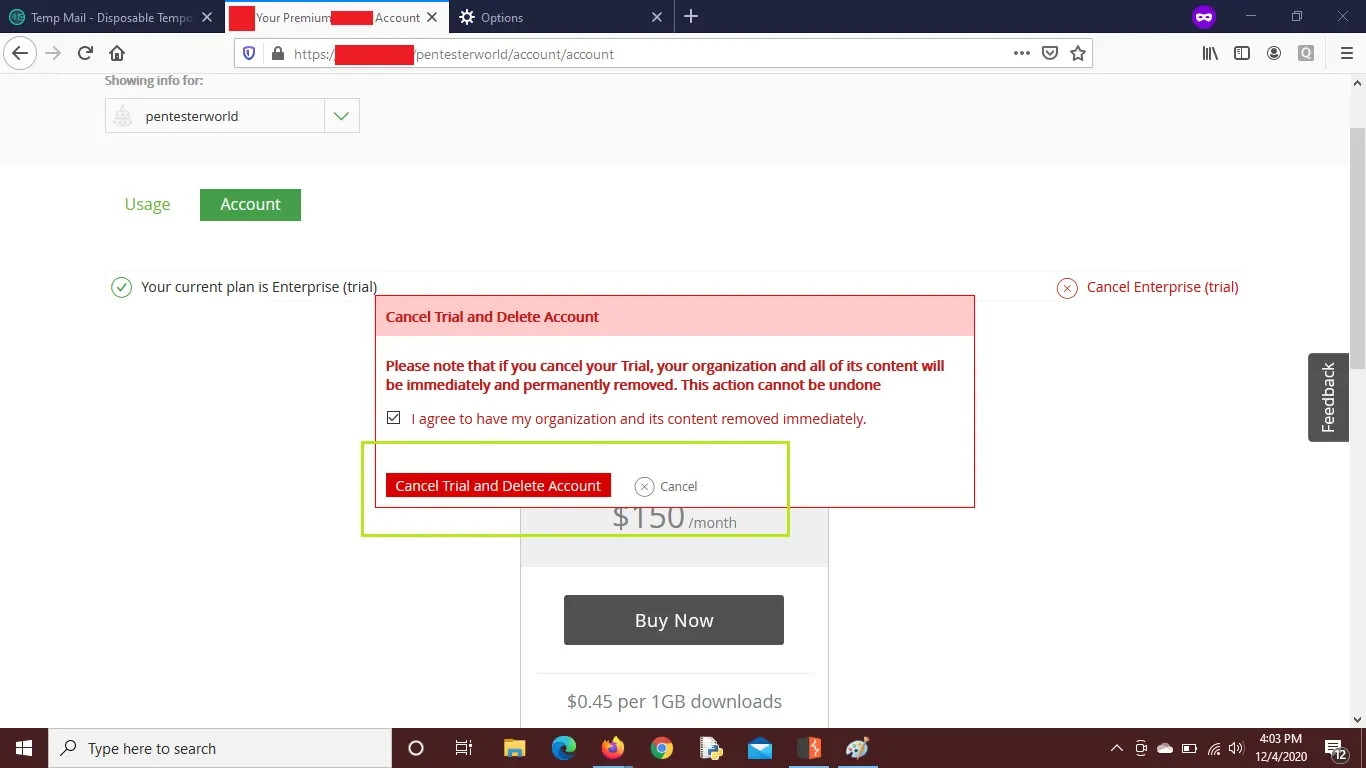
The three screenshots show the two accounts and the account deletion option as it appears on the account page.
Step 5: capture the cancel request
The button was clicked and the resulting request was captured in Burp Suite.
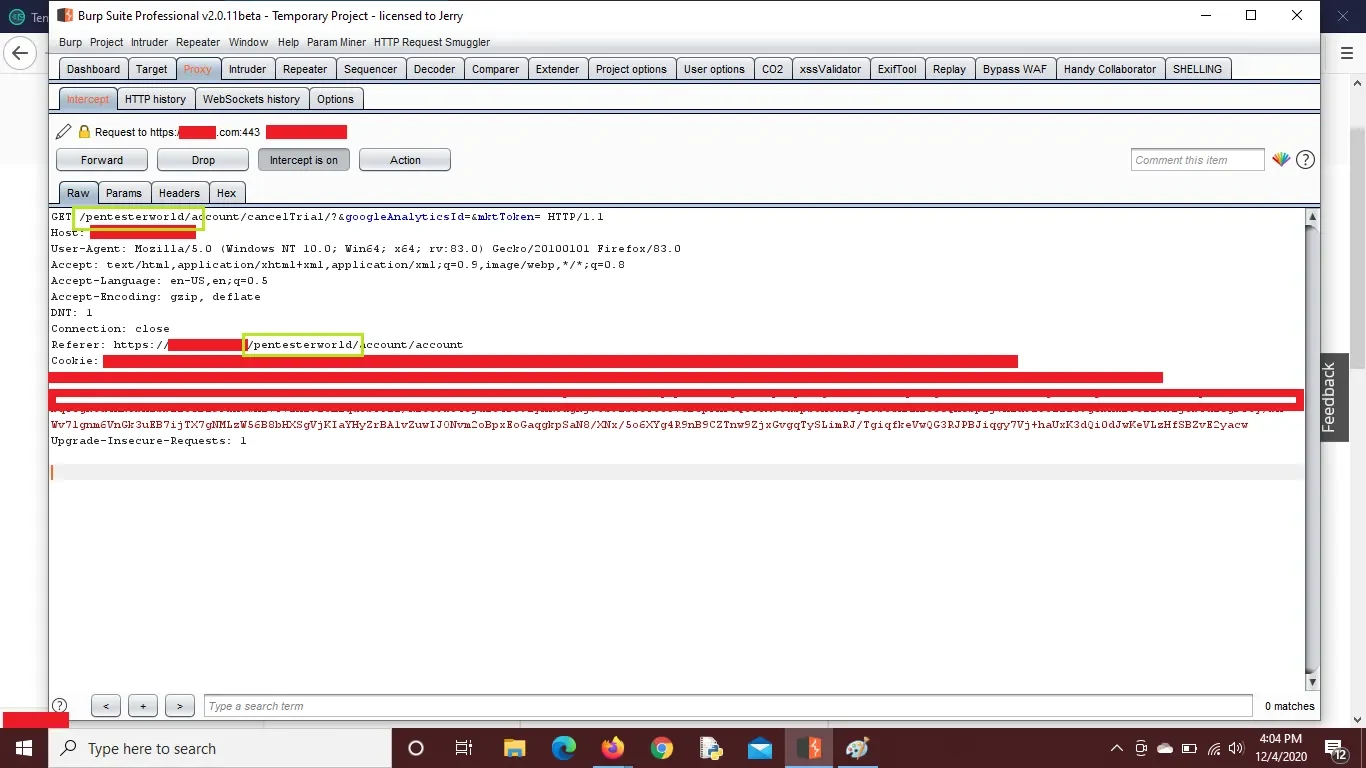
The captured cancelTrial deletion request is shown here. The researcher removed the values of the googleAnalyticsId and mktToken parameters, leaving them empty:
googleAnalyticsId=&mktToken=
Step 6: retarget the request to the victim
The username was changed to the victim's username, both in the GET request URL and in the referrer header, and the CSRF PoC was crafted from that.
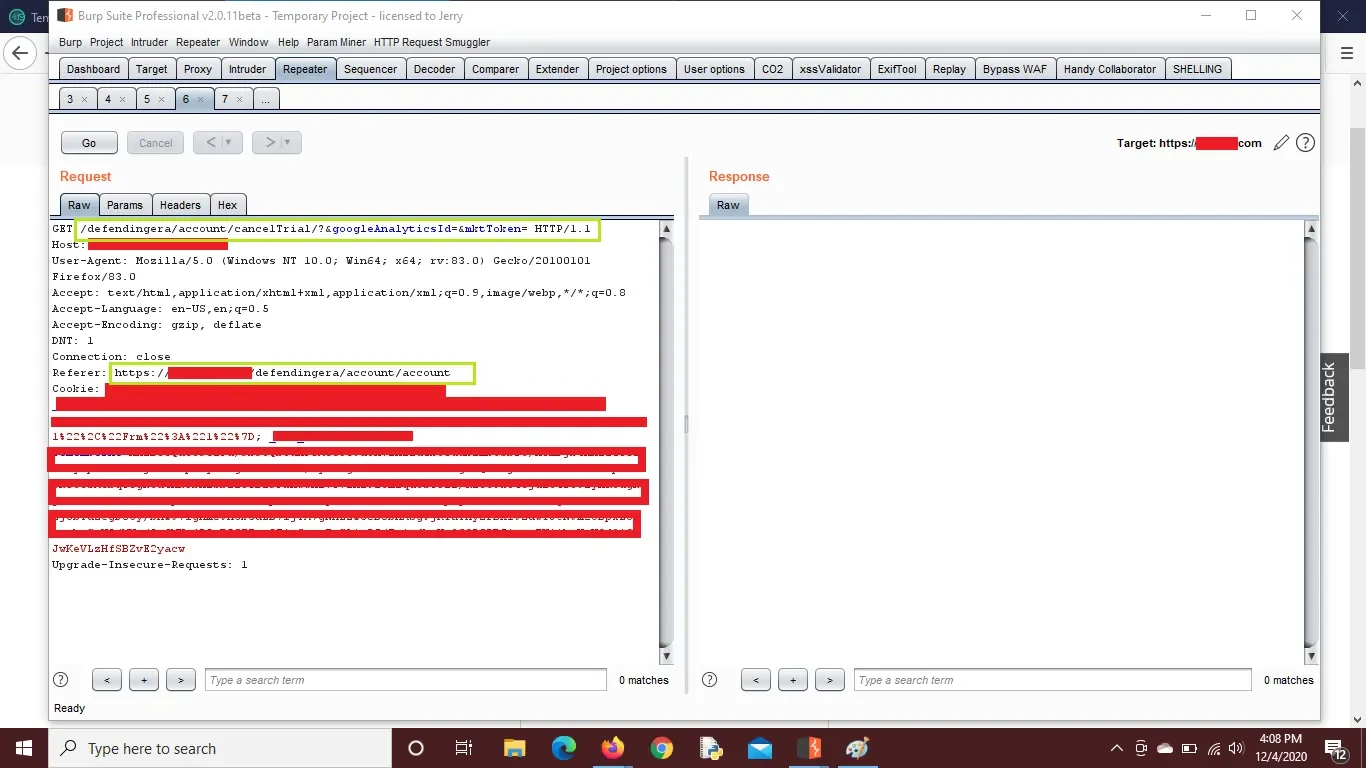
The screenshot shows the changed values in the request.
Step 7: generate the PoC
A CSRF PoC was generated and saved as an .html file.
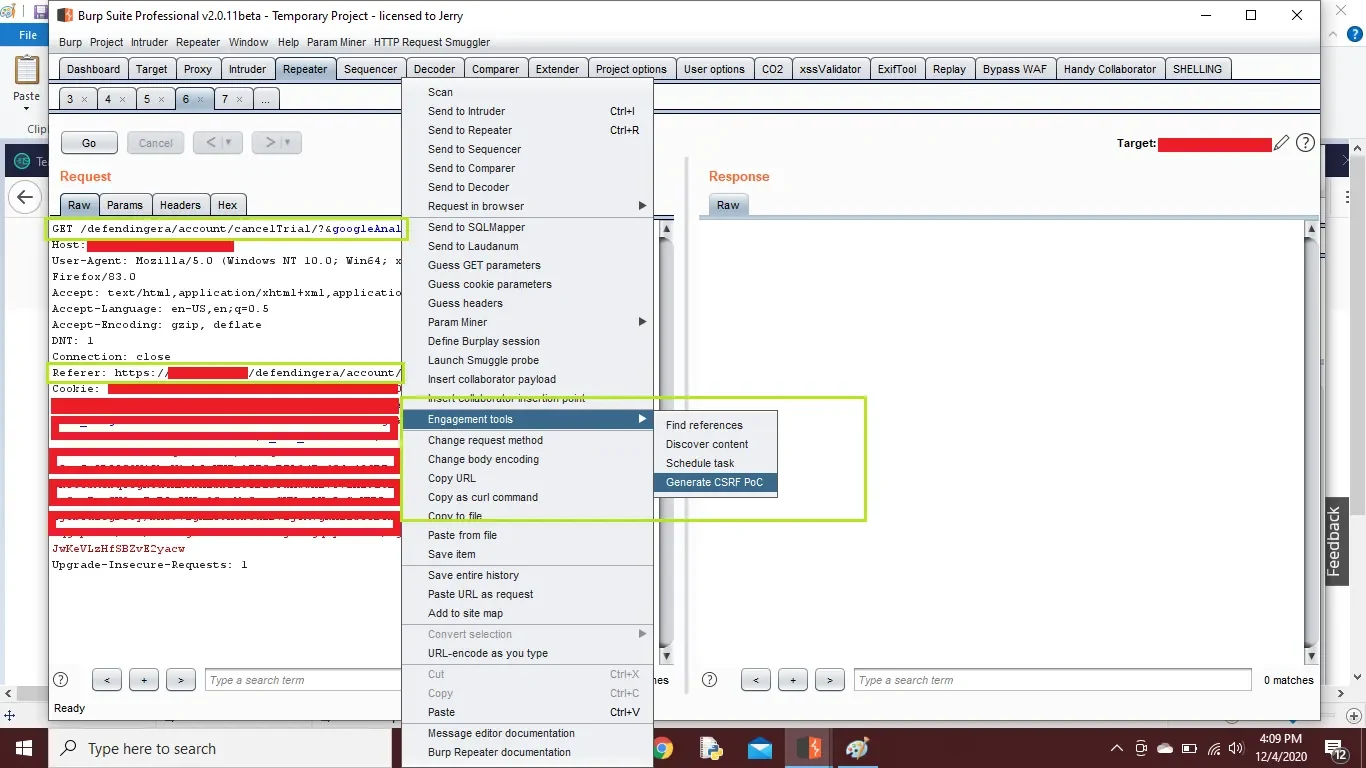
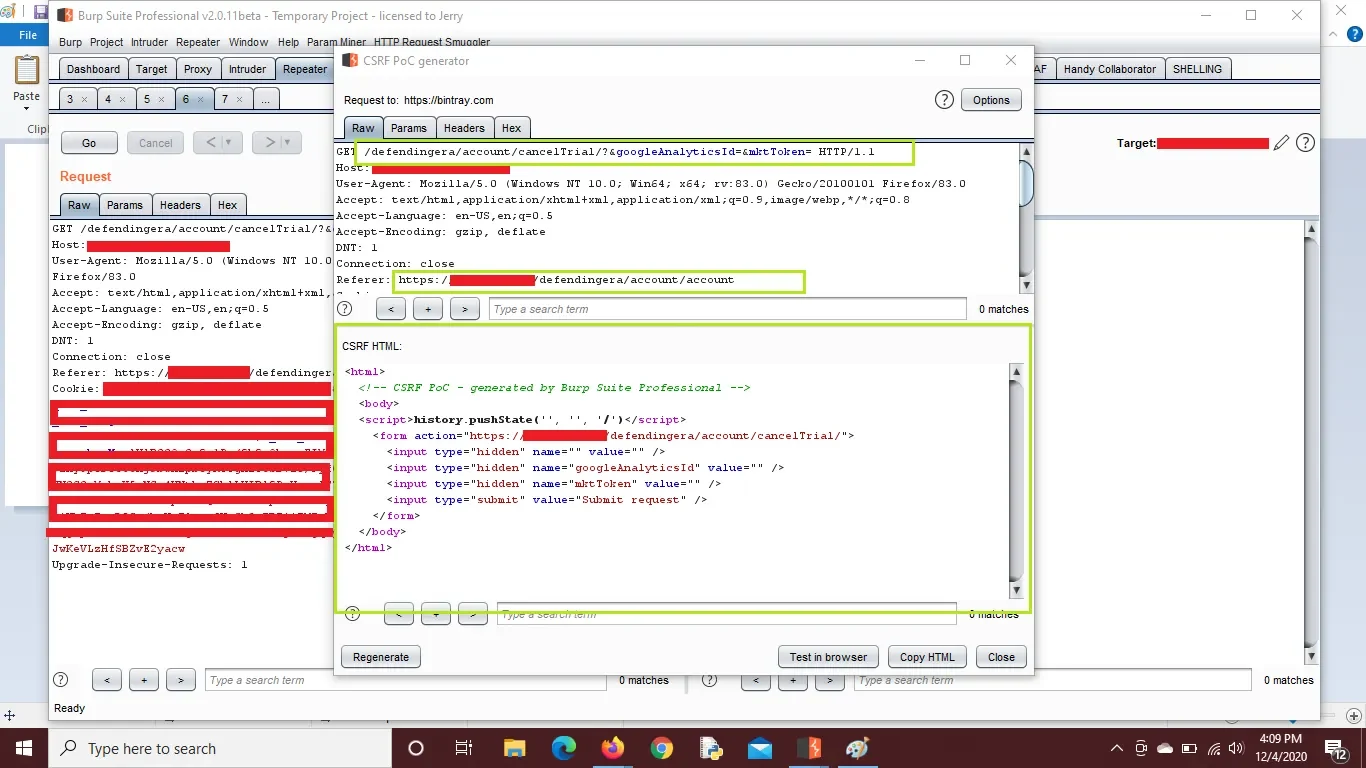
The generated PoC and the resulting proof of concept page are shown.
Step 8: run it against the victim session
The PoC was run, the page was reloaded in the first browser's account, and the account was deleted.
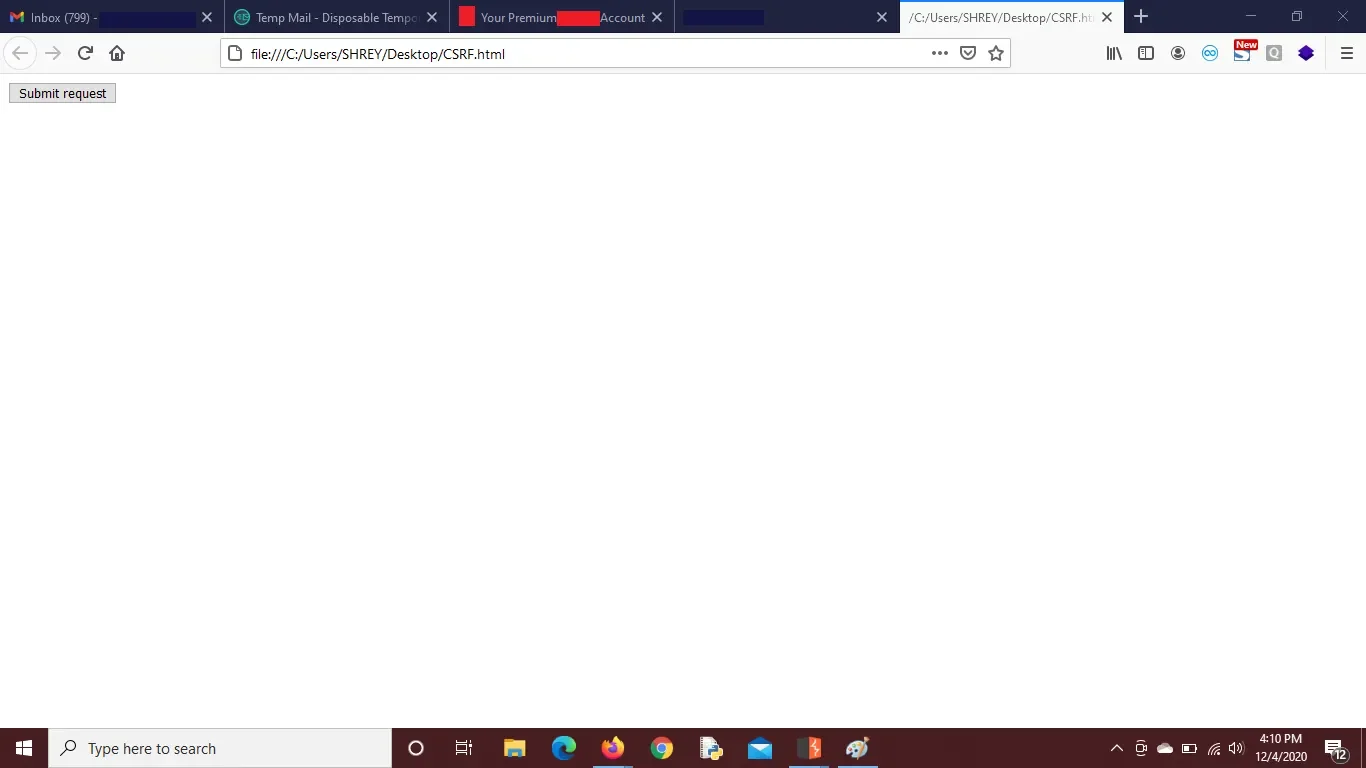
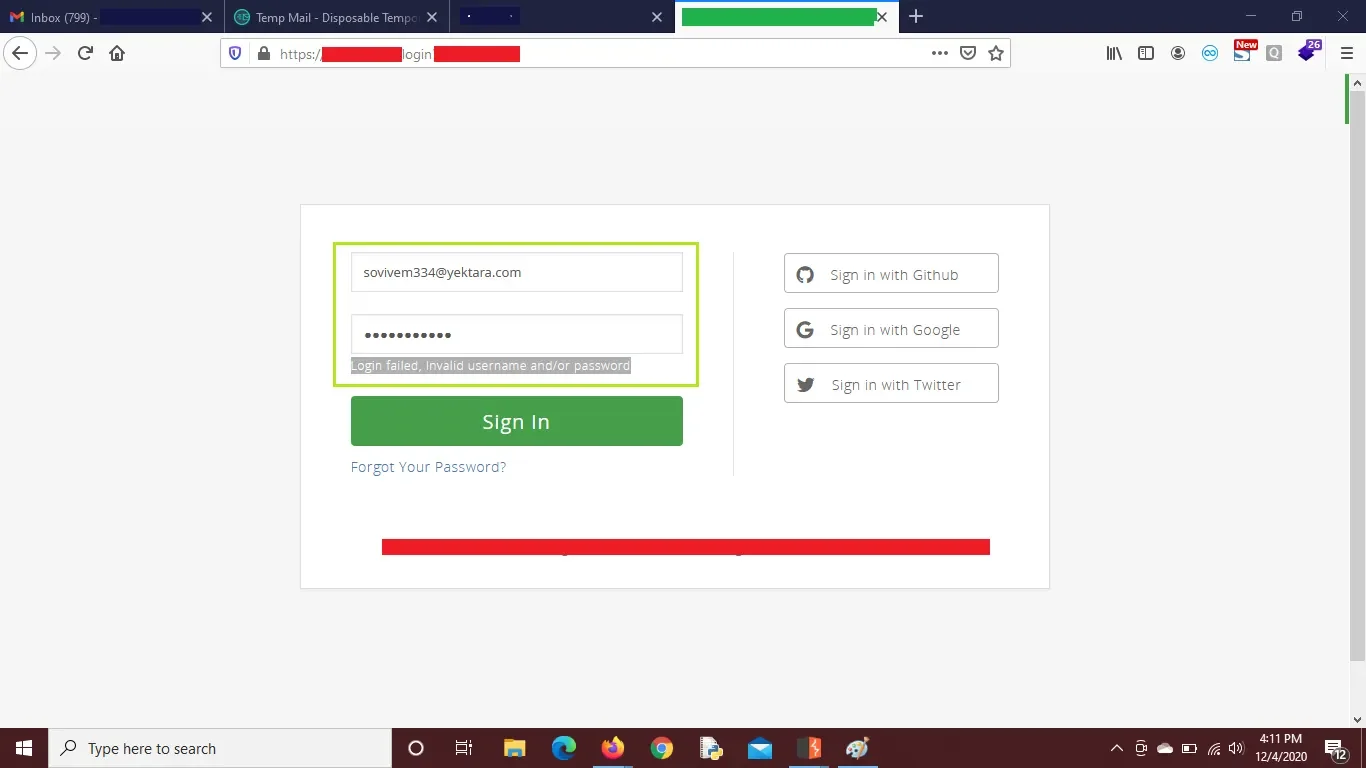
The PoC running and the deleted account afterwards.
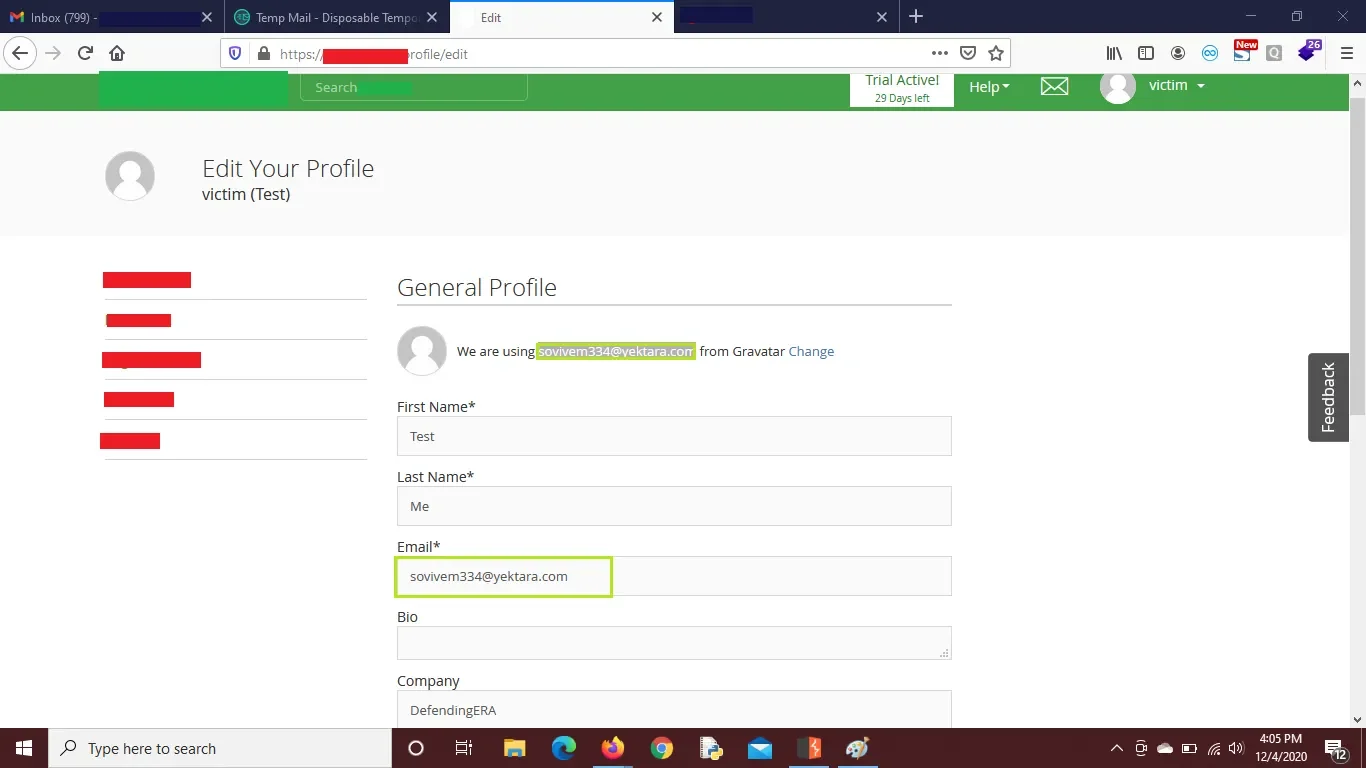
The target account in this run used the temporary address [redacted].
Comparing the two accounts
To make the difference clear, the requests from both accounts, open in Firefox and Firefox Private, were compared using the Comparer module of Burp Suite.
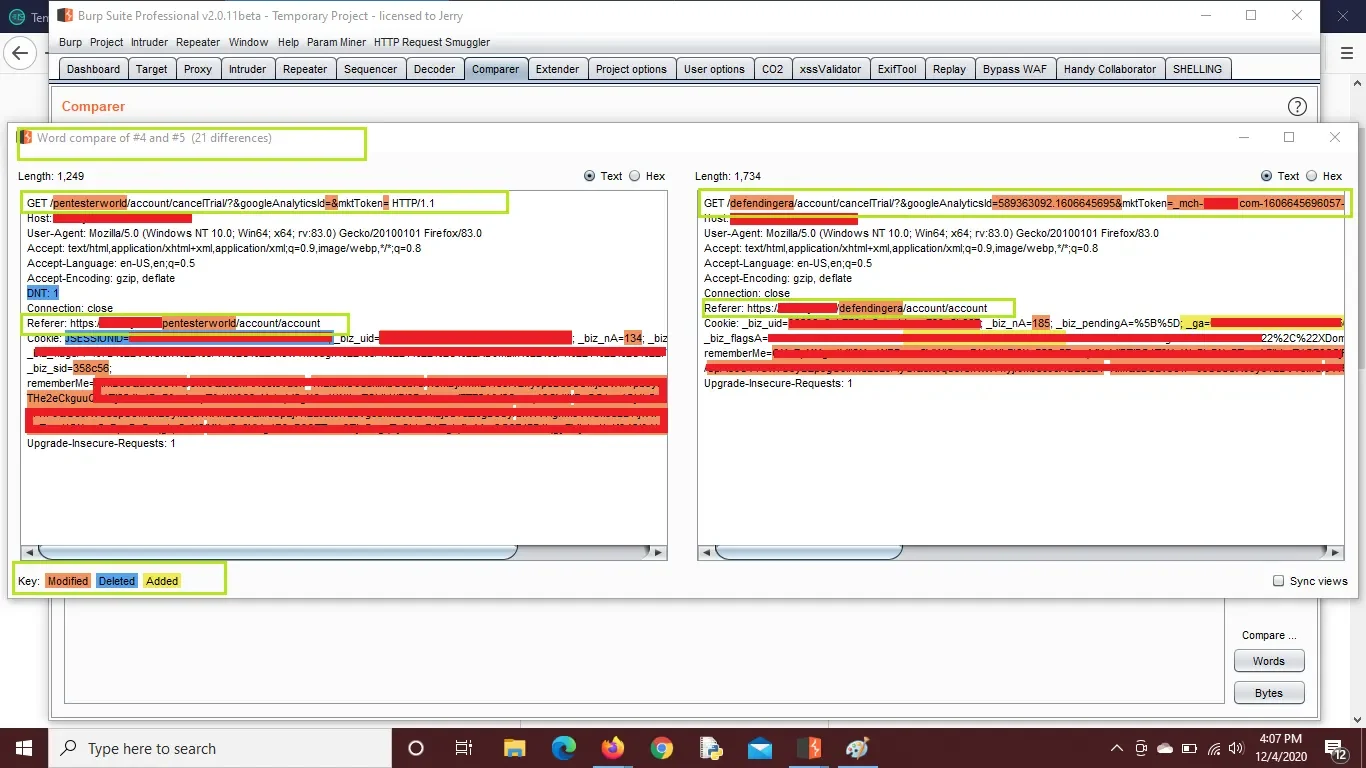
Root cause
The deletion endpoint accepted a GET request naming the account by username in the path, and the request also carried a referrer header that had to match. Two things follow from that design:
- Because the username is user-supplied input used to select the object to act on, changing it lets one account's request address another account's object. That is the IDOR half, and on its own it did not work, which suggests the server did compare the path username with something tied to the session or the referrer.
- The referrer header also had to point at the victim's account page, and changing it made the forged request work. That is the CSRF half.
Combining the two defeated both checks at once: the path named the victim, and the referrer named the victim too, so the request looked consistent to the server. The googleAnalyticsId and mktToken parameters were present but empty in the captured request. The destructive action was reachable with a GET, and the forged request deleted the account.
Impact
An attacker who can get a logged-in victim to load the crafted HTML can delete that victim's account. The action is immediate and, in the researcher's description, automatic: clicking the cancel option deletes the account, and the forged request reproduces that. The attack requires the victim to have an active session and to visit the attacker's page; the report does not describe any further precondition. The account used in the demonstration was a trial account with the Cancel Enterprise option, and the report does not state whether the same request works for other account types.
Fix
The report's mitigation is short: a proper CSRF token should be added to the request and validated on both the client and the server side.
Variants to test
- Referrer-only checks. Send the state-changing request with the referrer set to the victim's own account URL, as here. A positive result is the action completing for the victim while the attacker's session is the one making the request.
- Username in the path. Take any endpoint of the form
/userName/action/and swap the username for another account's. A positive result is the action applying to the other account, or the request being accepted once the referrer is adjusted to match. - GET-based destructive actions. Look for delete, cancel or deactivate features that fire on a plain link. A positive result is the action completing from a cross-site page load with no token and no confirmation.
- Empty analytics or marketing parameters. Parameters such as
googleAnalyticsIdandmktTokenthat appear with and without values across accounts are worth comparing; if the server ignores them for authorisation, they can be stripped. A positive result is the request succeeding with them emptied.
What happened, in plain words
A security researcher was invited to test a private bug bounty program on HackerOne. A bug bounty program is a scheme where a company invites independent testers to look for security problems in its systems and pays them for reporting what they find. This program had many websites (domains) in scope, meaning the researcher was allowed to test them. On one of those websites, the researcher found a way to delete any other user's account. The trick was to combine two separate weaknesses: Cross Site Request Forgery (CSRF) and Insecure Direct Object Reference (IDOR). A straight IDOR attempt did not work, but the CSRF attack succeeded once the username and referrer were changed to the victim's.
To understand the story, you need a few everyday ideas first.
- A website account is like a membership card for a shop. You sign in once, and the website remembers you on later visits.
- A session is that memory. When you log in, the website gives your browser a small piece of data (often called a cookie or a session token) that it checks on every later request. Think of it as a wristband you get at an event: the staff check the wristband instead of asking for your name every time.
- A request is what your browser sends to a website when you click a link or press a button. It is like filling in a form at a counter and handing it over. The website reads it and does something.
- A GET request is the simplest kind of request. It is what happens when you click an ordinary link or type an address into the address bar. It is meant for fetching a page, not for changing anything. When a website uses a GET request to delete something, that is a warning sign, because a link can be made to trigger it.
- An API endpoint is a specific address on a website that does a specific job, like a service window at a counter. One window might be for checking your balance, another for closing your account. The address in the request tells the website which window to use.
- A parameter is a small labelled value attached to a request, like a field on a paper form. For example,
name=Alicemeans the field callednamehas the valueAlice. Parameters can also be empty, likename=, which means the field is there but nothing was filled in. - A header is extra information attached to a request, separate from the address and the parameters. Think of it as the notes written on the envelope rather than the letter inside. One common header is the Referer (sometimes spelled Referrer), which tells the website which page the request came from.
- Cross Site Request Forgery (CSRF) is a trick where an attacker makes a victim's browser send a request to a website the victim is already logged into, without the victim meaning to. The browser automatically attaches the victim's session wristband, so the website thinks the request came from the victim. It is like someone writing a letter in your name and posting it for you, because the post office only checks the envelope, not who wrote it.
- Insecure Direct Object Reference (IDOR) is a weakness where a website lets you name the thing you want to act on directly in the request, and does not check that the thing belongs to you. If the address says
/alice/account/and you change it to/bob/account/, and the website obeys, that is IDOR. It is like a hotel where the room number on your key card is the only check, so you can write a different number on it and get into someone else's room.
With those ideas in place, here is the story in order.
The setup
The researcher wanted to test the website from two points of view at once: as an attacker and as a victim. To do that, they used two browsers: a normal Firefox window and a Firefox Private window. A private window keeps its own separate session, so the two accounts did not interfere with each other. It is like having two separate membership cards for the same shop.
They also used a tool called Burp Suite. Burp Suite is a program that sits between your browser and the website and lets you see and edit every request and response. Think of it as a transparent envelope that lets you read and rewrite the letter before it is posted. The researcher used it to capture the cancel request and to compare the two accounts' requests with a Burp Suite feature called Comparer, which shows two requests side by side and highlights the differences.
They used a CSRF PoC generator, a tool that builds a small HTML page which, when opened in a browser, sends a chosen request automatically. The output was saved as an .html file. A PoC (proof of concept) is a small demonstration that proves a weakness is real, without causing harm beyond what is needed to show it.
For the victim account, they used a temporary mailbox, shown in the report as [redacted]. A temporary mailbox is an email address you can use for a short time and then throw away, useful when you do not want to use your real address.
In the report's own naming, pentesterworld is the attacker's account and defendingera is the victim's account.
The two kinds of account
On the website, users could register two kinds of account:
- Open Source Account
- Trial Account
A trial account came with a 29 day trial and an option labelled Cancel Enterprise. Clicking that option deletes the account automatically. That is the interesting part: a destructive, irreversible action was available as a simple click, and the request behind it was a plain GET. In a well-built website, deleting an account should require a deliberate form submission with a secret token, not a link that can be triggered from anywhere.
The researcher's goal was to delete another user's account by combining CSRF with IDOR.
Finding it
The researcher first tried a straight IDOR against the cancel feature. That means they tried changing the username in the request to another user's username and seeing whether the website obeyed. It did not work. Then they moved to CSRF, and the attack succeeded once the username and referrer were changed to the victim's. This is the core of the finding: neither weakness was enough on its own here.
When the trial account was registered, the Cancel Enterprise option was present, and clicking it deleted the account immediately. Capturing that request in Burp Suite showed two parameters carrying values:
googleAnalyticsId=<Value>&mktToken=<Value>
Line by line: this is a fragment of a request showing two parameters joined by an ampersand (&). The first is googleAnalyticsId, which has some value (shown as <Value>). The second is mktToken, which also has some value. The names suggest they are used for analytics (tracking visits) and marketing (tracking campaigns). They look like tracking data, not security data.
Capturing the same request from the second account in the private browser showed the same parameters with no values at all:
googleAnalyticsId=&mktToken=
Line by line: the same two parameter names appear, but this time there is nothing after the equals sign. The fields are present but empty. The researcher noticed this difference and thought the request might be forgeable, because if the website did not care about these values, they could be removed.
The remaining obstacle was that the request was a GET carrying the account's username in the path:
GET /userName1/account/cancelTrial/?&googleAnalyticsId=&mktToken=
Line by line: GET is the request method, the simple kind used for links. /userName1/account/cancelTrial/ is the path, and it contains the username userName1 followed by the action cancelTrial. The ? starts the parameters, and &googleAnalyticsId=&mktToken= are the two empty parameters. The whole thing is a single address that, when visited, cancels the trial for userName1.
Changing the username in the path to the other account's username gave the shape of the attack:
GET /userName2/account/cancelTrial/?&googleAnalyticsId=&mktToken=
Line by line: the only change is userName1 becoming userName2. If the website obeyed this, it would cancel the trial for the second account. That is the IDOR idea: the username in the address is the only thing naming which account to act on, and it is supplied by whoever sends the request.
Something was still missing. The request also carried a referrer header:
Referrer: https://example.com/userName1/account/account
Line by line: Referrer is the header name, and the value is the address of the page the request came from. Here it points at userName1's own account page. The website was apparently checking that the request came from the same account's page.
Changing it to point at the second account made the forged request work:
Referer: https://example.com/userName2/account/account
Line by line: the header name is now spelled Referer (the historical spelling used in the HTTP standard), and the value points at userName2's account page. So the server was checking both the username in the path and the referrer, and both had to match the victim for the deletion to go through. That is why the two weaknesses had to be combined: the path named the victim, and the referrer named the victim too, so the request looked consistent to the server.
Exploitation, step by step
Step 1: open two sessions
The researcher went to https://example.com from two different browsers, a normal window and a private window. Why: to hold two separate sessions at once, one for the attacker and one for the victim, without logging out and back in.
Step 2: create two trial accounts
A trial account was registered in each browser, giving an attacker session and a victim session side by side. Why: the cancel option was found on the trial account.
Step 3: verify and reach the dashboard
The verification links were followed and both sessions were taken to their dashboards. Why: the researcher verified the links and reached the dashboard on both accounts.
Step 4: locate the cancel option on the victim account
From the second account (second browser), the researcher visited the account page:
https://example.com/<userName2>/account/
Line by line: this is the address of the second account's account page. <userName2> is a placeholder for the victim's username. Visiting it shows the options available for that account.
There the Cancel Enterprise (trial) option was available.
The three screenshots show the two accounts and the account deletion option as it appears on the account page. The first two are labelled Account1 and Account2, and the third is labelled Account Deletion.
Step 5: capture the cancel request
The button was clicked and the resulting request was captured in Burp Suite. Why: to see exactly what the browser sends when the cancel option is used, so it can be reproduced by hand.
The captured cancelTrial deletion request is shown here. In the captured request the values of the googleAnalyticsId and mktToken parameters were removed, leaving them empty:
googleAnalyticsId=&mktToken=
Line by line: as before, the two parameter names are present but nothing follows the equals signs. The researcher removed the values of the googleAnalyticsId and mktToken parameters, leaving them empty.
Step 6: retarget the request to the victim
The username was changed to the victim's username, both in the GET request URL and in the referrer header, and the CSRF PoC was crafted from that. Why: the attack succeeded once both the path username and the referrer pointed at the victim.
The screenshot shows the changed values in the request.
Step 7: generate the PoC
A CSRF PoC was generated and saved as an .html file. Why: an HTML file can be opened in a browser, and when it is opened it sends the chosen request automatically. That is how a CSRF attack reaches a victim: the victim opens the attacker's page, and the page quietly sends the request using the victim's session.
The generated PoC and the resulting proof of concept page are shown.
Step 8: run it against the victim session
The PoC was run, the page was reloaded in the first browser's account, and the account was deleted. Why: running the PoC simulates the victim opening the attacker's page. Reloading the account page shows the result.
The PoC running and the deleted account afterwards.
The target account in this run used the temporary address [redacted].
Comparing the two accounts
To make the difference clear, the requests from both accounts, open in Firefox and Firefox Private, were compared using the Comparer module of Burp Suite. Why: seeing the two requests side by side shows exactly which parts differ between the attacker's and the victim's requests, which is how the researcher worked out that the username and the referrer were the values that mattered.
Why it worked
The deletion endpoint accepted a GET request naming the account by username in the path, and the request also carried a referrer header that had to match. Two things follow from that design:
- Because the username is user-supplied input used to select the object to act on, changing it lets one account's request address another account's object. That is the IDOR half, and on its own it did not work, which suggests the server did compare the path username with something tied to the session or the referrer.
- The referrer header also had to point at the victim's account page, and changing it made the forged request work. That is the CSRF half.
Combining the two defeated both checks at once: the path named the victim, and the referrer named the victim too, so the request looked consistent to the server. The googleAnalyticsId and mktToken parameters were present but empty in the captured request. The destructive action was reachable with a GET, and the forged request deleted the account.
What an attacker could do
An attacker who can get a logged-in victim to load the crafted HTML can delete that victim's account. The action is immediate and, in the researcher's description, automatic: clicking the cancel option deletes the account, and the forged request reproduces that. The attack requires the victim to have an active session and to visit the attacker's page; the report does not describe any further precondition. The account used in the demonstration was a trial account with the Cancel Enterprise option, and the report does not state whether the same request works for other account types.
The fix
The report's mitigation is short: a proper CSRF token should be added to the request and validated on both the client and the server side. A CSRF token is a secret, unpredictable value that the website gives to the real page and expects back with any state-changing request. An attacker's page cannot know it, so a forged request fails.
Things worth testing elsewhere
These are patterns to look for on other websites, written as things to try and what a positive result looks like.
- Referrer-only checks. Send the state-changing request with the referrer set to the victim's own account URL, as here. A positive result is the action completing for the victim while the attacker's session is the one making the request.
- Username in the path. Take any endpoint of the form
/userName/action/and swap the username for another account's. A positive result is the action applying to the other account, or the request being accepted once the referrer is adjusted to match. - GET-based destructive actions. Look for delete, cancel or deactivate features that fire on a plain link. A positive result is the action completing from a cross-site page load with no token and no confirmation.
- Empty analytics or marketing parameters. Parameters such as
googleAnalyticsIdandmktTokenthat appear with and without values across accounts are worth comparing; if the server ignores them for authorisation, they can be stripped. A positive result is the request succeeding with them emptied.
Glossary
- Account: a membership on a website, identified by a username and protected by a login.
- API endpoint: a specific address on a website that performs a specific job when a request is sent to it.
- Burp Suite: a tool that sits between a browser and a website so requests and responses can be seen and edited.
- Comparer: a Burp Suite feature that shows two requests side by side and highlights the differences.
- Cookie: a small piece of data a website stores in your browser so it can recognise you on later visits.
- CSRF (Cross Site Request Forgery): a trick where an attacker makes a victim's browser send a request to a site the victim is logged into, without the victim meaning to.
- CSRF PoC: a small HTML page that sends a chosen request automatically when opened, used to demonstrate a CSRF weakness.
- CSRF token: a secret, unpredictable value the website expects with state-changing requests, which an attacker's page cannot know.
- GET request: the simplest kind of request, used when you click a link or type an address; meant for fetching, not for changing things.
- Header: extra information attached to a request, separate from the address and parameters.
- HackerOne: a platform where companies run bug bounty programs and researchers report security problems.
- HTML: the language web pages are written in; an
.htmlfile can be opened in a browser. - IDOR (Insecure Direct Object Reference): a weakness where a website lets you name the thing you want to act on directly in the request and does not check that it belongs to you.
- Parameter: a small labelled value attached to a request, like a field on a form.
- PoC (proof of concept): a small demonstration that proves a weakness is real.
- Private window: a browser window that keeps its own separate session, so two accounts can be used at once.
- Referer / Referrer header: a header that tells the website which page the request came from.
- Request: what a browser sends to a website when you click a link or press a button.
- Response: what the website sends back after a request.
- Session: the website's memory of you after you log in, usually carried by a cookie or token.
- Session token: the value that identifies your session, like a wristband checked on every request.
- Trial account: an account with a limited-time free period, here 29 days, with a cancel option.
- Username: the name that identifies an account, here used in the address to say which account to act on.
- Vulnerability: a weakness in a website that an attacker can use to do something they should not be able to do.


