IDOR + RBAC Vulnerability: Finding the Attack Scenario That Earned Me $100
A user with the Viewer role could delete admin-only resources via a DELETE endpoint, and a GET endpoint exposed all resource IDs. An attacker with a Viewer account could enumerate IDs and delete any resource.
 Published on medium.com
Cybersecurity
The full write-up lives on its author's site
It belongs to its author, so we link to it rather than copy it. The other two tabs are our own rewrites, checked against it.
Context
This write-up describes a broken access control issue found in an admin area of a web application. The feature involved is a delete operation exposed under an admin path, which the researcher expected to be restricted to administrators. The report does not name the target program, the product or the specific object type being deleted; the endpoints are shown with placeholder values such as example.com and {example_id}.
The researcher's point is that the delete endpoint on its own is a weak finding. The interesting part is the combination: a privileged non-admin role can call the delete endpoint, and a separate read endpoint exposes the identifiers needed to use it at scale. That combination is what turned a likely Low into a Medium.
Setup
The report does not describe the test accounts, the tooling or any version numbers. The only precondition it states is a role called Viewer, which the researcher describes as a privileged role that should not have access to the admin delete function.
Finding it
The researcher noticed that the Viewer role could delete an object in the admin area, even though only the admin should have access to that function. The endpoint was:
DELETE https://example.com/example/v1/example/example/{example_id}
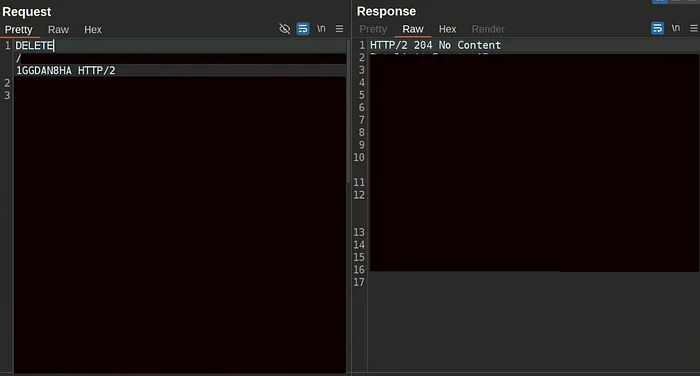
On its own, this looked like a Low. The researcher anticipated the triager's objection: how would an attacker obtain all the IDs needed to delete objects? Without an answer to that, there is no realistic attack scenario, just a single request that a privileged user can already make.
Exploitation
Step 1: Confirm the Viewer role can reach the admin delete endpoint
The researcher found that the Viewer role could reach the admin delete endpoint. The important parts are the HTTP method, DELETE, and the object identifier in the final path segment, {example_id}. The path sits under an admin-style prefix, which is why the researcher treats the ability to call it as a role problem rather than a normal feature of the Viewer role.
Step 2: Find a way to enumerate the identifiers
The researcher then looked for a source of IDs and found that the GET request returns access to all of them:
GET https://example.com/example/v1/Example/ID
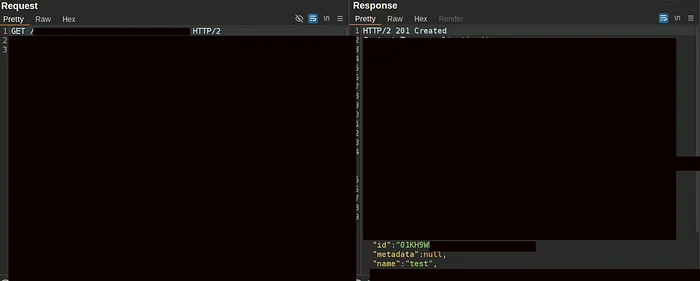
What matters is that the read endpoint is reachable and supplies the identifiers that the delete endpoint expects.
Step 3: Chain the two requests
With the IDs from the GET request, the Viewer account can call the DELETE endpoint for each one. The researcher does not include a script or a full request sequence; the chain is simply read the IDs, then delete by ID. This is the attack scenario that answers the triager's question and moves the finding beyond a single privileged action.
Result
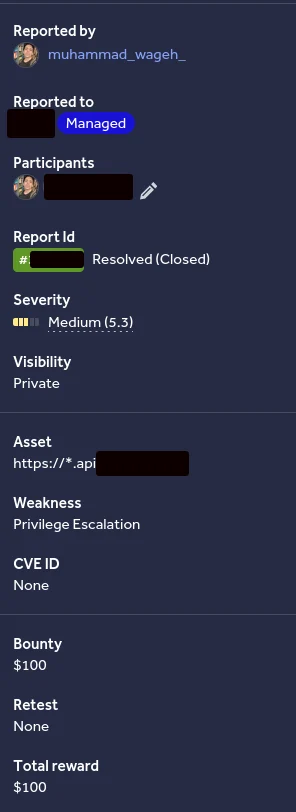
The report was rated Medium and the researcher earned $100.
Root cause
The report frames this as two weaknesses combined: an IDOR, where object identifiers are exposed or accepted without proper authorisation checks, and an RBAC problem, where the Viewer role is allowed to perform an admin-only action. The Viewer role was able to call the admin delete endpoint, and the read endpoint made the identifiers available.
The report does not include code, so the exact location of the missing check is not shown.
Impact
A user holding the Viewer role can delete objects in the admin area that should be reserved for administrators. Because a separate endpoint exposes the identifiers, the attacker does not need to guess or obtain IDs out of band; they can enumerate them and act on each one. The report was rated Medium.
Fix
Based on the finding, the delete endpoint should enforce that the caller holds the admin role, not merely an authenticated or privileged role such as Viewer, and the read endpoint should limit which identifiers a Viewer can retrieve. Both checks belong on the server side, since the client cannot be trusted to restrict the action.
Variants to test
- Try the same admin-only method and path with each lower-privileged role you have. A positive result is a successful state change, such as a 2xx response or the object disappearing from a subsequent read.
- Look for read endpoints that return identifiers for objects the current role should not see. A positive result is a list or single record containing IDs belonging to other users or tenants.
- Swap the identifier in a request that works for your own object with one belonging to another account. A positive result is the action succeeding on the other object.
- Check whether the role check is applied to the collection route but not to the item route, or the reverse. A positive result is one of the two paths accepting the request when the other rejects it.
- Test whether changing the HTTP method on the same path bypasses the check, for example a GET or POST where DELETE is expected. A positive result is the server processing the request instead of returning 403 or 405.
What happened, in plain words
A security researcher was testing a website that has an admin area, a part of the site where staff manage things. The site had a role called Viewer. A role is a label the site gives an account to decide what that account is allowed to do, a bit like a keycard that opens some doors and not others. The researcher describes Viewer as a privileged role.
He found that the Viewer role could delete something in the admin area, even though only the admin should have access to that. On its own, that is a small problem: a person reviewing the report (the triager, the person at the bug bounty programme who decides whether a report is valid and how serious it is) could reasonably ask how an attacker would ever know which items to delete. If you have to guess the name of the thing you want to delete, the bug is hard to use in practice.
So he dug further, and found that a GET request has access to all the IDs. Now the two fit together: read the list, then delete each item by its name. That combination is what made the report worth a Medium rating and a $100 reward.
Two ideas sit behind this. The first is IDOR (Insecure Direct Object Reference): the site lets you act on an item by putting its identifier in the request, and does not properly check that the item belongs to you or that you are allowed to touch it. Think of a hotel where room numbers are written on the keys: if reception hands you any key you ask for, the lock is not really protecting anything. The second is RBAC (Role-Based Access Control): the site is supposed to decide what you can do based on your role, and here the Viewer role was allowed to do an admin-only action.
The delete request
The researcher noticed that the Viewer role could delete an object in the admin area. The request looked like this:
DELETE https://example.com/example/v1/example/example/{example_id}
Line by line, in plain words:
DELETEis the HTTP method. A method is the verb of a web request: it tells the server what kind of action you want.GETmeans "give me something",DELETEmeans "remove something". Browsers normally sendGETwhen you type an address, but other methods exist and tools can send them.https://example.comis the address of the site.example.comis a placeholder name used in write-ups so the real target is not named./example/v1/example/example/is the path, the part of the address that points at a particular feature on the server. Thev1piece usually marks a version of the site's API. An API (Application Programming Interface) is the set of addresses a site offers for programs to talk to it, rather than for people clicking pages. When a web page loads data in the background, it is usually calling an API.{example_id}is a placeholder for the identifier of the item being deleted. An identifier (ID) is a unique label for one record, like a student number. The curly braces mean "a value goes here", not literal text.
Why this step mattered: the path sits under an admin-style prefix, so the researcher treated the ability to call it as a role problem. The Viewer role should not have been able to reach an admin-only function at all.
Why that alone was not enough
On its own, this looked like a Low severity finding. The researcher expected the triager to object: how would an attacker obtain all the IDs needed to delete objects? Without an answer to that, there is no realistic attack scenario, just a single request that a privileged user can already make. A privileged user here means someone with a role above an ordinary user, but still below admin.
This is a useful habit when reporting: a bug is judged not only by what is possible, but by how an attacker would realistically reach it. If the missing piece is "know the secret name of the item", the report is weak. If the missing piece is "read a list the site hands out freely", the report is strong.
The read request that supplies the IDs
So the researcher dug further, and found that a GET request has access to all the IDs:
GET https://example.com/example/v1/Example/ID
Line by line:
GETis the method for reading something. It is the same method your browser uses when you open a page.- The address is the same site and the same
v1API version, but a different path:/example/v1/Example/ID. Note the capitalEinExampleand the capitalID; paths can be case-sensitive, so this is written exactly as it appeared. IDhere is part of the path, a placeholder for the identifier value, not a separate parameter.
The response body is not shown, so the exact format of the returned IDs is not described. What matters is that the read endpoint is reachable and supplies the identifiers that the delete endpoint expects. An endpoint is one specific address on a server that performs one specific job, like one counter in a large office.
Why this step mattered: it answers the triager's question. The attacker does not need to guess IDs or obtain them from somewhere else; the site itself hands them out.
Chaining the two requests
With the IDs from the GET request, the Viewer account can call the DELETE endpoint for each one. The researcher does not include a script or a full request sequence; the chain is simply read the IDs, then delete by ID. This is the attack scenario that answers the triager's question and moves the finding beyond a single privileged action.
In everyday terms: the first request is a door that should be locked but is not. The second request is a noticeboard that lists every room number in the building. Either one alone is a nuisance; together they mean anyone with a Viewer keycard can walk the building and empty every room.
The result
The report was rated Medium and the researcher earned $100.
Why it happened
The report frames this as two weaknesses combined: an IDOR, where object identifiers are exposed or accepted without proper authorisation checks, and an RBAC problem, where the Viewer role is allowed to perform an admin-only action. The Viewer role was able to call the admin delete endpoint, and the read endpoint made the identifiers available.
Authorisation is the server deciding whether you are allowed to do a thing, as opposed to authentication, which is the server deciding who you are. Logging in proves who you are; authorisation is the separate check that your role permits this particular action on this particular item. A common mistake is to check only that someone is logged in, and forget to check the role.
The report does not include code, so the exact location of the missing check is not shown.
What the impact was
A user holding the Viewer role can delete objects in the admin area that should be reserved for administrators. Because a separate endpoint exposes the identifiers, the attacker does not need to guess or obtain IDs out of band; they can enumerate them and act on each one. To enumerate means to go through items one by one, here taking each ID from the list and using it.
The report does not state how many objects exist, whether deletion is reversible, or whether other roles are affected. The report was rated Medium.
How it should be fixed
The report does not describe a fix or say whether one was applied. Based on the finding, the delete endpoint should enforce that the caller holds the admin role, not merely an authenticated or privileged role such as Viewer, and the read endpoint should limit which identifiers a Viewer can retrieve. Both checks belong on the server side, since the client cannot be trusted to restrict the action. The client is the browser or app on your machine; anything it does can be changed by the person using it, so the decision has to be made where the data lives.
Variants to test
If you want to look for similar problems, these are the directions the finding suggests. Each one is a small variation on the same theme: does the server check the role and the ownership on every path, or only on some?
- Try the same admin-only method and path with each lower-privileged role you have. A positive result is a successful state change, such as a 2xx response or the object disappearing from a subsequent read. A 2xx response is the family of HTTP status codes that mean "it worked";
403means "forbidden" and405means "method not allowed". - Look for read endpoints that return identifiers for objects the current role should not see. A positive result is a list or single record containing IDs belonging to other users or tenants. A tenant is a separate organisation sharing the same system, like a separate company in a shared office building.
- Swap the identifier in a request that works for your own object with one belonging to another account. A positive result is the action succeeding on the other object.
- Check whether the role check is applied to the collection route but not to the item route, or the reverse. A positive result is one of the two paths accepting the request when the other rejects it. The collection route is the address for the whole list; the item route is the address for one entry in it.
- Test whether changing the HTTP method on the same path bypasses the check, for example a GET or POST where DELETE is expected. A positive result is the server processing the request instead of returning 403 or 405.
Glossary
- API: the set of addresses a site offers so that programs, rather than people clicking pages, can read and change data.
- Authentication: the server working out who you are, usually by checking a login.
- Authorisation: the server deciding whether you, once identified, are allowed to perform a particular action on a particular item.
- Bug bounty programme: a scheme where an organisation pays researchers for reporting security problems in its systems.
- Collection route: the address that refers to a whole list of items rather than one item.
- DELETE: an HTTP method meaning "remove this thing".
- Endpoint: one specific address on a server that performs one specific job.
- Enumerate: to go through items one by one, here using each identifier from a list in turn.
- GET: an HTTP method meaning "give me this thing"; the method a browser uses when you open a page.
- HTTP method: the verb of a web request, such as GET or DELETE, telling the server what kind of action is wanted.
- IDOR (Insecure Direct Object Reference): a flaw where a request names an item by its identifier and the server does not properly check that you are allowed to act on that item.
- Identifier (ID): a unique label for one record, like a student number.
- Item route: the address that refers to one specific item rather than a list.
- Low / Medium: severity ratings a programme gives a report to say how serious the issue is.
- Path: the part of a web address that points at a particular feature on the server.
- RBAC (Role-Based Access Control): deciding what an account may do based on the role assigned to it.
- Role: a label on an account, such as Viewer or admin, that determines what it is allowed to do.
- Tenant: a separate organisation sharing the same system.
- Triager: the person at a bug bounty programme who reviews a report and decides whether it is valid and how serious it is.
- 2xx response: the family of HTTP status codes meaning the request succeeded.
- 403: the HTTP status code meaning the server understood the request but refuses to allow it.
- 405: the HTTP status code meaning the server does not allow that method on that address.

