If It’s a Feature!!! Let’s Abuse It for $750
The Google Calendar OAuth callback endpoint accepted a GET request without CSRF protection, so an attacker could link their own Google Calendar to a victim's account. Once linked, the application synced the victim's meetings, events and invoice data to the attacker's calendar.
 Published on medium.com
So after some test i have found a CSRF on adding any google calendar to the application.While connecting the google calendar , the flow will work like below
The full write-up lives on its author's site
It belongs to its author, so we link to it rather than copy it. The other two tabs are our own rewrites, checked against it.
Context
The target was a private program application for managing meetings, events and invoices. The researcher had already reported XSS and privilege escalation issues on it, and the program staff then asked him to look for bugs that would be a threat to organisational data. The feature at the centre of this write-up is the Google Calendar integration: an account owner can connect a Google account to the application, and the application then syncs scheduled data (meetings, events, invoices) to that Google Calendar.
Setup
The researcher worked against a private program on HackerOne. The victim must be logged in to the target application in the browser where the crafted link is opened. The attacker needs their own account on the target and their own Google account, which is used to obtain a valid authorisation code.
Finding it
While connecting the Google Calendar, the flow works as follows: Google authorises the web app with a token to access its service, and the final request back to the application looks like this:
GET /app/google/auth_callback?code=4/0RAX4YfWgvjaHxzYX4FNLO-QvFVgDmMsSA0_IvL0FxAptS2mHJAXM-L4bMiZmKGhI6Mz-o3A&scope=https://www.googleapis.com/auth/calendar HTTP/1.1Host: target.comCookie: cookie here
The code parameter carries the authorisation value from Google; the application uses it to add that Google Calendar to the target account and then syncs and exchanges data with it. Two things stood out: the request is a GET, and there are no additional CSRF checks. That means a victim can be tricked into clicking a URL of the form:
https://target.com/app/google/auth_callback?code=4/0RAX4YfWgvjaHxzYX4FNLO-QvFVgDmMsSA0_IvL0FxAptS2mHJAXM-L4bMiZmKGhI6Mz-o3A&scope=https://www.googleapis.com/auth/
and the Google Calendar gets linked to the victim's account, provided the victim opens the link in the same browser where they are already logged in to the target.
The researcher is explicit about the limit of this: auth_callback?code= carries an authorisation token value from Google, and you can only obtain your own Google authorisation token. So through this CSRF, only the attacker's own Google account can be linked to the victim's account on the target.
Exploitation
Step 1: Prepare as the attacker
Navigate to your own account as the attacker.
Step 2: Enable the integration
Navigate to https://target.com/profile/settings. The Google Calendar app is disabled there. Enable it; this asks you to connect a Google account.
Step 3: Connect the attacker's Google account and capture the callback
Connect with the attacker's Google account and capture the final request containing the Google authorisation token:
GET /app/google/auth_callback?code=4/0RAX4YfWgvjaHxzYX4FNLO-QvFVgDmMsSA0_IvL0FxAptS2mHJAXM-L4bMiZmKGhI6Mz-o3A&scope=https://www.googleapis.com/auth/calendar HTTP/1.1Host: target.comCookie: cookie here
Because the request is a GET, the resulting link can be shared directly with any organisational owner. The researcher notes that a tiny URL for the link helps with tricking the victim. Opening it connects the attacker's Google account with that organisation's account.
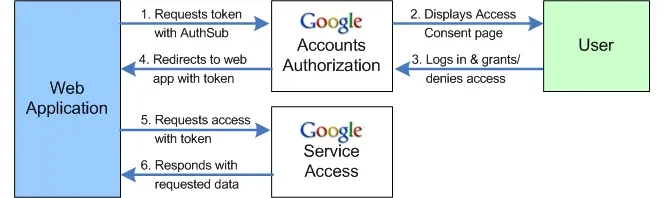
The image is captioned as a sample of how Google gives access.
Step 4: Deliver the link
Share the link with an employee of the victim organisation and let them click it. The attacker's Google Calendar is then added to their organisation.
Step 5: Collect the synced data
All the scheduled data is now synced to the attacker's Google Calendar, where the attacker can read it.
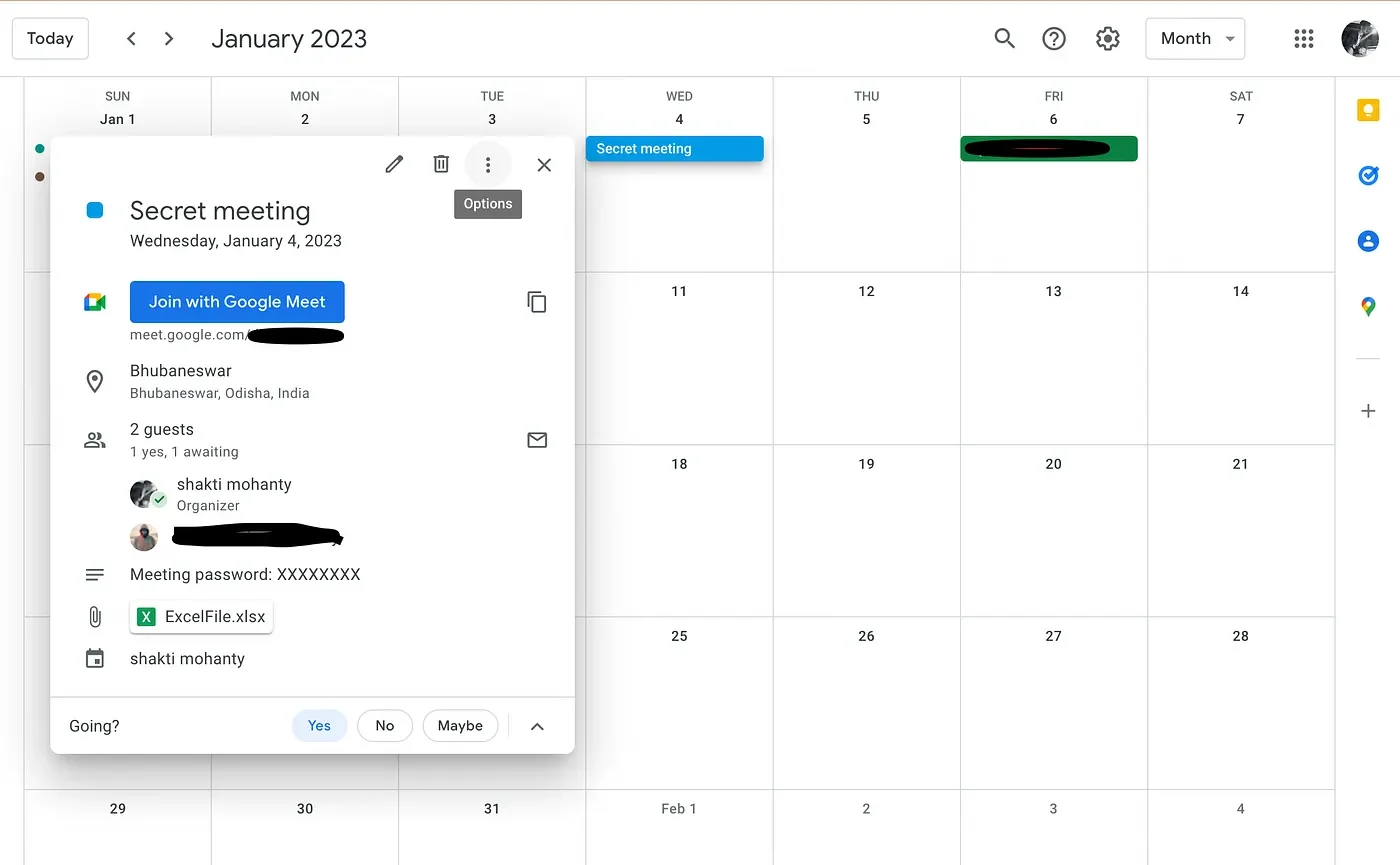
The image is captioned as a sample of one meeting added by the victim, synced to the attacker's Google Calendar.
Root cause
The callback endpoint that completes the Google OAuth flow accepts a state-changing action over GET and performs no additional CSRF checks. Any request that carries a valid code and the victim's session cookie will link the corresponding Google account to the victim's account, regardless of who initiated it. The code is the attacker's own Google authorisation value, so only the attacker's Google account can be linked.
Impact
Once the attacker's Google account is connected to the victim's account on the target, the application syncs all meetings, events and invoice data to that Google Calendar. According to the researcher, the synced data includes the date, invited users' names, email addresses (Google Calendar offers an option to copy the guest email), mobile numbers (if the owner added them to the guest details), attached files, location, meeting credentials and notes. The organisational owner can view the scheduled data in detail through Google Calendar, and in this case so can the attacker.
The attack requires the victim to open the link while logged in to the target in the same browser. The program staff had asked for bugs that would be a threat to organisational data.
Fix
The report does not describe any fix that was applied. The report does not describe any fix.
Variants to test
- OAuth callback endpoints on other targets: complete the flow with your own account and replay the callback URL in a second, logged-in session. A positive result is the attacker's third-party account being linked to the second account.
- State-changing
GETendpoints in integration settings (enable, connect, link, sync). A positive result is the setting changing for a victim who only opened a URL. - Missing
stateparameter validation in OAuth flows. A positive result is a callback accepted with astatevalue that was never issued to that session. - Tiny-URL or redirect wrapping of the callback link, to check whether delivery filters can be bypassed while the link still reaches the callback.
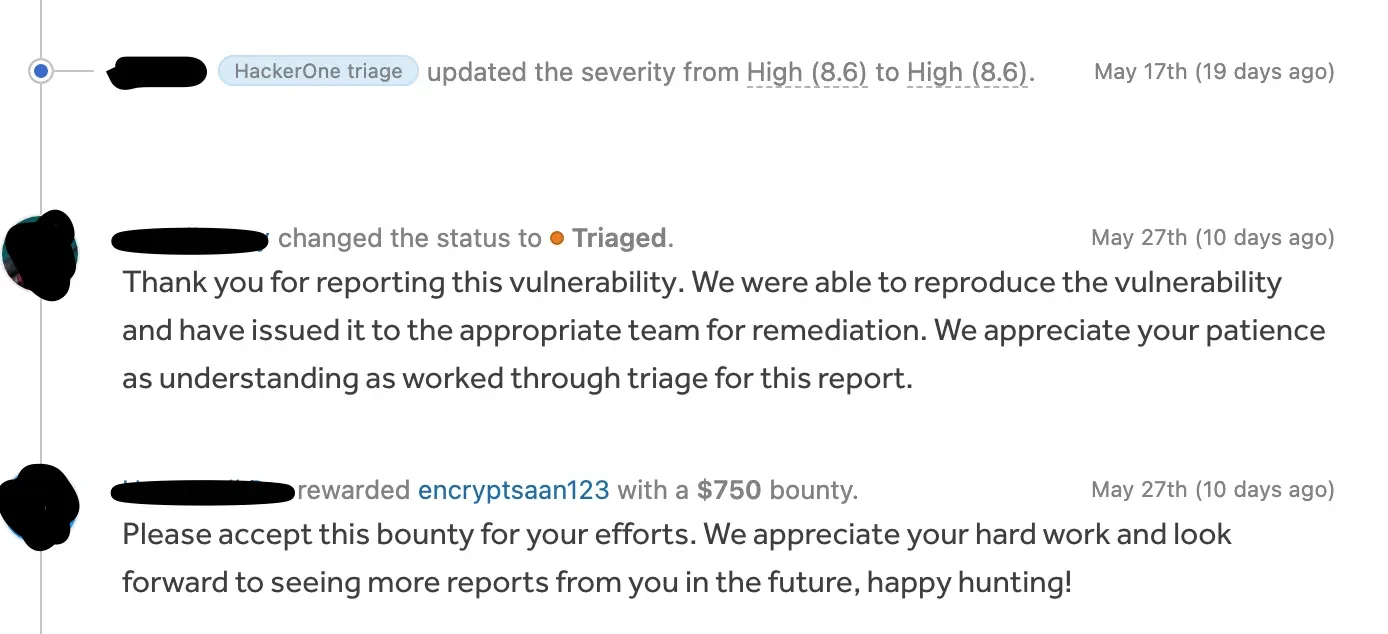
Reported on May 11th, 2022; triaged and rewarded on May 27th, 2022, with a bounty of $750.
What happened, in plain words
A security researcher found a way to make someone else's account in a web application send all of its meeting and event information to a Google Calendar that the researcher controlled. The trick did not need a password, a virus or any special software. It needed one link, and one click from the person being attacked.
The application was a tool for organisations to manage meetings, events and invoices. It had a feature that let an account owner connect a Google account, so that everything scheduled in the application was copied automatically into that Google Calendar. The researcher discovered that the step which finishes this connection could be triggered by simply opening a web address. If the person who opened it was already logged in to the application, the connection was made to their account, but with the researcher's Google Calendar on the other end. From then on, the application copied the organisation's meeting details into the researcher's calendar.
The researcher reported it on May 11th, 2022. It was triaged and rewarded on May 27th, 2022, with a bounty of $750.
Before going further, a few words on the terms used throughout, because everything below depends on them.
- An application here means a website you log in to, which stores data for you on its servers (the computers that run the site).
- A session is the period during which the website remembers who you are. You prove who you are once, by logging in, and the site then keeps track of you as you move from page to page.
- A cookie is a small piece of text that your browser stores for a website and sends back to it with every request. It is how the site recognises your session. Think of it as a wristband you get at an event: you show it once at the entrance, and after that the staff let you into every room without asking for your ID again.
- A request is the message your browser sends to a server when you open a page or click a button. It contains the address you want, and usually your cookie as well.
- CSRF stands for Cross-Site Request Forgery. It means making a victim's browser send a request to a site where the victim is logged in, without the victim intending to. The browser helpfully attaches the victim's cookie, so the site believes the request came from the victim. The everyday comparison: someone hands you a form to sign and you sign it without reading, and because it is your signature, everyone treats it as your decision.
- OAuth is a system that lets one website ask another website for permission to access your data there, without giving the first website your password. You have seen it whenever a site offers "Sign in with Google". Google asks you to approve, then hands the requesting site a short-lived proof that you approved.
- An API is the set of addresses a service offers so that programs, rather than people clicking, can talk to it. When the application talks to Google Calendar, it does so through Google's API.
- A token is a string of characters that acts as proof of permission, like a cloakroom ticket: whoever holds it can collect the coat. An authorisation code is a one-time token that a site exchanges for access.
- A parameter is a named value attached to a web address, written after a
?and separated by&. In?code=abc&scope=xyz,codeandscopeare parameters. - GET is one of the basic types of request a browser makes. It is what happens when you type an address or click a normal link: the browser asks the server to give it something. A POST is the type used when you submit a form, and it is meant for requests that change something.
- XSS (cross-site scripting) and privilege escalation are two other kinds of security bug. XSS lets an attacker run their own code in another user's browser; privilege escalation lets a user gain rights they should not have. The researcher had already reported both on this application before the events below.
The target and the feature
The researcher was working on a private program on HackerOne, a platform where companies invite researchers to test their systems and pay for valid findings. A private program is one you can only join by invitation. The application managed meetings, events and invoices for organisations.
After the earlier XSS and privilege escalation reports, the program staff asked the researcher to look for bugs that would be a threat to organisational data. That request shaped what he looked at next: not just whether one page could be broken, but whether one organisation's information could end up somewhere it should not.
The feature at the centre of the story is the Google Calendar integration. An account owner can connect a Google account to the application, and from then on the application copies scheduled data, meaning meetings, events and invoices, into that Google Calendar. This is a convenience feature: instead of checking two places, the owner sees everything in the calendar they already use.
Setup
The researcher worked against the private program on HackerOne. The attack has very few requirements:
- The victim must be logged in to the target application in the browser where the crafted link is opened. That is what makes the browser send the victim's cookie along with the request.
- The attacker needs their own account on the target application.
- The attacker needs their own Google account, because the authorisation code that gets used in the attack has to come from somewhere, and it can only come from the attacker's own Google login.
Nothing else is needed: no malware, no network position, no password of the victim.
Finding it
While connecting the Google Calendar, the flow works as follows. Google authorises the web application with a token to access its service, and the final request back to the application looks like this:
GET /app/google/auth_callback?code=4/0RAX4YfWgvjaHxzYX4FNLO-QvFVgDmMsSA0_IvL0FxAptS2mHJAXM-L4bMiZmKGhI6Mz-o3A&scope=https://www.googleapis.com/auth/calendar HTTP/1.1Host: target.comCookie: cookie here
Line by line, in plain words:
GETis the request type. It tells the server "give me the thing at this address". It is the same type of request your browser makes when you click an ordinary link or type an address into the bar./app/google/auth_callback?code=...&scope=...is the address being requested.auth_callbackis the name of the step that finishes the Google connection. Everything after the?is a parameter:codecarries the authorisation value that Google issued, andscopesays what the permission covers, herehttps://www.googleapis.com/auth/calendar, meaning calendar access.HTTP/1.1is the version of the request format being used.Host: target.comsays which website the request is for.target.comstands in for the real address of the application.Cookie: cookie hereis where the browser puts the victim's session cookie. In the real request this would be the actual cookie value; it is replaced here so the write-up can be shared.
The code parameter carries the authorisation value from Google. The application uses it to add that Google Calendar to the target account, and then syncs and exchanges data with it. In other words, this one request is the moment the connection is made: before it, the application and the calendar know nothing of each other; after it, they are linked and data starts flowing.
Two things stood out to the researcher:
- The request is a
GET. A request that changes something, like linking an account, should normally be aPOST, because aPOSTis not something a browser does just because you clicked a link. AGETcan be triggered by any link, anywhere, including one pasted into a chat message. - There are no additional CSRF checks. A CSRF check is a value the site requires in the request to prove that the request came from its own pages and not from somewhere else. Without one, the site has no way to tell the difference between a request the victim made on purpose and a request the victim was tricked into making.
Together, those two facts mean a victim can be tricked into clicking a URL of the form:
https://target.com/app/google/auth_callback?code=4/0RAX4YfWgvjaHxzYX4FNLO-QvFVgDmMsSA0_IvL0FxAptS2mHJAXM-L4bMiZmKGhI6Mz-o3A&scope=https://www.googleapis.com/auth/
This is the same address as the request above, written as a link a person can click. The code is the one the attacker obtained from their own Google login, and scope again describes the calendar permission. When the victim opens it, the Google Calendar gets linked to the victim's account, provided the victim opens the link in the same browser where they are already logged in to the target. That last condition matters: the browser only sends the victim's cookie if the victim has an active session there.
The researcher is explicit about the limit of this attack. auth_callback?code= carries an authorisation token value from Google, and you can only obtain your own Google authorisation token. So through this CSRF, only the attacker's own Google account can be linked to the victim's account on the target. That sounds like a small thing, but as the next section shows, it is enough.
Exploitation
Step 1: Prepare as the attacker
Navigate to your own account as the attacker. This is just the starting point: the attacker needs a normal account on the application, the same as any user would create.
Step 2: Enable the integration
Navigate to https://target.com/profile/settings. The Google Calendar app is disabled there. Enable it; this asks you to connect a Google account.
Why this step: the attacker needs to go through the real connection flow once, so that the application produces the callback request the attacker wants to copy. The settings page is where the feature is switched on, and switching it on is what starts the conversation with Google.
Step 3: Connect the attacker's Google account and capture the callback
Connect with the attacker's Google account and capture the final request containing the Google authorisation token:
GET /app/google/auth_callback?code=4/0RAX4YfWgvjaHxzYX4FNLO-QvFVgDmMsSA0_IvL0FxAptS2mHJAXM-L4bMiZmKGhI6Mz-o3A&scope=https://www.googleapis.com/auth/calendar HTTP/1.1Host: target.comCookie: cookie here
This is the same request as before, now seen from the attacker's side. The code in it was issued to the attacker's Google account. "Capture" means the attacker records this request as their browser sends it, for example with the developer tools built into every browser, which show the requests a page makes. The attacker captures the final request containing the Google authorisation token.
Because the request is a GET, the resulting link can be shared directly with any organisational owner. The researcher notes that a tiny URL for the link helps with tricking the victim. A tiny URL is a short link that redirects to a longer one; it hides what the link really points to, so the victim is less likely to be suspicious.
Opening it connects the attacker's Google account with that organisation's account.
The image is captioned as a sample of how Google gives access.
Step 4: Deliver the link
Share the link with an employee of the victim organisation and let them click it. The attacker's Google Calendar is then added to their organisation.
Why this works: the employee is logged in, so their browser sends their cookie with the request. The application sees a valid session and a valid code, and completes the link. It has no way to know that the person who obtained the code and the person whose session is being used are two different people.
Step 5: Collect the synced data
All the scheduled data is now synced to the attacker's Google Calendar, where the attacker can read it.
The image shows a sample of one meeting added by the victim, synced to the attacker's Google Calendar.
Root cause
The callback endpoint, the address that completes the Google OAuth flow, accepts a state-changing action over GET and performs no additional CSRF checks. Any request that carries a valid code and the victim's session cookie will link the corresponding Google account to the victim's account, regardless of who initiated it.
The code itself is not a defence here. It is bound to the attacker's Google account, but nothing binds it to the browser session that started the flow. That value is usually called state. Because the application does not do this, a code obtained by the attacker is accepted in the victim's session. The cloakroom ticket analogy applies: the ticket proves the coat was handed in, but not by whom, so anyone holding the ticket can collect the coat.
Impact
Once the attacker's Google account is connected to the victim's account on the target, the application syncs all meetings, events and invoice data to that Google Calendar. According to the researcher, the synced data includes:
- the date;
- invited users' names;
- email addresses (Google Calendar offers an option to copy the guest email);
- mobile numbers, if the owner added them to the guest details;
- attached files;
- location;
- meeting credentials;
- notes.
The organisational owner can view the scheduled data in detail through Google Calendar, and in this case so can the attacker. The synced data includes the date, invited users' names, email addresses, mobile numbers, attached files, location, meeting credentials and notes.
The attack requires the victim to open the link while logged in to the target in the same browser. It is a single click, and the link can be shortened so that it does not look like what it is.
Fix
The report does not describe any fix that was applied. The report does not describe any fix. In everyday terms, the application should check that the person finishing the connection is the same person who started it, instead of trusting anyone who arrives with a valid ticket.
Variants to test
These are the same ideas applied elsewhere, useful for a beginner who wants to practise the pattern rather than memorise one URL.
- OAuth callback endpoints on other targets: complete the flow with your own account and replay the callback URL in a second, logged-in session. A positive result is the attacker's third-party account being linked to the second account. "Replay" means sending the same request again from a different place.
- State-changing
GETendpoints in integration settings (enable, connect, link, sync). A positive result is the setting changing for a victim who only opened a URL. Look for any settings action that happens when you click a link rather than submit a form. - Missing
stateparameter validation in OAuth flows. A positive result is a callback accepted with astatevalue that was never issued to that session. If the application ignoresstateentirely, or accepts any value, the protection is not there. - Tiny-URL or redirect wrapping of the callback link, to check whether delivery filters can be bypassed while the link still reaches the callback. Many chat tools and mail filters block links that look like login callbacks; a short link may pass where the long one does not.
Reported on May 11th, 2022; triaged and rewarded on May 27th, 2022, with a bounty of $750.
Glossary
- API: the set of addresses and rules a service offers so that programs can talk to it, as opposed to pages meant for a person to click.
- Application: a website you log in to, which stores data for you on its servers.
- Authorisation code: a one-time value that a service such as Google issues after you approve a connection, which the receiving site exchanges for access.
- Bounty: money paid by a company to a researcher for a valid security report.
- Callback: the address a service sends you back to after you approve something elsewhere; here, the step that finishes the Google connection.
- Cookie: a small piece of text a browser stores for a website and sends back with every request, used to recognise your session.
- CSRF (Cross-Site Request Forgery): making a victim's browser send a request to a site where the victim is logged in, without the victim intending it.
- CSRF token: a value a site requires in a request to prove the request came from its own pages; its absence is what made this attack possible.
- Endpoint: a specific address on a server that performs a particular action.
- GET: the request type a browser uses when you open a link or type an address; it is meant for retrieving things, not for changing them.
- HackerOne: a platform where companies invite researchers to test their systems and pay for valid findings.
- Host: the part of a request that says which website it is addressed to.
- OAuth: a system that lets one website access your data on another website after you approve it, without sharing your password.
- Parameter: a named value attached to a web address after a
?, separated by&. - POST: the request type used when submitting a form; it is meant for actions that change something.
- Privilege escalation: a bug that lets a user gain rights they should not have.
- Private program: a bug bounty program you can only join by invitation.
- Request: the message a browser sends to a server when you open a page or click a button.
- Scope: the part of a request that states what a permission covers, for example calendar access.
- Session: the period during which a website remembers who you are after you log in.
- State parameter: a random value an application should issue when starting an OAuth flow and require back in the callback, to tie the two together.
- Sync: automatic copying of data from one place to another so both stay up to date.
- Tiny URL: a short link that redirects to a longer one, often used to hide where a link really goes.
- Token: a string of characters that acts as proof of permission.
- Triaged: reviewed by the program and confirmed as a valid issue.
- XSS (cross-site scripting): a bug that lets an attacker run their own code in another user's browser.


