An Out Of Scope domain Leads To a Critical Bug[$1500]
A public online booking endpoint issued an authorization token that was accepted by the main application's API with full read-write permissions for the organisation. An unauthenticated attacker could obtain this token and use it to access, create, modify, or delete organisation data, including employee accounts.
 Published on medium.com
Often I don’t post writeups for bugs that don’t have any uniqueness, because being a writer I always prefer posting such findings which will be unique and informational. As I Got lots of comments and dm for this writeup, here it is.
The full write-up lives on its author's site
It belongs to its author, so we link to it rather than copy it. The other two tabs are our own rewrites, checked against it.
Context
The target was a job management application reachable at app.target.com. Only that hostname was in scope; every other host under *.target.com, including booking.target.com and the per-organisation public sites at yourcompany.target.com, was explicitly out of scope.
The application manages jobs for an organisation. A job can be created in two ways. An organisational owner can create a job inside the app and assign it to an employee, and it appears at https://app.target.com/app/jobs. Alternatively the organisation can enable an online booking feature, which produces a public URL of the form https://booking.target.com/comany-name/some-hashed-value. That URL is published automatically on the organisation's public site yourcompany.target.com behind an "online booking" button, and any visitor can use it to request a new job, which then also shows up at https://app.target.com/app/jobs.
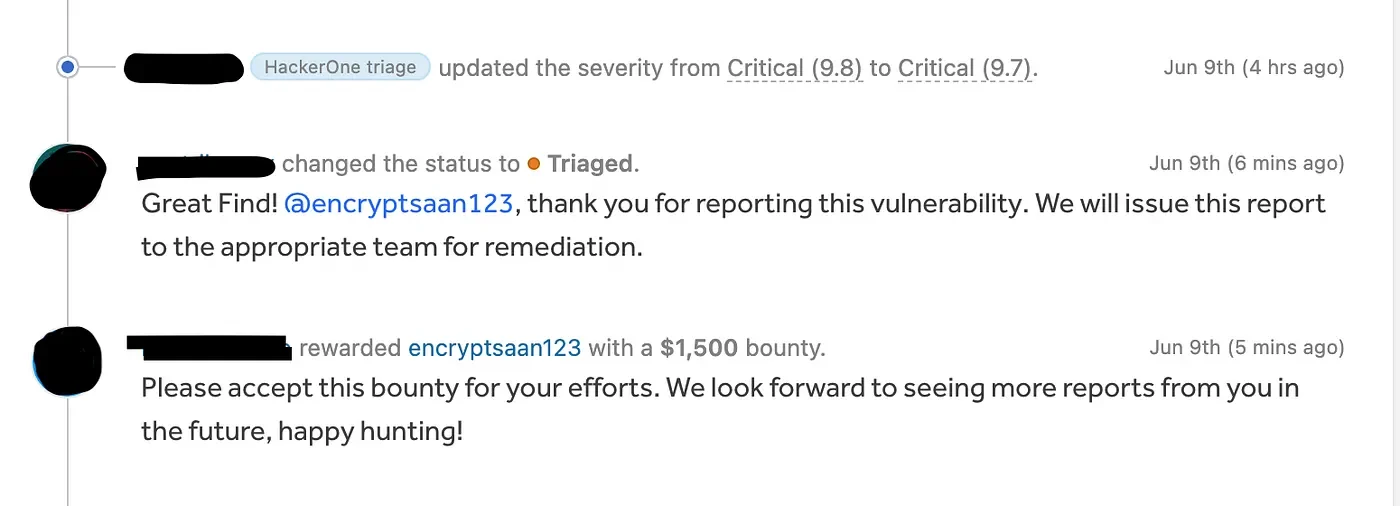
The write-up is by Shakti Ranjan Mohanty (3ncryptsaan). The report was filed on 4 June, triaged on 9 June, rewarded with $1500 on 9 June, and resolved on 22 June. The author states the severity as Critical (9.7) per CVSS.
Setup
The researcher had spent about a month on this single program and had become familiar with its functionality. No special accounts or tooling are described beyond an intercepting proxy used to capture requests, and a normal visitor session on the public booking page. The precondition for the attack is simply that the target organisation has the online booking feature enabled, which the author notes is common for organisations on a paid plan because they publish the link on their business website.
Finding it
While testing the in-scope app, the researcher observed an API endpoint with this request:
GET /app/target/configuration HTTP/1.1 Host: app.target.comX-Csrf-Token: valueCookie: value
Removing the X-Csrf-Token header still allowed access to the information at /app/target/configuration, which showed that the cookie alone was responsible for authentication there. Attempts at CORS and CSRF issues on this endpoint failed, and the researcher noted this and moved on.
The next day the researcher remembered booking.target.com. The question was how a job request submitted from the out-of-scope booking host ends up stored and reflected in the in-scope app at https://app.target.com/app/jobs. To answer it, the researcher acted as an ordinary visitor, navigated to the online booking URL https://booking.target.com/comany-name/some-hashed-value, and created a job request. This initiated a POST request:
POST /company/add_scheduled_job_for_user HTTP/1.1Host: booking.target.comUser-Agent: Mozilla/5.0 (Macintosh; Intel Mac OS X 10.15; rv:100.0) Gecko/20100101 Firefox/100.0Content-Type: application/x-www-form-urlencoded;charset=utf-8Authorization: Token [redacted] 1179DNT: 1Connection: closeSec-Fetch-Dest: emptySec-Fetch-Mode: corsSec-Fetch-Site: same-sitename=sds&street=sss&street_line_2=ss&city=ss&state=ss&postal_code=12222&mobile_number=700-897-8755&email=[redacted]&scheduled_end_time=&scheduled_start_time=&services[0][organizational_line_item_template_id]=43660983&services[0][name]=Custom+Job&services[0][description]=company+will+provide+you+a+quote+if+the+work+you+need+does+not+fit+into+one+of+our+standard+categories.Please+provide+as+much+detail+as+possible,+including+pictures.&services[0][default]=false&services[0][amount]=$0.00.
The body carries the booking details: name, street, city, state, postal code, mobile number, email, the scheduled start and end times (both empty here), and a services[0] array with an organisational line item template id, a name, a description, a default flag and an amount. The important part is the Authorization: Token token=... header. That token is what authenticates the anonymous visitor's booking against the organisation, which means the token issued by booking.target.com must have some correlation with app.target.com.
That raised the question the rest of the report answers: can the same Authorization: Token token=... be used to reach other authenticated data or perform state-changing actions for that organisation?
Exploitation
Step 1: confirm the token works against the in-scope app
The researcher sent a request to the configuration endpoint seen earlier, this time with the booking token instead of the cookie:
GET /app/target/configuration HTTP/1.1 Host: app.target.comAuthorization: Token [redacted]
The request succeeded. The configuration data for the respective organisation was returned, and it was being viewed by an anonymous user who had never logged in.
Step 2: enumerate what else the token reaches
With the same token obtained from an online booking request, the researcher, as a non logged-in user, could get the employee list, delete or restore an existing employee, get invoice settings, get the organisational profile, get all job lists, get customers, and create customers and jobs, among other actions.
Step 3: reproduce from scratch
- As an anonymous user, navigate to the target organisation's online booking URL
https://booking.target.com/comany-name/some-hashed-value. This URL is meant for the public and is used by organisations to receive new jobs; organisations on a paid plan often use the feature and publish the link on their business website. - While creating a booking, capture the request and note the `Authorization: Token [redacted] value.
- Use that token value in any API endpoint you want to access for that organisation. It replaces the need for both the
x-csrf-tokenheader and the cookie.
Step 4: read the employee list
GET /app/organization/employees?expand[]=reviews&expand[]=device_info&expand[]=permissions HTTP/1.1Host: app.target.comAccept: application/json, text/plain, */*User-Agent: Mozilla/5.0 (Macintosh; Intel Mac OS X 10_15_7) AppleWebKit/537.36 (KHTML, like Gecko) Chrome/102.0.5005.61 Safari/537.36Authorization: Token [redacted]
The response contains all employee data, including id, email and name.
Step 5: delete an employee
Because the employee id is now known, the same token can be used to delete that employee:
DELETE /app/organization/employees/zzzzzzzzzzzzzzzz HTTP/1.1Host: app.target.comAccept: application/json, text/plain, */*User-Agent: Mozilla/5.0 (Macintosh; Intel Mac OS X 10_15_7) AppleWebKit/537.36 (KHTML, like Gecko) Chrome/102.0.5005.61 Safari/537.36Authorization: Token [redacted]
As with the two examples above, the researcher could do everything an admin of that organisation can do: access, create and delete customers, jobs and invoices, and so on.
Root cause
The online booking request from booking.domain.com carries one form of authentication, the Authorization header. That token is responsible for creating jobs, and the developers gave it read and write permissions globally across all endpoints. As a result, anyone holding the token from an online booking can access, add or delete anything belonging to that organisation.
The token is responsible for creating jobs, and the developers gave it read and write permissions globally across all endpoints.
Impact
Online booking is publicly available for each organisation, so each organisation's online job creation has its own Authorization: Token token=.... Because the booking page is public, an attacker can obtain any organisation's token in less than a minute. An unauthenticated user, without logging in and without being a member of the organisation, can then take over control of that organisation: changing data, creating data, editing and accessing data, and deleting administrative users or restoring deleted users.
The author rates this Critical (9.7) per CVSS. The report does not give a CVSS vector.
Fix
The report does not describe the code change made. The report records that the issue was resolved on 22 June.
Variants to test
- Public forms that carry a bearer token. Capture the request behind any public booking, contact, quote or appointment form and replay its
Authorizationheader against the main application's API. A positive result is any administrative endpoint returning organisation data or accepting a state change. - Token scope probing. Take a token from a low-privilege public flow and try read endpoints first (
/app/target/configuration, employee lists, profile, invoice settings), then write endpoints (create, delete, restore). A positive result is a 2xx response with data or a confirmed state change where only a logged-in admin should succeed. - Header substitution. On endpoints that normally require a session cookie plus a CSRF header, drop both and send only the token from the public flow. A positive result is the same response as an authenticated admin request.
- Cross-host trust. Where a public subdomain and the main app share a backend, check whether credentials minted on the public host are honoured by the main host, as happened here between
booking.target.comandapp.target.com. - Identifier chaining. Use ids returned by one token-authorised read (for example employee ids) in destructive requests with the same token. A positive result is a successful delete or restore performed without any login.
What happened, in plain words
A security researcher found a way for a completely anonymous person, someone who has never signed in and is not a member of any company, to take full control of a company's account on a job management website. The trick was a small piece of text called a token that the website hands out to anyone who fills in a public booking form. That token was meant only to let a visitor request a job. Instead, the website accepted it everywhere, so the same token could be used to read the company's private data, list its employees, delete employees, and create or delete customers, jobs and invoices.
This article walks through the whole story slowly, assuming you only know how to use a browser. Every technical word is explained the first time it appears, and there is a glossary at the end.
The application and the rules of the game
The target was a job management application reachable at app.target.com. Think of it as a website where a company keeps track of the jobs it does for its customers, and where its employees have accounts.
A bug bounty program is a scheme where a company invites outside researchers to look for security problems in its systems and pays for good findings. Each program defines a scope: the list of systems a researcher is allowed to test. Here only the hostname app.target.com was in scope. Every other host under *.target.com was explicitly out of scope, including booking.target.com and the per-organisation public sites at yourcompany.target.com.
A hostname is the part of a web address after https://, for example app.target.com. The pattern *.target.com means every possible subdomain of target.com. Out of scope means the researcher is not supposed to attack those systems. It does not mean they are unimportant: as this story shows, an out-of-scope system can still be the key that opens an in-scope one.
The application manages jobs for an organisation. A job can be created in two ways:
- An organisational owner can create a job inside the app and assign it to an employee. It then appears at
https://app.target.com/app/jobs. - The organisation can enable an online booking feature. This produces a public URL of the form
https://booking.target.com/comany-name/some-hashed-value. That URL is published automatically on the organisation's public siteyourcompany.target.combehind an "online booking" button. Any visitor can use it to request a new job, and the request then also shows up athttps://app.target.com/app/jobs.
A URL is simply a web address. The some-hashed-value part is a long scrambled string that is hard to guess, a bit like a locker number that is written on the outside of the locker but is meaningless without the key. The public site yourcompany.target.com is the company's shop window, visible to anyone; the app at app.target.com is the back office, where staff work.
The write-up is by Shakti Ranjan Mohanty (3ncryptsaan). The report was filed on 4 June, triaged on 9 June, rewarded with $1500 on 9 June, and resolved on 22 June. Triaged means the company's security team looked at the report and confirmed it was a real problem. The author states the severity as Critical (9.7) per CVSS. CVSS is a standard scoring system for the seriousness of a security flaw, where 10 is the worst possible score.
Getting set up
The researcher had spent about a month on this single program and had become familiar with its functionality. Knowing a website well matters: you notice small differences, such as a request that works without one of its usual security headers, only when you have seen the normal behaviour many times.
No special accounts or tooling are described beyond an intercepting proxy used to capture requests, and a normal visitor session on the public booking page. An intercepting proxy is a program that sits between your browser and the website and lets you read and edit every request and response. A request is the message your browser sends to a server asking for something; a response is the server's reply. A header is a labelled line inside a request or response, such as Host: or Cookie:, carrying extra information. A session is the period during which a website remembers who you are.
The precondition for the attack is simply that the target organisation has the online booking feature enabled. The author notes this is common for organisations on a paid plan, because they publish the link on their business website.
Finding it
While testing the in-scope app, the researcher observed an API endpoint with this request:
GET /app/target/configuration HTTP/1.1 Host: app.target.comX-Csrf-Token: valueCookie: value
An API is the part of a website that answers requests with data rather than web pages, like a service counter where you ask for a specific item instead of browsing the shop. An endpoint is one specific address on that counter, here /app/target/configuration, which returns the organisation's configuration settings.
Line by line:
GET /app/target/configuration HTTP/1.1says: please give me (GET) the resource at this path, using version 1.1 of the HTTP protocol, the language browsers and servers use to talk.Host: app.target.comsays which website the request is for. One server can host many sites, so it needs to know which one you mean.X-Csrf-Token: valueis a CSRF token. CSRF stands for Cross-Site Request Forgery, an attack where a malicious site tricks your browser into sending a request to another site while you are logged in there. To defend against it, sites often require a second secret value, the CSRF token, in addition to your login cookie. A cookie is a small piece of data the website stores in your browser after you log in, so it can recognise you on later requests. The CSRF token is like a handwritten signature that must accompany every instruction, so a forged instruction without the signature is refused.Cookie: valueis the login cookie itself.
Removing the X-Csrf-Token header still allowed access to the information at /app/target/configuration. That showed the cookie alone was responsible for authentication there. Authentication means proving who you are. The CSRF token was not actually being checked on this endpoint, so the signature requirement was decorative.
Attempts at CORS and CSRF issues on this endpoint failed, and the researcher noted this and moved on. CORS (Cross-Origin Resource Sharing) is a browser rule about which websites may read responses from which other websites. The researcher tried to abuse these mechanisms and could not, so this endpoint alone was not enough.
The next day the researcher remembered booking.target.com. The question was how a job request submitted from the out-of-scope booking host ends up stored and reflected in the in-scope app at https://app.target.com/app/jobs. This is a good habit: when two systems clearly talk to each other, the connection between them is worth examining, even if one of them is out of scope for direct testing.
To answer it, the researcher acted as an ordinary visitor, navigated to the online booking URL https://booking.target.com/comany-name/some-hashed-value, and created a job request. This initiated a POST request:
POST /company/add_scheduled_job_for_user HTTP/1.1Host: booking.target.comUser-Agent: Mozilla/5.0 (Macintosh; Intel Mac OS X 10.15; rv:100.0) Gecko/20100101 Firefox/100.0Content-Type: application/x-www-form-urlencoded;charset=utf-8Authorization: Token [redacted] 1179DNT: 1Connection: closeSec-Fetch-Dest: emptySec-Fetch-Mode: corsSec-Fetch-Site: same-sitename=sds&street=sss&street_line_2=ss&city=ss&state=ss&postal_code=12222&mobile_number=700-897-8755&email=[redacted]&scheduled_end_time=&scheduled_start_time=&services[0][organizational_line_item_template_id]=43660983&services[0][name]=Custom+Job&services[0][description]=company+will+provide+you+a+quote+if+the+work+you+need+does+not+fit+into+one+of+our+standard+categories.Please+provide+as+much+detail+as+possible,+including+pictures.&services[0][default]=false&services[0][amount]=$0.00.
Line by line:
POST /company/add_scheduled_job_for_user HTTP/1.1says: I am sending data (POST) to this path to create a scheduled job for a user. POST is the method used when you submit a form, as opposed to GET which just asks for something.Host: booking.target.comsays the request is addressed to the booking site, not the main app.User-Agent: Mozilla/5.0 ... Firefox/100.0tells the server which browser made the request. It is normal background information.Content-Type: application/x-www-form-urlencoded;charset=utf-8says the body of the request is a standard web form, encoded asname=valuepairs joined by&.Authorization: Token [redacted] is the important line. An Authorization header is how a request proves it is allowed to do something. Here it carries a token, a long random string that acts like a temporary key. Thexxxxxxxx` is a placeholder for the real value, which is secret.Content-Length: 1179says how many bytes long the body is.DNT: 1is a "do not track" preference sent by the browser.Connection: closeasks the server to close the connection after replying.Sec-Fetch-Dest,Sec-Fetch-ModeandSec-Fetch-Siteare headers modern browsers add to describe the context of the request.same-sitehere means the request came from the same site family.- The last long line is the form body. It carries the booking details:
name,street,street_line_2,city,state,postal_code,mobile_number,email, the scheduled start and end times (both empty here), and aservices[0]array with an organisational line item template id, a name, a description, adefaultflag and an amount. An array is an ordered list;services[0]means the first item in the list of services.
The important part is the Authorization: Token token=... header. That token is what authenticates the anonymous visitor's booking against the organisation. In other words, the booking site does not ask the visitor to log in; it hands the visitor a key that represents the organisation for the purpose of this one form. That means the token issued by booking.target.com must have some correlation with app.target.com.
That raised the question the rest of the report answers: can the same Authorization: Token token=... be used to reach other authenticated data or perform state-changing actions for that organisation? A state-changing action is anything that alters data on the server, such as creating, editing or deleting something, as opposed to merely reading it.
Exploitation
Step 1: confirm the token works against the in-scope app
The researcher sent a request to the configuration endpoint seen earlier, this time with the booking token instead of the cookie:
GET /app/target/configuration HTTP/1.1 Host: app.target.comAuthorization: Token [redacted]
Line by line:
GET /app/target/configuration HTTP/1.1asks for the configuration data, exactly as before.Host: app.target.comaddresses the main app, the in-scope system.- `Authorization: Token [redacted] presents the token that was obtained from the public booking form, in place of a login cookie and CSRF token.
The request succeeded. The configuration data for the respective organisation was returned, and it was being viewed by an anonymous user who had never logged in. This is the moment the bug is proven: a key handed out at the front door opened the back office.
Step 2: enumerate what else the token reaches
With the same token obtained from an online booking request, the researcher, as a non logged-in user, could get the employee list, delete or restore an existing employee, get invoice settings, get the organisational profile, get all job lists, get customers, and create customers and jobs, among other actions. To enumerate means to systematically try each feature and record what it allows.
Step 3: reproduce from scratch
- As an anonymous user, navigate to the target organisation's online booking URL
https://booking.target.com/comany-name/some-hashed-value. This URL is meant for the public and is used by organisations to receive new jobs; organisations on a paid plan often use the feature and publish the link on their business website. - While creating a booking, capture the request and note the `Authorization: Token [redacted] value. Capturing means reading the request with the intercepting proxy before it leaves your browser.
- Use that token value in any API endpoint you want to access for that organisation. It replaces the need for both the
x-csrf-tokenheader and the cookie.
Step 4: read the employee list
GET /app/organization/employees?expand[]=reviews&expand[]=device_info&expand[]=permissions HTTP/1.1Host: app.target.comAccept: application/json, text/plain, */*User-Agent: Mozilla/5.0 (Macintosh; Intel Mac OS X 10_15_7) AppleWebKit/537.36 (KHTML, like Gecko) Chrome/102.0.5005.61 Safari/537.36Authorization: Token [redacted]
Line by line:
GET /app/organization/employees?expand[]=reviews&expand[]=device_info&expand[]=permissions HTTP/1.1asks for the employee list. Everything after the?is the query string, extra instructions attached to the address.Host: app.target.comaddresses the main app.Accept: application/json, text/plain, */*tells the server which reply formats the client can handle. JSON is a common text format for structured data, made of names and values.User-Agent: Mozilla/5.0 ... Chrome/102.0.5005.61 ...identifies the browser, here Chrome.- `Authorization: Token [redacted] presents the booking token again.
The response contains all employee data, including id, email and name. An id is a unique number or string the system uses to refer to a record, like a customer number.
Step 5: delete an employee
Because the employee id is now known, the same token can be used to delete that employee:
DELETE /app/organization/employees/zzzzzzzzzzzzzzzz HTTP/1.1Host: app.target.comAccept: application/json, text/plain, */*User-Agent: Mozilla/5.0 (Macintosh; Intel Mac OS X 10_15_7) AppleWebKit/537.36 (KHTML, like Gecko) Chrome/102.0.5005.61 Safari/537.36Authorization: Token [redacted]
Line by line:
DELETE /app/organization/employees/zzzzzzzzzzzzzzzz HTTP/1.1says: remove (DELETE) the employee whose id iszzzzzzzzzzzzzzzz. Thezzzzis a placeholder for the real id taken from the previous response.Accept: application/json, text/plain, */*states the accepted reply formats.User-Agent: Mozilla/5.0 ... Chrome/102.0.5005.61 ...identifies the browser.- `Authorization: Token [redacted] presents the same booking token.
As with the two examples above, the researcher could do everything an admin of that organisation can do: access, create and delete customers, jobs and invoices, and so on. An admin is a user with full rights over an organisation's account.
Root cause
The online booking request from booking.domain.com carries one form of authentication, the Authorization header. That token is responsible for creating jobs, and the developers gave it read and write permissions globally across all endpoints. Read permission means being allowed to view data; write permission means being allowed to change it. Globally means on every endpoint, not just the booking one.
As a result, anyone holding the token from an online booking can access, add or delete anything belonging to that organisation.
The token is responsible for creating jobs, and the developers gave it read and write permissions globally across all endpoints. Scoped means limited to a particular purpose or area. A bearer credential is one where simply presenting the string is enough, like a cinema ticket: whoever holds it gets in, no name check. The booking token then slotted into that same trust model with full organisational rights.
Impact
Online booking is publicly available for each organisation, so each organisation's online job creation has its own Authorization: Token token=.... Because the booking page is public, an attacker can obtain any organisation's token in less than a minute. An unauthenticated user, without logging in and without being a member of the organisation, can then take over control of that organisation: changing data, creating data, editing and accessing data, and deleting administrative users or restoring deleted users.
The author rates this Critical (9.7) per CVSS. The report does not give a CVSS vector, which is the detailed breakdown behind a CVSS score.
Fix
The report does not describe the code change made. The report records that the issue was resolved on 22 June.
Variants to test
These are patterns worth trying on other sites, based on the same idea.
- Public forms that carry a bearer token. Capture the request behind any public booking, contact, quote or appointment form and replay its
Authorizationheader against the main application's API. Replay means sending the same request again, possibly modified. A positive result is any administrative endpoint returning organisation data or accepting a state change. - Token scope probing. Take a token from a low-privilege public flow and try read endpoints first (
/app/target/configuration, employee lists, profile, invoice settings), then write endpoints (create, delete, restore). A positive result is a 2xx response with data or a confirmed state change where only a logged-in admin should succeed. A 2xx response is an HTTP status code in the 200s, meaning success. - Header substitution. On endpoints that normally require a session cookie plus a CSRF header, drop both and send only the token from the public flow. A positive result is the same response as an authenticated admin request.
- Cross-host trust. Where a public subdomain and the main app share a backend, check whether credentials minted on the public host are honoured by the main host, as happened here between
booking.target.comandapp.target.com. A backend is the server-side system that does the actual work behind the websites. - Identifier chaining. Use ids returned by one token-authorised read (for example employee ids) in destructive requests with the same token. A positive result is a successful delete or restore performed without any login.
Glossary
- Admin: a user with full rights over an organisation's account.
- API: the part of a website that answers requests with data rather than web pages.
- Array: an ordered list of items;
services[0]is the first item. - Authentication: proving who you are to a system.
- Authorization header: the part of a request that carries proof of permission, such as a token.
- Backend: the server-side system that does the actual work behind a website.
- Bearer credential: a credential where simply presenting the string is enough, like a cinema ticket.
- Bug bounty program: a scheme where a company invites outside researchers to find security problems and pays for good findings.
- Capturing a request: reading a request with an intercepting proxy before it leaves the browser.
- Cookie: a small piece of data a website stores in your browser, often to recognise you after login.
- CORS: Cross-Origin Resource Sharing, a browser rule about which websites may read responses from which other websites.
- CSRF: Cross-Site Request Forgery, an attack where a malicious site tricks your browser into sending a request to another site while you are logged in there.
- CSRF token: a second secret value a site may require alongside the cookie to prove a request was intended.
- CVSS: a standard scoring system for the seriousness of a security flaw, where 10 is the worst possible score.
- CVSS vector: the detailed breakdown behind a CVSS score.
- Endpoint: one specific address on an API that performs a particular function.
- Enumerate: to systematically try each feature and record what it allows.
- GET: the HTTP method used to ask for something.
- Header: a labelled line inside a request or response carrying extra information.
- Hostname: the part of a web address after
https://, for exampleapp.target.com. - HTTP: the protocol browsers and servers use to talk.
- Id: a unique number or string a system uses to refer to a record.
- Intercepting proxy: a program that sits between browser and website and lets you read and edit requests and responses.
- JSON: a common text format for structured data, made of names and values.
- Out of scope: a system a researcher is not supposed to attack under a program's rules.
- POST: the HTTP method used when submitting data, such as a form.
- Query string: the part of a URL after
?, carrying extra instructions. - Read permission: being allowed to view data.
- Replay: sending the same request again, possibly modified.
- Request: the message a browser sends to a server asking for something.
- Response: the server's reply to a request.
- Scoped: limited to a particular purpose or area.
- Session: the period during which a website remembers who you are.
- State-changing action: anything that alters data on the server, such as creating, editing or deleting.
- Subdomain: a hostname that sits under another, such as
booking.target.comundertarget.com. - Token: a long random string that acts like a temporary key.
- Triaged: confirmed by the company's security team as a real problem.
- URL: a web address.
- User-Agent: a header telling the server which browser made the request.
- Write permission: being allowed to change data.
- 2xx response: an HTTP status code in the 200s, meaning success.


