Improper Access Control in Decathlon’s Booxi Integration Leads to Unauthorized Access to Internal Staff and Booking Data
A public Merchant API key for Booxi was exposed in Decathlon's frontend JavaScript, and the key allowed unauthenticated access to internal staff and booking data through Booxi's booking API. An attacker could retrieve staff names and roles, store contact details, and internal service metadata without any authentication.
 Published on medium.com
Cybersecurity
The full write-up lives on its author's site
It belongs to its author, so we link to it rather than copy it. The other two tabs are our own rewrites, checked against it.
Context
Decathlon is a public e-commerce application, and the researcher was assessing it when they came across an access control problem in its integration with Booxi, a booking platform. The affected page is the store help page at the URL below, whose source carries the booking widget's configuration. The page is served from https://www.decathlon.be/fr/help/app/ask_store/store_code/ and its frontend JavaScript carries the configuration the booking widget needs.
Booxi's documentation states that Merchant API keys are public by design. The researcher's point is that on this deployment those keys were not merely public identifiers: they allowed unauthenticated access, without any restrictions or access controls, to sensitive internal business data through Booxi's booking API.
Setup
No account, role or special tooling was needed. The researcher used a normal browser to view the page source and a Windows command line to send the requests.
Finding it
The researcher was reviewing the Decathlon website and noticed that the Booxi integration exposes a public Merchant API key directly in frontend JavaScript. Because Booxi documents Merchant keys as public, the key being visible is not by itself the bug. What looked wrong was what the key could reach: the booking API answered requests carrying only that key, with no further authentication and no access control, and returned internal staff and booking data.
Exploitation
Step 1: Open the store help page and view its source
Browse to the store help page and open the page source:
https://www.decathlon.be/fr/help/app/ask_store/store_code/
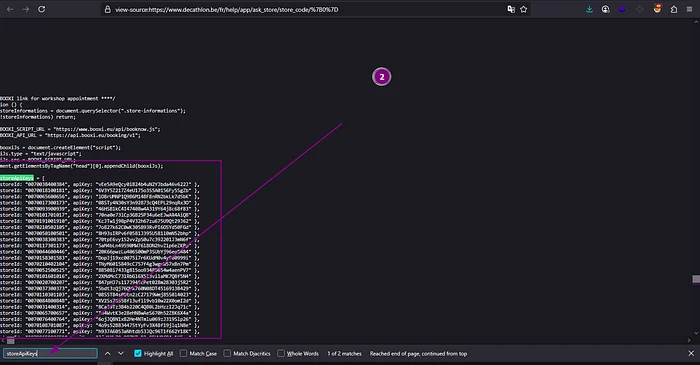
Right-click and choose view page source. The source of that page is where the keys are embedded.
Step 2: Extract the keys
Search the source for storeApikeys. The researcher found a lot of API keys there and saved one of them for testing, noting that every API key returns different data. The key used in the requests below is:
[redacted]
Step 3: Query the booking API
The researcher opened a command line (Windows cmd in their case) and sent the following requests. Each one is a GET to https://api.booxi.eu/booking/v1/ with the key supplied in the Booxi-APIKey header.
Merchant
curl -X GET "https://api.booxi.eu/booking/v1/merchant" \ -H "Booxi-APIKey: [redacted]"
This returned the store name, address and GPS coordinates, contact names (the example given is "Fietsen Kortrijk"), email and phone number, and the internal description, timezone and opening hours.
Staff
curl -X GET "https://api.booxi.eu/booking/v1/staff" \ -H "Booxi-APIKey: [redacted]"
This returned staff full names and roles. The example given is Pierre Gryp, position: Teamleader Mobility.
Service
curl -X GET "https://api.booxi.eu/booking/v1/service" \ -H "Booxi-APIKey: [redacted]"
This returned service IDs and product-specific metadata, plus booking instructions and business rules.
Service category (undocumented endpoint)
curl -X GET "https://api.booxi.eu/booking/v1/serviceCategory" \ -H "Booxi-APIKey: [redacted]"
This returned marketing descriptions and product categorisation. The researcher flags serviceCategory as an undocumented endpoint.
Root cause
The key is placed in frontend JavaScript, which is expected for a Booxi Merchant key, so the exposure of the key itself is by design. The mistake is on the API side: the booking API accepts a Merchant key on its own and applies no restriction or access control to the endpoints above, so a key that is meant to be public in the browser also unlocks internal business data. The researcher's framing is that the key is public by design but currently grants unauthenticated access to sensitive data. Why the existing defences did not stop it is not described in the report; likely the endpoints were treated as safe to expose because the key was considered public, without separating the data that should require more than a public key.
Impact
The exposure allows any unauthenticated user to access:
- Personally identifiable information (PII) of staff (names and roles)
- Internal service structure and product metadata
- Marketing text and booking flow details
The researcher also notes that each API key returns different data.
Fix
The report does not say what was changed. Based on the finding, the fix belongs on the API side: endpoints that return staff PII and internal service and booking metadata should not be reachable with a public Merchant key alone, and should require authentication or be restricted to the data the booking widget actually needs.
Variants to test
- Search other storefronts' frontend JavaScript for booking or scheduling vendor keys (
storeApikeysand similar configuration objects) and replay them against the vendor's API. A positive result is a response containing staff names, contact details or internal metadata rather than only public catalogue data. - Try undocumented sibling endpoints next to the documented ones, as with
serviceCategoryhere. A positive result is a response with marketing or internal fields. - Compare responses across several extracted keys to see whether they map to different stores or tenants. A positive result is data that differs between keys.
- Send the key with no other headers or session and check whether the API answers. A positive result is a full response from a bare command line request.
What happened, in plain words
Decathlon is a large shop that sells sports equipment, and it also runs a website where customers can look things up, including a help page that lets you pick a store and book an appointment there. That booking part is not built by Decathlon itself: it is provided by another company called Booxi, a booking platform. Decathlon's website talks to Booxi's computers behind the scenes so the booking calendar can work.
The researcher, who goes by the name 403_forbidd3n, was looking around the Decathlon website when they noticed something odd about that connection to Booxi. A secret-looking piece of text, called an API key, was sitting in plain sight in the code that the website sends to every visitor's browser. Normally that would be alarming, but Booxi's own documentation says that these particular keys, called Merchant keys, are public by design. So the key being visible was not the problem.
The problem was what the key could do. When the researcher sent that key to Booxi's booking service, the service answered with information that should not be public: the names and job roles of staff members, internal descriptions of the store, contact details, and details about how bookings are set up. No password, no login, no account was needed. Anyone who found the key could ask for the same information.
This kind of mistake is called an access control problem, or improper access control. Access control simply means the rules about who is allowed to see or do what. When those rules are missing or too loose, information ends up in the wrong hands. A useful comparison is a hotel: the room number written on your key card is not secret, but the card should still only open your own room. Here, the key was public, as intended, but it opened far more doors than it should have.

The pieces you need to understand first
Before walking through the steps, here are the basic ideas, explained from zero.
A website's source code. Every web page you see is produced from text that your browser receives and then draws on screen. You can look at that raw text yourself. It is called the page source, and it contains the instructions and data the page was built from. Sometimes developers leave things in there that visitors are not meant to notice.
JavaScript. This is the programming language that runs inside your browser and makes pages interactive, for example a booking calendar that updates without reloading the page. Because it runs in your browser, any JavaScript a page uses is delivered to you, and you can read it.
An API. Think of an API as a service counter. You do not walk into the kitchen of a restaurant; you go to the counter, ask for a dish by name, and someone brings it out. An API is the same idea for computers: one program asks another program for something specific, using an agreed address and format, and gets an answer back. Booxi's booking API is the counter where Decathlon's website asks for store and booking information.
An API key. This is a long string of letters and numbers that identifies who is asking. It works a bit like a membership card: you show it at the counter and the staff know which member you are. Some keys are meant to be secret, like a bank card PIN. Others are meant to be public, like a shop's loyalty card number that is printed on the card itself. Booxi's Merchant keys belong to the second kind, according to Booxi's documentation.
An endpoint. An endpoint is one specific address at the API counter. If the API is the counter, each endpoint is a different window: one for store details, one for staff, one for services. You reach each one by adding a word to the end of the API's web address.
A request and a response. When your computer asks an API for something, that is a request. The answer that comes back is the response. A request has a method, which is the type of action; GET means "give me something", as opposed to sending or changing data. A request also has headers, which are small labelled pieces of extra information attached to it, such as which key you are using.
curl. This is a small command-line program for sending requests to web addresses by hand, without a browser. It is useful because it shows you exactly what you sent and exactly what came back, with nothing hidden.
The command line. This is a text window where you type commands instead of clicking buttons. On Windows it is called cmd. It is the tool the researcher used to send the requests.
Personally identifiable information (PII). This is any information that can identify a real person, such as a full name, an email address or a phone number. It is treated carefully because it can be misused, for example for spam or impersonation.
Setting up
The researcher needed no account, no special role and no unusual software. A normal browser was enough to look at the page source, and a Windows command line was enough to send the requests. The only thing required was a store code in the help page address, because that address leads to a page whose source contains the keys.
Step 1: Open the store help page and look at its source
The first step is simply to visit the page and ask the browser to show you the raw text behind it. The page is:
https://www.decathlon.be/fr/help/app/ask_store/store_code/
This is the address of the store help page. The researcher browsed to this page, then right-clicked and chose "view page source". That menu option tells the browser to show the underlying text of the page instead of the drawn version. The reason for doing this is that the booking widget needs configuration to work, and that configuration, including the keys, is embedded in the page's source.
Step 2: Find the keys in the source
With the source open, the researcher searched it for the word storeApikeys. Searching a page's source is the same as searching any text: you press the search shortcut and type the word. Searching the source for storeApikeys jumps straight to the keys.
The researcher found a lot of API keys there and saved one of them for testing. They also noticed that every API key returns different data. The key used in the requests below is:
[redacted]
The reason for taking this step is that you cannot test what a key can reach until you have a key. Copying one out of the page source is the whole of the "attack" at this stage; there is no trickery involved, just reading what the site already sends to every visitor.
Step 3: Ask the booking API what it knows
The researcher then opened a command line, Windows cmd in their case, and sent four requests. Each one is a GET, meaning "give me this", sent to an address under https://api.booxi.eu/booking/v1/, with the key supplied in a header called Booxi-APIKey. The header is how the key is presented at the counter, so to speak.
The merchant endpoint
curl -X GET "https://api.booxi.eu/booking/v1/merchant" \ -H "Booxi-APIKey: [redacted]"
Line by line:
curlis the program being run.-X GETtells curl which method to use, hereGET, the "give me" method."https://api.booxi.eu/booking/v1/merchant"is the endpoint being asked: the merchant, meaning the store, information window at Booxi's booking API.\is a line continuation, a way of writing one long command across lines.-H "Booxi-APIKey: [redacted]"attaches a header namedBooxi-APIKeycarrying the key. This is the membership card being shown.
This request returned the store name, address and GPS coordinates, contact names (the example given is "Fietsen Kortrijk"), email and phone number, and the internal description, timezone and opening hours. The reason for starting here is that it is the most basic endpoint: if even this answers without a login, the key is being trusted on its own.
The staff endpoint
curl -X GET "https://api.booxi.eu/booking/v1/staff" \ -H "Booxi-APIKey: [redacted]"
This is the same shape as before, with staff as the endpoint instead of merchant. The -X GET and the -H header do the same jobs as above. This request returned staff full names and roles; the example given is Pierre Gryp, position: Teamleader Mobility. The reason for trying it is that staff information is personal data, so if the same public key reaches it, the exposure is more serious than store opening hours.
The service endpoint
curl -X GET "https://api.booxi.eu/booking/v1/service" \ -H "Booxi-APIKey: [redacted]"
Again the same pattern, this time asking the service endpoint, which describes the services a store offers for booking. It returned service IDs and product-specific metadata, plus booking instructions and business rules. The reason for checking it is that internal instructions and rules describe how the business is run, which is not the same as the public list of services a customer sees.
The service category endpoint
curl -X GET "https://api.booxi.eu/booking/v1/serviceCategory" \ -H "Booxi-APIKey: [redacted]"
This one asks serviceCategory, which groups services into categories. It returned marketing descriptions and product categorisation. The researcher flags serviceCategory as an undocumented endpoint, meaning it is not described in Booxi's public documentation. The reason for trying it is that undocumented endpoints are often overlooked when access rules are set up, so they are worth a look when a documented one already answers too freely.
Why this is a bug even though the key is public
The key sitting in the page's JavaScript is expected for a Booxi Merchant key, so the visibility of the key itself is by design. The mistake is on the API side. Booxi's booking API accepts a Merchant key on its own and applies no restriction or access control to the endpoints above. A key that is meant to be public in the browser therefore also unlocks internal business data. In the researcher's framing, the key is public by design but currently grants unauthenticated access to sensitive data.
Why the existing defences did not stop it is not described in the report. A plausible reading is that the endpoints were treated as safe to expose because the key was considered public, without separating the data that should require more than a public key.
What the exposure means
The exposure allows any unauthenticated user to access:
- Personally identifiable information (PII) of staff (names and roles)
- Internal service structure and product metadata
- Marketing text and booking flow details
The researcher also notes that each API key returns different data.
What the fix would look like
The report does not say what was changed. Based on the finding, the fix belongs on the API side: endpoints that return staff PII and internal service and booking metadata should not be reachable with a public Merchant key alone, and should require authentication or be restricted to the data the booking widget actually needs.
Similar things worth checking elsewhere
- Search other storefronts' frontend JavaScript for booking or scheduling vendor keys (
storeApikeysand similar configuration objects) and replay them against the vendor's API. A positive result is a response containing staff names, contact details or internal metadata rather than only public catalogue data. - Try undocumented sibling endpoints next to the documented ones, as with
serviceCategoryhere. A positive result is a response with marketing or internal fields. - Compare responses across several extracted keys to see whether they map to different stores or tenants. A positive result is data that differs between keys.
- Send the key with no other headers or session and check whether the API answers. A positive result is a full response from a bare command line request.
Glossary
- Access control: the rules that decide who is allowed to see or do what; when they are missing or too loose, it is called improper access control.
- API: a service counter for programs, where one program asks another for specific information and gets an answer back.
- API key: a long string of letters and numbers that identifies who is asking an API, like a membership card.
- Booxi: a booking platform whose service Decathlon's website uses for store appointments.
- Command line: a text window where you type commands instead of clicking buttons; cmd is the Windows version.
- curl: a command-line program for sending requests to web addresses by hand and seeing the raw answer.
- Endpoint: one specific address at an API, like one window at a service counter.
- Frontend JavaScript: code that runs inside your browser and is delivered to you with the page, so it can be read.
- GET: the request method that means "give me this information".
- Header: a small labelled piece of extra information attached to a request, such as which key is being used.
- JavaScript: the programming language that runs in the browser and makes pages interactive.
- Merchant key: Booxi's term for an API key that its documentation describes as public by design.
- Page source: the raw text a browser receives and turns into the page you see.
- Personally identifiable information (PII): information that can identify a real person, such as a name, email address or phone number.
- Request: a message your computer sends to an API asking for something.
- Response: the answer an API sends back.
- storeApikeys: the name of the configuration entry in the page source where the booking widget's keys are stored.
- Unauthenticated: without logging in or proving who you are.
- Undocumented endpoint: an API address that is not described in the vendor's public documentation.

