Improper CSRF token handling leads to site-wide CSRF issue, chained with clickjacking = woot! Multiple sites vulnerable
Some sites accept a request with a blank or otherwise invalid CSRF token, apply the change anyway, and only show an error asking the user to resubmit. An attacker could combine this with clickjacking to make a logged-in victim submit the form and change their account details.

I recently gave a talk at @DC151 about some interesting bug and bypasses i’ve found in my time doing bug bounties. In my talk I described an interesting technique for bypassing CSRF protections some sites have with clickjacking.
The full write-up lives on its author's site
It belongs to its author, so we link to it rather than copy it. The other two tabs are our own rewrites, checked against it.
Context
This write-up is about a technique for bypassing CSRF protections by combining improper CSRF token handling with clickjacking. The researcher first described it in a talk at @_DC151 and built a challenge around it on BugBountyNotes; the article goes into more detail. A similar issue affecting XVideos.com was blogged about back in 2016.
The feature in question is a settings endpoint that updates a user's email and name. CSRF tokens are designed to prevent a request coming from evil.com from executing an action, such as updating an email, which affects redacted.com. The question the article asks is what happens when a site does not handle that token correctly.
Setup
The article does not describe any particular account setup, tooling versions or roles. The example request carries a session cookie and a CSRF token, and the technique assumes the attacker can get a victim to load attacker-controlled HTML in a browser while logged in to the target.
Finding it
The starting point is an ordinary-looking settings request:
POST /settings HTTP/1.1
Host: redacted.com
Connection: close
Upgrade-Insecure-Requests: 1
User-Agent: Mozilla/5.0 (Windows NT 10.0; Win64; x64) AppleWebKit/537.36 (KHTML, like Gecko) Chrome/69.0.3497.100 Safari/537.36
Accept: text/html,application/xhtml+xml,application/xml;q=0.9,image/webp,image/apng,*/*;q=0.8
Referer: https://www.redacted.com/settings
Accept-Encoding: gzip, deflate
Accept-Language: en-GB,en-US;q=0.9,en;q=0.8
Cookie: [redacted]

email=[redacted]&name=Example&csrf_token=d9238iedodqw9e9
This updates the email and name as long as the csrf_token is valid. The interesting behaviour appears when the token value is sent blank:
email=[redacted]&name=Example&csrf_token=
Some sites will respond with the change the attacker wanted to make, such as updating the email and name, but with an error: Invalid CSRF token. Please resubmit the request. Upon submitting the request, the changes save.
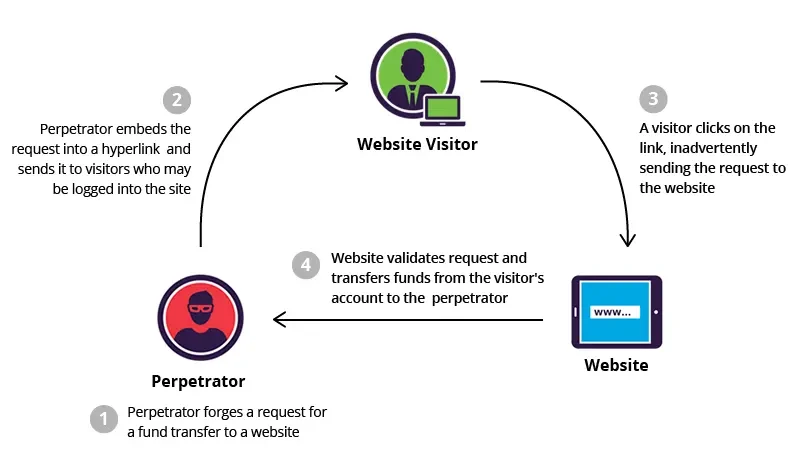
The article notes several ways to reach this error state. One is the blank token above. Another is to simply use your own CSRF token: when another user sends the request, the site sees the token as valid (it is yours) but not valid for that user, and therefore reflects the changes with the error. Other ways exist depending on the site and how it handles CSRF tokens.
Exploitation
Step 1: weaponise the request in an iframe
Because the user submitting the request causes the changes to save, the request can be executed inside an iframe and the user clickjacked:
The hidden form posts the chosen email, name and an empty csrf_token to the form action, targeting the iframe by name. The onload handler submits the form automatically. The article describes this as relatively simple.
Step 2: build the clickjacking PoC
For the clickjacking layer the article recommends an old-school tool, cakeslice.html, downloadable at https://www.bugbountynotes.com/cakeslice.html.zip. You input the URL and drag across the part of the website you want to iframe. Using # to move down the page can help, since you cannot scroll. The article invites readers who know a better tool to tweet @zseano.
Step 3: deal with X-FRAME-OPTIONS
If the response carries an X-FRAME-OPTIONS header, clickjacking is blocked, but the article says this can sometimes be bypassed in multiple ways depending on the framework. Many sites rely on the Referer header value for setting the X-FRAME-OPTIONS header. In some cases setting the Referer to the root domain causes X-FRAME-OPTIONS not to be set, and so does sending no referer header.
To get a blank referer, the form above can be iframed inside another iframe using data::
<iframe src=”data:text/html;base64,[redacted]+[redacted]+[redacted]==”></iframe>
Testing it shows not only that there is no Referer header, but that the origin is also set to null, which can lead to further issues with how CORS headers are handled.
The article credits @WPalant with the reminder that the referrer can also be set using HTML tags:
<meta name="referrer" content="origin">
More information is linked at https://developer.mozilla.org/en-US/docs/Web/HTTP/Headers/Referrer-Policy.
Root cause
The site processes the state-changing request even when the CSRF token is invalid, applying the change and returning an error message rather than rejecting the request. The article does not say whether this is a framework issue or just luck, but reports finding multiple sites with bug bounties vulnerable to both methods. In some cases the site relies on the Referer header value to decide whether to set X-FRAME-OPTIONS, so a missing or root-domain referer can leave the header unset.
Impact
An attacker can change a victim's settings, such as email and name, without a valid CSRF token, provided the victim submits the crafted request, which the clickjacking layer is designed to achieve. The article does not quantify the impact beyond the settings change and the potential for further issues arising from a null origin in CORS handling.
Fix
The article does not describe a fix. The article does not describe a fix.
Variants to test
- Send the settings request with a blank
csrf_tokenand check whether the change is applied alongside an error message. - Send the request with your own valid CSRF token from a different account and check whether the change is applied for the victim with an error.
- Load the request in an iframe and check whether the page can be framed, using a tool such as
cakeslice.htmlto position the click. - Send the request with no Referer header, or with the Referer set to the root domain, and check whether X-FRAME-OPTIONS is omitted from the response.
- Wrap the form in a
data:iframe to produce anullorigin and no Referer, then check the response headers and any CORS behaviour. - Set the referrer with
<meta name="referrer" content="origin">and observe how the site handles the resulting Referer value. - Always test how a site handles the Referer and Origin headers when making requests, especially with logging in, where they may rely on those headers to redirect.
What happened, in plain words
A security researcher described a way to make a website change a logged-in user's account settings, such as their email address and display name, without that user meaning to do it. Two weaknesses had to be combined. The first is that the site did not properly check a security token that is meant to prove a request really came from its own pages. The second is that the site could be tricked into showing its own page inside another page, a technique called clickjacking, which the article uses to deliver the request.
The researcher first described the technique in a talk at @_DC151 and built a practice challenge around it on BugBountyNotes. A similar issue affecting XVideos.com was written about back in 2016.
The feature involved is a settings page that updates a user's email and name. A CSRF token is a short secret value that a site puts into its forms so that a request coming from another site, say evil.com, cannot perform an action on the real site, say redacted.com. The question the article asks is what happens when a site does not handle that token correctly.
The everyday picture
Think of a bank counter. When you fill in a withdrawal slip, the clerk asks for your signature and compares it with the one on file. The signature is the token: it proves the slip came from you and not from someone who copied your account number. Now imagine a clerk who, on seeing a wrong signature, still hands over the money but adds a note saying "signature invalid, please come back". The money has already gone. That is the flaw here: the site complains about the token but performs the change anyway.
The pieces you need to know
- Request: the message your browser sends to a website when you click something or submit a form. It has a method (such as
GETto read orPOSTto send data), a path (such as/settings), some headers (extra information) and often a body (the data itself). - Cookie: a small piece of data the site stores in your browser after you log in, so it can recognise you on the next request. If someone else gets your cookie, they can act as you.
- CSRF token: a random value placed in a form by the site. When the form is submitted, the site checks the value matches the one it gave you. A request from another site will not know the value, so it should be rejected.
- CSRF (Cross-Site Request Forgery): an attack where a malicious page makes your browser send a request to another site where you are logged in, using your cookie automatically.
- iframe: a way to embed one web page inside another. The outer page controls where the inner page appears on screen.
- Clickjacking: placing a transparent or disguised iframe over a button so that when the victim clicks what looks like one thing, they are actually clicking the hidden page underneath.
- Header: a line of extra information in a request or response, such as
Referer(which page the request came from) orX-FRAME-OPTIONS(whether the page may be shown in an iframe). - Referer: a header the browser adds automatically, telling the site which page the request started from.
- Origin: the combination of scheme, host and port that identifies where a page came from, for example
https://redacted.com. Anullorigin means the browser could not give a normal origin, often because the page came from adata:URL. - CORS: a set of rules that decide whether a page from one origin may read responses from another origin. A
nullorigin can confuse those rules. data:URL: a URL that contains the whole page inside the URL itself, rather than pointing to a file on a server.
The setup
The article does not describe any particular account setup, tool versions or roles. The example request carries a session cookie and a CSRF token.
Finding it
The starting point is an ordinary-looking settings request:
POST /settings HTTP/1.1
Host: redacted.com
Connection: close
Upgrade-Insecure-Requests: 1
User-Agent: Mozilla/5.0 (Windows NT 10.0; Win64; x64) AppleWebKit/537.36 (KHTML, like Gecko) Chrome/69.0.3497.100 Safari/537.36
Accept: text/html,application/xhtml+xml,application/xml;q=0.9,image/webp,image/apng,*/*;q=0.8
Referer: https://www.redacted.com/settings
Accept-Encoding: gzip, deflate
Accept-Language: en-GB,en-US;q=0.9,en;q=0.8
Cookie: [redacted]

email=[redacted]&name=Example&csrf_token=d9238iedodqw9e9
Line by line:
POST /settings HTTP/1.1says this is a request that sends data to the/settingspath, using version 1.1 of the HTTP protocol.Host: redacted.comnames the site the request is for. One server can host many sites, so the browser says which one it wants.Connection: closeasks the server to close the connection after answering.Upgrade-Insecure-Requests: 1tells the server the browser would prefer a secure (HTTPS) version of the page if one exists.User-Agent: ...identifies the browser and operating system. Here it is Chrome 69 on 64-bit Windows 10.Accept: ...lists the kinds of content the browser can handle, mostly HTML and images.Referer: https://www.redacted.com/settingssays the request started from the site's own settings page. This is the header the later bypass plays with.Accept-Encoding: gzip, deflatesays the browser can accept compressed responses.Accept-Language: en-GB,en-US;q=0.9,en;q=0.8lists the user's preferred languages, with weights.- `Cookie: [redacted] is the login cookie. The site uses it to know who is making the request.
- The blank lines separate the headers from the body.
email=[redacted]&name=Example&csrf_token=d9238iedodqw9e9is the body: the new email, the new name, and the CSRF token, joined with&the way a web form sends them.
This request updates the email and name as long as the csrf_token is valid. The interesting behaviour appears when the token value is sent blank:
email=[redacted]&name=Example&csrf_token=
Here the body is the same except that the token is empty: the = at the end has nothing after it. Some sites will respond with the change the attacker wanted to make, such as updating the email and name, but with an error: Invalid CSRF token. Please resubmit the request. Upon submitting the request, the changes save. In other words, the site says "no" but does the work anyway.
The article notes several ways to reach this error state. One is the blank token above. Another is to simply use your own CSRF token: when another user sends the request, the site sees the token as valid (it is yours) but not valid for that user, and therefore reflects the changes with the error. Other ways exist depending on the site and how it handles CSRF tokens.
Exploitation
Step 1: turn the request into a weapon inside an iframe
Because the user submitting the request causes the changes to save, the request can be executed inside an iframe and the user clickjacked:
Line by line:
<iframe src=”” id=”mainsrc” name=”mainsrc”></iframe>creates an empty frame on the page. It has anidand aname, bothmainsrc, so the form can target it by name. Thesrcis empty for now; the form submission will fill it.<div style=”display:none”>starts a container that is hidden from view. The victim never sees the form.<form action=”https://www.bugbountynotes.com/aaa" id=”mainfrm” method=”POST” target=”mainsrc”>starts a form that will send aPOSTto the given address, with the idmainfrm, and put the response into the frame namedmainsrc.<input type=”text” name=”email” value=”[redacted]”>is the field that will carry the attacker's chosen email address.<input type=”text” name=”name” value=”Example”>is the field for the display name.<input type=”text” name=”csrf_token” value=””>is the token field, deliberately empty.</form>and</div>close the form and the hidden container.<script>starts a small piece of JavaScript, code that runs in the browser.window.onload = function(e){says: when the page has finished loading, run the function that follows.document.getElementById(“mainfrm”).submit();finds the form by its id and submits it, as if the victim had pressed the button.}and</script>close the function and the script.
The hidden form posts the chosen email, name and an empty csrf_token to the form action, targeting the iframe by name. The onload handler submits the form automatically. The article describes this as relatively simple.
Step 2: build the clickjacking proof of concept
For the clickjacking layer the article recommends an old-school tool, cakeslice.html, downloadable at https://www.bugbountynotes.com/cakeslice.html.zip. You input the URL and drag across the part of the website you want to iframe. Using # to move down the page can help, since you cannot scroll inside the frame. The article invites readers who know a better tool to tweet @zseano.
Why this step matters: the iframe above sends the request, but the victim still has to be looking at something. The tool helps you line up the hidden page so that a click the victim makes on your page lands on the right spot in the hidden page.
Step 3: deal with X-FRAME-OPTIONS
If the response carries an X-FRAME-OPTIONS header, clickjacking is blocked, but the article says this can sometimes be bypassed in multiple ways depending on the framework. Many sites rely on the Referer header value for setting the X-FRAME-OPTIONS header. In some cases setting the Referer to the root domain causes X-FRAME-OPTIONS not to be set, and so does sending no referer header.
To get a blank referer, the form above can be iframed inside another iframe using data::
<iframe src=”data:text/html;base64,[redacted]+[redacted]+[redacted]==”></iframe>
Line by line:
<iframe src=”data:text/html;base64,...”></iframe>creates a frame whose content is not fetched from a server but built from the URL itself.data:text/htmlsays the content is an HTML page, andbase64,says the page is encoded in base64, a way of writing any bytes using only letters, digits and a few symbols.- The long string after
base64,is the whole previous example, the iframe, the hidden form and the script, encoded. When the browser decodes it, it runs the same attack as before. - Because the page came from a
data:URL rather than a normal website, the browser has no normal address to put in theRefererheader, and it reports the origin asnull.
Testing it shows not only that there is no Referer header, but that the origin is also set to null, which can lead to further issues with how CORS headers are handled.
The article credits @WPalant with the reminder that the referrer can also be set using HTML tags:
<meta name="referrer" content="origin">
Line by line:
<meta ...>is a tag that gives the browser information about the page rather than showing content.name="referrer"says the information is about the referrer policy, the rule for what the browser puts in theRefererheader.content="origin"says: send only the origin (scheme, host and port) and not the full path. So a request fromhttps://example.com/some/secret/pagewould carry onlyhttps://example.com.
More information is linked at https://developer.mozilla.org/en-US/docs/Web/HTTP/Headers/Referrer-Policy.
Why it works
The site processes the state-changing request even when the CSRF token is invalid, applying the change and returning an error message rather than rejecting the request. The article does not say whether this is a framework issue or just luck, but reports finding multiple sites with bug bounties vulnerable to both methods. In some cases the site relies on the Referer header value to decide whether to set X-FRAME-OPTIONS, so a missing or root-domain referer can leave the header unset.
What an attacker could do
An attacker can change a victim's settings, such as email and name, without a valid CSRF token, provided the victim submits the crafted request, which the clickjacking layer is designed to achieve. The article does not quantify the impact beyond the settings change and the potential for further issues arising from a null origin in CORS handling.
How to fix it
The article does not describe a fix. The article does not describe a fix.
Things to try on your own
- Send the settings request with a blank
csrf_tokenand check whether the change is applied alongside an error message. - Send the request with your own valid CSRF token from a different account and check whether the change is applied for the victim with an error.
- Load the request in an iframe and check whether the page can be framed, using a tool such as
cakeslice.htmlto position the click. - Send the request with no Referer header, or with the Referer set to the root domain, and check whether X-FRAME-OPTIONS is omitted from the response.
- Wrap the form in a
data:iframe to produce anullorigin and no Referer, then check the response headers and any CORS behaviour. - Set the referrer with
<meta name="referrer" content="origin">and observe how the site handles the resulting Referer value. - Always test how a site handles the Referer and Origin headers when making requests, especially with logging in, where they may rely on those headers to redirect.
Glossary
- API: a set of addresses and rules a program uses to talk to another program, the way a menu tells you what you can order and how.
- Base64: a way of writing any data using only letters, digits and a few symbols, so it can travel safely inside text such as a URL.
- Clickjacking: hiding a real web page under a decoy so that a click meant for one thing lands on the other.
- Cookie: a small piece of data a site stores in your browser, often used to remember that you are logged in.
- CORS: rules that decide whether a page from one site may read responses from another site.
- CSRF (Cross-Site Request Forgery): making a logged-in user's browser send a request to another site without the user intending it.
- CSRF token: a random value placed in a form and checked on submission to prove the request came from the site's own pages.
data:URL: a URL that carries the whole page inside itself instead of pointing to a server.- Header: a line of extra information attached to a request or response, such as
RefererorX-FRAME-OPTIONS. - HTML: the language web pages are written in.
- HTTP: the protocol browsers and servers use to exchange requests and responses.
- iframe: a frame that shows one web page inside another.
- JavaScript: code that runs inside the browser and can change the page or submit forms.
- Origin: the scheme, host and port that identify where a page came from, such as
https://redacted.com. POST: an HTTP method used to send data to a server, often to change something.- Referer: a header the browser adds automatically, saying which page the request started from.
- Request: the message a browser sends to a server asking for something or sending data.
- Response: the message a server sends back.
- Session: the period during which a site remembers who you are, usually via a cookie.
- User-Agent: a header that identifies the browser and operating system.
- X-FRAME-OPTIONS: a response header that tells the browser whether the page may be shown inside an iframe.