Inf0rM@tion Disclosure via IDOR
The application had multiple IDOR vulnerabilities where tampering with numeric parameters in various endpoints exposed email addresses and names of registered users. A final IDOR allowed a restricted user to temporarily access admin-only user and group management modules.
 Published on medium.com
I was looking for some P1-P2 bugs and found this xyzcompany program is public in bugcrowd(Now it has become Private).
The full write-up lives on its author's site
It belongs to its author, so we link to it rather than copy it. The other two tabs are our own rewrites, checked against it.
Context
This is a write-up about a bug bounty hunt on a public Bugcrowd program referred to here as xyzcompany (the program has since become private). The target is a web application at app.xyzcompany.com, a spreadsheet-style product with an activity log, approval and notification flows, scheduled updates that can be sent as attachments, and organisation-level user and group management. The researcher, Pratyush Anjan Sarangi, was hunting for P1 and P2 issues and ended up with three duplicate reports and one final bug that paid out.
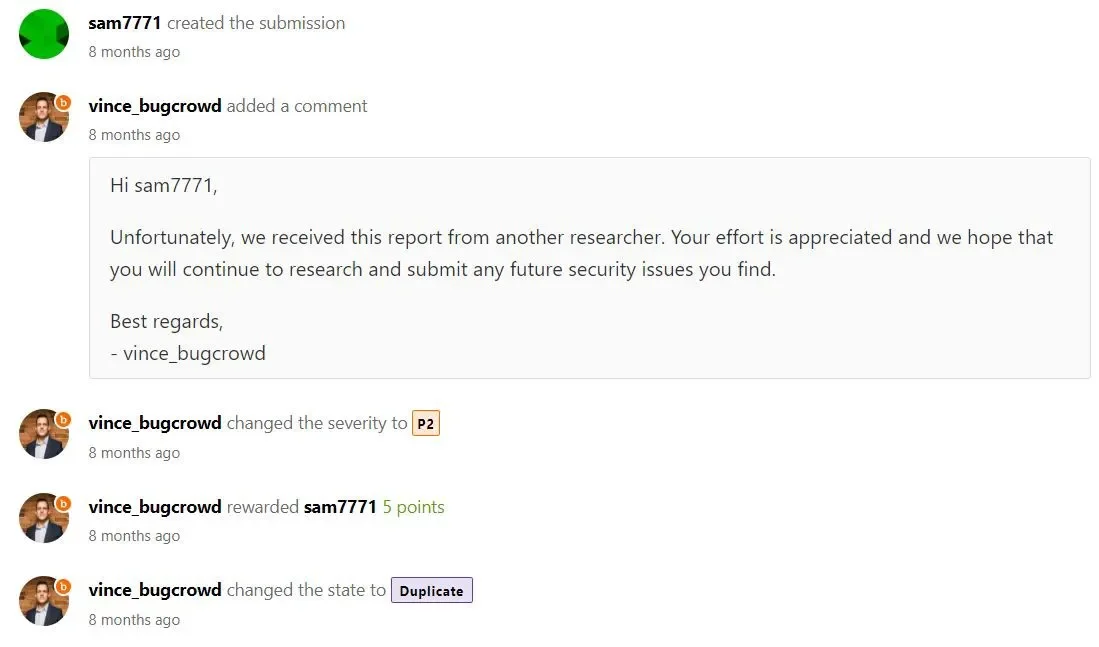
The article walks through four separate IDOR findings in the same application. The first three were closed as duplicates of a single earlier report; the fourth, a privilege escalation within the organisation, was accepted and rewarded.
Setup
The researcher created an Admin account on the application. For the final bug he also added a user as a Regular User with Restricted Access. Requests were captured and replayed with an intercepting proxy; the User-Agent shown throughout is Firefox 56.0 on Windows (WOW64). The application version string in the URLs moves from ss_v=72.0.4 to 72.0.5 and then 72.0.7 across the findings.
All requests below are sent to app.xyzcompany.com with a session cookie, which is redacted here. The application uses a formName/formAction routing scheme in the query string and JSON or form-encoded bodies depending on the endpoint.
Finding it
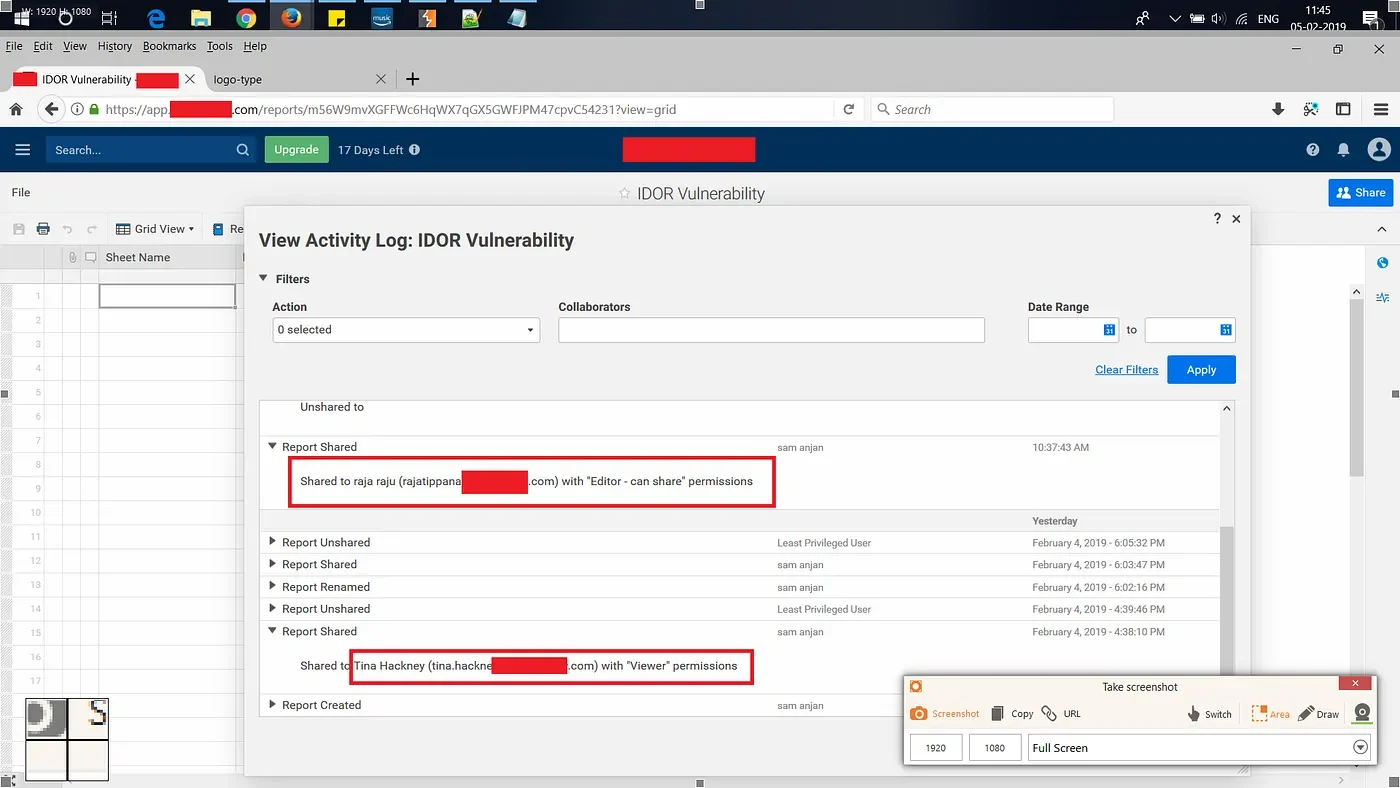
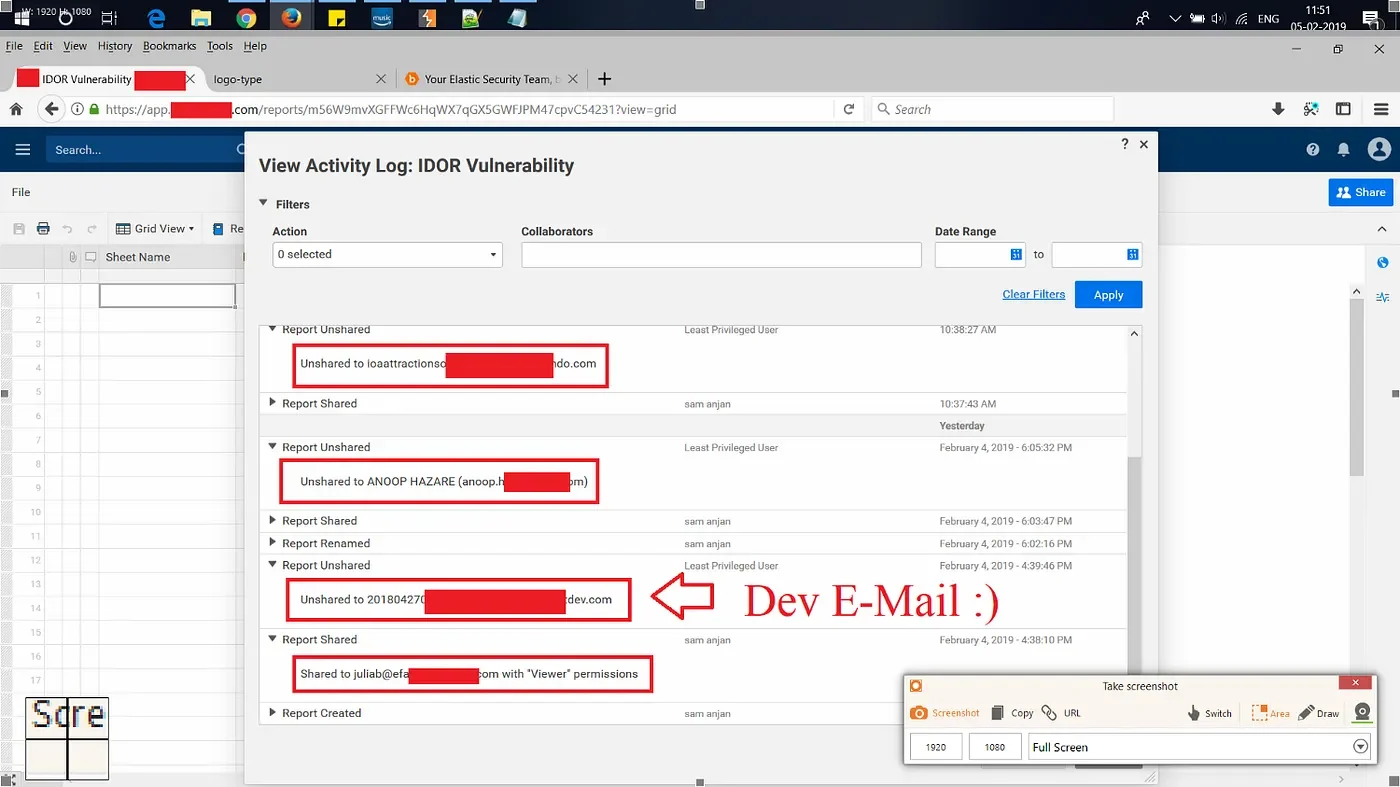
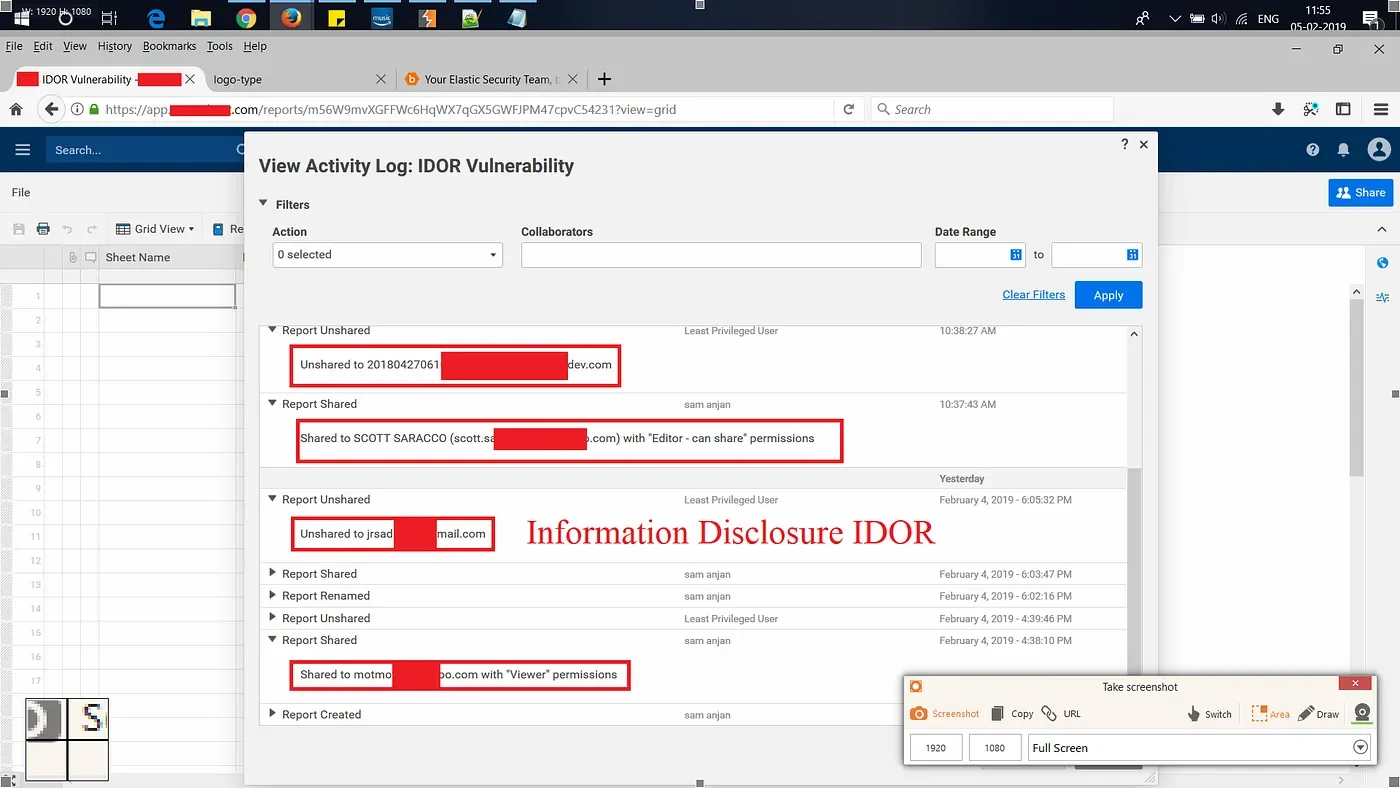
The first IDOR was found while working with an Admin account and looking at the request that populates the Activity Log. The request carries a userId in its JSON body, and that value is trusted by the server when it builds the response. Changing it returned the email addresses and names of other registered users.
Exploitation
Step 1: Activity Log IDOR
The request that produced the first finding:
POST /b/home?formName=webop&formAction=GetSheetHistoryDetails&sk=yiYH_Bj0zZ_UDTnfLZ-9Dc23_MQ&to=68000&ss_v=72.0.4 HTTP/1.1Host: app.xyzcompany.comUser-Agent: Mozilla/5.0 (Windows NT 10.0; WOW64; rv:56.0) Gecko/20100101 Firefox/56.0Accept: application/jsonAccept-Language: en-US,en;q=0.5Content-Type: application/jsonContent-Length: 202Cookie: <cookies>Connection: close{"detailType":"share_delete","eer":"S634694601","ier":1549343307000,"qih":276632578,"userId":28752022,"containerType":3,"properties":{"newAccessLevel":"0","containerID":"106635283","userID":"28752022"}}
The userId appears twice, once at the top level and once inside properties as userID. Changing the userId made the application return the email addresses and names of all registered users in the Activity Log.
Step 2: Automation recipient status IDOR
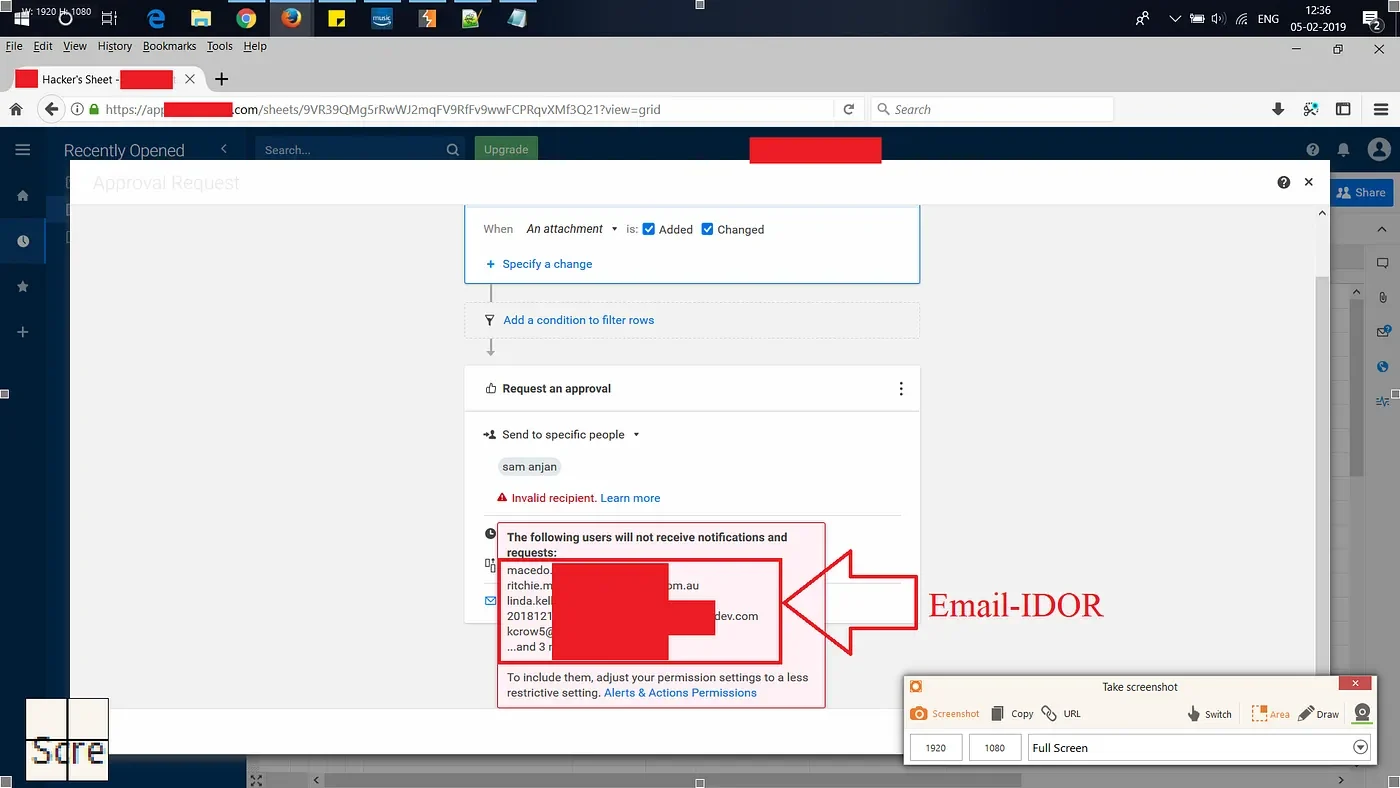
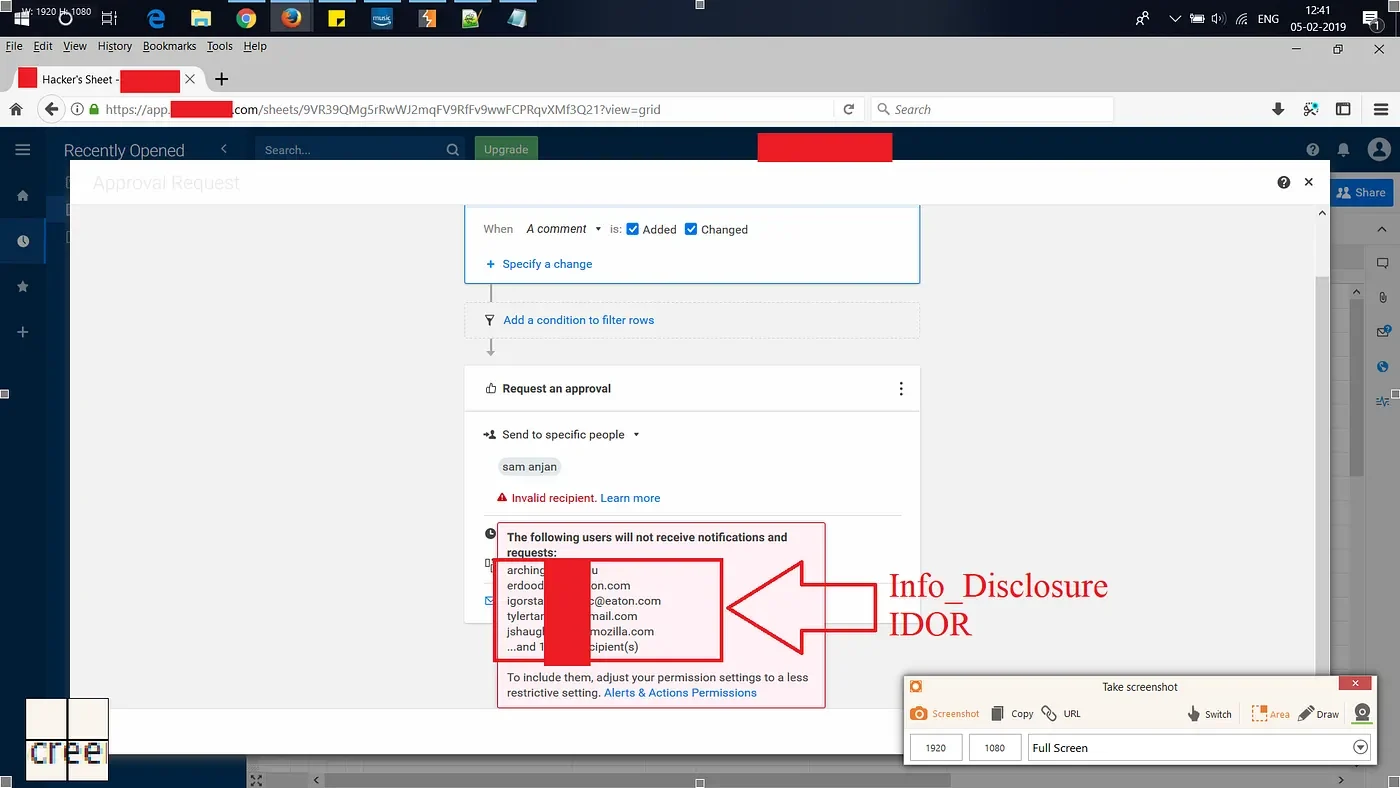
Looking for more endpoints, the researcher intercepted the approval request and found a second IDOR:
POST /b/home?formName=webop&formAction=GetAutomationRecipientStatus&sk=yiYH_Bj0zZ_UDTnfLZ-9Dc23_MQ&to=68000&ss_v=72.0.4 HTTP/1.1Host: app.xyzcompany.comUser-Agent: Mozilla/5.0 (Windows NT 10.0; WOW64; rv:56.0) Gecko/20100101 Firefox/56.0Accept: application/jsonAccept-Language: en-US,en;q=0.5Content-Type: application/jsonContent-Length: 45Cookie:<Cookies>Connection: close{"gridID":276644877,"Sae":[32310136,12310136,22310136,32140136],"$Q":[]}
By editing the sae parameter and adding as many entries as desired (HTTP parameter pollution), the application dumped out all the email addresses.
Step 3: SendAsAttachment IDOR
The third finding came from the scheduled update and cancel flows. Two requests are involved. The first saves a scheduled update:
1st Request:POST /b/home?formName=ajax&formAction=fa_scheduledUpdateSave&ss_v=72.0.5 HTTP/1.1Host: app.xyzcompany.comUser-Agent: Mozilla/5.0 (Windows NT 10.0; WOW64; rv:56.0) Gecko/20100101 Firefox/56.0Accept: */*Accept-Language: en-US,en;q=0.5Content-type: application/x-www-form-urlencodedxyzcompany-nep: formName,formAction,sk,to,ccid,parm1,parm2,parm3Content-Length: 721Cookie:<Cookies>Connection: closeformName=ajax&formAction=fa_scheduledUpdateSave&sk=5fLsqyRBHV1Yizprh4nkF9VUmh0&to=68000&ccid=aae0ad01-0a50-4996-9f5c-08a69bfb17b5&parm1=scheduledUpdate&parm2=[{"t":"scheduledUpdate","28":"-79","29":"1","30":"grid","31":"277823642","32":"asdasd","33":"I\u0027ve+attached+a+copy+of+my+sheet+for+your+review.","34":"4"},{"t":"scheduledUpdateUser","51":"-80","52":"-79","53":"1","54":"37154090","55":"1"},{"t":"recurrence","369":"-81","370":"1","371":"-79","372":"0"},{"t":"outputConfiguration","248":"-82","249":"scheduledUpdate","250":"-79","251":"1","252":"0","255":"7","256":"3","257":"100","258":"4","259":"0","261":"false","262":"true","263":"true","264":"true","265":"true","266":"true","267":"false"}]&parm3=[]&parm4=2nd Request:POST /b/home?formName=ajax&formAction=fa_cancelScheduledUpdateRequest&ss_v=72.0.5 HTTP/1.1 Host: app.xyzcompany.com User-Agent: Mozilla/5.0 (Windows NT 10.0; WOW64; rv:56.0) Gecko/20100101 Firefox/56.0 Accept: */* Accept-Language: en-US,en;q=0.5 Content-type: application/x-www-form-urlencoded xyzcompany-nep: formName,formAction,sk,to,ccid,parm1 Content-Length: 174 Cookie: <cookies> Connection: close formName=ajax&formAction=fa_cancelScheduledUpdateRequest&sk=5fLsqyRBHV1Yizprh4nkF9VUmh0&to=68000&ccid=aae0ad01-0a50-4996-9f5c-08a69bfb17b5&parm1=24928396&parm2=&parm3=&parm4=
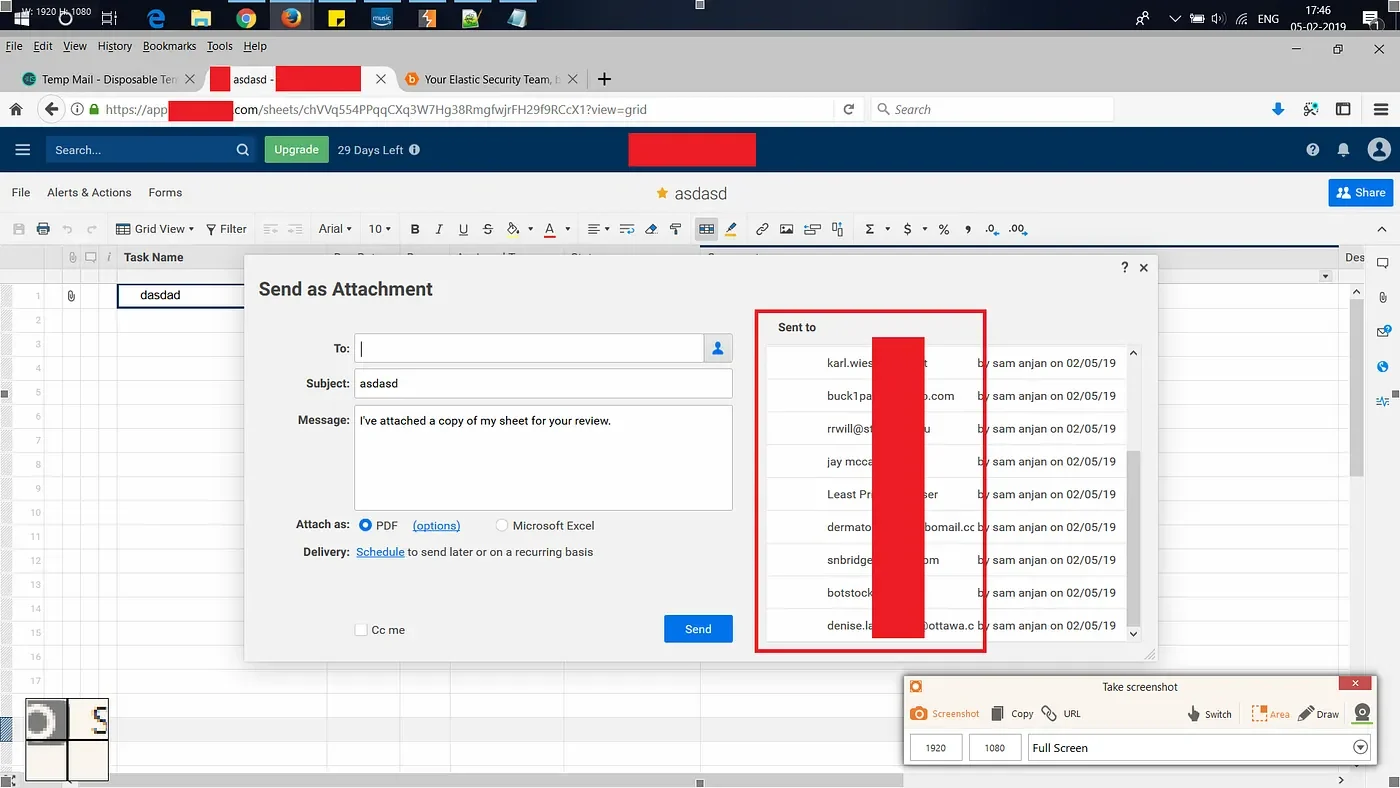
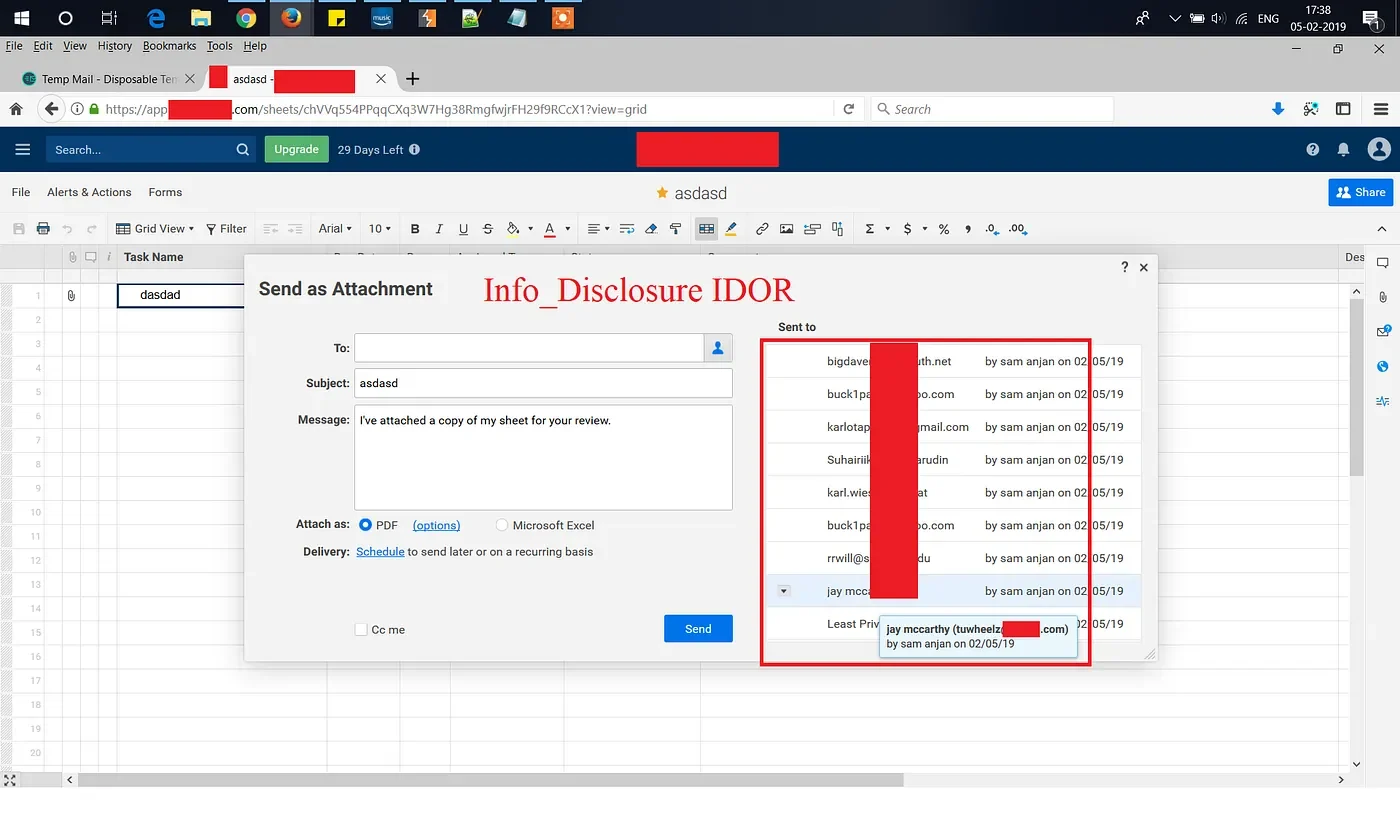
The researcher is explicit that the first request has no IDOR. The bug is in the second: tampering parm1 to any numeric value less than the value generated by the application returned the email IDs of other users. The application was fetching the email address of all registered users from the database.
The researcher's tip from this step: do not only look for parameter tampering or manipulation of numeric values in one place; look at different functionality that uses the same parameters.
Step 4: Privilege escalation within the organisation
After three duplicate reports, the researcher took a last look at the application. He created an Admin account and added a user as a Regular User with Restricted Access. The request that produced the final bug:
POST /b/home?formName=ajax&formAction=fa_loadOrgAdminEmails&ss_v=72.0.7 HTTP/1.1Host: app.xyzcompany.comUser-Agent: Mozilla/5.0 (Windows NT 10.0; WOW64; rv:56.0) Gecko/20100101 Firefox/56.0Accept: */*Accept-Language: en-US,en;q=0.5Content-type: application/x-www-form-urlencodedxyzcompany-nep: formName,formAction,sk,to,ccid,parm1Content-Length: 163Cookie:<cookies>DNT: 1Connection: closeformName=ajax&formAction=fa_loadOrgAdminEmails&sk=QejRv5Cw8mTNwAqUOeOq8ULa_Nc&to=68000&ccid=d5b34018-65a2-4115-8e69-b21dcd6dd6ad&parm1=1327595&parm2=&parm3=&parm4=
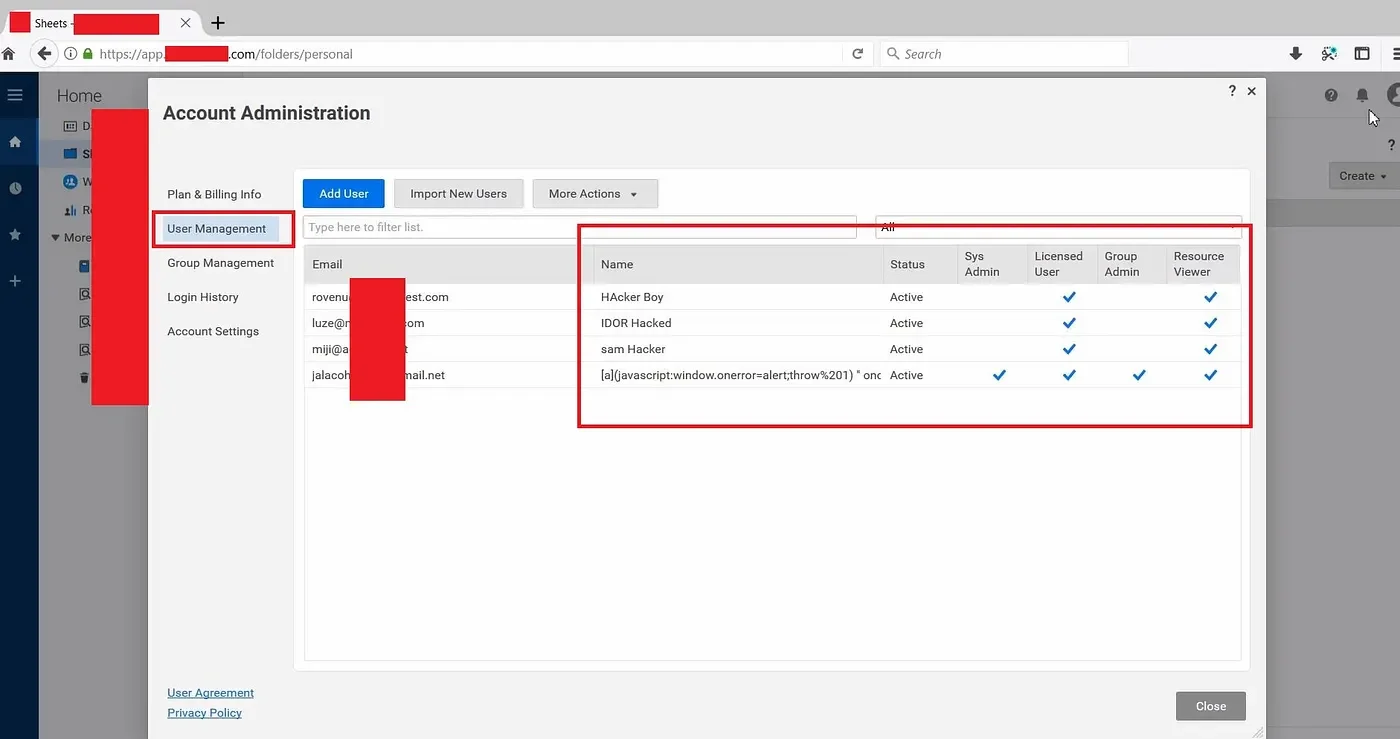
Tampering parm1 to any numeric value did not disclose other users' details. Instead, it temporarily allowed a Restricted User to access functional modules that should only be reachable by an Admin. The researcher notes that to see the user management and the users managed by the admin account, the user must first be added to the Admin account and then left for about 1 hour 30 minutes so the user is properly registered in the database; after that the attack can be performed.
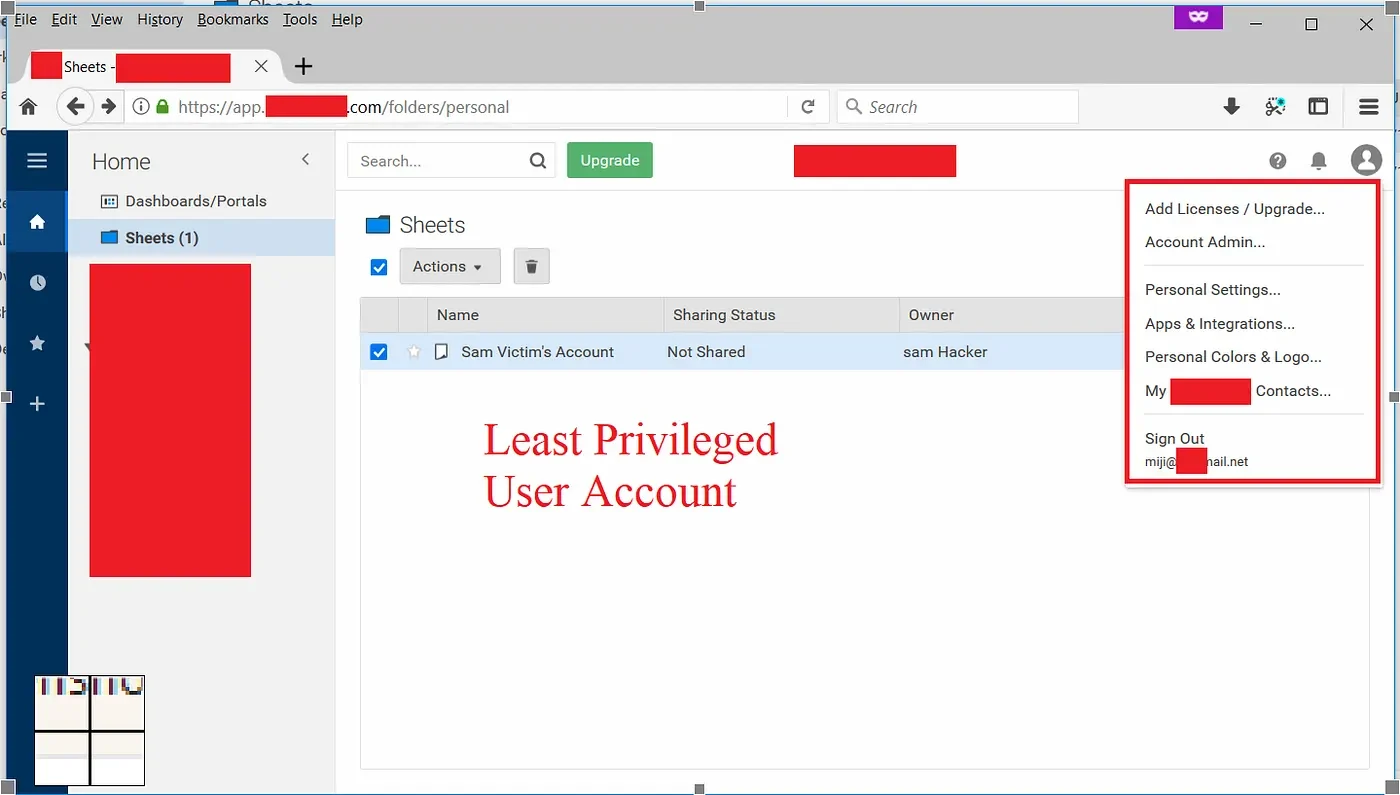
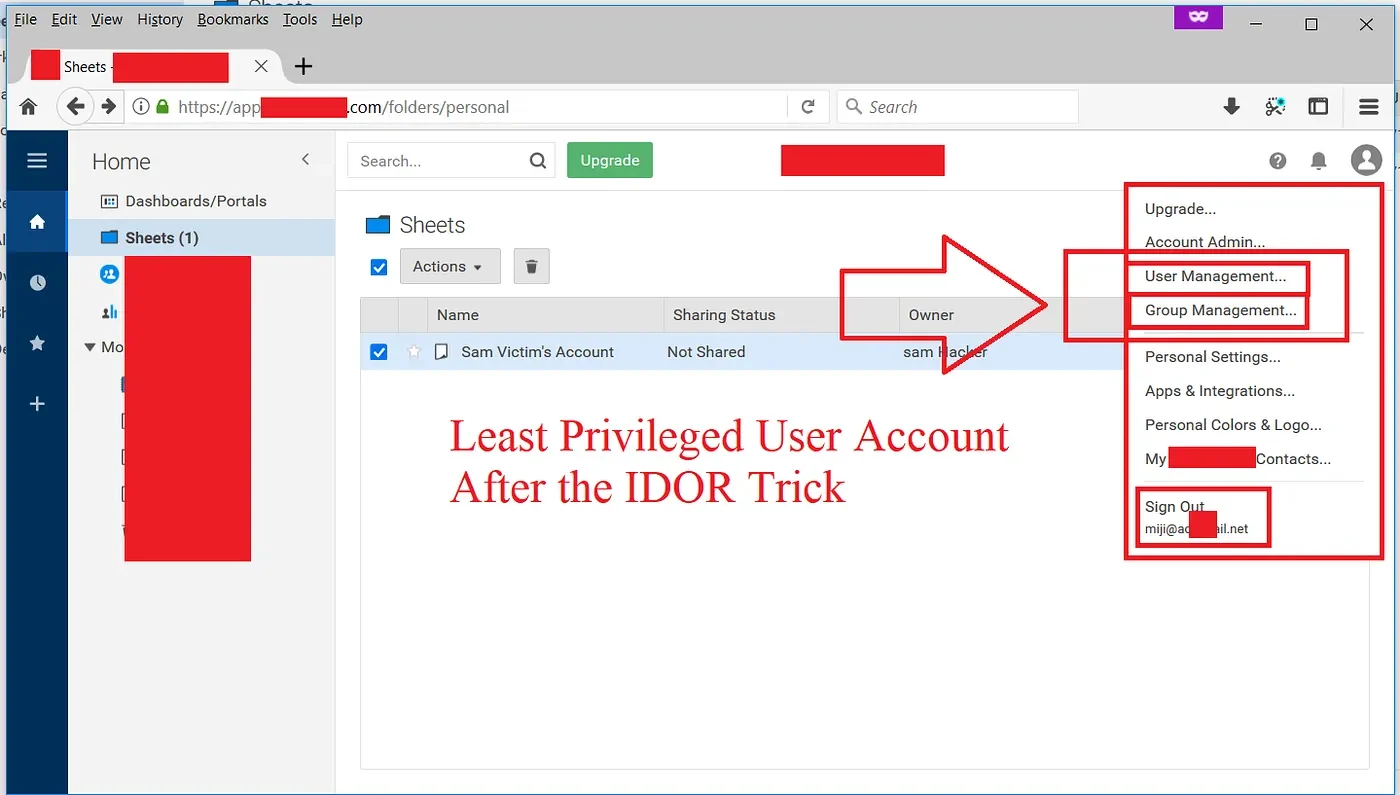
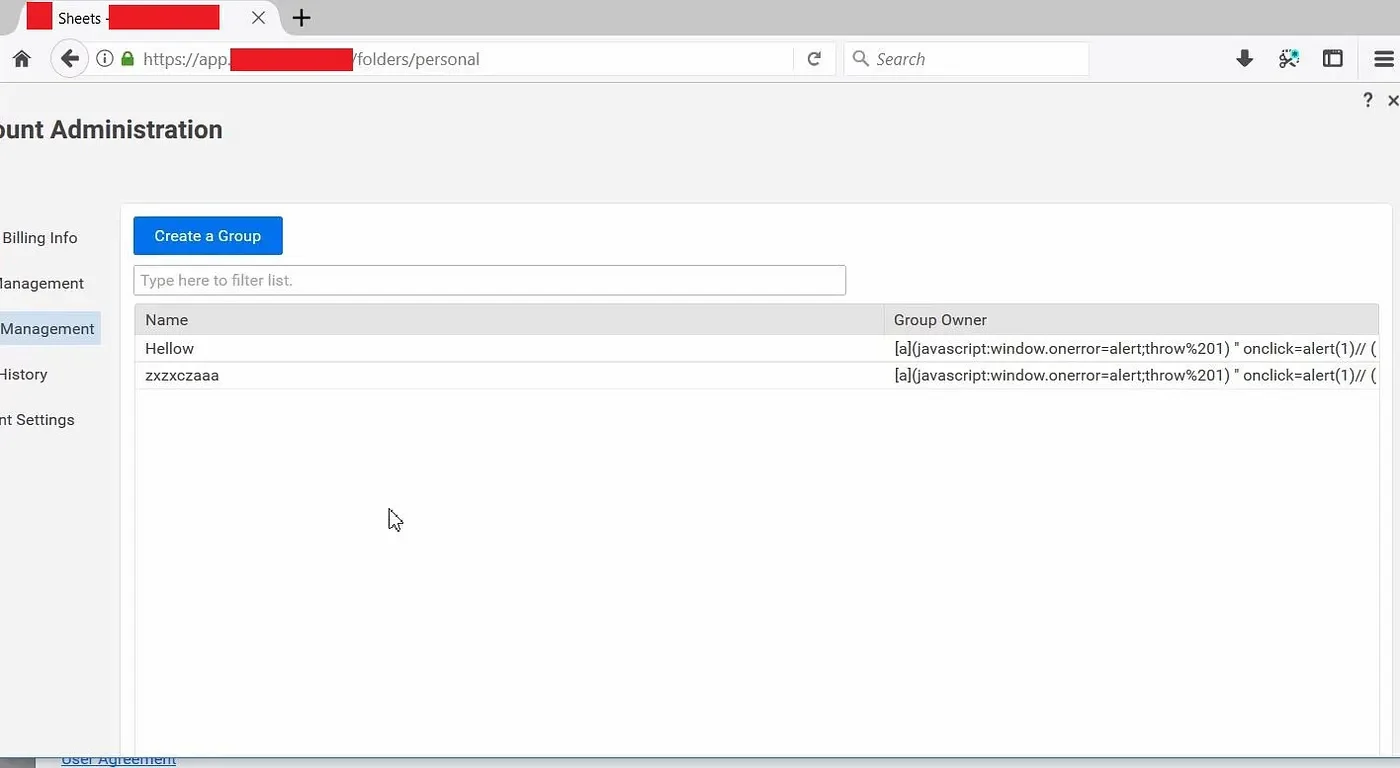
With the trick applied, the Restricted User account could see the User management and Group management modules. Because the researcher expected a valid bug to disclose information, he checked those modules to see whether they showed data.
Root cause
The pattern across all four findings is the same: the server accepts a client-supplied identifier (userId, the Sae array, parm1) and uses it to look up records without checking that the caller is authorised to see them. In the first three cases the identifier selects a user or a set of recipients, and the response includes names and email addresses. In the fourth case the identifier selects an organisation admin context, and the response is not data but a change in what the Restricted User can reach.
The fourth case is the more interesting one because the same tampering that would normally be an information disclosure instead grants access to admin-only modules, which the researcher describes as unusual behaviour he had not seen before.
Impact
An authenticated user could obtain registered users' names and email addresses through the Activity Log and the automation recipient status endpoint, and email IDs through the scheduled update cancel endpoint. In the fourth case, a Restricted User could temporarily reach the User management and Group management modules that are meant for an Admin, and from there see the users and groups managed by the admin account.
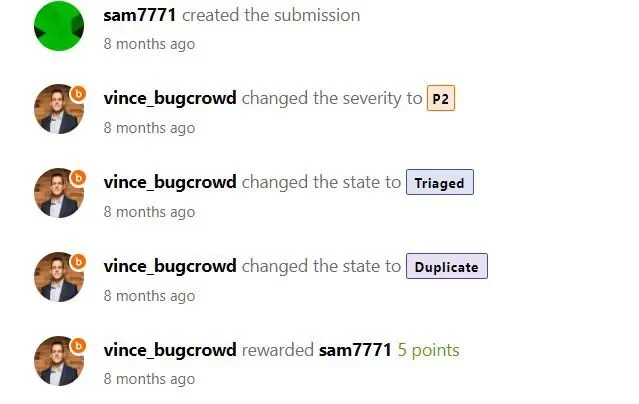
The first three findings were triaged and then closed as duplicates of a single earlier report. According to the researcher, xyzcompany stated that the issues on the different endpoints would be fixed by fixing the one bug reported 7 to 8 months earlier, and that the earlier researcher had been rewarded $1500 (P2). The researcher disagreed that the other two were duplicates, since the endpoints and the tampered parameters were different.
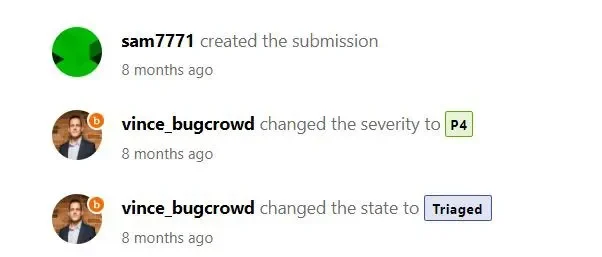
The fourth report was initially triaged as P4, which the researcher read as a possible $250. The team then raised it to P3, which the researcher read as a maximum of $750, and after a few days closed the bug and rewarded him. The platform record lists a bounty of 750.00 USD.
Fix
The report does not describe the fix that was applied. The fourth case in particular needs an authorisation check on the admin-only modules, not just on the data returned.
Variants to test
- Look for endpoints that take a numeric user or recipient identifier in the body and change it to another value. A positive result is a response containing another user's name or email address.
- Look for array parameters such as
Saethat accept a list of identifiers and try adding extra entries (HTTP parameter pollution). A positive result is the response returning more recipients than the caller should see. - Look at delete or cancel endpoints that take a single numeric identifier and try values lower than the generated one. A positive result is the response returning records belonging to other users.
- Look at endpoints that load admin context, such as
fa_loadOrgAdminEmails, and tamper the identifier. A positive result is a Restricted User seeing admin-only modules in the interface. - When a user is added to an organisation, wait for the account to be fully registered before testing, as the researcher did with the 1 hour 30 minute wait.
Timeline
| Date | Event |
|---|---|
| Feb. 08, 2019 | Initial Report |
| Feb. 08, 2019 | Report Triaged |
| Feb. 19, 2019 | Bug Fixed and Rewarded |
The researcher's closing suggestion: do not always think of IDOR as a bug that discloses information or takes over accounts; sometimes it provides privilege escalation or behavioural issues in a web application. Always look for changes in the content of the application to see whether the trick worked.
What happened, in plain words
A security researcher spent time hunting for bugs in a public bug bounty program on Bugcrowd, run by a company he calls xyzcompany. A bug bounty program is a deal between a company and outside testers: the company says "if you find a security problem in our product and tell us privately, we will pay you a reward (a bounty) and fix it". A public program is one that anyone can join; a private one is invitation only. The program in this story was public at the time and has since become private.
The product he was testing is a web application at app.xyzcompany.com, a spreadsheet-style tool. Think of it as an online version of a spreadsheet program, but shared: several people in the same organisation can work on the same sheets. It has an activity log (a list of who did what and when), approval and notification flows (the app emails people to ask them to approve something), scheduled updates that can be sent out as attachments, and organisation-level user and group management (an admin can create users and put them in groups).
Over the hunt he found four separate problems of the same family, called IDOR. IDOR stands for Insecure Direct Object Reference. The everyday comparison: imagine a hotel where your room key is just the room number written on a card, and the door only checks that the number is valid, not that the number is yours. You have key 214, you write 215 on the card, and the door opens. Nothing was hacked; the door simply trusted the number you gave it. In a web application, an IDOR is the same idea: the app asks the server for a record by its number (a user ID, an order ID, a file ID), the server looks the number up and returns the record, and it never checks whether the person asking is allowed to see that particular record.
The first three findings were all closed as duplicates of one earlier report by another researcher. A duplicate means the company already knew about that bug, so your report does not earn a new reward. The fourth finding, a privilege escalation inside the organisation, was accepted and paid. Privilege escalation means getting more power in the system than you were given: a limited user reaching admin-only screens.
The setup
The researcher created an Admin account on the application, so he could see the product the way an organisation owner sees it. For the final bug he also added a second user as a Regular User with Restricted Access, a limited account that should not be able to do admin things.
To see and change the traffic between his browser and the server, he used an intercepting proxy. A proxy is a program that sits between your browser and the website: your browser sends its request to the proxy, the proxy shows it to you, lets you edit it, and then forwards it. This is how testers change a number in a request without needing the website's own interface to offer that option.
The requests all show a User-Agent of Firefox 56.0 on Windows (WOW64). The User-Agent is a line your browser sends to identify itself; it is not important to the bug, it is just what his browser reported. The application version string in the URLs moves from ss_v=72.0.4 to 72.0.5 and then 72.0.7 across the findings.
Every request below goes to app.xyzcompany.com and carries a session cookie, redacted here. A cookie is a small piece of text your browser stores for a website and sends back with every request. The session cookie is what tells the server "this request comes from the person who logged in earlier". Without it the server would treat the request as anonymous. The application routes requests with a formName and formAction pair in the URL (the action names the operation, such as GetSheetHistoryDetails), and sends data either as JSON (a structured text format, {"key":"value"}) or as form-encoded data (key=value&key=value), depending on the endpoint. An endpoint is simply a specific address on the server that performs one operation; an API is the collection of these endpoints that the front end of the app talks to.
Finding it
The first IDOR was found while working with the Admin account and looking at the request that fills the Activity Log. The request carries a userId in its JSON body, and the server trusts that value when it builds the response. Changing it returned the email addresses and names of other registered users.
Exploitation
Step 1: Activity Log IDOR
This is the request that produced the first finding:
POST /b/home?formName=webop&formAction=GetSheetHistoryDetails&sk=yiYH_Bj0zZ_UDTnfLZ-9Dc23_MQ&to=68000&ss_v=72.0.4 HTTP/1.1Host: app.xyzcompany.comUser-Agent: Mozilla/5.0 (Windows NT 10.0; WOW64; rv:56.0) Gecko/20100101 Firefox/56.0Accept: application/jsonAccept-Language: en-US,en;q=0.5Content-Type: application/jsonContent-Length: 202Cookie: <cookies>Connection: close{"detailType":"share_delete","eer":"S634694601","ier":1549343307000,"qih":276632578,"userId":28752022,"containerType":3,"properties":{"newAccessLevel":"0","containerID":"106635283","userID":"28752022"}}
Line by line, in plain words:
POST /b/home?...is the request line.POSTmeans "I am sending data to the server", and the path plus query string says which operation:formAction=GetSheetHistoryDetails, which returns the history of a sheet.Host: app.xyzcompany.comnames the server the request is for.User-Agent,Accept,Accept-Languageare standard headers. A header is a labelled line of extra information sent with a request.Accept: application/jsonsays "I expect JSON back".Content-Type: application/jsonsays the body is JSON.Content-Length: 202says the body is 202 bytes long.Cookie: <cookies>is the session cookie, redacted. This is what proves who is logged in.Connection: closeasks the server to close the connection after replying.- The body is the JSON object.
userIdis the number of the user whose activity is being requested. NoticeuserIdappears twice: once at the top level and once insidepropertiesasuserID.
The bug: the server took that userId and used it to look up the activity, without checking that the logged-in user was that user. Changing the userId made the application return the email addresses and names of all registered users in the Activity Log.
Step 2: Automation recipient status IDOR
Looking for more endpoints, the researcher intercepted the approval request and found a second IDOR:
POST /b/home?formName=webop&formAction=GetAutomationRecipientStatus&sk=yiYH_Bj0zZ_UDTnfLZ-9Dc23_MQ&to=68000&ss_v=72.0.4 HTTP/1.1Host: app.xyzcompany.comUser-Agent: Mozilla/5.0 (Windows NT 10.0; WOW64; rv:56.0) Gecko/20100101 Firefox/56.0Accept: application/jsonAccept-Language: en-US,en;q=0.5Content-Type: application/jsonContent-Length: 45Cookie:<Cookies>Connection: close{"gridID":276644877,"Sae":[32310136,12310136,22310136,32140136],"$Q":[]}
Line by line:
- The headers are the same kind as before:
Host,User-Agent,Accept,Accept-Language,Content-Type,Content-Length,Cookie,Connection.
The bug: by editing the sae parameter and adding as many entries as he wanted, the application dumped out all the email addresses. He calls this HTTP parameter pollution: sending more values for a parameter than the application expects, so that the server processes a longer list than the interface would ever produce.
Step 3: SendAsAttachment IDOR
The third finding came from the scheduled update and cancel flows. Two requests are involved. The first saves a scheduled update:
1st Request:POST /b/home?formName=ajax&formAction=fa_scheduledUpdateSave&ss_v=72.0.5 HTTP/1.1Host: app.xyzcompany.comUser-Agent: Mozilla/5.0 (Windows NT 10.0; WOW64; rv:56.0) Gecko/20100101 Firefox/56.0Accept: */*Accept-Language: en-US,en;q=0.5Content-type: application/x-www-form-urlencodedxyzcompany-nep: formName,formAction,sk,to,ccid,parm1,parm2,parm3Content-Length: 721Cookie:<Cookies>Connection: closeformName=ajax&formAction=fa_scheduledUpdateSave&sk=5fLsqyRBHV1Yizprh4nkF9VUmh0&to=68000&ccid=aae0ad01-0a50-4996-9f5c-08a69bfb17b5&parm1=scheduledUpdate&parm2=[{"t":"scheduledUpdate","28":"-79","29":"1","30":"grid","31":"277823642","32":"asdasd","33":"I\u0027ve+attached+a+copy+of+my+sheet+for+your+review.","34":"4"},{"t":"scheduledUpdateUser","51":"-80","52":"-79","53":"1","54":"37154090","55":"1"},{"t":"recurrence","369":"-81","370":"1","371":"-79","372":"0"},{"t":"outputConfiguration","248":"-82","249":"scheduledUpdate","250":"-79","251":"1","252":"0","255":"7","256":"3","257":"100","258":"4","259":"0","261":"false","262":"true","263":"true","264":"true","265":"true","266":"true","267":"false"}]&parm3=[]&parm4=2nd Request:POST /b/home?formName=ajax&formAction=fa_cancelScheduledUpdateRequest&ss_v=72.0.5 HTTP/1.1 Host: app.xyzcompany.com User-Agent: Mozilla/5.0 (Windows NT 10.0; WOW64; rv:56.0) Gecko/20100101 Firefox/56.0 Accept: */* Accept-Language: en-US,en;q=0.5 Content-type: application/x-www-form-urlencoded xyzcompany-nep: formName,formAction,sk,to,ccid,parm1 Content-Length: 174 Cookie: <cookies> Connection: close formName=ajax&formAction=fa_cancelScheduledUpdateRequest&sk=5fLsqyRBHV1Yizprh4nkF9VUmh0&to=68000&ccid=aae0ad01-0a50-4996-9f5c-08a69bfb17b5&parm1=24928396&parm2=&parm3=&parm4=
Line by line:
- The first request calls
formAction=fa_scheduledUpdateSave, which saves a scheduled update. The body is form-encoded (key=value&key=value), not JSON.
The researcher is explicit that the first request has no IDOR. The bug is in the second: tampering parm1 to any numeric value less than the value generated by the application returned the email IDs of other users. The application was fetching the email address of all registered users from the database.
His tip from this step: do not only look for parameter tampering or manipulation of numeric values in one place; look at different functionality that uses the same parameters. In other words, if a number works as an identifier in one screen, the same kind of number may be trusted in another screen that nobody thought to protect.
Step 4: Privilege escalation within the organisation
After three duplicate reports, the researcher took a last look at the application. He created an Admin account and added a user as a Regular User with Restricted Access. This is the request that produced the final bug:
POST /b/home?formName=ajax&formAction=fa_loadOrgAdminEmails&ss_v=72.0.7 HTTP/1.1Host: app.xyzcompany.comUser-Agent: Mozilla/5.0 (Windows NT 10.0; WOW64; rv:56.0) Gecko/20100101 Firefox/56.0Accept: */*Accept-Language: en-US,en;q=0.5Content-type: application/x-www-form-urlencodedxyzcompany-nep: formName,formAction,sk,to,ccid,parm1Content-Length: 163Cookie:<cookies>DNT: 1Connection: closeformName=ajax&formAction=fa_loadOrgAdminEmails&sk=QejRv5Cw8mTNwAqUOeOq8ULa_Nc&to=68000&ccid=d5b34018-65a2-4115-8e69-b21dcd6dd6ad&parm1=1327595&parm2=&parm3=&parm4=
Line by line:
- It is form-encoded.
- The headers are the usual ones.
DNT: 1is the Do Not Track header, a browser preference; it plays no part in the bug. - The body has
parm1=1327595, a numeric identifier, and emptyparm2,parm3,parm4.
Tampering parm1 to any numeric value did not disclose other users' details. Instead, it temporarily allowed a Restricted User to access functional modules that should only be reachable by an Admin. A functional module here means a section of the interface, such as the screens for managing users and groups. The researcher notes that to see the user management and the users managed by the admin account, the user must first be added to the Admin account and then left for about 1 hour 30 minutes so the user is properly registered in the database; after that the attack can be performed.
With the trick applied, the Restricted User account could see the User management and Group management modules. Because the researcher expected a valid bug to disclose information, he checked those modules to see whether they showed data.
Root cause
The pattern across all four findings is the same: the server accepts an identifier supplied by the client (userId, the Sae array, parm1) and uses it to look up records without checking that the caller is authorised to see them. In the first three cases the identifier selects a user or a set of recipients, and the response includes names and email addresses. In the fourth case the identifier selects an organisation admin context, and the response is not data but a change in what the Restricted User can reach.
The fourth case is the more interesting one because the same tampering that would normally be an information disclosure instead grants access to admin-only modules, which the researcher describes as unusual behaviour he had not seen before.
Impact
An authenticated user could obtain registered users' names and email addresses through the Activity Log and the automation recipient status endpoint, and email IDs through the scheduled update cancel endpoint. Enumerate means to walk through a list systematically, here by changing a number and reading the result. In the fourth case, a Restricted User could temporarily reach the User management and Group management modules that are meant for an Admin, and from there see the users and groups managed by the admin account.
The first three findings were triaged and then closed as duplicates of a single earlier report. Triaged means the company's security team looked at the report, confirmed it was a real issue, and set a priority. According to the researcher, xyzcompany stated that the issues on the different endpoints would be fixed by fixing the one bug reported 7 to 8 months earlier, and that the earlier researcher had been rewarded $1500 (P2). P1, P2, P3 and P4 are priority levels used by bug bounty programs: P1 is the most severe, P4 the least. The researcher disagreed that the other two were duplicates, since the endpoints and the tampered parameters were different.
The fourth report was initially triaged as P4, which the researcher read as a possible $250. The team then raised it to P3, which the researcher read as a maximum of $750, and after a few days closed the bug and rewarded him. The platform record lists a bounty of 750.00 USD.
Fix
The report does not describe the fix that was applied. In everyday terms: the hotel door should check the name on the key against the guest register, not just that the number is a valid room. The fourth case in particular needs an authorisation check on the admin-only modules, not just on the data returned.
Variants to test
- Look for endpoints that take a numeric user or recipient identifier in the body and change it to another value. A positive result is a response containing another user's name or email address.
- Look for array parameters such as
Saethat accept a list of identifiers and try adding extra entries (HTTP parameter pollution). A positive result is the response returning more recipients than the caller should see. - Look at delete or cancel endpoints that take a single numeric identifier and try values lower than the generated one. A positive result is the response returning records belonging to other users.
- Look at endpoints that load admin context, such as
fa_loadOrgAdminEmails, and tamper the identifier. A positive result is a Restricted User seeing admin-only modules in the interface. - When a user is added to an organisation, wait for the account to be fully registered before testing, as the researcher did with the 1 hour 30 minute wait.
Timeline
| Date | Event |
|---|---|
| Feb. 08, 2019 | Initial Report |
| Feb. 08, 2019 | Report Triaged |
| Feb. 19, 2019 | Bug Fixed and Rewarded |
The researcher's closing suggestion: do not always think of IDOR as a bug that discloses information or takes over accounts; sometimes it provides privilege escalation or behavioural issues in a web application. Always look for changes in the content of the application to see whether the trick worked.
Glossary
- API: the set of addresses (endpoints) a web application's front end uses to talk to its server; each endpoint performs one operation.
- Bug bounty program: an arrangement where a company pays outside testers for reporting security problems privately.
- Bounty: the money paid for an accepted report.
- Cookie: a small piece of text a website stores in your browser and gets back with every request; the session cookie identifies who is logged in.
- Duplicate: a report of a bug the company already knows about, so it earns no new reward.
- Endpoint: one specific address on a server that performs one operation, for example
GetSheetHistoryDetails. - Enumerate: to walk through a list systematically, here by changing an identifier and reading each result.
- Form-encoded: a way of sending data as
key=value&key=valuein the request body. - Functional module: a section of the application's interface, such as the screens for managing users and groups.
- Header: a labelled line of extra information sent with an HTTP request or response, such as
Content-Type. - HTTP parameter pollution: sending more values for a parameter than the application expects, so the server processes a longer list than the interface would produce.
- IDOR (Insecure Direct Object Reference): a bug where the server looks up a record by an identifier supplied by the client without checking that the caller is allowed to see that record.
- Intercepting proxy: a program that sits between your browser and a website, letting you view and edit requests before they are forwarded.
- JSON: a structured text format for data, written as
{"key":"value"}. - P1, P2, P3, P4: priority levels used by bug bounty programs, P1 being the most severe and P4 the least.
- Privilege escalation: getting more power in a system than your account was given, for example a limited user reaching admin-only screens.
- Proxy: see intercepting proxy.
- Query string: the part of a URL after the
?, carrying parameters such asformAction=.... - Restricted Access: a limited account type that should not be able to perform admin actions.
- Scheduled update: a feature that sends a sheet to chosen people at a set time, optionally repeating.
- Session: the server's record of a logged-in user, kept alive by the session cookie.
- Triaged: reviewed by the company's security team, confirmed as a real issue, and given a priority.
- User-Agent: a header in which the browser identifies itself and its operating system.
- WOW64: a Windows subsystem that lets 32-bit programs run on 64-bit Windows; it appears here only as part of the browser's User-Agent string.