Interesting Stored XSS via meta data
A media-fetching feature that built thumbnails from user-supplied links could be pointed at an attacker's HTML page whose meta tag referenced an SVG containing script. The SVG was stored on a CDN with an image MIME type but a .jpeg extension, so the script ran when the stored file was viewed.
 Published on medium.com
Back in February of this year Bibek Neupane and I had hacked on a private bug bounty program on Hackerone, we had chosen one of the social platform as our target. This post will detail how we discovered Stored Cross-Site Scripting via meta data on one of the CDN of target.
The full write-up lives on its author's site
It belongs to its author, so we link to it rather than copy it. The other two tabs are our own rewrites, checked against it.
Context
In February of that year, Bibek Neupane and Veshraj Ghimire were working on a private bug bounty program on HackerOne. They picked one of the program's social platforms as their target: a web application built around posting media and text and interacting with other people, in the authors' words somehow similar to Twitter.
The feature that mattered was one where you could fetch media from a custom URL. The application would take a link you supplied, look for an image in it, and fetch that image to keep as a thumbnail. The write-up describes the resulting bug as stored cross-site scripting via metadata on one of the target's CDNs.
Setup
The report does not describe accounts, roles or tool versions. The only tooling named is Burp Collaborator, used to generate a URL that would call back to the researchers if the server made an outbound request.
Finding it
The custom-URL media feature immediately suggested SSRF. Entering a Burp Collaborator URL produced a request from the server, and that request disclosed various headers. The researchers tried to exploit this but failed.
They later found that the behaviour matched a known issue on Acunetix, categorised low:
https://www.acunetix.com/vulnerabilities/web/envoy-metadata-disclosure/
They reported it as it was and it was marked as a duplicate.
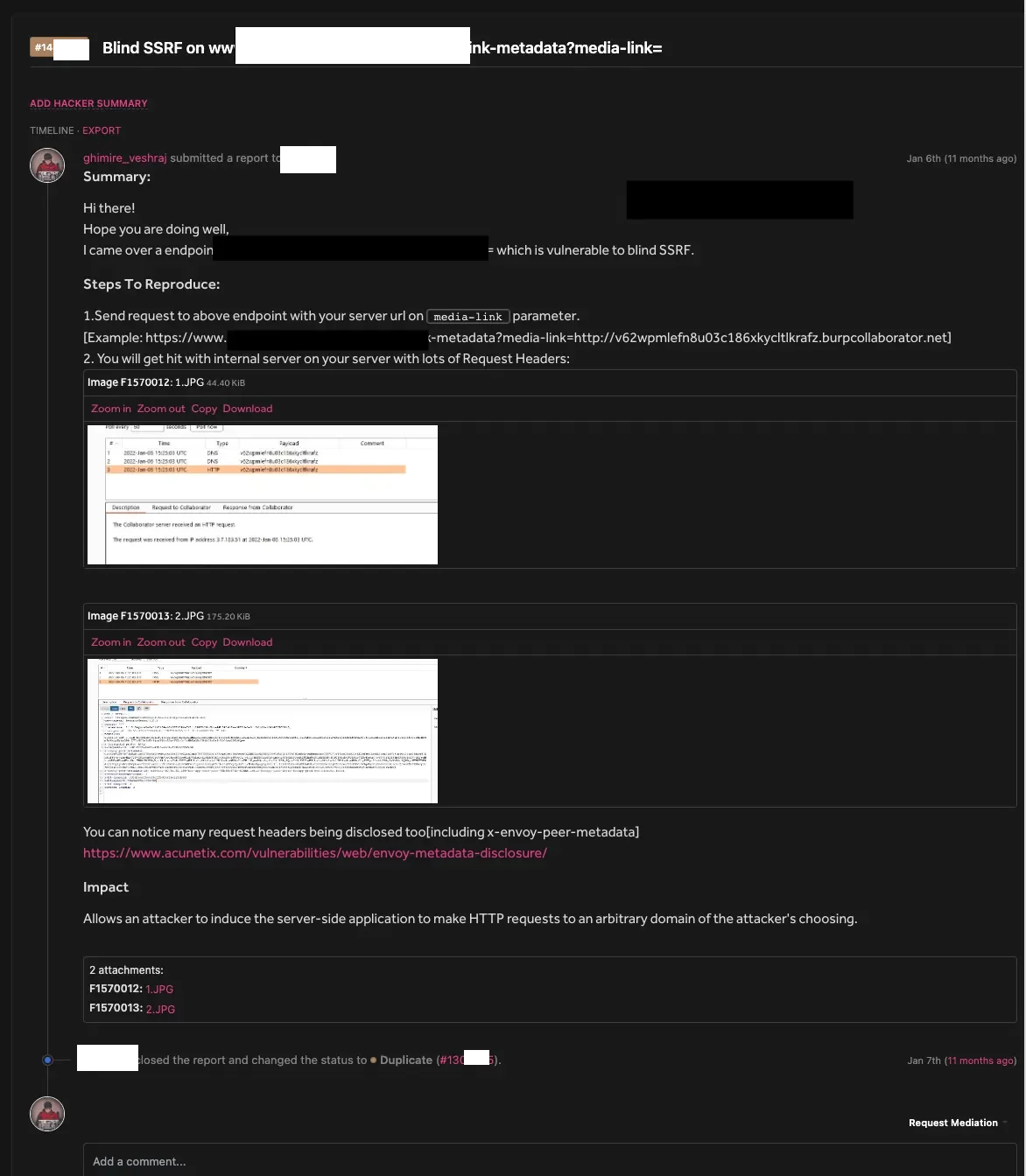
Rather than stop there, they kept digging into the feature.
Exploitation
Step 1: an XSS that fired from a .jpeg
After some time on the feature, Bibek found something interesting: the XSS executed even though the file had a jpeg extension. Neither of them understood how at that point.
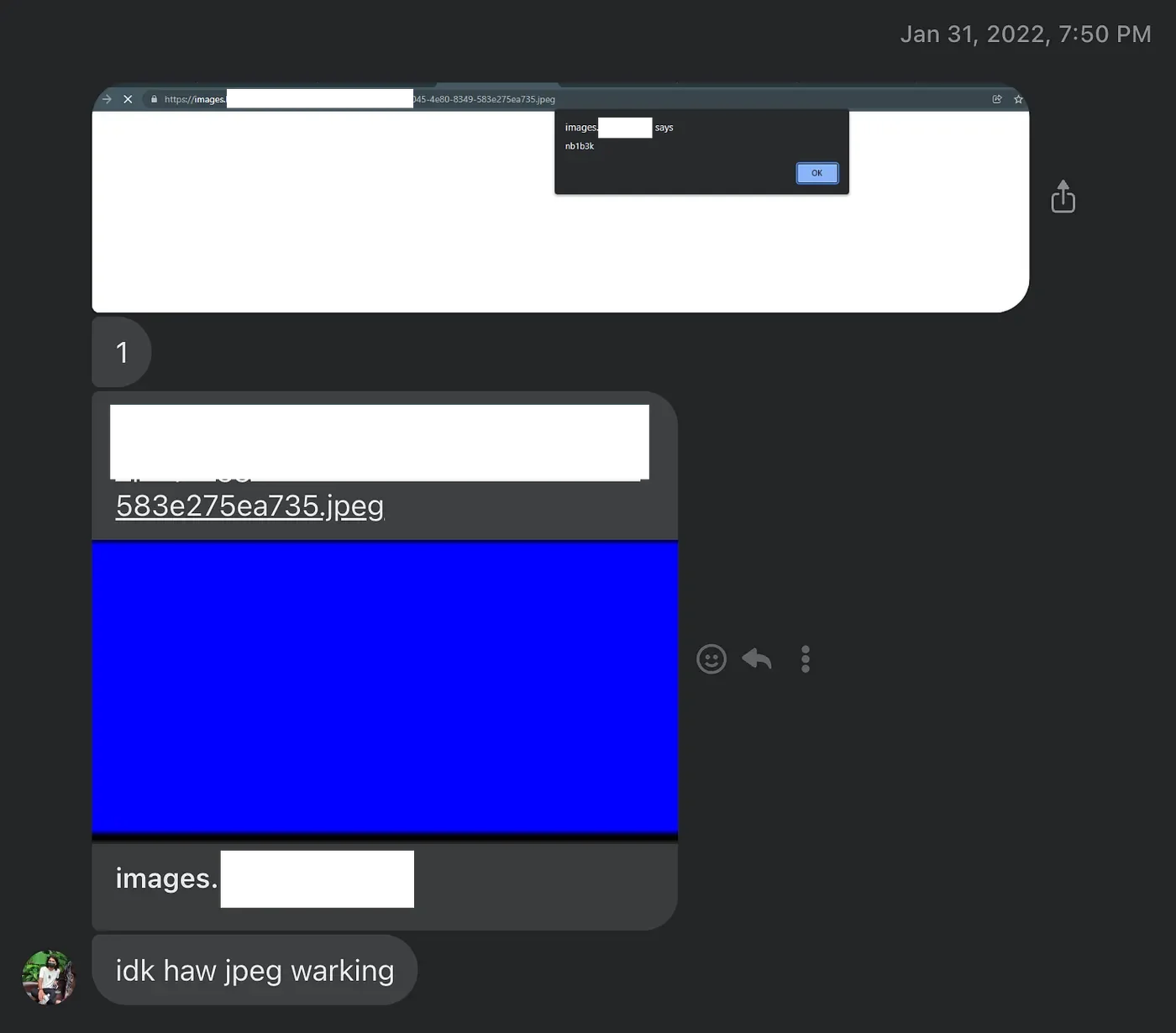

The result confused them: script execution from a resource that, by its extension, should have been a plain image.
Step 2: understanding the thumbnail fetch
More time on the feature produced the explanation. When you supply a link to any HTML page, the application searches that page for an image and tries to fetch the image in order to keep a thumbnail.
Bibek's approach was to host an HTML page containing a <meta> tag that pointed at an SVG file containing JavaScript. The application fetched the image referenced by the metadata and stored it as image/svg+xml mime-type, but with a .jpeg extension.
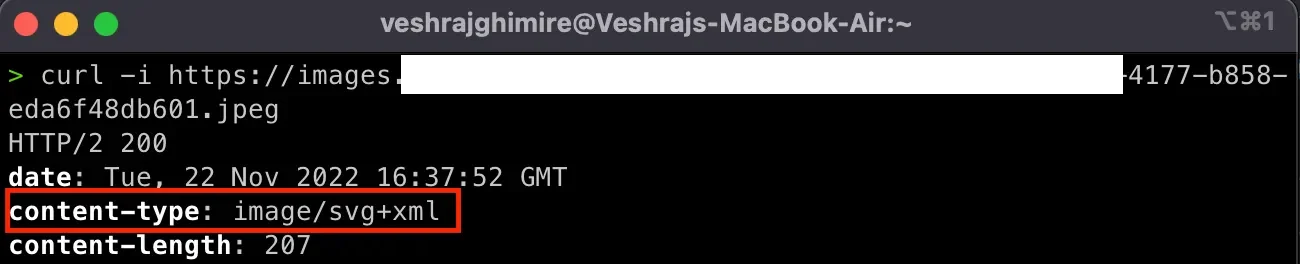
So the stored object carried a misleading extension while its content type was SVG, and the script executed.
Step 3: the final exploit
The final exploit looked like this.
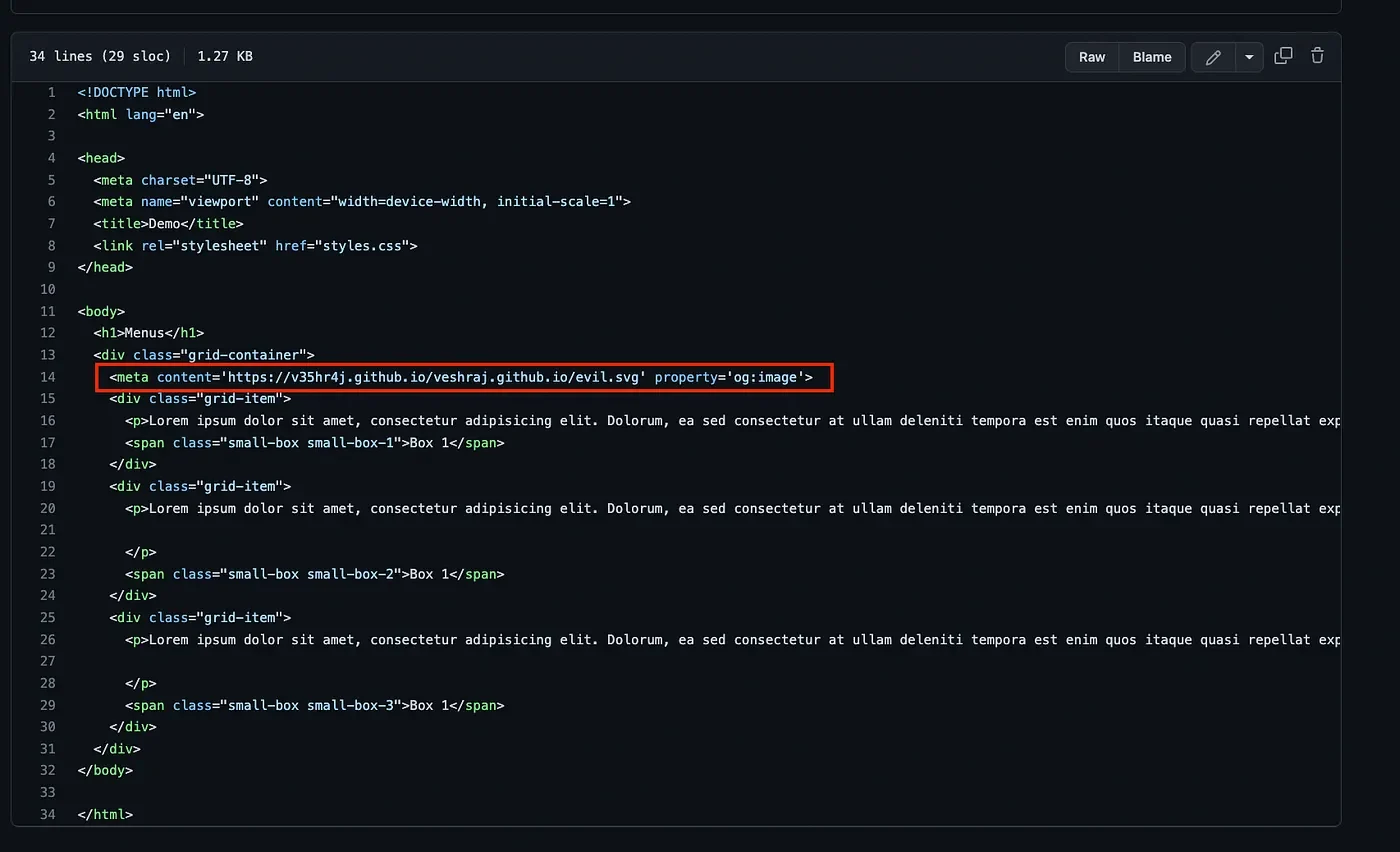
The evil.svg file was hosted with the following SVG payload.
<?xml version="1.0" standalone="no"?><!DOCTYPE svg PUBLIC "-//W3C//DTD SVG 1.1//EN" "http://www.w3.org/Graphics/SVG/1.1/DTD/svg11.dtd"><svg version="1.1" baseProfile="full" xmlns="http://www.w3.org/2000/svg"> <polygon id="triangle" points="0,0 0,50 50,0" fill="#009900" stroke="#004400"/> <script type="text/javascript"> alert("n1b3bk"); </script></svg>
The payload is an SVG document with a polygon and a <script> element that calls alert("n1b3bk").
Root cause
The server stored the fetched SVG as image/svg+xml but named it with a .jpeg extension. When the supplied page's metadata pointed at an SVG, the server stored the object as image/svg+xml but named it with a .jpeg extension. The extension suggested an inert image, while the stored content type allowed the SVG to be interpreted as a document with script.
The report does not describe the response headers or any content-type sniffing protections on the CDN.
Impact
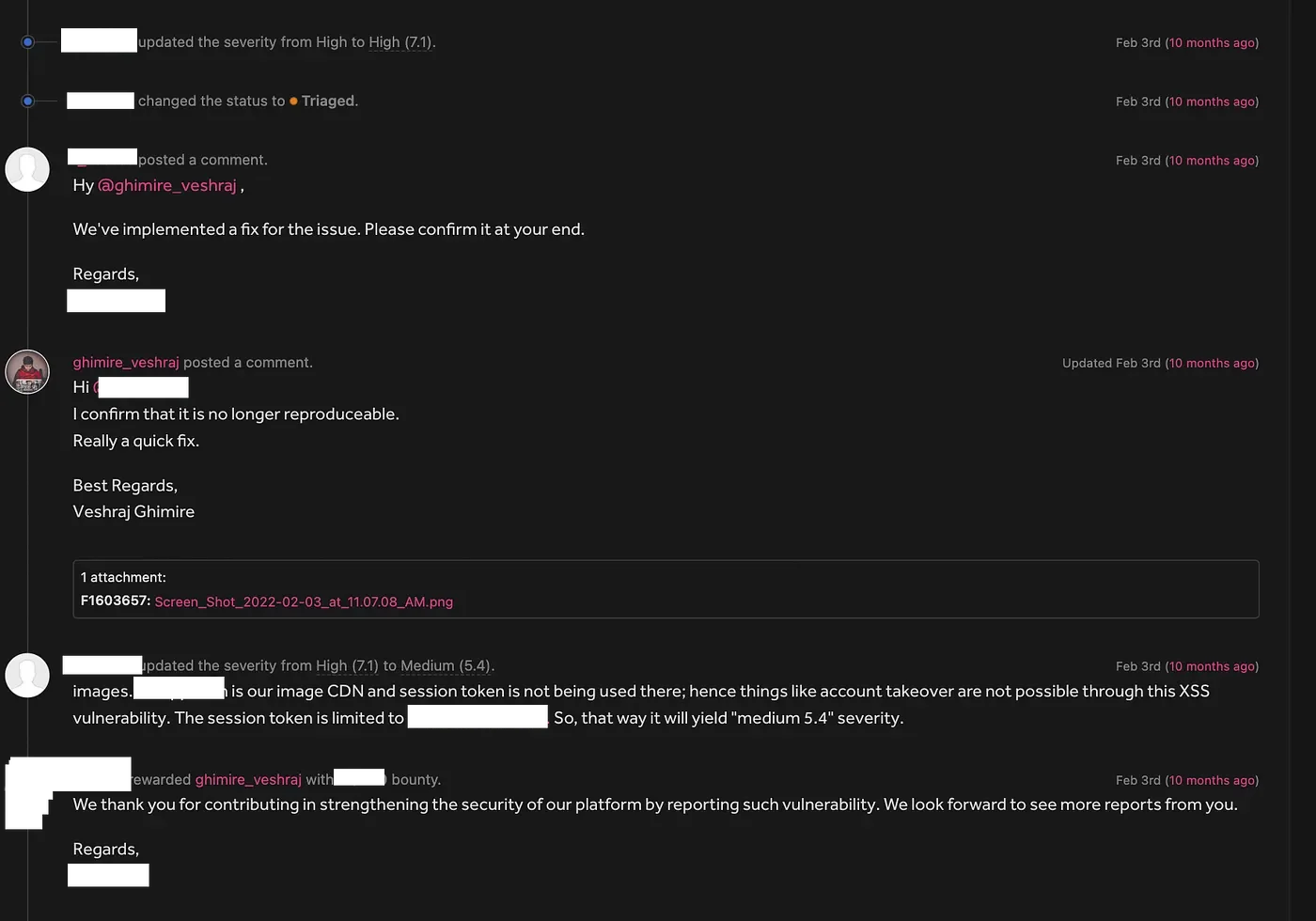
The stored object was served from one of the target's CDNs. The internal team initially raised the severity from medium to high, then reduced it back to medium and granted the bounty correspondingly, because the attack was on a CDN, which they considered less severe.
Fix
The report was submitted immediately and the team's reaction was prompt: the issue was rectified within three days of receiving the report.
- Supply a URL to an HTML page whose metadata points at an SVG containing script, then check whether the stored thumbnail is served with an SVG content type under an image extension. A positive result is a stored resource that executes script when opened as a document.
- Try other content types that browsers can interpret as documents, such as HTML, through the same thumbnail fetch. A positive result is a stored object whose served content type differs from its extension and is rendered as a document.
- Check whether the fetch follows redirects or accepts data from other metadata fields. A positive result is the server fetching and storing content from a source you control that it should not have accepted.
- Re-test the outbound request behaviour with a Collaborator URL and inspect the disclosed headers. A positive result is a server-side request carrying internal headers that reveal infrastructure details.
What happened, in plain words
Two researchers, Bibek Neupane and Veshraj Ghimire, were taking part in a private bug bounty program on HackerOne. A bug bounty program is a scheme where a company invites independent testers to look for security problems in its systems and pays them for reporting what they find. "Private" means only invited testers can take part. The target they chose was a social platform: a website built around posting media and text and interacting with other people, which the authors describe as somehow similar to Twitter.
The feature that mattered let you give the site a link to some media somewhere else on the internet, and the site would go and fetch it. The site would take the link you supplied, look inside the page it found there for an image, and download that image to keep as a thumbnail. A thumbnail is the small preview picture you see next to a post.
The bug they ended up reporting is called stored cross-site scripting, usually shortened to stored XSS. To understand it, start with what a browser does with a web page. A page is text, and some of that text is instructions the browser follows: it can draw things, fetch other files, and run small programs written in a language called JavaScript. Normally the browser only runs those programs when they come from the site you are visiting, because otherwise anyone could put instructions on a page and have them run in your browser. Cross-site scripting means someone has found a way to get their own instructions onto a page, so that the browser runs them as if the site itself had written them. "Stored" means the malicious content is saved on the server first, and then served to whoever views it later, rather than being reflected back in a single response.
The write-up describes the result as stored XSS via metadata on one of the target's CDNs. A CDN, or content delivery network, is a set of servers spread around the world that hold copies of files so they can be delivered quickly to people in different places. Metadata here means the hidden descriptive information inside a web page, in this case a particular tag that tells software where to find an image.
Setup
The report does not describe accounts, roles or tool versions. The only tool named is Burp Collaborator. Burp is a well-known tool for inspecting and modifying the traffic between your browser and a website. Collaborator is a companion feature: it gives you a unique web address that nobody else is using, and it tells you if anything ever contacts that address. Testers use it to answer a simple question: did the server actually go out and fetch the link I gave it? If the server does, Collaborator sees the incoming request and reports it back.
Finding it
The custom-URL media feature immediately suggested SSRF. SSRF stands for server-side request forgery: it is when you can make a server send a request to an address of your choosing. The everyday comparison is a receptionist who will phone any number you write on a form. If the receptionist will dial anything, you can use them to reach phone lines you could not dial yourself, and you can learn things from how they behave when they call.
To test for SSRF, the researchers entered a Burp Collaborator URL into the feature. The server made a request out to that address, and the request it sent disclosed various headers. Headers are the small labelled lines that travel with every web request and response, carrying information such as what kind of content is being sent and which software is handling it. Seeing the server's own request, with its headers, confirmed the server was fetching the link.
They tried to exploit this but failed. Later they found that the behaviour matched a known issue documented by Acunetix, a security tool vendor, and categorised there as low severity:
https://www.acunetix.com/vulnerabilities/web/envoy-metadata-disclosure/
This is a link to the Acunetix page describing the issue. "Envoy metadata disclosure" refers to information about the server's internal setup being revealed through the request it makes. The researchers reported it as it was, meaning they submitted exactly what they had found, and it was marked as a duplicate. A duplicate means the company had already received the same finding from someone else, so it does not earn a separate reward.
Rather than stop there, they kept digging into the feature.
Exploitation
Step 1: an XSS that fired from a .jpeg
After some time on the feature, Bibek found something interesting: the XSS executed even though the file had a jpeg extension. A file extension is the part of a filename after the last dot, such as .jpeg, and it is a label telling people and software what kind of file to expect. A .jpeg is supposed to be a photograph, and a photograph cannot contain a program. So script running from a file named with a jpeg extension made no sense to them at that point.
The image is captioned "Confused us", which sums up their reaction.
Step 2: understanding the thumbnail fetch
More time on the feature produced the explanation. When you supply a link to any HTML page, the application searches that page for an image and tries to fetch the image in order to keep a thumbnail. HTML is the language web pages are written in, and a <meta> tag is one of its elements: a piece of information about the page that is not shown to the reader. Some meta tags tell software where to find a picture that represents the page, for example a preview image for a link.
Bibek's approach was to host an HTML page containing a <meta> tag that pointed at an SVG file containing JavaScript. SVG stands for Scalable Vector Graphics: a format for drawings described in text, which browsers can display. Crucially, an SVG file is not just a picture; it is a document that can contain a <script> element, and browsers will run that script when they open the SVG as a page. The everyday comparison is a picture frame that also has a tiny speaker built in: it looks like a picture, but it can also make a sound.
The application fetched the image referenced by the metadata and stored it as image/svg+xml mime-type, but with a .jpeg extension. A mime type is the official label for a file's content, sent in a header, and it is what software should trust when deciding how to handle the file. So the stored object carried a misleading extension while its content type was SVG, and the script executed.
Step 3: the final exploit
The final exploit looked like this.
The evil.svg file was hosted with the following SVG payload.
<?xml version="1.0" standalone="no"?><!DOCTYPE svg PUBLIC "-//W3C//DTD SVG 1.1//EN" "http://www.w3.org/Graphics/SVG/1.1/DTD/svg11.dtd"><svg version="1.1" baseProfile="full" xmlns="http://www.w3.org/2000/svg"> <polygon id="triangle" points="0,0 0,50 50,0" fill="#009900" stroke="#004400"/> <script type="text/javascript"> alert("n1b3bk"); </script></svg>
Line by line, in plain words:
<?xml version="1.0" standalone="no"?>declares that this is an XML document, version 1.0. XML is a general text format for structured data, and SVG is written in it.<!DOCTYPE svg PUBLIC "-//W3C//DTD SVG 1.1//EN" "http://www.w3.org/Graphics/SVG/1.1/DTD/svg11.dtd">says which published definition of the SVG format this file follows. The long address points at the official description of the format.<svg version="1.1" baseProfile="full" xmlns="http://www.w3.org/2000/svg">opens the drawing itself and states the SVG version and the namespace, which is the identifier that tells the browser these tags belong to SVG.<polygon id="triangle" points="0,0 0,50 50,0" fill="#009900" stroke="#004400"/>draws a triangle from three coordinate points, filled dark green with a darker green outline. This is the harmless visible part, so the file looks like an ordinary picture.<script type="text/javascript">opens a block of JavaScript, the programming language browsers run.alert("n1b3bk");is the program: it tells the browser to show a pop-up box with the textn1b3bk, which is Bibek's handle. A pop-up is the classic harmless proof that script ran, because only script can make one appear.</script></svg>closes the script block and the drawing.
The payload is a normal SVG document with a polygon and a <script> element that calls alert("n1b3bk"). The stored object was kept as image/svg+xml with a .jpeg extension.
Root cause
The server stored the fetched SVG as image/svg+xml but named it with a .jpeg extension. When the supplied page's metadata pointed at an SVG, the server stored the object as image/svg+xml but named it with a .jpeg extension. The extension suggested an inert image, while the stored content type allowed the SVG to be interpreted as a document with script.
The report does not describe the response headers or any content-type sniffing protections on the CDN.
Impact
The stored object was served from one of the target's CDNs. The internal team initially raised the severity from medium to high, then reduced it back to medium and granted the bounty correspondingly, because the attack was on a CDN, which they considered less severe.
Fix
The report was submitted immediately and the team's reaction was prompt: the issue was rectified within three days of receiving the report.
Variants to test
- Supply a URL to an HTML page whose metadata points at an SVG containing script, then check whether the stored thumbnail is served with an SVG content type under an image extension. A positive result is a stored resource that executes script when opened as a document.
- Try other content types that browsers can interpret as documents, such as HTML, through the same thumbnail fetch. A positive result is a stored object whose served content type differs from its extension and is rendered as a document.
- Check whether the fetch follows redirects or accepts data from other metadata fields. A redirect is when one address answers by pointing to another address. A positive result is the server fetching and storing content from a source you control that it should not have accepted.
- Re-test the outbound request behaviour with a Collaborator URL and inspect the disclosed headers. A positive result is a server-side request carrying internal headers that reveal infrastructure details.
Glossary
- Bug bounty program: a scheme where a company invites independent testers to find security problems and pays them for valid reports.
- Private program: a bug bounty program open only to invited testers.
- HackerOne: a platform that hosts bug bounty programs and handles report submissions.
- Stored XSS (cross-site scripting): a bug where an attacker's script is saved on a server and later runs in other people's browsers as if the site had written it.
- CDN (content delivery network): a set of servers in many locations that hold copies of files so they load quickly for users everywhere.
- Thumbnail: a small preview image shown next to a post or link.
- Metadata: hidden descriptive information about a page or file, not shown to the reader.
<meta>tag: an HTML element carrying information about a page, sometimes including where to find a preview image.- HTML: the language web pages are written in.
- JavaScript: the programming language browsers run to make pages interactive.
<script>element: an HTML or SVG element that contains JavaScript for the browser to run.- SVG (Scalable Vector Graphics): a text-based image format for drawings; browsers can open it as a document and run any script inside it.
- XML: a general text format for structured data, which SVG is written in.
- Namespace (
xmlns): an identifier that tells the browser which format a set of tags belongs to. - Polygon: an SVG shape defined by a list of coordinate points.
alert(): a JavaScript function that shows a pop-up box; used as harmless proof that script ran.- Burp: a tool for inspecting and changing traffic between a browser and a website.
- Burp Collaborator: a Burp feature that provides a unique address and reports back if a server contacts it, proving the server made an outbound request.
- SSRF (server-side request forgery): a bug where you can make a server send a request to an address of your choosing.
- Header: a labelled line sent with a web request or response carrying information such as content type or software details.
- Mime type: the official label for a file's content, such as
image/svg+xml, sent in a header. - File extension: the part of a filename after the last dot, such as
.jpeg, conventionally indicating the file type. - Content-type sniffing: software guessing a file's real type from its content instead of trusting the declared type or extension.
- Duplicate: a report of a finding the company has already received from someone else.
- Severity: a rating of how serious a bug is, here medium or high.
- Bounty: the payment a company gives for a valid report.
- Redirect: a response that points the requester to a different address.



