It’s the Little Things : Breaking an AI
The AI model creation feature accepted a user-supplied file path and used it to read local files, but only when a specific data separator character was also provided. An attacker could then view the model logs to see partial contents of local system files such as /etc/passwd.
 Published on infosecwriteups.com
tl;dr — Feeding an AI path traversal payloads and getting local files spit out in return.
The full write-up lives on its author's site
It belongs to its author, so we link to it rather than copy it. The other two tabs are our own rewrites, checked against it.
Context
CatCorp is a company that builds NLP models as an API service, which the author frames as a rising trend in the SaaS economy. The application is simple: after logging in, you get a dashboard where you can create and train your own AI model. Creating a model means selecting the model type and size, then supplying a data separator and your training data. The training data can be provided either by uploading a .txt file or by referencing a link to a pre-uploaded .txt file hosted on a website of your choosing.
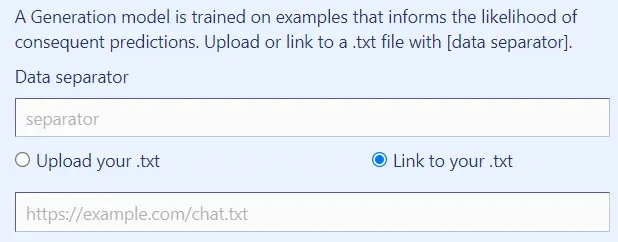
Once the data is uploaded, processing begins as a five-stage pipeline: Data Processing > Finetuning > Exporting Model > Deploying API > Ready. It takes a while. The application also provides a feature to view the logs produced during that process.
Setup
The author worked against the model creation feature of the CatCorp dashboard after logging in. The only tool mentioned is Burp, whose session history turned out to be decisive later on. No versions, accounts or roles beyond the logged-in dashboard user are described.
Finding it
The researcher took a deeper look at the model creation feature, and the Link to your .txt component caught their interest. They started fuzzing it and fed in a basic path traversal payload, /../../../etc/doesnotexist, just to see how the server responds.
Before going further, here is how the request actually looks:
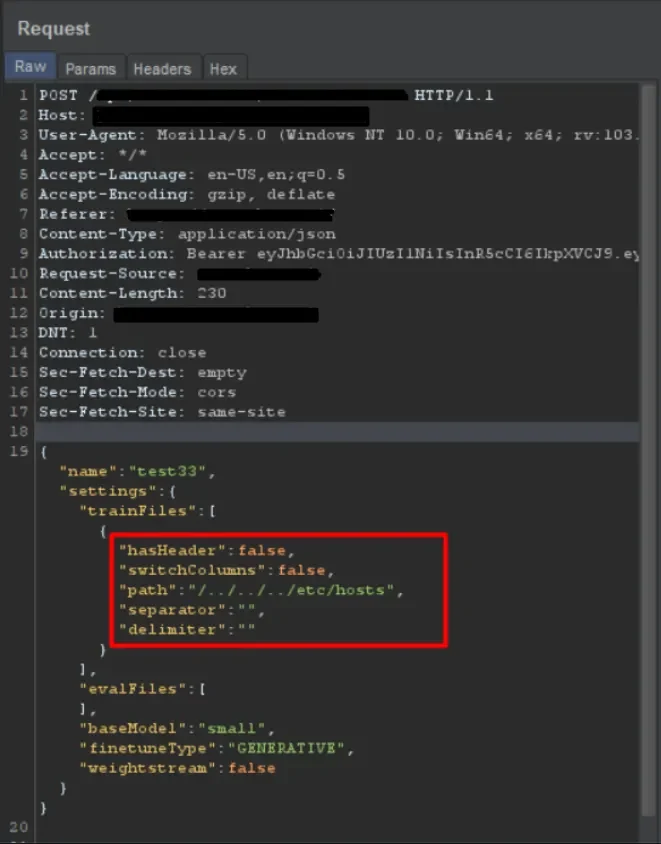
The request passes the name, the path (the link to the .txt) and the other attributes required for model creation. Two responses then stood out.
Request and response A (valid path)
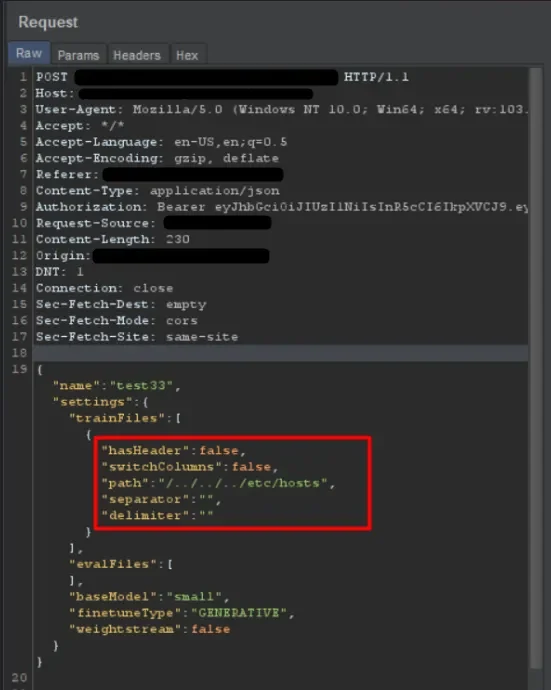
Request A
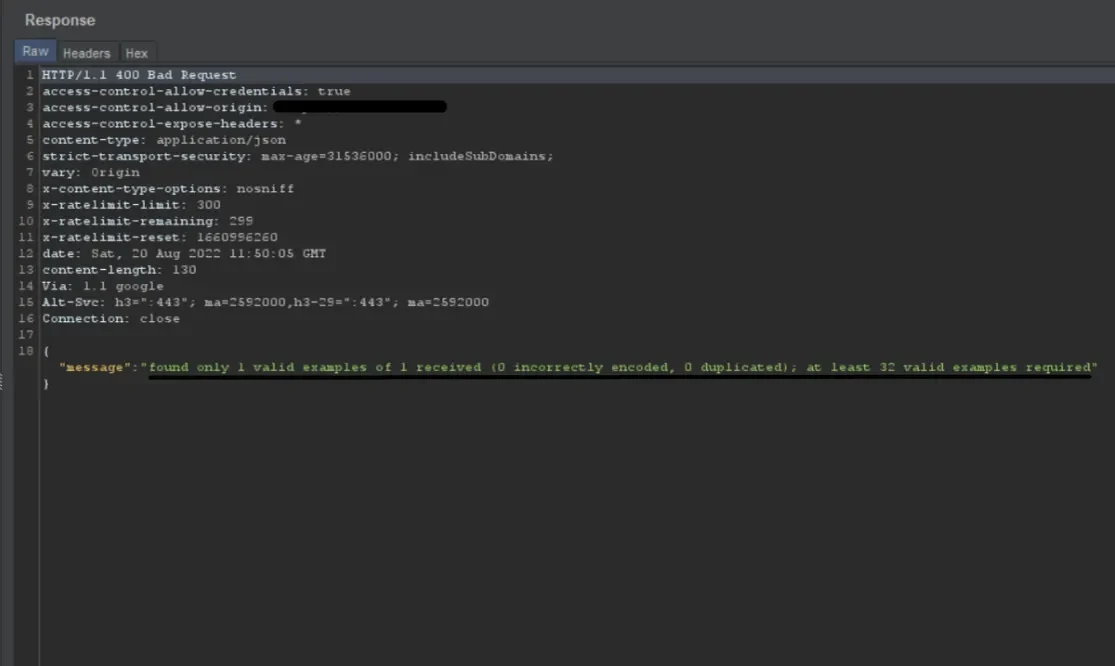
Response A
Request and response B (invalid path)
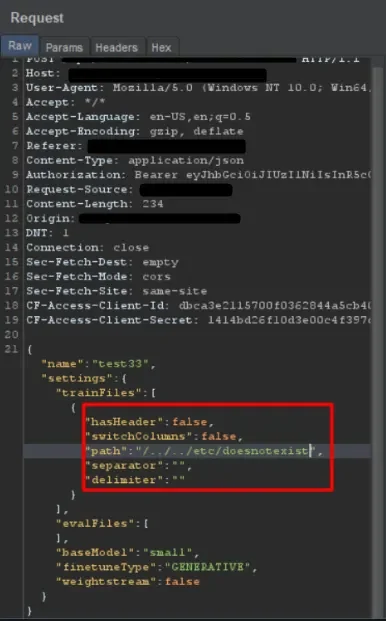
Request B
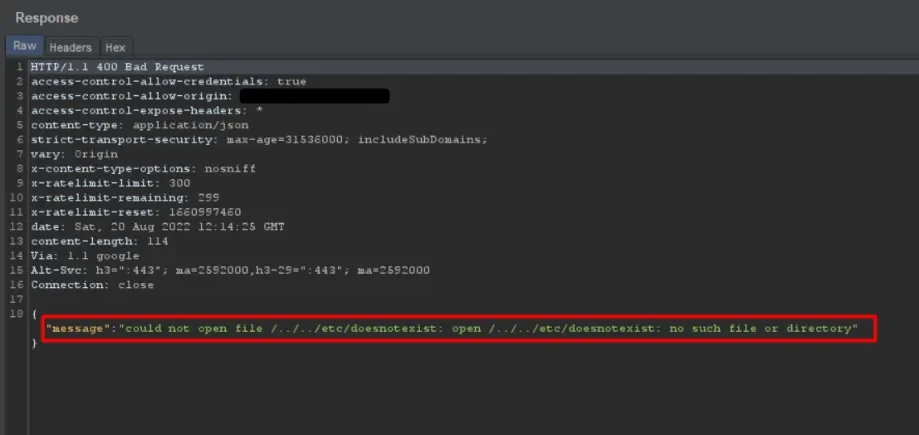
Response B
Looking closely at the response, there is a common Linux verbose error, which indicates that the application is indeed traversing back through directories and trying to fetch the requested file.
Exploitation
Step 1: Confirm traversal with a non-existent file
The first payload was a basic traversal to a file that does not exist:
/../../../etc/doesnotexist
This was only meant to check how the server responds. The verbose Linux error in the response confirmed that the application walks back the directories and attempts to fetch the requested file.
Step 2: Try real files and hit a wall
Supplying any valid file, for example /etc/hosts or /etc/passwd, throws a requirement error, as shown in Response A. The researcher was stuck on this for hours.
Step 3: Recover the one successful request from Burp history
There had been a single successful response showing the contents of a local file, but the researcher could not recall how it was produced. The Burp session had not been closed, and a simple search revealed the culprit: a single data separator, /. A single character decided whether this was going to be critical or not.
Step 4: Reproduce with the separator
This is how it worked:
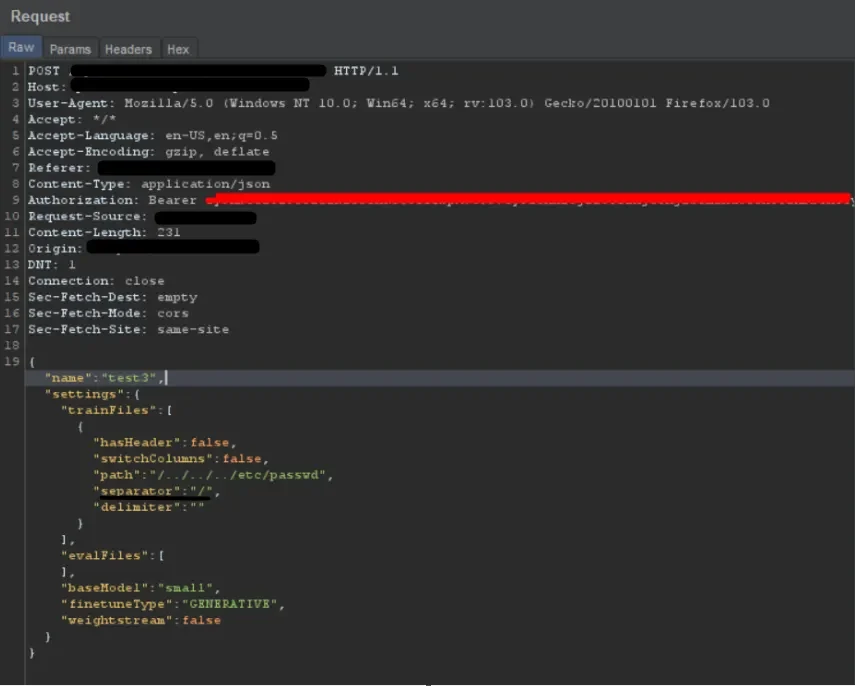
All that was needed was to pass the tiny separator, which set things into place to extract part of the local file through a side-channel leak.
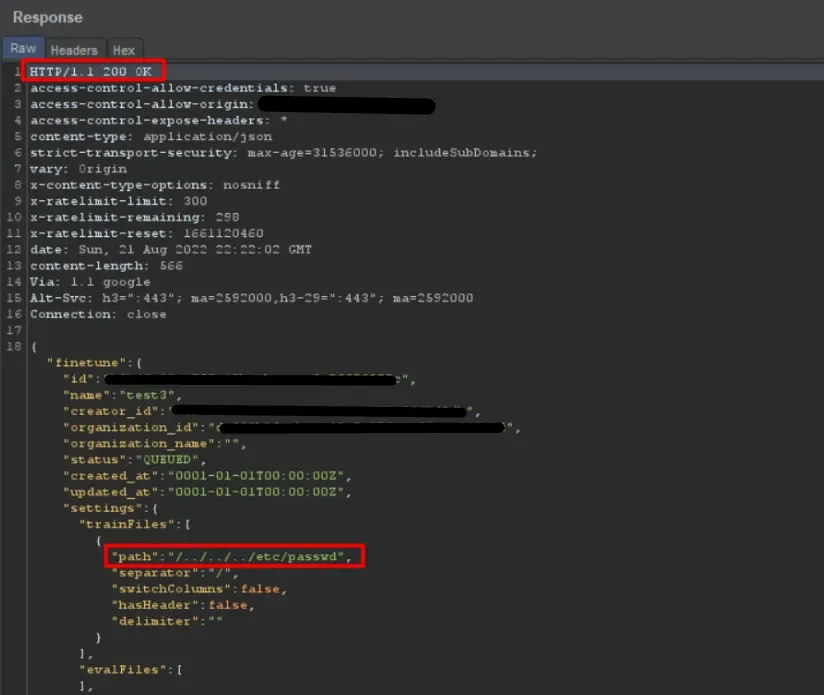
New response
The new response differs from the initial response obtained with a valid filename. That difference is the hint worth watching for.
Step 5: Read the leaked content from the logs
Once the request succeeds, revisit the dashboard, tap on the created AI model and View the logs. That brings up partial contents of the requested file, here /etc/passwd, as happens in a side-channel leak.
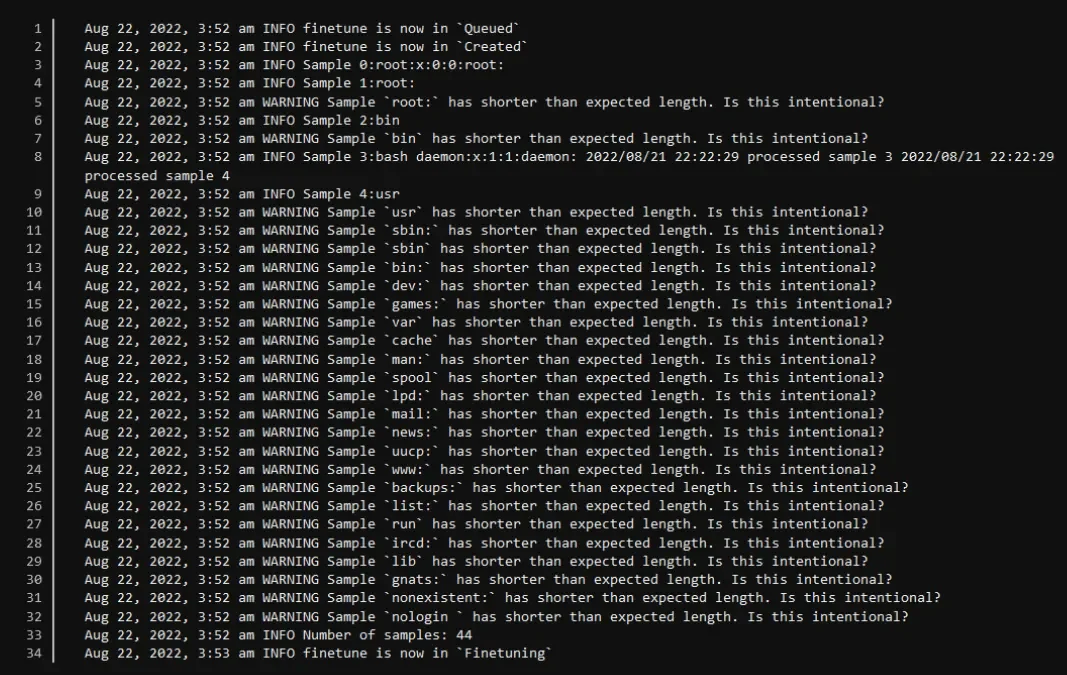
Contents of /etc/passwd being disclosed
The author states the finding was accepted as critical.
Root cause
The author's best guess, in their own words:
My best guess is the supplied separator, somehow breaks up/ interrupts the input flow and as a result partially-renders the file contents, as part of an error/warning message.
In other words, the separator supplied as part of model creation likely interferes with how the input is processed, so the file contents end up partially rendered inside an error or warning message rather than being returned directly. The report does not identify the specific code path involved.
Impact
A logged-in user of the model creation feature could cause the application to disclose partial contents of a local file, demonstrated with /etc/passwd, through the model logs. The disclosure is partial, delivered as a side-channel leak rather than a full file read, and the report demonstrates it against /etc/passwd.
Fix
The report does not describe any fix or remediation applied by CatCorp.
Variants to test
- Feed traversal payloads into any field that accepts a URL or file path, starting with a non-existent target such as
/../../../etc/doesnotexist. A positive result is a verbose error revealing that the server walked back directories. - Repeat with real files such as
/etc/passwdand watch for requirement or validation errors. A positive result is a requirement error, as shown in Response A. - Vary the data separator and other small single-character inputs around the traversal. A positive result is a response that differs from the valid-filename response, as the new response did here.
- Check every place the application surfaces processing output, such as logs, job status or error views, after a successful request. A positive result is partial file contents appearing there.
- Keep Burp history for the whole session and search it whenever a single anomalous response appears. A positive result is recovering the exact request that produced it, which is what turned this finding into a reproducible one.
Timeline: reported 20 Aug 2022, rewarded 16 Sep 2022. The bug was found in collaboration with https://twitter.com/rajesh_ranjan.

Take care of your Burp logs and keep an eye out for even the tiniest of input fields.
What happened, in plain words
A security researcher was testing a website that lets people build their own AI models. One of the boxes on that website asks you to paste a link to a text file that will be used to train the AI. The researcher typed a special kind of link into that box, one that tries to make the server walk backwards out of its own folders and read files that belong to the operating system itself. The server did not hand the file over directly, but it did something almost as bad: it printed part of the file's contents into a log page that the researcher could open in the dashboard. The company accepted this as a critical bug and the report was rewarded.
The interesting part of the story is not the clever payload. It is that the researcher had already produced one successful result by accident, could not remember how, and only found the answer by searching their saved history of web requests. The answer was a single character: a forward slash, /, typed into the "data separator" field. That one character was the difference between a harmless error and a leaked system file.
This article walks through the whole thing slowly, explaining every term as it appears, so that someone who has only ever used a browser can follow it.
Some background first
What an API is
An API (Application Programming Interface) is a way for one piece of software to talk to another. A useful everyday comparison: a restaurant. You do not walk into the kitchen and cook; you tell the waiter what you want, the waiter takes your order to the kitchen, and the kitchen sends food back. The waiter is the API. In web terms, the "waiter" is a set of addresses (called endpoints) on a server that accept a request and send back a response.
What SaaS and NLP mean
SaaS stands for Software as a Service: software you use over the internet instead of installing it on your own computer. Webmail is SaaS; so is this AI service.
NLP stands for Natural Language Processing: the branch of computing concerned with getting computers to work with human language, such as text. An NLP model is a program trained on text so that it can do something useful with language later.
What CatCorp's product does
CatCorp is the name the author gives to the company in the report. It builds NLP models as an API service, which the author describes as a rising trend in the SaaS economy. In practice, a customer logs in, goes to a dashboard, and creates and trains their own AI model. Creating a model means choosing the model type and size, then supplying two things: a data separator and the training data.
Training data is the collection of text the AI learns from. The data separator is a character used to mark boundaries between pieces of that text, so the software knows where one item ends and the next begins. Think of it like the lines on a page that separate one address label from the next; without them the printer would not know where to cut.
The training data can be supplied in two ways: by uploading a .txt file, or by giving a link to a .txt file that is already hosted somewhere on the web. That second option is the one that matters here, because a link is just text that the server will later go and fetch. Whenever a server fetches something based on text a user typed, there is a question worth asking: what exactly will it fetch, and from where?
Once the data is uploaded, processing begins. The report describes it as a five-stage pipeline: Data Processing > Finetuning > Exporting Model > Deploying API > Ready. It takes a while. The application also lets you view the logs produced during that process. A log is a running record of what a program did, a bit like a diary the program keeps for itself; developers read logs to work out what went wrong.
What path traversal is
A path is the address of a file on a computer, for example /etc/passwd. On Linux and similar systems, paths are written with forward slashes separating folders, and .. means "the folder above this one". So /../../../etc/passwd means: go up one folder, up again, up again, then into etc and take the file passwd.
Path traversal is a vulnerability where a program accepts a path from a user and follows it without checking that the path stays inside the folder it was supposed to stay in. The everyday comparison: a hotel clerk is told to fetch a guest's file from cabinet 3, but the guest writes "cabinet 3, then the staff room, then the manager's office" on the slip, and the clerk obediently walks all the way there. The clerk did nothing wrong technically; the slip was never checked.
/etc/passwd is a real file on Linux systems that lists user accounts. It is a classic target in demonstrations because it is readable and its presence proves the server read a system file rather than one of its own.
What Burp is
Burp (Burp Suite) is a tool that sits between your browser and a website and records every request and response. A request is the message your browser sends to a server ("please give me this page"); a response is the message the server sends back. Burp keeps a history of all of them, which is like a browser's history page but with the full contents of every message. This history becomes the hero of the story later.
Finding it
The researcher logged in to the CatCorp dashboard and looked more closely at the model creation feature. The Link to your .txt component caught their interest, precisely because it makes the server fetch something the user names. They started fuzzing it. Fuzzing means trying lots of odd or unexpected inputs to see how the software reacts; it is the software equivalent of jiggling every handle on a door to see which ones are loose.
The first thing they fed in was a basic path traversal payload, /../../../etc/doesnotexist, just to see how the server responds. Note the deliberate choice of doesnotexist: the file is not real, so if the server complains in a way that shows it tried to walk up the folders, that proves the traversal is happening without needing to read anything sensitive yet. It is a safe probe.
Before going further, here is how the request actually looks:
This is a pretty basic request. It passes the name, the path (the link to the .txt) and the other attributes required for model creation. In plain terms: the browser sent a message to the server saying "create a model with this name, using this file as training data, with these settings". The path part is where the user-supplied link lives, and that is the part the researcher was probing.
Two responses then stood out.
Request and response A (valid path)
Request A
Response A
Request A is the normal case: the link points at a real, valid file. Response A is what the server says back. The researcher kept this as the baseline, the "what normal looks like" picture to compare everything else against.
Request and response B (invalid path)
Request B
Response B
Request B is the traversal attempt, pointing at a file that does not exist. Response B is different from Response A. Looking closely at it, there is a common Linux verbose error. Verbose means the error message says too much: instead of a polite "something went wrong", it reveals internal details. That error indicated that the application is indeed traversing back through directories and trying to fetch the requested file.
This is the first real signal. The error message is the server accidentally telling on itself.
Exploitation
Step 1: Confirm traversal with a non-existent file
The first payload was a basic traversal to a file that does not exist:
/../../../etc/doesnotexist
Line by line, in plain words:
- The leading
/means "start from the top of the filesystem", the root folder. - Each
../means "go up one folder". Three of them climb three levels. etc/is the folder where Linux keeps many system configuration files.doesnotexistis a filename the researcher made up on purpose.
Why this step: the goal was only to check how the server responds. A server that refuses the path outright would say something generic. A server that follows the path and then fails to find the file will say something specific, and that specificity is the proof. The verbose Linux error in the response confirmed that the application walks back the directories and attempts to fetch the requested file.
Step 2: Try real files and hit a wall
Supplying any valid file, for example /etc/hosts or /etc/passwd, throws a requirement error, as shown in Response A. The researcher was stuck on this for hours.
This is a common moment in security testing and worth understanding. The traversal clearly worked, but the useful files were being rejected by some other check. The application was apparently rejecting the input with a requirement error. The researcher could see the door was unlocked but something else was blocking the corridor.
Step 3: Recover the one successful request from Burp history
There had been a single successful response showing the contents of a local file, but the researcher could not recall how it was produced. This is where the habit of leaving tools running pays off. The Burp session had not been closed, and a simple search revealed the culprit: a single data separator, /. A single character decided whether this was going to be critical or not.
Why this step matters: when you are trying many variations quickly, it is easy to produce a result and lose track of which variation produced it. The request history is the only reliable record. Searching it is not a technical skill so much as a discipline, and here it turned hours of confusion into a reproducible finding.
Step 4: Reproduce with the separator
This is how it worked:
All that was needed was to pass the tiny separator, which set things into place to extract part of the local file through a side-channel leak. A side channel is an indirect route for information to escape. The everyday comparison: you cannot read the letter in the sealed envelope, but you can see the shadow of its text through the paper. The application was not returning the file as a download; it was letting fragments of it appear somewhere else, in this case in the logs.
New response
The new response differs from the initial response obtained with a valid filename. That difference is the hint worth watching for. In security testing, the interesting thing is rarely a dramatic success; it is a small inconsistency between two responses that should have been identical. Here, the presence of the separator changed the shape of the response, which told the researcher that the separator was interfering with the application's processing in a useful way.
Step 5: Read the leaked content from the logs
Once the request succeeds, revisit the dashboard, tap on the created AI model and View the logs. That brings up partial contents of the requested file, here /etc/passwd, as happens in a side-channel leak.
Contents of /etc/passwd being disclosed
The disclosure was enough for the vulnerability to be accepted as critical. In security terms, critical is the highest severity band: it usually means an attacker could read data they should never see, or take over part of the system. Here the data is only partial, but it is system data.
Root cause
The author's best guess, in their own words:
My best guess is the supplied separator, somehow breaks up/ interrupts the input flow and as a result partially-renders the file contents, as part of an error/warning message.
In other words, the separator supplied as part of model creation likely interferes with how the input is processed, so the file contents end up partially rendered inside an error or warning message rather than being returned directly. The report does not identify the specific code path or the validation that was missing.
A plain-language way to picture it: the application takes the user's link, fetches the file, and then tries to split the file's contents using the separator the user supplied. The author's best guess is that the separator interrupts the input flow, so the file contents are partially rendered in an error or warning message.
Impact
An authenticated user of the model creation feature could cause the application to read local files and disclose part of their contents through the model logs. Authenticated means the user has an account and is logged in; this was not an anonymous attack from the open internet, but it also did not require any special privileges beyond a normal dashboard account.
The disclosure is partial, delivered as a side-channel leak rather than a full file read, and the report demonstrates it against /etc/passwd. The author states the finding was accepted as critical.
Fix
The report does not describe any fix or remediation applied by CatCorp. For a reader learning from this, the general lesson is that any field accepting a link or a file path should be checked against an allow-list of permitted locations, and error messages should not include file contents. The report itself does not state what the company did.
Variants to test
If you want to look for similar issues in software you are allowed to test, these are steps for looking for similar issues, based on what the report describes:
- Feed traversal payloads into any field that accepts a URL or file path, starting with a non-existent target such as
/../../../etc/doesnotexist. A positive result is a verbose error revealing that the server walked back directories. - Repeat with real files such as
/etc/passwdand watch for requirement or validation errors. A positive result is a different error shape than the traversal error, which tells you validation is happening after the fetch. - Vary the data separator and other small single-character inputs around the traversal. A positive result is a response that differs from the valid-filename response, as the new response did here.
- Check every place the application surfaces processing output, such as logs, job status or error views, after a successful request. A positive result is partial file contents appearing there.
- Keep Burp history for the whole session and search it whenever a single anomalous response appears. A positive result is recovering the exact request that produced it, which is what turned this finding into a reproducible one.
Timeline: reported 20 Aug 2022, rewarded 16 Sep 2022. The bug was found in collaboration with https://twitter.com/rajesh_ranjan.
Take care of your Burp logs and keep an eye out for even the tiniest of input fields.
Glossary
- API: a defined way for one piece of software to ask another for something, like a waiter carrying orders between you and the kitchen.
- Authenticated: logged in with an account, as opposed to browsing anonymously.
- Burp (Burp Suite): a tool that sits between browser and website and records every request and response.
- Critical: the highest severity rating for a security bug, usually meaning serious data exposure or system compromise.
- Data separator: a character used to mark where one piece of training text ends and the next begins.
- Endpoint: a specific address on a server that accepts a particular kind of request.
- Fuzzing: trying many odd or unexpected inputs to see how software reacts.
- Log: a running record a program keeps of what it did, used by developers to diagnose problems.
- NLP (Natural Language Processing): the field of computing concerned with software that works with human language.
- Path: the address of a file or folder on a computer, written with slashes between folders.
- Path traversal: a bug where a program follows a user-supplied path without checking it stays inside the intended folder, letting
../climb out. - Payload: the specific piece of input an attacker sends to try to trigger a bug.
- Pipeline: a fixed sequence of processing stages that data passes through one after another.
- Request: the message a browser or tool sends to a server.
- Response: the message a server sends back.
- SaaS (Software as a Service): software you use over the internet rather than installing locally.
- Side-channel leak: information escaping indirectly, through something other than the intended output, such as an error message or a log.
- Training data: the text an AI model learns from.
- Verbose error: an error message that reveals internal details such as file paths or system information.
- Vulnerability: a weakness in software that can be misused to do something the designers did not intend.



