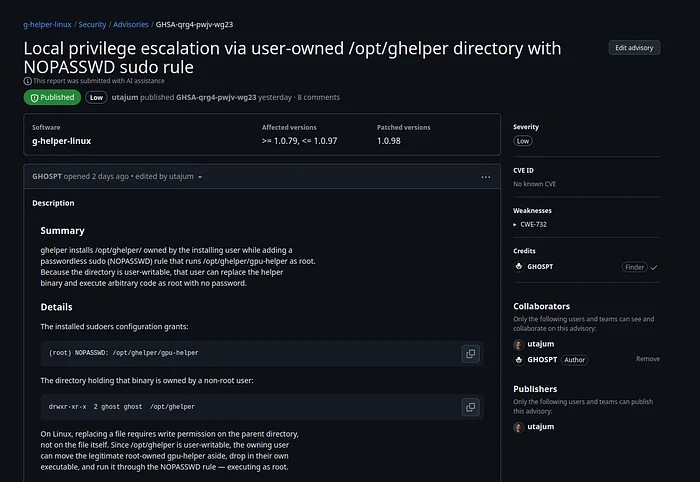
Local privilege escalation via user-owned /opt/ghelper directory
The installer for g-helper-linux made the /opt/ghelper directory owned by the user, and that directory holds a binary that a sudoers.d rule lets the user run as root without a password. A local attacker could replace that binary with their own and gain root privileges.

Cve
The full write-up lives on its author's site
It belongs to its author, so we link to it rather than copy it. The other two tabs are our own rewrites, checked against it.
Context
G-Helper is an open-source optimisation program for Asus laptops, offered as an alternative for people who use Armoury Crate and want something else to tune their machine. The Linux port lives at:
https://github.com/utajum/g-helper-linux
The affected range is G-Helper 1.0.79 <= version <= v1.0.97 (Linux). The program is designed to perform privileged actions, such as killing processes as root and reading hardware values, and it does this by creating a configuration and a file under sudoers.d. That sudoers entry is what makes the program work without a password prompt, and it is also where the problem starts.
Setup
The researcher, GHOSPT, came to the issue through a friend who used the program to optimise a machine and noticed that it could kill any process with root privileges. That behaviour is by design, because the installer writes a sudoers.d entry. The testing question was how bad things get if a laptop running this program is compromised through RCE (Remote Code Execution): can that foothold be turned into Local Privilege Escalation? The relevant precondition is that the directory in question is readable and writable only by the user who owns it.
Finding it
The sudoers entry grants the user permission to run only what gpu-helper can do, such as killing processes and reading values from the hardware. The screenshot below shows that consent being granted.
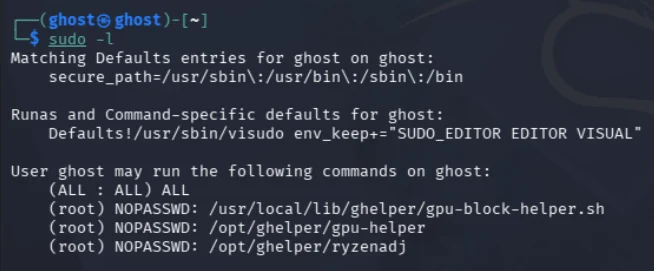
What stood out was the path where the gpu-helper binary is stored. That path is not safe.
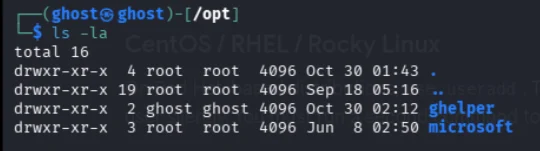
The directory allows the user to write anything into the folder, and it also allows renaming files inside it. That is enough to forge a binary file at this path. The researcher then tested how serious this is when a laptop using the program is reached through RCE, given that the directory can be read and written only by the user who owns it.
Exploitation
Step 1: confirm the sudoers grant
The program's installer creates a sudoers.d entry so that the helper can run privileged operations without a password. The commands permitted are limited to what gpu-helper does, for example killing processes and reading hardware values. The grant itself is shown in the first screenshot above.
Step 2: inspect the binary path
The ghelper directory in /opt is owned by the user, and that directory is writable by the user. Because the user can write into the folder and rename files in it, a binary file at this path can be forged. The second screenshot above shows the directory permissions.
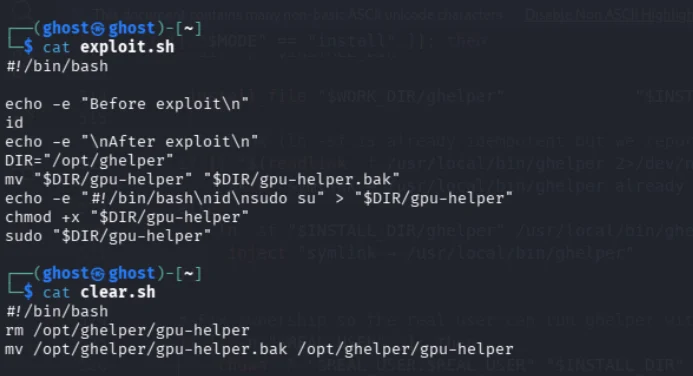
Step 3: build the proof of concept
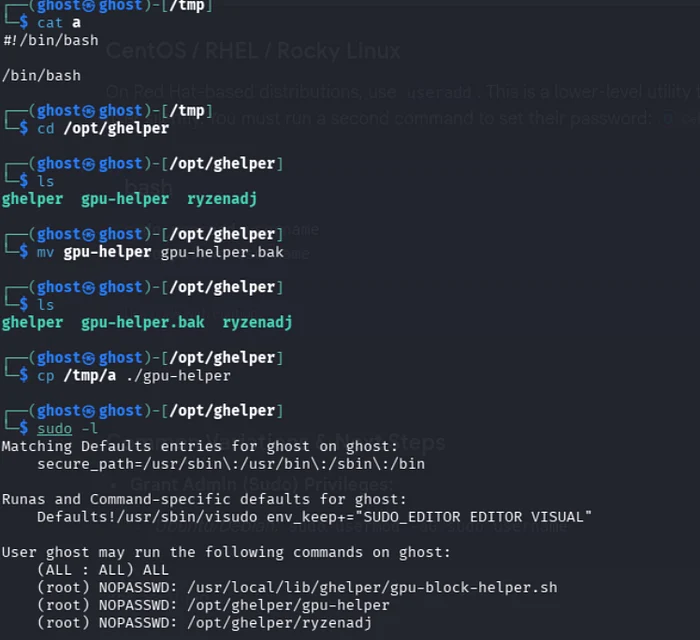
With the precondition that the directory is readable and writable only by its owner, the researcher wrote a PoC to see whether an RCE foothold could become Local Privilege Escalation.
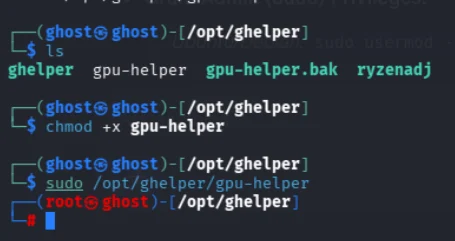
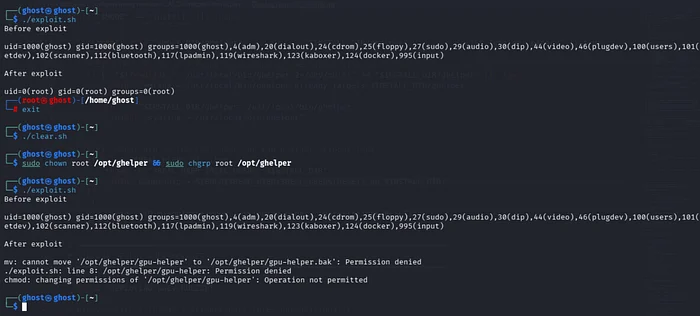
The PoC showed that privilege escalation does occur, and the researcher describes it as fairly dangerous.
Step 4: run the exploit and clean up
The researcher's PoC includes clear.sh, which removes the exploit file afterwards so the machine returns to its default state as it was after installation.
Root cause
The flaw comes from the install.sh script, at lines 525-528, which should not be there. The documented installation method is to curl the script and run it:
curl -sL https://raw.githubusercontent.com/utajum/g-helper-linux/master/install/install.sh | sudo bash

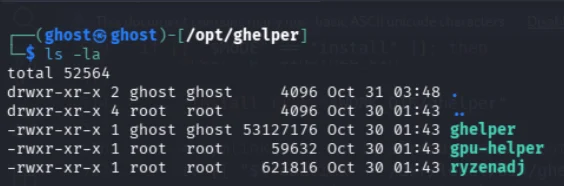
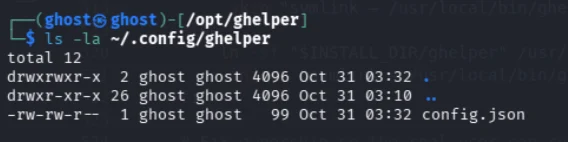
Those lines try to make the ghelper directory in /opt owned by the user, which is unnecessary. Making the user the owner of a path that sits inside a NOPASSWD ROOT grant allows the binary name to be forged, or a file to be written in place of the binary that is set in the NOPASSWD ROOT path. The binary is set to mode 755, which allows anyone to execute it. The program also keeps its config file in ~/.config/ghelper, which has no effect on the user's ability to use it.
In short, the installer hands ownership of a path inside the NOPASSWD ROOT grant to the unprivileged user, allowing the binary there to be forged or replaced.
Impact
An attacker who already has code execution as the user on a laptop running an affected version can forge or replace the binary in the user-owned path inside the NOPASSWD ROOT grant, escalating to root. The researcher's PoC confirmed that the escalation works and called it fairly dangerous. The precondition is the one stated above: the directory is readable and writable only by the user who owns it, so the attack requires that user's context first.
Fix
For anyone who has not installed the program yet and is worried about using it, download the script to the machine, delete the offending lines, and then run the script as normal.
For anyone already using it, take ownership of the directory back:
sudo chown root:root /opt/ghelper
The researcher was waiting for a CVE number at the time of writing, and the program has published a patched version.
Variants to test
- Look for sudoers.d entries that grant NOPASSWD execution of a binary by absolute path, then check the ownership and permissions of every directory in that path. A positive result is a directory writable or renameable by an unprivileged user.
- Review installer scripts for
chownorchmodcalls that hand user ownership to directories referenced by privileged rules. A positive result is a privileged path owned by the invoking user after installation. - Check whether the privileged binary is mode 755, which allows anyone to execute it.
- Check whether the program stores configuration in a user-controlled directory such as
~/.config/ghelperand whether that configuration influences what the privileged helper executes. - On any host where a helper is invoked through sudo, test whether renaming the binary and dropping a replacement at the same path is executed with root privileges.
What happened, in plain words
A security researcher called GHOSPT found a configuration mistake in an open-source program for Asus laptops. The program is called G-Helper, and it is an alternative to Asus's own Armoury Crate software. People use it to tune and optimise their machine.
The Linux version of the program lives here:
https://github.com/utajum/g-helper-linux
The affected versions are G-Helper 1.0.79 up to and including v1.0.97 on Linux.
To do its job, the program needs to perform actions that normally require the most powerful account on the computer, called root. For example, it can kill any running program (a process) and read values from the hardware. Rather than asking for a password every time, the installer adds a rule to a system configuration area called sudoers.d. That rule says: this ordinary user may run this specific helper program as root, without typing a password. This kind of rule is called NOPASSWD.
The problem is where that helper program is stored. The installer creates a folder at /opt/ghelper and then hands ownership of that folder to the ordinary user. Because the user owns the folder, the user can write new files into it and rename files inside it. And because the folder path sits inside the NOPASSWD ROOT grant, the binary there can be forged or replaced. So an ordinary user can put their own program in place of the real helper and have it run with full power. That is a local privilege escalation: going from a normal user account to root on the same machine.
The researcher's friend noticed the program could kill any process as root, which prompted the investigation. The question was: if a laptop running this program is already compromised through RCE (Remote Code Execution, meaning an attacker can run commands on it from elsewhere), can that foothold be turned into full root access? The answer, demonstrated with a proof of concept, was yes.
Background: what the program does and why it needs power
G-Helper is an open-source optimisation program for Asus laptops. It is offered as an alternative for people who use Armoury Crate and want something else to tune their machine. The Linux port is the one at the GitHub address above.
The program is designed to perform privileged actions, such as killing processes as root and reading hardware values. It does this by creating a configuration and a file under sudoers.d.
Two ideas need explaining here.
Root is the administrator account on Linux, the one that can do anything: read any file, change any setting, stop any program. Normal user accounts are deliberately limited so that a mistake, or a malicious program, cannot wreck the system.
sudo is the standard Linux tool that lets a normal user run a single command as root. Normally sudo asks for the user's password first. The sudoers file (and the sudoers.d directory, which holds extra rule files) is where the system administrator writes down who is allowed to run what through sudo. A rule marked NOPASSWD means: allow this without asking for a password. That is convenient for a helper program that needs to act in the background, and it is exactly the kind of rule that deserves careful review, because anything the rule allows happens with root power.
So the sudoers entry is what makes the program work without a password prompt, and it is also where the problem starts.
How the researcher got there
GHOSPT came to the issue through a friend who used the program to optimise a machine and noticed that it could kill any process with root privileges. That behaviour is by design, because the installer writes a sudoers.d entry.
The testing question was how bad things get if a laptop running this program is compromised through RCE. RCE means an attacker has found a way to make the machine run commands of their choosing, for example through a malicious document or a vulnerable network service. On its own, RCE often runs as the ordinary user who opened the document or ran the service. The interesting question is whether that attacker can then climb to root. That climb is called Local Privilege Escalation, or LPE: local because the attacker is already on the machine, privilege escalation because they gain more power than they started with.
The relevant precondition is that the directory in question is readable and writable only by the user who owns it. In other words, this is not a case of one user attacking another user's account; it is a case of a user (or an attacker acting as that user) attacking the system itself.
Finding it
The sudoers entry grants the user permission to run only what gpu-helper can do, such as killing processes and reading values from the hardware. The screenshot below shows that consent being granted.
In plain terms: the rule is narrow. It does not say "this user may run anything as root". It says "this user may run this one helper program as root, and the helper only does a few specific things". That sounds safe, and it is the reason the program can work smoothly. But a narrow rule is only as safe as the thing it points at.
What stood out was the path where the gpu-helper binary is stored. That path is not safe.
A binary is a compiled program file, the thing that actually runs when you start an application. A path is simply the address of a file or folder on disk, like /opt/ghelper. The sudoers rule names the helper by its path. If someone can change what lives at that path, the rule will happily run the changed thing.
The directory allows the user to write anything into the folder, and it also allows renaming files inside it. That is enough to forge a binary file at this path. Think of it like a locked cabinet where the key is kept in the lock: the rule says only the item in this drawer may be used, but the drawer itself can be opened and its contents swapped by the very person the rule is meant to limit.
The researcher then tested how serious this is when a laptop using the program is reached through RCE, given that the directory can be read and written only by the user who owns it.
Exploitation, step by step
Step 1: confirm the sudoers grant
The program's installer creates a sudoers.d entry so that the helper can run privileged operations without a password. The commands permitted are limited to what gpu-helper does, for example killing processes and reading hardware values. The grant itself is shown in the first screenshot above.
Why this step matters: before claiming a misconfiguration, you have to read the rule and understand exactly what it permits. Here the rule permits running the helper as root without a password. That is the power the attacker will try to borrow.
Step 2: inspect the binary path
The binary is installed under /opt/ghelper, and that directory is writable by the user. Because the user can write into the folder and rename files in it, a binary file at this path can be forged. The second screenshot above shows the directory permissions.
Why this step matters: the sudoers rule trusts a path, not a particular file with a particular fingerprint. If the folder holding that path is writable by an ordinary user, the trust is misplaced. Checking who owns a folder and who may write to it is one of the first things to do whenever a privileged rule points at a file.
Step 3: build the proof of concept
With the precondition that the directory is readable and writable only by its owner, the researcher wrote a PoC to see whether an RCE foothold could become Local Privilege Escalation.
A PoC, or proof of concept, is a small demonstration that shows a weakness is real rather than theoretical. It is the difference between saying "this door looks flimsy" and actually opening it. The PoC showed that privilege escalation does occur, and the researcher describes it as fairly dangerous.
Step 4: run the exploit and clean up
The PoC includes clear.sh, which removes the exploit file afterwards so the machine returns to its default state as it was after installation.
A file ending in .sh is a shell script: a plain text file of commands that the system runs in order, like a recipe. clear.sh is the tidy-up recipe: it deletes the planted file so the machine looks as it did right after installation. Cleaning up matters in a demonstration because it shows the attack leaves no lasting damage and makes the test repeatable.
Root cause
The flaw comes from the install.sh script, at lines 525-528, which should not be there. The documented installation method is to curl the script and run it:
curl -sL https://raw.githubusercontent.com/utajum/g-helper-linux/master/install/install.sh | sudo bash
Line by line, in plain words:
curlis a command-line tool for downloading things from the web. Here it fetches a file from GitHub.-smeans silent: do not print progress noise.-Lmeans follow redirects: if the address points somewhere else, go there.- The long address is the installer script on GitHub.
- The vertical bar
|is a pipe. It takes whatever the left side produced (the downloaded text of the script) and feeds it to the right side as input. sudo bashruns thebashshell as root, andbashreads the script from that input and executes it.
So the whole line means: download the installer and immediately run it with full administrator power. This is a common way to install software on Linux, and it is also a moment of trust: you are running code you have not read, with root power. The researcher's point is that this installer contains lines that should not be there.
Those lines try to make the ghelper directory in /opt owned by the user, which is unnecessary. Making the user the owner of a path that sits inside a NOPASSWD ROOT grant allows the binary name to be forged, or a file to be written in place of the binary that is set in the NOPASSWD ROOT path. The binary is set to mode 755, which allows anyone to execute it. The program also keeps its config file in ~/.config/ghelper, which has no effect on the user's ability to use it.
A few terms here. Ownership on Linux means which user account a file or folder belongs to; the owner normally decides who may read, write or enter it. chown is the command that changes ownership. Mode 755 is a way of writing file permissions as three digits: the owner may read, write and execute; everyone else may read and execute. In other words, anyone on the machine can run that binary. The config file is where a program stores its settings; ~ is shorthand for the user's home folder, so ~/.config/ghelper is a settings folder inside the user's own home area. The researcher notes that moving or keeping settings there does not affect whether the user can use the program, so there was no need to give the user ownership of the program folder in /opt.
In short, the installer hands ownership of a path inside the NOPASSWD ROOT grant to the unprivileged user, allowing the binary there to be forged or replaced.
Impact
An attacker who already has code execution as the user on a laptop running an affected version can forge or replace the binary in the user-owned path inside the NOPASSWD ROOT grant, escalating to root. The researcher's PoC confirmed that the escalation works and called it fairly dangerous. The precondition is the one stated above: the directory is readable and writable only by the user who owns it, so the attack requires that user's context first.
Put simply: this is not a way in from the outside on its own. It is a way to turn a small foothold into total control. An attacker who can already run commands as your user account can borrow the program's root permission and become root. From there, everything on the machine is open: other users' files, system settings, and any data stored on the disk.
Fix
For anyone who has not installed the program yet and is worried about using it, download the script to the machine, delete the offending lines, and then run the script as normal.
For anyone already using it, take ownership of the directory back:
sudo chown root:root /opt/ghelper
Line by line:
sudoruns the following command with administrator power, because changing ownership of a system folder requires it.chownmeans change owner.root:rootsets both the owning user and the owning group to root./opt/ghelperis the folder being changed.
After this, the folder belongs to root, so an ordinary user can no longer write into it or rename files inside it.
The researcher was waiting for a CVE number at the time of writing, and the program has published a patched version. A CVE is a public identifier for a known security flaw, so that people can refer to the same issue unambiguously and track when it is fixed.
Variants to test
These are the general lessons, written as things to check on other software:
- Look for sudoers.d entries that grant NOPASSWD execution of a binary by absolute path, then check the ownership and permissions of every directory in that path. A positive result is a directory writable or renameable by an unprivileged user.
- Review installer scripts for
chownorchmodcalls that hand user ownership to directories referenced by privileged rules. A positive result is a privileged path owned by the invoking user after installation. - Check whether the privileged binary is mode 755, which allows anyone to execute it.
- Check whether the program stores configuration in a user-controlled directory such as
~/.config/ghelperand whether that configuration influences what the privileged helper executes. - On any host where a helper is invoked through sudo, test whether renaming the binary and dropping a replacement at the same path is executed with root privileges.
An absolute path is a full address starting from the top of the filesystem, like /opt/ghelper, as opposed to a relative one that depends on where you currently are. chmod is the command that changes permissions. The common thread in all five checks is the same: whenever a powerful rule points at a file, ask who can change that file, and whether the answer is "someone who should not be able to".
Glossary
- Root: the administrator account on Linux, able to do anything on the system.
- sudo: the standard Linux tool that lets a normal user run a command with root power.
- sudoers / sudoers.d: the configuration, and the directory of extra configuration files, that define who may run what through sudo.
- NOPASSWD: a sudoers setting that allows a command to run as root without asking for a password.
- Binary: a compiled program file that the computer executes.
- Path: the address of a file or folder on disk, such as
/opt/ghelper. - Absolute path: a full path starting from the top of the filesystem, rather than relative to the current folder.
- Ownership: which user account a file or folder belongs to; the owner normally controls access to it.
- chown: the command that changes which user and group own a file or folder.
- chmod: the command that changes a file's permissions.
- Mode 755: permission digits meaning the owner may read, write and execute, and everyone else may read and execute.
- Process: a running program on the computer.
- RCE (Remote Code Execution): a weakness that lets an attacker make a machine run commands of their choosing.
- Local Privilege Escalation (LPE): gaining more power on a machine you are already on, typically from a normal user to root.
- PoC (proof of concept): a small demonstration proving that a weakness can actually be exploited.
- Shell script: a text file of commands that the system runs in order;
.shis the usual file ending. - Pipe (
|): a way to feed the output of one command into another as input. - curl: a command-line tool for downloading content from the web.
- Config file: a file where a program stores its settings.
~: shorthand for the current user's home folder.- CVE: a public identifier for a known security flaw, used to track it and its fix.

