Loom Subscription Bypass Let Starter Users Download Premium Transcriptions
A Loom Starter (free) user could download video transcriptions that were meant to be a paid Business-tier feature, because the restriction was only enforced in the browser interface. The page already contained references to the transcription resources, so a short script in the browser console could fetch them and save them as a subtitle file.
 Published on osintteam.blog
Bug Bounty
The full write-up lives on its author's site
It belongs to its author, so we link to it rather than copy it. The other two tabs are our own rewrites, checked against it.
Context
Loom is a video messaging product with several subscription tiers, and some functionality is restricted depending on the plan. One of those features is downloading a video's transcript or captions. As a Starter/free user you can watch a video normally, but the transcript download functionality is not available to you.
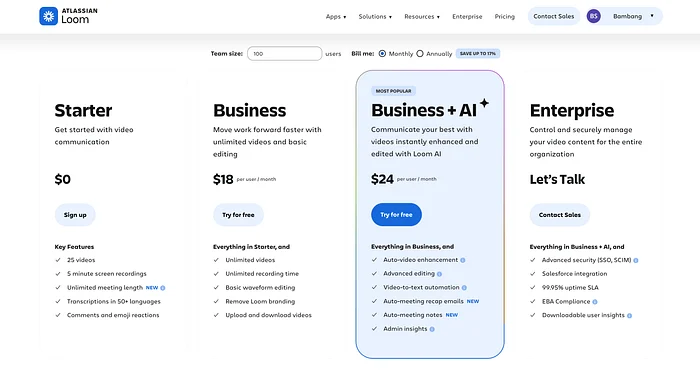
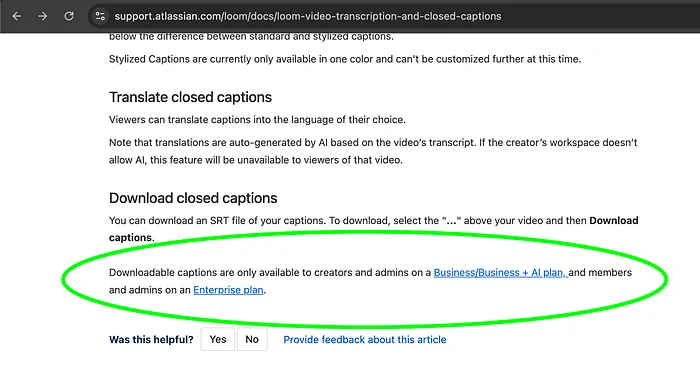
The researcher reported what follows through Bugcrowd. The report was ultimately classified as [Informational] because it was considered to have no security impact. He agreed with the triage decision rather than starting a never-ending "but technically..." discussion, but still found the behaviour interesting from a subscription-enforcement and business-logic perspective.
Setup
The only precondition was a regular Starter account. The researcher opened a Loom video with that account and used the browser's DevTools, first to inspect the page and then to run a snippet in the Console. No special tooling, no proxy manipulation and no second account are described.
As a Starter/free user, the video played normally, but the transcript download functionality was not available.
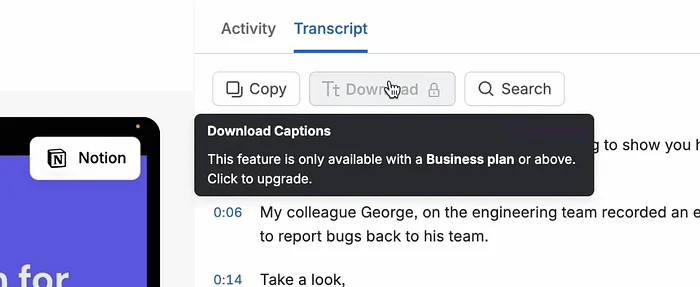
So far, everything worked as expected.
Finding it
The UI correctly enforced the subscription restriction, and there was no obvious "Download transcript" functionality available to the account. Instead of stopping there, the researcher wanted to see whether the restriction was actually enforced server-side or whether the browser was simply hiding functionality based on the user's subscription. A quick look at the client-side behaviour suggested the latter.
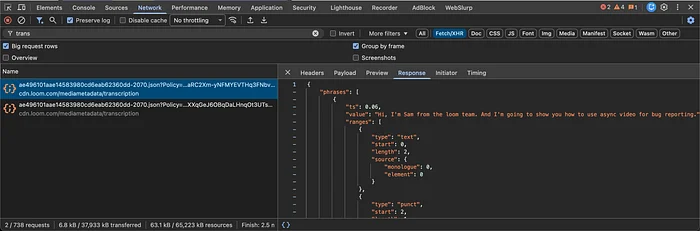
The application already had the information necessary to retrieve the transcript. The restriction appeared to be enforced by the frontend rather than by a server-side authorisation check, which made the next test pretty straightforward.
Exploitation
Step 1: open the video with a Starter account
With a regular Starter account, the video is watchable but the transcript download control is absent from the UI. The restriction is visible only as missing functionality.
Step 2: inspect the client-side HTML
Looking at the page in DevTools showed that the Loom page already contained references to the transcription and caption resources in the client-side HTML. The subscription restriction prevented the Starter user from accessing the download functionality through the normal UI, but the underlying resources were still available to the browser.
Step 3: run the snippet in the Console
The researcher opened DevTools, went to the Console and executed a small JavaScript snippet. The original PoC is intentionally redacted in the write-up:
(async()=>{ let h=document.documentElement.innerHTML, j=h.match(/REDACTED/)?.[0], v=h.match(/REDACTED/)?.[0]; })()
The snippet reads the page's HTML from document.documentElement.innerHTML and pulls out two values with regular expressions, both of which are redacted in the published version. The snippet pulls out two values with regular expressions, both redacted in the published version. The resource-extraction logic was deliberately withheld, partly to keep the writeup within responsible disclosure boundaries and partly not to hand over a ready-to-use bypass.
And it worked: the transcript was downloaded even though the account itself was not subscribed to the plan that normally provides the feature.
The important part is not the JavaScript itself.
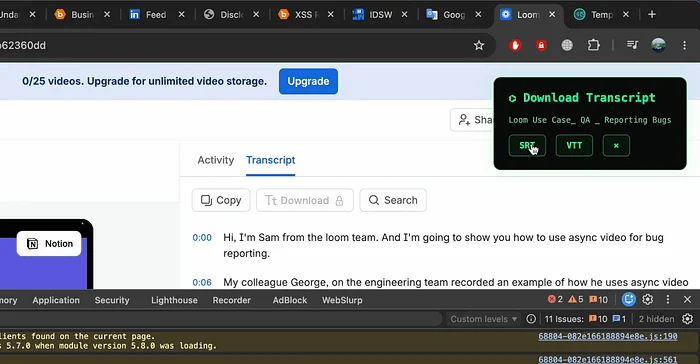
It is the fact that the browser was able to perform the operation without a meaningful server-side subscription check preventing it.
What the PoC does
The bypass itself is quite simple. The PoC:
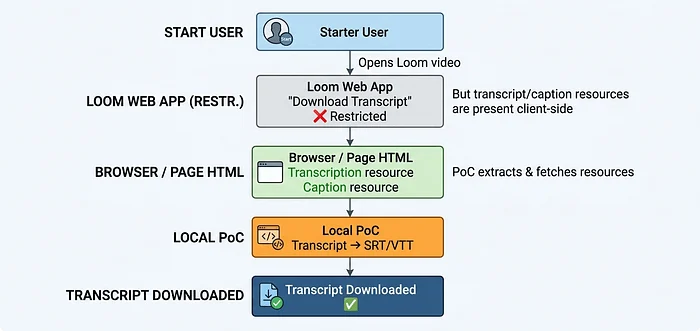
- Extracts the transcription/caption resource references from the page.
- Fetches those resources from the browser.
- Converts the transcription data into a downloadable SRT file.
- Provides a small local download interface directly in the page.
So the problem was not really "breaking" the transcript system. It was bypassing the UI restriction and using functionality that the browser could already access. The key distinction is that the UI restriction and the actual resource access were not enforcing the same boundary.
Root cause
The page already contained references to the transcription and caption resources, and the restriction appeared to be enforced by the frontend. The browser was able to perform the operation without a meaningful server-side subscription check preventing it, so hiding the button did not prevent the functionality from being invoked. In the researcher's framing, the UI effectively said "You can't download this", while the underlying functionality effectively said "Sure, why not".
For a paid feature, the stronger model would be to enforce the subscription entitlement when the backend serves or generates the requested resource, not merely when the frontend decides whether to show the download button. Client-side checks are generally useful for controlling the UI, but they should not be the final authorisation boundary for a paid capability.
Impact
From a pure security perspective, the researcher understands why this was not considered impactful. There was no account takeover, no sensitive data belonging to another user was exposed, no authentication boundary was crossed, and there was no obvious confidentiality or integrity impact.
But there was still a business impact. The affected functionality was a paid feature, and a Starter user could access functionality that was intended to require a higher-tier subscription without actually upgrading:
Starter user → premium feature → no upgrade required.
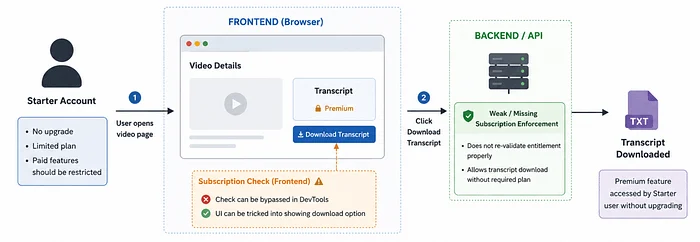
The bypass was also trivial. It did not require manipulating complex requests, exploiting a race condition, or chaining several vulnerabilities. Anyone familiar with browser DevTools could reproduce the behaviour. That means the technique could potentially be shared or automated, making it less effective as a subscription-enforcement mechanism and reducing the incentive for affected users to upgrade.
Triage
The issue was reported through Bugcrowd, highlighting the potential business impact:
Starter users can access a paid Business feature without upgrading.
The report also pointed out that the bypass was trivial, easily shareable, and potentially automatable.
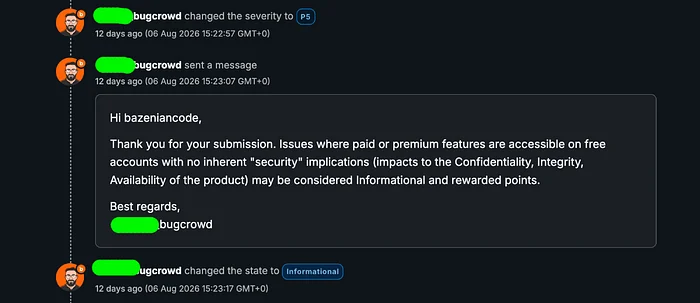
The final result was Informational.
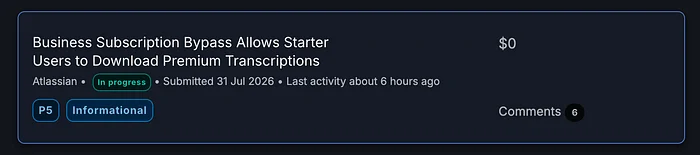
The researcher agrees with the classification from a conventional vulnerability perspective: no meaningful security boundary was being crossed, and he was not accessing someone else's protected data or account. The interesting part is simply that the behaviour demonstrates how a paid feature could be accessed outside its intended subscription tier.
Fix
The write-up does not describe any change made by Loom. The recommendation it gives is that the backend should enforce the subscription entitlement when the actual operation is performed, that is, when the transcription or caption resource is served or generated, rather than relying on the frontend to hide the download control.
Variants to test
- Other paid export features on the same product. Check whether other premium-only exports, such as captions in other formats, also have their resource references embedded in the page for non-entitled users. A positive result is that the reference is present in the HTML and the resource can be fetched from the Console without an upgrade.
- Any feature gated only by a hidden button. For each control that is missing on a lower tier, search the page source for the endpoint or resource it would call. A positive result is a working request to that resource from a non-entitled account.
- Entitlement checks at page load rather than at resource fetch. Compare what the server returns when the resource is requested directly, outside the UI flow. A positive result is a full response with no subscription check applied at fetch time.
- Automatability. If the extraction can be reduced to a fixed snippet that works across videos, the bypass becomes shareable at scale. A positive result is the same snippet succeeding on several videos without per-video adjustment.
Not every interesting bug is a security vulnerability. Sometimes you find something that is technically real, reproducible, and arguably undesirable from a product or business perspective, but does not meet the bar for a security bounty. A button being hidden does not necessarily mean the underlying functionality is protected, and sometimes a few minutes in DevTools are enough to find out which one you are dealing with.
What happened, in plain words
Loom is a website for recording and sharing short videos, often used at work instead of writing a long email. It sells access in tiers: a free or cheap plan called Starter, and more expensive plans such as Business. Some features only exist on the higher plans.
One of those paid features is downloading the written text of a video, its transcript or captions. If you are on Starter, you can still watch the video, but the button that lets you download the transcript is not there.
Hangga Aji Sayekti, a security researcher, had a normal Starter account. He noticed that the page he was looking at already contained, inside its own code, references to the transcription and caption resources. The website was simply choosing not to show him the download button. So he opened the browser's built-in developer tools, pasted a short piece of JavaScript into the Console, and the transcript downloaded anyway, without any upgrade.
He reported it through Bugcrowd, a platform where companies collect security reports from outside researchers. Bugcrowd's triage team, the people who first read and sort incoming reports, marked it Informational, which means roughly "noted, but not a security problem worth a reward". The researcher agreed with that call. Nothing private was exposed and no one else's account was touched. What was bypassed was a paywall, not a security wall.
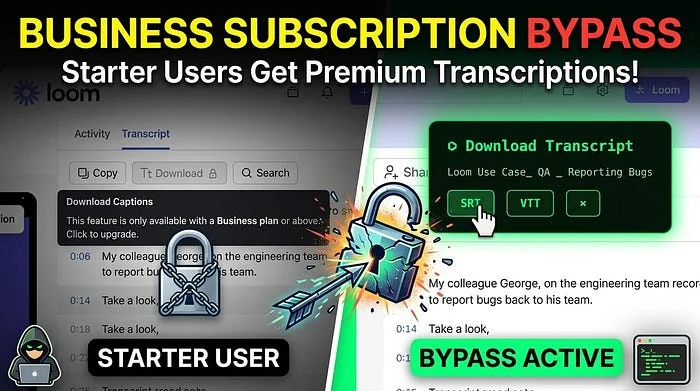
This article walks through the same story for someone who has never done security work: what each piece of the page does, why the researcher looked where he looked, and what the small script actually did.
The feature
Loom has different subscription tiers, and some functionality is restricted depending on the plan.
One of those features is downloading a video's transcript or captions. A transcript is the text of everything spoken in the video, with timestamps. Captions are the same text shown on screen while the video plays. Downloading them is useful if you want to search the text, translate it, or paste it into a document.
As a Starter/free user, the researcher could watch the video normally, but the transcript download functionality was not available to him.
So far, everything worked as expected. That is worth pausing on: the website was doing exactly what its pricing page promised. The question the researcher asked next was not "is the button missing?" but "why is the button missing, and is that the only thing stopping me?".
Looking under the hood
He opened a Loom video using a regular Starter account and checked the browser's DevTools.
DevTools (developer tools) are a panel built into every modern browser. You open them with a key such as F12, or by right-clicking a page and choosing "Inspect". They let you see the page's code, the files it downloaded, and any messages the page logs. They also include a Console, a box where you can type commands in JavaScript, the programming language that web pages run in, and have the browser execute them immediately.
The UI (user interface) correctly enforced the subscription restriction. There was no obvious "Download transcript" functionality available to the account.
But instead of stopping there, he wanted to see whether the restriction was actually enforced server-side or whether the browser was simply hiding functionality based on the user's subscription.
This is the central idea of the whole report, so it is worth spelling out. A website is split into two halves that talk to each other:
- The frontend is everything that runs in your browser: the buttons, the layout, the code that decides what to show. You, the visitor, have full control over it, because it is running on your machine.
- The backend (or server) is the computer owned by the company. It stores the videos, the transcripts and the account records, and it answers requests from browsers. You cannot see or change it directly.
A useful comparison is a restaurant. The menu you are handed is the frontend. The kitchen is the backend. A menu that does not list a dish is not the same as a kitchen that cannot cook it. If you know the dish exists and you ask the waiter for it anyway, the only thing that decides whether you get it is what the kitchen does with your order.
So the researcher's question was: when I ask for the transcript, does the kitchen check my plan, or did the menu simply leave the dish off?
A quick look at the client-side behaviour suggested the latter. "Client-side" means "in the browser".
The application already had the information necessary to retrieve the transcript. The restriction appeared to be enforced by the frontend rather than by a server-side authorisation check.
Authorisation is the process of deciding whether a particular user is allowed to do a particular thing. Authentication is proving who you are (logging in); authorisation is what you are then permitted to do. A server-side authorisation check means the backend itself looks at your account and your plan before handing over the file. Here, that check appeared to be missing, which made the next test pretty straightforward.
The bypass
He opened DevTools, went to the Console and executed a small JavaScript snippet. A snippet is just a short piece of code. The original proof of concept (PoC), the small demonstration that proves the problem is real, is intentionally redacted in the write-up:
(async()=>{ let h=document.documentElement.innerHTML, j=h.match(/REDACTED/)?.[0], v=h.match(/REDACTED/)?.[0]; })()
Line by line, in plain words:
(async()=>{ ... })()is a function that is defined and then immediately run. Theasynckeyword means the code inside is allowed to wait for slow things, such as downloading a file, without freezing the page. The empty parentheses at the very end are what actually start it.let h=document.documentElement.innerHTMLtakes the entire HTML of the page, the raw markup that describes everything on it, and stores it in a variable calledh.documentis the browser's built-in object representing the page;documentElementis the outermost element of that page;innerHTMLis everything inside it, as text.j=h.match(/REDACTED/)?.[0]searches that text for a pattern and keeps the first match.matchis a built-in text-searching function, and the/.../syntax is a regular expression, a way of describing a pattern of text rather than an exact string. The pattern itself is replaced withREDACTEDin the published version. The?.[0]means "if something was found, take the first result; if not, give nothing back instead of crashing".v=h.match(/REDACTED/)?.[0]does exactly the same thing a second time, with a different redacted pattern, and stores the result inv.
So the snippet reads the page's own HTML and pulls out two values. Both patterns are hidden in the public version. Both patterns are hidden in the public version, so the published snippet does not show what the two values are.
And it worked. The transcript was downloaded even though the account itself was not subscribed to the plan that normally provides the feature.
The resource-extraction logic was deliberately withheld, partly to keep the writeup within responsible disclosure boundaries and partly not to hand over a ready-to-use bypass. Responsible disclosure is the practice of telling a company about a flaw and giving it time to fix it before publishing details that others could abuse.
The important part is not the JavaScript itself.
It is the fact that the browser was able to perform the operation without a meaningful server-side subscription check preventing it. In the restaurant comparison: the kitchen accepted the order from someone whose menu did not include the dish.
What the PoC does
The bypass itself is quite simple. The PoC:
- Extracts the transcription/caption resource references from the page.
- Fetches those resources from the browser.
- Converts the transcription data into a downloadable SRT file.
- Provides a small local download interface directly in the page.
Step 2 deserves a word of explanation. "Fetching" means the browser sends a request to a web address and receives the file back, exactly as it does when it loads an image. The difference is that here the request is made by the snippet rather than by a button the site chose to show. An SRT file is a plain text file format for subtitles: each block has a number, a start and end time, and the line of text. Media players and video editors can open it.
So the problem was not really "breaking" the transcript system. It was bypassing the UI restriction and using functionality that the browser could already access. The key distinction is that the UI restriction and the actual resource access were not enforcing the same boundary. One boundary was drawn around a button; the other, which should have existed, would have been drawn around the file itself.
Root cause
The page already contained references to the transcription and caption resources, and the restriction appeared to be enforced by the frontend. The browser was able to perform the operation without a meaningful server-side subscription check preventing it, so hiding the button did not prevent the functionality from being invoked.
An entitlement is simply the right to use a feature, granted by the plan you pay for. "Served" means the backend sends the file; "generated" means the backend creates it on demand. Either moment would be a natural place to check the entitlement.
In the researcher's framing, the UI effectively said "You can't download this", while the underlying functionality effectively said "Sure, why not".
For a paid feature, the stronger model would be to enforce the subscription entitlement when the backend serves or generates the requested resource, not merely when the frontend decides whether to show the download button. Client-side checks are generally useful for controlling the UI, but they should not be the final authorisation boundary for a paid capability.
Impact
From a pure security perspective, the researcher understands why this was not considered impactful. There was no account takeover, meaning nobody gained control of someone else's account. No sensitive data belonging to another user was exposed. No authentication boundary was crossed, meaning nobody got in without logging in. And there was no obvious confidentiality or integrity impact: confidentiality means keeping data secret from those who should not see it, integrity means keeping data accurate and unaltered.
But there was still a business impact. The affected functionality was a paid feature, and a Starter user could access functionality that was intended to require a higher-tier subscription without actually upgrading:
Starter user → premium feature → no upgrade required.
The bypass was also trivial. It did not require manipulating complex requests, exploiting a race condition, or chaining several vulnerabilities. A race condition is a bug where the result depends on two things happening in an unlucky order; chaining means combining several small flaws so that together they do something bigger. Anyone familiar with browser DevTools could reproduce the behaviour.
That means the technique could potentially be shared or automated, making it less effective as a subscription-enforcement mechanism and reducing the incentive for affected users to upgrade. If a snippet circulates, the paywall stops being a paywall for anyone who reads the right post.
But isn't this just client-side enforcement?
Pretty much. And that is exactly why the researcher would not describe this as a high-severity security vulnerability. Severity is a rough measure of how much harm a flaw could cause.
If a feature is supposed to be available only to users with a particular subscription, the backend should ideally enforce that entitlement when the actual operation is performed. Otherwise, hiding the button does not necessarily prevent the underlying functionality from being invoked.
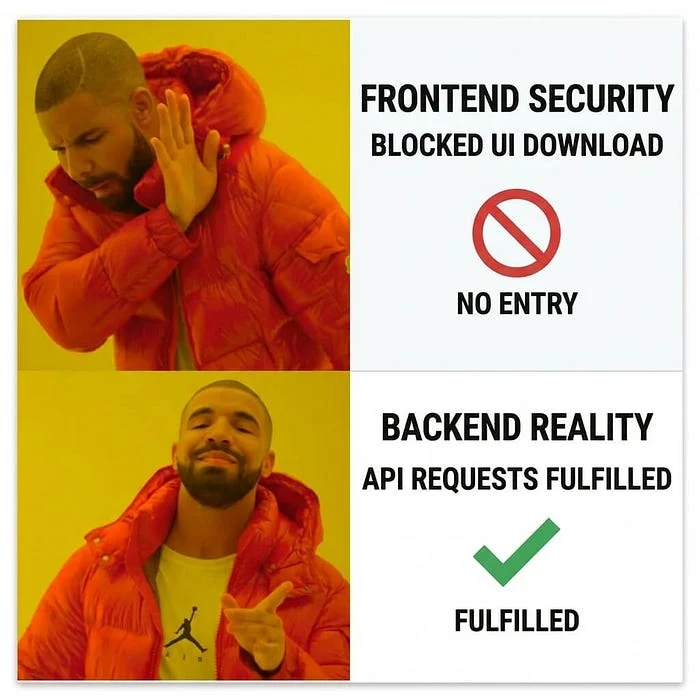
In this case, the UI effectively said:
"You can't download this."
While the underlying functionality effectively said:
"Sure, why not?"
That is not exactly the strongest subscription enforcement mechanism.
Bugcrowd triage
He reported the issue through Bugcrowd and highlighted the potential business impact:
Starter users can access a paid Business feature without upgrading.
He also pointed out that the bypass was trivial, easily shareable, and potentially automatable, which could reduce the effectiveness of Loom's subscription enforcement and the incentive for affected users to upgrade.
The final result?
Informational. In a bug bounty programme, a company publishes rules and pays rewards for reports that meet its bar. Triage is the first stage, where the report is read, reproduced if possible, and given a severity. Informational is the lowest bucket: the behaviour is real, but it is not treated as a security issue and normally earns nothing.
And honestly, the researcher agrees with the classification from a conventional vulnerability perspective. There was no meaningful security boundary being crossed, and he was not accessing someone else's protected data or account. The interesting part is simply that the behaviour demonstrates how a paid feature could be accessed outside its intended subscription tier.
Final thoughts
Not every interesting bug is a security vulnerability. Sometimes you find something that is technically real, reproducible, and arguably undesirable from a product or business perspective, but does not meet the bar for a security bounty.
That is exactly what happened here. The PoC was tiny, the impact was mostly commercial, and the triage result was Informational.
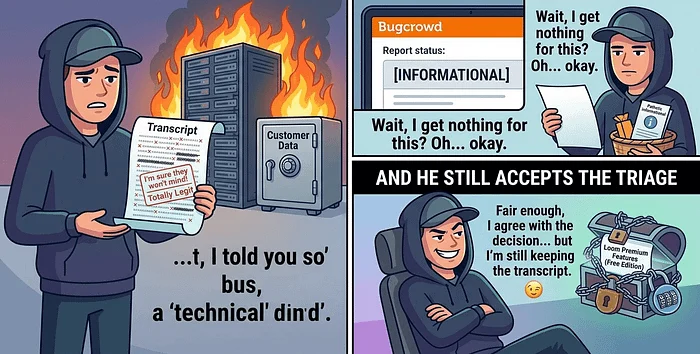
Still, it is a good example of why it is worth looking beyond what the UI allows. A button being hidden does not necessarily mean the underlying functionality is protected. And sometimes, a few minutes in DevTools are enough to find out which one you are dealing with.
TL;DR: The UI said a Starter user couldn't download premium transcriptions. The underlying functionality disagreed.
Glossary
- Authentication: proving who you are, usually by logging in.
- Authorisation: deciding what a logged-in user is allowed to do.
- Backend (server): the company's computer that stores data and answers requests from browsers.
- Bug bounty programme: a scheme where a company invites outside researchers to report flaws and pays for reports that meet its bar.
- Bugcrowd: the platform through which this issue was reported and triaged.
- Captions: the text of a video shown on screen while it plays.
- Chaining: combining several small flaws so that together they cause a bigger effect.
- Client-side (frontend): code that runs in your own browser, which you can inspect and change.
- Confidentiality: keeping data secret from people who should not see it.
- Console: the panel in browser DevTools where you can type and run JavaScript.
- DevTools: the developer panel built into browsers, used to inspect pages and run code.
- Entitlement: the right to use a feature, granted by the plan you pay for.
- Fetch: to request a file from a web address and receive it.
- HTML: the markup language that describes the content and structure of a web page.
- Informational: the lowest triage bucket; a real observation that is not treated as a security issue.
- Integrity: keeping data accurate and unaltered.
- JavaScript: the programming language that web pages run in the browser.
- PoC (proof of concept): a small demonstration that proves a problem is real.
- Race condition: a bug where the outcome depends on two things happening in an unlucky order.
- Regular expression: a way of describing a pattern of text to search for, rather than an exact string.
- Responsible disclosure: telling a company about a flaw and giving it time to fix it before publishing details.
- Severity: a rough measure of how much harm a flaw could cause.
- Snippet: a short piece of code.
- SRT: a plain text subtitle file format with numbered blocks, timestamps and lines of text.
- Subscription tier: one of the plans a product is sold in, such as Starter or Business.
- Transcript: the written text of everything spoken in a video, with timestamps.
- Triage: the first stage of handling a report, where it is read, reproduced and given a severity.
- UI (user interface): the buttons, menus and layout you see and interact with.
- Vulnerability: a flaw that lets someone do something the system was not meant to allow.