I Found a LiteLLM API Key in a Publicly Accessible `.env` File on a NASA Subdomain
A publicly accessible .env file on a NASA subdomain exposed a LiteLLM proxy API key. An attacker who obtained the key could potentially authenticate to the LiteLLM proxy and consume LLM quota or access proxy functionality, depending on the key's permissions.
 Published on osintteam.blog
Cybersecurity
The full write-up lives on its author's site
It belongs to its author, so we link to it rather than copy it. The other two tabs are our own rewrites, checked against it.
Context
NASA runs a Vulnerability Disclosure Program (VDP) that lists which of its systems are in scope and publicly accessible to researchers. The author had seen other bug hunters on LinkedIn posting findings from NASA, which prompted him to look at the VDP page and its scope himself.
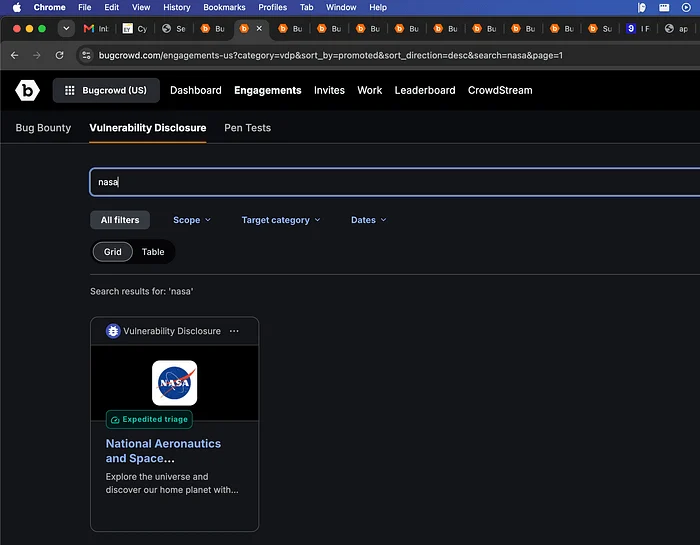
The target of this write-up is a single NASA subdomain that served a .env environment configuration file over the web. The file contained configuration for a LiteLLM proxy, including a LiteLLM API credential.
LiteLLM is a gateway or proxy for LLM APIs. Rather than an application talking directly to OpenAI, Anthropic or another provider, it sends requests to the LiteLLM proxy, which handles communication with the underlying provider. Depending on the deployment, the proxy can provide centralised authentication, model routing, usage tracking, budgets and access control. A simplified setup looks like this:
Application | | API request | + API key vLiteLLM Proxy | + | + | +
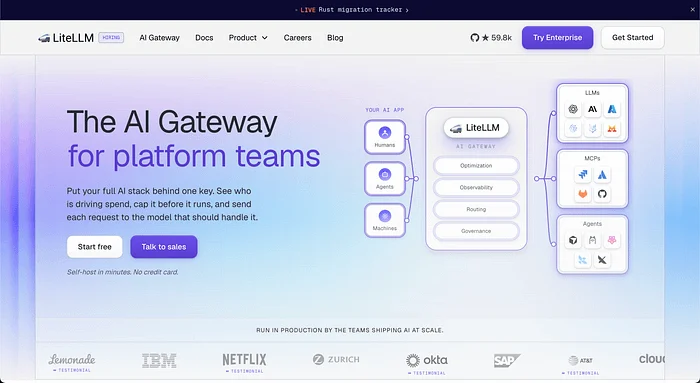
A variable such as LITELLM_PROXY_API_KEY is meant to be used by the application's backend, which loads it from an environment variable and presents it to the proxy:
Application Backend | | Authorization: Bearer <API_KEY> vLiteLLM Proxy
The secret is supposed to stay on the server. Using an environment variable for a secret is normal; making the environment file itself downloadable through the web server is the problem.
Setup
The reconnaissance required no accounts, no special roles and no complex tooling. The author describes the workflow as:
NASA VDP → in-scope target → subfinder → check for exposed .env → validate the finding
He started with subfinder to identify subdomains within the target's scope, then performed a basic check for commonly exposed files, particularly .env files. No sophisticated exploitation techniques were used.
Finding it
While enumerating subdomains in scope, the author requested a .env file on one of them:
And it worked. The server returned the .env file directly, without authentication or any special request.
An exposed .env file on its own is already notable, but the contents made it more interesting: among the configuration variables was a LiteLLM API credential. The response contained configuration related to a LiteLLM proxy.
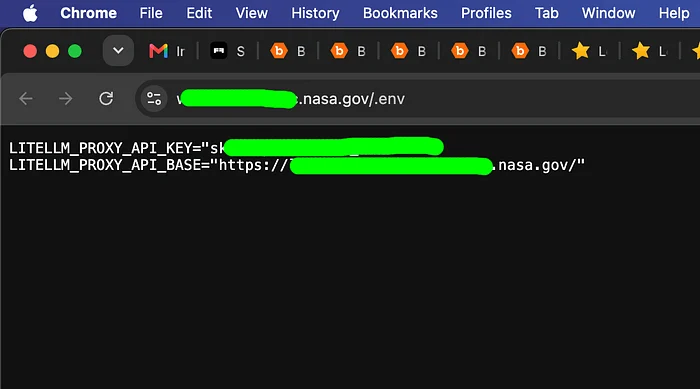
The important detail is that this was not merely an application setting such as:
APP_ENV=productionDEBUG=false
It included a credential used for communication with another service.
Exploitation
Step 1: Confirm the file is served
The issue was straightforward to reproduce. A normal request to the endpoint was enough:
curl -s https://[REDACTED]/.env
The response returned the environment configuration containing the LiteLLM-related variables. There was no authentication flow to bypass and no special header required.
Step 2: Stop at confirming the exposure
The author stopped at confirming the exposure. He did not attempt to use the API key against the LiteLLM service, make LLM requests, access other resources or consume any associated quota. For this type of finding, exposing the credential is already enough to demonstrate the security issue.
Root cause
The web server returned the .env file to anyone who requested it. The report does not describe the server configuration that allowed this.
This is why .env exposure can be more serious than it first looks. A typical environment file might contain:
DATABASE_URL=...[redacted]
Not every variable is necessarily sensitive, but you do not know what a deployment team has put inside the file until you see it. One accidental web-server configuration can turn a layout such as:
Application├── public/├── src/└── .env
into one where the internet reaches the web server, which serves .env directly, making the application's runtime configuration part of the public attack surface.
Impact
The impact depends on how the key is configured. If the credential is still valid, an unauthorised party who obtains it may be able to authenticate to the associated LiteLLM proxy. Depending on its permissions, that could potentially allow:
- Sending requests to permitted LLM models
- Consuming API or LLM quota
- Generating usage that is billed to the associated account
- Accessing functionality exposed through the proxy
That does not automatically mean the key provides unrestricted access to the entire AI infrastructure. The actual impact depends on the key's permissions, restrictions, expiration, proxy configuration and the services behind it. But once a credential has been publicly exposed, it should be treated as compromised.
Fix
The exposed .env should be removed from public access, and the exposed API key should be revoked and replaced. The deployment should also be reviewed to make sure sensitive configuration files cannot be served by the web server. The author's recommendations:
- Remove
.envfrom the web-accessible document root. - Revoke the exposed
LITELLM_PROXY_API_KEY. - Generate a new credential.
- Review LiteLLM and related API logs for unexpected usage.
- Store secrets outside publicly served directories.
- Explicitly deny access to
.envand similar configuration files at the web-server level. - Review the deployment pipeline so the same file cannot be exposed again.
Deleting the file is only part of the fix. If the credential inside it is still valid, the secret itself remains compromised.
Variants to test
- A positive result is a 200 response containing configuration or repository data rather than an error page.
- A positive result is any subdomain that returns a
.envfile without authentication. - A controlled check would be an authenticated request to the LiteLLM proxy with the key, looking for a successful response rather than an authentication error, but only within the programme's rules.
- A positive result is requests from unexpected sources or at unexpected times.
Disclosure timeline
The report went through an interesting journey. It was initially classified as P1, later downgraded to P3.
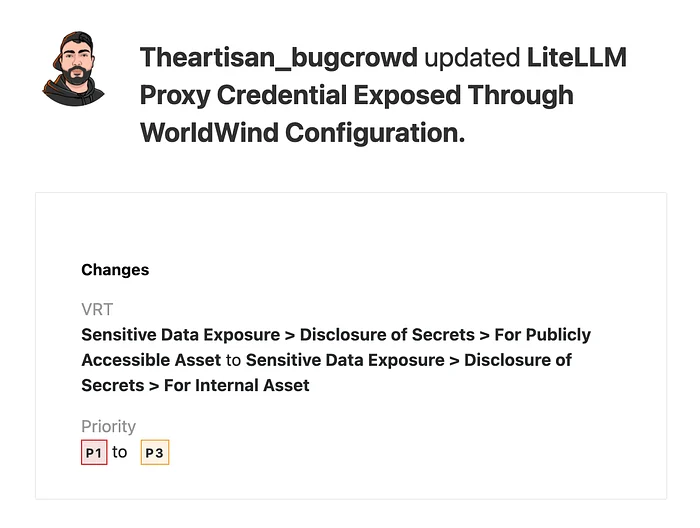
And then, somewhat unexpectedly:
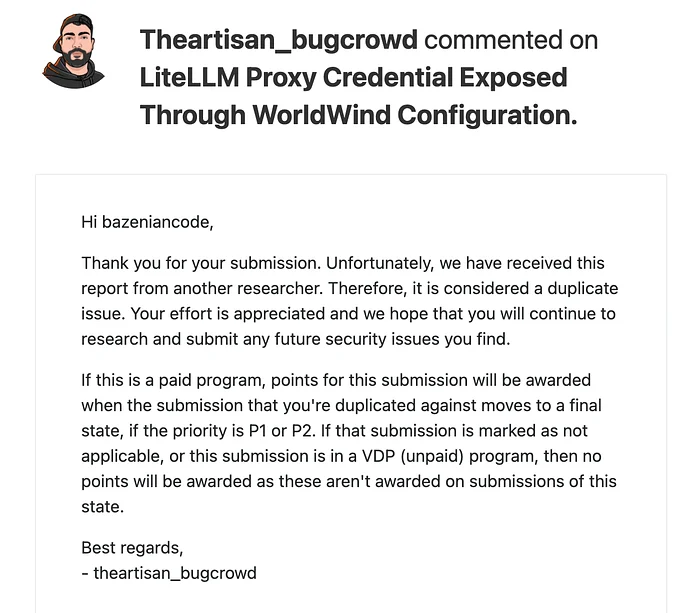
Duplicate.
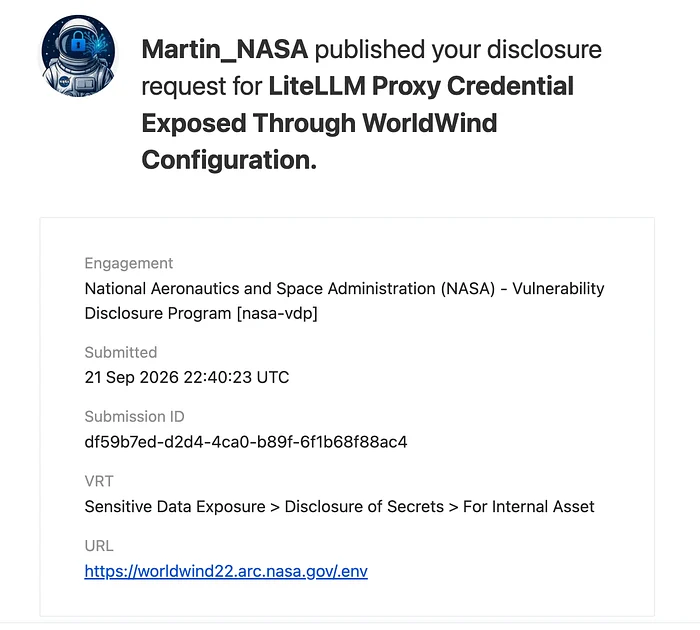
Even though the report was marked as Duplicate, NASA later approved the author's request to publicly disclose the report.
This happened around the same time an Indonesian sixth-grade student, Ibrahim Al Abrar from Boyolali, was in the news after finding and responsibly reporting a vulnerability affecting a NASA domain, and received an acknowledgement from NASA. As the author puts it, he lost to a sixth grader.

Final thoughts
There is nothing particularly exotic about this vulnerability: no complicated exploit chain, no authentication bypass, no fancy payload. Just a configuration file that should not have been publicly accessible, containing a credential intended to remain server-side. Security testing is not always about finding the most sophisticated vulnerability possible; sometimes a simple check for accidentally exposed files reveals something much more valuable than expected. And if that file happens to contain an API key for an LLM gateway, it is worth paying attention to, even if the report eventually says Duplicate.
What happened, in plain words
A security researcher found a file on a NASA website that was never meant to be public. The file is called .env, and it is the kind of file a website's developers use to store settings and secrets, such as passwords and API keys. Anyone on the internet could download it just by typing its address into a browser. Inside it was a credential for a service called LiteLLM, which is a gateway that applications use to talk to artificial intelligence (AI) models.
The researcher did not break into anything, did not guess a password and did not use any clever attack. He simply asked the web server for a file by name, and the server handed it over. He then stopped and wrote a report to NASA.
The report was first rated as a serious problem (P1), then lowered to a minor one (P3), and finally marked as a duplicate, meaning someone else had reported the same thing first. NASA still allowed him to publish the story.
This article walks through the whole thing from zero: what a subdomain is, what a .env file is, what an API key is, why a leaked key matters, and what should be done about it. No prior security knowledge is assumed.
Some background: what NASA's programme is
NASA runs something called a Vulnerability Disclosure Program, usually shortened to VDP. A vulnerability is a weakness in a computer system that could let someone do something they should not be able to do, such as read private files or take over an account. A disclosure programme is a formal way for outside people to report such weaknesses safely, instead of exploiting them or selling them.
A VDP page usually lists which of the organisation's systems are in scope. In scope means "you are allowed to test this, and we want to hear about problems you find here". Anything not listed is out of scope, and testing it may be against the rules. This matters: a researcher who pokes at the wrong system can get into trouble even with good intentions.
The author had seen other bug hunters posting NASA findings on LinkedIn. That made him curious about what NASA actually allowed people to test, so he opened the VDP page and read the scope.
That screenshot shows the programme page he was reading, the starting point for everything that follows. Reading the rules first is not a formality; it is what tells you where you may legally and ethically look.
The tools and the plan
Before the technical steps, here is the vocabulary you need.
A domain is a name on the internet, like nasa.gov. A subdomain is a name that sits in front of it, like something.nasa.gov. Large organisations have many subdomains, one per service or team, and each one is effectively a separate website that may be run by different people with different levels of care. Finding subdomains is useful because a big organisation may protect its main site well while an old or forgotten subdomain is left exposed.
subfinder is a free command-line tool whose only job is to discover subdomains for a given domain. It gathers names from public sources such as certificate records and search engines. It does not attack anything; it just collects names. A command-line tool is a program you run by typing its name in a text terminal rather than clicking in a window.
A .env file is a plain text file that holds configuration for an application: settings such as which database to connect to, and secrets such as passwords and API keys. The name comes from "environment", because the values are meant to be loaded into the application's environment when it starts. Developers keep these values in a file so they do not have to hard-code them in the program itself.
The crucial point is where that file lives. A web server has a public folder, called the document root, which is the only part of the disk it will hand out to visitors. Files outside that folder are not reachable from the internet. A .env file belongs outside the public folder, or the server should be configured to refuse requests for it. If it ends up inside the public folder, anyone who knows or guesses the name can download it, exactly like a normal web page.
The author's plan was deliberately simple. He describes it as:
NASA VDP → in-scope target → subfinder → check for exposed .env → validate the finding
Read that as a chain: read the programme rules, pick a target that is allowed, find its subdomains, ask each one for a .env file, and if one answers, confirm the result carefully. Each arrow is a decision. The first arrow keeps him legal. The second narrows the work to something manageable. The third is the actual test. The fourth is about not fooling yourself: a single odd response could be a fluke, so you check it again.
He notes that he used no sophisticated exploitation techniques and no complex tooling. That is the point of the story: the finding came from a basic check, not from expertise in breaking things.
Finding the file
He ran subfinder against the in-scope target and got a list of subdomains. Then he performed a basic check for commonly exposed files, particularly .env files.
One of the addresses he tried was:
Line by line: https is the secure version of the protocol browsers use to fetch web pages. [REDACTED].nasa.gov is the subdomain, with the specific name hidden here to avoid pointing people at it. The / separates the server name from the path being requested. .env is the file name. So the whole line simply means "give me the file called .env from this server".
And it worked. The server returned the .env file directly, without authentication and without any special request. Authentication here means proving who you are, usually by logging in. There was no login, no password prompt, no permission check. The server treated the file like any public web page.
Finding an exposed .env file is already enough to raise an eyebrow, because such a file often contains secrets. But the contents made it more interesting. Among the configuration variables was a LiteLLM API credential.
That image shows the response, the contents of the file as the server sent them. The important detail is that this was not merely an application setting such as:
APP_ENV=productionDEBUG=false
Those two lines are ordinary, harmless settings. APP_ENV=production tells the application it is running in the live environment rather than on a developer's laptop. DEBUG=false turns off detailed error messages that are useful during development but should not be shown to the public. Neither is a secret. Knowing them helps an attacker very little.
The file also contained a credential used for communication with another service. That is a different category entirely: a credential is something that proves identity, like a key to a door. If you have it, you can act as the application.
What LiteLLM is, and why the key matters
LiteLLM, as the author explains, is best thought of as a gateway or proxy for LLM APIs. Two terms need unpacking.
An API, short for Application Programming Interface, is a way for one piece of software to ask another piece of software to do something. A useful comparison is a restaurant. You do not walk into the kitchen and cook; you tell the waiter what you want, and the waiter brings it. The API is the waiter: a fixed set of requests you are allowed to make, and responses you get back.
An LLM, or large language model, is the kind of AI system behind chat assistants. Companies such as OpenAI and Anthropic run these models on their servers and expose them through APIs, so other software can send a question and receive an answer.
A proxy is a middleman. Instead of an application talking directly to OpenAI or Anthropic, it sends its requests to the LiteLLM proxy, and the proxy talks to the provider on its behalf. The comparison is a company receptionist: visitors do not wander the building, they speak to one desk, and that desk routes them to the right person.
Why bother with a middleman? Depending on how it is set up, the proxy can provide centralised authentication (one place that checks who is allowed in), model routing (sending each request to the most suitable model), usage tracking (recording how much is used), budgets (capping spending) and access control (limiting what each user may do). The author's simplified diagram is:
Application | | API request | + API key vLiteLLM Proxy | + | + | +
Reading it top to bottom: the application sends an API request, carrying an API key, down to the LiteLLM proxy. The proxy then fans out to the underlying providers below. The key is what the proxy uses to recognise the application.
So a variable like:
LITELLM_PROXY_API_KEY=...
is not something you would normally want sitting in a file anyone on the internet can download. The name says it plainly: this is the key for the LiteLLM proxy. The ... stands for the actual secret value, which is not reproduced here.
How the key is supposed to be used
The key is meant to be used by the application's backend, meaning the part of the software that runs on the server, out of sight of visitors. The backend loads the key from an environment variable and presents it when talking to the proxy:
Application Backend | | Authorization: Bearer <API_KEY> vLiteLLM Proxy
Line by line: the application backend sits at the top. It sends a request downwards to the LiteLLM proxy. That request carries a header, which is a small piece of extra information attached to a web request, like the label on a parcel. The header here is Authorization: Bearer <API_KEY>. Authorization is the header's name, and Bearer is the scheme, meaning "the thing that follows is the token that grants access". <API_KEY> is a placeholder for the actual secret.
The important part is that the secret stays on the server. Using an environment variable to hold a secret is completely normal and good practice. The problem is making the environment file itself available through the web server. The comparison is a house key kept in a drawer inside the house, which is fine, versus the same key left in an envelope taped to the front door, which is not.
This is why .env files are normally kept outside the public document root, or explicitly blocked by the web server. Blocked means the server is configured to answer "no" to any request for that file name, even if the file happens to be in a reachable place.
Confirming the exposure
The issue was easy to reproduce, which is important: a finding you cannot repeat is not a finding. A normal request to the endpoint was enough:
curl -s https://[REDACTED]/.env
Line by line: curl is a command-line program for fetching things from the web, essentially a browser without a window. -s means silent, which suppresses the progress meter so the output is just the content. https://[REDACTED]/.env is the address being fetched, the same one as before. Running this prints the file's contents into the terminal.
The response returned the environment configuration containing the LiteLLM-related variables. There was no authentication flow to bypass and no special header required. In other words, nothing clever was needed: no login to fake, no cookie to steal, no header to add. A cookie, by the way, is a small piece of data a website stores in your browser to remember you between requests, and a token is a string that stands in for your credentials; neither was involved here.
Then he stopped. He did not attempt to use the API key against the LiteLLM service, did not make LLM requests, did not access other resources and did not consume any associated quota. Quota means an allowance, such as a monthly number of requests or a spending limit. Using the key would have meant acting as NASA's application, potentially spending their money and touching systems he had no permission to touch.
For this type of finding, exposing the credential is already enough to demonstrate the security issue. That is a principle worth remembering: prove the problem exists, do not go further than necessary. The comparison is a locksmith showing you that your door opens with a bent paperclip, then handing the clip back rather than walking in and taking the television.
Why an exposed API key matters
The answer depends on how the key is configured. If the credential is still valid, an unauthorised party who obtains it may be able to authenticate to the associated LiteLLM proxy. Valid means it has not been cancelled or expired. Authenticate means to prove identity using it, in this case to the proxy.
Depending on its permissions, that could potentially allow things such as:
- Sending requests to permitted LLM models
- Consuming API or LLM quota
- Generating usage that is billed to the associated account
- Accessing functionality exposed through the proxy
In plain terms: someone could ask the AI models questions on NASA's account, use up the allowance, run up a bill, and reach whatever else the proxy offers. Permissions are the limits attached to a key, like a hotel key card that opens your room but not the manager's office.
That does not automatically mean the key provides unrestricted access to the entire AI infrastructure. The actual impact depends on the key's permissions, restrictions, expiration, proxy configuration and the services behind it. Expiration means the key stops working after a set date. So the honest answer to "how bad is this?" is "it depends", and a good report says so rather than exaggerating.
But once a credential has been publicly exposed, it should be treated as compromised. Compromised means you must assume someone has already copied it, even if you have no evidence. A secret on a public web server may have been read by anyone, and web servers keep logs, but they cannot tell you who else already fetched the file.
Why .env files are dangerous
This is why .env exposure can be more serious than it initially looks. A typical environment file might contain:
DATABASE_URL=...[redacted]
Line by line: DATABASE_URL is the address and credentials for the database, the store where the application keeps its data. API_KEY is a key for some external service. SECRET_KEY is a value used to sign things so they cannot be tampered with. JWT_SECRET is the signing secret for JSON Web Tokens, a common way of representing a logged-in session; anyone with it can forge a valid login. LITELLM_PROXY_API_KEY is the key we have been discussing. Each ... is a real secret that is not shown here.
Not every variable is necessarily sensitive. The problem is that you do not know what a deployment team has put inside the file until you see it. A deployment is the act of putting an application onto a server so it can run. One accidental web-server configuration can turn a layout such as:
Application├── public/├── src/└── .env
into one where the internet reaches the web server, which serves .env directly. Reading that little tree: Application is the project folder. public/ is the folder whose contents are meant to be served to visitors. src/ holds the source code. .env sits at the top level, outside public/, which is exactly where it should be. The problem is the server being willing to serve the file.
And now the application's runtime configuration has become part of the public attack surface. Attack surface means everything an outsider can reach and try to interact with. Every file the server will hand out is part of it, whether or not anyone intended it to be.
What should be done
The remediation, meaning the fix, is fairly straightforward. The exposed .env should be removed from public access, and the exposed API key should be revoked and replaced. Revoked means cancelled so it no longer works; replaced means a new one is issued. The deployment should also be reviewed to make sure sensitive configuration files cannot be served by the web server.
The author's recommendations:
- Remove
.envfrom the web-accessible document root. - Revoke the exposed
LITELLM_PROXY_API_KEY. - Generate a new credential.
- Review LiteLLM and related API logs for unexpected usage.
- Store secrets outside publicly served directories.
- Explicitly deny access to
.envand similar configuration files at the web-server level. - Review the deployment pipeline so the same file cannot be exposed again.
A few of those deserve a word. Logs are records the server keeps of requests it received; reviewing them means looking for activity that does not match normal use, which would suggest someone already used the key. A deployment pipeline is the automated process that copies code and configuration onto servers; reviewing it means finding out how the file got there and stopping it happening again.
Deleting the file is only part of the fix. If the credential inside it is still valid, the secret itself remains compromised. The comparison is a leaked password: deleting the email that contained it does not change the password.
Other things worth checking
- A positive result is a 200 response containing configuration or repository data rather than an error page. A 200 response is the standard code a web server sends when it successfully returns something; an error page would carry a different code. A
.bakfile is a backup copy, and.git/configis part of a code repository's internal data, which can reveal source code. - A positive result is any subdomain that returns a
.envfile without authentication. Different teams, different habits: one subdomain being careful says nothing about the rest. - A controlled check would be an authenticated request to the LiteLLM proxy with the key, looking for a successful response rather than an authentication error, but only within the programme's rules. In other words, even this follow-up needs permission first.
- A positive result is requests from unexpected sources or at unexpected times. This is how you find out whether the leak was already used.
How the report was handled
The report went through an interesting journey. It was initially classified as P1, later downgraded to P3. Priority labels like these are the programme's way of ranking severity: P1 is the most serious, P3 much less so. The report does not say why the rating changed.
And then, somewhat unexpectedly:
Duplicate. A duplicate means the same issue had already been reported by someone else. It is a common outcome in bug hunting, where many people look at the same popular targets.
Even though the report was marked as Duplicate, NASA later approved the author's request to publicly disclose the report. Disclosure here means publishing the details. Programmes usually keep reports private until the issue is fixed, and they decide whether the reporter may talk about it afterwards.
This happened around the same time an Indonesian sixth-grade student, Ibrahim Al Abrar from Boyolali, was in the news after finding and responsibly reporting a vulnerability affecting a NASA domain, and received an acknowledgement from NASA. As the author puts it, he lost to a sixth grader.
Responsibly reporting, in this context, means telling the organisation privately and giving them time to fix it, rather than publishing it or using it. It is the behaviour disclosure programmes are designed to encourage.
Final thoughts
There is nothing particularly exotic about this vulnerability: no complicated exploit chain, no authentication bypass, no fancy payload. An exploit chain is a sequence of small weaknesses combined into a bigger attack. An authentication bypass is a way to get in without valid credentials. A payload is the crafted input sent to a system to trigger a flaw. None of that was needed here.
Just a configuration file that should not have been publicly accessible, containing a credential intended to remain server-side. Security testing is not always about finding the most sophisticated vulnerability possible; sometimes a simple check for accidentally exposed files reveals something much more valuable than expected. And if that file happens to contain an API key for an LLM gateway, it is worth paying attention to, even if the report eventually says Duplicate.
For a beginner, the practical lessons are: read the rules before you test, learn what a file like .env is and where it belongs, try the simple checks first, stop as soon as you have proved the problem, and report it properly.
Glossary
- API: a fixed set of requests one piece of software can make to another, like a waiter taking your order to the kitchen.
- API key: a secret string that proves an application's identity to a service.
- Attack surface: everything an outsider can reach and interact with on a system.
- Authentication: proving who you are, usually by logging in or presenting a key.
- Authentication bypass: getting access without valid credentials.
- Backend: the part of an application that runs on the server, out of sight of visitors.
- Bearer: a scheme in an
Authorizationheader meaning the following token grants access. - Bug hunter: someone who looks for security weaknesses, often through disclosure programmes.
- Compromised: assumed to be in someone else's hands, even without evidence.
- Cookie: a small piece of data a website stores in your browser to remember you between requests.
- Credential: something that proves identity, such as a password, key or token.
- curl: a command-line program for fetching things from the web.
- Deployment: putting an application onto a server so it can run.
- Deployment pipeline: the automated process that copies code and configuration onto servers.
- Disclosure: publishing the details of a vulnerability, usually after it is fixed.
- Document root: the folder on a web server whose contents are served to visitors.
- Domain: a name on the internet, such as
nasa.gov. - Dotfile: a file whose name starts with a dot, often used for configuration.
- Duplicate: a report of an issue that someone else already reported.
.envfile: a plain text file holding an application's settings and secrets.- Exploit chain: several small weaknesses combined into a bigger attack.
- Expiration: the point at which a key or credential stops working.
- Gateway: a service that sits between an application and other services and routes its requests.
- Header: extra information attached to a web request, like a label on a parcel.
- In scope: listed by a programme as allowed to be tested.
- JWT (JSON Web Token): a common format for representing a logged-in session.
- LLM (large language model): the kind of AI system behind chat assistants.
- LiteLLM: a gateway or proxy for LLM APIs.
- Logs: records a server keeps of the requests it received.
- Out of scope: not listed by a programme as allowed to be tested.
- P1 / P3: priority labels used by programmes to rank severity, P1 being the most serious.
- Payload: the crafted input sent to a system to trigger a flaw.
- Permissions: the limits attached to a key or account, defining what it may do.
- Proxy: a middleman service that forwards requests on an application's behalf.
- Quota: an allowance, such as a number of requests or a spending limit.
- Remediation: the fix for a vulnerability.
- Revoke: cancel a credential so it no longer works.
- Subdomain: a name in front of a domain, such as
something.nasa.gov, often a separate service. subfinder: a free command-line tool that discovers subdomains from public sources.- Token: a string that stands in for credentials.
- VDP (Vulnerability Disclosure Program): a formal way for outside people to report weaknesses safely.
- Vulnerability: a weakness that could let someone do something they should not be able to do.
- 200 response: the standard code a web server sends when it successfully returns something.