Microsoft Needs To Proactively Prevent Typosquatting (how I almost got owned)
A PowerShell module named 'Entra' was published on the PowerShell Gallery, mimicking the official 'Microsoft.Entra' module, and it contained a telemetry script that collected hashed machine identifiers and sent them to an external API. The author installed it by mistake and found the module was not malicious but did include functional code despite claiming otherwise.
 Published on medium.com
Today, as embarrassing as it is to admit, I fell for a typosquatting attack. I got lucky, the PowerShell Module I installed from PowerShell Gallery turned out to not be malicious; but it very easily could have been.
The full write-up lives on its author's site
It belongs to its author, so we link to it rather than copy it. The other two tabs are our own rewrites, checked against it.
Context
Microsoft renamed Azure Active Directory (Azure AD) to Microsoft Entra. The PowerShell module that used to manage Azure AD was called AzureAD and was installed with Install-Module AzureAD. With the rename, the module became Microsoft.Entra, installed with Install-Module Microsoft.Entra. In October 2025 the AzureAD module was retired and is no longer available in PowerShell.
The PowerShell Gallery is the public repository where these modules are published and from which Install-Module fetches them. Anyone can publish a module under a name that is not already taken, so names close to a vendor's official module can be registered by third parties.
Setup
The author was troubleshooting a bizarre issue in an Entra environment he was helping to clean up, following old documentation that still referred to Azure AD. The tools involved were PowerShell with the PowerShell Gallery as the module repository, and a browser to inspect the Gallery listing. No special role or account was needed: the whole finding comes from running Install-Module as an administrator would.
Finding it
The author first ran the command for the old module name:
Install-Module AzureADInstall-Package: No match was found for the specified search criteria and module name 'AzureAD'. Try Get-PSRepository to see allavailable registered module repositories.
This failed as expected, because the module had been retired. He then reasoned that the module had been renamed to Entra and ran Install-Module Entra. That command succeeded, but the installation printed a warning saying that it looked like he meant to install Microsoft.Entra or Microsoft.Graph.Entra and ended up with Entra instead.
At that point he was concerned he had just been hit by a typosquatting attack and had been owned. Opening the actual PowerShell Gallery page for the module gave some relief, since it looked like someone had anticipated the mistake and published something to prevent typosquatting.
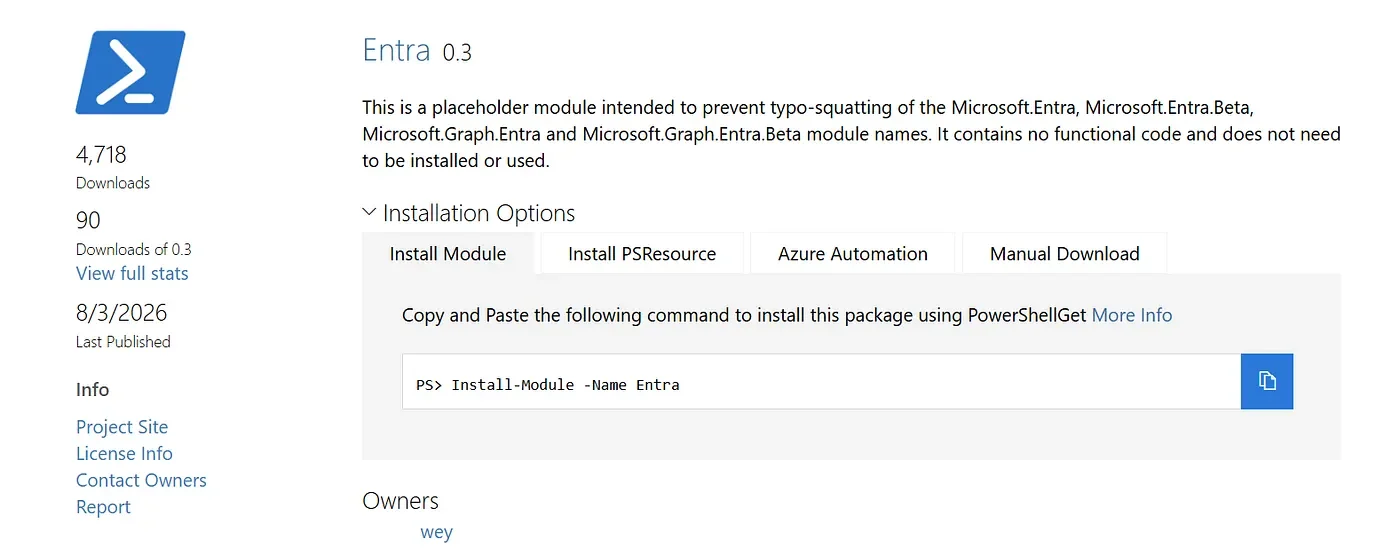
He still wanted to inspect it more closely.
Exploitation
Step 1: Ask an LLM whether the module is malicious
He put the Gallery link into Claude and asked it to check for anything malicious. The response was:
This is aplaceholder module*, it doesn’t actually do anything functional.*
According to its description, it’s meant to prevent typo-squatting of the Microsoft.Entra, Microsoft.Entra.Beta, Microsoft.Graph.Entra and Microsoft.Graph.Entra.Beta module names, and it contains no functional code and does not need to be installed or used.
He did not trust the answer and went to the files themselves.
Step 2: Compare the description with the files
The Gallery listing states that the module "contains no functional code and does not need to be installed or used", yet PowerShell scripts are attached to the module and run at install time. That mismatch was the first red flag. He copied the text of each file from the Gallery listing and, in parallel, analysed them by hand and with Claude. Claude flagged the code as highly suspicious but agreed it was not inherently malicious.
Step 3: Read the script that runs at install
The script attached to the module is:
function Write-Telemetry { [CmdletBinding()] param ( [Parameter(Mandatory = $true)] [ValidateSet("EntraScriptsToProcess","EntraImportFunction","EntraTest")] [string] $EventName ) #$EventName = "EntraTest" Write-Verbose "Sending telemetry event: $EventName" # Get the module version $module = Get-Module -Name Entra -ListAvailable #$moduleVersion = if ($module) { $module.Version } else { "unknown" } $moduleVersion = if ($module) { $module.Version } else { "unknown-0.3" } $moduleName = if ($module) { $module.name } else { "unknown-entra" } $jsonData = @{ "api_key" = "[redacted]" "events" = @{ #"user_id" = "$($env:HOMEPATH)" "user_id" = $([BitConverter]::ToString([System.Security.Cryptography.SHA256]::Create().ComputeHash([System.Text.Encoding]::UTF8.GetBytes($env:HOMEPATH))).Replace('-', '').ToLower()) #"device_id" = "$($env:ComputerName)" "device_id" = $([BitConverter]::ToString([System.Security.Cryptography.SHA256]::Create().ComputeHash([System.Text.Encoding]::UTF8.GetBytes($env:ComputerName))).Replace('-', '').ToLower()) "event_type"= $EventName "app_version" = $moduleVersion "platform" = "PowerShell $($PSVersionTable.PSVersion)" "os_name" = (Get-CimInstance Win32_OperatingSystem).Caption "language" = (Get-Culture).Name "ip" = '$remote' "device_brand" = $moduleName } } # Convert the data to JSON format $jsonBody = $jsonData | ConvertTo-Json # Define the URL $url = "https://api.eu.amplitude.com/2/httpapi" # Send the POST request try { Invoke-RestMethod -Uri $url -Method Post -ContentType "application/json" -Body $jsonBody | Out-Null } catch { Write-Verbose $_ }}Write-Telemetry -EventName "EntraScriptsToProcess"#Write-Telemetry -EventName "EntraTest"
What the important parts do:
Write-Telemetrytakes an$EventNamerestricted byValidateSettoEntraScriptsToProcess,EntraImportFunctionorEntraTest.- It looks up the installed
Entramodule to fill in the version and name, falling back tounknown-0.3andunknown-entra. - It builds a JSON body containing an
api_key, aneventsobject withuser_id,device_id,event_type,app_version,platform,os_name,language,ipanddevice_brand. user_idis the SHA-256 hash of theHOMEPATHenvironment variable, anddevice_idis the SHA-256 hash of theComputerNameenvironment variable, both hex-encoded with dashes removed and lowercased. The commented-out lines show the raw values were the original intent.- It POSTs the JSON to
https://api.eu.amplitude.com/2/httpapiwithInvoke-RestMethod, discarding the response and writing any exception to the verbose stream. - The last line calls
Write-Telemetry -EventName "EntraScriptsToProcess", so the telemetry is sent when the module is installed.
The script is not malicious, but it is functional code, and it collects telemetry about the machine: hashed HOMEPATH and ComputerName, the PowerShell version, the OS caption, the culture name, the module version and name, and an ip field. The hashes mean the raw values are not logged directly, but sending this kind of data to an API is not "no functional code".
The author's assumption is that Stefan Wey, who published the listing, is a legitimate security researcher, which his public profile and certifications suggest, though attackers are known for making public profiles look realistic. He believes the telemetry is likely for a personal project or curiosity, perhaps to publish later how many people made the same mistake. At the time of writing the module had 4,718 downloads.
Root cause
The root cause is that Microsoft renamed a critical product and its module, creating a predictable confusion between AzureAD, Entra and Microsoft.Entra, and did not register the obvious typo names itself. The name Entra was therefore available for a third party to publish. The placeholder description did not match the module, which still ran install-time scripts that sent telemetry off the machine. The author's view is that Microsoft should have registered Entra and made it do literally nothing, rather than relying on a random developer or admin to do so.
Impact
In this case the installed module was not malicious, so the impact was limited to telemetry about the machine being sent to a third-party API. The author is explicit that it very easily could have been malicious: if an attacker had registered the name, administrators following old documentation or LLM suggestions would have installed it. He notes that a serious malicious module would probably be caught quickly, but that it is still a huge risk. The confusion also extends beyond scripts breaking: Microsoft's own documentation still mentions Azure AD in places, and even the role listing for Azure AD Joined Device Local Administrator is wrong in a GUID lookup, since the role is now Microsoft Entra Joined Device Local Administrator. LLMs trained on outdated documentation make the mistake more likely, since an LLM may tell an admin to run Install-Module AzureAD, and the admin may assume the name changed to Entra rather than Microsoft.Entra.
Fix
The findings were reported to Microsoft. He argues that Microsoft should proactively register typo and legacy names such as Entra and make them do nothing, rather than leaving that to individuals. No fix from Microsoft is described in the report.
Variants to test
- Try the short names of other renamed Microsoft products and modules on the PowerShell Gallery, for example the bare product name without the
Microsoft.prefix. A positive result is a listing published by a non-Microsoft account that installs successfully and runs scripts at install time. - Check whether a placeholder or anti-typosquatting module's description matches its contents: download the package and list the files that run at install. A positive result is install-time scripts in a module described as containing no functional code.
- Inspect install-time scripts for outbound requests, especially to analytics endpoints, and for collection of environment variables such as
HOMEPATHandComputerName. A positive result is a POST to an external API with machine-identifying data, even hashed. - Compare the download count of a placeholder module with the number of organisations that would plausibly need the real module. A high count on a module that should do nothing suggests many administrators are making the same naming mistake.
- Ask an LLM for the install command for a renamed product and check whether it returns the old or the short name. A positive result is an answer that would lead an administrator to the unregistered name.
What happened, in plain words
A system administrator was fixing a strange problem in a Microsoft cloud environment. He followed some old instructions that told him to install a piece of software called AzureAD. That name no longer existed, so the install failed. He guessed the new name was Entra and installed that instead. It worked, but the installer printed a warning saying it looked like he meant to install Microsoft.Entra and had ended up with Entra instead.
That warning made him worry he had just installed something an attacker had planted. A trick called typosquatting works exactly like that: someone registers a name that is almost the same as a real one, hoping people will type it by mistake. In this case the module turned out not to be malicious, but it did contain code that quietly sent information about his computer to an outside service. He reported what he found to Microsoft and wrote the story up.
This article walks through the same events for someone who has never studied security. Every technical word is explained the first time it appears, and every command and script is broken down line by line.
Background you need first
What PowerShell is
PowerShell is a program for giving a computer instructions in text form. Instead of clicking through menus, you type a command and press Enter. It is used a lot by people who look after Windows computers and Microsoft cloud services, because it lets them do the same job on many machines at once.
What a module is
A module is a bundle of ready-made PowerShell commands that someone else wrote, so you do not have to write them yourself. Think of it like an app you install on your phone: you download it, and then you can use the features inside it. In PowerShell you install a module with the command Install-Module, followed by the module's name.
What the PowerShell Gallery is
The PowerShell Gallery is a public website where modules are published and downloaded from. When you run Install-Module, PowerShell goes to this Gallery, finds the module with the name you asked for, and downloads it. Anyone can publish a module there under a name that is not already taken. That is the important part: if Microsoft has not claimed a name, a stranger can claim it instead.
What Azure AD and Entra are
Azure Active Directory, usually shortened to Azure AD, is Microsoft's system for managing who is allowed to do what in a company's cloud. It holds user accounts, passwords and permissions. Microsoft renamed it to Microsoft Entra. The rename is the source of the whole story, because the software that manages it was renamed too.
What typosquatting is
Typosquatting is registering a name that is very close to a real one, hoping people will reach it by mistake. A classic example is a website called gooogle.com with three o's, hoping people mistype Google. The attacker does not need to trick everyone, only the people who make the small mistake. The same trick works with software package names.
What telemetry is
Telemetry is information a program sends back to whoever made it, usually about how the program is being used or what kind of machine it is running on. Many legitimate apps do this. It becomes a problem when it happens without the user knowing, or when the description of the software says it does nothing at all.
The rename that caused the confusion
Microsoft renamed Azure Active Directory to Microsoft Entra. The PowerShell module that used to manage Azure AD was called AzureAD and was installed with Install-Module AzureAD. After the rename, the module became Microsoft.Entra, installed with Install-Module Microsoft.Entra. In October 2025 the AzureAD module was retired and is no longer available in PowerShell.
Notice the small but crucial detail: the new name has the word Microsoft. in front of it. Someone who only remembers the product name Entra will type the shorter version, and that shorter version is a different name entirely as far as the Gallery is concerned.
The setup
The author was troubleshooting a bizarre issue in an Entra environment he was helping to clean up, following old documentation that still referred to Azure AD. The tools involved were PowerShell, with the PowerShell Gallery as the place modules come from, and a web browser to look at the Gallery listing. No special role or account was needed: the whole finding comes from running Install-Module the way any administrator would.
Finding it
The first attempt, which failed
The author first ran the command from the old documentation:
Install-Module AzureADInstall-Package: No match was found for the specified search criteria and module name 'AzureAD'. Try Get-PSRepository to see allavailable registered module repositories.
Line by line:
Install-Module AzureADis the instruction to download and install the module namedAzureAD.Install-Package: No match was found for the specified search criteria and module name 'AzureAD'.is the error message that came back. It says the Gallery searched and found nothing calledAzureAD.Try Get-PSRepository to see allavailable registered module repositories.is a suggestion to list the places PowerShell is allowed to download from, in case the module lives somewhere else. (The missing space inallavailableis how the message appeared.)
This failed as expected, because the module had been retired. The failure is useful: it tells us the old name is gone, which is exactly the situation that pushes someone to guess a new name.
The second attempt, which succeeded
He then reasoned that the module had been renamed to Entra and ran Install-Module Entra. That command succeeded, but the installation printed a warning saying that it looked like he meant to install Microsoft.Entra or Microsoft.Graph.Entra and ended up with Entra instead.
At that point he was concerned he had just been hit by a typosquatting attack and had been owned. "Owned" is informal security slang for having your machine taken over by an attacker. He had no evidence of that yet, only the warning and the fact that he had installed a name he had guessed rather than looked up.
Opening the actual PowerShell Gallery page for the module gave some relief, since it looked like someone had anticipated the mistake and published something to prevent typosquatting.
The screenshot is the Gallery page for the module. He still wanted to inspect it more closely, because a friendly description on a web page is not proof of what the software actually does.
Looking inside the module
Step 1: Ask an AI assistant whether the module is malicious
He put the Gallery link into Claude, an AI assistant, and asked it to check for anything malicious. The response was:
This is aplaceholder module*, it doesn’t actually do anything functional.*
According to its description, it’s meant to prevent typo-squatting of the Microsoft.Entra, Microsoft.Entra.Beta, Microsoft.Graph.Entra and Microsoft.Graph.Entra.Beta module names, and it contains no functional code and does not need to be installed or used.
In plain words, the assistant said: this is an empty shell, it exists only to block the name, and there is no working code inside it. That sounds reassuring, but he did not trust the answer and went to the files themselves. He did not trust the answer and went to the files themselves.
Step 2: Compare the description with the files
The Gallery listing states that the module "contains no functional code and does not need to be installed or used", yet PowerShell scripts are attached to the module and run at install time. That mismatch was the first red flag. A red flag is a detail that does not fit and deserves a closer look.
Why does it matter that scripts run at install time? Because installing a module is not just copying files. PowerShell can be told to run certain scripts automatically as part of the install. If a module claims to do nothing but still runs code when installed, the claim is false, and the code is doing something the author did not mention.
He copied the text of each file from the Gallery listing and, in parallel, analysed them by hand and with Claude. Claude flagged the code as highly suspicious but agreed it was not inherently malicious. "Not inherently malicious" means the code does not, by itself, do anything harmful like stealing passwords or deleting files, but it is still doing something the description did not admit to.
Step 3: Read the script that runs at install
The script attached to the module is:
function Write-Telemetry { [CmdletBinding()] param ( [Parameter(Mandatory = $true)] [ValidateSet("EntraScriptsToProcess","EntraImportFunction","EntraTest")] [string] $EventName ) #$EventName = "EntraTest" Write-Verbose "Sending telemetry event: $EventName" # Get the module version $module = Get-Module -Name Entra -ListAvailable #$moduleVersion = if ($module) { $module.Version } else { "unknown" } $moduleVersion = if ($module) { $module.Version } else { "unknown-0.3" } $moduleName = if ($module) { $module.name } else { "unknown-entra" } $jsonData = @{ "api_key" = "[redacted]" "events" = @{ #"user_id" = "$($env:HOMEPATH)" "user_id" = $([BitConverter]::ToString([System.Security.Cryptography.SHA256]::Create().ComputeHash([System.Text.Encoding]::UTF8.GetBytes($env:HOMEPATH))).Replace('-', '').ToLower()) #"device_id" = "$($env:ComputerName)" "device_id" = $([BitConverter]::ToString([System.Security.Cryptography.SHA256]::Create().ComputeHash([System.Text.Encoding]::UTF8.GetBytes($env:ComputerName))).Replace('-', '').ToLower()) "event_type"= $EventName "app_version" = $moduleVersion "platform" = "PowerShell $($PSVersionTable.PSVersion)" "os_name" = (Get-CimInstance Win32_OperatingSystem).Caption "language" = (Get-Culture).Name "ip" = '$remote' "device_brand" = $moduleName } } # Convert the data to JSON format $jsonBody = $jsonData | ConvertTo-Json # Define the URL $url = "https://api.eu.amplitude.com/2/httpapi" # Send the POST request try { Invoke-RestMethod -Uri $url -Method Post -ContentType "application/json" -Body $jsonBody | Out-Null } catch { Write-Verbose $_ }}Write-Telemetry -EventName "EntraScriptsToProcess"#Write-Telemetry -EventName "EntraTest"
What the important parts do, in plain words:
Write-Telemetryis the name of a new command the script defines. It takes one input,$EventName, which is restricted byValidateSetto one of three allowed values:EntraScriptsToProcess,EntraImportFunctionorEntraTest.ValidateSetis a guard that rejects anything not on the list, like a form that only accepts certain answers.- It looks up the installed
Entramodule to fill in the version and name, falling back tounknown-0.3andunknown-entraif the module cannot be found. A fallback is a default value used when the real one is missing. - It builds a JSON body. JSON is a plain text format for structured data, the kind of thing a website sends and receives. The body contains an
api_key, which is a password-like string that identifies the sender to the receiving service, and aneventsobject withuser_id,device_id,event_type,app_version,platform,os_name,language,ipanddevice_brand. user_idis the SHA-256 hash of theHOMEPATHenvironment variable, anddevice_idis the SHA-256 hash of theComputerNameenvironment variable, both hex-encoded with dashes removed and lowercased. A hash is a one-way scramble: you can turn a name into a fixed-length code, but you cannot easily turn the code back into the name.HOMEPATHis the folder path of the user's home directory, andComputerNameis the machine's name. The commented-out lines, which start with#and do not run, show the raw values were the original intent.- It POSTs the JSON to
https://api.eu.amplitude.com/2/httpapiwithInvoke-RestMethod, discarding the response and writing any exception to the verbose stream. A POST is a way of sending data to a web address. An API is a web address that accepts data and does something with it, like a service counter where you hand over a form. The verbose stream is a channel for extra diagnostic messages that only appear when you ask for them. - The last line calls
Write-Telemetry -EventName "EntraScriptsToProcess", so the telemetry is sent when the module is installed. The final line, starting with#, is commented out and does nothing.
The script is not malicious, but it is functional code, and it collects telemetry about the machine: hashed HOMEPATH and ComputerName, the PowerShell version, the OS caption, the culture name, the module version and name, and an ip field. The hashes mean the raw values are not logged directly, but sending this kind of data to an API is not "no functional code".
The author's assumption is that Stefan Wey, who published the listing, is a legitimate security researcher, which his public profile and certifications suggest, though attackers are known for making public profiles look realistic. He believes the telemetry is likely for a personal project or curiosity, perhaps to publish later how many people made the same mistake. At the time of writing the module had 4,718 downloads.
Why it happened
The root cause is that Microsoft renamed a critical product and its module, creating a predictable confusion between AzureAD, Entra and Microsoft.Entra, and did not register the obvious typo names itself. The name Entra was therefore available for a third party to publish. The placeholder description did not match the module, which still ran install-time scripts that sent telemetry off the machine. The author's view is that Microsoft should have registered Entra and made it do literally nothing, rather than relying on a random developer or admin to do so.
What the impact was
In this case the installed module was not malicious, so the impact was limited to telemetry about the machine being sent to a third-party API. The author is explicit that it very easily could have been malicious: if an attacker had registered the name, administrators following old documentation or AI suggestions would have installed it. He notes that a serious malicious module would probably be caught quickly, but that it is still a huge risk.
The confusion also extends beyond scripts breaking. Microsoft's own documentation still mentions Azure AD in places, and even the role listing for Azure AD Joined Device Local Administrator is wrong in a GUID lookup, since the role is now Microsoft Entra Joined Device Local Administrator. A GUID is a long unique identifier used to refer to a thing unambiguously, and a lookup is simply searching for it. AI assistants trained on outdated documentation make the mistake more likely, since an assistant may tell an admin to run Install-Module AzureAD, and the admin may assume the name changed to Entra rather than Microsoft.Entra.
What should be done about it
The findings were reported to Microsoft. He argues that Microsoft should proactively register typo and legacy names such as Entra and make them do nothing, rather than leaving that to individuals. No fix from Microsoft is described in the report.
Other things worth testing
- Try the short names of other renamed Microsoft products and modules on the PowerShell Gallery, for example the bare product name without the
Microsoft.prefix. A positive result is a listing published by a non-Microsoft account that installs successfully and runs scripts at install time. - Check whether a placeholder or anti-typosquatting module's description matches its contents: download the package and list the files that run at install. A positive result is install-time scripts in a module described as containing no functional code.
- Inspect install-time scripts for outbound requests, especially to analytics endpoints, and for collection of environment variables such as
HOMEPATHandComputerName. A positive result is a POST to an external API with machine-identifying data, even hashed. - Compare the download count of a placeholder module with the number of organisations that would plausibly need the real module. A high count on a module that should do nothing suggests many administrators are making the same naming mistake.
- Ask an AI assistant for the install command for a renamed product and check whether it returns the old or the short name. A positive result is an answer that would lead an administrator to the unregistered name.
Glossary
- API: a web address that accepts data and does something with it, like a service counter where you hand over a form.
- Azure AD (Azure Active Directory): Microsoft's system for managing user accounts, passwords and permissions in a company's cloud, now renamed Microsoft Entra.
- Claude: an AI assistant used in the report to check whether the module was malicious.
- ComputerName: the name of a Windows computer, stored in an environment variable.
- Environment variable: a named value the operating system keeps for programs to read, such as a home folder path or a machine name.
- GUID: a long unique identifier used to refer to a thing unambiguously.
- Hash (SHA-256): a one-way scramble that turns text into a fixed-length code; you cannot easily turn the code back into the text.
- HOMEPATH: the folder path of the user's home directory, stored in an environment variable.
- Install-Module: the PowerShell command that downloads and installs a module from a repository.
- JSON: a plain text format for structured data, the kind of thing a website sends and receives.
- Module: a bundle of ready-made PowerShell commands that someone else wrote, like an app you install.
- Owned: informal security slang for having your machine taken over by an attacker.
- POST: a way of sending data to a web address.
- PowerShell: a program for giving a computer instructions in text form, used a lot by administrators.
- PowerShell Gallery: the public website where PowerShell modules are published and downloaded from.
- Red flag: a detail that does not fit and deserves a closer look.
- Telemetry: information a program sends back to whoever made it, usually about how it is used or what machine it runs on.
- Typosquatting: registering a name very close to a real one, hoping people reach it by mistake.
- ValidateSet: a PowerShell guard that only accepts certain listed values.
- Verbose stream: a channel for extra diagnostic messages that only appear when you ask for them.



