MIME-Type Confusion with S3 Bucket Content-Type Override lead to Stored-XSS
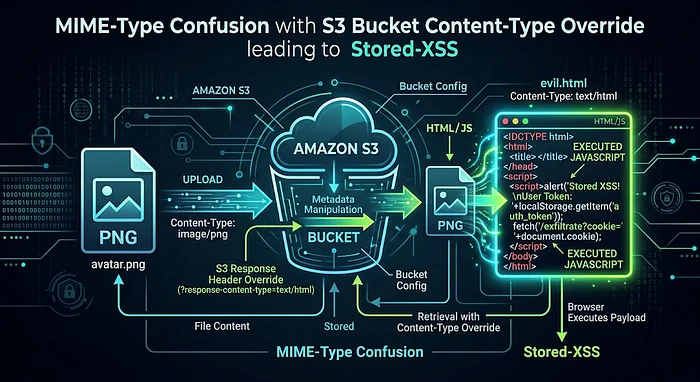
An avatar upload accepted an image containing an XSS payload, and a user-controllable S3 response-content-type parameter let the stored file be served as HTML, producing stored XSS on a static subdomain. By moving document.domain to the parent domain and opening a forgotten campaign endpoint that fully initialised the SPA, the payload could read the auth token from localStorage, leading to account takeover or phishing.

Xss Attack
The full write-up lives on its author's site
It belongs to its author, so we link to it rather than copy it. The other two tabs are our own rewrites, checked against it.
Context
The target is a web application that lets users upload an avatar. Uploaded images are not kept on the application servers: they are stored as static assets in an Amazon S3 bucket served from the static.target.com subdomain. The main application lives on www.target.com, and the authentication token is kept client-side in localStorage on that origin.
The chain described here combines two separate weaknesses. The first is that the application validates uploaded avatars only by their surface-level MIME type, without scanning the file contents for malicious payloads. The second is that the pre-signed S3 URLs handed out for those objects let the client control the response-content-type query parameter, so the response header returned by S3 can be rewritten. Together they turn an uploaded image into an HTML document served from a trusted subdomain: a stored XSS.
Setup
The work started from routine scanning and manual analysis of the application, with attention on the avatar upload functionality. No special accounts, roles, tools or versions are described beyond that. The relevant preconditions are:
- The attacker can upload an avatar.
- The upload endpoint accepts a file whose declared MIME type looks like an image, without inspecting the bytes.
- The object is stored in S3 and served from
static.target.comthrough a pre-signed URL whoseresponse-content-typeparameter the client can set. - The victim can be made to open that URL, and the browser used still allows the
document.domainrelaxation described below.
Finding it
The avatar upload looked weak: the application checked only surface-level MIME types and did not scan the uploaded avatars for malicious payloads. A file that presents itself as an image but contains an XSS payload was therefore accepted.
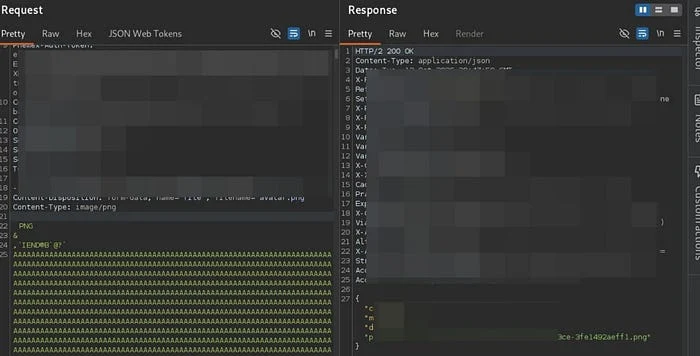
Overwriting existing objects in the bucket was attempted, but the server renames uploaded images using UUIDs, so a previously stored object cannot simply be replaced by name. The stored object is reachable under static.target.com, a subdomain of the main application's domain.
Exploitation
Step 1: abuse the S3 response header override
When a pre-signed URL is generated for a GET request, S3 accepts query string parameters that override the HTTP response headers it returns. The overridable headers are:
response-content-type->Content-Typeresponse-content-language->Content-Languageresponse-expires->Expiresresponse-cache-control->Cache-Controlresponse-content-disposition->Content-Dispositionresponse-content-encoding->Content-Encoding
These overrides should be restricted to server-side operations, with regular users unable to manipulate them through arbitrary requests. On this application the client had direct control over response-content-type, so the rendering of an uploaded image could be forced into another format such as text/html:
https://static.example.com/a7bc3052-5674-446a-a2cb-0451492a4c96.png?response-content-type=text/html
The query parameter makes S3 answer with Content-Type: text/html instead of an image type. The browser then parses the stored bytes as HTML rather than as a PNG, which is the MIME-type confusion at the heart of the bug. Uploading an image that contains an XSS payload and pointing the victim at that URL yields stored XSS on the trusted domain, and from there a phishing attack hosted on that domain.
Step 2: reach the token on the parent domain
The XSS executes on static.target.com, but the authentication token is stored in localStorage on www.target.com. That storage is client-side and lacks HttpOnly protection, so it is readable from JavaScript, but only from the origin that owns it. Modern browser versions heavily restrict cross-origin capabilities and document.domain mutations.
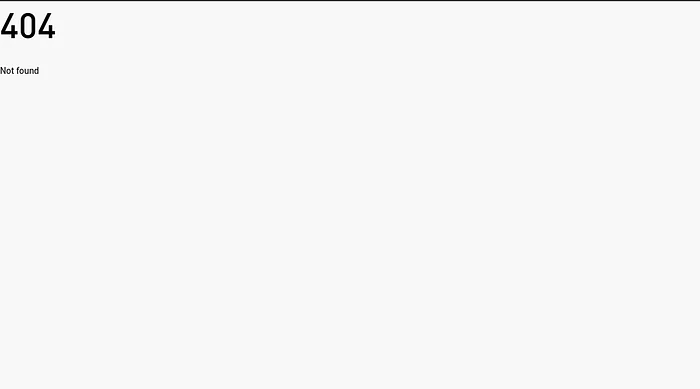
The workaround was to change the document.domain of static.target.com to target.com, and then to use a temporary campaign endpoint with a ready-made 404 status to complete the chain.
A note in the write-up records that this works in Firefox (and maybe in others, which were not tested) but no longer in Chrome.
Step 3: why a campaign endpoint
Campaign endpoints exist so that KOLs and influencers can track redirects. They are frequently left behind because developers forget to delete the route once the promotional campaign is over. Forgotten routes are attractive to researchers because they usually face fewer security controls, such as relaxed CSP rules or minimal redirection checks.
During enumeration, a route that returns a custom, application-rendered 404 status, rather than the default browser error, confirms that the Single Page Application has fully initialised. That means all core JS files and website assets load successfully, so localStorage and other client-side data are fully available in that window.
Step 4: read the token from the child window
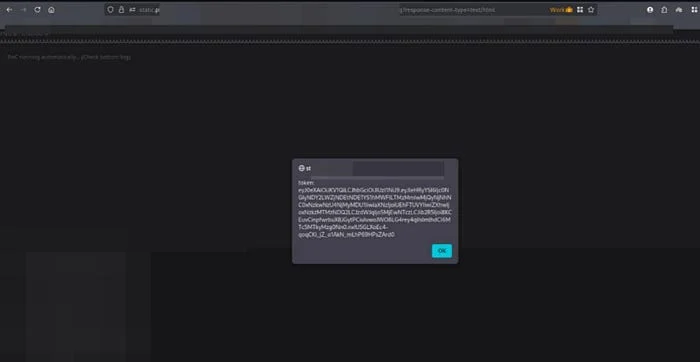
The XSS payload opens the campaigns endpoint as a child window, then watches its readyState and reads window.child.localStorage['auth-token']:
window.child.localStorage['auth-token']
The payload reads window.child.localStorage['auth-token'] from the child window.
Root cause
Two design mistakes combine. First, avatar validation trusts the declared MIME type and never inspects the file contents, so an image carrying an HTML/JS payload is stored. Second, the pre-signed URL generation leaves response-content-type under client control, so the stored object can be served as text/html from a trusted subdomain. Either one alone would be far less dangerous; together they give script execution on static.target.com.
The escalation then relies on the fact that the authentication token sits in localStorage without HttpOnly protection, and on a forgotten campaign route that renders a custom 404 after the SPA has fully initialised, giving the payload a same-site window whose localStorage can be reached after relaxing document.domain. The write-up does not describe any CSP or other control that stopped the payload on the static host.
Impact
The write-up lists two outcomes:
- Account Takeover in some situations.
- Phishing Attack by trusted domain.
The account takeover depends on the browser allowing the document.domain relaxation: it worked in Firefox and was not tested elsewhere, and it no longer works in Chrome. The write-up lists phishing by trusted domain as an impact.
Fix
The write-up does not say what the application changed. Based on the chain, the fixes are: stop letting clients set response-content-type (and the other response-* overrides) on pre-signed URLs, and validate uploaded files by content rather than by declared MIME type, rejecting anything that is not a real image. Serving user-uploaded content from a separate domain that shares no parent domain with the application would also break the document.domain step.
Variants to test
- Client-controlled
response-content-typeon any S3-backed upload. Upload a benign file, then request its pre-signed URL with?response-content-type=text/html. A positive result is a response whoseContent-Typeistext/htmland whose body is parsed as HTML by the browser. - Other
response-*overrides. Tryresponse-content-dispositionwith an attachment or inline value, andresponse-content-encoding. A positive result is a response header the client should not be able to choose. - Upload validation by declared type only. Send a file with an image MIME type but HTML or script content. A positive result is the file being stored and later retrievable byte for byte.
- Forgotten campaign or redirect routes. Enumerate marketing, KOL and influencer redirect endpoints. A positive result is a route that returns an application-rendered 404 (proving the SPA initialised) with relaxed CSP or weak redirect checks.
- Token storage readable from a sibling subdomain. Check whether the auth token lives in
localStorageand whetherdocument.domaincan be relaxed to the parent domain in the target browser. A positive result is the payload readinglocalStorage['auth-token']from the child window.
What happened, in plain words
A website let people upload a profile picture (an avatar). The pictures were not kept on the website's own servers. They were stored in Amazon S3, which is a file storage service run by Amazon, and served to visitors from a subdomain called static.target.com. The main website, where people log in, lives at www.target.com.
Two small mistakes combined into a serious one. First, the upload check only looked at the label the file carried (its declared type, called a MIME type) and never looked inside the file. Second, the links the site handed out for those stored pictures let the person holding the link choose what type the file would be served as. By putting an HTML page with a script inside a file that claimed to be an image, and then asking S3 to serve it as a web page, the researcher got a script running on a trusted subdomain. That is called stored XSS: a script that is saved on the server and later runs in other people's browsers.
The script then reached across to the main site and read the login token kept there, which can lead to taking over an account or to a convincing phishing page on a domain users trust, though the cross-domain step worked in Firefox and not in Chrome.
The pieces involved
Before the steps, here is what each part is, from zero.
- Avatar upload: a feature where a logged-in user picks an image file from their computer and the site stores it so it can be shown next to their name.
- MIME type: a short label that says what kind of file something is.
image/pngmeans a PNG picture,text/htmlmeans a web page. Browsers use this label to decide how to display a file. If a file is labelledtext/html, the browser treats its contents as a web page and runs any script inside it. - Amazon S3: Amazon's file storage service. Files placed there are called objects, and each object has a name (a key).
- Subdomain: a smaller name under a main domain.
static.target.comandwww.target.comare both subdomains oftarget.com. Browsers treat them as separate origins, which matters later. - Pre-signed URL: a long web address that already contains permission to fetch one specific file, so the holder does not need to log in to S3. Think of it as a ticket with the file's name printed on it: whoever holds the ticket can collect that one parcel.
- Query string parameter: the part of a web address after the
?. It passes small pieces of information to the server, such as?response-content-type=text/html. - HTTP response header: extra information a server sends alongside a file, such as its type.
Content-Typeis the header that carries the MIME type. - Stored XSS: Cross-Site Scripting where the malicious script is saved on the server (here, inside an uploaded file) and runs later in the browser of anyone who opens it.
localStorage: a small storage area inside the browser where a website can keep data on the visitor's computer. It is readable by JavaScript running on that same site.- Authentication token: a piece of text that proves who you are, a bit like a wristband at an event. If someone else copies it, they can act as you.
document.domain: a setting a page can use to tell the browser "treat me as belonging to the parent domain too", which can let two related subdomains talk to each other.- SPA (Single Page Application): a website built so that one page loads once and then swaps its content with JavaScript, instead of loading a fresh page for every click.
- CSP (Content Security Policy): rules a site sends to the browser saying which scripts are allowed to run.
Setting the scene
The researcher was doing routine scanning and manual analysis of the application, and paid attention to the avatar upload feature. The write-up does not describe any special accounts, tools or software versions used.
The conditions that made the chain possible were:
- The attacker can upload an avatar.
- The upload accepts a file whose declared MIME type looks like an image, without inspecting the bytes inside it.
- The file is stored in S3 and served from
static.target.comthrough a pre-signed URL whoseresponse-content-typeparameter the client can set. - The victim can be made to open that URL, and the browser still allows the
document.domaintrick described later.
Finding the weak upload
The avatar upload looked weak. The application checked only the surface-level MIME type and did not scan the uploaded avatars for malicious payloads. A file that presents itself as an image but contains an XSS payload was therefore accepted.
The researcher also tried to overwrite existing objects in the S3 bucket, but the server renames uploaded images using UUIDs. A UUID is a long random-looking identifier, so each upload gets a new name and an old file cannot simply be replaced by uploading a file with the same name. The stored object is still reachable under static.target.com, a subdomain of the main application's domain.
Step 1: abuse the S3 response header override
When a pre-signed URL is generated for a GET request (a request that asks for a file), S3 accepts query string parameters that override the HTTP response headers it returns. In plain words, the address can carry instructions that change the label S3 attaches to the file when it hands it over.
The overridable headers are:
response-content-type->Content-Typeresponse-content-language->Content-Languageresponse-expires->Expiresresponse-cache-control->Cache-Controlresponse-content-disposition->Content-Dispositionresponse-content-encoding->Content-Encoding
Each line pairs a parameter you can put in the address with the header it replaces. For example, response-content-type replaces the Content-Type header, which is the one that tells the browser what kind of file it is receiving.
These overrides should be restricted to server-side operations, with regular users unable to manipulate them through arbitrary requests. On this application the client had direct control over response-content-type, so the rendering of an uploaded image could be forced into another format such as text/html:
https://static.example.com/a7bc3052-5674-446a-a2cb-0451492a4c96.png?response-content-type=text/html
Line by line:
https://static.example.com/is the host that serves stored files. In the write-up the real host isstatic.target.com; this example usesstatic.example.com.a7bc3052-5674-446a-a2cb-0451492a4c96.pngis the UUID-renamed object in the bucket, the name the server gave the uploaded file. The.pngending suggests a picture.?response-content-type=text/htmlis the query parameter that makes S3 answer withContent-Type: text/htmlinstead of an image type.
The browser then parses the stored bytes as HTML rather than as a PNG. That is the MIME-type confusion at the heart of the bug: the file is a picture by name, but the browser is told to read it as a web page. Uploading an image that contains an XSS payload and pointing the victim at that URL yields stored XSS on the trusted domain, and from there a phishing attack hosted on that domain. Phishing means a fake page that looks genuine, placed on a domain users already trust.
Step 2: reach the token on the parent domain
The XSS executes on static.target.com, but the authentication token is stored in localStorage on www.target.com. That storage is client-side and lacks HttpOnly protection. HttpOnly is a flag that would stop JavaScript from reading a value; without it, any script on the right origin can read the token. The catch is "the right origin": a script on one subdomain cannot normally read storage belonging to another.
Modern browser versions heavily restrict cross-origin capabilities and document.domain mutations. The workaround was to change the document.domain of static.target.com to target.com, and then to use a temporary campaign endpoint with a ready-made 404 status to complete the chain.
A note in the write-up records that this works in Firefox (and maybe in others, which were not tested) but no longer in Chrome.
Step 3: why a campaign endpoint
Campaign endpoints exist so that KOLs and influencers can track redirects. A KOL is a key opinion leader, someone with an audience who promotes a product; the endpoint is a link that records where visitors go. These routes are frequently left behind because developers forget to delete them once the promotional campaign is over. Forgotten routes are attractive to researchers because they usually face fewer security controls, such as relaxed CSP rules or minimal redirection checks.
During enumeration, a route that returns a custom, application-rendered 404 status, rather than the default browser error, confirms that the Single Page Application has fully initialised. A 404 is the "page not found" answer. A custom one, drawn by the application itself, proves the app's JavaScript has loaded and run. That means all core JS files and website assets load successfully, so localStorage and other client-side data are fully available in that window.
Step 4: read the token from the child window
The XSS payload opens the campaigns endpoint as a child window, then watches its readyState and reads window.child.localStorage['auth-token']:
window.child.localStorage['auth-token']
Line by line:
window.childrefers to the child window the payload opened, the one showing the campaigns endpoint..localStorageis the browser storage area belonging to that window's origin.['auth-token']picks the entry namedauth-token, which is where the login token is kept.
readyState is a property that says whether the page has finished loading. The payload waits for it before reading, because the storage is only there once the page has loaded. The payload reads window.child.localStorage['auth-token'] from the child window.
Why it worked
Two design mistakes combine. First, avatar validation trusts the declared MIME type and never inspects the file contents, so an image carrying an HTML/JS payload is stored. Second, the pre-signed URL generation leaves response-content-type under client control, so the stored object can be served as text/html from a trusted subdomain. Either one alone would be far less dangerous; together they give script execution on static.target.com.
The escalation then relies on the fact that the authentication token sits in localStorage without HttpOnly protection, and on a forgotten campaign route that renders a custom 404 after the SPA has fully initialised, giving the payload a same-site window whose localStorage can be reached after relaxing document.domain. The write-up does not describe any CSP or other control that stopped the payload on the static host.
Impact
The write-up lists two outcomes:
- Account Takeover in some situations.
- Phishing Attack by trusted domain.
Account takeover means someone else gets into your account, here by using the stolen token. It depends on the browser allowing the document.domain relaxation: it worked in Firefox and was not tested elsewhere, and it no longer works in Chrome. The write-up lists phishing by trusted domain as an impact.
Fix
Based on the chain, the fixes are: stop letting clients set response-content-type (and the other response-* overrides) on pre-signed URLs, and validate uploaded files by content rather than by declared MIME type, rejecting anything that is not a real image. Serving user-uploaded content from a separate domain that shares no parent domain with the application would also break the document.domain step.
Variants to test
- Client-controlled
response-content-typeon any S3-backed upload. Upload a benign file, then request its pre-signed URL with?response-content-type=text/html. A positive result is a response whoseContent-Typeistext/htmland whose body is parsed as HTML by the browser. - Other
response-*overrides. Tryresponse-content-dispositionwith an attachment or inline value, andresponse-content-encoding. A positive result is a response header the client should not be able to choose. - Upload validation by declared type only. Send a file with an image MIME type but HTML or script content. A positive result is the file being stored and later retrievable byte for byte.
- Forgotten campaign or redirect routes. Enumerate marketing, KOL and influencer redirect endpoints. A positive result is a route that returns an application-rendered 404 (proving the SPA initialised) with relaxed CSP or weak redirect checks.
- Token storage readable from a sibling subdomain. Check whether the auth token lives in
localStorageand whetherdocument.domaincan be relaxed to the parent domain in the target browser. A positive result is the payload readinglocalStorage['auth-token']from the child window.
Glossary
- Account Takeover (ATO): when an attacker gains control of someone else's account, for example by stealing their login token.
- Authentication token: a piece of text that proves who you are to a website, like a wristband at an event; whoever holds it can act as you.
- Avatar: the profile picture shown next to a user's name.
- Child window: a second browser window opened by a script from the first one.
- Content Security Policy (CSP): rules a site sends to the browser saying which scripts and sources are allowed.
- Content-Type: the HTTP header that tells the browser what kind of file it is receiving, such as an image or a web page.
- Cross-origin: belonging to a different origin (scheme, host and port) than the page you are on; browsers restrict what one origin can do with another.
document.domain: a setting a page can use to declare it belongs to the parent domain, which can let related subdomains interact.- Enumeration: systematically listing the routes, files or features of an application to find ones that were forgotten or are weakly protected.
- GET request: a request that asks a server to send a file or page, without changing anything on the server.
- HTTP response header: extra information a server sends with a file, such as its type or caching rules.
HttpOnly: a flag that stops JavaScript from reading a stored value such as a cookie or token.- KOL (key opinion leader): an influencer with an audience, often used in marketing campaigns.
localStorage: a small storage area in the browser where a website can keep data on the visitor's computer, readable by JavaScript on that same origin.- MIME type: a label saying what kind of file something is, such as
image/pngortext/html. - MIME-type confusion: when a file is treated as a different kind than it really is, because the label and the contents disagree.
- Object (S3): a file stored in an Amazon S3 bucket, identified by a name called a key.
- Origin: the combination of scheme, host and port that a browser uses to decide what a page is allowed to access.
- Phishing: a fake page or message that pretends to be genuine in order to trick people into giving away information.
- Pre-signed URL: a web address that already contains permission to fetch one specific stored file, so the holder does not need to log in.
- Query string parameter: the part of a web address after the
?, used to pass small pieces of information to the server. readyState: a property that says whether a page or document has finished loading.- S3 (Amazon Simple Storage Service): Amazon's file storage service, where files are kept as objects in buckets.
- Single Page Application (SPA): a website that loads once and then swaps content with JavaScript instead of loading a new page for every click.
- Stored XSS: Cross-Site Scripting where the malicious script is saved on the server and runs later in the browsers of people who open it.
- Subdomain: a smaller name under a main domain, such as
static.target.comundertarget.com. - UUID: a long random-looking identifier, used here to give each uploaded file a unique name.
- XSS (Cross-Site Scripting): a vulnerability where an attacker gets their own script to run in someone else's browser on a trusted site.



