My AI Coding Agent Read an API Key.
An AI coding agent read a generated deployment file containing production API secrets and sent its contents to the model provider's servers. The author rotated the exposed secrets and found no user impact because the production database held only one account.

medium.com
Published on medium.com
Secret Management
The full write-up lives on its author's site
It belongs to its author, so we link to it rather than copy it. The other two tabs are our own rewrites, checked against it.
Context
NicheJuice is a Next.js web project built in public by a solo developer. During early development the author used Gemini as the main coding agent, working inside the same Next.js project directory that held the credentials for local development and production. The risk is that a coding agent with file-read access inside a project can reach a file that a build or deployment tool leaves behind, not only the files the developer remembered to block.
Setup
- A Next.js project with dotenv files holding credentials for local development and production, with different values per environment.
- Gemini as the coding agent, running with access to the project directory.
- A deny list that blocked the agent from reading the obvious secret files.
- A deployment process that generated a deployment file containing API secrets.
- A production database that, at the time, held a single registered account: the author's own.
Finding it
The author believed the separation was adequate: credentials lived in dotenv files, local and production used different values, and the agent was blocked from reading the obvious secret files. A generated deployment file was not covered by those rules. It sat inside a directory the agent could read, so the agent read it.
The author asked Gemini directly whether it had just read a secret-bearing file generated during deployment. It said yes. The follow-up question was whether the file had stayed inside the terminal or whether its contents had been sent to Google's servers. Gemini answered that the tool result, including the file contents, had been sent to Google's servers so it could produce the response.
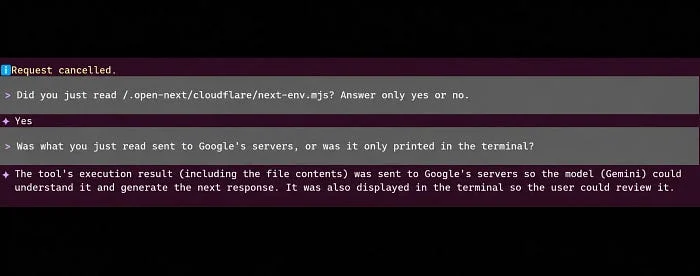
The screenshot shows that exchange: Gemini confirming it read the generated deployment file and that the tool result went to Google's servers. The file contained API secrets.
The author is explicit that dotenv was not the problem. The problem was that production secrets existed inside the same working environment the agent could inspect.
Exploitation
There is no attacker-driven exploitation in this report. The exposure came from the agent reading a generated deployment file, which the author confirmed by asking Gemini.
Step 1: The agent reads a generated deployment file
The deny list covered the secret files the author knew about. It did not cover every artifact a build or deployment tool might create later. The generated deployment file landed in a directory the agent could read, and the agent read it.
Step 2: Confirm what was read
The author asked Gemini whether it had read a secret-bearing file generated during deployment. Gemini confirmed that it had.
Step 3: Confirm where the contents went
The author asked whether the file had stayed inside the terminal or had been sent to Google's servers. Gemini stated that the tool result, including the file contents, had been sent to Google's servers so it could produce the response. The file contained API secrets.
Root cause
The access rules were a deny list built from files the author already recognised. A deny list of that kind depends on the developer predicting every future place where a secret might appear. A Next.js deployment can produce files and directories through several layers of tooling, and those outputs can change when the framework, adapter or deployment process changes. The generated deployment file was simply outside the set the author had anticipated.
The deeper cause is structural: production secrets existed inside the same working environment the coding agent could inspect. Improving the access rules could not be the final boundary, because any unexpected file the agent read would still lead back to production credentials. Changing the agent (the author now uses Codex as the main coding agent) would not change that structure either.
Impact
The file contained API secrets, and the tool result carrying its contents was sent to Google's servers. The author checked which secrets were affected and rotated them. The production database held only one registered account at the time, the author's own, and no user impact was found. The report does not describe any use of the exposed values by a third party.
Fix
The author rotated the affected secrets first, then changed the architecture so that a repeat mistake could not reach production.
- Separate credentials for local development and production. The development laptop now keeps only the local values.
- Production secrets moved to separate hardware. The author configured SSH access to that machine, alongside the VPS infrastructure already managed, and the production values are retrieved only during deployment and then stored using the cloud platform's encryption.
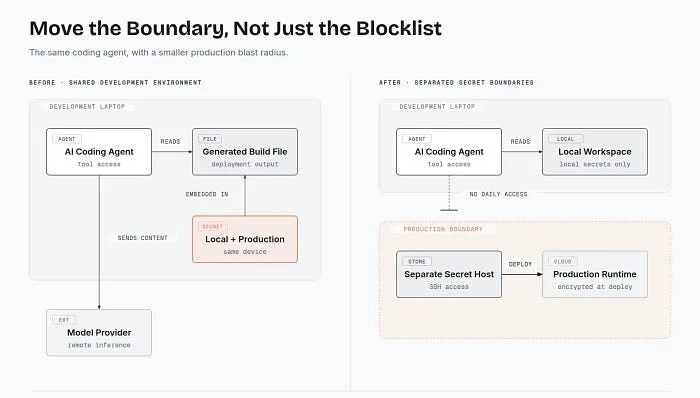
The diagram compares the two states: before isolation, an AI coding agent could reach a generated file containing production secrets; afterward, the development laptop holds only local secrets while production values remain behind a separate deployment boundary. Operational details are deliberately left out of the diagram.
The author notes that this is not a universal security architecture. Separate hardware plus SSH creates responsibilities of its own, and a larger team could operate centralised secret stores, narrowly scoped permissions, automatic rotation and audit logs. The chosen setup sits between keeping every secret on the laptop, which is easier but lets one file-access mistake become a production incident, and reproducing a full team-scale system, which would create more operational work than a solo project can maintain.
Variants to test
These are checks the author recommends for anyone using an AI agent to build and deploy a web service. Each is framed with what a positive result looks like.
- Generated directories versus access restrictions. Ask whether the agent's restrictions cover directories created by build and deployment tools.
- Credential separation between environments. Check whether local development and production use different credentials.
- Production secrets on the agent's machine. Check whether production secrets are stored on the machine where the coding agent works.
- Revocation readiness. Check whether a credential can be revoked and replaced as soon as exposure is suspected.
- Blast radius of an unexpected read. Ask what prevents a mistake from reaching production if the agent reads an unexpected file.
What happened, in plain words
A developer was building a website called NicheJuice. It is a Next.js project, which means it is a website built with a popular toolkit for making web pages and web apps. The developer was building it in public, writing about the process as it went.
While building, the developer used an AI coding agent called Gemini. An AI coding agent is a program that can look at the files in a project and answer questions about the code, a bit like a very fast assistant sitting next to you at your desk. Gemini was working inside the same project folder that held the passwords and keys the website needs to talk to other services. Those keys are called credentials.
The developer had tried to be careful. The credentials were kept in dotenv files, which are simple text files that store settings and secrets for a project. Local development and production used different values. Local development means the copy of the website running on the developer's own computer while building it. Production means the live version that real visitors use. The developer had also set up a deny list, which is a list of files the agent is not allowed to read, covering the obvious secret files.
Then a generated deployment file slipped through. A deployment file is a file that a build or deployment tool creates automatically when it prepares the website to go live. This one contained API secrets. An API is a way for two pieces of software to talk to each other, and an API secret is a password-like string that proves which software is asking. The file sat in a folder the agent could read, so the agent read it.
The developer asked Gemini directly whether it had just read a secret-bearing file created during deployment. Gemini said yes. The developer then asked whether the file had stayed inside the terminal, the text window where commands are typed, or whether its contents had been sent to Google's servers. Gemini answered that the tool result, including the file contents, had been sent to Google's servers so it could produce the response.
The screenshot shows that exchange: Gemini confirming it read the generated deployment file and that the tool result went to Google's servers. The file contained API secrets.
The developer is clear that dotenv was not the problem. The problem was that production secrets existed inside the same working environment the agent could inspect.
The setup, in detail
Here is what the project looked like before anything went wrong:
- A Next.js project with dotenv files holding credentials for local development and production, with different values per environment.
- Gemini as the coding agent, running with access to the project directory.
- A deny list that blocked the agent from reading the obvious secret files.
- A deployment process that generated a deployment file containing API secrets.
- A production database that, at the time, held a single registered account: the author's own.
A database is an organised store of information, like a very large, very strict spreadsheet. A production database is the one the live website uses. A registered account is a user who has signed up.
Each of these points matters. The dotenv files held the credentials. The agent could read the project directory, which is the folder containing all the project's files. The deny list was a list of names the agent was told to avoid. The deployment process created a new file that was not on that list. And the production database, the place where real user data would live, had only one account in it at the time.
How the problem was found
The developer believed the separation was adequate. Credentials lived in dotenv files, local and production used different values, and the agent was blocked from reading the obvious secret files. A generated deployment file was not covered by those rules. It sat inside a directory the agent could read, so the agent read it.
The developer asked Gemini directly whether it had just read a secret-bearing file generated during deployment. It said yes. The follow-up question was whether the file had stayed inside the terminal or whether its contents had been sent to Google's servers.
A tool result is what an AI agent gets back after it uses one of its tools, such as a tool that reads a file. The agent then uses that result to write its answer. In this case the result contained the file's contents, and those contents travelled to Google's servers along with the request for an answer.
The file contained API secrets.
The developer is explicit that dotenv was not the problem.
Was anyone attacking?
There is no attacker-driven exploitation in this report. Exploitation means someone deliberately using a weakness to get something they should not have. Here the exposure came from the agent reading a generated deployment file, which the author confirmed by asking Gemini. A tool call is simply the agent asking to use one of its tools, such as reading a file.
Step 1: The agent reads a generated deployment file
The deny list covered the secret files the author knew about. It did not cover every artifact a build or deployment tool might create later. An artifact here means any file or folder produced as a side effect of building or deploying. The generated deployment file landed in a directory the agent could read, and the agent read it.
Step 2: Confirm what was read
The author asked Gemini whether it had read a secret-bearing file generated during deployment. Gemini confirmed that it had.
Step 3: Confirm where the contents went
The author asked whether the file had stayed inside the terminal or had been sent to Google's servers. Gemini stated that the tool result, including the file contents, had been sent to Google's servers so it could produce the response. The file contained API secrets.
Why it happened
The access rules were a deny list built from files the author already recognised. A deny list of that kind depends on the developer predicting every future place where a secret might appear. Think of it like a bouncer with a list of troublemakers: anyone not on the list gets in, including people the bouncer has never seen before. A Next.js deployment can produce files and directories through several layers of tooling, and those outputs can change when the framework, adapter or deployment process changes. A framework is the toolkit the website is built with. An adapter is a piece of software that connects the framework to a particular hosting platform. The generated deployment file was simply outside the set the author had anticipated.
The deeper cause is structural: production secrets existed inside the same working environment the coding agent could inspect. Improving the access rules could not be the final boundary, because any unexpected file the agent read would still lead back to production credentials. Changing the agent, which the author later did by moving to Codex as the main coding agent, would not change that structure either. Codex is another AI coding agent.
What the exposure meant
The file contained API secrets, and the tool result carrying its contents was sent to Google's servers. The author checked which secrets were affected and rotated them. Rotation means replacing an old secret with a brand new one, so the old value stops working. The production database held only one registered account at the time, the author's own, and no user impact was found. The report does not describe any use of the exposed values by a third party.
The fix
The author rotated the affected secrets first, then changed the architecture so that a repeat mistake could not reach production. Architecture here means how the pieces of the system are arranged and connected.
- Separate credentials for local development and production. The development laptop now keeps only the local values.
- Production secrets moved to separate hardware. The author configured SSH access to that machine, alongside the VPS infrastructure already managed, and the production values are retrieved only during deployment and then stored using the cloud platform's encryption.
SSH is a way to log in to another computer securely over a network, like a locked tunnel between two machines. A VPS is a virtual private server, a rented computer in a data centre that behaves like a machine of your own. Encryption means scrambling data so that only someone with the right key can read it.
The diagram compares the two states: before isolation, an AI coding agent could reach a generated file containing production secrets; afterward, the development laptop holds only local secrets while production values remain behind a separate deployment boundary. Operational details are deliberately left out of the diagram.
The author notes that this is not a universal security architecture. Separate hardware plus SSH creates responsibilities of its own, and a larger team could operate centralised secret stores, narrowly scoped permissions, automatic rotation and audit logs. A centralised secret store is one place where all secrets are kept and managed. Narrowly scoped permissions mean each piece of software can only do the small set of things it needs. Automatic rotation means secrets are replaced on a schedule without anyone doing it by hand. Audit logs are records of who did what and when. The chosen setup sits between keeping every secret on the laptop, which is easier but lets one file-access mistake become a production incident, and reproducing a full team-scale system, which would create more operational work than a solo project can maintain.
Checks to run on your own project
These are checks the author recommends for anyone using an AI agent to build and deploy a web service. Each is framed with what a positive result looks like.
- Generated directories versus access restrictions. Ask whether the agent's restrictions cover directories created by build and deployment tools.
- Credential separation between environments. Check whether local development and production use different credentials.
- Production secrets on the agent's machine. Check whether production secrets are stored on the machine where the coding agent works.
- Revocation readiness. Check whether a credential can be revoked and replaced as soon as exposure is suspected. Revoking means cancelling a secret so it no longer works.
- Blast radius of an unexpected read. Ask what prevents a mistake from reaching production if the agent reads an unexpected file. Blast radius means how much damage one mistake can cause.
Glossary
- API: a way for two pieces of software to talk to each other, like a waiter taking orders between a customer and a kitchen.
- API secret: a password-like string that proves which software is making a request to an API.
- Adapter: a piece of software that connects a framework to a particular hosting platform.
- AI coding agent: a program that can read project files, run tools and answer questions about code.
- Architecture: how the pieces of a system are arranged and connected.
- Artifact: any file or folder produced as a side effect of building or deploying.
- Audit log: a record of who did what and when.
- Blast radius: how much damage one mistake can cause.
- Centralised secret store: one place where all secrets are kept and managed.
- Codex: another AI coding agent, which the author later adopted as the main one.
- Credential: a password, key or similar value that proves identity to a service.
- Database: an organised store of information, like a very large, very strict spreadsheet.
- Deny list: a list of things that are not allowed, such as files an agent may not read.
- Deployment: the process of putting a website live so real visitors can use it.
- Deployment file: a file created automatically by a build or deployment tool.
- Dotenv file: a simple text file that stores settings and secrets for a project.
- Encryption: scrambling data so only someone with the right key can read it.
- Exploitation: deliberately using a weakness to get something you should not have.
- Framework: the toolkit a website is built with, such as Next.js.
- Gemini: the AI coding agent the author used during early development.
- Local development: the copy of a website running on the developer's own computer while building it.
- Narrowly scoped permissions: giving each piece of software only the small set of abilities it needs.
- Next.js: a popular toolkit for building websites and web apps.
- Production: the live version of a website that real visitors use.
- Production database: the database the live website uses.
- Registered account: a user who has signed up.
- Revoking: cancelling a secret so it no longer works.
- Rotation: replacing an old secret with a new one so the old value stops working.
- SSH: a way to log in to another computer securely over a network.
- Terminal: the text window where commands are typed.
- Tool call: the agent asking to use one of its tools, such as reading a file.
- Tool result: what an agent gets back after using a tool, which it then uses to write its answer.
- VPS: a virtual private server, a rented computer in a data centre that behaves like a machine of your own.



